
The residents who look “effortless” on rounds aren’t smarter than you. They just have better task-tracking systems.
Let me be blunt: trying to run a ward service from memory, scattered sticky notes, and half-finished sign-out is how you miss a potassium recheck or forget to call a critical value. That’s how things fall through the cracks. And that’s how you get the “we need to talk” email from your attending.
You need a real system. Not vibes. Not “I’ll remember.” A repeatable, boring, almost mechanical way to capture every task, prioritize it, and close the loop.
Here’s how to do it.
The Only Rule That Matters: Capture Everything
The core problem isn’t that you can’t work hard enough. It’s that your brain is being asked to hold 30+ patients’ labs, consults, images, family updates, and follow-ups at once. It will drop things. Every time.
You fix that with one rule:
If it’s not written down in your system, it doesn’t exist.
That means:
- New order to place later → written.
- Lab to recheck in 4 hours → written.
- “Call GI if hemoglobin drops below 7” → written.
- “Update daughter after CT” → written.
I’ve watched interns “keep a running list in my head,” and I’ve watched those same interns miss anticoagulation restarts or fail to follow up cultures. It’s predictable.
Your first job is not to choose the perfect app or template. Your first job is to decide where your single source of truth will live and commit to it.
You get three realistic options:
- Paper list
- Spreadsheet
- Note-taking or task app
Pick one. Live there. Stop scattering tasks across index cards, EMR sticky notes, and your memory.
Choosing Your System: Paper vs Digital vs Hybrid
You don’t need something fancy. You need something you’ll actually use at 4:30 am and 7:15 pm when you’re exhausted.
| System Type | Pros | Cons |
|---|---|---|
| Paper lists | Fast, flexible, no tech issues | Can be lost, no auto-sorting |
| Spreadsheet (Excel/Sheets) | Sort/filter by patient, status, time | Needs device, some setup |
| Note/task app (Notion, OneNote, Todoist) | Syncs across devices, reusable templates | Setup time, may be overkill |
Here’s my honest take:
Paper list (laminated “brain” + pen):
- Best for: Busy floor rotations, people who like writing.
- Set up: One sheet per team list; one column per patient; use symbols for tasks.
- Weakness: Harder to track follow-ups after you hand off or cross-cover.
Spreadsheet (Excel, Google Sheets):
- Best for: Residents who like structure, ICU or heme/onc with lots of follow-up tasks.
- Set up: One row per task, sortable by patient, due time, status.
- Weakness: Needs computer or tablet; slower than scribbling in the moment.
Task/note app:
- Best for: Tech-comfortable residents, continuity clinics, consult rotations.
- Set up: Reusable templates, tags for “today,” “after 5 pm,” “weekend follow-up.”
- Weakness: EMR access rules, may not be allowed for PHI—be careful.
If you’re drowning and just want something today, use a simple paper system first, then evolve.
The Minimal Structure: What Every System Must Track
Whatever system you use, it needs to capture the same core fields. Because the data is the point, not the platform.
For each task, you want:
- Patient identifier (room + name or initials)
- Task description (concrete, not vague)
- Type (order, note, call, follow-up, dispo)
- Due timing (now, this afternoon, before sign-out, specific clock time)
- Status (not started / in progress / done)
- Who is responsible (you, co-intern, night float, consultant)
You don’t need to label every column obsessively. But you do need to think in those buckets.
Here’s what a dead-simple spreadsheet structure might look like:
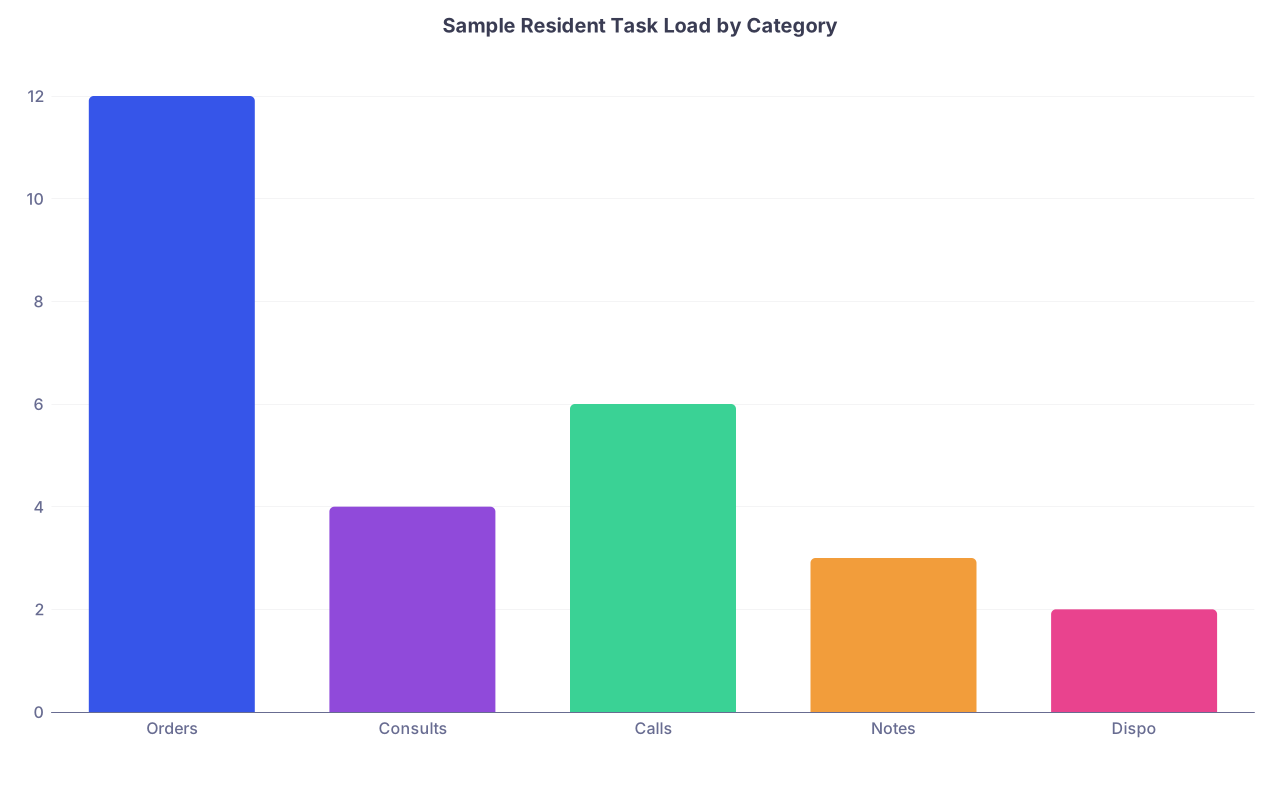
| Category | Value |
|---|---|
| Orders | 12 |
| Consults | 4 |
| Calls | 6 |
| Notes | 3 |
| Dispo | 2 |
You’re staring at 27 small chances to drop the ball. That’s why structure matters.
Example row on a spreadsheet:
- Patient: 734B – Jones
- Task: Recheck BMP 4 hours after Lasix
- Type: Lab follow-up
- Due: 14:00
- Status: Not started
- Owner: Me
Versus what I see all the time on paper:
- “Jones – labs”
Guess which one actually happens?
How to Build Your Daily Workflow (Step by Step)
Let’s walk through a day and layer in the system.
1. Pre-round: Create / Update Master List
Before you see a single patient, your list should already be alive.
- Copy forward yesterday’s tasks that are still open.
- Add known follow-ups from sign-out (imaging to check, consults to chase).
- Mark overnight events that need follow-up (new fevers, new oxygen needs, etc.)
You should NOT be creating a new system every morning. You’re just updating the existing one.
2. While Pre-rounding: Record Tasks in Real Time
As you walk room to room, do not trust your brain. Use short, standardized shorthand.
On paper, under each patient:
- Write bullets:
- “f/u AM labs”
- “check CT read”
- “c/s nephro re: chronic hyperK”
- “update wife”
In a spreadsheet/app:
- Add new rows as you go.
And make them actionable. “Sepsis?” is not a task. “Review lactate, repeat if >2, consider fluids/pressors” is.
Turning Rounds Into a Task-Generation Machine
Rounds are where your list either gets sharp or turns into a mess.
Most interns write down only what they’re judged on: presentation, assessment, plan. Then they “plan to remember” the five extra things their attending casually mentioned while walking away.
That’s how tasks disappear.
On rounds, your brain should be doing two parallel jobs:
- Presenting/communicating
- Capturing action items
Here’s how you make that manageable:
- Designate a “task zone” for every patient on your sheet or app. Same physical area every time. Your muscle memory will start putting tasks there without thinking.
- Use a symbol system:
- ◻ box = task not done
- ◐ half-fill = in progress (ordered, waiting for result)
- ✓ = done
- → = delegated to someone else (consult, nurse, night float)
- Say the tasks out loud at the end of your presentation.
“For action items: I’ll page ID, restart DVT ppx, and call daughter after CT.”
This both impresses your attending and helps you catch missing tasks.
Your rule for rounds: if someone says “let’s…” or “can we…” or “we should…” and it implies work, you write it as a task. Immediately.
Prioritizing So You Don’t Get Crushed at 2 pm
A giant undifferentiated list is slightly better than nothing, but not by much. You need to know what matters when.
After rounds, take 5 minutes to triage your tasks. Literally 5. Time it if you have to.
Mark each task with one of three priorities:
- A = Critical / time-sensitive (STAT orders, unstable patients, imaging that changes management, consults that bottleneck dispo)
- B = Important but not emergent (med rec, non-urgent consults, social work coordination)
- C = Nice-to-have / “if time” (perfect documentation tweaks, non-urgent med changes)
Block your day mentally:
- Immediately after rounds: hit your A tasks first, ruthlessly.
- Late morning: work through remaining A, then B.
- Afternoon: clean up B, maybe C. Then prepare sign-out.
If everything is “ASAP,” nothing is.
Protecting the Follow-Ups: Time-Based Reminders
Where residents really get burned isn’t starting tasks. It’s closing the loop.
- You order troponins q6h and never re-check the trend.
- You start broad-spectrum antibiotics and never follow cultures.
- You request a CT angio and forget to look until night float calls you.
So you need time anchors.
On a digital system, use:
- Due times (e.g., “15:00 – Recheck lactate,” “17:00 – Follow BCx preliminary report”)
- Reminders/alerts (if your hospital allows secure, compliant tools)
On paper, use:
- A side column with times (“10, 12, 14, 16, 18”) and mark tasks by time.
- Or a separate mini-list: “Afternoon follow-ups” with specific clock times.
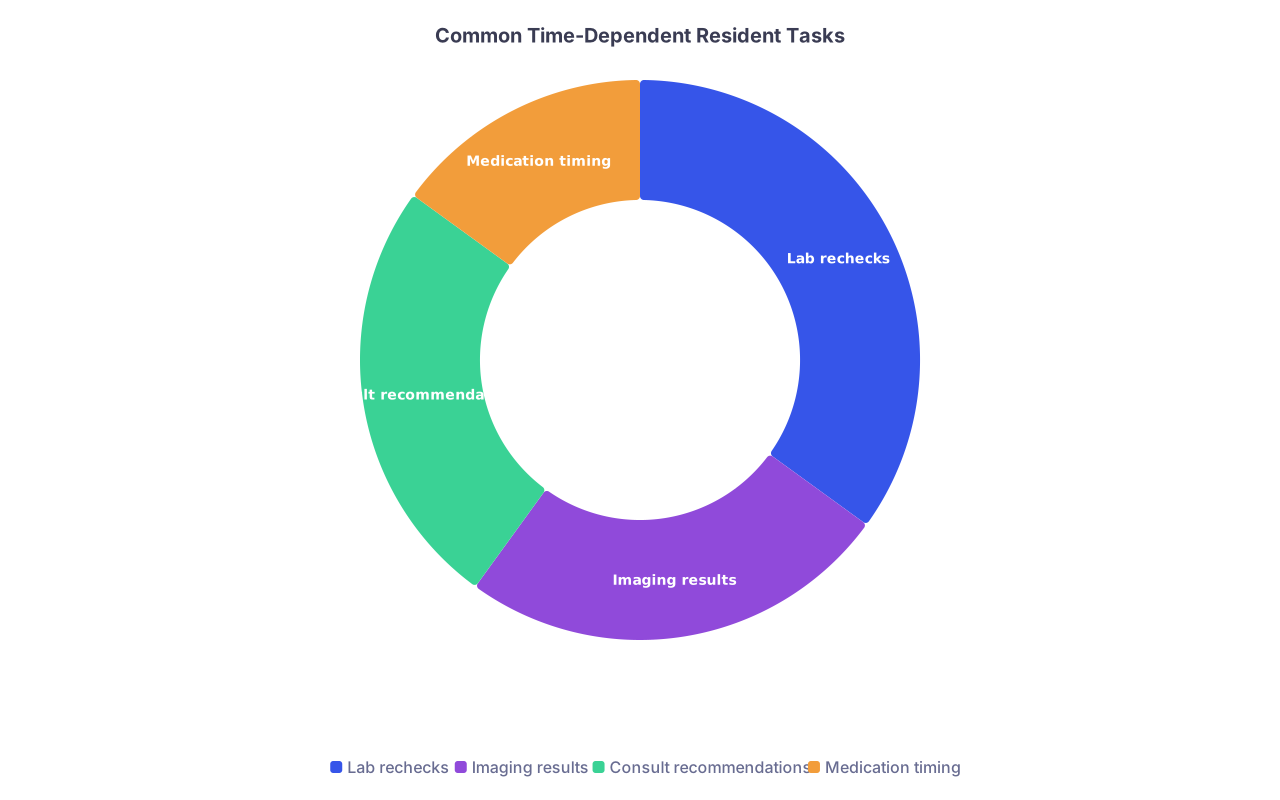
| Category | Value |
|---|---|
| Lab rechecks | 35 |
| Imaging results | 25 |
| Consult recommendations | 25 |
| Medication timing | 15 |
Do not rely on the EMR “result notification” banner. That is a graveyard of ignored alerts.
If something must be seen later, it belongs in your system with a time, not floating in your subconscious.
Using the EMR Without Letting It Use You
Yes, some EMRs have built-in task lists or sticky notes. They’re… fine. But they have limits.
Use the EMR for:
- Seeing active orders
- Time-stamped events (results, vitals)
- Task distribution across the team, if your group actually uses that feature
Do NOT use the EMR alone for:
- Big-picture follow-ups (e.g., “when biopsy returns next week, call patient”)
- Communication tasks (family updates, PCP letters)
- Multi-step workflows (“if CT negative, de-escalate antibiotics; if positive, call surgery”)
The EMR is a record of what happened. Your system is what needs to happen.
Building a Reliable Sign-Out That Actually Protects You
Sign-out isn’t just CYA. It’s also how things don’t die after 7 pm.
Every evening, your task system should drive your sign-out, not the other way around.
Your process:
- Filter tasks by “not done yet.”
- Decide: does this really need to be done tonight or can it safely wait for tomorrow?
- For tonight tasks, write them clearly in sign-out with:
- Specific trigger (“If SBP > 180 after labetalol…”)
- Specific action (“…give second dose and page night senior”)
- Mark those in your own system as “→ NF” or similar so you know they’re handed off.
After sign-out, take 2–3 minutes and clean up:
- Remove tasks completed by you.
- Add notes for tasks completed by night float.
- Carry forward what’s still live for tomorrow.
That 2–3 minute ritual is how you avoid the “I thought night float was going to do that” disaster.
Templates That Actually Work on Busy Rotations
Let me give you some lightweight templates that you can steal and modify.
For Paper (ward rotation)
One sheet per team list. For each patient, a small section:
- Top line: Room – Name – Code status – Isolation
- Below: 4–6 lines for tasks with boxes ◻
- Small column on the right for due time or A/B/C
Example under “612A – Smith”:
- ◻ Page cardiology: timing of cath
- ◻ Recheck K at 14:00
- ◻ Call wife after CT chest
- ◐ Wean O2 as tolerated
- A/B/C in tiny letter to the left
For Spreadsheet (ICU or heavy follow-up service)
Columns:
- Patient
- Task
- Type (order, lab follow-up, call, dispo, documentation)
- Priority (A/B/C)
- Due time
- Status
- Owner
Filter by A tasks, then sort by due time. That’s your roadmap.

| Step | Description |
|---|---|
| Step 1 | Pre round update list |
| Step 2 | Capture tasks while seeing patients |
| Step 3 | Add tasks from rounds |
| Step 4 | Prioritize by A B C |
| Step 5 | Do A tasks first |
| Step 6 | Time based follow ups |
| Step 7 | Prepare sign out from list |
| Step 8 | Clean list for next day |
Team-Level Habits That Keep You Out of Trouble
You can have the perfect personal system and still watch chaos if the rest of the team’s sloppy. A few habits that actually help:
One shared “running list” per team.
Location decided on Day 1. Everyone uses it. No shadow lists.Spell out responsibilities.
For each patient on work rounds:
“I’ll do orders + notes. You handle family updates. MS3 follows up consults.”Mini huddles.
Two minutes at 11 am and 3 pm:
“Anything critical still hanging? Any labs/consults we’re waiting on that will change dispo?”“Last look” rule.
Before any resident leaves, they scan the A tasks still open and explicitly say who owns them.
Sounds overkill. It’s not. This is how you avoid calling your attending at 8 pm because no one realized the CT showed a PE and the patient’s still not anticoagulated.
What To Do When You’re Already Behind
Sometimes you’re just buried. Twelve cross-cover pages in 30 minutes, two transfers, someone crumping. Your beautiful system starts to fall apart.
Use a disaster mode:
- Grab a fresh small piece of paper or a new "urgent" section in your app.
- Write ONLY:
- Room – Name – urgent task.
- Focus on safety tasks first: airway, breathing, circulation, rapid vitals changes.
- Once the fires are out, fold those urgent notes back into your main system.
Don’t try to micro-organize in the middle of a code or rapid response. “Disaster list” first, then integrate later.
Avoiding the Three Classic Mistakes
You’ll see these over and over. Avoid them and you’re already above average.
Vague tasks
“Follow up labs” vs. “Recheck CBC at 14:00 and transfuse if Hgb <7.”
Always define what you’re looking for and what you’ll do.No owner
“Call family” written vaguely. Who? When? You or night float?
Every task has an owner and a time frame.No close-out
Orders placed but no follow-up check.
Build a reflex: order → add follow-up task to your system.

The Bottom Line
You don’t need to be perfect. You do need a system. Here’s what actually matters:
- Have one single, consistent place to capture every task. Paper, spreadsheet, or app—but one home.
- Make tasks specific, time-anchored, and owned. Vague intentions are where patient care gets missed.
- Build tiny daily rituals around your list. 5 minutes after rounds to prioritize, 3 minutes before sign-out to close the loop, 2 minutes after sign-out to reset for tomorrow.
Do this for a month and you’ll notice something: attendings trust you more, nurses page you less frantically, and you stop waking up at 3 am wondering, “Did I ever re-check that potassium?”