
What do you do when you’re on day 9 of a 14‑day stretch, your pager won’t shut up, and you’ve got 18 patients whose stories are all blurring together—and you’re terrified you’re going to miss something important on rounds?
Here’s the answer: your patient list has to do the thinking for you.
Not be pretty. Not be “how the senior likes it.” It needs to be a functional, fast, error‑catching tool that saves your brain when you’re tired and distracted.
Let’s walk through exactly how to build that.
The Core Rule: Your List Is a Workflow Tool, Not a Document
Most interns treat their list like a static census: name, age, room, problem list.
That’s wrong.
On busy ward months, the list should be:
- A brain: holds key facts so you don’t have to
- A checklist: tells you what still needs to be done
- A handoff tool: another human can pick it up and understand the patient in 10–20 seconds
- A rounds script: basically, your bullets for presenting
If your list doesn’t do those four things, you’re working way harder than you need to.
Step 1: Use a Consistent, Ruthless Structure
I don’t care if your hospital uses Epic, Cerner, paper, or Google Sheets. The structure is more important than the software.
Here’s the basic skeleton that works on literally any medicine/surgery floor team.
One Row Per Patient, Standard Columns
Bare minimum columns I recommend:
Identifier
- Room/bed
- Patient last name (or initials if privacy rules require it)
- Age / Sex (e.g., 68M)
Service / Level / Risk
- Primary team if relevant (e.g., Cards, Heme/Onc, Hospitalist)
- A tiny “acuity” marker (I use H/M/L or an asterisk for sick)
Diagnosis / Why They’re Here
- One line, not a novel:
- “Sepsis 2/2 PNA on O2”
- “Decomp HFpEF, volume OL”
- “Post‑op day 2 s/p lap sigmoid colectomy”
- One line, not a novel:
Today’s Plan – Problem‑Based
- Short, structured bullets. Sections that repeat every day:
- Neuro
- Cardio
- Pulm
- Renal/Fluid
- ID
- GI/Nutrition
- Endo
- Heme/Onc
- Misc / Dispo
- You won’t use every sub‑heading on every patient. That’s fine. The point is consistency for your brain.
- Short, structured bullets. Sections that repeat every day:
To‑Dos & Time‑Critical Items
- “Make sure to do ___” lives here, not in your memory.
Key Data Snapshots (tiny, not full labs)
- Vitals trend signal: “Tmax 38.4, SBP 90–100 on pressors off”
- One‑line labs trend: “WBC 18→14, Cr 1.0→1.6, Hgb stable 8.2”
- Connected directly to your plan, not just for decoration
If you want to see that visually:
| Column | Purpose |
|---|---|
| Room / Name / ID | Identify patient quickly |
| Age / Sex / Service | Context at a glance |
| Diagnosis / Reason | Why they’re admitted |
| Today’s Plan | Problem-based action items |
| To-Dos / Timing | Tasks you must complete |
| Key Data Snapshot | Vitals/lab trends that matter |
Notice what’s not on that list: full med lists, copied imaging reports, past medical history paragraphs.
If it doesn’t change your decisions today, it probably doesn’t belong on the list. It belongs in the chart.
Step 2: Sort for How You Actually Work, Not for Aesthetics
Most juniors default to alphabetical or room order because “that’s how it prints.”
That’s lazy and it hurts you.
Your list should be ordered to support three things:
- Rounds flow
- Rapid triage
- Your mental bandwidth
Practical Sorting Strategy
Here’s a structure I’ve seen work on 20+ resident teams:
Sickest at the top
- On pressors, high O2 needs, unstable arrhythmias, active bleed, rapid response in last 24 hours.
- These are the patients you think about first every day.
- Star them, highlight them, whatever your EMR allows.
Next: Discharge‑ready / social dispo maze patients
- Medically stable but stuck (placement, family issues, insurance).
- These patients clutter your census and your brain. You want them off your list, so keep them in a block where you intentionally push dispo once per day.
Everyone else in room order
- Makes walking the hall more efficient.
- Helps you and your attending not ping‑pong floors.
So your list order might look like:
- 6E‑12 – 72F – Septic shock (on pressors overnight)
- 6E‑05 – 60M – Acute hypoxemic resp failure (HFNC)
- 6E‑08 – 84F – DNR, goals of care conversation pending
- 4W‑03 – 58M – “Med ready; SNF pending”
- 4W‑07 – 43F – “Med ready; home PT”
- 4W‑09 – 71F – Decomp HFpEF
- 4W‑10 – 52M – DKA resolved, transition to SQ insulin
That structure alone will make you feel less chaotic.
Step 3: Make Your Plan Section Do 80% of the Work
Your “today’s plan” block is where residents either win or lose.
The wrong way: narrative, rambling plans.
“Patient is a 72-year-old female who came in with shortness of breath, thought to be secondary to pneumonia, we’re treating with ceftriaxone and azithromycin, and we’ll see how she does…”
That’s useless on a busy day.
The right way is tight, problem‑based, and formatted the same way for every patient. For example:
- Neuro: A&O x3, no delirium, cont home sertraline
- Cardio: HFrEF 25%. BP soft 90s, hold lisinopril, cont metop 12.5
- Pulm: CAP on RA, cont CTX/azith day 3/5, CXR tomorrow if still febrile
- Renal: Cr 1.6 (1.0), suspect pre‑renal, LR 75/h x12h, trend BMP q12h
- ID: WBC down 18→14, BCx NGTD, lactate cleared, broaden abx if unstable
- Heme: Hgb stable 8.2, no transfusion today
- Dispo: PT today, likely home in 1–2 days if afebrile and on PO meds
You should be able to:
- Present off this almost verbatim
- Hand this to a cross‑cover and they know what to watch for
- Update it in under 2 minutes after looking at labs and vitals
If you can’t, your plan is too vague.
Step 4: Track To‑Dos Like a Pilot Checklist, Not “Stuff I’ll Remember”
If your to‑do list lives in your head, you will drop things on busy days. Everyone does.
You need a system where a task doesn’t exist unless it’s physically on your list.
How to Structure To‑Dos
I like a simple code next to each item:
- “N” = Now / before rounds
- “D” = During rounds
- “A” = After rounds
- “P” = Pending someone/something else (consult, imaging, placement)
Example under To‑Dos for one patient:
- N – Recheck vitals, confirm MAPs >65 off pressor
- D – Update attending on Cr bump, discuss holding ACE
- A – Call son about possible hospice vs SNF
- P – Await renal consult recs
Then, as you go through the day, you physically cross them off or delete them.
If you like visual cues, you can use:
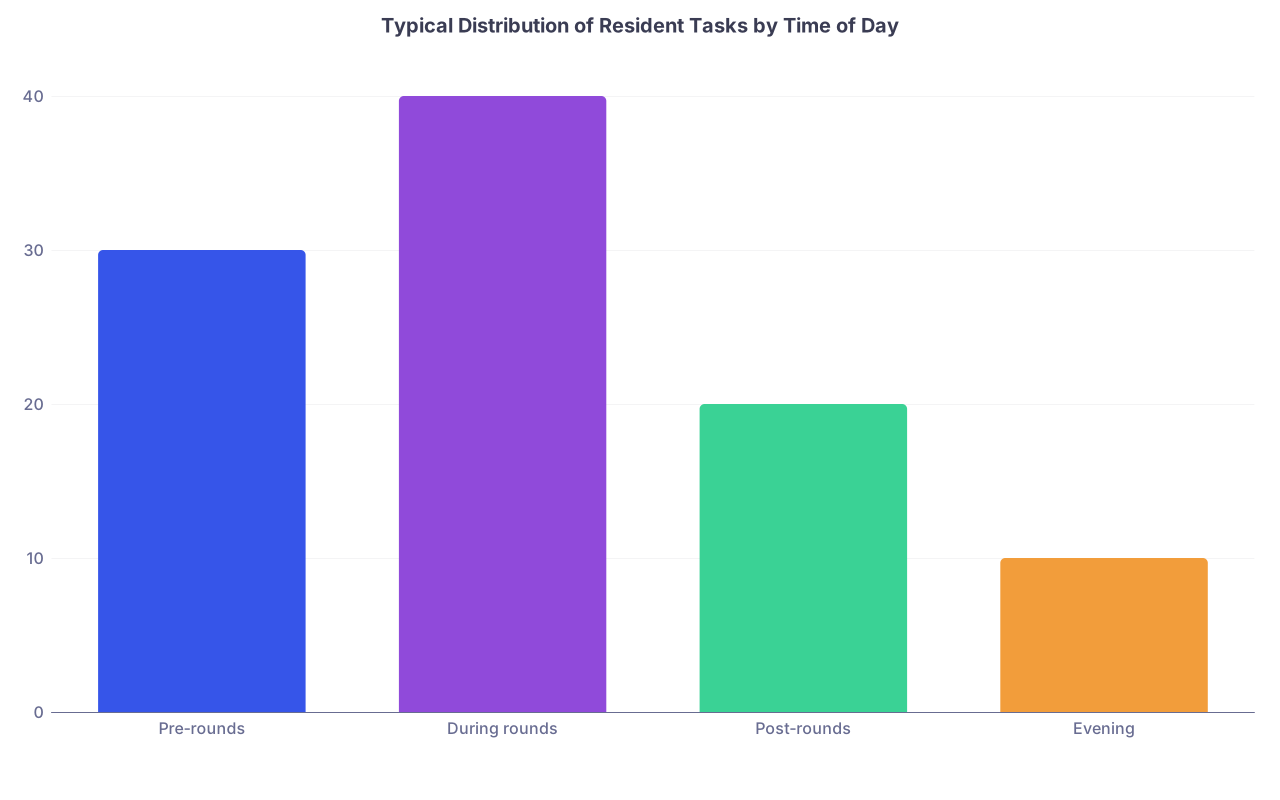
| Category | Value |
|---|---|
| Pre-rounds | 30 |
| During rounds | 40 |
| Post-rounds | 20 |
| Evening | 10 |
Not exact numbers, but you get the point: most chaos is early in the day. Your list should be built for that time pressure.
Step 5: Build a Reliable Quick-Glance Triage System
At 3 pm when your pager explodes, you don’t have time to re‑read everyone’s full plan.
You need:
- A visual cue for “who is sick”
- A one‑line “watch for this” for each high‑risk patient
Easy way to do this:
Tag each patient with H/M/L at the start of the day:
- H – High risk / unstable
- M – Moderate (can worsen, but stable right now)
- L – Low risk / discharge‑ready
For your “H” patients, add a bolded line in the plan:
- “Watch for: MAP <65 off pressor, RR >30, O2 >6L”
- “Watch for: chest pain, hypotension post‑GI bleed, Hgb drop”
So when cross‑cover or the nurse calls, you can glance at one line and know what you were worried about.
Step 6: Separate Your “Brain” from the Official Handoff
Don’t try to cram everything into your own working list.
You should really have two related but distinct tools:
Your working list
- Messy in a controlled way
- Problem‑based plan, to‑dos, your shorthand, arrows, circles, whatever
The formal sign‑out / handoff (e.g., I‑PASS in your EMR)
- Cleaner, standardized language
- Key background, hospital course, overnight “if/then”s
They should share the same core mental model (same diagnosis line, same main problems), but you don’t need your full ICU‑level handoff language on a printed list you carry around.
On busy ward months, residents who try to make one document do both jobs are always behind and always editing.
Step 7: Use the EMR Smartly Without Letting It Use You
If you’re in Epic or similar, use it, don’t worship it.
Smart ways to use the system:
- Custom columns: add creatinine, WBC, last fever, O2 device as columns so you can scan the whole team at a glance
- Special lists: “My discharges,” “My high‑risk,” “New admits <24h”
- Auto‑populate core data: MRN, room, attending—let the EMR do that so your brain can stay on the plan
Dumb ways to use the system:
- Copy‑pasting old notes into your list
- Keeping full consult notes in a “comments” field
- Letting the EMR default order dictate your workflow
Your list is for today’s thinking, not a backup chart.
Step 8: Don’t Overcomplicate. Residents Love Making Perfect, Useless Templates.
You are not a product designer. You’re tired, under‑slept, and getting paged.
If it takes more than 2–3 seconds per patient to update the list in the morning, it’s too complicated.
A good test:
- Can you update an 18‑patient list in under 20–25 minutes of focused pre‑rounds work?
- Can a co‑resident pick it up and understand every patient in <30 seconds each, without you in the room?
- Can you present off it without hunting all over the chart?
If the answer to any of those is “no,” simplify.
Step 9: Example Template You Can Steal (and Tweak)
Here’s a lean, real‑world example that works for most ward months. Adapt it, don’t worship it.
Columns:
- H/M/L
- Room – Name – Age/Sex
- Dx / Reason here (1 line)
- Key data (1–2 lines)
- Today’s Plan (problem-based bullets)
- To‑Dos (coded by time: N/D/A/P)
- Dispo target + barrier (1 line)
Example single patient line, expanded:
- H | 6E‑12 – Smith – 72F
- Septic shock 2/2 PNA, now off pressors on 4L NC
- Vitals: Tmax 38.4, MAPs 65–70 off pressors; Labs: WBC 18→14, Cr 1.0→1.6
- Plan:
- Pulm: Wean O2 as tolerated, goal sat >92%
- Renal: Suspect pre‑renal ATN, LR 75/h x12h, BMP this pm
- ID: CTX/vanc day 3, de‑escalate if cultures neg at 72h
- Cards: Soft BPs, hold home ACE, cont low‑dose metop
- Dispo: Needs PT eval; ICU downgrade completed
- To‑Dos:
- N – Check O2 needs before rounds
- D – Ask attending about vanc stop if MRSA swab neg
- A – Call daughter with update
- Dispo: Floor 1–2 days, likely home with HH if stable
That’s it. Simple, fast, informative.
Step 10: Use Visuals for Your Own Brain, Not for Decoration
You don’t have to be a highlighter freak, but very small visual rules help a ton:
- Circles or asterisks for “must do today”
- One color for discharges, another for sick patients
- Underline or bold meds you’re changing (ACEI held, anticoag changed, etc.)
But don’t turn your list into a rainbow diary. If everything is highlighted, nothing is.
Here’s how a typical census might break down in reality:
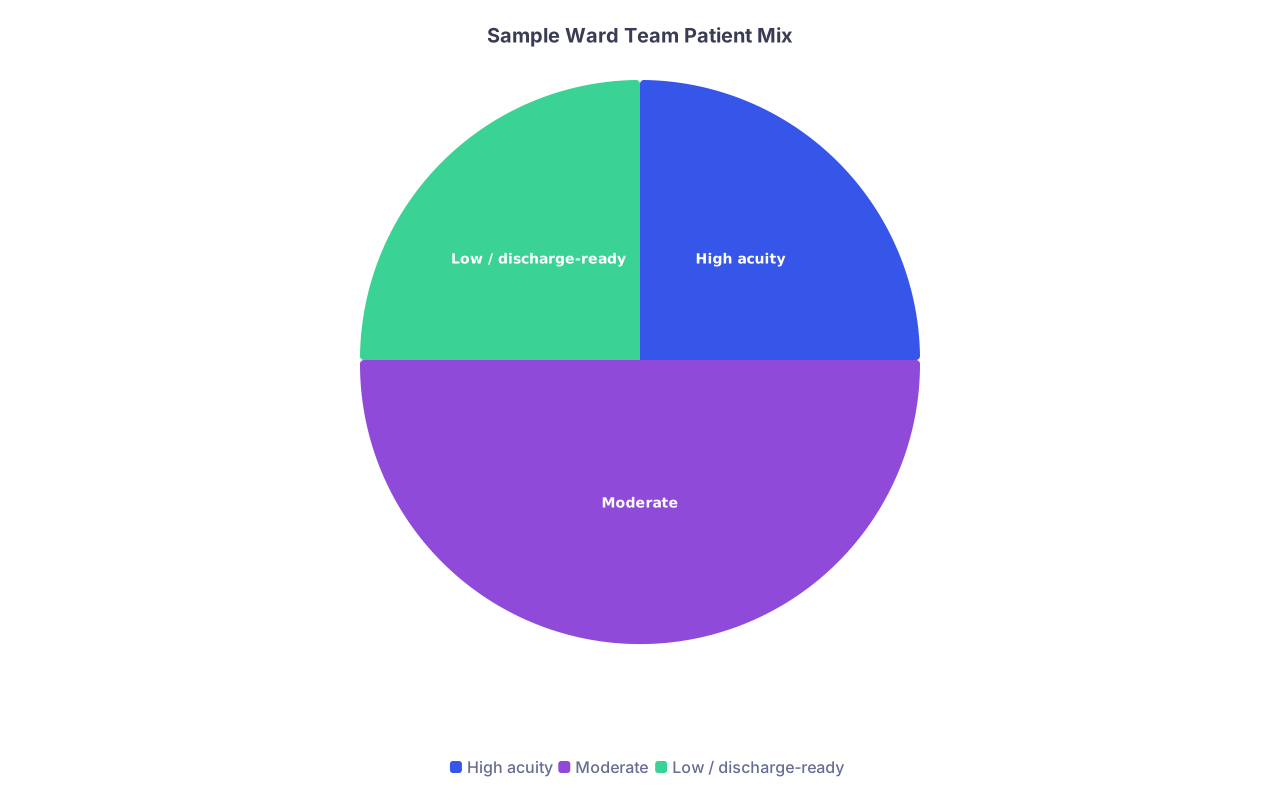
| Category | Value |
|---|---|
| High acuity | 25 |
| Moderate | 50 |
| Low / discharge-ready | 25 |
Your list’s job is to keep your attention weighted roughly in that ratio.
Step 11: Make Daily Micro‑Improvements
The best patient lists I’ve seen weren’t born perfect. They were adjusted 1–2% every day.
At the end of a shift (or during a quiet 5 minutes), ask yourself:
- What information was I constantly scrolling for that should just live on the list?
- What section did I never actually use?
- Which to‑dos did I keep forgetting to add?
Then tweak one thing. Not ten.
Over a month of wards, that’s 20–25 small improvements. Suddenly your list feels like cheating.
Step 12: Protect Your Future Self
Your list should also protect future you:
- Make sure every new admit gets a reason‑for‑admission line written in non‑garbage language the first day.
- Make sure recurrent issues (fall risk, family that calls nightly, chronic refusing labs) are noted once in a short, recognizable way.
- Make sure the discharge block is filled with a target date and barrier, not just “TBD.”
If tomorrow you got pulled to cross‑cover a different team, could someone use your list and not curse your name?
That’s the standard.
One Concrete Thing to Do Today
Take your current list—Epic report, Word document, crumpled paper, whatever.
Pick three patients and rewrite their line using this structure:
- One‑line diagnosis / reason here
- 3–6 bullet problem‑based “today” plan items
- Clear, coded to‑dos (N/D/A/P)
- Dispo target + barrier (one line)
Time yourself. Then do the rest of the team.
By the end of that exercise, you’ll know exactly what you’ve been missing—and your next ward month will feel a lot less like barely controlled chaos and a lot more like you’re actually running the service instead of it running you.