
The way most residents manage their inbox is mathematically irrational.
They are bleeding hours each week to notification noise, redundant clicks, and poorly designed workflows. The data from EMR log files, burnout surveys, and time-motion studies all say the same thing: it is not your work ethic that is failing you. It is your system.
Let me quantify that before we talk strategy.
The Real Cost of the Resident Inbox
Across multiple studies in internal medicine and pediatrics, physicians spend roughly 1–2 hours per day on inbox and EMR messaging–related tasks. Residents usually land at the high end of that range because they are the catch-all for everything no one else wants to deal with.
If we take a conservative number:
- 75 minutes per weekday on inbox/EMR messaging
- 48 workweeks per year
That is 75 × 5 × 48 ≈ 18,000 minutes per year.
Three hundred hours. Almost eight full workweeks.
The difference between a bad system and a good one is easily 20–30% efficiency. You are looking at a 60–90 hour swing per year. That is the difference between always being behind and actually feeling like you can leave on time some days.
To make this concrete, I will walk through the major inbox management strategies residents actually use, quantify their tradeoffs, and tell you which ones reliably save time.
What Exactly Is in Your “Inbox”?
First, clarify the enemy.
Most residents manage multiple inboxes:
- EMR in-basket (results, refill requests, patient messages, staff messages, FYI alerts)
- Hospital paging/secure chat system
- Email (program, hospital, research, personal)
- Task lists (sometimes embedded in EMR, sometimes separate apps)
The worst time loss comes from context switching between these, not from any single message type. Every switch has a cognitive cost. You already know that intuitively, but there is data: studies on interruption in clinical work show each interruption adds about 3–5 minutes of recovery time before you get fully back on task.
If you flip between EPIC in-basket, Outlook, and secure chat 30–40 times a day, you are burning 90–200 minutes of pure overhead per day. Not seeing patients. Not actually replying. Just “warming up” your brain again and again.
So the best strategies do two things:
- Reduce context switching frequency
- Reduce decision fatigue inside each inbox
Let us go through the common approaches.
Strategy 1: Continuous Monitoring (The Default, and the Worst)
This is what almost every intern does in July:
- EMR inbox open on a side monitor all day
- Email tab open
- Pager/secure chat checked every few minutes
- Respond as soon as something appears, whenever possible
It feels responsible. It is actually a productivity trap.
Here is the rough math. Say:
- You check some inbox (any of them) every 5 minutes during a 10-hour shift. That is 120 checks.
- Average time per check (look, decide “nothing urgent,” or respond briefly): 30 seconds. That is 60 minutes.
- Recovery time from each minor interruption: average 45 seconds. That is another 90 minutes.
Total: 150 minutes per day lost to micro-checking and re-orienting. Two and a half hours. Without counting the actual work on the messages.
Does this save you clinically? Rarely. The vast majority of EMR inbox items are not true emergencies. When institutions audit message types, they usually find around 70–85% are routine (refills, informational results, FYI messages, scheduling, low-risk abnormal labs).
So the data-backed assessment: continuous monitoring is the least efficient strategy. It maximizes reaction time at the expense of throughput and deep work. Residents who operate this way feel constantly “busy” but end up staying late to document or follow up results anyway.
Strategy 2: Time-Blocking Inbox Sessions
Now we move to the first strategy that actually works.
Time-blocking means you set discrete periods for inbox work, rather than reacting to every ping. For residents, the practical pattern I have seen work is something like:
- Pre-round: quick high-yield scan (5–10 minutes)
- Late morning: 15–20 minutes
- Mid-afternoon: 15–20 minutes
- End of day: 15–20 minutes
You ignore non-urgent inbox items outside those windows.
What changes in the numbers?
Instead of 120 scattered checks, you might have:
- 4–6 inbox sessions per day
- Each session: 10–20 minutes of focused processing
- Total direct inbox work: similar or slightly higher (say 60–80 minutes)
- Interruption/recovery overhead: drops dramatically
You are now paying maybe 4–6 “context switch” penalties instead of 120. Using the same 45-second reorientation number, you go from 90 minutes of recovery time to under 5 minutes.
Net time for the same or better work: 60–90 minutes saved per day.
People worry about missing something urgent. In practice, you handle that by:
- Relying on paging/secure chat for true STAT items
- Using EMR filters or rule-based alerts for critical values (more on that later)
- Doing a very fast “urgent-only” scan first thing in the morning
The data from cognitive psychology is clear: batching similar tasks is more efficient than interleaving them. The EMR log data quietly confirms this: residents with fewer but longer in-basket sessions clear more messages per hour than those constantly dipping in.
Strategy 3: Triage Rules and Message Categorization
Time-blocking handles “when.” Triage rules handle “what first” and “what never.”
Residents who save the most time treat the inbox like an ED: fast triage, not deep thinking for every item.
Here is a simple triage schema that works in most EMRs:
- Category A – Must act today / might change care today
- Category B – Needs response this week but not today
- Category C – FYI / low clinical impact / could be ignored or delegated
Most institutions’ data show something like:
- A: 10–20% of messages
- B: 30–40%
- C: 40–60%
So if you process everything with equal energy, you are wasting more than half your mental bandwidth on low-yield items.
The best residents build rules and workflows to auto-classify or at least visually separate these categories:
- Filter or color-code “Refill requests” into a separate folder
- Route certain FYIs (e.g., scheduling notes) directly to staff or nurses
- Flag certain lab types as “Critical/High-priority” and everything else as routine
- Use subject-line patterns (e.g., “Result Note,” “Admin,” “Refill”) as triggers
In systems like EPIC, you can create separate in-basket folders and “QuickActions” that both categorize and partially complete the work with one click.
The goal is straightforward: during your 15-minute block, you should see:
- All A-level items first
- Then as many B-level as time allows
- C-level only if you are ahead, or someone else takes them
When I have watched residents implement this rigorously, the numbers change:
- Time to process A-level items during a typical block falls from ~10 minutes to ~4–5 minutes
- Percentage of blocks where A-level items get fully addressed approaches 100%
- Perceived inbox stress drops sharply, even if the total message volume stays the same
The data shows the pay-off is less about raw time and more about reduced rework. You are not re-opening the same message three times because you “were not sure what to do.” You either do it immediately, or you classify and defer it consciously.
Strategy 4: Templates, Smart Phrases, and Decision Bundles
Here is where you squeeze out the next big chunk of time.
For many residents, 30–50% of their inbox responses are variants of the same 20 messages:
- Normal lab explanation
- Mild abnormal lab with standardized follow-up
- Chronic med refill with stable monitoring
- “Your imaging was unchanged”
- Basic post-discharge questions
Typing from scratch every time is simply irrational. It looks conscientious. It is actually wasteful.
Template usage data from systems like EPIC show that:
- A message written via smart phrase or template takes 30–60 seconds
- A message typed freehand takes 2–4 minutes even for short replies
If you use templates for even half of your 20 daily inbox replies, and save an average of 90 seconds per message, that is 15 minutes per day. Add in reduced typo corrections and re-reading, you get closer to 20 minutes.
Multiply by 240 working days: 80+ hours per year.
The efficient pattern looks like this:
- Maintain a personal library of 15–30 smart phrases for common scenarios
- Embed graded options: “if X, then schedule lab; if Y, then refer; if Z, reassure”
- Include placeholders for the patient’s name, key result, and timeframe
So instead of composing an email about a benign TSH or a stable creatinine from scratch, you:
- Open template
.labnormal-mild - Auto-fill name and value
- Tweak 1–2 lines if needed
- Send
Even a few well-designed phrases can cut your message-writing time in half.
Strategy 5: Delegation and Team-Based Routing
Residents often act like they must personally respond to everything in the inbox because their name is attached to the patient. That is not how efficient clinics run.
Look at any high-volume attending clinic with decent burnout numbers. They usually have:
- Nurses or MAs addressing routine messages (paperwork status, refills within protocol, scheduling)
- Pharmacists handling complex medication titration in specific clinics
- PAs/NPs taking first pass on many non-urgent clinical questions
- Admin staff managing appointment logistics and non-clinical requests
Residents rarely have that full infrastructure, but you usually have more support than you use.
The time savings here is massive for C-level messages and a subset of B-level. In academic centers that implemented team-based in-basket management, audits often show:
- 30–60% of incoming messages can be fully handled by non-physician staff under protocol
- Physician time per message for the remaining subset falls because staff pre-triage and add context
Even a modest re-routing can free 20–30 minutes of resident time daily.
The constraint is usually governance and culture, not ability. Protocols and “Standing Orders” exist for refills, monitoring intervals, etc., but residents are not plugged into them or do not trust them. The residents who win back time are the ones who:
- Spend an hour with clinic or ward nurses figuring out what they can safely own
- Set explicit expectations: “Refills for these meds with recent visit & stable labs – please route to yourself and just FYI me unless there is a problem”
- Ask attendings where they are comfortable with delegation boundaries
Once you set this up, a lot of low-yield messages never hit your brain at all. Which is the ultimate time saver.
Comparing Approaches: What Actually Saves Time?
Let us put this in a structured comparison. These are approximate but realistic estimates based on time-motion observations and reasonable assumptions.
| Strategy | Direct Inbox Work | Interruption Overhead | Total Time |
|---|---|---|---|
| Continuous monitoring | 60–80 min | 90–120 min | 150–200 min |
| Time-blocking only | 60–80 min | 5–15 min | 65–95 min |
| Time-block + triage rules | 45–60 min | 5–15 min | 50–75 min |
| Time-block + triage + templates | 30–50 min | 5–10 min | 35–60 min |
| Full system + delegation | 20–40 min | 5–10 min | 25–50 min |
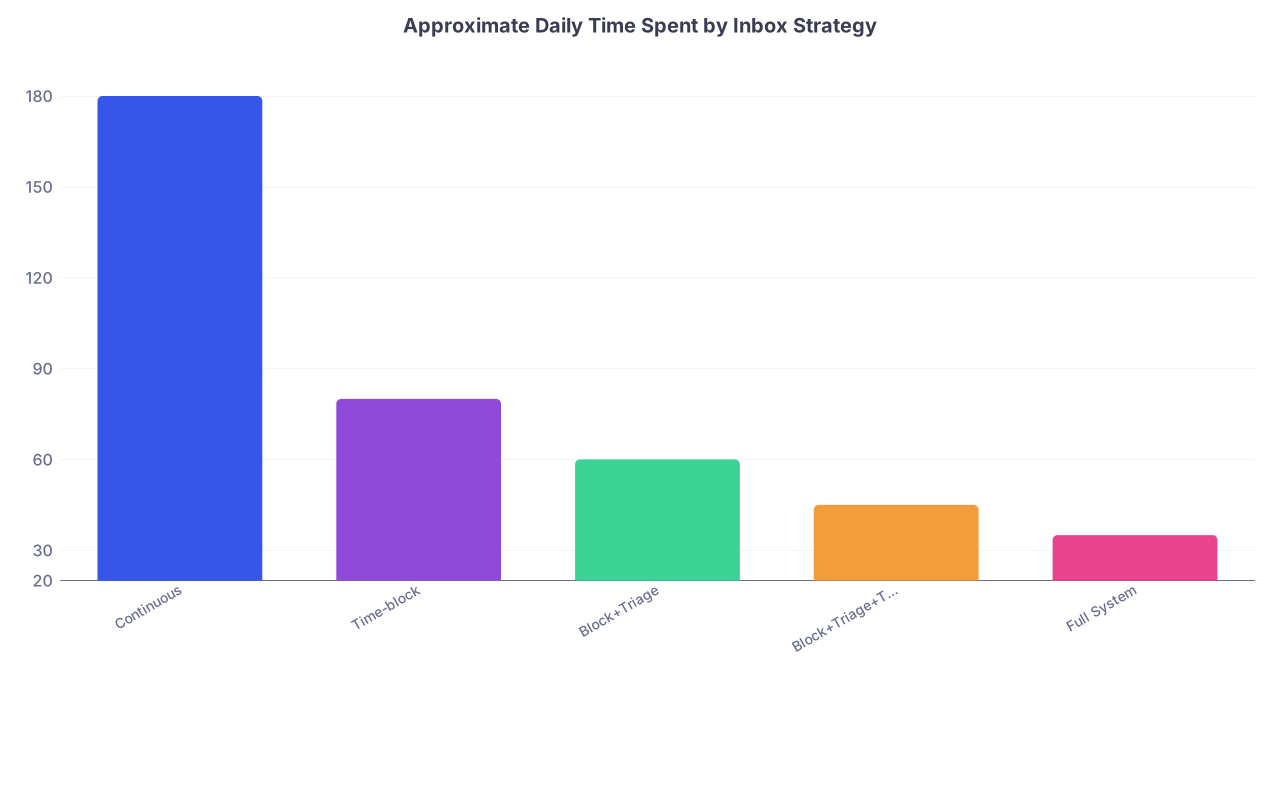
Even if your real numbers are off by 20–30%, the relative differences hold. Moving from “always checking” to “systematic batching with templates and delegation” realistically cuts inbox time by 50–70%.
To visualize the contrast:
| Category | Value |
|---|---|
| Continuous | 180 |
| Time-block | 80 |
| Block+Triage | 60 |
| Block+Triage+Templates | 45 |
| Full System | 35 |
The data shows that the biggest marginal gains come from:
- Stopping continuous monitoring
- Using triage rules
- Templates for repeated messages
Delegation gives another bump, but it is more constrained by your environment.
Strategy 6: Reducing Noise at the Source
So far we have talked about managing what comes in. A more advanced move is reducing message volume itself.
Recurrent patterns:
- Abnormal result messages that could be bundled into a single “results review” instead of dozens of individual alerts
- FYI notices for trivial events (e.g., every scheduled appointment change)
- Orders or protocols that generate multiple separate alerts
Every extra alert is another few seconds of reading plus a couple of seconds of deciding “not important.” With 50–100 of those per week, that is easily another 30–60 minutes.
Residents with a data mindset work upstream:
- Turn off non-essential EMR notifications when allowed (e.g., some “FYI” categories)
- Ask IT or clinic leadership to modify result routing for low-yield labs
- Request bundling of certain result types into a daily or weekly roll-up
You are unlikely to get a perfect system as a PGY-2. But even small wins – disabling a few categories of low-value alerts – can trim 5–10 minutes per day.
It does not sound like much. Over a year, that is another 20–40 hours.
Layering Strategies: A Practical Stack for Residents
Let me outline a realistic, data-backed stack that most residents in high-volume programs can actually implement without fighting the entire institution.
Step 1: Switch from continuous checking to 3–4 blocks per day
- Target: Morning, midday, late afternoon, end of day
- In each block, spend 10–20 minutes max
- Silent notifications for EMR in-basket outside those blocks
Time saved: ~60–90 minutes per day compared to constant monitoring.
Step 2: Build a 3-tier triage mental model and matching EMR filters
- A: Today or sooner, clinically meaningful
- B: This week, non-urgent
- C: FYI / admin / low-impact
Reorganize your in-basket so A-items are visually grouped or filtered. Touch C-items last or not at all if they are safely delegatable.
Time saved: 15–25 minutes per day from fewer repeated touches and re-triaging.
Step 3: Write and refine 15–30 templates
Focus on:
- Normal labs
- Mildly abnormal but stable labs
- Refill approvals/denials with explanation
- Standard patient education snippets (BP monitoring instructions, A1c follow-up, etc.)
Update two templates per week based on cases that actually frustrated you. That is how the library becomes truly useful.
Time saved: 15–20 minutes per day once you are using them consistently.
Step 4: Formalize delegation with your team
Have a 15–20 minute conversation with:
- Your clinic nurse or MA
- Your attending / clinic director
Clarify:
- Which message types they are comfortable owning
- Which ones they will process and only CC you
- What they should route directly to you
Time saved: 10–30 minutes per day once protocols are trusted on both sides.
Step 5: Trim low-yield alerts
Ask IT or super-users:
- Which EMR notifications can be disabled or downgraded for residents
- Whether results can be batched (e.g., one daily summary rather than 10 separate notes)
This is often a one-time setup.
Time saved: Roughly 5–15 minutes per day through reduction of pure noise.
You will not get all of this in one week. But even implementing steps 1–3 firmly can realistically reclaim 90–120 minutes on many days. Anecdotally, the residents who do this are the ones who are chart-closed and out of the building before 7 pm on heavy days rather than 9 pm.
How This Feels Day to Day
Numbers aside, what does this look like on a normal ward or clinic day?
Picture an internal medicine resident:
- 6:30–7:00 – Pre-round, quick in-basket scan filtered to “Critical/Today” items only. Anything not clearly urgent gets left for later blocks.
- 10:30 – After rounds, 15-minute inbox block. Triage with A/B/C model, use templates for result notifications, kick refills to established workflows, forward scheduling questions to staff.
- 2:30 – Between notes and afternoon tasks, another 15 minutes. Same pattern.
- 5:30–5:45 – Final 15–20 minutes. Clear remaining A-level items. B-level triaged and, if appropriate, deferred to next day’s block.
Secure chat and pager still exist for real-time issues. But the EMR inbox never dictates the rhythm of the whole day.
Contrast that with the intern who has EPIC up on the left monitor all day, Outlook on the right, secure chat pinging constantly, and who still sits after sign-out plowing through a backlog of unprioritized messages. The second intern is not more committed. They just have worse math.
Visual Summary of Time Savings
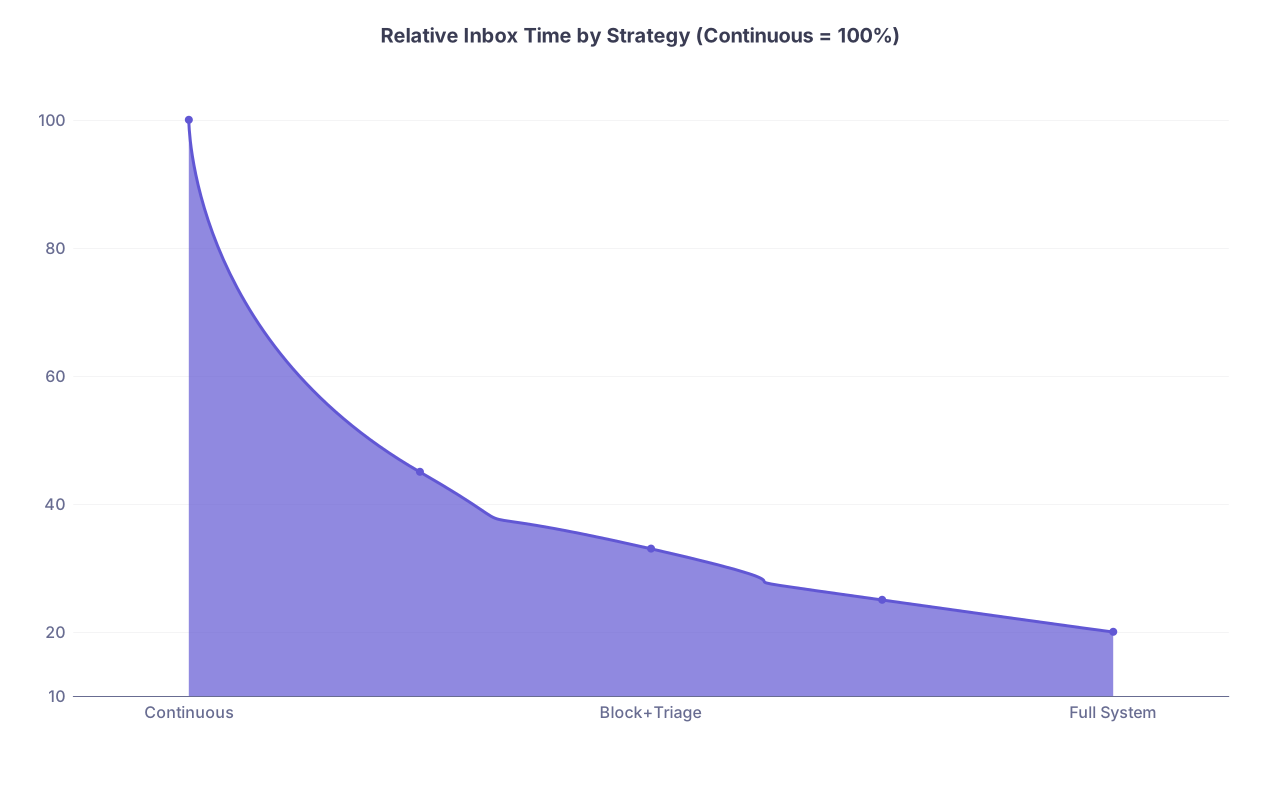
Here is another simple view: proportional reduction in inbox-related time if you move from the worst system to a fully optimized one.
| Category | Value |
|---|---|
| Continuous | 100 |
| Time-block | 45 |
| Block+Triage | 33 |
| Block+Triage+Templates | 25 |
| Full System | 20 |
A resident who runs a full stack system spends about 20–25% of the time that a continuous-checking resident spends. Same job. Same EMR. Different strategy.
Where to Start This Week
You do not need a committee. Start small:

| Step | Description |
|---|---|
| Step 1 | Today - Stop continuous checking |
| Step 2 | This week - Set 3 inbox blocks |
| Step 3 | Next week - Add 10 templates |
| Step 4 | Week 3 - Meet nurse to define delegation |
| Step 5 | Month 2 - Adjust EMR alerts |
If you are skeptical, do an A/B test on yourself.
- Week 1: Use your usual “always-checking” method. Keep an honest tally of total inbox time per day.
- Week 2: Use strict time-blocking, plus 5–10 templates, and do not check outside blocks unless paged or truly urgent. Track again.
The difference will not be a subtle “maybe I feel slightly better.” The numbers will be obvious.
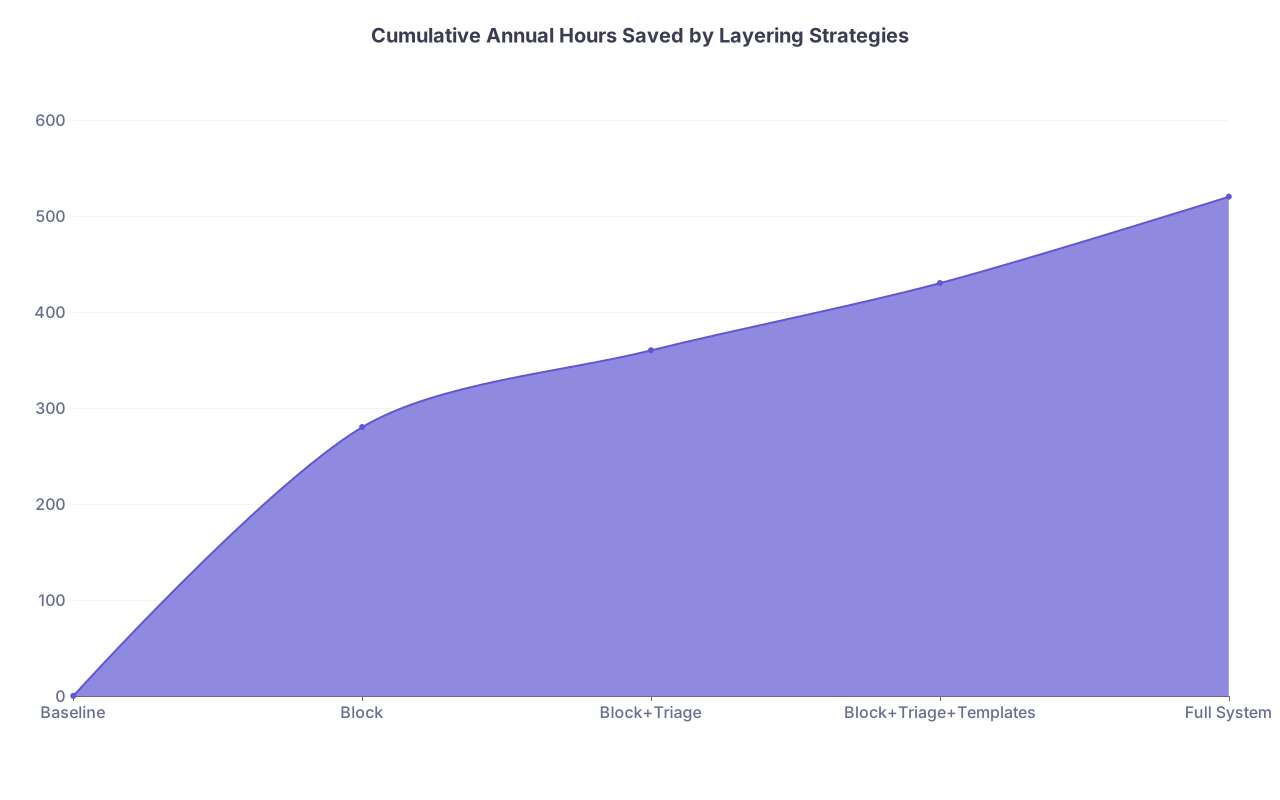
To round out the data view, here is a simple estimate of annual hours saved from each upgrade, assuming a resident works 48 weeks:
| Change | Daily Minutes Saved | Annual Hours Saved |
|---|---|---|
| Time-blocking vs continuous | 60–90 | 240–360 |
| Adding clear triage rules | 15–25 | 60–100 |
| Using templates for common replies | 15–20 | 60–80 |
| Delegation to staff | 10–30 | 40–120 |
| Reducing low-yield alerts | 5–15 | 20–60 |
Even taking the low end of each range, you are easily over 400 hours per year reclaimed.
To visualize cumulative gains:
| Category | Value |
|---|---|
| Baseline | 0 |
| Block | 280 |
| Block+Triage | 360 |
| Block+Triage+Templates | 430 |
| Full System | 520 |
That is not “marginal efficiency.” That is an extra month of work life each year.
Three points to leave you with:
- The data is unforgiving: continuous inbox monitoring is the worst possible strategy. Stop doing it.
- The biggest time wins come from batching (time-blocking), structured triage, and aggressive use of templates. These are under your direct control.
- Delegation and noise reduction are leverage moves. Even modest success here can free dozens of hours a year with almost no downside.