
The way most residents manage pages on call is unsafe, chaotic, and asking for a serious miss.
Let’s fix that.
You don’t need another fluffy “stay organized” article. You need a concrete system you can actually run at 2:37 a.m. when you’ve had 3 hours of sleep and 7 people are paging you at once.
Here’s the answer: the safest method to manage pages during peak call hours is a deliberate, written, triage-based system that does three things every single time:
- Captures every page in a single trusted place
- Forces you to triage and prioritize before acting
- Closes the loop with documentation and cross‑checks so nothing gets dropped
I’ll walk you through exactly how to do that in real life.
Step 1: Build a Single “Source of Truth” for All Pages
If you’re juggling sticky notes, scrap printer paper, and random text messages, you’re playing safety roulette.
You need one place where every page lives. Always. No exceptions.
Use one of these three:
| Method | Pros | Cons |
|---|---|---|
| Paper list | Fast, flexible, no tech | Easy to lose, hard to audit |
| Notes app | Searchable, portable | Typing can be slower |
| Spreadsheet | Sort/filter, structured | Overkill on busy nights |
What I recommend for most residents: a simple paper list on a clipboard or a notes app with a template you reuse every shift.
Your page log should always capture:
- Time of page
- Who paged (nurse/consult/other)
- Patient ID (full name + room or at least name + MRN digits)
- Brief reason (1 line)
- Priority (your triage level)
- Status (not done / in progress / done)
Make it fast. You’re not writing a novel; you’re creating a safety checklist for your brain.
Example of a clean, fast format (paper):
- 23:12 | RN Sarah | Doe, John 712B | BP 80/40 | P1 | ☐
- 23:14 | Lab | Smith, Ana 634 | K 6.2 | P0 | ☑
- 23:19 | RN Mike | Lee, Chen 520 | pain meds | P3 | ☐
That “☐/☑” column is your lifeline when it’s 5 a.m. and you barely remember your own name.
Step 2: Use a Simple, Ruthless Triage System
The safest residents don’t answer pages in the order they come in. They answer them in the order they matter.
You need a simple triage code you can apply in 2 seconds. Something like this works very well:
P0 – Code/Immediate life threat
“STAT”, “not breathing”, “unresponsive”, “HR 20”, “crashing”, overhead code.
Drop everything. Go now. Don’t finish your note. Don’t grab coffee. Just go.P1 – Unstable / potentially life‑threatening in minutes
Chest pain, MAP <60, new sepsis concern, significant respiratory distress, new neuro changes, rapidly dropping urine output in a sick patient.
You respond ASAP, but you can take 10–30 seconds to grab a WOW, check last vitals, or call backup as you move.P2 – Urgent but not crashing
Uncontrolled pain, agitation with safety risk, significant abnormal labs (K 6.0 in stable patient, Hgb 6.5, Na 120), persistent tachycardia you didn’t know about, new AFib in stable patient.
Needs attention within ~30–60 minutes.P3 – Routine / non-urgent
Sleep meds, stool regimen, diet order clarification, “family wants update”, minor PRN adjustments, non-critical lab questions.
Safe to batch and handle in blocks when the storm calms a bit.
You don’t tell the nurse the number. That’s just for you. But you absolutely assign one every time and write it down.
This is how you avoid blowing 15 minutes adjusting trazodone while someone else is decompensating two floors away.
Step 3: Use a Micro‑Workflow for Every Single Page
Responding safely to pages isn’t magic; it’s a repeatable mini‑workflow you run over and over.
Here’s the safest, most efficient pattern I’ve seen work:
Log the page immediately
As soon as you see the page number or hear the overhead call, write the entry. Even “23:12 | RN | ? | ? | ? | ☐” is better than nothing. You can fill details after the call.Call back quickly — but don’t let them story‑dump you
“Hi, this is Dr. X calling back for a page about [patient name]. Can you give me the headline first?”
Force a one‑sentence summary. Otherwise you lose time on noise and miss the signal.Ask 3–4 structured safety questions (tailored by complaint)
For example, for “patient not doing well”:- “What are the last vitals?”
- “Any changes in mental status?”
- “How’s their breathing?”
- “Any new chest pain or neuro symptoms?”
This keeps you from getting blindsided when you show up.
Assign / confirm your triage level (P0–P3)
Update the log if your initial guess was wrong.Decide: go now vs. task vs. bundle later
- P0/P1: physically go (or send someone)
- P2: can often be handled via chart + order + brief bedside check
- P3: bundle into a “non-urgent” block
Close the loop
When done, mark it ✔ and note “order placed”, “saw pt”, or “discussed w attending”.
Is this overkill? No. The unsafe thing is winging it and assuming you’ll remember everything.
Step 4: Bundle and Time‑Block Non‑Urgent Pages
Peak call hours (often 6 p.m.–1 a.m.) will drown you if you treat every page like a fire.
Once you’ve separated P0/P1 danger from noise, the safest method is to batch P2–P3 tasks so you’re not running in 20 directions and forgetting what you started.
Use a simple pattern:
- As you get pages, keep logging and triaging
- Every 30–60 minutes (or when there’s a lull in P0/P1), stop and run a “batch cycle”
Your batch cycle:
Scan your list for any P2 tasks that are time-sensitive (critical labs, agitation, uncontrolled pain). Knock those out first via chart review + orders + quick bedside checks.
Group “same room/nearby rooms” tasks so you walk once, not five times.
Example:- 5th floor: stool softener for A, sleep meds for B, re‑check vitals for C
- 7th floor: family update, write transfer order, reassess pain score
Do all low‑risk, purely order-based items at a workstation when you’re sitting:
Sleep meds, bowel regimens, maintenance fluids, diet changes, pharmacy clarifications.After each small batch, pause and re‑check for new P0/P1 threats before starting the next batch.
This is how people stay safe in actual high-acuity jobs (EM, ICU, trauma). Residents are no different—you need structured batching, not perpetual whack‑a‑mole.
Step 5: Handle Multiple Simultaneous Crises Safely
At some point you’ll get hit with something like:
- Overhead code on 4W
- Sepsis alert on 6E
- Nurse calling about “patient not waking up” on 3N
Here’s what safe looks like in that situation:
Pick the true highest priority and commit
Code blue > unresponsive new change > sepsis alert in stable patient.
Don’t half‑respond to all three. Go all‑in on the worst, first.Immediately communicate what you’re not doing
Call back or have someone call:
“I’m responding to a code on 4W right now. I haven’t forgotten about Mr. X on 3N. I’ll get there as soon as the code is over. If he changes further, call me back or call RRT.”This does two things:
- Protects the patient (nurses know you’re not ignoring them)
- Protects you medicolegally (clear reason for delay, clearly communicated)
Use your team – aggressively
Night float buddy? Senior resident? Hospitalist? ICU fellow? Call them.
“Can you go assess the sepsis alert on 6E while I’m at this code?”
The dumbest resident move is trying to be a hero and running solo into three disasters.Document the sequence
Post‑event: a one‑liner in your note or sign‑out:
“Between 2300–0000 was primary responder to code blue on 4W; delayed response to 6E sepsis alert but RN was aware and notified to call RRT with further change.”
That’s how attendings think. Priorities, communication, documented reasoning.
Step 6: Create a “Standard Script” for Common Page Types
The more you standardize, the safer you are at 3 a.m.
For frequent page themes, have mental checklists/scripts. A few examples:
Chest pain page:
- Ask: location, radiation, associated SOB, diaphoresis, vitals, telemetry changes
- Orders you almost always consider: EKG, troponin, repeat vitals, O2, maybe nitro if appropriate
- Triage: usually P1 unless clearly chronic/unchanged
Fever/sepsis concern:
- Ask: exact temp, BP/HR/RR/O2, mental status, urine output, recent cultures/antibiotics
- Check chart: last labs, current abx, source, comorbidities
- Orders: sepsis bundle elements as indicated (cultures, lactate, fluids, abx if not already)
- Triage: P1 if hypotensive, altered, tachypneic; P2 if stable but likely infection
Pain meds:
- Ask: current pain score, last dose/time, other sedating meds, RR/O2
- Check: kidney/liver function, home regimen, current inpatient PRNs
- Triage: usually P3 unless uncontrolled severe pain impacting breathing/mobility → P2
Write these somewhere in your call notebook. Use them until they’re automatic.
Step 7: Protect Yourself Against the Two Biggest Failure Modes
Most bad page management comes down to two things:
- Forgetting to follow up on something important
- Not realizing how sick someone actually was until they crashed
To counter those, build in two guardrails:
Guardrail 1: “Must‑Recheck” Column
Next to each log entry, add a small “R?” column:
- Leave blank if it’s truly one‑and‑done (e.g., stool softener order)
- Mark “R” if you need to circle back: repeat vitals after interventions, re‑assess chest pain, re‑check K after treatment, follow‑up ABG, etc.
Then, during lulls, scan your list for “R” items and close the loop.
Guardrail 2: Pattern Recognition + Paranoia
If you see any of this in pages about a patient:
- Multiple pages on the same patient in 2–3 hours
- Escalating concerns from the same nurse
- Words like “more drowsy”, “less responsive”, “just doesn’t look right”
Treat that as a yellow flag bordering on red.
Go see them. Pull vitals trends. Ask the nurse explicitly:
“Do you feel this patient is safe on the floor right now?”
Nine times out of ten, the nurse’s gut is your early warning system. Ignoring it is how you end up doing CPR later.
Step 8: Debrief and Adjust Your System
The safest residents don’t just survive bad nights; they learn from them.
Once in a while after a brutal call block:
- Take 5–10 minutes to review your page log
- Ask:
- Where did I get behind?
- What kind of pages ate my time?
- Which things almost fell through?
- Adjust: maybe add a new shorthand, rework your triage categories, or create a new script for a common scenario that kept biting you.
That’s how your system goes from “this kind of works” to “this saves my ass weekly.”
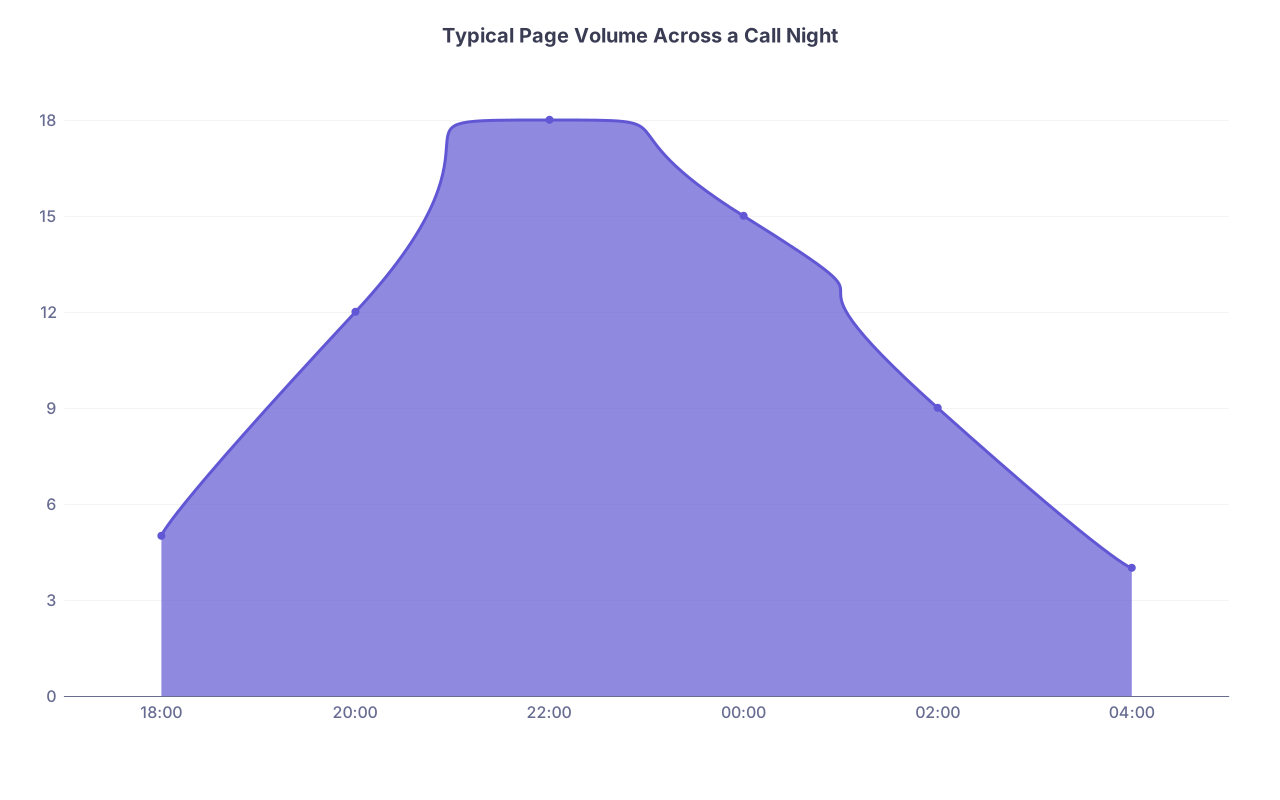
| Category | Value |
|---|---|
| 18:00 | 5 |
| 20:00 | 12 |
| 22:00 | 18 |
| 00:00 | 15 |
| 02:00 | 9 |
| 04:00 | 4 |

| Step | Description |
|---|---|
| Step 1 | Page Received |
| Step 2 | Log Page |
| Step 3 | Quick Triage P0-P3 |
| Step 4 | Go See Patient Now |
| Step 5 | Batch With Other Tasks |
| Step 6 | Intervene and Document |
| Step 7 | Handle During Next Task Block |
| Step 8 | Mark Complete and Recheck Flags |
| Step 9 | P0 or P1? |
FAQ: Safest Way to Manage Pages on Call
1. Is it safer to carry both a pager and my personal phone, or just one device?
Use whatever your hospital’s system uses for official communication, but don’t let informal text chains become the primary channel. Any critical communication should go through the official pager/secure messaging system so it’s logged and reliable. You can use your phone for quick team coordination, but pages and orders should live in the official system—and still be written in your own log.
2. What if nurses get annoyed when I ask for a concise “headline” first?
Some will at first, especially if they’re used to rambling through the entire story. Stay polite but firm: “I just want to be sure I’m prioritizing safely—what’s the main concern in one sentence, then we’ll go into details.” Once they see you respond faster and more appropriately, most will appreciate it. And if you’re consistent with everyone, it stops feeling personal.
3. How do I handle an attending who wants instant answers while I’m drowning in pages?
Be direct, not defensive: “I’m on cross‑cover with X patients, currently responding to [brief crisis]. I’ve logged the other issues and triaged them—nothing else is emergent right now. I’ll update you on [specific patient] after I see them in the next 30 minutes.” That tells them you’re not clueless; you’re running an organized system. Most reasonable attendings will back off when they hear that.
4. Is it safer to chart in real time or batch my notes later?
Hybrid. For critical events (codes, rapid responses, significant decompensation), drop at least a quick event note while details are fresh. For routine pages (stool softener, sleep meds), you can document in batches during lulls. What’s not safe is waiting till 6 a.m. to write your first word about a 1 a.m. near‑ICU transfer.
5. How can I safely cover multiple teams’ patients at night when I don’t know them?
Your page management system is even more important here. Rely heavily on: structured triage questions, vitals trends, problem list, and last attending note. When in doubt, over‑escalate concerns: call the primary team/attending or RRT sooner rather than later. And keep a tighter “R?” follow‑up list on any patient you touch that makes you uneasy.
6. What’s the biggest red flag that my current way of managing pages is unsafe?
If you regularly find yourself saying, “Oh crap, I totally forgot to go back and…”—that’s your sign. Also: if you can’t reconstruct your last 3–4 major decisions from the night because nothing is written down in a structured way. A safe system leaves a breadcrumb trail your tired brain can follow, even on your worst call.
Key takeaways:
Use a single written log for all pages, triage every page with a simple P0–P3 system, and batch non‑urgent work so you’re free to respond fully to real emergencies. If your system works at 3 a.m. when you’re exhausted and getting slammed, that’s the safest method—and it’s absolutely buildable.