
The fastest way to look unprofessional to a residency program is not a typo. It’s a badly formatted CV.
People obsess over Step scores and personal statements, then casually slap together a CV the night before ERAS opens. That’s how otherwise solid applicants end up in the “no” pile after a 15‑second skim. And yes—faculty really do skim. I’ve watched it happen during file review meetings: “This CV is a mess; next.”
You’re not getting rejected because you failed to bold something. But you absolutely can get ignored because your CV looks chaotic, childish, or lazy.
Let’s walk through the common CV formatting mistakes that quietly kill your professionalism—and how to avoid making the same dumb errors.
Mistake #1: Treating Your CV Like a Creative Writing Project
Residency CVs are not art projects. They’re technical documents. Programs want speed, clarity, and consistency. You give them anything else and they’ll move on.
The classic error: trying to be “unique” with your CV design.
I’ve seen:
- Two‑column layouts with colored sidebars and icons
- Headshots pasted in random corners
- Section titles in script fonts
- Background watermarks from some Canva template
That works for graphic designers. Not for physicians.
The danger isn’t just taste. Busy layouts hide the information programs are scanning for:
- Education and graduation year
- Exams (USMLE/COMLEX)
- Clinical experience
- Research and publications
- Leadership and teaching
When that info is buried under design clutter, you look like someone who doesn’t understand the culture you’re trying to join.
Do this instead:
- Single column
- Left‑aligned text
- One font family only
- Simple hierarchy (Name at top > Section headings > Content)
If your CV looks like it could have been built in Word 2007, that’s not a problem. That’s a compliment.
Mistake #2: Inconsistent Formatting That Screams “I Rushed This”
Nothing says “I don’t pay attention to detail” like a CV where every section follows new rules.
Example I’ve actually seen:
- In “Education,” dates are on the right.
- In “Work Experience,” dates are on the left.
- In “Research,” some entries have institution names, others don’t.
- Some bullet points end with periods. Others don’t.
- One section uses “–” for dashes, another uses “—”, another uses “to”.
You might think: “Nobody cares about that level of detail.” Wrong. Physicians are trained to care about consistency: medication doses, lab values, vitals, follow‑up plans. When your CV formatting is all over the place, you look like someone who shrugs at details.
Common inconsistency traps:
- Switching between MM/YYYY and Month YYYY
- Alternating between past and present tense in similar roles
- Mixing “Dr. John Smith” and “John Smith, MD” randomly
- Using different bullet styles (hyphens, dots, arrows)
Pick a standard, then enforce it mercilessly.
| Element | Consistent Example | Inconsistent Example |
|---|---|---|
| Dates | Aug 2020 – May 2024 | 08/2020-5/24; May 2024; 2020–24 |
| Bullets | Hyphen, no period at end | Dot + hyphen + mix of periods |
| Tense | Past tense for all past roles | “Led…”, “Leads…”, “Was leading…” |
| Sections | Same order, same spacing | Random spacing, different heading sizes |
Fix this by doing one brutal read‑through just for consistency. Don’t edit content. Only format. Pretend you’re an attending circling every mismatch in red pen. Because some of them will be.
Mistake #3: Overstuffing With Irrelevant or Embarrassing Content
You are not writing your life story. You’re presenting evidence that you’re ready for residency.
Yet I still see:
- High school awards
- Church choir participation
- Babysitting from age 14–18
- “Hobbies: Netflix, social media, hanging out with friends”
That’s not just unnecessary. It’s juvenile. It tells programs you don’t understand what matters clinically or professionally.
Here’s the rule: if it doesn’t help someone believe you’ll be a reliable, capable resident, it probably doesn’t belong.
Red flags I’ve seen:
- Listing shadowing from undergrad as “Clinical Experience” when you now have clerkships
- Including every insignificant poster that never left your school as if it’s a national conference
- Overinflating volunteer roles (3 hours one weekend listed as if it was an ongoing commitment)
That last one is especially dangerous. Interviewers will ask about it. “So tell me about this 2019 outreach project you led.” If you can’t talk about it naturally, it shows.
You’re better off with a shorter, sharper CV than a bloated, padded one. Emptiness is fixable in an interview. Exaggeration is not.
Mistake #4: Sloppy Date and Timeline Presentation
Program directors scan your CV to answer one question: “Does this timeline make sense?”
If the dates are garbled, they can’t answer that quickly—and that makes them suspicious.
Common problems:
- Gaps with no explanation (especially >3 months)
- Overlapping full‑time roles that look impossible
- Using only years so it’s unclear how long anything lasted
- Mixing US and international date formats (e.g., 05/08/2022 could be May or August)
When dates are unclear, they start wondering:
- Did you fail something and hide it?
- Is this research really ongoing or did it end years ago?
- Did you actually work this many roles at once, or are you padding?
You need a clean, believable timeline. Use Month YYYY – Month YYYY consistently. If something is ongoing, write “Month YYYY – Present” and make sure “Present” is actually true.
And if you have a real gap (failed an exam, medical leave, caring for family), don’t play hide‑and‑seek with dates. That’s how you poison trust before you even step in the door.
Mistake #5: Font Crimes and Layout That’s Painful to Read
This one’s simple, but I see it constantly.
The biggest offenders:
- Font size too small (anything under 10 is pushing it; 11–12 is safer)
- Using more than 2 fonts (no excuse for this)
- Fonts that look like a Google Slides template: Lato, Comic Sans, or any “fun” font
- Paragraphs with no spacing between entries
- Margins squeezed to 0.3" so you can brag, “Everything fits on two pages!”
The goal isn’t to cram your life into as few pages as physically possible. The goal is to make your information easy to scan at 7:30 pm after a 12‑hour clinic day.
Imagine a tired faculty member on a laptop with small screen resolution. Tiny fonts, dense paragraphs, and 0.4" margins are hostile.
Safe defaults:
- Font: Calibri, Arial, Times New Roman, or similar
- Size: 11–12 for body, 12–14 for headings
- Line spacing: 1.0 or 1.15 with clear space between entries
If a stranger can’t quickly find “Education” and “Research” within 5 seconds, your layout failed.
Mistake #6: Section Chaos and Illogical Ordering
The order of your sections matters. Not because there’s one “perfect” order—but because a chaotic order makes your CV hard to interpret.
Where students screw this up:
- Listing “Hobbies” before “Research” because they’re proud of their marathon time
- Putting “High School Awards” above “Medical School Honors”
- Burying “Publications” under some generic “Activities” section
- Creating bizarre section titles like “Impactful Roles” or “Passions” (yes, I’ve seen that)
Here’s a safe, professional order for most residency applicants:
- Contact information (name, email, phone, LinkedIn if clean)
- Education
- Exams (if they’re strong and appropriate to list separately)
- Clinical experience / Clerkships (if not captured elsewhere)
- Research and publications
- Teaching and leadership
- Volunteer service
- Honors and awards
- Professional memberships
- Skills / Languages
- Hobbies and interests (brief, at the end)
If you’re research‑heavy (e.g., applying to IM or neurology with strong research), move Research higher. If you have minimal research but strong leadership, raise Leadership. But don’t get cute with naming or ordering. Programs shouldn’t have to decode your structure.
Mistake #7: Bullet Points That Are Either Novels or Useless
Most applicants botch bullet points in one of two ways:
- They write walls of text that look like paragraphs with dots in front.
- They write vague, content‑free fluff like “Worked well in a team” or “Participated in rounds.”
Both make you look unprofessional—either because you don’t know how to summarize, or because you’re trying to fill space with buzzwords.
Bad bullet examples:
- “As part of my clinical responsibilities, I was involved in a variety of tasks including but not limited to rounding with the team, talking to patients, writing progress notes, and helping interns with various tasks in order to ensure patient care.”
- “Team player; hard working; passionate about medicine.”
- “Assisted with research.”
You’re not writing a novel or a personality ad. You’re demonstrating concrete work.
Better structure: short, specific, outcome‑oriented.
Example:
- “Collected and analyzed data for 120+ patient encounters in a retrospective chart review on heart failure readmissions.”
- “Developed and delivered 4 peer‑teaching sessions on EKG interpretation for MS2 students.”
- “Coordinated 30‑member volunteer schedule for free clinic, reducing no‑show rate by 15%.”
Quick test: if your bullet could apply to 95% of medical students, it’s too generic. If it takes more than two lines on the page, it’s probably too long.
Mistake #8: Mislabeling Roles and Inflating Titles
Nothing triggers faculty skepticism faster than title inflation.
Examples I’ve actually seen on CVs:
- “Director, Community Medicine Program” for someone who volunteered 3 evenings.
- “Principal Investigator” when the real PI is a faculty member and the student managed data.
- “Clinical Research Coordinator” for a short‑term volunteer role checking boxes in REDCap.
Once you do this, readers start doubting everything else you say.
Be accurate with:
- Titles
- Role level (Volunteer, Student, Coordinator, Co‑author)
- Scope (local vs national vs international)
You do not need to be “Director” of anything to impress programs. Being a “Student Volunteer” who clearly explains concrete, meaningful work is far more credible than a made‑up executive‑sounding role.
If your official title was vague or unimpressive, use a clear, honest one that matches what you did. For example:
- Official: “Student” → CV: “Student Research Assistant”
- Official: “Volunteer” → CV: “Volunteer, Free Medical Clinic”
Clarity beats ego every time.
Mistake #9: Overcrowded CVs With No White Space
Here’s the quiet killer: fear of leaving anything out.
Students try to jam every experience onto one or two pages. They shrink fonts, tighten line spacing, and remove margins until the page is visually suffocating.
You know what crowded CVs signal? Anxiety and insecurity. They say: “If I don’t list every single thing I’ve ever done, you won’t think I’m enough.”
Faculty don’t read every line anyway. They scan:
- Top of page 1
- Section headings
- Anything that visually stands out (publications, major roles)
If everything is the same dense blob, nothing stands out.
Use white space intentionally:
- Leave at least one blank line between entries
- Avoid more than 5–6 bullets under any single role
- Don’t be afraid of a third page if your content is truly substantial and well‑spaced
You’re not being graded on compression. You’re being judged on readability.
To drive this home:
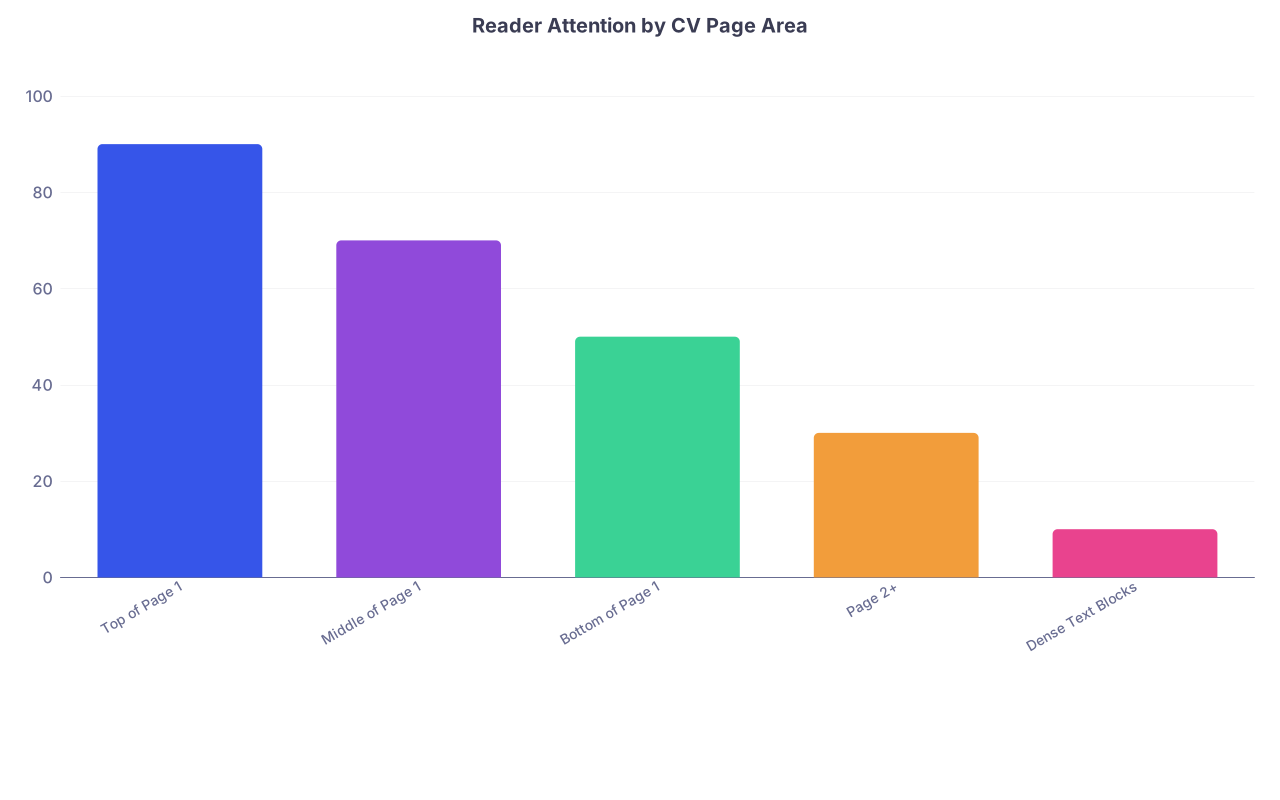
| Category | Value |
|---|---|
| Top of Page 1 | 90 |
| Middle of Page 1 | 70 |
| Bottom of Page 1 | 50 |
| Page 2+ | 30 |
| Dense Text Blocks | 10 |
That’s roughly how attention actually works. Design your CV like you understand that.
Mistake #10: Mixing Personal Statement Content Into the CV
Your CV is not the place for:
- A “Summary” paragraph about how you’ve always wanted to be a doctor
- Your “Objective: To obtain a residency position where I can grow…”
- Philosophical statements about “my journey in medicine”
That belongs in your personal statement, not your CV.
On a CV, “Objective” sections for residency are usually filler and read as amateurish. Programs know your objective. You applied.
Every line on your CV should be:
- Concrete
- Verifiable
- Attached to a time, place, or role
Save the reflective narrative for your personal statement and interviews. Don’t blur genres just because a random generic CV template from some career office told you to put an “Objective” at the top.
Mistake #11: Sloppy Handling of Publications and Presentations
Research sections are where professionalism really shows—or collapses.
Here’s how applicants mess this up:
- Mixing submitted, accepted, and in‑progress papers without clearly labeling
- Listing abstracts as full publications
- Using a completely nonstandard citation format that looks amateur
- Putting their own name in bold while leaving others plain, with no explanation
That last one is controversial. Some fields accept bolded names; others find it tacky. If you do it, at least be consistent and subtle.
Minimal expectations for research formatting:
- Separate “Publications,” “Abstracts,” and “Presentations” if you have enough of each
- Label status clearly: “Published,” “In press,” “Accepted,” “Submitted,” “In preparation”
- Use one consistent citation style (e.g., AMA)
A clean research section might look like:
Doe J, Smith A, You R, et al. Title of the article. Journal Name. 2023;12(3):123‑130.
Not:
- “J. Doe, R. You, et al. Great article. 2023.”
- “Published paper in heart stuff, 2022.”
If you don’t know how to format citations, copy directly from PubMed and standardize them.
Mistake #12: Poor File Naming, Version Control, and Exporting
You can have a beautiful CV and still look sloppy if the file you attach is called:
- “CV_final_REAL_3.pdf”
- “John Smith CV updated FINAL USE THIS.docx”
Or worse: you upload a .docx that breaks formatting when viewed on a different system.
This is low‑hanging fruit to fix, yet people still mess it up.
Do this:
- Always export to PDF for emailing or uploading
- Name file: Lastname_Firstname_CV_2025.pdf (or similar, clean format)
- Open the PDF yourself on a different device to make sure formatting holds
And do not rely on ERAS or other systems to “convert” your document perfectly. Sometimes headers shift, fonts substitute, or page breaks move. Check the final version they’ll actually see.
Mistake #13: Ignoring the “Glance Test”
The biggest mindset error: editing your CV as if people will read it line by line.
They won’t.
Most CVs get:
- 5–15 seconds in an initial screen
- Maybe 30–60 seconds if you’re borderline or under serious consideration
Your format has to pass the glance test:
- Can they immediately see what stage you’re at and where you trained?
- Can they spot research without hunting?
- Do section headings jump out cleanly?
- Does it look like a resident’s CV, or like an undergrad’s first resume?
To enforce this, use a brutal test:
- Print your CV or open it on a laptop
- Stand up, take two steps back
- Give yourself 5 seconds to look
If your eyes don’t naturally land on your strongest sections and key information, you have a formatting problem.
A Simple, Safe Structure You Won’t Embarrass Yourself With
If you’re overwhelmed and scared of messing this up, use a boring, proven layout. Something like:

| Step | Description |
|---|---|
| Step 1 | Header: Name & Contact |
| Step 2 | Education |
| Step 3 | Exams (optional) |
| Step 4 | Clinical Experience |
| Step 5 | Research & Publications |
| Step 6 | Teaching & Leadership |
| Step 7 | Volunteer & Service |
| Step 8 | Honors & Awards |
| Step 9 | Professional Memberships |
| Step 10 | Skills & Languages |
| Step 11 | Hobbies & Interests |
Linear. Predictable. Adult.
From there, your job is not to “impress with design.” It’s to:
- Use consistent formatting
- Keep content relevant and honest
- Make it painless to read
That alone puts you ahead of a depressing number of applicants.
Final Warning—and Your Next Step Today
Messy CV formatting doesn’t feel urgent while you’re obsessing over Step 2 CK or letters of recommendation. But it’s one of the easiest ways to silently sabotage yourself. Programs won’t send you an email saying, “We passed because your bullets were inconsistent and your font was tiny.” They’ll just never invite you.
Do not let that be you.
Here’s what you should do today:
Open your CV and pick one of these to attack right now:
- Standardize all dates to “Month YYYY – Month YYYY”
- Fix all section headings so they’re the same size, style, and spacing
- Delete any role before college unless it’s truly exceptional
- Print to PDF, stand back, and do the 5‑second glance test
Start with that single pass. Then schedule one more 30‑minute block this week to hunt nothing but inconsistencies.
If you treat your CV with the same precision you’d bring to a medication order or a procedure checklist, programs will notice—even if they never say it out loud.