The biggest mistake surgical residents make with case logs is simple: they start caring two years too late.
You do not “figure out” case volume in your chief year. You build it—deliberately—from the first month of PGY‑1, then you tighten the screws PGY‑3 and hit panic mode (in a good way) by PGY‑4.
Here is the timeline you should be following, in plain language and with specific checkpoints.
Big Picture Timeline: When You Should Care (And How Much)
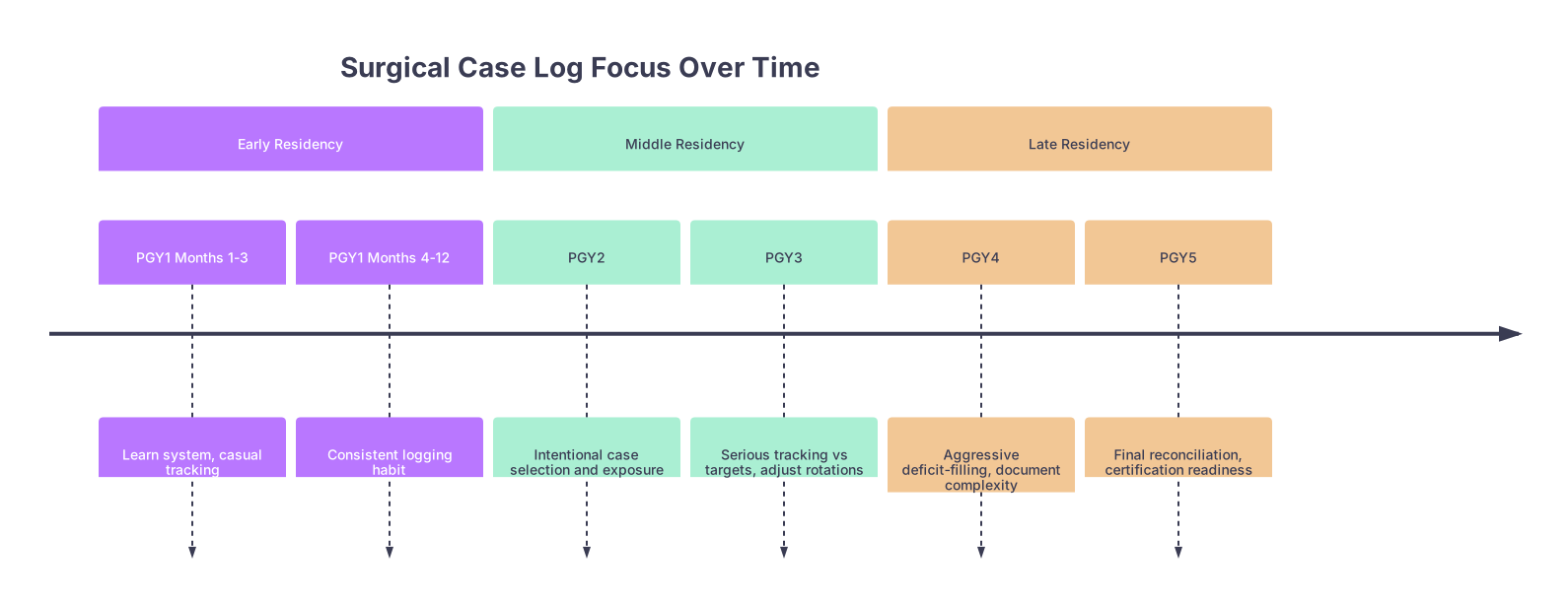
| Period | Event |
|---|---|
| Early Residency - PGY1 Months 1-3 | Learn system, casual tracking |
| Early Residency - PGY1 Months 4-12 | Consistent logging habit |
| Middle Residency - PGY2 | Intentional case selection and exposure |
| Middle Residency - PGY3 | Serious tracking vs targets, adjust rotations |
| Late Residency - PGY4 | Aggressive deficit-filling, document complexity |
| Late Residency - PGY5 | Final reconciliation, certification readiness |
At each stage, your relationship to case volume shifts:
- PGY‑1: Build the habit, learn the logging system, do not lose cases.
- PGY‑2: Start being selective and intentional, recognize gaps.
- PGY‑3: Start tracking seriously against ACGME numbers and program norms.
- PGY‑4: Go into “deficit kill” mode; proactively chase missing categories.
- PGY‑5: Clean-up, verification, and documentation for boards, jobs, and fellowships.
Now let us walk this chronologically.
PGY‑1: From Zero to Habit (Months 1–12)
At this point you should be focused on: not losing data and learning the system.
Most interns think: “I do not have enough operative autonomy yet, so case logs can wait.” That is how you end up in PGY‑3 with 100 undocumented hernias and zero clue what you have actually done.
First 2–4 Weeks of PGY‑1
Your only goals:
Learn the platform your program uses
- ACGME case log system itself
- Or an intermediary like MedHub, New Innovations, myTIPreport, etc.
Set a logging rule
- My recommendation: log every case within 24 hours.
- No weekly bulk entry. That is how details get fuzzy and cases vanish.
Clarify expectations with your program
Ask your chief or APD:- “What is the minimum we expect interns to log by the end of year one?”
- “Who reviews my case logs and how often?”
- “Do I log bedside procedures? Central lines? Chest tubes?”
You are not tracking aggressively yet. You are building muscle memory.
Months 2–6 of PGY‑1
By now you should:
- Log every OR case where you scrubbed and participated.
- Log procedures you are allowed to log:
- Central lines, chest tubes, ICU procedures (if permitted by your specialty board).
- Basic endoscopy if applicable.
At this point, you should:
- Check your cumulative totals once per month.
- Make sure your name is showing up as a participant in the operative report:
- If your name is missing in the dictation, that case may not be defensible later.
Do not obsess over numbers yet. Obsess over completeness.
Months 7–12 of PGY‑1
Second half of intern year:
- You should have several dozen to 100+ cases logged, depending on specialty and program culture.
- You should know:
- How to classify a case (major vs minor, approach, body region).
- How your program defines “surgeon junior” vs “assistant”.
At this stage, start a simple monthly check:
- Total number of operative cases
- Rough breakdown:
- Basic general surgery (hernia, cholecystectomy, appendectomy)
- Trauma / emergency cases (if relevant)
- Endoscopy (if your discipline does it)
You are not chasing quotas yet. But you are starting to understand your mix.
PGY‑2: From Habit to Strategy (Months 13–24)
At this point you should be using logs to guide choices, not just document them.
You are out of pure survival mode. Now case volume has to inform how you structure your training.
Early PGY‑2 (Months 13–18)
Your checklist:
Have a quarterly (every 3 months) look at:
- Your total cases per category (e.g., for Gen Surg: hernia, gallbladder, colorectal, endocrine, trauma, endoscopy).
- Your role: assistant vs surgeon junior.
Compare informally to:
- Co-residents at your level.
- Graduating chiefs (ask them what their numbers looked like at different points).
At this point you should start:
- Noting which rotations are “case-rich” vs “clinic/ward-heavy”.
- Planning to repeat or extend certain operative-heavy rotations later if your program allows it.
Still not full-on panic mode. But your decisions should start reflecting your log.
Late PGY‑2 (Months 19–24)
You should now:
- Sit down with your program director or advisor and explicitly review your case log at least once.
- Identify obvious gaps:
- For example, in general surgery: almost no endoscopy, very few laparoscopic colectomies, minimal foregut exposure.
Use that information to:
- Request specific rotations or electives for PGY‑3/4.
- Position yourself for fellowships (e.g., more vascular, more colorectal, more MIS).
By the end of PGY‑2 you are expected to have:
- A stable, daily logging habit.
- A working understanding of where your log is strong and where it is thin.
PGY‑3: This Is When You Start Tracking Seriously (Months 25–36)
This is the pivot year.
You are no longer just an assistant. You are expected to function as a surgeon junior and intermediate. Case logs now directly impact:
- Readiness for independent call.
- Competency sign-offs.
- Fellowship competitiveness.
Months 25–30 (Early PGY‑3): Baseline vs Targets
At this point you should:
- Pull your full ACGME case log summary.
- Get your board’s minimum requirements and typical graduating numbers from your PD.
For example, for a general surgery resident (illustrative numbers, not official):
| Year Level | Total Cases Target | Approx Laparoscopic Cases | Endoscopy Cases |
|---|---|---|---|
| End PGY1 | 75–125 | 20–40 | 0–20 |
| End PGY2 | 200–250 | 60–100 | 25–50 |
| End PGY3 | 375–450 | 150–200 | 75–125 |
| End PGY5 | 850–1000+ | 300–400+ | 200–250+ |
Now you:
- Plot your current numbers against the expected trajectory.
- Flag any category in the bottom quartile compared to:
- Your co-residents.
- Recently graduated chiefs.
This is the moment the word “deficit” should start living in your head.
Months 31–36 (Late PGY‑3): Active Course Correction
Your case log now drives behavior:
If you are light on endoscopy:
- Request GI or endoscopy-heavy rotations for PGY‑4.
- Show up early to every scope list; make it impossible to leave you off.
If your index cases are low (e.g., colectomy, foregut):
- Ask chiefs and attendings to let you be primary on cases at your level.
- Trade lower-value cases with juniors when appropriate.
You should now be:
- Reviewing your log every month.
- Keeping a short list (written) of categories you are short on and rotations that can fix them.
This is what “serious tracking” looks like: numbers → deficits → rotation and behavior changes.
PGY‑4: Aggressive Deficit Management (Months 37–48)
At this point you should treat your case log like a board eligibility project plan.
PGY‑4 is where complacent residents suddenly realize they are short on essential categories. Do not be that person.
Early PGY‑4 (Months 37–42): Hard Comparison vs Requirements
Now you sit down with your PD or mentor and do a brutal review:
- ACGME/board minimums by category.
- Program’s usual graduation numbers.
- Your current counts and projected trajectory.
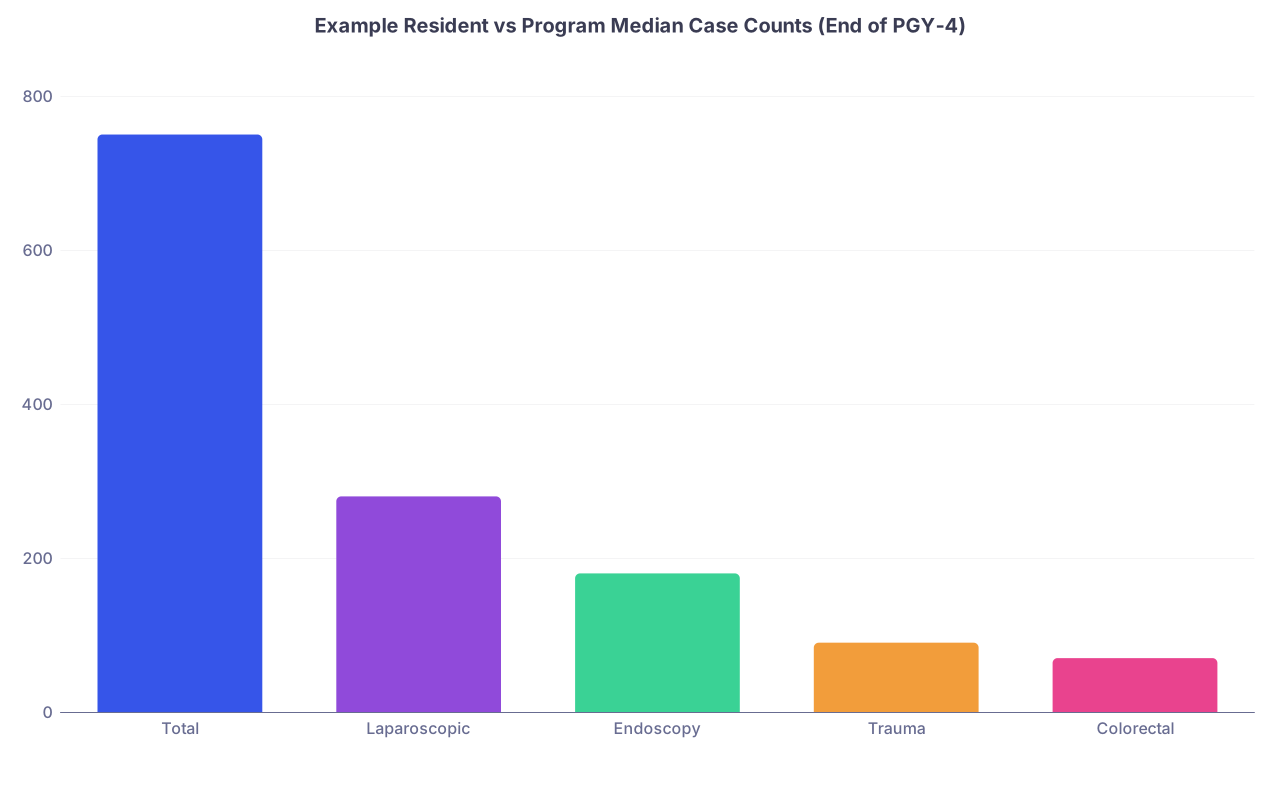
| Category | Value |
|---|---|
| Total | 750 |
| Laparoscopic | 280 |
| Endoscopy | 180 |
| Trauma | 90 |
| Colorectal | 70 |
Let us say your program median at end of PGY‑4 is:
- Total: 800
- Lap: 320
- Endoscopy: 200
- Trauma: 120
- Colorectal: 90
You are below median in trauma and colorectal. That is not a suggestion. That is a problem to fix.
At this point you should:
- Map specific rotations to each deficit category.
- Plan your remaining rotations and electives to maximize those deficits.
Late PGY‑4 (Months 43–48): Surgical Case Volume Sprint
This is the sprint phase:
You should know exactly how many cases you need in each threatened category.
Example: “I need ~25 more colon resections and 30 more endoscopies by graduation.”You should:
- Aggressively volunteer for relevant cases.
- Communicate with chiefs and attendings:
- “I am short on colorectal numbers; can I primary this next case?”
- Avoid wasting time on cases that add little training value or numbers you already have in surplus.
Your goal by the end of PGY‑4:
- No unfixable deficits remain.
- Any short areas can reasonably be filled with your chief year schedule.
PGY‑5: Documentation, Defense, and Future Proofing (Months 49–60)
Now volume is about more than minimums. It is about narrative:
- Are you competent?
- Can you back that up with your case log when applying for:
- Fellowships
- First jobs
- Credentialing and privileges at hospitals
Early PGY‑5 (Months 49–54): Verify and Cross-Check
At this point you should:
- Run a full export of your case log.
- Cross-check a sample of cases against:
- Operative notes
- Your personal call/OR schedules
You are looking for:
- Obvious omissions (that big trauma call night you never logged).
- Wrong categorizations (you marked something as assistant instead of surgeon junior).
You should also:
- Start pulling data for fellowship/job applications:
- Case counts by type (e.g., bariatric cases if applying MIS, HPB cases if HPB).
- Complexity examples for personal statements and interviews.
Late PGY‑5 (Months 55–60): Final Cleanup and Evidence Package
Make sure:
- All required categories meet or exceed board minimums.
- Any borderline categories are documented and discussed with your PD.
Save:
- PDF exports (or screenshots) of your final log.
- A short summary table of your key case volumes for future privileging.
Think long-term:
- Hospitals and credentialing departments may ask for:
- “Your last 100 laparoscopic cholecystectomies”
- “Documented volume of colon resections in the past 24 months”
If you leave residency with a clean, organized, backed-up case log, you are future-proofing your career.
Daily / Weekly / Monthly: What You Should Be Doing When
To make this practical, here is what a solid logging rhythm looks like.
| Time Scale | What You Do | Why It Matters |
|---|---|---|
| Daily | Enter all cases from that day | Prevents loss and detail errors |
| Weekly | Quick glance at new cases by category | Spot short-term patterns and missed logs |
| Monthly | Review summary, roles, and key categories | Guides requests for OR time, autonomy |
| Quarterly | Compare to class norms and target numbers | Drives rotation planning and deficit fixing |
A Simple Weekly Routine
At this point (whatever year you are in) you should be doing at least this:
End of every day:
- Log each case with:
- Correct CPT or category
- Your actual role
- Approach (open vs lap vs robotic)
- Log each case with:
End of every week:
- Spend 10 minutes:
- Scan your weekly list to ensure nothing is missing.
- Mentally note what you are seeing a lot or too little of.
- Spend 10 minutes:
End of every month:
- Look at your summary by category:
- Are you gaining autonomy?
- Are you stagnating in certain areas?
- Look at your summary by category:
It is boring. It is administrative. Yes. Do it anyway. Future you will be extremely grateful.
The Future: Smarter Case Volume Tracking
Let me be blunt: manual entry into ACGME logs is archaic. The future is better.
We are already seeing:
- Operative note–integrated logging:
- Systems that pull CPT codes and automatically suggest case log entries.
- Analytics dashboards:
- Real-time visualizations of how your case mix compares to:
- Program averages
- National medians
- Real-time visualizations of how your case mix compares to:
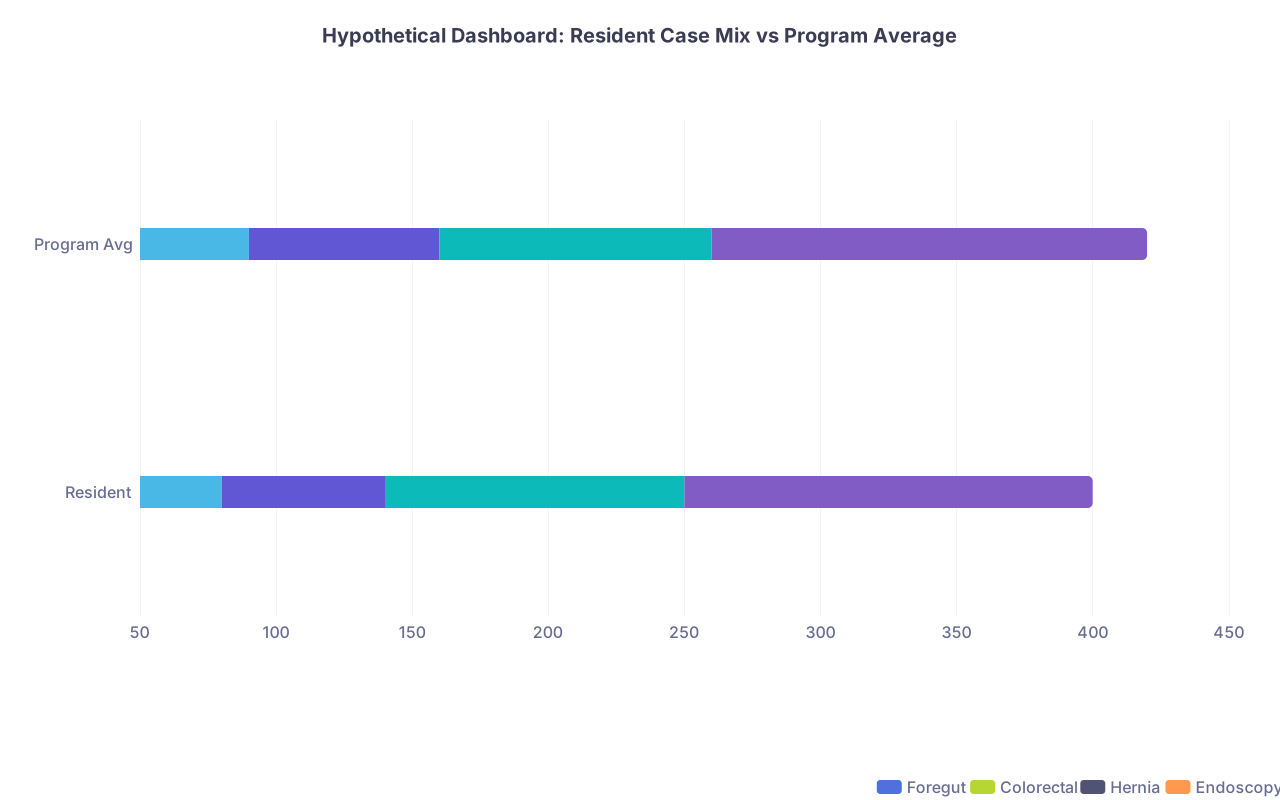
| Category | Foregut | Colorectal | Hernia | Endoscopy |
|---|---|---|---|---|
| Resident | 80 | 60 | 110 | 150 |
| Program Avg | 90 | 70 | 100 | 160 |
Expect:
- More automated error checking:
- Flagging unrealistic numbers or missing key experiences.
- Integration with credentialing systems:
- Seamless export of your log when you apply for privileges.
But here is the catch: if your underlying data are garbage—late, incomplete, misclassified—no fancy AI dashboard will fix that. The timeline I laid out still holds.
Tooling will improve. Responsibility will not disappear.
Common Pitfalls by Year (And When To Correct Them)

You can anticipate, and avoid, the usual mistakes.
PGY‑1
- Pitfall: “I will back-enter cases later.”
- Fix by Month 2: Daily 24-hour rule.
PGY‑2
- Pitfall: Treating all cases as equal.
- Fix by Month 20: Start valuing index, autonomy-building cases.
PGY‑3
- Pitfall: Ignoring category-level deficits.
- Fix by Month 30: Quarterly comparison vs expected numbers.
PGY‑4
- Pitfall: Assuming chief year will magically fill gaps.
- Fix by Month 40: Aggressively schedule deficit-filling rotations.
PGY‑5
- Pitfall: Not exporting and backing up logs.
- Fix by Month 55: Create your personal archive.
Fast Checklist by Phase

Use this as a quick reference.
PGY‑1
- Learn logging system in first 2 weeks.
- Daily logging habit.
- Monthly quick review of totals.
PGY‑2
- Quarterly review with attention to case mix.
- Identify high-yield rotations for desired categories.
- One formal review with advisor or PD.
PGY‑3
- Serious tracking vs ACGME and program benchmarks.
- Monthly summary review, quarterly deep dive.
- Use numbers to influence rotation and OR assignments.
PGY‑4
- Explicit deficit list by category.
- Schedule rotations and elective time to fix deficits.
- Monthly progress check on deficit categories.
PGY‑5
- Clean up misclassified or missing cases.
- Export and archive your full log.
- Prepare case volume summaries for boards, jobs, and credentialing.
FAQ (Exactly 4 Questions)
1. Is it ever “too early” to start logging cases seriously?
No. The earlier you start, the less you lose and the more accurate your log will be. The intensity of analysis ramps up PGY‑3 and beyond, but the habit should start in your first weeks as an intern.
2. How detailed do my entries really need to be?
Accurate role, procedure category, and approach are non‑negotiable. You do not need to write essays in the comments, but if something is atypical or especially complex, a brief note can help later when you are defending experience for privileges or fellowships.
3. What if my program culture is very casual about case logs?
Then you protect yourself. Programs get cited, PDs change, rules tighten. Boards and credentialing committees will care about your numbers regardless of how chill your program was. Treat your log as your personal professional asset, not their administrative chore.
4. How do fellowships actually look at case volume?
Competitive fellowships (e.g., MIS, colorectal, HPB, vascular) absolutely look at case logs. They want evidence that you have a solid foundation and real exposure in their area. Being able to say, “I have done 220 endoscopies, 90 bariatric cases, 40 complex foregut” with printed logs to back it up is a concrete advantage.
Key points: Start the logging habit PGY‑1, but start analyzing and acting on your data by PGY‑3. Use PGY‑4 as your aggressive clean‑up and deficit-filling year so PGY‑5 becomes documentation, not desperation.