What happens when your video freezes mid-consult with a high‑risk patient… and you’re the attending, not the resident, and there’s no one to “call IT” for you?
That’s the nightmare, right?
You’re post‑residency, in a new telemedicine-heavy job, and one glitch makes you look incompetent, unsafe, maybe even “not a good fit.” Your brain immediately jumps to: complaint → QA review → “we’re going in a different direction.”
Let’s walk straight into that fear and defang it.
The ugly truth: tech will fail on you
It’s not “if.” It’s “how often” and “how badly.”
The platforms crash.
Patients use 9‑year‑old Android phones on 1 bar of LTE.
Your Wi‑Fi randomly resets during an abnormal lab discussion.
I’ve seen:
- An oncology follow‑up where the video died right as the patient asked, “So… is this curable?”
- A psychiatrist kicked out of the platform in the middle of a suicide risk assessment.
- A primary care doc forced to finish a new‑patient visit entirely by phone because the patient’s camera “only shows black.”
Here’s the part your anxious brain doesn’t believe:
No one gets fired for a glitch. People get in trouble when there’s no plan and no documentation.
So your real job isn’t “make tech perfect.”
Your job is “have backup systems so when it breaks, it looks like you’re prepared and safe.”
Build a redundancy mindset (so glitches don’t own you)
Think like an ICU doc about oxygen: one source is never enough.
Same with telemedicine tech.
You want two of everything that matters:
- Two ways to contact the patient
- Two internet options
- Two documentation strategies
- Two ways to reach help if there’s an emergency
Not because you’re dramatic. Because that’s how you sleep at night.
Let’s map it out.

| Step | Description |
|---|---|
| Step 1 | Start telemedicine visit |
| Step 2 | Continue visit |
| Step 3 | Try quick fixes |
| Step 4 | Switch to phone call |
| Step 5 | Call EMS and document |
| Step 6 | Complete visit and document issue |
| Step 7 | Video working |
| Step 8 | Fix works |
| Step 9 | Clinical emergency |
This is the mental flowchart you want in your head before you accept that first job.
Backup #1: Your “when it breaks” script
The worst feeling isn’t the glitch. It’s the silence right after, when you have no idea what to say and your brain is screaming, “This looks unprofessional. Say something smart.”
So script it now.
When video starts cutting in and out, have a canned line you always use, like:
“It looks like our video connection is unstable and that can affect your care. I’m going to switch us to a phone call right now so we don’t lose time. If we get disconnected, I’ll call you at [XXX‑XXX‑XXXX]. Does that still work?”
That sentence does a few key things:
- Names the problem
- Frames it as a safety issue, not “ugh, my tech is bad”
- States a clear plan
- Confirms the backup number
You can also have a “platform died mid-visit” script:
“The system logged us out unexpectedly. I’m so sorry about that. I’m calling you now to continue, and I’ll document that the platform malfunctioned so your visit is still fully covered and complete.”
You sound calm. You sound in control. You’re silently freaking out, but the patient never sees it.
Backup #2: Phone as your safety net (not as an afterthought)
Your phone isn’t “lesser telemedicine.” It’s your emergency bridge.
Here’s what you set up before Day 1 in a telemedicine job:
| Backup Type | What You Need Ready |
|---|---|
| Phone Call | Confirm phone number before starting video |
| SMS/Text | Pre-approved template messages |
| Standard fallback message language | |
| Platform Chat | Short script for reconnect instructions |
| Landline Option | Clinic number patients can call back |
You should have at least:
- A personal or clinic number you know you can use to reach patients quickly
- A default phrase you type or say in every visit: “If we get disconnected, I’ll call you at [number].”
That tiny sentence early in the visit lowers anxiety a ton. For them and for you.
And yes, some groups are weird about you using your own cell. Ask about this before you sign a contract. If they won’t give you a proper system (e.g., Doximity dialer, RingCentral, built-in masked calling), that’s a red flag.
Backup #3: Documentation that protects you when tech fails
This is where your worst‑case‑scenario brain is actually useful. Assume every serious glitch could be reviewed later by:
- QA
- Risk management
- Maybe even a board if the case goes nuclear
So you leave a trail. Not a novel. Just enough to show you weren’t negligent.
When tech glitches happen during a visit, drop in a quick line like:
- “Video connection lost at 10:12. Visit continued via patient’s cell phone. Identity reconfirmed.”
- “Audio cutting out repeatedly; switched to phone to ensure adequate history and counseling.”
- “Platform crash x2 during medication counseling; completed discussion by phone, patient verbalized understanding.”
That kind of note screams: “I took this seriously and I had a plan.”
Your future self will thank you. Especially if someone asks, six months later, “Why wasn’t there a visual exam?” and you can point to, “Because the platform died and I adapted.”
Backup #4: Internet and hardware redundancy (so you’re not hostage to one router)
Here’s the scenario you’re terrified of: your home internet dies on a full clinic day, and IT says “we’re working on it” and you imagine 18 one‑star reviews.
You can blunt this with simple redundancy:
- Personal hotspot on your phone with enough data to run at least audio and low-res video for a day
- A second device (laptop + tablet, or laptop + desktop) so if one decides to update for 45 minutes, you’re not dead in the water
- Wired headphones/mic as backup when your Bluetooth freaks out mid-visit
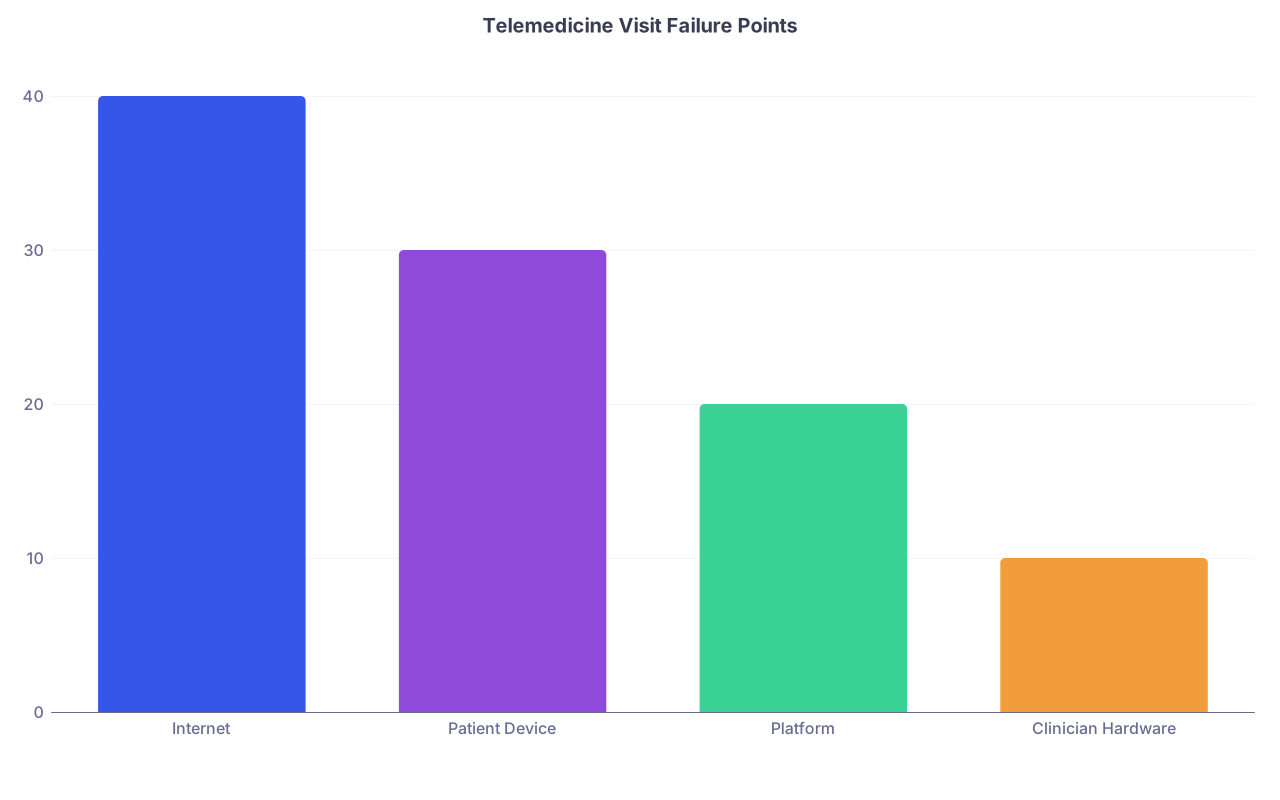
| Category | Value |
|---|---|
| Internet | 40 |
| Patient Device | 30 |
| Platform | 20 |
| Clinician Hardware | 10 |
You can’t fix the patient’s 3G connection in rural nowhere. You can avoid being the weak link yourself.
If you’re going into a primarily remote job, treat a decent router and some redundancy like buying a stethoscope. It’s equipment, not a luxury.
Backup #5: Clinical safety nets for high‑risk situations
Tech failing during a “my blood pressure is a bit high” visit is annoying.
Tech failing during “I’m not sure I want to be alive” is terrifying.
You need a prebuilt mental and written protocol for high‑risk scenarios. Not in the moment. Now.
For psychiatric risk, chest pain, anaphylaxis concerns, etc., your brain should automatically go:
- Can I safely keep this tele?
- If no, what’s the fastest safe alternative? ED, urgent care, EMS?
- How do I communicate this clearly and document it?
Have phrases ready:
“Because of what you’re describing and the limits of video right now, I’m worried about your safety. The safest next step is for you to go to the emergency department now. I’ll call ahead/give you the details.”
If tech is glitching during that kind of conversation, you escalate faster. Phone. If that fails: instruct them where to go and, if appropriate, call EMS.
Then you document like your license depends on it, because in those cases, it might.
Backup #6: Setting expectations with patients so glitches don’t look like incompetence
This part feels small but changes everything: tell patients up front that tech isn’t perfect and that you have a plan.
Something like:
“Sometimes the video acts up. If that happens, I don’t want it to affect your care, so I’ll switch us to a phone call and we’ll keep going. If we get disconnected, you’ll see a call from [clinic number] or [masked number].”
You just made tech glitches “normal and handled” instead of “panic and blame the doctor.”
Same with older patients, or anyone clearly struggling with the platform. Acknowledge it:
“These systems can be finicky. If anything weird happens, I’ll reach you by phone. You don’t have to figure it out alone.”
You’re not promising perfection. You’re promising continuity.
Backup #7: Emotional backup for you (so one glitch doesn’t wreck your confidence)
Here’s the part no one talks about: your first big failure—frozen screen during a tearful moment, platform crash right after you gave bad news—will stick with you. You’ll replay it at 2 a.m. and ask, “Did I look unprofessional? Did they think I didn’t care?”
You need your own backup plan for that.
A few ideas:
- Decide ahead of time what “good enough” looks like for a botched visit. For example: “If I switched to phone quickly, addressed the issue, and documented it, that’s a professional response. Not a failure.”
- Have one trusted colleague you can text or message: “Tech disaster today, I feel awful.” The goal isn’t advice, just reality-check.
- Build a simple post-mortem habit: 3 questions, no self-abuse:
- What went wrong that was in my control?
- What wasn’t in my control?
- What one small thing will I change for next time?
That keeps your anxious brain from turning a glitch into a character flaw.

Questions to ask before you accept a telemedicine-heavy job
Your fear is that you’ll sign a contract, then find out they expect you to magically handle chaos with no support.
So here are the non-negotiable questions:
| Topic | Question to Ask |
|---|---|
| IT Support | Is support available live during my clinic hours? |
| Backup Modality | Can I freely convert to phone if video fails? |
| Documentation | Is there standard language for tech failures? |
| Hardware | Do you provide equipment or expect BYO? |
| Emergencies | What is the protocol for 911 and high-risk cases? |
If they stare blankly when you ask, “What’s your process when the platform crashes mid-day?” that’s… not reassuring. You’re allowed to walk away.
You’re not “high maintenance” for wanting a safe system. You’re protecting your license and your sanity.
A quick, realistic worst‑case walk‑through
Let’s actually run your worst case.
You’re in your first month post‑residency. New virtual primary care job. You’re on with a middle‑aged patient reporting chest discomfort. You’re trying to risk-stratify. The video freezes. You can still hear them, then the whole thing drops.
Here’s the difference between spiraling and coping:
- You already confirmed their phone number at the start.
- You immediately call.
- You say: “Our video just crashed during an important part of your story. I’m going to continue by phone so we don’t delay your care.”
- Based on the story, you tell them they need ED now. If they refuse and it sounds bad, you consider calling EMS with the information you have.
- You document the entire sequence: video failure, phone switch, recommendations, patient response.
Did something scary happen? Yes.
Was it malpractice-by-glitch? No.
Would QA or a board say, “Why didn’t you see into the future and keep the internet from failing?” No. They’d look at: “Did you act reasonably and quickly once it did?”
That part—your response—is under your control. And it’s enough.
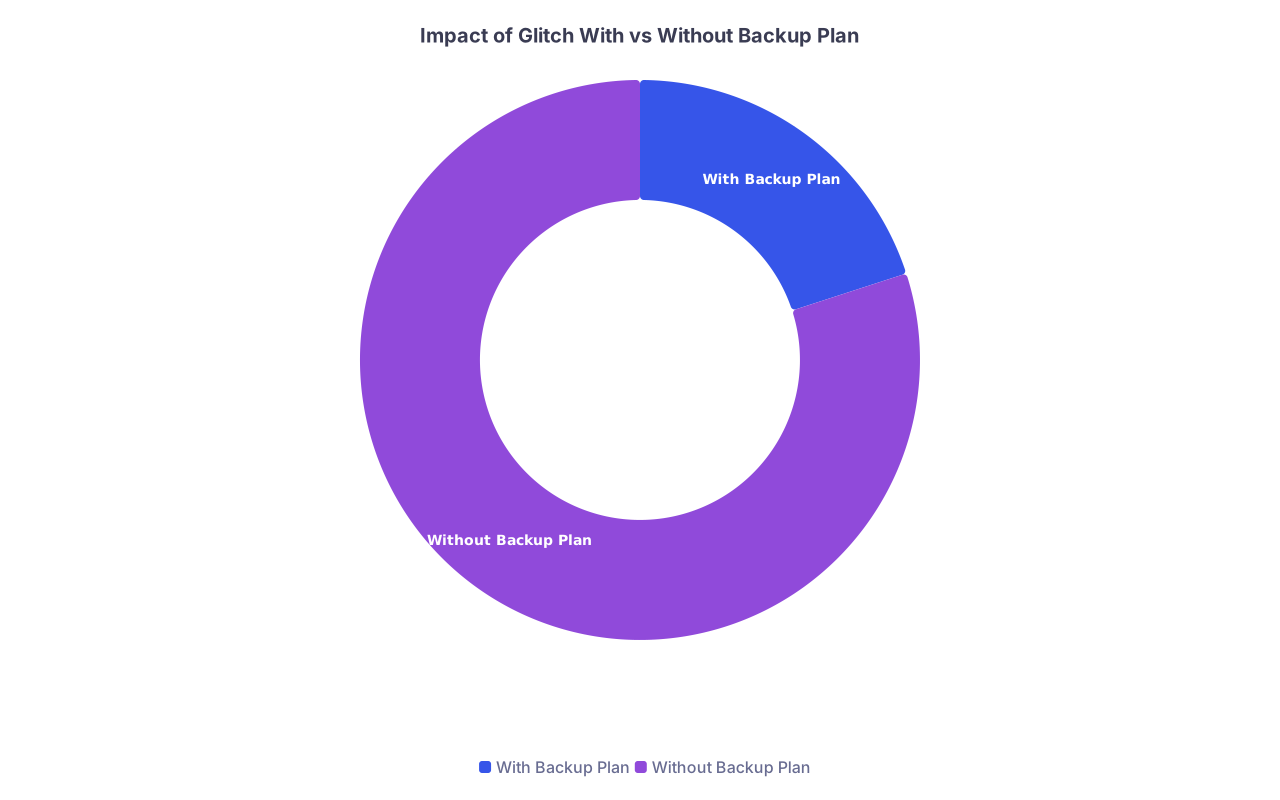
| Category | Value |
|---|---|
| With Backup Plan | 20 |
| Without Backup Plan | 80 |
(Think of that as “percent of mental anguish,” not some formal study—but you get the idea.)
What you can do today so you’re not at tech’s mercy
If you’re already in a job or about to start, here’s the kind of tiny, boring prep that actually kills 70% of the anxiety:
- Write your “glitch script” for switching to phone and for explaining platform crashes
- Create a smart phrase or template in your EMR for documenting tech failures
- Make sure your phone hotspot works and test a quick connection with your laptop
- Decide what you’ll say in the first two minutes of every visit about what happens if you disconnect
That’s it. Not a full disaster-response center. Just a few guardrails so that when the tech gods inevitably betray you, you look like the competent, prepared physician you actually are.