
Most practices bolt telemedicine on like a cheap aftermarket accessory. Then they decide “telehealth doesn’t work” when it predictably underperforms. The problem is not telemedicine. The problem is how you integrate it.
You already run a functioning brick‑and‑mortar operation. That is both your advantage and your risk. Done correctly, telemedicine will:
- Increase access and revenue without killing your staff.
- Reduce no‑shows.
- Improve patient satisfaction for the right visit types.
Done poorly, it will clog your schedule, burn out your team, and irritate patients.
Here is the practical, step‑by‑step playbook I recommend when I help post‑residency physicians retrofit telemedicine into existing practices.
1. Get Clear on Why You Are Doing This (And What You Will Not Do)
If your reason is “everyone else is doing telemedicine,” stop. That is not a strategy. You need specific, measurable goals.
Pick two or three primary drivers:
- Stabilize or increase revenue.
- Reduce no‑shows / last‑minute cancellations.
- Expand your geographic catchment.
- Improve follow‑up adherence.
- Support patients with mobility or childcare barriers.
- Offload low‑complexity visits from crowded in‑person slots.
Then decide what you will not use telemedicine for at the start:
- No high‑acuity problems.
- No complex new consults that clearly need a physical exam.
- No procedures or visits that require in‑office diagnostics.
This is not theoretical. I have seen practices get crushed because they allowed “tele-anything” and then spent 20 minutes on video telling patients to come in anyway. Everyone loses: wasted time, angry patient, no added revenue.
Action steps (do these in writing):
- Write down your top 3 goals for telemedicine.
- Make a “not for telemedicine” list of visit types.
- Communicate both lists to your entire staff in one meeting.
Keep it blunt. “If you schedule X as a telemedicine visit, you are setting me up to fail.” Staff respect clarity.
2. Pick a Telemedicine Stack That Works With Your Reality
You do not need the fanciest platform on the market. You need something that:
- Integrates with your existing EHR or
- Is simple enough that your staff can run it without thinking.
If you are on Epic, Athena, eClinicalWorks, etc., they typically have built‑in telehealth modules. Use them unless they are truly terrible. The hidden cost of “best in class standalone telehealth” is your staff doing double documentation and managing two schedules.
| Option Type | When It Makes Sense |
|---|---|
| Built‑in EHR module | Medium/large practices, existing EHR use |
| Simple add‑on (Doxy.me, Zoom for Healthcare) | Small practices, low IT support |
| Full telehealth suite | High telehealth volume, multi‑site groups |
| Health system platform | Employed physicians, system mandates |
Core requirements you should insist on:
- HIPAA‑compliant video.
- Waiting room function and basic texting / email invites.
- Easy for patients (no insane app download steps).
- Works on phone + desktop.
- Lets staff “room” patients (check meds, vitals, consent) before you appear.
If a vendor cannot demo a mock visit in under 5 minutes, I would move on.
Action steps:
- List your must‑have features based on your current workflows.
- Have front desk, MA/nurse, and one provider each test any platform.
- Run three mock visits: tech‑savvy patient, older patient with smartphone, and worst‑case “no camera / poor audio” scenario.
- Time how long each step takes for staff and clinician.
If your staff hates it in the mock phase, they will quietly sabotage adoption later. Believe them.
3. Define What Is “Telemedicine Appropriate” in Your Practice
This is where most practices either succeed or implode. You need a clear triage and scheduling rule set so the right visits land in telemedicine slots.
Make three buckets:
- Telemedicine‑Preferred
- Telemedicine‑Optional
- In‑Person Only
Here is a concrete starting point.
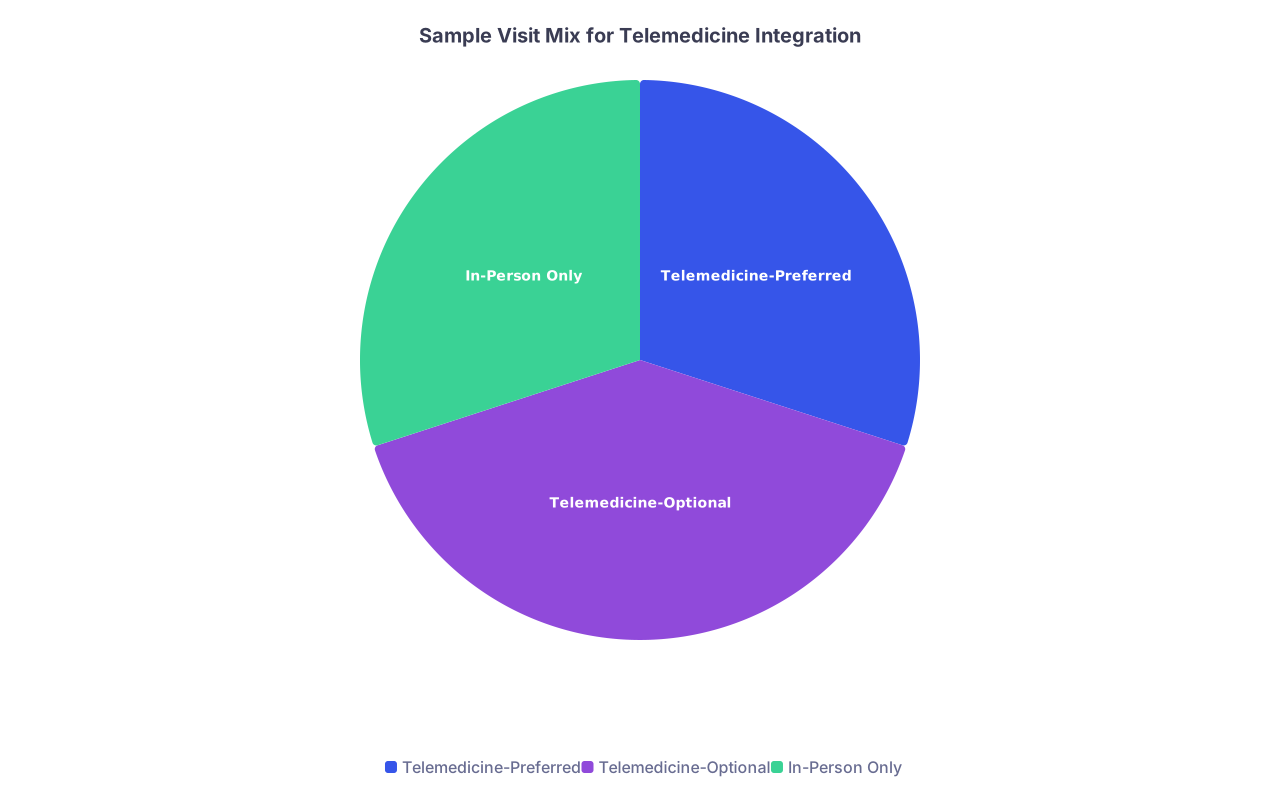
| Category | Value |
|---|---|
| Telemedicine-Preferred | 30 |
| Telemedicine-Optional | 40 |
| In-Person Only | 30 |
Telemedicine‑Preferred (push these to virtual)
- Medication refills for stable chronic conditions (HTN, DM with recent labs, depression/anxiety under control).
- Simple lab / imaging follow‑up with no major management change expected.
- Minor acute issues where exam does not usually change management:
- Uncomplicated UTI with classic symptoms.
- Mild URI without red flags.
- Contraception counseling.
- Post‑op / post‑procedure wound checks if patient can share clear video/photo.
- Behavioral health follow‑ups.
Telemedicine‑Optional
- Chronic disease management where you already know the patient and exam is useful but not critical each time.
- Reviewing abnormal results where shared decision making is the point.
- Pre‑visit planning for complex in‑person consults.
In‑Person Only (hard stop)
- Chest pain, significant SOB, neuro deficits, high fever with rigors.
- First prenatal visit, new oncology consults, complex rheum/neurology evals.
- Anything requiring hands‑on exam, in‑office testing, or procedure.
Action steps:
- Spend 30 minutes with your billing manager and lead clinician to map your top 30 CPT visit types into the three buckets.
- Convert that into a simple, one‑page scheduling protocol for front desk staff.
- Train staff with real scenarios: “Mrs. Smith calls with X. Where does she go?”
Post that protocol at every scheduling workstation. No ambiguity.
4. Redesign Your Schedule – Do Not Mix Randomly
The worst telehealth schedule is “sprinkle video visits wherever there is a hole.” You will spend your day switching context:
- Room patient → see patient → clean room → jump on video → back to rooming issues.
It feels chaotic because it is. You lose rhythm.
A much better model is block scheduling:
- Dedicated telemedicine blocks in the day or week.
- Contiguous chunks: 60–180 minutes of back‑to‑back telehealth.
Example for a full‑time outpatient physician:
- Monday/Wednesday/Friday: mostly in‑person, with 1–2 hour telehealth block after lunch.
- Tuesday/Thursday: one morning teleblock, one afternoon block, remaining time in‑person.
You can adjust based on specialty and demand.
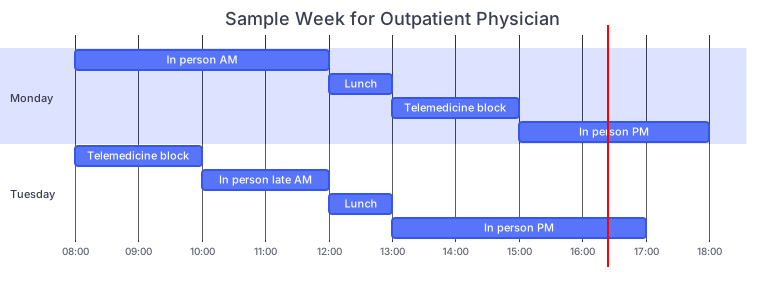
| Task | Details |
|---|---|
| dateFormat HH | mm |
| axisFormat %H | %M |
| Monday: In person AM | m1, 08:00, 4h |
| Monday: Lunch | m2, 12:00, 1h |
| Monday: Telemedicine block | m3, 13:00, 2h |
| Monday: In person PM | m4, 15:00, 3h |
| Tuesday: Telemedicine block | t1, 08:00, 2h |
| Tuesday: In person late AM | t2, 10:00, 2h |
| Tuesday: Lunch | t3, 12:00, 1h |
| Tuesday: In person PM | t4, 13:00, 4h |
Within teleblocks, aim for:
- 15–20 minute established patient slots.
- 20–30 minute new telehealth consults.
- 5–10 minute overflow slots each hour to absorb tech issues.
Action steps:
- Analyze your last 3–6 months: how many visits could have been telemedicine‑preferred?
- Start conservatively: allocate 10–20% of your weekly visits as telemedicine blocks.
- Protect those blocks. Do not let schedulers turn them into in‑person visits “just this once.”
After 6–8 weeks, adjust volume based on demand and your tolerance.
5. Recreate Your Rooming Process Virtually
Telemedicine fails when you try to be your own MA and front desk. You should not be verifying meds, allergies, and pharmacy during the video visit if you can avoid it.
You need a virtual rooming workflow.
Typical efficient sequence:
- Front desk:
- Confirms appointment, sends link and instructions 24 hours prior.
- Verifies insurance and copay policy.
- MA / nurse 10–15 minutes pre‑visit:
- Calls patient or joins video first.
- Confirms meds, allergies, chief complaint.
- Collects home vitals (BP cuff, pulse ox, weight, temp if available).
- Documents all this in EHR just like in‑person.
- Physician:
- Enters visit once chart is prepped.
- Focuses on clinical problem solving, exam, and plan.
Yes, this uses staff time. So does in‑person rooming. If you skip it, you are just transferring that work to yourself and turning a 15‑minute visit into 25 minutes.
Action steps:
- Map your current in‑person rooming checklist.
- Decide what translates 1:1 to telemedicine (meds, allergies, vitals, PHQ‑9, etc.).
- Build a telemedicine rooming template in your EHR.
- Train one MA as “tele‑superuser,” then have them train others.
Do not overcomplicate the exam documentation. “Limited telemedicine exam due to modality. General: speaking in full sentences, no distress. Resp: no audible wheeze, no accessory muscle use on video.” That is enough in many cases.
6. Fix the Legal, Compliance, and Billing Pieces Up Front
You can bill well for telemedicine. You can also get burned if you pretend the rules do not exist.
You must address:
- Licensure: Are you seeing patients who are physically in states where you are licensed? Telemedicine follows the patient’s location.
- Payer policies: Each plan has its own rules on:
- Which CPT codes are allowed via telehealth.
- Whether audio‑only is reimbursed.
- Place of service and modifiers (e.g., 02 vs 10, modifiers 95 or GT).
- Consent: Some states require specific telemedicine consent. Build it into your intake or rooming protocol.
- Privacy: No video visits on personal FaceTime or WhatsApp. Use approved platforms.
If you think “billing will figure it out,” you are asking for denials and write‑offs.
| Element | Example / Note |
|---|---|
| POS code | 02 (telehealth) or 10 (patient home) |
| Modifier | 95 for synchronous telemedicine |
| CPT codes | 99212–99215, 99441–99443, etc. |
| Consent | Documented once per year or per visit |
Action steps (sit with your biller):
- Pull payer telehealth policies for your top 5–10 payers.
- Decide your default coding rules for:
- Video vs audio‑only.
- Time‑based vs MDM‑based coding.
- Add standard telehealth language to your templates for:
- Patient location.
- Consent obtained.
- Tech used (video vs audio).
You want your billing team to see consistent patterns, not freestyle chaos from each clinician.
7. Train Your Patients and Set Expectations (Like Adults)
Patients do not magically know how this works. Your job is to set firm expectations, not apologize for having boundaries.
Patients must know, before they book:
- What problems can be seen by telemedicine.
- What might still require an in‑person follow‑up.
- What tech they need (smartphone or computer, quiet space, stable internet).
- That they may be billed just like an office visit.
Your front desk script matters. Scripts I have actually seen work:
- “We can absolutely do this visit by video if you prefer. If we find anything that needs an in‑person exam or test, we will convert you to an office visit promptly.”
- “Telemedicine visits are billed the same way as in‑person, subject to your plan benefits.”
Do not promise that “this will save you money” unless you are 100% certain.
Practical tools:
- One‑page telemedicine FAQ handout (printed and on your website).
- Auto‑text in your portal messages describing telehealth options.
- Short email or text sequences:
- 24–48 hours pre‑visit: reminder, tech check instructions.
- 1–2 hours pre‑visit: link, what to have ready (med list, vitals).
Action steps:
- Write a short patient‑facing telehealth policy (1 page).
- Put it on your website, portal, and hand out paper copies in clinic.
- Add a “convert to telemedicine” option to reminder calls / texts when appropriate (for follow‑ups).
Teach them how to use your new service or they will treat it like a video version of a walk‑in clinic: chaotic and entitled.
8. Hardwire Telemedicine Into Your Team’s Daily Operations
Telehealth integration fails when it is treated as “extra work” instead of “how we do visits here.” You need to formalize it in your operations.
Specific things I have seen make the difference:
Daily huddle includes:
- Which teleblocks are full.
- Any high‑risk telemedicine patients (fragile CHF, recent discharge).
- Backup plan if tech fails (convert to phone? reschedule?).
Clear roles:
- Who calls patients if they have not joined 5 minutes into the slot?
- Who helps with technical issues?
- Who rebooks if the visit cannot be completed?
Standard failure protocol:
- 5 minutes late to join: staff call.
- 10 minutes of unresolved tech issues: convert to audio‑only if allowed by payer and clinically acceptable.
- If still impossible: mark as no‑show or reschedule per your existing policy.
Action steps:
- Write a 1‑page “telemedicine operations checklist”:
- Rooming steps.
- No‑show / tech failure rules.
- Escalation for red‑flag symptoms.
- Practice a mock “bad day” with staff:
- Platform outage.
- Patient cannot connect.
- Patient becomes acutely ill on video.
If your staff know exactly what to do, telemedicine stops feeling like a fragile experiment and starts feeling like another clinic session.
9. Measure Results for 60–90 Days, Then Adjust
You are not done when you “launch telehealth.” You are done when it is working better than in‑person for the right visit types. That means you must track some metrics.
Bare minimum data to watch:
- Volume:
- Number and percentage of total visits that are telemedicine.
- Financial:
- Average reimbursement per telemedicine visit vs in‑person.
- Denial rates for telehealth claims.
- Operational:
- No‑show and late‑cancel rates (often lower for telemedicine).
- Average clinician overtime / after‑hours charting.
- Quality / satisfaction:
- Short patient survey after visit (2–3 questions).
- Provider satisfaction (one 5‑minute check‑in at the end of each week).
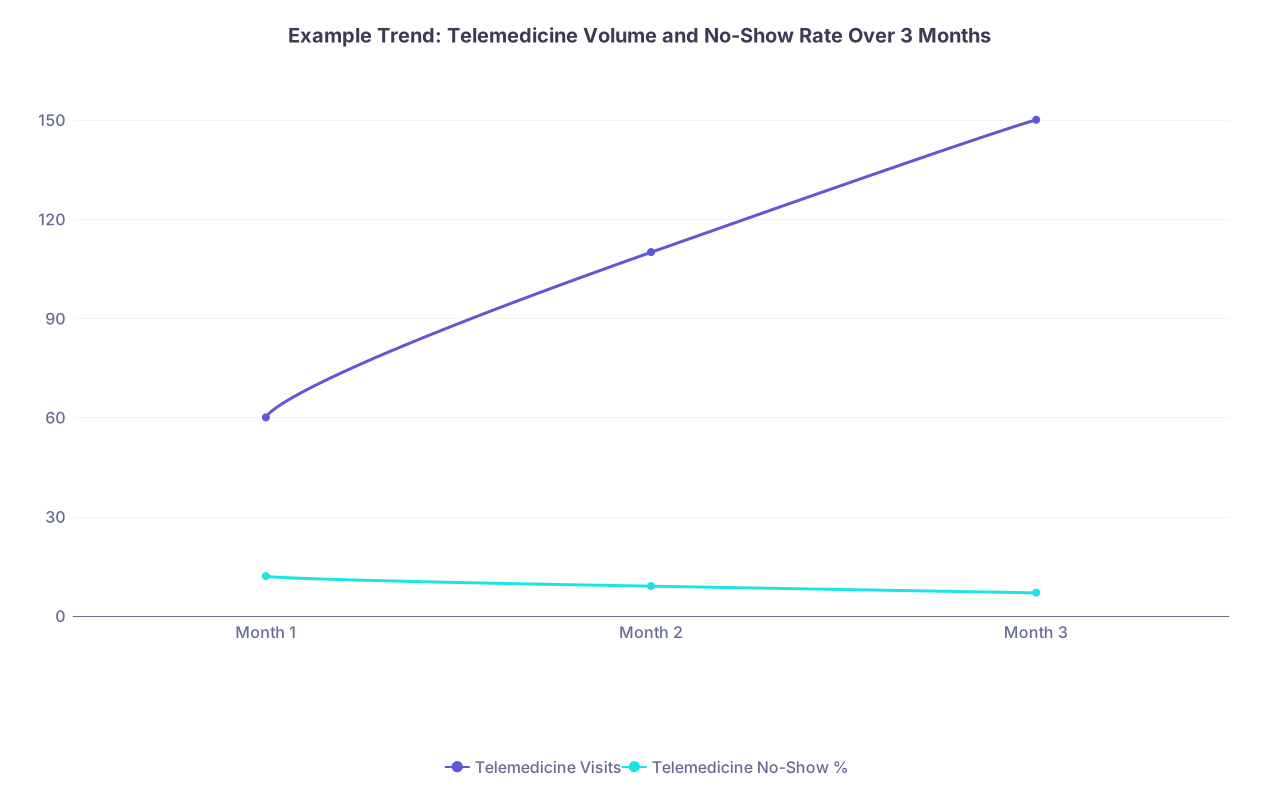
| Category | Telemedicine Visits | Telemedicine No-Show % |
|---|---|---|
| Month 1 | 60 | 12 |
| Month 2 | 110 | 9 |
| Month 3 | 150 | 7 |
What you are looking for:
- Are you meeting the goals you wrote in step 1?
- Did no‑show rates actually drop?
- Are you getting paid adequately, or are payers playing games?
- Are certain clinicians better suited to telemedicine blocks?
Then adjust. If your Monday afternoon teleblock is a ghost town but Thursday evenings are full, move capacity. If one clinician despises telemedicine and another thrives on it, load‑balance accordingly.
Action steps:
- Set up simple weekly reports (Excel is fine) for:
- Tele vs in‑person counts.
- Denials and reasons.
- Hold a 30‑minute review every 4 weeks for the first 3 months.
- Change only 1–2 things at a time (e.g., block length, eligible visit list) so you can see what worked.
10. Protect Your Clinical Judgment and Sanity
Last point, because this is what burns people out.
Telemedicine is a tool, not a religion. You are still responsible for safe care. That means you must be ready to say:
- “This cannot be safely handled over video; I need to see you in person.”
- “You need to go to the ER now, not schedule a clinic visit.”
- “We are ending this telemedicine visit because the environment is not safe or private.”
Write those sentences into your scripts, so you are not improvising when confronted with a patient with chest pain on video in their car.
Also: protect buffer time. Telemedicine tends to expand to fill available space, especially if you start squeezing “quick” virtual follow‑ups into lunch or after hours. That is how resentment grows.
Non‑negotiables I recommend:
- No adding unscheduled telemedicine visits in what used to be your protected lunch.
- No after‑hours video “quick questions” without a clear policy (on‑call vs scheduled).
- No allowing staff to “squeeze in” same‑day telemedicine visits without your explicit approval once your blocks are full.
Your practice will live with whatever boundaries you set in the first 3–6 months. Set them intentionally.
Key Takeaways
- Telemedicine integration is an operations project, not a tech experiment. Define clear goals, visit types, and schedules before you turn anything on.
- Copy your in‑person structure: rooming, triage, check‑in, billing, and documentation. Do not improvise each visit.
- Treat the first 60–90 days as a pilot with metrics. Adjust blocks, visit types, and workflows based on data, not vibes.
Do those three things and telemedicine stops being chaos on a webcam and becomes exactly what it should be: an efficient extension of the clinic you have already built.