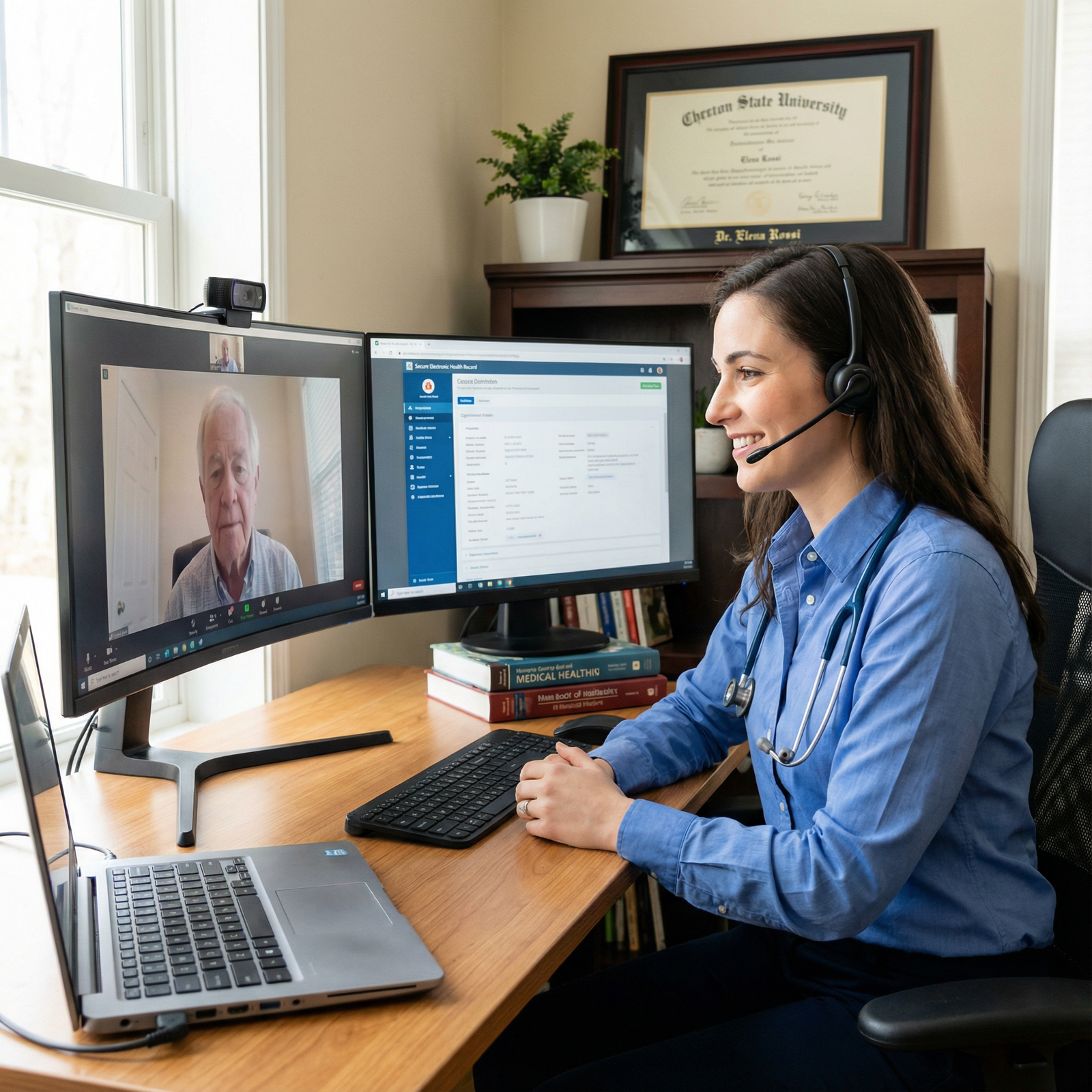
You just finished residency, signed your first telemedicine contract, and now you are staring at tomorrow’s schedule: 32 video visits. Back-to-back. Minimal buffer. No established workflows, no MA, no smart templates set up.
You already know what will happen if you wing it:
- You will run behind by noon.
- Your notes will spill into the evening.
- You will feel like a glorified prescription dispenser instead of an actual clinician.
Let’s fix that.
This is a blueprint. Not vague “optimize your time” nonsense. A step‑by‑step, here’s‑what‑to‑click, who‑does‑what, when‑and‑how kind of plan you can actually implement in a high‑volume telemedicine clinic.
1. Define the Mission and Constraints First
If you skip this step, everything else gets messy. You build workflows around reality, not wishful thinking.
You need to answer four hard questions:
What kind of telemedicine are you doing?
- Urgent care (UTIs, URIs, rashes, med refills)
- Longitudinal primary care
- Specialty follow‑ups (psych, endo, rheum, etc.)
- Asynchronous / text‑based + occasional video
What is your target visit length and volume?
- Common setups:
- 7–10 minutes: urgent‑care style, high volume, focused problems.
- 15 minutes: primary care problem‑focused.
- 20–30 minutes: complex chronic care or new specialty consults.
- Be honest: you cannot safely manage three uncontrolled comorbidities in a 7‑minute slot.
- Common setups:
What support do you actually have?
- Dedicated MA/tech support?
- Shared call center?
- Just you and the platform?
What is non‑negotiable for you?
- Charting done by end of day?
- No more than X hours of non‑visit work?
- Hard boundaries on after‑hours messaging?
Write down your answers. That is your box. Every workflow you design has to fit inside it.
2. Structure the Clinic Day: Time Blocking and Session Design
A high‑volume telemedicine day cannot be “random calls until the schedule is empty.” That guarantees chaos.
You need sessions and blocks.
2.1 Basic Session Architecture
Think in half‑day blocks.
Example for a 4‑hour AM session (urgent‑care style, 10‑minute slots):
- 8:00–8:10: Pre‑clinic huddle / review queue
- 8:10–9:40: Visit Block 1 (8–9 visits, depending on buffer)
- 9:40–9:50: Micro‑admin block (sign notes, review labs, messages)
- 9:50–11:20: Visit Block 2
- 11:20–11:30: Admin wrap‑up for AM
For 15‑minute primary care visits (same 4‑hour block):
- 8:00–8:10: Pre‑clinic prep
- 8:10–9:40: 6 visits (15 min each + 5 min buffer every 2)
- 9:40–9:55: Admin
- 9:55–11:25: 6 more visits
- 11:25–11:30: Wrap‑up
Lock these blocks in. Fight random mid‑block meetings and “just one quick thing” requests. High volume and ad‑hoc are enemies.
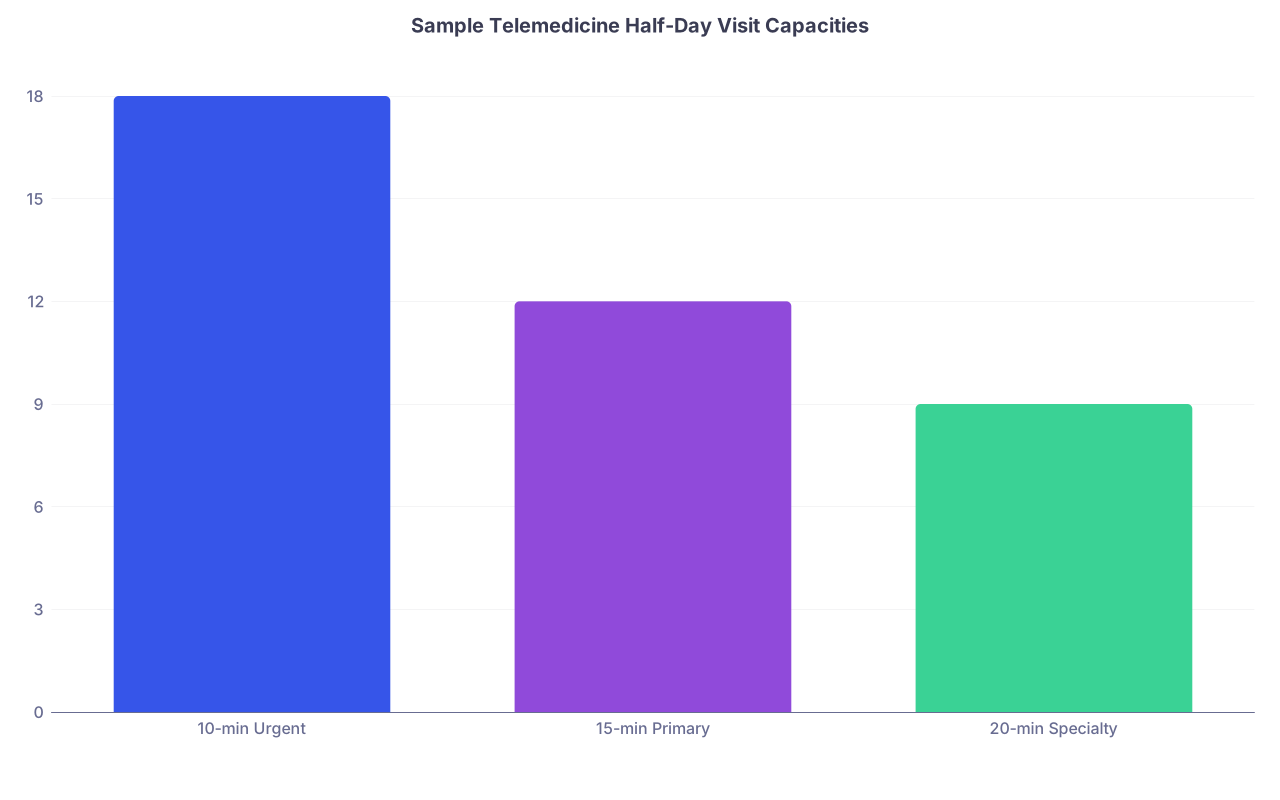
| Category | Value |
|---|---|
| 10-min Urgent | 18 |
| 15-min Primary | 12 |
| 20-min Specialty | 9 |
2.2 Use Visit Buckets and Capacity Ceilings
Group visit types by expected complexity and cap how many of each you take per session.
Example:
- Urgent‑care clinic:
- “Simple low‑acuity” (single complaint, no major chronic issues) – up to 80%
- “Moderate complexity” (multiple meds, chronic conditions) – 20% max
- Primary care clinic:
- New patient – 1–2 per half‑day
- Med management / follow‑up – most of the schedule
- Complex multi‑problem – 1 per block
If your system lets you, tag visit types so schedulers (or the platform) enforce those limits.
3. Pre‑Visit Workflows: Do Not Start at Zero Every Time
The pre‑visit process is where telemedicine clinics either become efficient or burn out their physicians.
Goal: When you open the chart, you are not “discovering” the visit. You are confirming and acting.
3.1 Standard Pre‑Visit Intake Script
If you have staff or a call center, they follow a strict script before the visit. If not, you build this into online intake forms.
For a high‑volume urgent‑care telemed clinic, the script includes:
- Chief complaint (forced single sentence)
- Onset and duration
- Key red‑flag screen specific to complaint
Example for cough:- Shortness of breath?
- Chest pain?
- High fever > 3 days?
- History of COPD/asthma/heart failure?
- Pharmacy confirmed
- Allergies checked
- Preferred contact method for follow‑up (portal vs phone)
For primary care / chronic care:
- Agenda: “Top 1–2 things you want to accomplish today”
- Recent vitals (home BP, weights, glucose logs, etc.)
- Medication changes since last visit
- Any new ED/urgent care visits or hospitalizations
Make most of this structured (select boxes, yes/no, ranges) instead of free text. Free text wastes your time reading; structured data lets you scan.
3.2 Automatic Pre‑Chart Template
Set up EMR templates that populate the note before you join the visit.
Key elements:
- Import intake answers into HPI
- Auto‑populate med list, PMH, allergies
- Smart phrases for common visit types
Examples of smart phrases:
.tmed_uc_uti_visit– builds:- “Patient presents via telemedicine with dysuria for X days...”
- Auto‑inserts standard review of systems and risk factor prompts.
.tmed_pc_htn_fu– builds:- “Follow‑up telemedicine visit for hypertension. Home BPs reviewed…”
You should not be typing the structure of the note every time. You just fill in the clinical judgment and decisions.
4. In‑Visit Workflow: Rigid Structure, Flexible Content
Here is where most people lose time. They chat, wander, let patients pile on problems, and then scramble to document.
You need a default visit script. Not to be robotic. To avoid chaos.
4.1 The 7‑Step Telemedicine Visit Skeleton
Use this for most short visits (7–15 minutes):
Connection and Safety Check (30–45 seconds)
- “Hi, can you hear and see me clearly?”
- Confirm full name and DOB.
- Confirm location: “Where are you physically located right now?”
- If you practice across multiple states, this matters legally.
Set the Frame (30–45 seconds)
- “We have about X minutes today. I see you scheduled for [visit type]. I want to make sure we focus on your top concern and leave a clear plan.”
- This is where you shut down the 5‑problem visit.
Agenda Confirmation (1 minute)
- “In one sentence, what are you hoping we take care of today?”
- If they list 3+ items:
- “We probably cannot safely address all three in one short video visit. Let us pick the most urgent and we can schedule a follow‑up for the rest.”
Targeted History and Remote Exam (3–6 minutes)
- Use built‑in question clusters per chief complaint.
- For remote exams, you standardize:
- Ask patient to adjust camera.
- Use home vitals (if available).
- Symptom‑based maneuvers: e.g., for ankle injury, have them point to max tenderness, walk across room.
Clinical Thinking Out Loud (1–2 minutes)
- No long monologues. Short explanation:
- “Based on what you told me and what I can see on video, this is most consistent with…”
- “Here are the serious things I am thinking about and why I do not think you have them right now.”
- No long monologues. Short explanation:
Concrete Plan + Safety Net (2–3 minutes)
- Meds: name, dose, duration.
- Testing: what, where, why.
- Follow‑up: exact interval, not “as needed.”
- Safety net:
- “If X, Y, or Z happens, do not wait for another telemedicine visit. Go straight to urgent care / ED.”
Documentation Finalization (Last 1–2 minutes while still on video)
- You should be typing during the visit.
- Use final minute to:
- Update assessment and plan in real time.
- Send Rx.
- Place orders.
- Queue patient instructions.
You end the visit with chart >90% done. The remaining 30–60 seconds are for small clean‑up after they disconnect.
4.2 Script for Managing Scope Creep
You will need this, often:
“You brought up a few important issues today. Each deserves proper time so I do not rush and miss something. For today’s short visit, we will focus on [issue]. I recommend we schedule another telemedicine visit or in‑person appointment to cover [other issues] thoroughly.”
Say it calmly. Say it every time. If you allow unlimited problem lists in a 10‑minute slot, you will destroy your schedule and your notes.
5. Documentation: Templates, Snippets, and Decision Trees
Fast telemedicine workflows live or die on documentation.
You want:
- Standardized templates for each visit type.
- Smart phrases for common decisions and explanations.
- Minimal free typing.
5.1 Core Note Template Structure
Build one generic telemedicine template, then clone variants.
Components:
- Telemedicine statement:
- “Encounter conducted via secure, HIPAA‑compliant audio/video platform. Patient identity and location verified. Limitations of remote exam discussed.”
- HPI with structured complaint‑specific sections.
- Remote exam:
- General appearance
- Specific system‑focused exam elements
- Limitations explicitly documented
- Assessment and Plan with bullet subheadings:
- Diagnosis 1:
- Brief assessment rationale
- Plan: meds, orders, follow‑up
- Red flag / safety language
- Diagnosis 2, etc.
- Diagnosis 1:
- Patient instructions:
- Auto‑pull to after‑visit summary / portal message.
| Section | Must Include |
|---|---|
| Telemed Statement | Modality, identity check, location, limits |
| HPI | Chief complaint, key positives/negatives |
| Remote Exam | Observable findings + limitations |
| Assessment | Problem list with clinical reasoning |
| Plan | Orders, meds, follow-up, safety net |
5.2 Smart Phrases for Risk and Safety
Create reusable snippets so you do not type the same risk discussions 30 times a day.
Examples:
.tmed_sorethroat_risk- “Discussed that serious conditions such as peritonsillar abscess, epiglottitis, or airway compromise cannot be fully excluded by video. Advised patient to seek in‑person urgent or emergency evaluation for any worsening pain, drooling, difficulty swallowing, difficulty breathing, or voice changes.”
.tmed_abx_stewardship- “Reviewed that antibiotics are not indicated at this time based on current findings. Discussed expected course, symptomatic management, and signs that would prompt reassessment.”
If you are in a multi‑physician telemed clinic, share these. Standardization is not just about speed; it is about medicolegal consistency.
5.3 Real‑Time vs Batch Charting
Hard rule if you want a life: 80–90% of documentation should be done while the patient is on screen.
Use this pattern:
- Type HPI while they are talking.
- Fill exam as you are literally “examining” them.
- Drop in diagnosis and plan templates before you verbalize your plan; then tweak.
Batch charting (waiting until lunch or end of day) guarantees:
- Details forgotten.
- Sloppy notes.
- An extra unpaid hour of work.
6. Team and Task Distribution: Stop Doing Everything Yourself
If you have zero support staff, skip to section 7 and focus on automation. But if you have even partial support, you must design who does what with discipline.
6.1 Clear Role Definitions
For a high‑volume clinic, I like a simple RACI‑style division (Responsible, Accountable, Consulted, Informed) even if you do not call it that.
Practical version:
- Physician:
- Diagnose, treat, prescribe.
- High‑risk triage decisions.
- Final review of sensitive results.
- MA / RN / Virtual scribe:
- Intake completion.
- Med reconciliation (pre‑visit).
- Routing messages appropriately.
- Drafting patient education messages from templates.
- Front desk / Call center:
- Scheduling by visit type and rules.
- Basic tech troubleshooting.
- Payment/insurance issues.
Build a one‑page “who handles what” that everyone can refer to. Ambiguity is how work slowly shifts onto you.
6.2 Message Routing Protocols
The messaging tab is where telemedicine docs silently burn out. Patients love portal messages. Employers love “quick questions.” That combination is dangerous.
Set rules:
Medication refills:
- Routine, chronic stable meds → routed to MA/RN with protocol.
- Red flags (controlled substances, psych meds with concerning remarks) → physician.
Results:
- Normal labs with standard instructions → staff can send templated note.
- Abnormal or serious → physician calls or video visit.
“Quick questions”:
- If it requires medical decision making beyond <60 seconds, convert to a visit.
- Script:
- “To answer this safely and fully, I recommend scheduling a quick video visit. That way we can review your concerns and update your plan appropriately.”

| Step | Description |
|---|---|
| Step 1 | New Patient Message |
| Step 2 | Front desk handles |
| Step 3 | MA RN uses template |
| Step 4 | Convert to visit or MD reply |
| Step 5 | Clinical question? |
| Step 6 | Meets simple protocol? |
| Step 7 | Requires MD decision? |
7. Technology Stack and Setup: Your Digital “Exam Room”
Your physical exam room is controlled: good lighting, exam table, supplies. Your telemedicine workspace must be just as deliberate.
7.1 Hardware Setup That Actually Works
Minimum serious setup:
- Dual monitors:
- Monitor 1: video platform.
- Monitor 2: EMR and notes.
- Wired internet connection, not just Wi‑Fi. Dropped calls kill flow.
- Quality webcam angled at eye level.
- Decent microphone or headset. Patients will forgive mediocre video before they forgive terrible audio.
- Neutral, non‑distracting background. No messy bookshelves, no unmade bed behind you.
This is not vanity. Clarity and professionalism increase patient trust and reduce repeated explanations.
7.2 Software and Tools
Do not rely purely on your EMR. A few extras help:
- Text expander / macro tool for smart phrases (if your EMR is weak).
- Clipboard manager for frequently used instructions.
- Secure internal chat tool to coordinate with staff in real time.
If your platform supports it, use:
- Waiting room view showing:
- Who is checked in.
- Who no‑showed.
- Time waiting.
- One‑click re‑invite for dropped calls.
- Integrated visit summaries that you can push with minimal extra typing.
8. Protocols for Common High‑Volume Visit Types
Here is where you get real efficiency: predefined “care bundles” for common problems. You are not reinventing the wheel every time.
8.1 Example: Telemedicine UTI Visit Protocol (Adult Female, Low Risk)
Intake flags:
- Age 18–65.
- Not pregnant.
- No flank pain, fever, nausea/vomiting.
- No history of kidney stones, anatomic anomalies, or immunosuppression.
History checklist:
- Onset, dysuria, frequency, urgency, hematuria.
- Vaginal discharge or concerns for STI?
- Recent antibiotics?
- Allergies, prior UTI organisms if known.
Remote exam:
- Appearance, vitals if available.
- CVA tenderness self‑check instructions (with clear safety limits).
Decision pathway:
- Classic uncomplicated signs, low risk → treat empirically.
- Atypical features, systemic symptoms, pregnancy concern → in‑person/urgent care.
Documentation snippet:
- Smart phrase that pulls in all yes/no risk factors and standard education.
You build similar quick pathways for:
- URIs / sore throat
- Rash evaluation
- Medication refills
- Anxiety / depression follow‑ups
- Hypertension follow‑ups
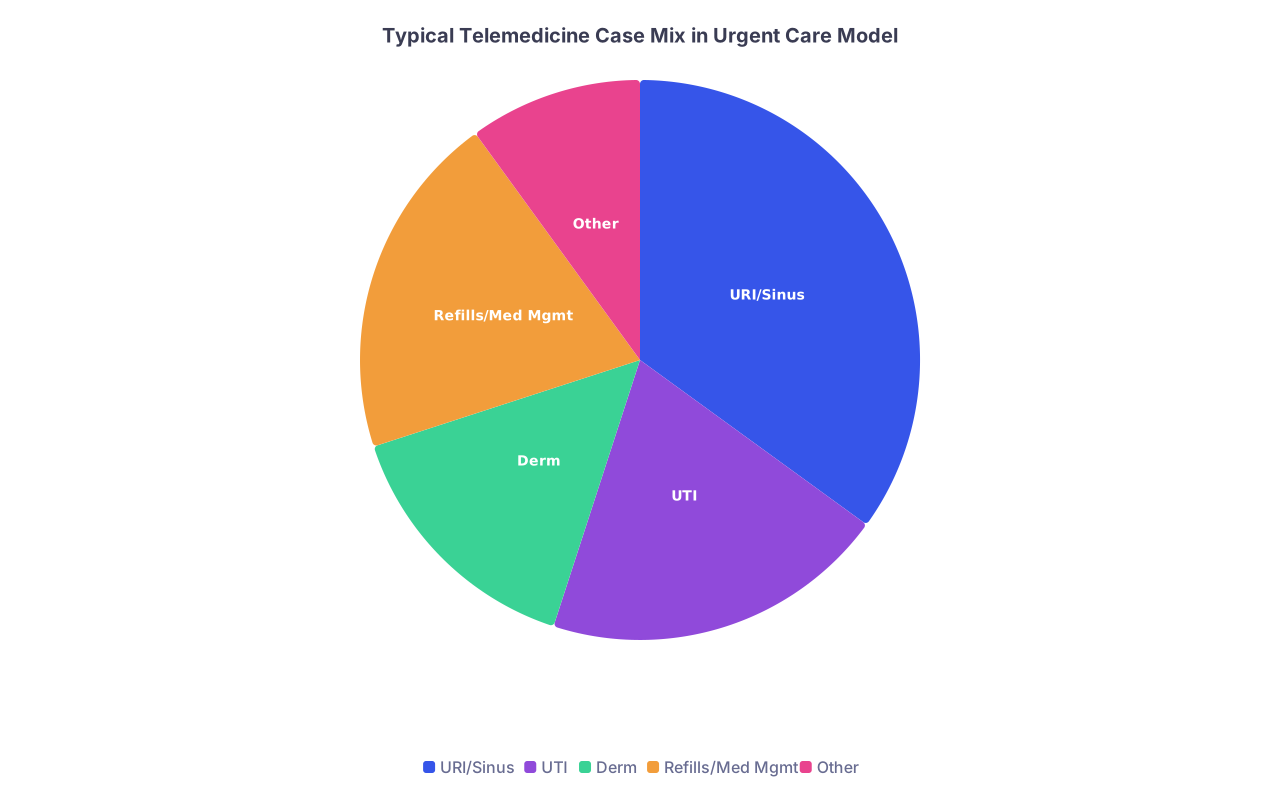
| Category | Value |
|---|---|
| URI/Sinus | 35 |
| UTI | 20 |
| Derm | 15 |
| Refills/Med Mgmt | 20 |
| Other | 10 |
9. Handling No‑Shows, Delays, and Overflows
High volume means some chaos. Your job is to contain it.
9.1 No‑Show Policy and Scripts
Have a clear policy. Enforce it.
- Late threshold: for 10‑min visits, 3–5 minutes of no‑show before you move on.
- Script for front desk / support:
- “Dr. X waited on the video line for several minutes but was not able to reach you. We can help you reschedule, but there may be a fee for missed appointments depending on your plan.”
You cannot wait 8–10 minutes for every late patient without imploding your schedule.
9.2 Running Behind: Recovery Tactics
If you are 10–15 minutes behind:
- Use the next admin micro‑block to:
- Triage visits: any that can safely be converted to asynchronous or rescheduled?
- Staff calls or messages patients:
- “Dr. X is running about 10 minutes behind but will still see you today.”
Do not try to “catch up” by cutting necessary history or skipping safety net discussions. You reduce medico‑legal safety to preserve a schedule that is already broken. Wrong trade.
10. Personal Sustainability: Guardrails Against Burnout
You cannot run a high‑volume telemedicine clinic like a sprint every day without crashing.
Set non‑negotiables:
Limit daily total visits to a realistic number for your visit length.
If you are doing 10‑minute urgent‑care style visits, 35–40 per full day is already intense. For 15‑minute primary care, 24–28 is plenty.Hard stop times:
- All notes done by X PM.
- No charting in bed at midnight.
Message boundaries:
- Block 1–2 short windows per day for inbox and results.
- Resist constant context‑switching between visits and messages.

11. Putting It All Together: A Sample Daily Blueprint
Here is how a full 8‑hour urgent‑care‑style telemedicine day might look, applied:
- 7:45–8:00 – Log in, hardware check, review first 3–4 charts.
- 8:00–10:00 – Visit Block 1 (12–14 short visits)
- Use strict 7‑step visit structure.
- Finish notes in real time.
- 10:00–10:15 – Admin Block
- Results review with protocols.
- Message triage: convert complex questions to visits.
- 10:15–12:00 – Visit Block 2 (12–14 visits)
- 12:00–12:30 – Wrap + lunch
- Clear notes backlog before you eat.
- 1:00–3:00 – Visit Block 3 (12–14 visits)
- 3:00–3:15 – Admin Block
- 3:15–5:00 – Visit Block 4 (12–14 visits)
- 5:00–5:30 – Final admin
- No pending notes.
- Only time‑sensitive messages left.
You will adjust volumes down or up based on your specialty, support, and platform speed. But the basic skeleton stays.
FAQs
1. How do I safely balance speed with quality in high‑volume telemedicine?
Use strict visit structures and clinical protocols for common problems, and be ruthless about scope: one or two focused issues per short visit. Real‑time charting with smart templates lets you spend cognitive energy on decision making instead of typing. You maintain quality not by slowing every visit to 30 minutes, but by standardizing the repetitive parts and reserving more time for the genuinely complex cases.
2. What if my employer pushes volumes that feel unsafe?
You set your clinical safety boundaries and communicate them clearly: minimum visit times for complex care, limits on new patient slots, and conversion of “quick questions” to visits when decision making is required. Document your concerns in writing if volumes consistently exceed safe practice. You can also propose concrete alternatives (longer slots for high‑risk visits, caps on daily visit counts, more support staff) instead of vague complaints. If an organization will not respect those boundaries over time, you start planning your exit.
Key Takeaways:
- High‑volume telemedicine only works with deliberate structure: session blocks, clear visit types, and strict in‑visit scripts.
- Real efficiency comes from pre‑visit intake, powerful templates, and disciplined task distribution across your team.
- Protecting your clinical standards and personal limits is non‑negotiable; a “busy” telemedicine clinic that erodes safety or your sanity is not a sustainable job—it is a countdown.