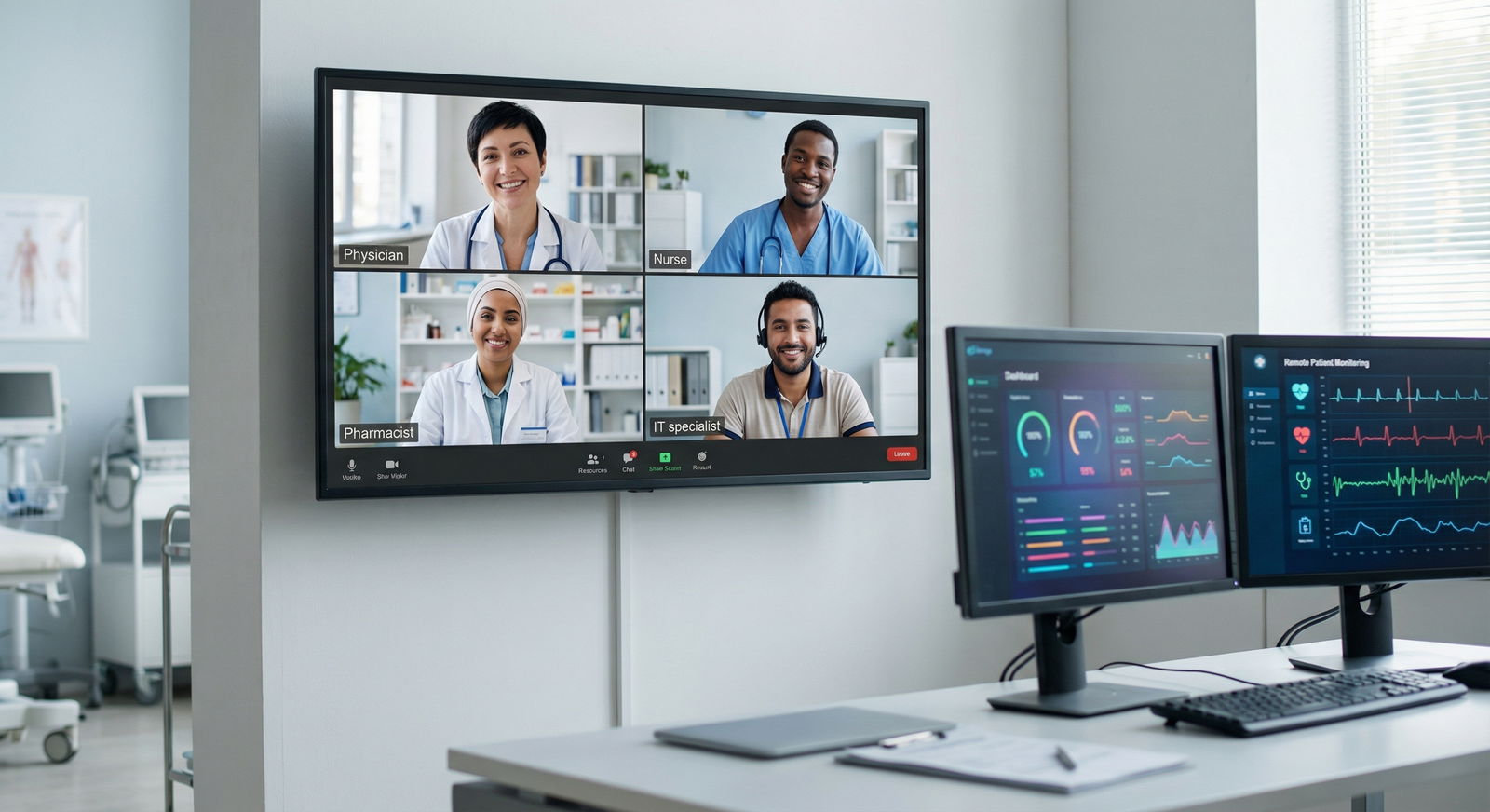
The way most clinicians “wing it” on telehealth is costing them patients, time, and reputation. You need scripts, not vibes.
You spent residency mastering in‑person medicine. Post‑residency, the job market is very clear: if you cannot deliver clean, efficient telehealth, you are already behind. The good news: you do not need to reinvent your bedside manner. You need to translate it. Systematically. With scripts and micro‑protocols you can reuse all day.
This is your telehealth script kit. Not theory. Actual phrasing, workflows, and templates you can copy, tweak, and deploy on your next shift.
1. The 5‑Minute Pre‑Visit Routine That Makes Everything Easier
Most bad telehealth visits are lost before you click “Join.” Sloppy tech. No plan. No opening script. Fix the pre‑visit routine and half your problems disappear.
Use this 5‑minute protocol before each clinic block (or each visit if your tech is unreliable).

| Step | Description |
|---|---|
| Step 1 | Start of Telehealth Block |
| Step 2 | Check camera and mic |
| Step 3 | Open EHR and needed tabs |
| Step 4 | Review last note and meds |
| Step 5 | Load visit script prompts |
| Step 6 | Join visit on time |
Step 1: Tech and Environment (2 minutes)
Run a quick checklist:
- Camera at eye level, not laptop‑chin angle
- Light source in front of you, not behind
- Background: neutral, uncluttered, no personal mess, no open charts visible
- Headset ready (not optional in noisy home environments)
- Notifications off: email, Teams, Slack, phone on silent
Script if you need to reset the room while patient is joining:
“I am just adjusting my camera so I can see you clearly, this will take a few seconds.”
Simple, but it signals professionalism instead of chaos.
Step 2: EHR Setup (2 minutes)
Stop hunting for tabs mid‑visit. Pre‑load:
- Patient chart with last note, meds, problem list
- Lab/imaging results you expect to discuss
- Prescription page, but not yet filled
- Smartphrases or templates for telehealth specific counseling
Have a text file or note with your common scripts visible in a side window. You do not need to memorize everything from day one.
Step 3: Micro‑Review Before You Click “Join” (1 minute)
Look at three things:
- Why they are booked (chief complaint or reason for visit)
- Last plan and follow‑up instructions
- Recent messages or calls to the office
Then set a concrete mental agenda:
“Today I will: 1) address the cough, 2) review inhaler use, 3) decide if they need in‑person or imaging.”
That 10‑second intention makes your telehealth visit feel structured instead of meandering.
2. Openings: Scripts That Build Trust in 30 Seconds
Most remote visits feel awkward because clinicians open weakly. Mumbled greetings, tech issues, no explicit structure. Patients feel like they are interrupting your computer work.
You fix this with a tight, repeatable opening script.
The Core Opening Script
Use this as your default. Adjust for specialty and personality, but keep the structure.
“Hello, I am Dr. [Name]. I am connecting from [clinic/health system]. Can you hear and see me clearly?”
[Pause, fix any issues.]
“Before we start, could you please confirm your full name and date of birth for me?”
“Good. Today we have about [X] minutes. My plan is: first I will listen to what is going on in your own words, then I may ask some detailed questions, and we will finish with a clear plan, including whether you need to be seen in person. How does that sound?”
You just did four things:
- Confirmed identity (compliance)
- Checked technical quality (safety)
- Set expectations about time and structure (efficiency)
- Normalized possible in‑person escalation (risk management)
When They Are Obviously Struggling With Tech
You need a stock line that calms them down:
“No problem, this platform can be finicky. We will take a minute to get it sorted. If for some reason the video does not cooperate, we can still continue by phone so you are not left without care.”
That sentence reduces anxiety and protects you from “the doctor did not care” complaints.
When You Are Running Late
Own it. Quickly. Then reset.
“Thank you for waiting for me. I am about [X] minutes behind because of earlier emergencies. You still have my full attention right now. Let us focus on what is most important for you today.”
Stop pretending your time warp is invisible. Patients notice. This script preserves dignity for both of you.
3. History and Exam: How to “Examine” Without a Stethoscope
Traditional physical exam scripts do not work on video. What you need is a remote‑first examination toolkit: very specific questions and instructions that approximate what you would do in person.
The Remote History Script Framework
Telehealth history is not completely different. It is just less forgiving. You must be more explicit and “paint the picture” through the camera.
Use this pattern:
Open‑ended:
“Tell me what is bothering you today from the beginning.”
Focused clarification:
- Timing: “When did this start?”
- Evolution: “Is it getting better, worse, or about the same?”
- Impact: “What can you not do now that you could do last week?”
Context tailored to remote risk:
“Any red flag symptoms like chest pain, trouble breathing at rest, confusion, or severe pain that wakes you from sleep?”
Telehealth limitations disclosure (short):
“Since this is a video visit, there are some things I cannot check directly, like listening to your lungs. I am going to guide you through some things you can show me, and if there is any doubt we will bring you in.”
That one sentence saves you in charting and builds trust.
Guided Remote Exam: Practical Scripts
You need very concrete language. Patients do not understand “palpate” or “percuss.”
Example: Suspected Respiratory Infection
Visual assessment:
“I am going to look at your breathing. Can you sit so I can see your upper chest and shoulders? Now, just breathe normally for about 15 seconds.”
Then:
- “Do you feel short of breath when you are sitting still, like now?”
- “Can you speak in full sentences without needing to pause for breath?”
If they have a home device:
“Do you have a thermometer or oxygen monitor at home?”
“Please check your temperature now while we talk and tell me the number when you have it.”
“If you have a pulse oximeter, place it on your finger and tell me what number you see and if the symbol next to it looks steady.”
Script for light exertion (if safe):
“If you feel safe to do so, can you walk across the room and back while keeping the camera on if possible? Let me know if you feel more short of breath or dizzy.”
You are not pretending this replaces in‑person. You are documenting functional status and obvious distress.
Example: Musculoskeletal Pain
You cannot “test strength,” but you can see function.
“Point with one finger to where it hurts the most.”
“Use your other hand to push gently on that area. Does that increase, decrease, or not change the pain?”
“Let us do some gentle movement. Only as far as is comfortable. Lift your arm straight in front of you… now to the side… and now try to touch the back of your head.”
You narrate what you see in the note: “Observed active range of motion shoulder flexion to ~120 degrees with reported pain.”
When You Must Escalate to In‑Person or ED
You need a non‑negotiable escalation script. Memorize it.
“Based on what I am seeing and what you are telling me, this is not something I can safely handle by video. I recommend you be seen in person today at [clinic/urgent care/ER]. The main concern is [short, concrete risk: ‘possible heart issue,’ ‘appendicitis,’ ‘significant infection’]. I know this is inconvenient, but this is about safety, not preference.”
And then, document that sentence almost verbatim.
4. Managing Time and Expectations Without Sounding Rushed
Telehealth magnifies poor time management. Patients ramble more. You interrupt more. Everyone ends up annoyed. You fix this with explicit agenda‑setting and redirection scripts.
The 3‑Point Agenda Script
Use it after the opening:
“To make sure we use the time well, could you tell me the top one or two things you want to make sure we address today?”
Then reflect back:
“So I am hearing: 1) your blood pressure readings, and 2) this new headache. We will focus on those. If we have extra time, we can touch on the sleep issues, but that might need a separate visit.”
You are not asking permission. You are setting boundaries kindly.
When They Bring a Long List
Do not try to sprint through 8 problems in 12 minutes. That is how you miss strokes and get one‑star reviews.
“That is a lot to cover in one visit, and I do not want to rush through important issues. Let us prioritize the ones that are most urgent or risky today, and we can schedule another visit to dig into the others properly.”
Then you pick:
“From a medical risk standpoint, I suggest we focus on the chest tightness and the high readings you mentioned. We will plan a follow‑up within [timeframe] for the rest.”
This is not “nice to have.” It is malpractice prevention.
Redirection Script When They Go Off‑Track
Do not be vague. Be clean and direct:
“I want to make sure we address your main concern before our time runs out. I am going to bring us back to the [primary issue] for now, and we can decide whether the other topic needs a separate follow‑up.”
You will feel repetitive at first. Patients hear it as structure, not rudeness.
5. Documentation and Risk Management for Telehealth
Post‑residency, you are not just a clinician. You are a liability target. Telehealth adds a new angle: “doctor never told me video was limited” or “refused to see me in person.”
You protect yourself with two things:
- Standard telehealth documentation phrases
- Clear, charted communication about limitations and escalation
| Element | Example Short Phrase |
|---|---|
| Modality | Video visit via [platform] |
| Location | Patient at home, provider at office/home |
| Limitations statement | Exam limited due to telehealth format |
| Remote exam description | Observed and patient guided maneuvers |
| Escalation decision | Advised in-person/ED vs safe for telehealth |
| Consent | Patient agreed to telehealth visit |
Core Documentation Smartphrases (Adapt and Load into Your EHR)
Telehealth header:
“This encounter was conducted as a [video/phone] telehealth visit. Patient location: [home/other]. Provider location: [clinic/home office]. Patient consented to telehealth format and understands its limitations.”
Limitations and exam:
“Physical examination is inherently limited by telehealth format. Findings are based on visual inspection, patient‑guided maneuvers, and home device readings when available.”
Disposition clarity:
When keeping in telehealth lane:
“Based on current history and remotely observed exam, immediate in‑person evaluation is not indicated. Strict return and emergency precautions reviewed.”
When escalating:
“Due to concern for [condition], telehealth is not sufficient for safe evaluation. Strongly advised in‑person evaluation at [clinic/urgent care/ED] today. Patient verbalized understanding and plan.”
Yes, that exact phrase has saved clinicians I know from complaints.
6. Difficult Situations: Scripts You Will Actually Use
If you do telehealth more than one day a month, you will hit the same landmines over and over. Have scripts ready.
When the Problem Is Not Appropriate for Telehealth
Classic example: new severe abdominal pain, or “I need an exam for disability paperwork.”
“The issue you are describing requires a hands‑on physical exam that I cannot do safely by video. If I tried to manage this remotely, I could easily miss something serious. The safest and most appropriate next step is an in‑person evaluation at [location, timeframe].”
If they push back:
“I understand it is difficult to get in. I would not be recommending this if I thought a video visit were safe or adequate here. My responsibility is to keep you safe, and that means seeing you in person for this specific problem.”
When They Expect Antibiotics or Controlled Substances
Telehealth made antibiotic and opioid‑shopping worse. You must have spine and language.
Antibiotics:
“Right now, based on your symptoms and what I can see, this looks more like a viral infection. Antibiotics do not help viruses and can cause side effects or resistance. What I can do is focus on managing your symptoms and tell you what warning signs would mean we need to re‑evaluate or see you in person.”
Controlled substances (new patient, no records):
“For safety reasons, I do not prescribe controlled medications like [med] at an initial telehealth visit without prior records or an in‑person exam. What I can do today is address your symptoms with non‑controlled options, and we can plan for appropriate follow‑up once I have more information.”
Then stop talking. Silence is your friend here.
When the Patient Is in a Different State
This is not theoretical. It happens constantly: “I am just visiting my sister in another state.”
Your script depends on your license reality, but the structure stays the same:
“I am seeing that you are physically in [state]. I am licensed to practice in [licensed states]. Regulations require that I only provide medical care when you are located in a state where I am licensed. That means I cannot legally continue this visit as a medical consultation today.”
Then offer something non‑clinical:
“What I can do is help you find urgent care resources locally, and if you have any emergency symptoms like [X, Y, Z], you should go to the nearest emergency department.”
Document that word‑for‑word.
7. Closing the Visit: Script for Clarity, Not Confusion
Telehealth visits often end with an awkward “OK, I guess that is it?” and the patient logs off unsure what to do next. That leads to portal messages, complaints, and non‑adherence.
You fix this with a three‑part closing script.
The 3‑Part Closing Script
- Plan summary
- Safety net
- Logistics
Example:
“Let me quickly recap our plan to make sure we are on the same page.
- You will start [medication] once a day for the next [X] days.
- You will check your [BP/glucose/temp/etc.] [frequency] and write down the numbers.
- We will schedule a follow‑up [video/in‑person] visit in about [timeframe] to see how you are doing.
If you notice [specific warning signs], go to [urgent care/ER] or call emergency services. If things are not improving but not urgent, send me a message through the portal or call the clinic.
Do you have any questions about what we are doing or what you should watch for?”
Then:
“You will see the visit summary and any prescriptions in your portal within about [time]. If something looks off, let us know.”
You are done. No drama. No confusion.
8. Career Angle: Using Telehealth Competence as a Job Market Weapon
You are in the post‑residency phase. That means telehealth is not “nice extra experience.” It is a line item that gets you hired or skipped.
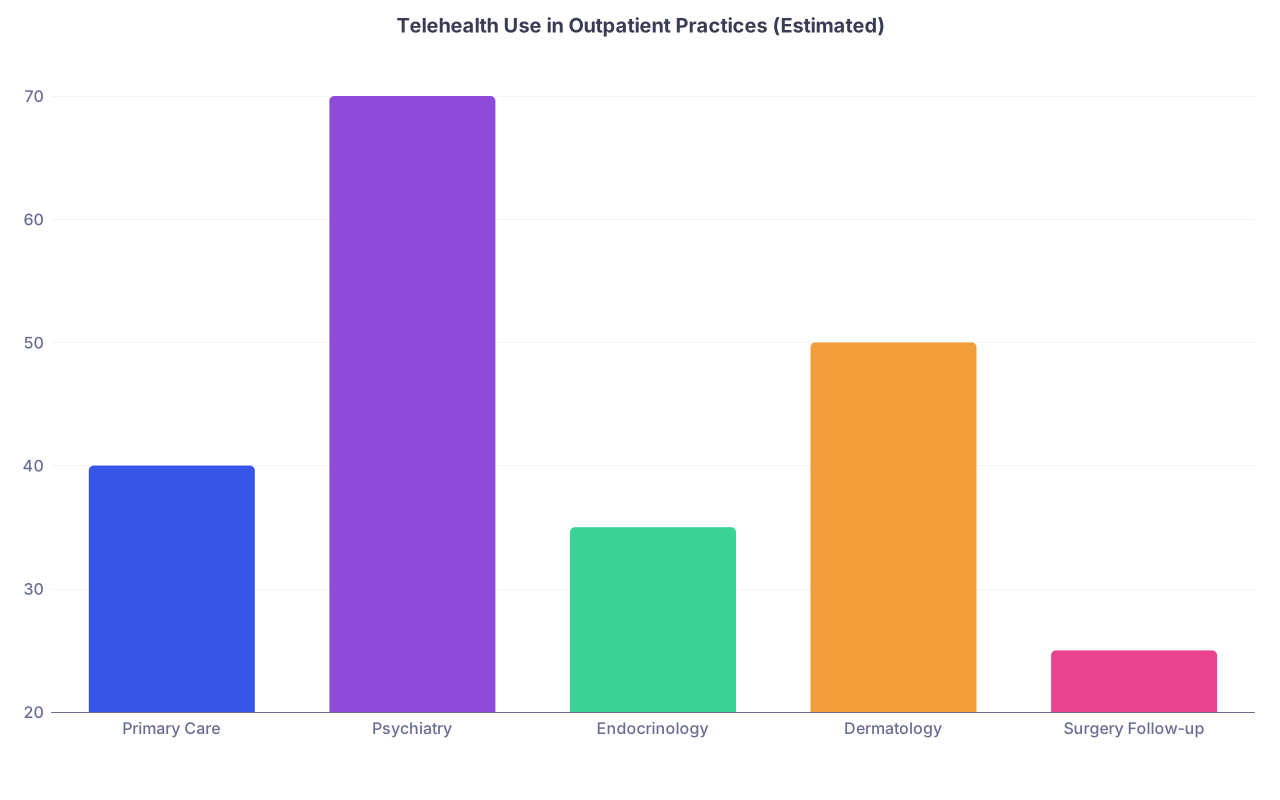
| Category | Value |
|---|---|
| Primary Care | 40 |
| Psychiatry | 70 |
| Endocrinology | 35 |
| Dermatology | 50 |
| Surgery Follow-up | 25 |
How to Signal Telehealth Competence on Your CV
Stop writing “comfortable with telemedicine.” That means nothing. Instead:
- “Completed >1,000 outpatient video visits during [year] across primary care/urgent care.”
- “Implemented telehealth protocols for hypertension follow‑up, reducing no‑show rates by 20%.”
- “Trained new hires on telehealth documentation, risk management, and patient education scripts.”
Specific. Measurable. Very hireable.
Talking About Telehealth in Interviews
You will get some version of: “Are you comfortable with telemedicine?”
Your answer should be structured:
- Volume: “At my current site, about [X]% of my practice is virtual.”
- Scope: “I routinely manage [list of conditions] via telehealth and triage to in‑person when needed.”
- Systems: “I use standardized script sets for openings, escalation, and documentation to keep visits safe and efficient.”
Then, hit one concrete example:
“For example, we built a telehealth hypertension follow‑up protocol: automated BP uploads, 10‑minute focused tele‑visit using a standard script, and clear triggers for medication change or in‑person evaluation. That cut our uncontrolled HTN visits significantly.”
Now you sound like someone who can build, not just click “Join meeting.”
Remote‑First Job Options After Residency
You want to know what this skill buys you. Quite a bit.
| Role Type | Typical Telehealth Share | Notes |
|---|---|---|
| Virtual urgent care | 80–100% | Shift-based, multi-state |
| Outpatient primary care | 20–50% | Mix of in-person and virtual |
| Psychiatry | 60–100% | Strong remote job market |
| Subspecialty consults | 20–60% | Often second-opinion work |
| Post-op / chronic follow-up | 20–40% | Good for lifestyle balance |
Knowing how to run efficient, safe telehealth blocks is one of the few levers that can actually improve your lifestyle without tanking your income. Especially if you stack licenses in multiple states.
9. Building Your Personal Script Kit (So You Do Not Re‑Invent This Every Day)
Do not try to memorize everything in this article. Build a small, ruthless toolkit and use it until it is muscle memory.
Step 1: Create a “Telehealth Scripts” Document
One page. Max two. Sections:
- Openings
- Agenda‑setting
- Redirection
- Remote exam phrases (respiratory, GI, MSK, psych)
- Escalation to in‑person/ED
- Closing script
- Risk phrases for documentation
Then keep it:
- As a note in your EHR
- As a pinned doc on your desktop
- Or as a split‑screen note during visits
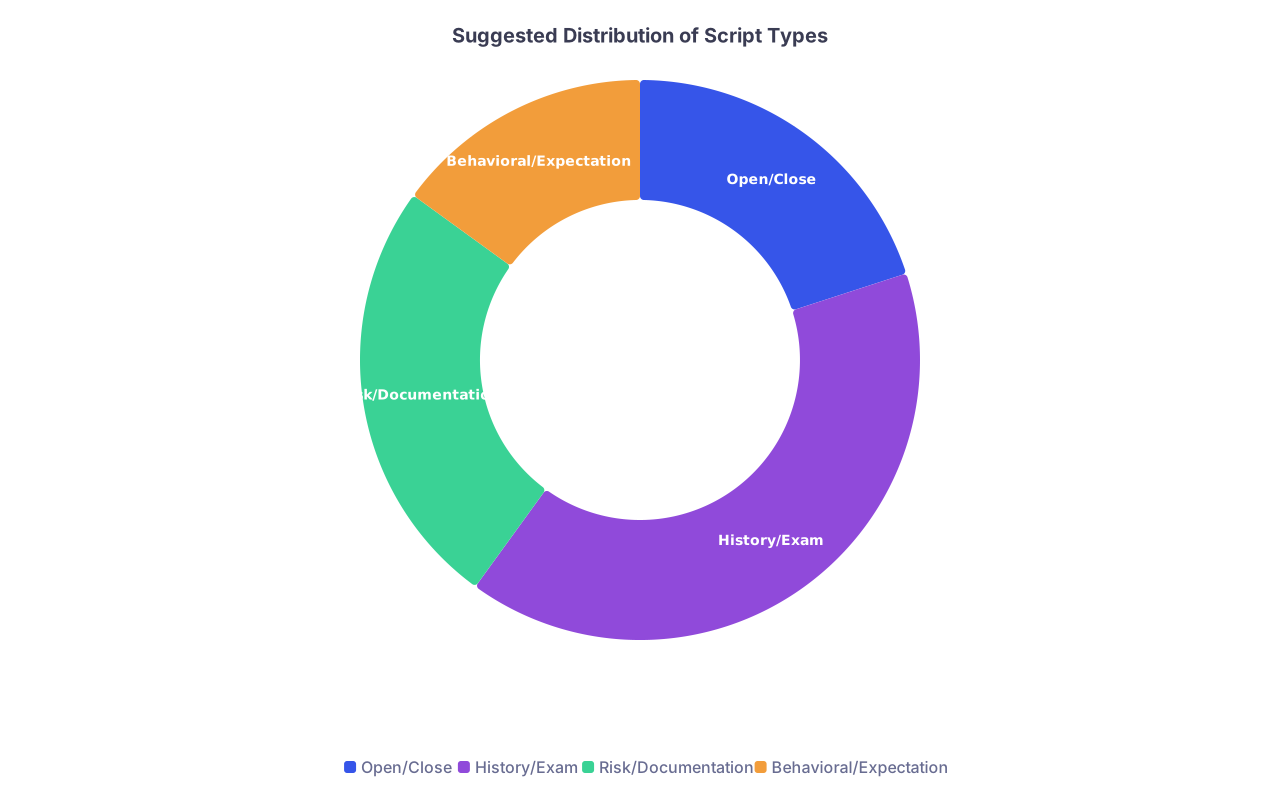
| Category | Value |
|---|---|
| Open/Close | 20 |
| History/Exam | 40 |
| Risk/Documentation | 25 |
| Behavioral/Expectation | 15 |
Step 2: Add One Script Per Week
Do not try to be a telehealth poet on day one. Choose one category per week:
- Week 1: Perfect your opening + 3‑part closing
- Week 2: Add respiratory and MSK exam scripts
- Week 3: Add escalation and “not appropriate for telehealth” scripts
- Week 4: Add antibiotic/opioid refusal scripts
By month two you will sound natural, not scripted, because you have repeated these dozens of times.
Step 3: Debrief Bad Visits
After a messy visit, ask yourself two questions:
- Which part failed: opening, agenda, exam, or closing?
- What single sentence would have made that smoother?
Then add that sentence to your script kit. That is how real clinicians get better—micro‑iterations, not inspirational quotes.
You do not need a new personality to be good at telehealth. You need a tighter playbook.
Here is your next step today: open a blank document and write three things—your opening script, your “not appropriate for telehealth” escalation script, and your 3‑part closing script. Copy the templates above, tweak a few words to sound like you, and have that file open during your next clinic block.