

You just got the quarterly report from admin.
Telehealth satisfaction scores: red arrows down, comments full of “hard to connect,” “felt rushed,” “doctor looked distracted,” and the killer phrase: “Would not use again.” Leadership wants a “rapid improvement plan” on their desk in a week. You are already juggling in‑person clinic, inbox, and call. And now your virtual practice is on the chopping block.
You do not have a year to fix this. You have about a month before someone starts pulling back telehealth slots or hinting you should “focus on what you’re best at—in‑person visits.”
So here is a 30‑day, no‑fluff action plan to move those scores. Not theoretically. In your actual schedule, with your current constraints.
We will do this in four 1‑week sprints:
- Week 1: Diagnose the problem precisely
- Week 2: Fix the visit experience
- Week 3: Fix communication and follow‑through
- Week 4: Lock in systems and show your leaders real numbers
If you follow this, you will not have perfect Press Ganey heaven in 30 days. You will, however, stop the bleeding and create a visible upward trend. That is what keeps programs alive.
Week 1 – Get the Real Diagnosis (You Are Not Guessing)
Most telehealth satisfaction problems fall into the same predictable buckets: tech friction, access/flow, perceived empathy, and follow‑up. But you are not going to shotgun solutions. You are going to find your top 2–3 failure points.
Step 1: Pull and slice the data (1–2 hours)
Ask whoever owns your metrics (quality office, service line manager, or vendor rep) for:
- Telehealth satisfaction by:
- Provider (including you)
- Visit type (new vs follow‑up, urgent vs routine, behavioral vs medical)
- Time of day/day of week
- Top 10 negative comment themes, last 3–6 months
- No‑show / aborted visit rate, last 3–6 months
- Average telehealth visit length and “on‑time start” rate
If your organization uses a vendor (Amwell, Teladoc, Doxy, etc.), they often have all of this in a dashboard. Make them earn their contract.
You want a view like this:
| Pattern ID | Primary Problem | Typical Data Signal |
|---|---|---|
| A | Tech/connection issues | High aborted visits, early disconnects |
| B | Access & wait times | Long queue, comments on waiting |
| C | Rushed / poor communication | Short visit length, comments on “doctor in a hurry” |
| D | Follow‑up gaps | Comments “no one called,” “confusing plan” |
| E | Wrong visit type | Comments “could not do exam,” “told to come in anyway” |
Step 2: Read at least 50 recent comments (30–45 minutes)
Yes, actually read them. Not the summary. The raw comments.
Sort by most recent and sample across:
- Your visits
- Your group’s visits
- Different days/times
You are looking for specific phrases that repeat. Examples I see all the time:
- “Spent first 10 minutes trying to get video to work”
- “Doctor looked like they were typing the whole time”
- “Got disconnected and no one called me back”
- “Waited 25 minutes, visit was 7 minutes”
- “Ended up needing to come in anyway—waste of time”
Make a quick tally by hand. You want your top 3 complaint themes with counts. Something like:
- Tech / connection / confusion: 18
- Rushed / not listening: 14
- Hard to schedule / late start: 9
Those are your targets for the next 30 days. Ignore everything else.
Step 3: Watch 3–5 of your own recorded visits (60 minutes)
If your system records visits (many do, with patient consent), watch:
- 2 “bad score” visits (if identifiable)
- 2 “good score” visits
- 1 random
If there is no recording, at least:
- Ask an MA / RN / front desk who sees telehealth flow: “Where are people getting stuck or mad?”
- Shadow one of your highest‑rated colleagues for 2–3 visits. Cameras on, watch everything: greeting, background, note‑taking, close.
Do this with zero ego. You are a scientist collecting data on your own practice. You will see things you do not like. Good. That is why we are here.
Step 4: Define your 30‑day goal and metrics (30 minutes)
Pick 2–3 measurable targets that fit your problems. Examples:
- Raise telehealth mean satisfaction from 3.8 → 4.3 in 30 days
- Cut aborted/failed visits by 30%
- Cut “doctor seemed rushed” comment frequency in half
Then pick 3–4 leading process metrics:
- % visits starting within 5 minutes of scheduled time
- % visits where you verbally summarize plan + follow‑up
- % visits where patient receives post‑visit message within 2 hours
- % scheduled telehealth visits that had pre‑visit tech instructions sent
You will track these weekly. Leadership loves trend lines more than absolute numbers. Give them both.
Week 2 – Fix the Core Visit Experience (What Patients Actually Feel)
Now that you know your top failure modes, you attack them inside the visit itself. This week is about the 10–20 minutes you spend on camera.
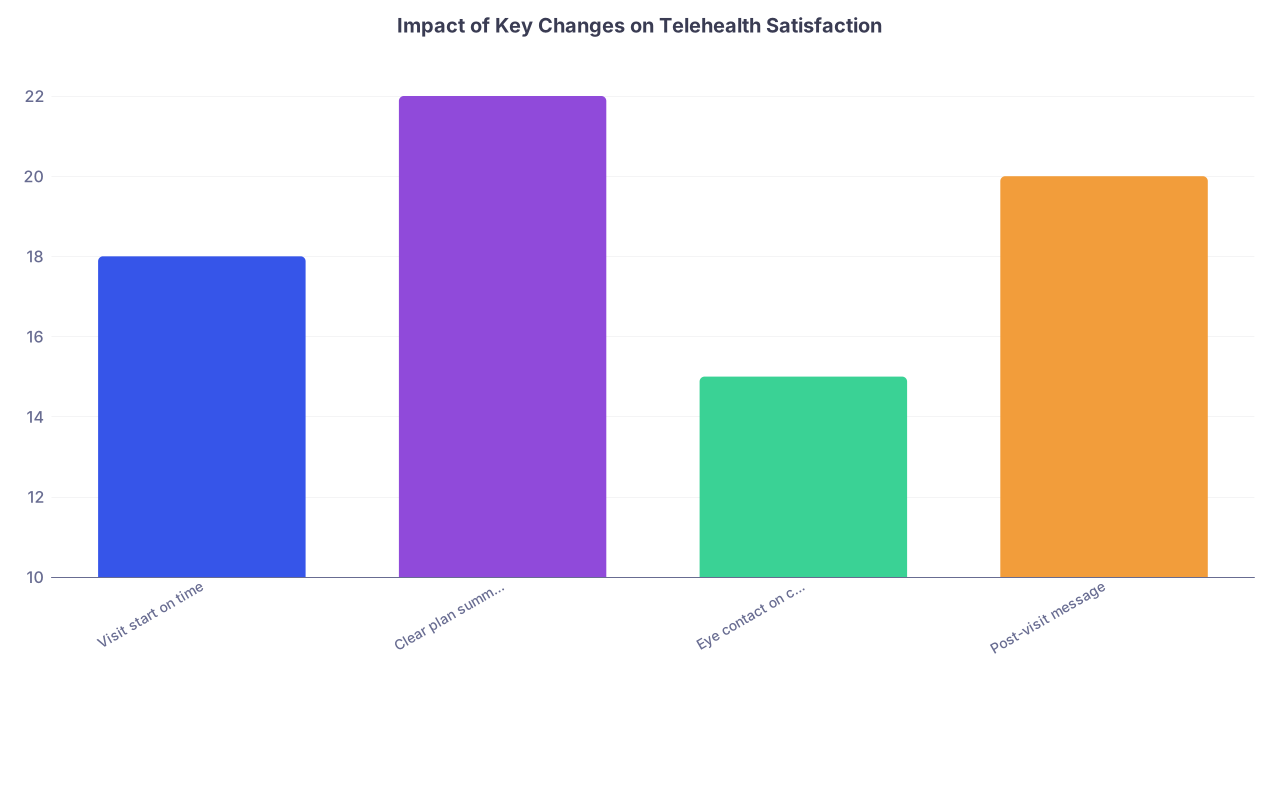
| Category | Value |
|---|---|
| Visit start on time | 18 |
| Clear plan summary | 22 |
| Eye contact on camera | 15 |
| Post-visit message | 20 |
(Values = typical percentage point satisfaction increase I have seen when these are consistently implemented.)
Step 5: Standardize the first 2 minutes
Most telehealth visits are lost in the first 120 seconds. Patients judge you fast.
Use a simple opening script and do it every single time:
Confirm connection and name
- “Hi Ms. Jones, I can see and hear you clearly. Can you see and hear me OK?”
Location and consent (if required)
- “Are you still in your home in Springfield today?”
- “Is it alright if we proceed by video for this visit?”
Agenda setting (this is huge)
- “We have about 15 minutes today. I see ‘follow‑up on blood pressure’ and ‘medication questions’ in the chart. Is there anything else you were hoping we would cover?”
- “Out of those, what is the most important thing we get done by the end of this visit?”
You just did three things: established control, showed you read the chart, and told them there is a plan. That alone shifts satisfaction.
Step 6: Fix your telepresence (how you look and sound)
You can be the smartest clinician in the group, but if you look like you are calling from a storage closet with bad audio, patients will rate you like a distracted intern on a broken phone.
Minimum standard setup:
- Camera at eye level, 2–3 feet away
- Neutral, uncluttered background; no backlighting windows
- Dedicated microphone or good headset (built‑in laptop mics are often awful)
- Stable internet; if your home Wi‑Fi is flaky, plug in Ethernet or use your office
Then behavioral changes:
Look at the camera when you are asking or answering something important
Tell the patient when you need to look away:
- “I am going to look at your labs for a moment, so my eyes will be off camera.”
Avoid typing frantically while they are talking. Take brief written notes, then document more fully after or during a pause.
This is not vanity. Patients literally equate “looked at me” with “cared about me” and “took me seriously.”
Step 7: Use a tight visit structure
Telehealth visits fall apart when they are unstructured. The clock is too unforgiving.
Use this simple 4‑part template:
Opening (2 minutes)
- Tech / identity / location
- Agenda setting
Focused history & review (6–8 minutes)
- Target 2–3 main issues
- Use screen‑sharing for labs, imaging, or home BP logs when available
- Say out loud what you are doing in the chart
Plan and education (4–6 minutes)
- Diagnosis or “working diagnosis” in plain language
- Specific plan elements:
- Med changes with doses and timing
- What to monitor and how (home BP device, symptom diary, etc.)
- Clear follow‑up trigger: “If X happens, do Y”
Close and confirm (2 minutes)
- “Let me summarize what we decided today…”
- Ask them to repeat key steps: “Just so I know I was clear, can you tell me how you will take the new dose?”
- Tell them exactly what they will receive after:
- “You will get a message in your portal within 2 hours with your plan in writing.”
You can do this in 15 minutes. But not if you let the first 5 minutes be tech chaos and small talk.
Step 8: Script the hard limitation conversations
Some of your worst scores come from visits where telehealth was the wrong modality, and nobody explained that upfront. You must own that.
Example script for when physical exam limits what you can do:
“I want to be honest. Because we are on video, there are safe limits to what I can do today. For belly pain like this, I really need to press on your abdomen to check for serious causes. I cannot do that through the screen.
We can still use today to do something useful: review what has been happening, decide how urgent this is, and arrange the right in‑person evaluation. It is not a wasted visit if we use it to make a good plan.”
Then, crucially, you document and communicate:
- That you explained the limitation
- Why in‑person is needed
- What the concrete next step is (same‑day clinic, ED, imaging, etc.)
Patients get angry when they feel the telehealth visit was a pointless toll. They tolerate it much better when it is framed as “step 1 of a safe, thoughtful process.”
Step 9: Build one micro‑habit per visit to improve scores
Pick 1–2 behavior changes you will do in every visit starting now:
- Always ask “Any final questions before we wrap up?”
- Always share one small piece of education (e.g., what “130/80” actually means)
- Always verbalize empathy at least once: “I can see this has been frustrating”
- Always mention follow‑up channel: “If things change, send a message through the portal or call this number.”
Do not try to change 10 things. Pick 2. Do them 100% of the time.
Week 3 – Fix Everything Before and After the Visit
By now your in‑visit experience is tighter. Next you address the two other killers of satisfaction: friction getting into the visit, and feeling abandoned after.
Step 10: Reduce pre‑visit chaos (15–60 minutes with your staff/IT)
Half of “bad doctor” comments are actually “bad system” problems.
You need a pre‑visit protocol. For your clinic, not theoretically.

| Step | Description |
|---|---|
| Step 1 | Telehealth visit scheduled |
| Step 2 | Automated confirmation sent |
| Step 3 | Pre-visit instructions 24h before |
| Step 4 | Staff tech check for high-risk patients |
| Step 5 | Patient ready at start time |
| Step 6 | Clinician joins visit |
Concrete steps:
Standard pre‑visit message, auto‑sent 24 hours before
- How to log in (step‑by‑step, with screenshots or link to vendor guide)
- What device works best (phone vs computer)
- What to have ready (med list, home BP readings, glucometer, weights, pictures of rashes, etc.)
- A line about where they need to physically be (quiet, private space, decent lighting)
Identify high‑risk for tech failure
- Older adults, first‑time telehealth users, non‑English speakers
- For these, schedule a 5‑minute pre‑visit tech check call with support staff (MA, front desk, or centralized tech support).
Clear fallback plan for failed connections
- “If we lose video, I will call you at [confirmed phone number] within 5 minutes to complete the visit by phone if safe.”
- Put this sentence in your pre‑visit message and repeat it at the beginning of the visit.
You do not control all of this. But you can push for it. Pick one admin ally and say, “Here is what I want to pilot for my panel for 30 days.”
Step 11: Fix the waiting experience
If your system shows you “running late,” fine. If not, you need a manual workaround.
Make this your standard:
If you are >5 minutes behind, staff sends a quick message or call:
- “Dr. Lee is running about 10 minutes behind, but your visit is still happening today. Please stay connected; we appreciate your patience.”
If you know you will be >15 minutes late, and you have no support staff:
- Send a quick in‑portal message template:
- “I am finishing with an earlier patient and will be about 10–15 minutes late joining. I am looking forward to speaking with you today. Thank you for your patience.”
- Send a quick in‑portal message template:
Patients hate silence more than they hate waiting. Silence reads as disrespect.
Step 12: Create a ruthless post‑visit follow‑up system
Post‑visit black holes wreck satisfaction scores. People walk away unclear, or promises are not followed.
Build a simple, repeatable pattern:
- Within 2 hours of visit: send a concise summary message
- Diagnosis or working problem list
- Meds started / changed, with doses and timing
- Key self‑monitoring instructions
- Follow‑up plan: when, how, and what should trigger early contact
You can use smart phrases/templates in your EHR. Spend an hour building 5–10 common ones:
- HTN follow‑up
- DM med adjustment
- Depression/anxiety check‑in
- Rash / dermatology tele‑follow‑up
- Post‑COVID or respiratory check
Orders and referrals placed same day
- Labs, imaging, consults. No “I will do that later” if you can avoid it.
- If something must wait, tell the patient when: “By tomorrow evening, you will see the lab orders in your portal.”
Inbox response expectations
- In your summary and at visit close, be explicit:
- “If you send a message, we typically respond within 1 business day. If something is urgent, call the clinic directly at [number].”
- In your summary and at visit close, be explicit:
This costs you some front‑end time. It pays you back in fewer confused messages, fewer angry calls, and much higher feeling of “my doctor took care of me.”
Step 13: Coordinate with your team (even if “team” is 1 MA)
Telehealth gets crushed when everyone works in silos. Spend 30–45 minutes with the people who touch your visits.
Agenda for a quick huddle:
Share your 2–3 main problems and your 30‑day goals
Propose 3–4 concrete actions they can help with:
- Tech checks for first‑timers
- Reminder calls for patients who are no‑shows to reschedule quickly
- Routing of certain messages (e.g., vitals logs) to a pool first, then to you
Agree on clear division of labor:
- Who sends pre‑visit messages
- Who does reminder/tech calls
- Who handles post‑visit tasks like printing and mailing instructions for non‑portal users
If you are essentially solo, fine. Document a simple checklist for yourself and stick it by your monitor.
Week 4 – Lock It In, Measure, and Prove Improvement
The last week is about moving from “heroic effort” to “system that survives when you are tired.” And about giving leadership something they can show their bosses.
Step 14: Track your key numbers this week, not just end of quarter
Make your own micro‑dashboard. Use a scrap of paper or a simple spreadsheet. For this week, track:
Per day:
- Number of scheduled telehealth visits
- Number started within 5 minutes of scheduled time
- Number converted to phone due to tech issues
- Number where you documented a clear written plan in the portal
- Any same‑day complaints/escalations
At end of week, calculate:
- On‑time start rate
- Tech failure rate
- % with written plan sent
Compare to baseline from Week 1 data.
Step 15: Sample new satisfaction comments
Do not wait for formal quarterly reports. Most systems allow near‑real‑time viewing of comments.
Mid‑week: read the last 20–30 telehealth comments, focusing on:
Any mention of:
- Felt rushed / did not listen
- Tech issues
- Confusing plan
- Long wait with no explanation
Look for the inverse too:
- “Doctor explained everything clearly”
- “App was easy to use”
- “Appreciated the follow‑up message”
Tally again. You are looking for trend shift, not perfection.
If your changes are not registering at all, pick 1 more fix you can implement immediately:
- Add the explicit agenda‑setting line in your opening
- Increase visit length by 5 minutes for complex telehealth slots for the next 2 weeks
- Do a 30‑second closing recap every single time, no exceptions
Step 16: Adjust your schedule template if needed
Some of your satisfaction problem is probably template design. I see this constantly:
- 20‑minute new telehealth for undifferentiated pain
- Back‑to‑back video visits with zero buffer time
- No slots reserved for “same‑day escalation” from telehealth to in‑person
You have leverage here if you show data. Propose a 60‑day pilot to your scheduler / medical director:
- Slightly longer telehealth visits:
- Example: 20 minutes for new, 15 for follow‑up instead of 15/10
- Built‑in buffer:
- Every 3rd slot is 5 minutes of “admin/overflow” time
- A couple of short same‑day in‑person backup slots tied to your telehealth block
You are trading quantity for quality. On paper, admin will grumble. When satisfaction scores move and complaint volume drops, the math looks better.
Step 17: Create a one‑page “Telehealth 2.0” brief for leadership
You want to get ahead of the narrative. Do not wait for someone to “check in” on you. Put a concise progress summary in front of your medical director or service chief.
One page. Bullet points. Something like:
Problem:
- Telehealth satisfaction 3.8 (below clinic average 4.4), high comments on tech problems and feeling rushed.
30‑Day Actions Implemented:
- Standardized opening/closing script for all telehealth visits
- Pre‑visit instruction messages for 100% of scheduled visits
- Tech‑check calls for first‑time users over 70
- Within‑2‑hour post‑visit summary messages for all visits
- Clear fallback to phone for dropped video
Early Results (Week 4 vs Baseline):
- On‑time start rate: 62% → 82%
- Tech‑failure conversions to phone: 18% → 9%
- Visits with documented plan sent: 40% → 92%
- Sampled comments: “tech issues” mentions down ~50%, “felt rushed” down ~40%
Next 60‑Day Needs / Requests:
- Slight extension of new‑telehealth slot length (+5 minutes)
- Support to make pre‑visit instructions a system default, not manual
- Dedicated IT contact to support telehealth blocks
This changes the conversation. You move from “physician whose scores are bad” to “physician leading a structured quality improvement project.”
Concrete Daily Plan for the 30 Days
To make this real, here is how you could structure your effort without blowing up your life.
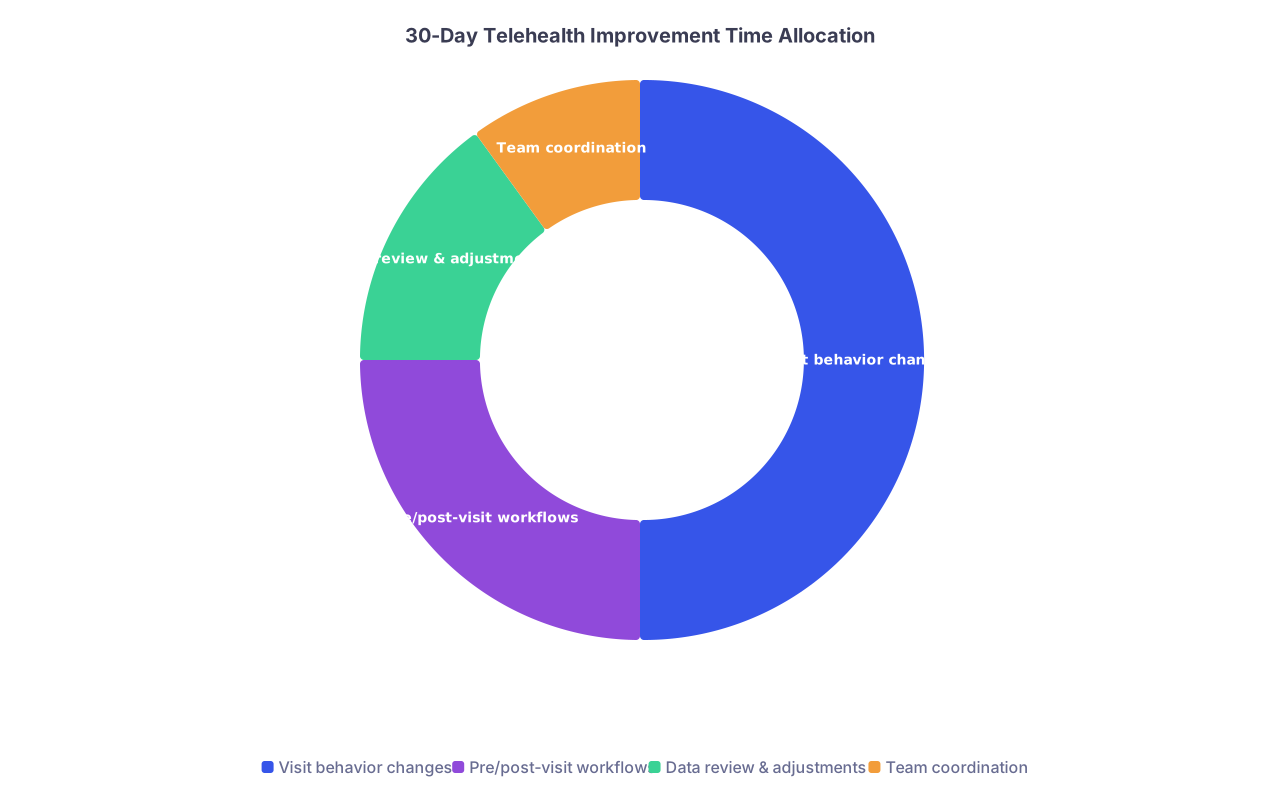
| Category | Value |
|---|---|
| Visit behavior changes | 50 |
| Pre/post-visit workflows | 25 |
| Data review & adjustments | 15 |
| Team coordination | 10 |
Days 1–7 (Week 1 – Diagnose)
Block 2–3 hours total:
- Pull data and read comments
- Watch recorded visits or shadow a colleague
- Define your 2–3 main problems and set targets
Micro‑habit this week:
- Start using a basic opening script in every visit, even before full redesign.
Days 8–14 (Week 2 – Visit Fix)
No extra big blocks; just:
- Implement your full 4‑part visit structure
- Practice eye‑contact and “I am looking at your labs now” narration
- Use 1–2 empathy statements per visit
- End with verbal summary + check‑back
One 30–45 minute block:
- Test your camera/audio and adjust background
- Build 2–3 smart phrases for common telehealth visits
Days 15–21 (Week 3 – Before & After)
One 60‑minute block with staff/IT:
- Create or refine pre‑visit instructions
- Identify who can do tech‑check calls
- Define fallback workflow for dropped connections
Daily:
- Send concise post‑visit plan summaries
- Use your standardized closing statement
Days 22–30 (Week 4 – Lock and Prove)
Daily 5–10 minutes:
- Track process metrics (on‑time start, tech failures, plan summaries)
- Glance at newest comments
One 60‑minute block:
- Analyze your week’s data vs baseline
- Draft your one‑page summary for leadership
- Decide which habits become permanent and what needs system support
Two Things That Will Sabotage This (So Avoid Them)
Trying to fix everything everywhere at once.
If you attempt to overhaul tech, access, visit structure, templates, and organizational policy simultaneously, you will do none of them well. Pick 2–3 high‑impact levers, execute hard.Letting “system problems” become an excuse for zero change.
Yes, some of this is the platform’s fault. Or the scheduler’s fault. Or the CMO’s fault. You still control a huge chunk of what the patient experiences: your presence, your clarity, your follow‑through. Start there while you push on the rest.
Summary – What Actually Moves Telehealth Satisfaction
Three big levers move the needle fastest:
- A consistent, structured visit experience – strong opening, focused middle, clear recap and next steps.
- Frictionless pre‑ and post‑visit steps – simple tech instructions, realistic expectations, and reliable written follow‑up.
- Visible measurement and communication – track your own metrics for a month and show leadership the upward trend.
Do this for 30 days with intent, and your patients will feel the difference long before the next formal survey catches up.


