

Dropped calls do not kill interviews. Your reaction does.
If you panic, over-apologize, or ramble when the connection dies, you look unprepared. If you use crisp, confident language and a simple recovery script, you look professional and resilient. Program directors actually care more about that second part.
You asked for exact words. Good. We are going to script this like a code response.
This is not theory. I have watched applicants recover from complete disconnections and still match at competitive programs. I have also watched people self-destruct by talking too much after a glitch. The difference is less than 30 seconds of language.
Below is a step-by-step protocol and plug‑and‑play phrases you can literally keep next to your keyboard on interview day.
1. Your Default Recovery Script (Memorize This)
Assume this happens during a Zoom/Teams/WebEx interview with a PD or faculty. Call drops. You reconnect.
Use this exact sequence.
A. When you successfully reconnect on video
First sentence (clear, calm, short):
“Thank you for waiting, Dr. [Last Name]. It looks like my connection briefly cut out.”
Then immediately follow with one of these depending on what just happened:
If they were talking when it dropped:
“I am sorry for the interruption. You were explaining [last thing you remember]. Would you mind repeating the last part of what you said?”
If you were answering a question:
“I was answering your question about [topic]. I am happy to pick up where I left off, or I can give a concise summary from the start—whichever you prefer.”
If the entire platform crashed / they know it is on their side:
“No problem at all. These things happen. I appreciate you reconnecting. I think we were just discussing [topic].”
Then stop talking. Let them lead.
Key points:
- One brief acknowledgment.
- One short apology or recognition of the glitch.
- One sentence that orients back to the topic.
- Then silence.
Anything beyond that and you start sounding rattled or needy.
B. If the video will not reconnect quickly (switching to phone)
If you have a call‑in number or they suggest a phone:
“Thank you for switching over, Dr. [Last Name]. My video connection was unstable on my end. I appreciate your flexibility. I am ready to continue.”
Again, then pause and let them re‑start.
If you are the one suggesting the phone:
“It looks like my video connection is unstable. I want to be respectful of your time. Would it be alright if we continue the interview by phone? I can call [number] now.”
Say it once. Calm, direct, solution‑oriented.
2. What To Do In The 30 Seconds After A Drop
This is where most people lose the plot. They freeze, click randomly, or start emailing three different people.
Here is the protocol.

| Step | Description |
|---|---|
| Step 1 | Call drops |
| Step 2 | Rejoin same link |
| Step 3 | Use recovery script |
| Step 4 | Try alternate network |
| Step 5 | Email coordinator |
| Step 6 | Offer phone or reschedule |
| Step 7 | Can rejoin in < 60 sec? |
| Step 8 | Still failing after 3 min? |
Step 1: Try to rejoin the same link immediately (within 60 seconds)
Do not:
- Open email first.
- Restart your entire computer.
- Change five settings.
Do:
- Reopen the platform.
- Click “Join” again on the same link.
- Turn camera and mic back on.
While it is loading, take two slow breaths. You need your voice steady when they see you again.
Step 2: If rejoin fails within 1–2 minutes
Try a quick change:
- Move closer to the router or plug in Ethernet.
- Turn off video and just try audio.
- If on Wi‑Fi, toggle Wi‑Fi off/on once.
- If on phone hotspot, confirm it is still on.
Give this 2–3 minutes total, not 10. Past that, you are wasting both your time and theirs.
Step 3: After 3 minutes of failure → Email the right person
Do not email the PD first. Email the program coordinator (or the contact email from your interview instructions). They are the traffic controller.
Here is the exact email template:
Subject: Interview Connection Issue – [Your Name], [Specialty] Applicant
Dear [Coordinator Name],
I am currently scheduled for an interview with Dr. [Last Name] at [time, time zone]. I was just disconnected from the video platform and have been unable to reconnect after multiple attempts.
I want to be respectful of Dr. [Last Name]’s time. I am available to continue by phone at [your phone number], or I am happy to reschedule if that is easier for the team.
Thank you for your help,
[Full Name], AAMC ID [ID]
Short. Professional. Offers solutions.
If the PD has already emailed you directly about logistics, you can CC them on this. But coordinator first.
3. Exact Words To Use In Different Scenarios
Now the part you actually want: scripts for specific, ugly real‑world situations.
Scenario 1: PD was mid‑question and the call died
When you reconnect:
“Thank you for your patience, Dr. [Last Name]. My connection cut out for a moment. I believe you were asking about [topic]. Would you mind repeating the last part of the question so I answer it fully?”
Why this works:
- You do not pretend nothing happened.
- You show you were listening (by naming the topic).
- You focus on answering well, not on the tech drama.
Scenario 2: You were mid‑answer and got cut off
When you reconnect:
“Thank you for waiting, Dr. [Last Name]. My internet briefly dropped. I was just explaining [topic]. I can quickly summarize the key point again, if that would be helpful.”
If they say yes, keep it tight:
“The main point I wanted to make is that [one sentence core point]. An example of that was [1–2 sentence example].”
Do NOT try to re‑create your 3‑minute monologue. You will sound flustered and repetitive. Hit the essence and move on.
Scenario 3: PD clearly frustrated or short on time now
Sometimes you reconnect and you can hear it in their voice. They are behind schedule.
Your language here matters a lot.
“I understand we are tight on time now. I appreciate you continuing the interview despite the tech issue. I am happy to keep my answers concise so we can cover what is most useful for you.”
That sentence does three things:
- Acknowledges the time pressure.
- Shows gratitude instead of anxiety.
- Signals you can adjust on the fly (which is exactly what residents must do constantly).
Then you actually keep your answers tight. If they want more, they will ask.
Scenario 4: Connection keeps dropping repeatedly
If it drops twice, do not just keep pretending. Address it and offer a practical solution.
On the second reconnection:
“Dr. [Last Name], I apologize for the repeated interruptions. My connection seems unstable at the moment. To avoid further disruptions, would you prefer we continue with audio only, or I can switch to a phone call?”
This turns a chaotic situation into a clear decision for them. Most PDs will pick one and appreciate that you are solution‑oriented instead of just apologizing again.
Scenario 5: They suggest rescheduling
You might feel like this is a death sentence. It is not. It is logistics.
Respond like this:
“Of course, I understand completely. Thank you for your flexibility. I am very interested in your program and would appreciate the opportunity to complete the interview at a time that works best for you. I am generally available [give 2–3 blocks of availability].”
Again: calm, interested, flexible. No dramatics.
Follow up with a short confirmation email to the coordinator the same day:
Subject: Rescheduling Interview – [Your Name]
Dear [Coordinator Name],
Thank you for helping reschedule my interview with Dr. [Last Name] after the connection issues today. I remain very interested in the program and appreciate the opportunity to speak again.
As mentioned, I am available [repeat 2–3 time windows].
Best regards,
[Your Name], AAMC ID [ID]
4. What To Say About It Later (Emails and Thank‑Yous)
You do not need to keep apologizing for a dropped call forever. But you should handle the immediate follow‑up with some precision.
A. Post‑interview thank‑you email if there was a major glitch
Here is the version tailored to a call that dropped once or twice:
Dear Dr. [Last Name],
Thank you for taking the time to speak with me today and for your patience with the brief connection issues. I appreciated learning more about [specific element you discussed: the program’s curriculum, resident autonomy, research opportunities, etc.].
Our conversation reinforced my strong interest in [Program Name], particularly [specific detail that shows you were listening].
Sincerely,
[Your Name]
Notice:
- One clause acknowledging the connection issue. Not a paragraph.
- The focus is on substance, not the tech.
If the interview was completely rescheduled due to tech:
Dear Dr. [Last Name],
Thank you again for your flexibility in rescheduling our interview after the connection problems earlier. I am grateful we had the chance to speak. Learning more about [specific element] confirmed my strong interest in [Program Name].
Sincerely,
[Your Name]
That is enough. Do not reopen the wound.
5. Pre‑Interview Setup So You Rarely Need These Scripts
You still need to do your part. “My internet died” stops being sympathetic once it is clearly negligence.
Here is the practical checklist I push on applicants.

| Item | Target Standard |
|---|---|
| Internet speed | ≥ 20 Mbps upload |
| Backup device | Laptop + smartphone ready |
| Audio | External mic or headset |
| Power | Device plugged in |
| Platform test | Test link day before |
Non‑negotiables the day before
- Hard‑wire if possible. Ethernet beats Wi‑Fi.
- Run a speed test. If your upload speed is garbage, do not pretend it will “probably be fine.”
- Update the platform. Zoom, Teams, WebEx—open them and let them update before the big day.
- Test audio and video with a friend. Not a 30‑second “can you see me?” Real test: 10 minutes of talking.
Non‑negotiables the day of
- Restart your computer 30–60 minutes before your first interview.
- Close everything that eats bandwidth: streaming, cloud backups, big downloads, automatic updates.
- Turn off Wi‑Fi on other devices in your space if your bandwidth is limited.
- Have your phone ready on silent, screen up, with the interview email pulled up in case you need to call in.
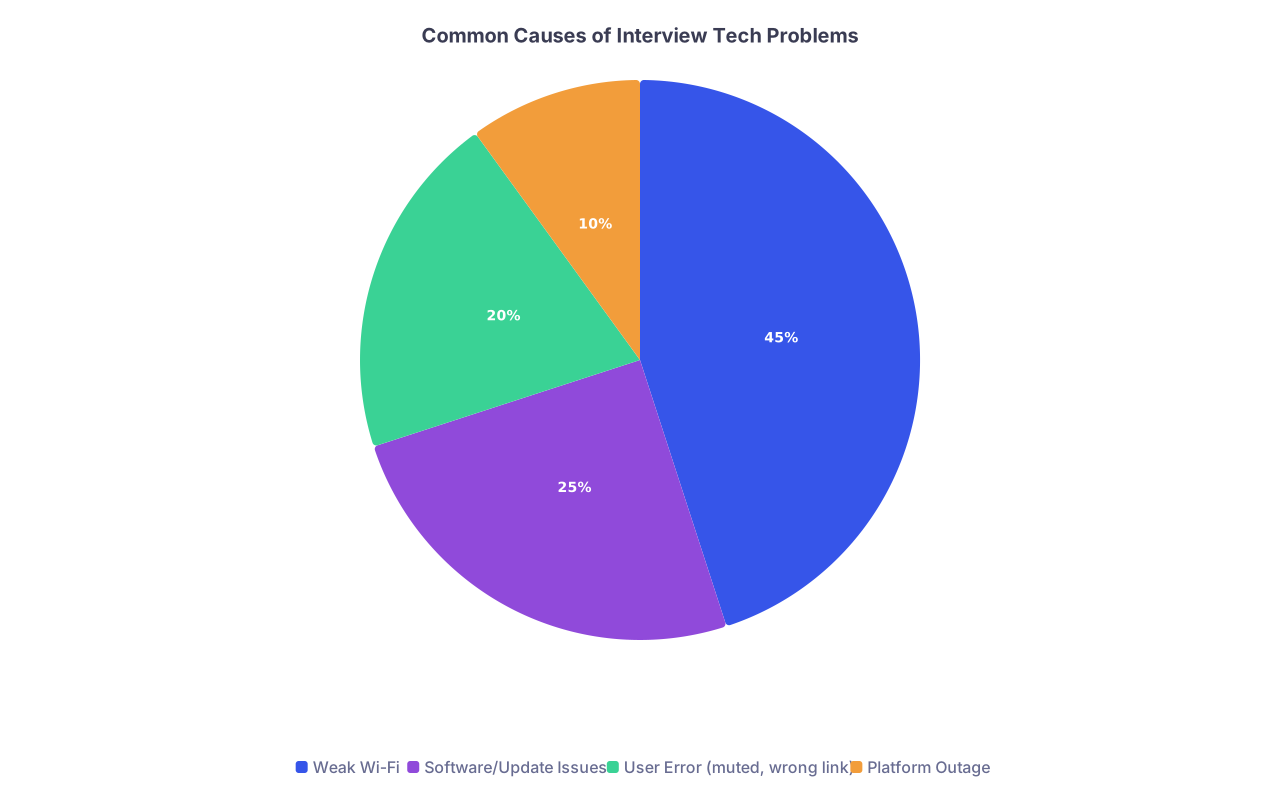
| Category | Value |
|---|---|
| Weak Wi-Fi | 45 |
| Software/Update Issues | 25 |
| User Error (muted, wrong link) | 20 |
| Platform Outage | 10 |
You cannot control a platform outage. You absolutely can control “my roommate started streaming 4K Netflix on our shared Wi‑Fi.”
6. Mental Reset: How To Sound Calm When You Are Not
Your words matter, but your tone sells them. If your voice is shaking when you say, “Thank you for your patience,” it does not sound reassuring. It sounds like fear.
Here is a 60‑second reset routine I have seen work repeatedly.
The 4‑sentence grounding script (use this while rejoining)
Quietly, to yourself:
- “The call dropping is annoying, not catastrophic.”
- “Program directors care more about professionalism than about perfect Wi‑Fi.”
- “I know exactly what to say when I reconnect.”
- “My job is to calmly continue where we left off.”
Then do one slow inhale for 4 seconds, hold 4, exhale 6–8. Twice. That is it.
When you reconnect, your first sentence will land cleaner.
7. How PDs Actually See This (Reality Check)
Most applicants assume: “Dropped call = red flag = no rank.” That is wrong.
Here is how PDs and faculty usually think about it:
, Tech Smoothness](https://cdn.residencyadvisor.com/images/articles_svg/chart-what-matters-most-to-pds-during-an-interview-1338.svg "What Matters Most to PDs During an Interview")
| Category | Value |
|---|---|
| Fit/Personality | 40 |
| Clinical Experience | 30 |
| [Professionalism Under Stress](https://residencyadvisor.com/resources/video-interviews-residency/how-to-recover-gracefully-from-tech-failures-mid-interview-on-zoom) | 20 |
| Tech Smoothness | 10 |
They care far more about:
- How you react under mild stress.
- Whether you are flustered for the next 20 minutes.
- Whether you blame others or focus on solutions.
The dropped call is actually a mini‑stress test. If you handle it like a responsible PGY‑2 during a busy call night—brief acknowledgement, clear plan, back to the work—they store that as a positive.
If anything, it gives them a better sample of how you will behave when things go wrong clinically. Which they know they will.
8. One‑Page “Dropped Call” Script Sheet You Can Use
Print or write this next to your laptop. Minimal, to the point.
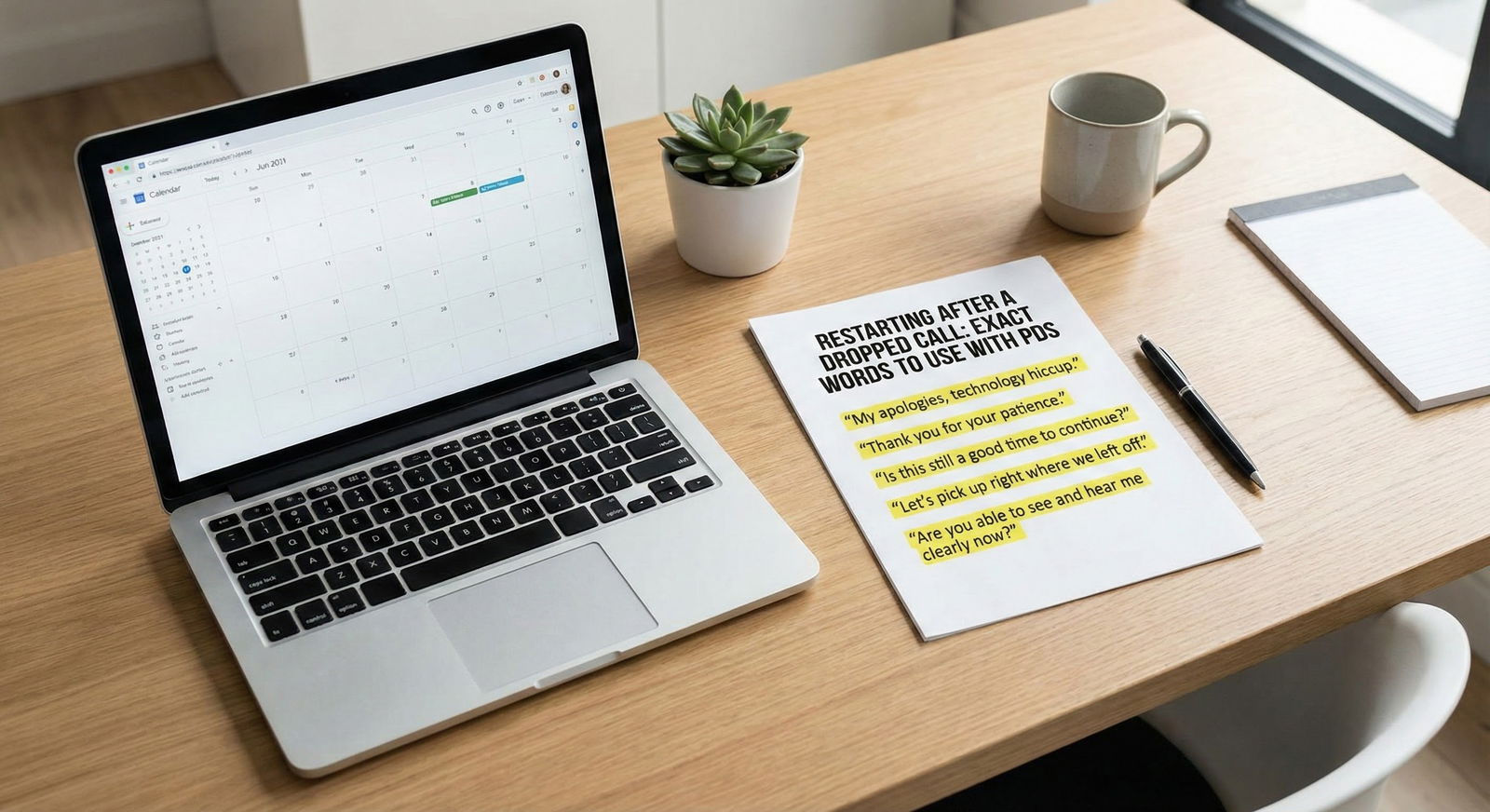
When I reconnect:
- “Thank you for waiting, Dr. [Last Name]. It looks like my connection briefly cut out.”
- If they were speaking: “You were explaining [topic]. Would you mind repeating the last part?”
- If I was speaking: “I was answering your question about [topic]. I can give a concise summary from the start, if that would be helpful.”
If it drops twice:
- “I apologize for the repeated interruptions. My connection seems unstable. Would you prefer we continue with audio only, or by phone?”
If we reschedule:
- “Thank you for your flexibility. I remain very interested in your program and appreciate the chance to speak at a time that works better for you.”
If I have to email coordinator:
Subject: Interview Connection Issue – [Your Name]
Body:
“I was just disconnected from the video platform and cannot reconnect after multiple attempts. I am available to continue by phone at [number], or I am happy to reschedule if that is easier.”
That is really all you need under pressure.
9. Timeline: How Long To Troubleshoot Before Escalating
You should not spend 20 minutes in tech purgatory while a PD waits on mute.
Use this simple timing model:
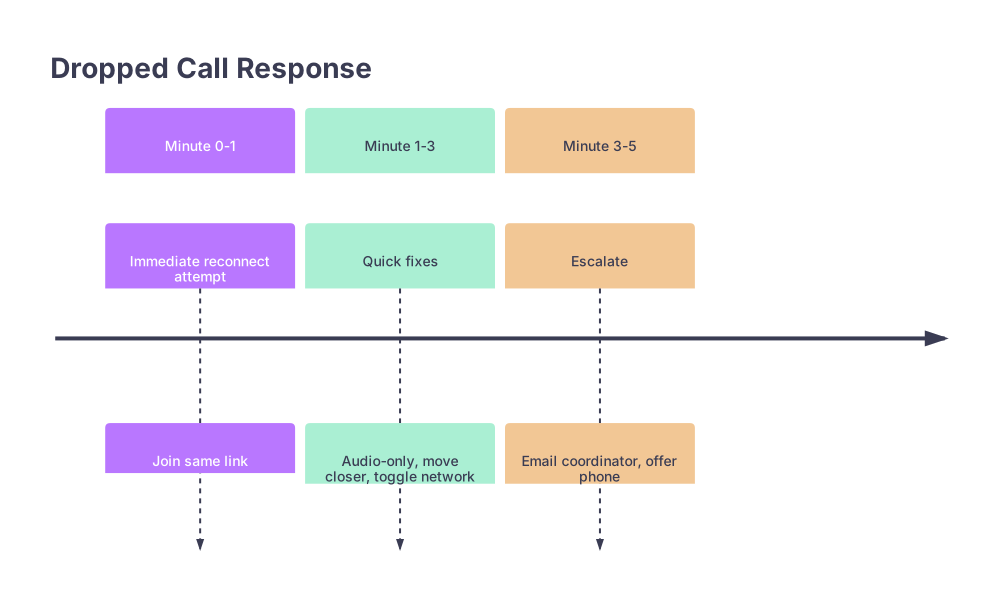
| Period | Event |
|---|---|
| Minute 0-1 - Immediate reconnect attempt | Join same link |
| Minute 1-3 - Quick fixes | Audio-only, move closer, toggle network |
| Minute 3-5 - Escalate | Email coordinator, offer phone |

- 0–1 minute: Just rejoin.
- 1–3 minutes: Try one or two quick fixes (not a full system overhaul).
- 3–5 minutes: Stop. Email coordinator. Offer call or reschedule.
This shows respect for their time and decisiveness on your part.
FAQ (Exactly 3 Questions)
1. Should I explicitly say it was my internet, or just say “connection issue”?
Say “connection” unless they directly ask. For example: “My connection briefly dropped.” You do not need a long explanation or to confess your router brand. Over‑explaining sounds defensive.
2. If the PD seems annoyed, should I apologize multiple times to show I care?
No. One concise apology plus a solution is professional. Repeated apologizing keeps the focus on the problem and makes you look insecure. Shift quickly to: “I am happy to keep my answers concise so we can cover what is most helpful for you.”
3. Will a dropped call ever cost me a spot on a rank list?
Only if your reaction is poor—panic, blame, or inability to recover. Programs know tech issues happen. They judge how you handle them. If you use the recovery scripts above, keep your answers solid, and do not let the glitch infect the rest of the conversation, it will be a non‑issue or even a small plus in your favor.
Key points:
- One clean, confident recovery sentence beats a long apology.
- Respect the PD’s time: quick reconnect, brief troubleshooting, then escalate with clear options.
- The glitch is not the test. Your composure and language afterward are.



