

It is 7:42 AM where you are. You are sipping coffee in scrubs, thinking your video interview for Internal Medicine at 9:00 AM EST is in more than an hour.
Your phone buzzes: “We’re ready whenever you are, just let us know when you can join the Zoom room.”
You stare at the email. You realize 9:00 AM EST was… 7 minutes ago. Your heart drops. You scramble to open the link, mumbling apologies, trying to blame “time zones” without sounding incompetent. You know what the coordinator is thinking:
If you cannot read a time zone correctly, can you handle cross-cover, consults, and 28 patients on a night shift?
That is exactly the association you are fighting during residency interview season. Time-zone and scheduling mistakes do not just cost you punctuality points. They label you as unreliable in a process where reliability is the minimum requirement.
Let me walk you through the most common traps that make applicants look flaky, and how to avoid every single one of them.
Mistake #1: Misreading the Time Zone (And Pretending It Is No Big Deal)
This is the obvious one, but people still blow it every year.
Programs send invitations that say things like:
- “Your interview is scheduled for 10:30 AM Pacific Time.”
- “Orientation at 7:45 AM Central. First interview at 8:00 AM.”
- “All times listed are in Eastern Time (US & Canada).”
Applicants glance at it, think, “Sure, 3 hours difference,” and move on. Then they:
- Forget that some states do not observe Daylight Saving.
- Assume the program’s city is in a time zone it is not.
- Mix up CET/EST, PST/PDT, GMT/UTC, or “local time” vs their own calendar’s default.
I have seen people miss interviews by exactly one hour more times than I can count.
The part that hurts you the most is not the honest mistake. It is when you minimize it:
“Sorry, I got the time zone wrong, haha, my bad.”
To a PD, that sounds like: “I did not double-check something basic, and I am not taking it seriously even now.”
How to avoid this
You do not “eyeball” time zones. You standardize:
- Convert everything to one personal standard time zone the moment you get the email. I recommend converting all interviews into your local time and into UTC (for sanity checking).
- Use a reputable converter:
- Timeanddate.com
- World Time Buddy
- Google: “10:30 AM Central Time in [your city]”
- Confirm the city AND zone. Example: “Minnesota” is Central. “Phoenix” might not observe DST. “Indiana” has areas in Eastern and Central. Do not assume.
If you are even slightly unsure, you email the coordinator:
“Just to confirm, my interview on December 5 is at 9:00 AM Central Time, which is 10:00 AM Eastern Time, correct?”
Yes, you risk sounding detail-obsessed. That is better than sounding absent.
Mistake #2: Trusting Calendar Auto-Conversion Blindly
“Do not worry, they sent a calendar invite. It auto-adjusts.”
This sentence has gotten so many applicants into trouble.
Calendar tools are great until:
- You have your default time zone set incorrectly (e.g., still set to your home country while you are in the U.S.).
- You are traveling between time zones (audition rotations, away electives, going home).
- You use multiple calendar apps: iCal, Google, Outlook, ERAS scheduler.
- The program’s invite time zone setting is wrong. (Yes, this happens.)
You click “Accept,” it lands in your calendar, and you never check the time zone metadata. Then suddenly what you think is 9:00 AM becomes 8:00 AM or 10:00 AM on a different device.
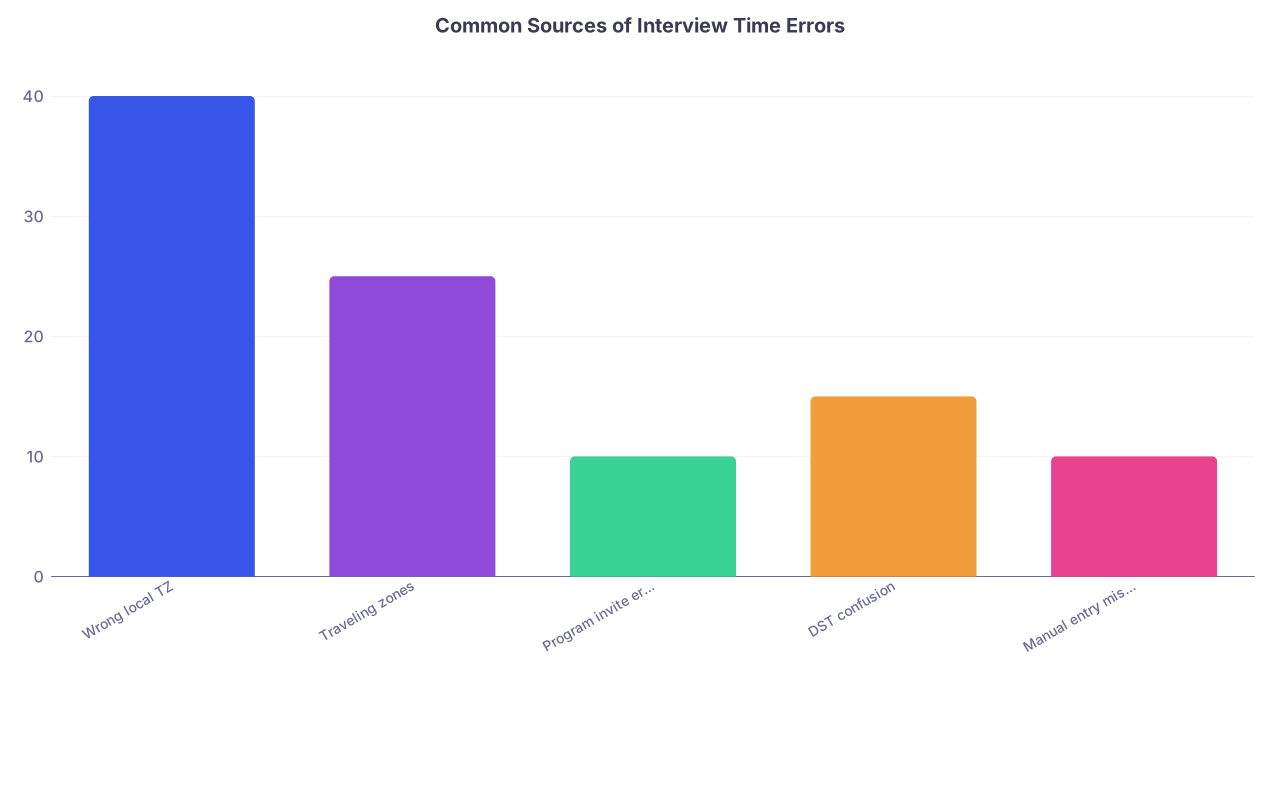
| Category | Value |
|---|---|
| Wrong local TZ | 40 |
| Traveling zones | 25 |
| Program invite error | 10 |
| DST confusion | 15 |
| Manual entry mistake | 10 |
How to avoid this
You treat calendar invites like medication orders: you verify.
When you receive any interview invite:
- Open the calendar item.
- Look for “Time zone” on the event details.
- Confirm:
- The event time (“10:00 AM Eastern”)
- Your device’s time zone setting
- What that means in your actual physical location on that date
If you are going to travel:
- The week before your trip, deliberately check a couple of interviews that occur during travel.
- Confirm where you will be physically, and what time your devices will think it is.
Worst-case? Create two events on your calendar:
- One in the program’s time zone
- One in your local time zone
Label one “DO NOT USE – program TZ reference only” if you must. But do not hand over control to software and hope for the best.
Mistake #3: Booking Back-to-Back Interviews Across Time Zones
This one is deadly because it looks fine… on paper.
You think:
- “8 AM–12 PM EST interview with Program A.”
- “Then 11 AM–3 PM CST interview with Program B.”
You see a one-hour offset, think there is overlap but maybe they will end early. Or you gamble that introductions run short.
On the actual day:
- Program A runs late. Breakouts run long. PD talks an extra 25 minutes.
- Program B starts on time.
- You are sweating in a breakout room trying to secretly log onto another Zoom meeting “just to explain.”
Programs talk to each other. Even if they do not, word gets around when an applicant leaves mid-session for another interview.
You look like someone who:
- Overcommits.
- Cannot plan.
- Treats the program as interchangeable.
There is no way to spin that into “I am very enthusiastic about both your programs.”
How to avoid this
You create protected blocks around each interview.
For every interview, you block:
- 60–90 minutes before start time (tech check, dress, mental prep).
- 60–90 minutes after scheduled end (overruns, debrief, notes).
If there is even a small chance of overlap between two programs, you do not schedule both on the same day. You ask for an alternate date.
Programs would rather you say:
“I am very interested in your program. I am already scheduled for another interview that might overlap in timing. Is there any chance of another date?”
than see you vanish halfway through a faculty interview.
Mistake #4: Losing Track of Daylight Saving Time and International Differences
If you are an IMG or taking interviews from outside the U.S., you are at higher risk here. Daylight Saving Time changes are brutal.
Common errors:
- U.S. switches clocks. Your country does not. Suddenly, all your interview times shift by one hour.
- You schedule based on “GMT” but the program actually meant “local time” and used a calendar default.
- You rely on a screenshot of the original invite instead of re-checking closer to the date.

| Step | Description |
|---|---|
| Step 1 | Receive Invite |
| Step 2 | Check Program Time Zone |
| Step 3 | Check DST Status on Date |
| Step 4 | Use Online Converter for That Specific Date |
| Step 5 | Create Calendar Event in Local Time |
| Step 6 | Reconfirm Time 3-5 Days Before |
How to avoid this
You treat Daylight Saving like a medication change: you re-check.
- Every time there is a DST shift in your country or the U.S., go through your upcoming two weeks of interviews.
- For each interview:
- Confirm the date and time on the original email.
- Re-run that date/time through a converter.
- Compare it to what your calendar currently shows.
Do this especially if:
- You are in Europe or Asia and interviewing in U.S. time zones.
- You are traveling across borders.
- You scheduled interviews before a DST change was applied.
Yes, it is tedious. It is less tedious than explaining to a coordinator why you appeared in the Zoom room an hour after the PD had already left.
Mistake #5: Being Vague or Casual in Scheduling Emails
The content of your emails can quietly make you look unreliable even before any time-zone confusion happens.
Red flags in your messages:
- “Any time that afternoon works.”
- “Morning is fine for me.”
- “I think that should be 7 AM my time, right?”
- “I am usually around.”
This signals you are not committing to a specific moment. You are leaving wiggle room. Programs do not want wiggle room. They want: “You will show up at exactly 9:30 AM. Period.”
How to avoid this
You write like someone who runs a trauma service, not a casual meetup.
When confirming time, always:
- State the program’s time.
- State your local time.
- State the date clearly, including day of week.
For example:
“Thank you for the opportunity. I confirm my interview on Tuesday, November 14, at 9:00 AM Pacific Time, which is 11:00 AM Central Time, where I will be located.”
If you are wrong, the coordinator will correct you. That is what you want—to catch it in email, not on interview day.
Mistake #6: Overloading Your Interview Calendar Like a Workhorse
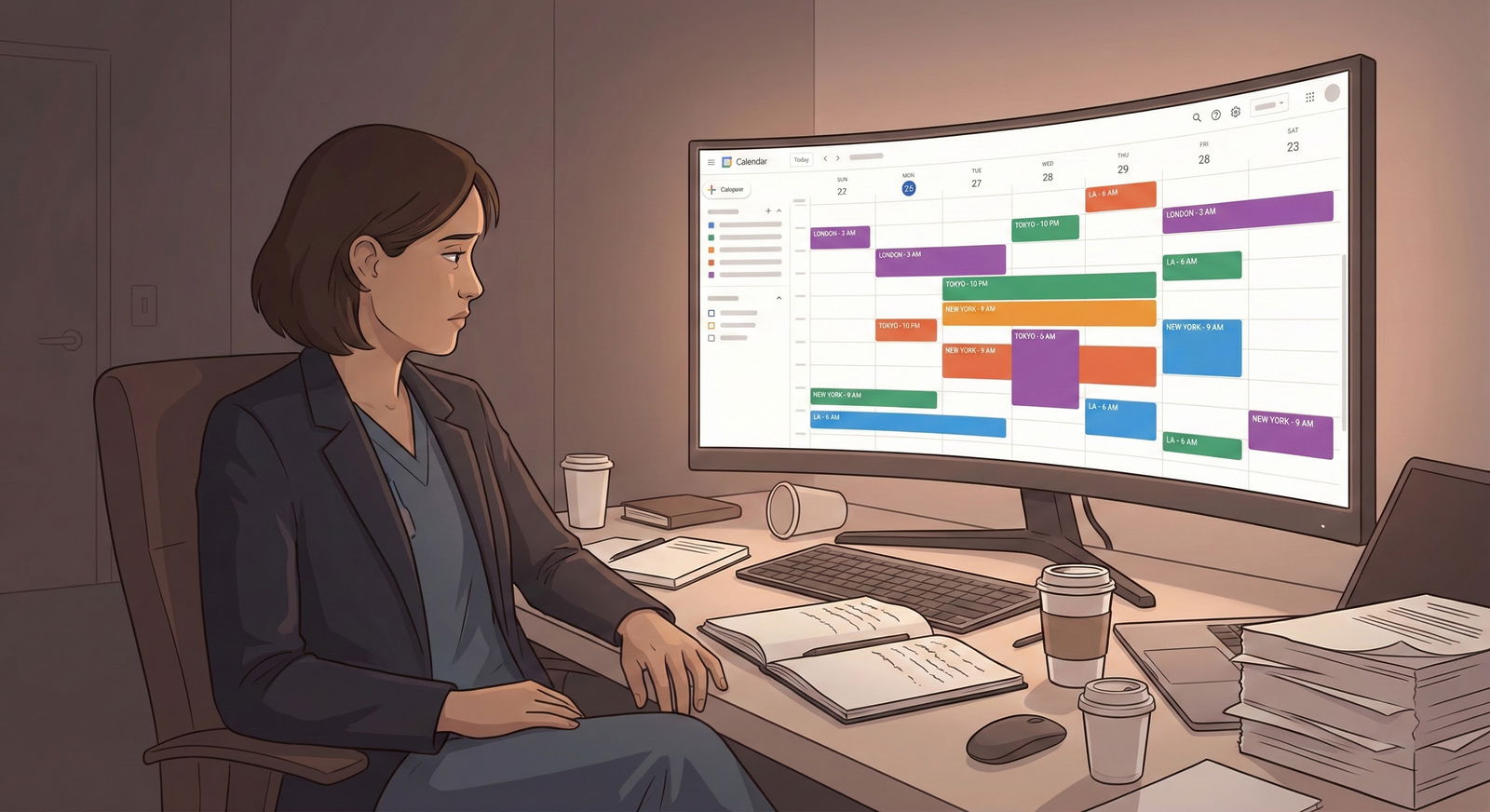
Another pattern: the applicant who tries to stack interviews nearly every day, across multiple time zones, with minimal breaks for sleep, travel, or mental reset.
On paper:
- You “maximize” your chances.
- You “fit” 20+ interviews into a tight window.
In reality:
- You mis-remember which program is at which time.
- You show up frazzled, or late.
- You confuse one program’s features with another during interviews.
- Your scheduling fatigue leads you to click “accept” on the wrong date or wrong time.
This is exactly how smart, capable applicants end up no-showing or joining halfway through a social event that started an hour earlier.
How to avoid this
You plan your interview season like an ICU call schedule, not like a weekend trip.
Non-negotiables:
- Hard cap on number of interview days per week (e.g., 3–4 max).
- At least one full no-interview day per week.
- Avoid scheduling more than one program per day; two only if one is a short social and there is zero time conflict.
If a program offers you a date that would force unsafe stacking, say:
“I would be honored to interview with your program. On that date, I am already scheduled with another program and want to ensure I give your interview my full attention. Is there an alternative date available?”
That reads as professional, not demanding.
Mistake #7: Not Doing a Time-Zone “Pre-Flight Check” the Day Before
Many applicants think “I already checked everything when I scheduled it.” Then:
- Their device automatically changes time zones during travel.
- The program sends an updated schedule with slightly shifted times.
- They misremember whether it was 8:00 or 8:30.
- They mix up AM and PM on one device.
The day-before check is where you catch most of these.
The 24-Hour Pre-Interview Checklist
Do this for every interview, even if you are 100% sure:
- Open the original email.
- Confirm:
- Date
- Time
- Time zone
- Meeting link
- Open your calendar event.
- Confirm that the start time on your device matches what you get from:
- Google (e.g., “9:00 AM Pacific Time in Chicago on November 14, 2025”)
- Set two alarms:
- 60 minutes before
- 15–20 minutes before
If you spot a discrepancy, email the coordinator immediately, not the morning of.
Mistake #8: Playing the “Technology Glitch” Card When You Just Miscalculated
I have to say this bluntly.
Coordinators and PDs have heard every excuse:
- “Zoom wasn’t working.”
- “My internet cut out right when we were starting.”
- “My calendar didn’t convert the time properly.”
- “My phone didn’t update the time zone.”
Many of them are true. Many are not.
If your real issue was that you got the time conversion wrong, and you try to blame it on an “error,” it often shows. You sound vague. Your timeline does not add up. Your apology feels scripted. The coordinator is not fooled.
And once they suspect you are not being straight, you have another problem: perceived dishonesty.
How to avoid this
First, avoid the error with all the steps above.
If you still mess up, be direct:
- Own exactly what happened.
- Do not add fluff.
Example:
“I want to apologize. I misread the time zone and joined 25 minutes late. That was my mistake. I understand if it is not possible to reschedule, but if there is any chance to still meet with your team, I would be very grateful.”
It is not about groveling. It is about sounding like a grown professional who can admit an error without deflecting.
Mistake #9: Ignoring How Programs Perceive Reliability
Here is what many applicants do not fully grasp:
To a residency program, interviewing you is a stress test of your reliability.
They are asking:
- Do you answer emails clearly and promptly?
- Do you show up on time or early?
- Do you handle basic logistics without hand-holding?
- If something goes wrong, do you communicate proactively and truthfully?
A time-zone or scheduling mistake, by itself, may not doom your chances. I have seen people matched at strong programs even after a minor hiccup—if everything else about them screamed “solid, mature, dependable.”
But when your application is “borderline” and you combine:
- 1 time-zone mix-up
- 1 reschedule request at the last minute
- 1 late login to a social
…you are quietly moved from “maybe” to “no” at many places. Without anyone ever telling you why.
| Applicant Behavior | Common Program Interpretation |
|---|---|
| Confirms time explicitly in both time zones | Detail-oriented, reliable |
| Joins 5–10 minutes early | Professional, organized |
| Logs in 10–15 minutes late once, honest | Human error, still potentially solid |
| Repeated time confusion / rescheduling | Disorganized, high-risk intern |
| Blames tech vaguely for time errors | Questionable honesty, low reliability |
Mistake #10: Treating Socials and "Optional" Events as Time-Flexible
Evening pre-interview socials, Q&A with residents, optional tours—they get labeled in your brain as “less important.” That is where people get sloppy:
- Showing up “whenever” during the social because the time zone felt fuzzy.
- Leaving after 15 minutes because another commitment “ran over.”
- Logging in late and explaining you thought it was 7 PM “your time.”
Residents talk. If your name comes up later and someone says, “That was the person who joined 40 minutes late and then left quickly,” that sticks.
How to avoid this
You treat socials like mini-interviews.
- Same time-zone rigor.
- Same pre-checking.
- Same early login.
If you legitimately cannot attend or you realize a time-zone mistake before the event starts, email:
“I am very interested in the chance to speak with your residents. I realized I may have miscalculated the time zone for tonight’s social and will not be able to join on time. If there is another opportunity to meet residents, I would greatly appreciate it.”
That is infinitely better than ghosting or drifting in mid-way with a weak excuse.
Pulling It Together: A Simple, Safe System
Do not rely on “being careful.” Build a system you follow every time.
Here is a straightforward workflow:

| Step | Description |
|---|---|
| Step 1 | Receive Invite |
| Step 2 | Log Program Time & TZ |
| Step 3 | Convert to Local Time with Online Tool |
| Step 4 | Create Calendar Event with Exact TZ |
| Step 5 | Block Prep and Overrun Time |
| Step 6 | Set 2 Alarms |
| Step 7 | Recheck 24 Hours Before |
| Step 8 | Confirm If Any Doubt |
Once you treat time-zone and scheduling like a clinical safety check rather than a clerical detail, your risk of looking unreliable drops dramatically.



