
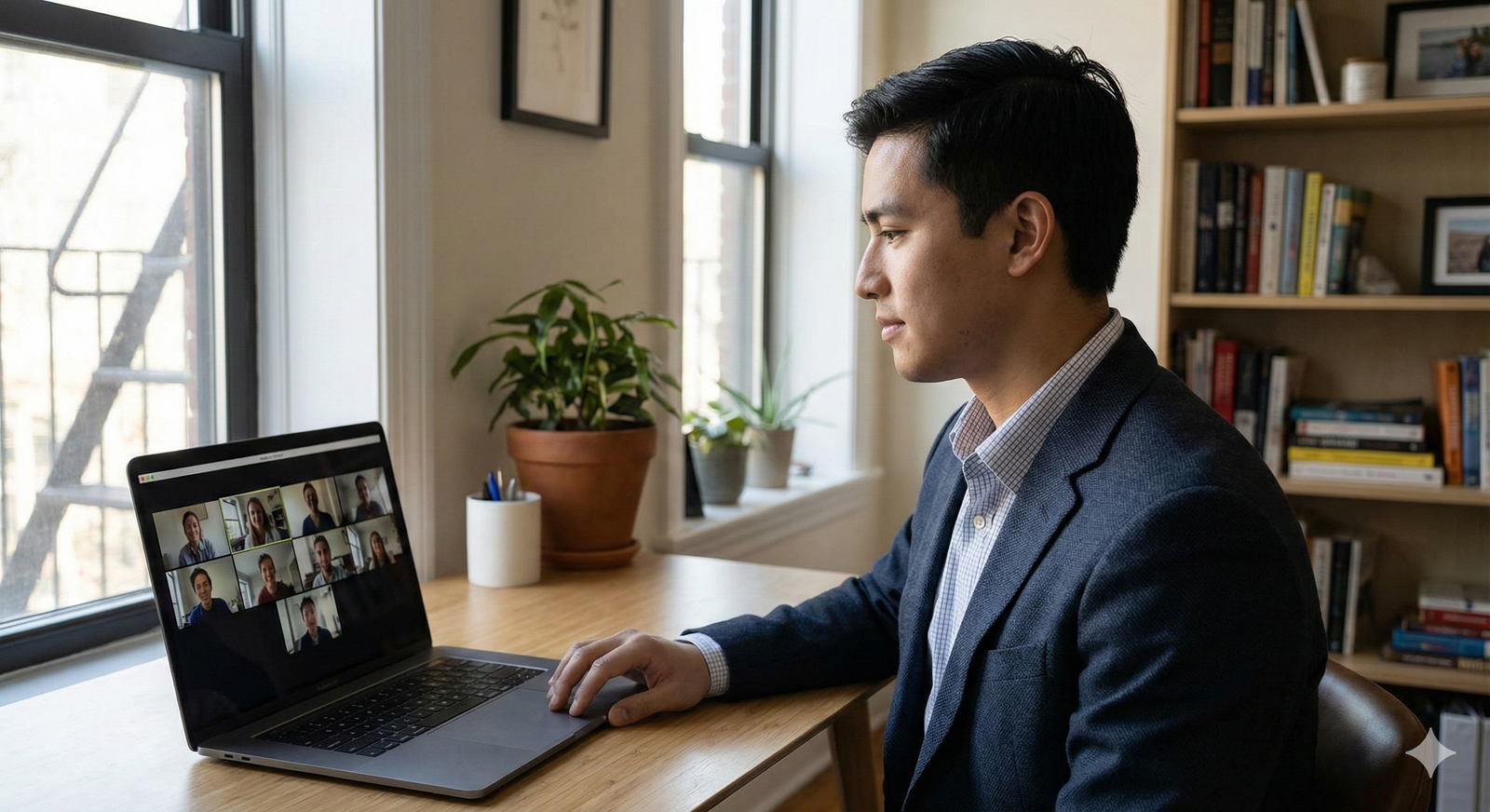
You’re three minutes into your big residency video interview. The PD is asking you about your research, you’re answering smoothly, and then you see it—their eyes flick away from your face to something behind you. They keep doing it. You don’t know if it’s the crooked poster, the pile of laundry, or the weird shadow on your wall that looks like a horror movie extra.
You walk away thinking, “I think that went okay?” It did not.
Background and lighting mistakes kill otherwise solid interviews. Not because program directors are shallow. Because distraction kills connection. And once they’re half-focused on your messy bookshelf, they’re not fully listening to your answer about managing an acutely decompensating patient.
Let’s walk through the specific background and lighting errors I see over and over again in residency video interviews—and how to avoid making the same dumb, totally preventable mistakes.
1. The “Dorm Room” Disaster Background
If your interview frame screams “first-year undergrad” instead of “future colleague,” you’ve already lost points before you say hello.
The usual offenders
I’ve seen all of these on real residency interviews:
- Open closet with clothes spilling out
- Unmade bed taking up half the frame
- Posters (Marvel, anime, football team flags) behind your head
- Empty takeout containers or water bottles stacked on a dresser
- Piles of laundry on a chair in the corner
- Visible trash can with trash above the rim
You think, “It’s just a background, they know I’m a student.” No. They’re evaluating professional judgment. If you can’t be bothered to clear your visible space for a 20–30 minute high-stakes conversation, what does that say about how you prep for rounds? Handoffs? Patient care?
Do not give them that question.
The fix
You do not need a Pinterest-perfect apartment. You need a frame that is:
- Clean
- Neutral
- Boring in the best way
If your only “quiet” space is your bedroom:
- Make the bed. Properly. Tight, no clutter on top.
- Remove all posters/wall art that looks like a dorm. Keep one simple, neutral piece at most.
- Pull laundry, boxes, and random junk completely out of frame, not just off to the side.
If you have an open closet in view, either close it or move your setup. An open closet behind you instantly makes the shot look chaotic, even if it’s technically “organized.”
2. Busy Backgrounds That Compete With Your Face
The other extreme: the “I’m interesting, look at all my stuff” background. Giant gallery walls. Bookshelves crammed full. Diplomas, medals, photos, plants, candles, trophies, and fourteen other “conversation starters.”
It does start conversations. In their head:
- “Is that a Funko Pop on the shelf?”
- “Why is that painting crooked?”
- “What’s that framed quote say?”
Every time they’re trying to read your wall, they’re not listening to you.
The tell-tale signs
You’ve made this mistake if:
- You’ve thought, “Maybe they’ll notice my [award/book/art] behind me.”
- Your shelves are visible and crammed floor to ceiling.
- Your background looks great on Instagram but chaotic on Zoom.
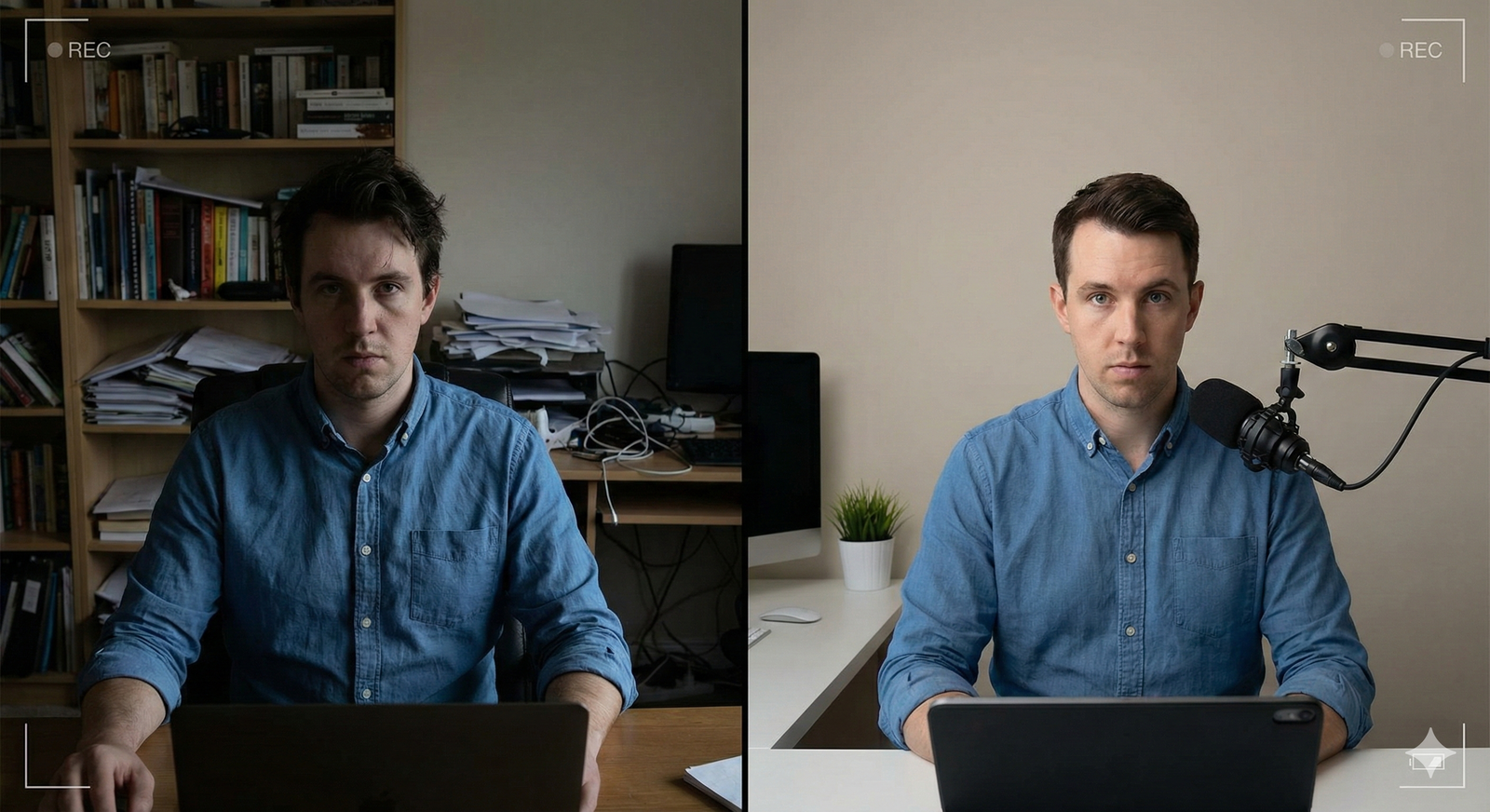
The fix
Think like a PD: they want your face and your words to be the only focal point.
Aim for:
- A plain wall or one piece of muted, non-controversial art
- A simple plant or lamp off to the side, not directly behind your head
- If you use a bookshelf, keep it mostly empty in the visible portion—2–3 neat items max
When in doubt, stand back from your screen, squint, and see what your eye is drawn to first. If it’s not your own face, strip the background down.
3. Terrible Lighting That Makes You Hard to Read
If they can’t clearly see your face, they can’t read your expressions. If they can’t read your expressions, they can’t feel like they know you. That’s a problem.
Here are the lighting disasters I keep seeing.
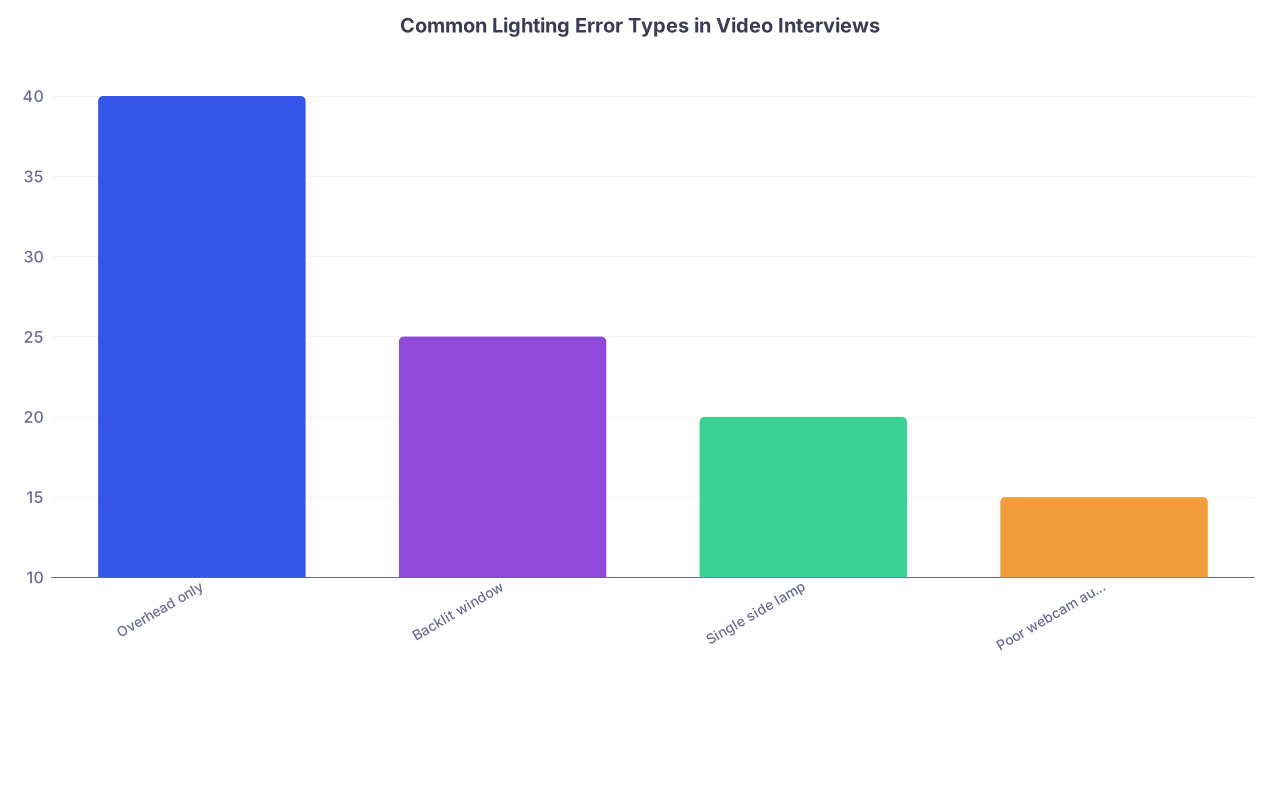
The “Overhead Dungeon” Look
You’re lit by a single ceiling light directly above or behind you. Result:
- Harsh shadows under your eyes
- Deep shadows in the eye sockets
- Weird shine on the forehead
- You look tired, stressed, and older than you are
This lighting makes even the most enthusiastic applicant look flat or annoyed. It also makes micro-expressions harder to detect, which hurts you when you’re trying to show warmth.
The Backlit Silhouette
You sit in front of a bright window or open blinds because “natural light is good.” Yes, but not like that.
What they see:
- Your face is dark and underexposed
- The window behind you is a glowing white box
- You look like you’re in a witness protection interview
| Category | Value |
|---|---|
| Overhead only | 40 |
| Backlit window | 25 |
| Single side lamp | 20 |
| Poor webcam auto-exposure | 15 |
The Single Side Lamp Shadow Face
You have one strong lamp to your left or right. It creates:
- One overly bright side of your face
- One side in deep shadow
- A “villain monologue” vibe
Not the look you want while discussing professionalism.
The fix
You want soft, even front light. Not harsh, not dim, and definitely not behind you.
Bare minimum setup:
- Turn off harsh overhead lights if they cause deep shadows.
- Place a lamp or ring light behind your laptop/webcam, slightly above eye level, pointing at your face.
- If there’s a window, face the window, do not have it behind you.
Cheap but effective:
- A $20–30 ring light can fix 80% of lighting disasters.
- If you cannot buy anything, use two lamps: one on each side of your screen, aimed slightly toward your face, with shades or bounced off a wall for softer light.
Then test in your actual interview platform (Zoom, Thalamus, Teams, whatever the program uses), not just your laptop camera app. Some platforms handle auto-exposure differently.
4. Virtual Backgrounds Used Wrong
Virtual backgrounds are not automatically professional. I’ve watched too many applicants turn a normal room into a cartoon.
Here’s where it goes wrong:
- Hair edges glitching in and out
- Parts of your shoulders disappearing
- Your head cutting off when you lean back
- Background changing when you move your hands
Every glitch screams “this is fake” and pulls attention away from you. And if your internet or laptop is marginal, virtual backgrounds chew up processing power and cause lag.
When virtual backgrounds are a bad idea
They’re a mistake when:
- Your actual room is fine but “not exciting enough”
- You’re using a branded campus background that’s low resolution
- You have a complex hairstyle or headset that constantly glitches at the edges
When they’re acceptable (with conditions)
If your real environment is truly unusable (roommates walking through, very cluttered shared space), a plain, non-distracting virtual background can be safer than chaos.
Rules:
- Choose a simple, solid or very subtle gradient color. No fake offices, beaches, libraries, or cityscapes.
- Avoid strong blur if your machine struggles—it will lag and ghost around your edges.
- Check your internet and CPU load. If your video stutters, drop the background.
You know you’ve made a mistake if you spent more time choosing the virtual wallpaper than checking whether your own head disappears when you move.
5. Camera Position That Warps Your Face (and Your Presence)
This one isn’t technically just lighting or background, but it directly affects how those show up.
The classic errors:
- Laptop too low: camera looking up your nose, ceiling fan dominating the top of the frame.
- Camera too high: you look like a child peering up at an adult.
- Too close: your face fills the frame, your background looks fine but they feel physically crowded.
- Too far: you’re a tiny head in the distance, with tons of visible wall and distractions around you.
It’s not just aesthetic. This changes the power dynamic. A low camera angle can make you look intimidating or odd. A high angle can make you look diminished.
The fix
You want:
- Camera at or slightly above eye level
- Your eyes about 1/3 from the top of the frame
- Head and upper chest visible (roughly mid-torso up)
Stack textbooks or boxes under your laptop if needed. Everyone does it. Just don’t leave the stack visible behind you.
6. Reflective Glasses and Screen Glare
If you wear glasses, you have a different set of traps.
Here’s what goes wrong:
- Bright ring light reflection dead center on both lenses
- Multiple screen reflections so your eyes vanish behind white rectangles
- Tilted glasses causing asymmetrical glare on one eye
I’ve watched interviews where I literally couldn’t see the applicant’s pupils at all—just big white or green screen reflections. That makes it hard to feel like you’re talking to a person instead of a robot.
The fix
You need to adjust angles, not just brightness.
Try this sequence:
- Raise the light source a bit higher and tilt it slightly downward.
- Move the light farther to the side and diffuse it (through a lampshade, white bedsheet, or wall bounce).
- Tilt your glasses minutely down or up by adjusting the nose pads or the ear pieces.
Then test with video recording. Move your head the way you actually move in conversation. Check if your pupils remain visible under normal motion, not just when you’re rigidly still.
7. Background Noise That Ruins Visual Focus
Yes, noise is audio. But it makes people scan your background visually, searching for the source: the fan, the open window, the roommate, the dog.
Common distracting sounds that pull visual attention to your surroundings:
- Loud HVAC/fans
- Street noise through open windows
- Roommates slamming doors or laughing
- Phone buzzing on the visible desk behind you
Your background might look clean, but if they keep hearing things, they’re mentally imagining what’s outside the frame instead of listening to you.
The fix
Before your real interview day:
- Do a test call at the same time of day. Listen for outside noise.
- Turn off fans if possible, or move them out of mic range.
- Put your phone in another room or at least out of sight and on Do Not Disturb.
If your only quiet space is still imperfect (e.g., thin walls, siblings), use the tightest, simplest frame possible so at least your visuals aren’t adding to the chaos.
8. Overcompensating: The Overproduced Look
Here’s another trap: you fix all the basics, then you overdo it to “stand out.”
I’ve seen:
- RGB LED strips behind applicants changing colors
- Dramatic colored lighting (blue/purple/pink) like a Twitch streamer setup
- Professional studio mics and boom arms in frame dominating half the image
- Super heavy blur or portrait mode that glitches on hair/shoulders constantly
Programs are not looking for content creators. They want a clear, professional human they can imagine on their team at 3 a.m. on call. If your setup looks more like a gaming stream than a residency interview, they will assume your priorities are slightly misaligned.
The fix
Ask yourself one question: “If I saw this exact setup in a faculty Zoom meeting, would I think, ‘this is a serious physician’ or ‘this person spends way too much time on their lighting’?”
If it’s the latter, dial it back.
9. Not Testing Under “Real Conditions”
The biggest meta-error: people only check their setup once, quickly, and assume it holds.
You’d be surprised how different things look:
- Morning vs afternoon vs evening (window light shifts massively)
- On Zoom vs Thalamus vs Teams (different compression and exposure)
- On your laptop vs on their larger monitor

| Step | Description |
|---|---|
| Step 1 | Schedule test time |
| Step 2 | Set up camera & lighting |
| Step 3 | Open actual platform |
| Step 4 | Record 2-minute mock answer |
| Step 5 | Review on another device |
| Step 6 | Lock in setup & mark spot |
| Step 7 | Face clear & centered? |
If you only check once, at night, on Zoom, don’t be surprised when your 9 a.m. Teams interview looks like a completely different room.
The fix
Do a real rehearsal:
- Same time of day as your first interview.
- On the actual platform the program will use (or a close approximation).
- Wearing the same clothes you’ll wear—some fabrics reflect a lot more light than you expect.
- Recording yourself and then watching on a different device (so you see it with fresh eyes).
If you look at the recording and your first thought is anything other than “clear, simple, professional,” keep fixing.
10. Quick Visual Cheatsheet: Good vs Bad Setups
Here’s how some typical setups compare.
| Setup Type | Background Issue | Lighting Issue | Overall Impression |
|---|---|---|---|
| Unmade bed + window | Messy/distracting | Backlit silhouette | Disorganized, unpolished |
| Bookshelf crammed w/ stuff | Busy, competes w/ face | Mixed, uneven shadows | Distracting, try-hard |
| Plain wall, desk lamp | Clean, minimal | Harsh from one side | Acceptable but fixable |
| Plain wall, front soft light | Clean, professional | Even, clear on face | Strong, focused |
| Virtual office background | Slight glitching | Depends on hardware | Risky, can feel fake |
If your current setup looks like the first or second row, do not convince yourself “it’s probably fine.” It’s not. Programs might not articulate it, but they feel the lack of polish.
Your Next Step Today
Do not wait until the night before your interview to figure this out.
Today—right now—open your laptop, join a test Zoom/Teams/Thalamus call, and hit record. Sit exactly where you think you’ll sit on interview day. Answer one standard question out loud for 60–90 seconds.
Then watch that recording and ask yourself, ruthlessly:
- What’s the first thing my eye goes to?
- Can I clearly see my eyes, or are they in shadow/glare?
- Does anything behind me pull attention more than my face?
If the answer to any of those is wrong, move one thing. Change one light. Remove one item from the background. Record again.
Repeat until the only thing worth noticing is you.



