
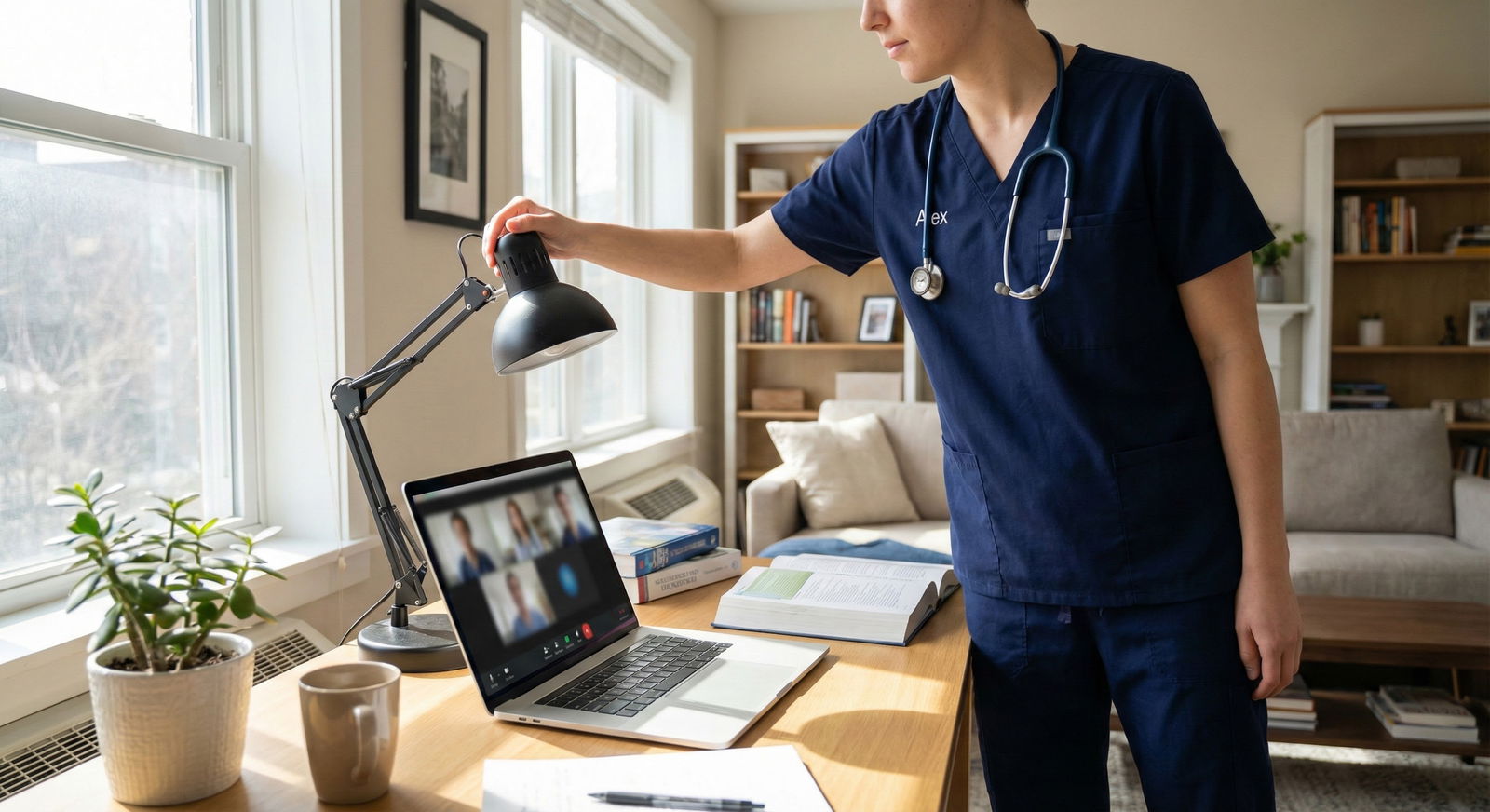
No Private Room on Campus? Creative Solutions for Video Interviews
Your residency interview is tomorrow at 8 a.m., your roommate snores, the walls are thin, and every “quiet” spot on campus turns into a social hub exactly when you need silence. So where are you actually supposed to do this video interview?
Let’s walk through what people really do when they don’t have a private room. Not the fantasy version. The “my dorm is chaos, my campus is packed, and I still have to look like a future resident” version.
I’ll break it down like this:
- How programs actually judge your setup
- Best location options (ranked from ideal to desperate-but-workable)
- How to turn a non-ideal space into a professional one
- Exact scripts to reserve spaces and ask for help
- What to do if something goes wrong mid-interview
What Programs Actually Care About (It’s Not Fancy Decor)
You are not being graded on whether your background looks like a Pottery Barn catalog.
Programs care about three things:
- Can we see you clearly?
- Can we hear you clearly?
- Are you taking this seriously?
That’s it. “Taking this seriously” shows up as:
- You clearly tried to find a quiet, contained space
- You tested your tech
- You’re not obviously in a chaotic environment you didn’t bother to control
Interviewers have seen:
- People in tiny campus offices with a blank wall behind them – totally fine
- People in cars that are clean, parked, and quiet – surprisingly acceptable
- People in busy coffee shops with clanging cups and people yelling drink orders – not fine
So the game is not “find perfection.” It’s “eliminate distractions aggressively.”
Location Options: Ranked From Best to Last-Resort
Here’s the reality menu. You start at the top and work down until something works.
| Rank | Location Type |
|---|---|
| 1 | Official reserved study/meeting room |
| 2 | Office you borrow (faculty/admin) |
| 3 | Library/quiet building corner + backdrop |
| 4 | Parked car with stable Wi-Fi |
| 5 | Dorm room / bedroom heavily controlled |
| 6 | Other “weird but quiet” space (closet, storage, etc.) |
1. Reserved Study or Meeting Rooms (Best Case)
If your campus has:
- Library study rooms
- Med school conference rooms
- Student affairs / dean’s office meeting rooms
Those are gold.
What to do:
- Book the room for at least 30–45 minutes before your interview and 30 minutes after.
If the interview is 60 minutes, reserve 2 hours. You want buffer for tech issues and overruns. - If booking requires a reason, write: “Residency interview – private video call, needs quiet space.”
- Day before: physically walk there, test Wi-Fi, find outlets, check cell service.
Red flags to avoid:
- Glass walls looking into a busy hallway with people constantly walking by. If that’s all you’ve got, sit with your back to the glass and point the camera toward the wall.
- Rooms near the café or student lounge that become noisy at random times.
Script for email to admin / library if online booking is full:
Hi [Name],
I’m a [MS4 / IMG student] and I have a residency video interview on [date] from [time–time]. The online booking system shows no available rooms, but I wanted to ask if there’s any way to reserve a quiet space just for that hour. It’s a high-stakes interview and I don’t have a private room in my housing.Totally understand if it’s not possible, but I wanted to check before I start looking off campus.
Thank you so much,
[Your Name]
People are usually more sympathetic than you expect when they see “residency interview.”
2. Borrowed Office (Faculty / Staff / Clinic)
Students forget this option constantly: someone around you has an office that sits empty part of the day.
Candidates I’ve worked with have done interviews in:
- Clerkship director’s office
- Research mentor’s office
- School counselor’s office
- Even the med librarian’s office
You’re not asking for daily use. You need one or two blocks of 1–2 hours each.
Script to a faculty mentor:
Hi Dr. [Name],
I have a virtual residency interview for [Program] on [date] from [time–time]. I don’t have a private space in my housing, and the library rooms are booked.Would it be possible to use your office (or another private space you know of) for that time? I’d bring my own laptop and headphones, and of course I’d leave everything exactly as I found it.
No worries at all if it’s not doable, just thought I’d ask.
Best,
[Your Name]
Do this 7–10 days before the interview if you can. People’s calendars fill up.
3. Library / Quiet Building Corner + Makeshift Backdrop
Maybe all the private rooms are gone. That doesn’t mean the building is useless.
You’re looking for:
- A tucked-away corner away from the main traffic
- An outlet
- Wi-Fi that doesn’t drop
- A wall or bookshelf behind you instead of an open walkway
Then you create privacy:
- Use a cheap portable backdrop (even a solid-color foldable screen off Amazon).
- Or hang a neutral sheet or blanket behind you using Command hooks or a garment rack.
- Position your camera so the background is close behind your head. That hides more of the environment.
If your school allows it, put a sign on a nearby post during your interview time:
“Quiet Please – Video Interview in Progress – [Time–Time]”
Do not do this in the middle of the main reading room. Use side stacks, basement levels, or underused floors. I’ve seen students use the “oversized books” area because no one ever goes there.
4. Parked Car + Hotspot (More Common Than You Think)
You’ll hear people scoff at this. Ignore them. A clean, silent, parked car with solid Wi-Fi is miles better than a dorm with yelling roommates.
Conditions that must be true:
- You can park somewhere legal and safe where you won’t get towed or ticketed mid-interview.
- Your laptop can connect to reliable internet: campus Wi-Fi that reaches the lot, or a strong phone hotspot.
- Weather is tolerable enough that you won’t be visibly sweating or shivering.
- You’re not in direct blazing sun blasting your face.
How to set it up:
- Park early. At least 45 minutes before start time.
- Test your connection: run a quick Zoom/Teams test call with a friend.
- Put your laptop on the dashboard or a stable stand at eye level, not your lap.
- Angle the camera so the background is mostly your headrest, not the car window.
- Use wired earbuds or wired headphones with mic – car acoustics can echo.
Things interviewers have actually said when they realize someone is in a car:
- “Oh wow, nice thinking – whatever works for a quiet environment.”
- “Honestly, this is better than some of the chaotic homes I’ve seen.”
What they hate more than the car: noise, chaos, poor audio.
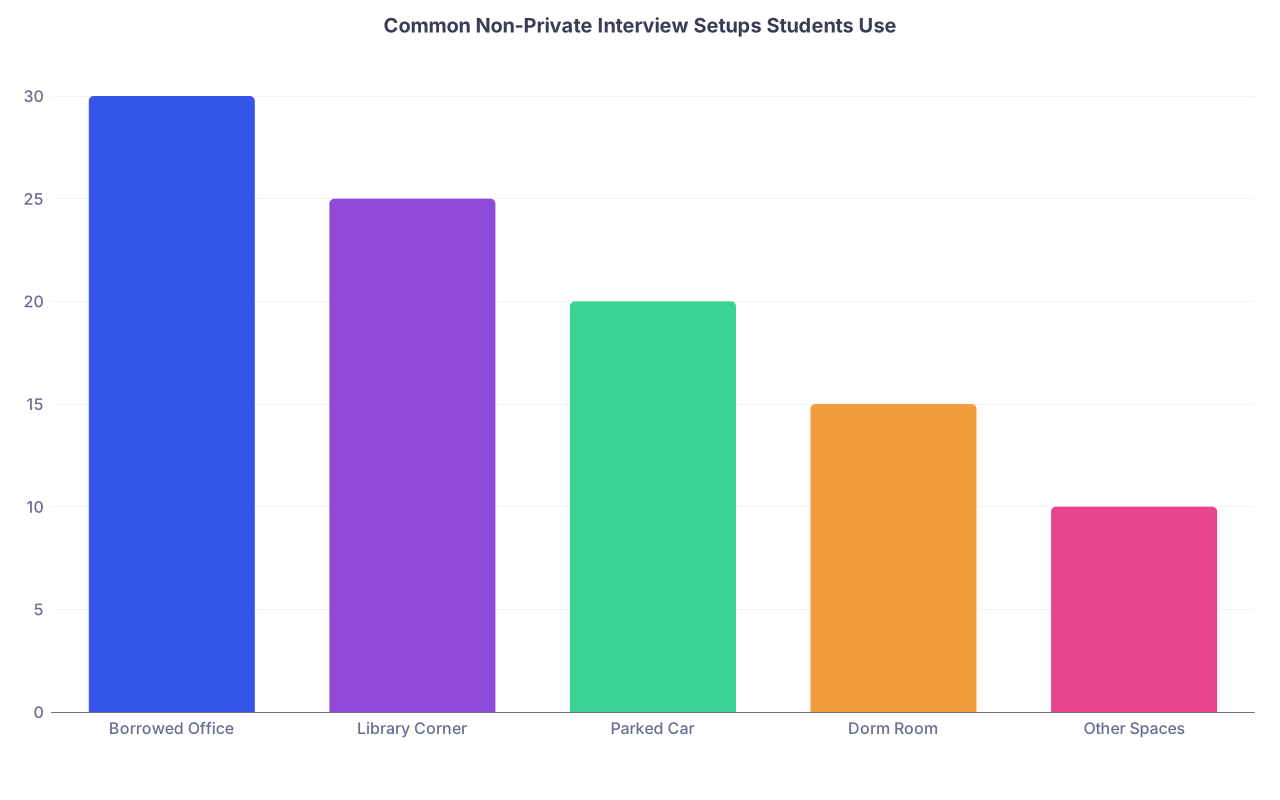
| Category | Value |
|---|---|
| Borrowed Office | 30 |
| Library Corner | 25 |
| Parked Car | 20 |
| Dorm Room | 15 |
| Other Spaces | 10 |
5. Dorm Room / Bedroom You Temporarily Turn Into a Studio
If you’re stuck in your room, you’re not doomed. You just need to treat it like a set.
Your job is to control:
- Entry
- Noise
- Background
- Roommates
Step-by-step:
Coordinate roommates early
- Tell them the date and exact times.
- Ask them to be out of the room or absolutely quiet during that period.
- Offer to swap favors: you’ll leave for their important events.
Control the physical space
- Face a blank wall or closet doors if possible.
- Remove anything behind you that looks childish, messy, or polarizing (political posters, alcohol bottles, laundry piles).
- If the only wall is ugly/chaotic, hang a plain sheet or curtain.
Soundproof as much as you can
- Close windows firmly.
- Turn off fans that make whirring noise near your mic (use a quieter one across the room if you must).
- Put a towel at the bottom of the door to dampen hallway noise.
Boundaries with roommates/neighbors
Tape a sign on your door:“Interview in progress: [Time–Time]. Please do not knock unless emergency.”
Also send a group text to roommates / close neighbors the night before:
“Hey everyone – I’ve got a big residency video interview tomorrow from [time–time]. I’ll be in my room and really need it quiet – no music, loud calls, or knocking if possible.
I really appreciate it and owe you all.”
You do not need a Pinterest-level room. You need “neutral, quiet, and clearly not a disaster.”
6. Oddball Options That Actually Work
I’ve seen every one of these used successfully:
- A large walk-in closet (with a chair and laptop on a box)
- An unused seminar room in a non-med building (art history, languages)
- The back room of a friendly campus office (student affairs, career services)
- A rented 1–2 hour slot in a coworking space near campus
Rule here: if it’s quiet, you can sit comfortably, and the Wi-Fi doesn’t die, you’re in business. No committee is docking you for being resourceful.
How To Make Any Space Look and Sound Professional
Once you pick a location, the job isn’t done. You still have to make it interview-ready.
Video: What They See
Aim for:
- Camera at eye level
- Your face well lit
- Background boring in a good way
Quick upgrades:
- Stack books or boxes to lift your laptop camera up so you’re not looking down.
- Sit 2–3 feet away from the camera, not inches.
- Use natural light from a window in front of you, not behind you. If that’s not an option, use a lamp behind your laptop, slightly above eye level.
- Wear a solid-color top that contrasts with your background. Avoid small patterns that flicker on camera.
Virtual backgrounds:
- Use only if your real background is truly bad and your system can handle it.
- Choose the simplest image: neutral office or plain color. No beach scenes, no fake libraries that look cartoonish.
- Test beforehand to make sure your hair, glasses, and hands are not glitching in and out.
Audio: What They Hear (More Important Than You Think)
If programs have to choose between seeing you in HD and hearing you clearly, they’ll pick audio every time.
Non-negotiables:
- Use some kind of headphones with built-in mic (wired preferred; AirPods / Bluetooth only if you’ve tested for lag and dropouts).
- Mute yourself when you’re not talking if your environment is at all questionable.
- Turn off noisy items: AC directly hitting your mic, loud mechanical keyboards, phone notification sounds.
Do a mock interview with a friend in the exact spot at the same time of day. Ask them:
- Is there echo?
- Any weird background noises I’m tuning out but you can hear?
- Does my voice distort when I speak louder?
Locking Down the Logistics
Test Everything in the Exact Setup
Not the night before. Two days before if possible. Then a quick re-test night before.
Checklist:
- Open the same platform (Zoom, Thalamus, Teams, Webex, whatever the program uses).
- Test audio and video in that software, from that device, on that network, in that spot.
- Plug in your laptop charger, make sure you can reach an outlet comfortably.
- Confirm your camera and mic aren’t blocked by any privacy sliders.
If your chosen space is shared (library corner, office), test it close to the actual time you’ll interview. Noise patterns change throughout the day.
Backup Plan: You Always Need One
Programs don’t just expect things to go wrong. They live with it.
Have a Plan B for:
- Location: “If the Wi-Fi here dies, I move to my car in the parking lot with my hotspot.”
- Device: “If my laptop fails, I immediately switch to my phone with headphones.”
- Internet: “If campus Wi-Fi dies, I turn on my hotspot and close all non-essential apps.”
Write this down. Literally, on paper next to you during the interview:
- Backup location: ______
- Backup device: ______
- Program contact email/number: ______
That way if something happens, you act instead of panic.
Scripts for When Things Go Wrong
Let’s say you did all this and still:
- A fire alarm goes off.
- A roommate forgets and slams the door.
- Construction starts outside your window mid-interview.
You’re not doomed. You’re judged on your composure.
If there’s sudden loud noise
Pause, stay calm, and say:
“I’m so sorry about the noise – there’s unexpected [construction / alarm / hallway traffic]. Would you mind if I take 30 seconds to move to a quieter spot so we can continue without interruption?”
Then move quickly to your backup location. Don’t narrate every step. Just relocate and rejoin.
If your Wi-Fi drops
As soon as you’re disconnected:
- Switch to hotspot or backup connection.
- Rejoin the meeting.
- If you can’t rejoin within 2–3 minutes, email the coordinator immediately from your phone.
Sample email:
Subject: Connection Issue – [Your Name] Interview at [Time]
Hi [Coordinator Name],
I just lost my internet connection during my interview for [Program Name] at [time]. I’m working to reconnect now on a backup network/device.I apologize for the disruption and will rejoin as soon as possible. If we’re unable to reconnect today, I’d be grateful for the opportunity to reschedule or continue by phone.
Thank you for your understanding,
[Your Name]
Most programs will either wait for you, let you finish, or reschedule a bit. I’ve seen people recover from full disconnections and still match there.
Coordinating Around Clinical Duties and Time Zones
No private room is one headache. Being on an inpatient service while trying to interview from campus is another.
What I’ve seen work:
Tell your attending and senior resident at the start of the rotation:
“I have a few residency interviews coming up. They’ll be on [dates] from [time–time]. I’ll do everything I can not to disrupt the team, but I may need 1–2 hours away from the hospital those days. Can we plan coverage ahead of time?”Ask if there’s an empty call room, conference room, or office in the hospital you can borrow for the interview block. Hospitals often have more private rooms than campus.
Don’t try to do the interview from:
- The team room with people walking in and out
- An on-call room that’s actively in use
- A hallway or stairwell (yes, people try this)
If you’re in a wildly different time zone than the program:
- Double-check the time zone three times.
- Set calendar reminders with the program’s time zone embedded.
- If you’re forced into a very early or late time for your location, that’s even more reason to control your environment and alert roommates.
Pulling It Together: A Real Example
Let me give you a composite scenario I’ve seen work:
- MS4 in a noisy campus apartment with 3 roommates
- Interview at 7:30 a.m. Eastern, in a city where her med school library didn’t open until 8
- No car, no private office
What she did:
Emailed the med school student affairs office:
- Explained she had a virtual residency interview, no private housing.
- Asked if there was any early-access room she could use.
They offered:
- A small advising office on the first floor, normally used for meetings starting at 9 a.m.
- She could have it 7–9 a.m. that day.
She:
- Went in the day before at 7:30 a.m. to confirm the doors actually opened that early and test Wi-Fi.
- Brought a small USB ring light, laptop stand, and wired earbuds.
- Logged on at 7:00 a.m. day-of, did a last-minute tech check, closed the door, and put a printed sign outside.
Interview went smoothly. No one cared the office wasn’t “hers.” They cared she looked prepared and unflustered.

| Step | Description |
|---|---|
| Step 1 | Interview Scheduled |
| Step 2 | Reserve study/meeting room |
| Step 3 | Ask to borrow office |
| Step 4 | Use corner + backdrop |
| Step 5 | Use parked car setup |
| Step 6 | Control dorm room/closet as last resort |
| Step 7 | Campus rooms available? |
| Step 8 | Faculty/staff office? |
| Step 9 | Quiet campus corner? |
| Step 10 | Car + reliable Wi-Fi? |
The Bottom Line
You don’t need a perfect apartment or a home office. You need:
- A space you’ve intentionally chosen and tested for quiet, light, and Wi-Fi.
- A contingency plan if that space fails you mid-interview.
- The composure to treat hiccups like an intern on call: calm, direct, and solutions-focused.
If you handle that, no one on the other side of the screen will care that your “office” is a borrowed room, an empty corner of the library, or a parked car. They’ll just see someone who can adapt and still show up like a professional.



