
It is 10:07 a.m. Your residency interview starts at 10:15.
You log in to test your camera and immediately hear it: leaf blower outside, toddler meltdown in the hallway, roommate arguing on a work call in the next room. Your “quiet” space is suddenly a circus.
You do not have time to move apartments. You barely have time to move chairs.
This is exactly the moment you prepare for now—before it happens.
Here is how to handle virtual residency interviews when your environment is noisy, crowded, or both. Not vague “try your best” advice. Concrete protocols, backup plans, and the exact words to use with programs if the situation goes sideways.
1. The Baseline: What Programs Actually Care About
Let me clear something up: programs are not expecting you to live in a soundproofed, beautifully lit condo with a dedicated office.
What they do care about:
- Can they hear you clearly without strain?
- Can they see your face (eyes, expressions) without distraction?
- Do you show judgment, professionalism, and preparation in a suboptimal situation?
They are evaluating you, not your square footage. I have seen applicants match at top programs while interviewing from:
- A parked car in a quiet lot
- A library study room with a plain wall
- A corner of a shared bedroom with a sheet used as a backdrop
And I have seen applicants look unprepared and flaky from gorgeous, silent home offices—because their tech failed and they had no backup plan.
So your job is not “perfect environment.” Your job is “controlled, thoughtful, and resilient despite your environment.”
2. Pre-Game: Build a Redundancy Plan (Not Just a Setup)
Do not wait until the morning of the interview to think about noise.
You need a three-layer plan:
- Primary setup – your ideal space
- Backup setup – a different location if primary fails
- Emergency protocol – what you do if both are compromised
2.1 Primary Setup Checklist (Crowded or Not)
Even if you live with 5 other people and two dogs, you can usually carve out one functional corner.
Minimum requirements:
Headphones with microphone (non‑negotiable if noise is any possibility)
- Wired or USB tends to be more reliable than Bluetooth.
- Avoid giant gaming headsets if possible; simple, discreet ones look more professional.
Camera angle
- Your head and upper torso visible.
- Camera at eye level (use books, boxes, whatever).
Background
- Plain wall, closet doors, or a simple corner.
- If your place is chaotic, a virtual background only if your hardware can handle it without lag or weird blur. Plain color or office-like setting. No beaches. No galaxies.
Lighting
- Light source in front of you, not behind.
- A lamp behind your laptop aimed at your face is usually enough.
Now the noise/crowd specifics.
Control What You Can: The Household Agreement
Have an actual conversation; do not rely on hope.
The day before your interview, say something like:
“I have a very important residency interview tomorrow from 10 a.m. to 2 p.m.
I really need the place to be as quiet as possible. Could you avoid loud calls, TV, vacuuming, and loud music in that block? I will wear headphones, and I just need background noise to be minimal.”
Then:
- Put the times on a shared calendar, group chat, or a physical note on the fridge.
- Tape a sign on your door:
“Interview in progress – 09:45 to 14:15 – please knock only for emergencies.”
Does this feel overkill? Good. Overkill is what keeps random blender usage from wrecking your morning.
3. Backup Locations: You Need at Least One
If your primary space becomes unusable (construction starts, roommate sick at home, fire alarm tests—seen them all), you must already know your backup.
Common workable options:
Car in a quiet parking area
- Surprisingly effective and private.
- Park away from roads and people traffic.
- Bring: laptop stand or lap desk, phone hotspot, car charger, a sunshade if glare is bad.
Hospital/School conference or call rooms
- Many medical schools have Zoom rooms or empty offices you can reserve.
- Ask student affairs, GME, or your dean’s office well in advance.
Library private study room
- Reserve for the entire possible interview window plus 30–60 minutes buffer.
- Check Wi‑Fi strength in that specific room beforehand.
Friend/relative’s quiet home/office
- Someone with an extra room or office who is out during the day.
3.1 Vet the Backup Like an Attending Checks a Dispo
Do not just assume it will work. Test it.
Two–three days before your first interview:
Go to the backup location at around the same time of day as your interview.
Do a video call with a friend:
- Ask: “How do I sound? Any echo? Any weird background noise?”
- Check your camera framing and lighting.
Test the internet:
- Speedtest.net or similar.
- You want:
- Download: ≥ 10 Mbps
- Upload: ≥ 5 Mbps
- If speeds are borderline, plan for camera off only as a last resort, but keep it in your head.
Confirm power:
- Are there outlets?
- If in a car, do you have a car charger?
If the backup is worse than your crowded apartment, fine. At least you know. But usually, this gives you real options.
4. Tech That Saves You When People and Noise Do Not
If your environment is noisy or unpredictable, your gear matters more.
4.1 Minimum Tech Setup for Noisy Environments
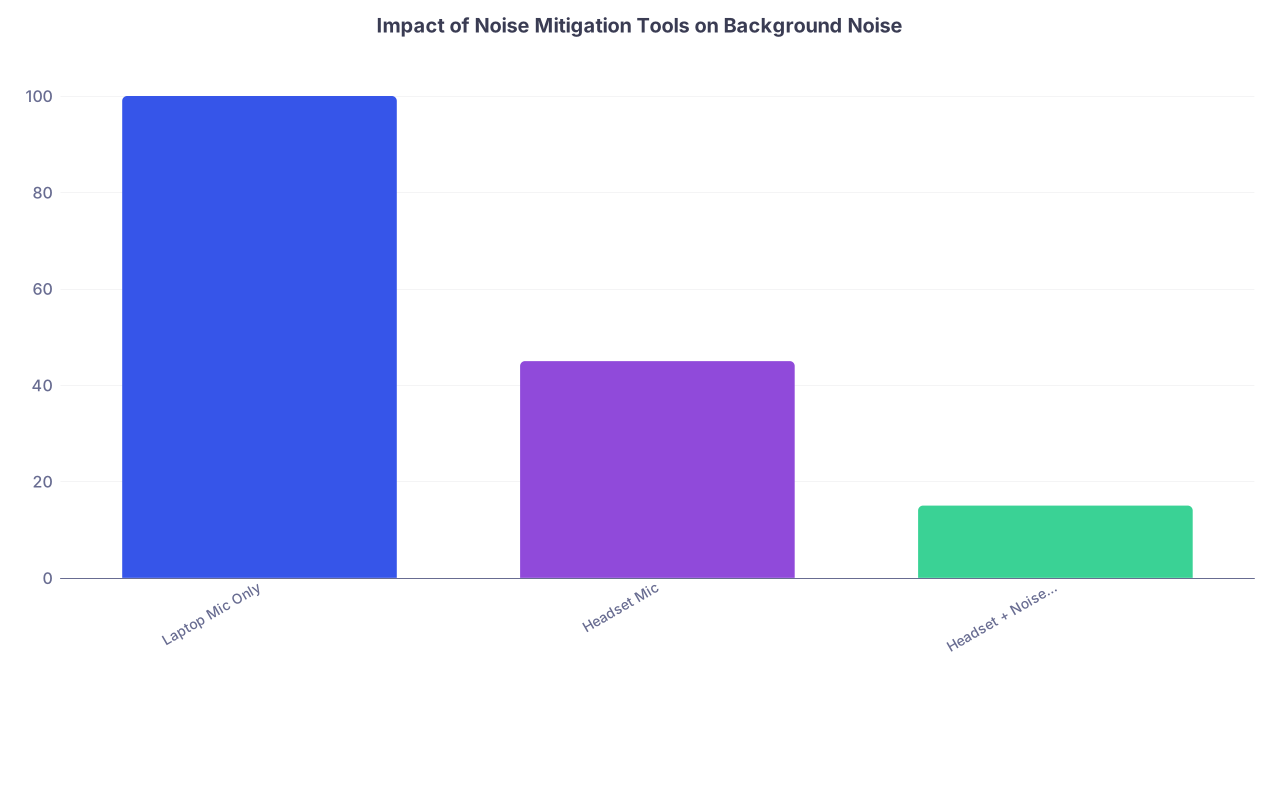
Directional or noise‑cancelling mic
A simple wired headset microphone near your mouth will pick up you over room noise. Better than relying on your laptop mic.Noise suppression software
- Zoom, Teams, and most platforms now have “suppress background noise” options. Turn it to “High” or “Most aggressive” if your environment is loud.
- Test this with someone talking in the background during your practice call.
Stable internet redundancy
- Primary: home Wi‑Fi or institutional Wi‑Fi
- Backup: phone hotspot (check you have enough data and decent LTE/5G where you live)
- Keep your phone fully charged and charger close by.
| Category | Value |
|---|---|
| Laptop Mic Only | 100 |
| Headset Mic | 45 |
| Headset + Noise Suppression | 15 |
4.2 Quick System Check Protocol (Night Before and Morning Of)
Night before:
- Open the actual platform (Zoom, Webex, Thalamus, whatever).
- Test mic and speakers.
- Turn on background noise suppression / echo cancellation.
- Lock in your chosen background and camera settings.
Morning of (30–45 minutes before):
- Restart the computer.
- Close everything unrelated:
- Streaming apps
- Cloud backups
- Browsers with 20 tabs
- Do a 2–3 minute test call with a friend or just use the platform’s own test function.
This is about eliminating controllable variables so you are only managing the noise and crowd issue, not 12 other problems at once.
5. Live Fire: What to Do When Noise Starts During the Interview
This is the real test. You are mid‑answer about why you like their program and suddenly:
- Dog starts barking.
- Roommate barges in.
- Neighbor’s renovation kicks off.
Your priority is: protect the signal. Your voice, your thoughts, your composure.
5.1 Micro‑Tactics in the Moment
Here is the stepwise approach.
Stay visually calm.
Do not whip your head around, roll your eyes, or visibly panic. Interviewers understand life happens. They are watching how you handle it.Pause briefly and acknowledge if needed.
If the noise is loud enough that they obviously hear it, say something once, short and controlled:“I apologize for the background noise – there is unexpected construction outside. I will speak a bit more slowly and clearly. Please let me know if you have trouble hearing me.”
Then proceed. Do not keep apologizing.
Slow your speech slightly.
When audio quality drops, slowing down and enunciating helps far more than increasing volume.If the noise is temporary, power through.
For a quick, 10–15 second noise event, ignore it. Do not break your answer unless it is extreme.If the noise persists and is crippling comprehension, ask for 30 seconds:
“The noise level just increased significantly on my end. May I take 30 seconds to close another door / adjust my setup so you can hear me clearly?”
Most interviewers will respect this. Then:
- Close windows/doors.
- Move the mic slightly closer to your mouth.
- Quickly message a housemate if that helps.
If nothing helps and you know they cannot hear you, you escalate.
5.2 When the Space Itself Fails – Controlled Relocation
If you truly cannot salvage audio where you are (for example, surprise fire alarm test), you need a planned escape route.
This is where the backup plan you made earlier saves you.
Your script:
“I am very sorry, but there is an unexpected noise event in my building that is making it difficult for you to hear me. I have a backup location prepared nearby. Would it be acceptable for me to rejoin the meeting from that quieter space in about 5–10 minutes?”
Options:
- They may let you leave and reconnect later in the day.
- They may suggest turning off video and continuing with audio only for this block.
- They may reschedule a specific portion.
Key point: Calm, proactive, solution‑oriented. Not flustered, not blaming, not helpless.
6. Crowded Space: People, Privacy, and Interruptions
A lot of applicants are not dealing with just noise. They are dealing with human traffic. Parents, kids, siblings, roommates, in‑laws. Tiny bedrooms. Zero real privacy.
You are not the first. You will not be the last. But you need structure.
6.1 Physical and Social Boundaries
Things that consistently work:
Chairs and furniture as barriers
Even in a studio or a shared room, move a shelf, chair, or small screen to create a “door” behind you. People are less likely to walk into what looks like a defined space.Scheduled “do not enter” windows
- Block out the entire time range of the interview, plus 30 minutes before and after.
- For example, if they said 10–2, mark 9:30–2:30 as quiet lockdown.
Pre‑emptive check‑ins the morning of
- Quick: “Just a reminder—my interviews are 10–2. I really appreciate you keeping this area quiet and avoiding this part of the room while I am on camera.”
6.2 Handling Accidental Walk‑Ins
Someone walks behind you mid‑interview. Or a child runs in. Or a roommate crosses in a towel. It happens.
Your focus: de‑dramatize and reset.
Script:
“I apologize for that interruption – I am interviewing from a shared space today. That situation is now resolved. May I continue?”
Then continue as if nothing happened. Do not keep referencing it. Do not show frustration at the other person. Programs are watching your professionalism.
If the interruption is major (e.g., someone starts talking loudly to you):
- Mute immediately.
- Turn slightly away from the camera, quickly but not theatrically.
- Firm but quiet to the person: “I am in a residency interview right now—please step out. I will talk to you later.”
- Unmute, give the one‑sentence acknowledgment above, and move on.
7. If Your Only Option Is Objectively Bad
There are situations where every space you have is noisy, crowded, or unstable, and you know this weeks in advance. Constant construction, large family in close quarters, unsafe neighborhood to sit in a car, etc.
This is when you proactively communicate with programs ahead of time. Not the night before. At least several days in advance if possible.
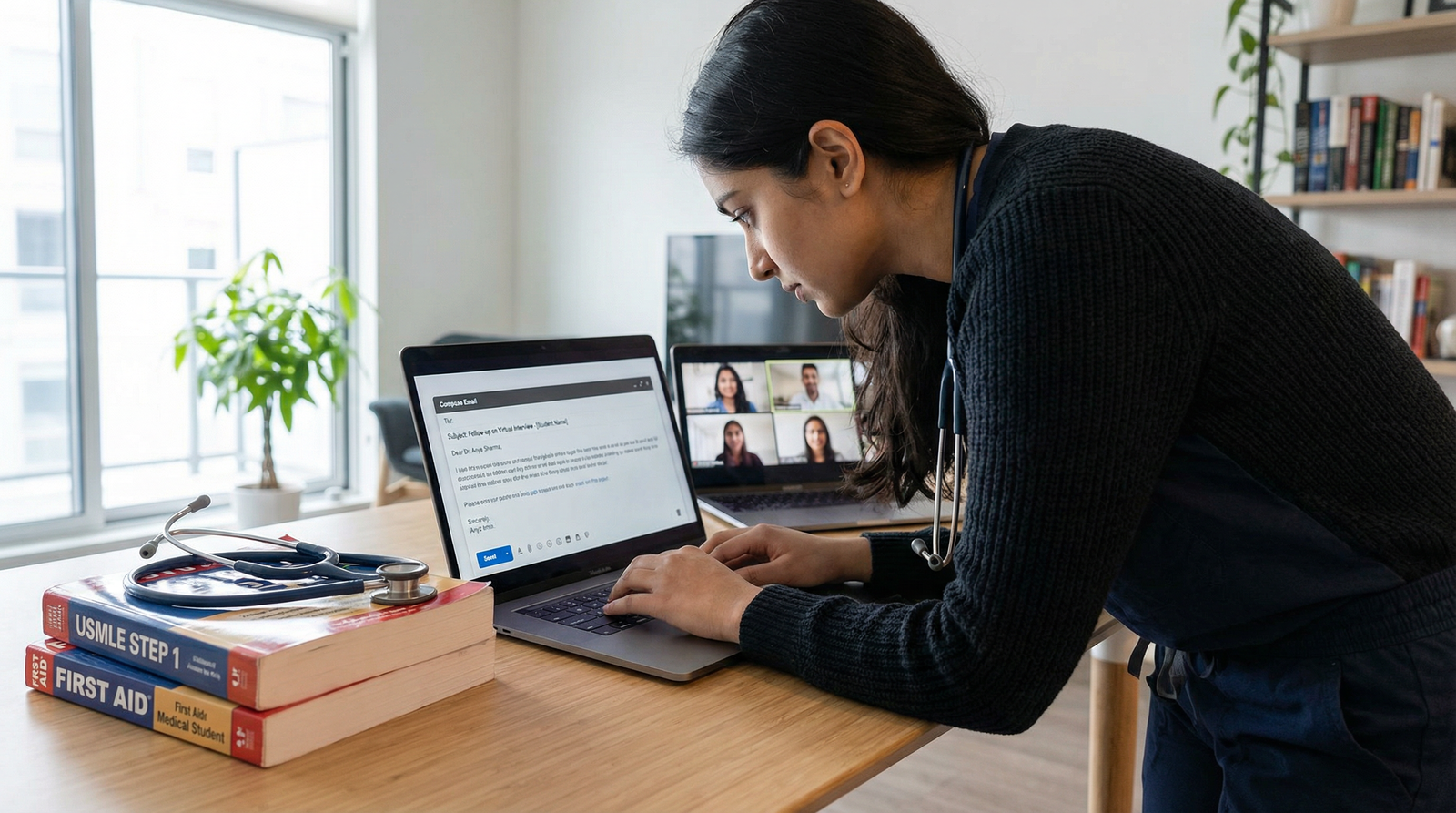
7.1 How to Email Programs Preemptively
You are not asking for sympathy. You are giving them a heads‑up and showing you are trying to solve a problem.
Subject: [Your Name] – Upcoming Interview – Potential Audio Environment Concern
Body:
Dear Dr. [Program Director Last Name] and Residency Selection Committee,
I am very much looking forward to my interview with [Program Name] on [date].
I want to make you aware of a logistical concern in advance. Due to [brief, non‑dramatic description – e.g., “ongoing building construction and a crowded shared living environment”], I have limited ability to secure a fully quiet space for virtual meetings, despite arranging multiple alternatives.
I will be using a headset microphone, noise suppression software, and have tested my audio to maximize clarity. Nonetheless, there may be some unavoidable background noise at times.
If there are any accommodations you recommend (for example, favoring audio‑only if video becomes unstable, or alternative scheduling during a specific time window), I am very willing to adapt. My priority is ensuring that the interviewers can hear and interact with me clearly.
Thank you for your understanding. I remain very enthusiastic about speaking with you and learning more about your program.
Sincerely,
[Full Name], [Medical School]
Most programs will appreciate the heads‑up and either say “No problem” or offer a suggestion.
7.2 When To Ask for an Alternative Format
If your environment is truly chaotic and you cannot upgrade it:
- Ask (once, politely) if they would consider:
- A phone interview with your photo and application in front of them.
- Or an audio‑priority option where they are okay with your video off if needed.
Do not abuse this. But if the alternative is being repeatedly disconnected on unstable Wi‑Fi with screaming in the background, an honest request is smarter.
8. Practicing Under Adverse Conditions
Most applicants do mock interviews assuming perfect conditions. Quiet room, good lighting, no interruptions. Then they fall apart when real‑life chaos shows up.
You need at least one mock session under realistic conditions.
8.1 Stress Test Your Setup
Ask a friend or mentor to help you:
- Do a full 30–45 minute mock interview.
- During this, ask them to:
- Turn on a TV in another room.
- Talk quietly in the background while you answer.
- Randomly interrupt you at least once (“Your roommate just walked in.”)
Your goals:
- Keep eye contact with the camera.
- Maintain steady, unhurried speech.
- Use the exact one‑sentence acknowledgment script and get back on track.
You are training your brain to stay in “interview mode” even when the environment misbehaves.

| Step | Description |
|---|---|
| Step 1 | Interview Day |
| Step 2 | Use Primary Setup |
| Step 3 | Move to Backup Location |
| Step 4 | Use Headset + Noise Suppression |
| Step 5 | Inform Program and Request Adjustment |
| Step 6 | Minor Noise Event |
| Step 7 | Brief Acknowledgment and Continue |
| Step 8 | Primary Space Quiet? |
| Step 9 | Backup Location Available? |
| Step 10 | Noise Manageable with Tech? |
9. What Programs Actually Remember
Here is what faculty remember in February when they sit down to rank you. Not that your neighbor’s dog barked twice. They remember:
- You kept composure when something went wrong.
- You had backup plans.
- You communicated clearly and professionally.
- You did not make your personal chaos the program’s problem.
They are training physicians. They deal with overhead codes, screaming patients, alarms, and chaos daily. They want residents who can stay functional in less-than-ideal conditions.
A little drilling on this now pays off later.
10. Today’s Action Step
Do this today:
- Pick the spot you think you will use for interviews.
- Sit there. Open your laptop. Turn on the camera.
- Ask one person (roommate, family member, partner) to walk through and talk at normal volume while you do a quick test call with a friend.
- Ask your friend honestly: “Could you hear me clearly? Was the background manageable?”
If the answer is anything less than “Yes, you were fine,” you now know you need a better plan. Do not wait until 10:07 a.m. on interview day to fix this.



