
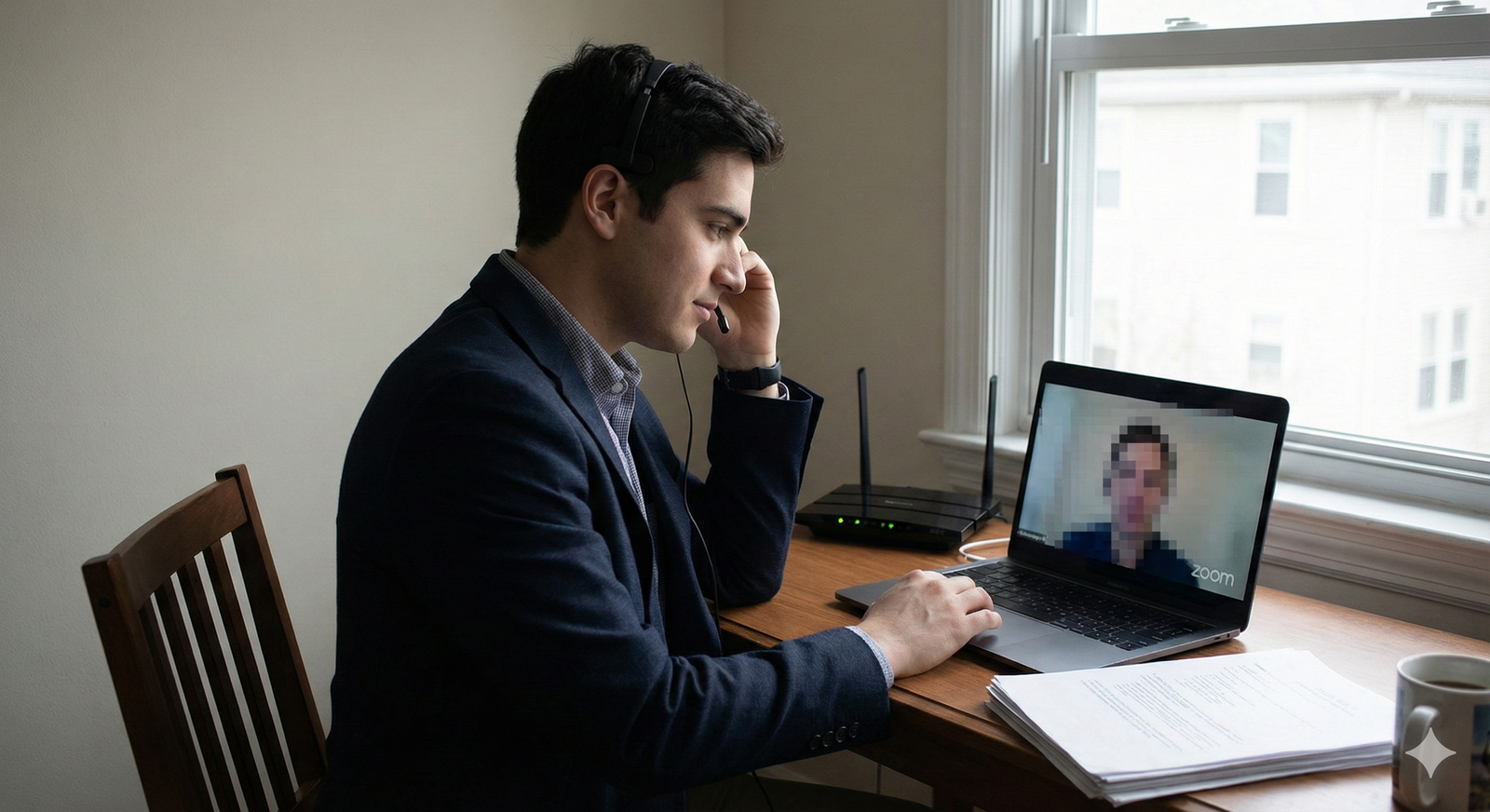
Tech will fail during Zoom interviews. What separates strong applicants is how they recover, not whether they crash.
If you are interviewing for residency in 2025 and beyond, you are not just being evaluated on your CV and Step scores. You are being evaluated on how you handle stress in real time, in an artificial setting, with technology that occasionally decides to self-destruct.
I have watched excellent candidates tank an otherwise strong interview because they panicked when Zoom froze. I have also watched average candidates suddenly look like seasoned clinicians because they handled a tech failure the same way you would hope they handle a crashing patient: calm, structured, and communicative.
You want to be the second type.
This is your playbook for recovering gracefully when Zoom betrays you mid-interview.
1. Reframe the Problem: You Are Being Evaluated on Recovery
Programs do not blacklist you because Zoom glitched.
They do downgrade you when you:
- Vanish without explanation
- Blame the program or Zoom with visible frustration
- Come back flustered and disorganized
- Spend minutes fumbling with audio while everyone watches awkwardly
Here is what faculty quietly look for when tech fails:
- Composure under stress – Do you stay functional or spiral?
- Communication skills – Do you explain what is happening concisely?
- Problem-solving – Do you move through fixes logically?
- Professionalism – Do you apologize once, then move on without drama?
If you remember nothing else, remember this:
The tech failure itself is neutral. Your response is part of your interview performance.
Once you accept that, you stop acting like a victim of Zoom and start acting like a physician-in-training managing an unexpected complication.
2. Pre-Interview Protocol: Reduce Risk and Build Safety Nets
If you only react once things break, you will look sloppy. You need pre-emptive structure.
A. Redundancy Setup (Bare Minimum)
You need backups. Not “in theory” — in place, tested.
Have all of this ready before interview season starts:
Primary device
- Laptop with working camera and mic
- Zoom desktop client updated to latest version
- Power plugged in (do not trust battery for a 6-hour interview day)
Backup device
- Smartphone with Zoom app installed and signed in
- Or tablet with Zoom installed
- Phone stand or stack of books to hold it at eye level if needed
Backup internet
- Personal hotspot set up on your phone
- Data plan checked (know your limit)
- Tested once with Zoom video on
Backup audio
- Wired earbuds with mic (Bluetooth loves to cut out at the worst time)
- Internal laptop mic tested as a fallback
Backup contact routes
- Interview coordinator email pre-saved and starred
- Coordinator phone number saved in your phone
- Program’s main line noted somewhere you can see without digging
You are not being paranoid. You are acting like someone who understands contingency planning.
B. Tech Check the Day Before (Non-Negotiable)
This is your 10–15 minute systems check. Do it for every interview day.
Speed test your internet
- Use any basic online speed test
- Target: at least 10 Mbps down / 5 Mbps up for stable video
- If speeds are borderline, set up your hotspot as a live backup
Zoom test meeting
- Use Zoom’s “Test Meeting” feature or hop on with a friend
- Check:
- Camera angle (eyes ~1/3 from top of frame)
- Background (no clutter, no bed if you can avoid it)
- Audio levels (no heavy echo, no clipping)
Shared devices off Wi-Fi
- Ask roommates/family to avoid streaming during your interview block
- Turn off or disconnect bandwidth hogs (smart TV, gaming consoles, cloud backups)
System reboot
- Restart your computer the night before or morning of
- Close unnecessary apps: browsers with 23 tabs, Spotify, Teams, etc.
You are building a margin of safety. The fewer variables, the fewer disasters.
3. When Things Break: A Stepwise Recovery Protocol
Let us talk about the actual moment everything goes sideways.
Scenario 1: Audio Cuts Out (They Cannot Hear You)
You see them talking. You respond. They look confused. Someone says, “Sorry, I think your audio just dropped.”
Do not guess. Move through a quick, visible algorithm.
Step 1: Confirm and Acknowledge (5–10 seconds)
Use chat or gestures quickly.
- Type in Zoom chat:
- “I think my audio just cut out. One moment while I fix it.”
- Or say (if partially working):
- “I am having an audio issue. Let me switch devices / headphones. One moment.”
Step 2: Simple reset first (20–30 seconds)
- Mute → unmute
- Leave the Zoom meeting → rejoin immediately
- If you are using wireless earbuds:
- Turn Bluetooth off and on
- Or unplug them and use laptop mic / wired backup
Step 3: Fast device switch if not resolved (60–90 seconds)
You do not linger for 5 minutes poking settings while everyone watches.
- Grab phone (already logged into Zoom).
- Turn off Wi-Fi if you suspect network issues and use cellular data or hotspot.
- Rejoin the meeting:
- Same link
- Same display name (FIRST LAST – “Audio backup” is fine)
Once back:
“Thanks for your patience – my audio died on the laptop, so I switched to my phone. I appreciate the flexibility.”
Say it once. Calm tone. Then move on.
Scenario 2: Video Freezes or Drops
Your video freezes mid-answer, or they say, “We lost your video.”
Step 1: Quick self-check (5–10 seconds)
- Look at your own video preview
- If frozen / black screen:
- Turn video off → on
- If that fails, leave and rejoin
If your screen freezes completely, you may have to force quit Zoom and reopen.
Step 2: Communicate as soon as you are back (15–30 seconds)
The mistake is reappearing silent, flustered.
Instead, when you rejoin:
“Sorry about that – my video froze and I had to reconnect. Where would you like me to pick up?”
This invites them to reset the conversation and signals you are not rattled.
If video keeps failing but audio is stable:
“My video seems unstable. I want to respect everyone’s time, so I suggest we proceed with audio only if that is acceptable.”
Programs will almost always say yes. They care more about your answers than your pixels.
Scenario 3: Full Disconnect / Internet Crash
This is the big one. Your Wi-Fi dies or your router reboots mid-interview.
You are booted from Zoom.
Here is the protocol.
Step 1: Immediate backup connection (within 60 seconds)
- Switch your phone from Wi-Fi to cellular
- Open Zoom app, rejoin the meeting
- If possible, turn video on after you are stable
If your home Wi-Fi is down completely and your laptop is useless:
- Use your phone as the primary device
- Prop it at eye level (books, stand, anything)
- Plug it into power – video drains battery faster than you think
Step 2: Short, professional explanation (20 seconds)
“Thank you for your patience – my internet dropped unexpectedly, so I switched to my phone’s data. I am back and ready to continue.”
Stop talking about it after that unless they ask.
Step 3: If you cannot get back in at all (within 5–10 minutes)
This is rare, but it happens.
Move to your external contact protocol:
Email the coordinator from your phone:
- Subject: “Technical issue – [Your Name] – [Program Name] Interview”
- Message:
“Dear [Coordinator Name],
I was in the [time] interview block today when my internet connection failed. I am attempting to rejoin via alternate connection, but if I am unable to re-enter the Zoom room, I want to express my apologies for the disruption and my continued enthusiasm for [Program Name].
If we are disconnected permanently, I am happy to reschedule or complete remaining interviews by phone if that is easier.
Best regards,
[Your Name]”
If they provided a phone number, call once. If no answer, do not spam. One voicemail is enough:
- “This is [Your Name], one of the residency interviewees. I lost internet mid-session and am trying to reconnect. If I cannot, I just wanted to apologize and let you know I am still very interested in the program.”
You look responsible and respectful of their time. That matters.
4. What To Say Right After a Tech Failure
A lot of applicants ruin a decent recovery with bad wording.
Here is the structure that works:
- Brief acknowledgment
- Simple, non-blaming explanation (if needed)
- Reassurance you are ready to continue
- Invitation to reset
Examples you can literally script and keep next to your screen:
- “Thank you for your patience – Zoom crashed on my side and I had to restart. I am back now and ready to continue.”
- “My audio dropped for a moment there; I switched to a backup. Would you like me to repeat the last part of my answer?”
- “Apologies for the interruption. My internet briefly cut out, but I am on a stable connection now.”
Things to avoid:
- Over-apologizing: “I am so, so sorry, this is so embarrassing, this always happens to me…”
- Blaming: “Zoom is terrible,” “Our IT here is awful,” “My roommate is probably streaming again.”
- Over-explaining: They do not need the saga of your modem’s firmware.
5. How to Handle Lost Momentum and Half-Finished Answers
One very specific problem: you were mid-answer, got cut off, came back, and now the thread is broken.
You want to look like you can mentally “bookmark” a conversation, not like you were erased.
Two options:
A. Quick recap plus completion
“I think I got cut off as I was describing my sub-internship on the heme/onc service. I had been explaining how that rotation shaped my interest in longitudinal patient relationships. To finish that thought briefly…”
Then give the condensed version of your original answer. Not the full 2-minute monologue.
B. Offer to restart the answer completely
If the interruption was early:
“I am not sure how much came through before I disconnected. I am happy to restart that answer from the beginning, if that is easier.”
This shows self-awareness and respect for clarity.
6. Mental Reset: Stopping the Spiral After Things Go Wrong
You will feel your heart rate spike. That is normal. What you cannot do is let the next 30 minutes be poisoned by the prior 30 seconds.
Here is a 3-step mental reset you can do in under 20 seconds while waiting to rejoin or while someone else is speaking:
Physical reset
- Put both feet flat on the floor
- Unclench jaw and shoulders
- One slow breath: 4 seconds in, 6 seconds out
Cognitive reframe
- Silently: “They care how I recover, not that this happened.”
- Or: “This is data for them about my composure. I am going to show them I handle this like a resident on call.”
Micro-plan the next move
- Decide exactly what you will say when back in the room
- Decide the very next question you will ask them (to stay engaged and not self-focused)
This stops the “I blew it” loop from devouring the rest of your performance.
7. Group Sessions, Breakout Rooms, and Social Mixers
Residency interviews are not just one-on-one.
You have:
- Morning welcome sessions
- Resident socials
- Breakout rooms for faculty interviews
- Program director Q&A
Tech failures in each context need slightly different handling.
A. Large group welcome / PD presentation
If you disconnect briefly during a one-way presentation:
- Rejoin quietly
- Do not interrupt
- If you missed logistics, email or chat the coordinator after:
- “I briefly disconnected during the schedule overview. Could you confirm what time the afternoon breakout starts?”
No need to draw attention in front of the whole group.
B. Resident social
You have more leeway here.
If you drop out and return:
“Sorry, my Wi-Fi hiccuped for a minute there. What were you saying about call schedules?”
Shows you are engaged and not obsessed with the glitch.
C. Faculty breakout room
Smaller setting, higher stakes. Use the full script:
- Brief apology
- One-line explanation
- Offer to pick up where you left off
“Thank you for your patience – my Zoom froze and I had to reconnect. I think we were talking about your community outreach clinic before I dropped.”
You are anchoring back to the conversation, not the tech.
8. Post-Interview Damage Control (If Things Went Really Sideways)
Most tech issues do not require follow-up. Do not send a “sorry about my Wi-Fi” email for a 30-second glitch. You will make it a bigger deal than it is.
You consider follow-up only if:
- You missed an entire faculty interview block
- You were disconnected for >10–15 minutes during critical sessions
- You had to leave the interview day entirely because tech never recovered
In those cases, fold it into your standard thank-you email to the coordinator or PD:
“Thank you again for the opportunity to interview with [Program]. I appreciated learning more about [specific detail]. I also want to briefly apologize for the technical issue that interrupted my [morning/afternoon] session; I am grateful for everyone’s flexibility and the chance to reconnect.
The interview day reinforced my strong interest in [Program Name], particularly [specific program attribute].”
You acknowledge it once, without drama, and then pivot back to enthusiasm and fit.
9. Quick Prep Checklist for Interview Week
Print this or keep it on your desk. Do not just “kind of remember” it.
| Item | Status |
|---|---|
| Zoom updated on laptop | ☐ |
| Phone Zoom app logged in | ☐ |
| Personal hotspot tested | ☐ |
| Wired earbuds tested | ☐ |
| Coordinator email/phone saved | ☐ |
And right next to it, write these two sentences:
- “Thank you for your patience – my [audio/video] just failed, so I switched to my backup. I am back and ready to continue.”
- “I think I got cut off as I was answering your question about [X]. I was explaining [Y]; to finish that thought briefly…”
You do not want to improvise those in a panic.
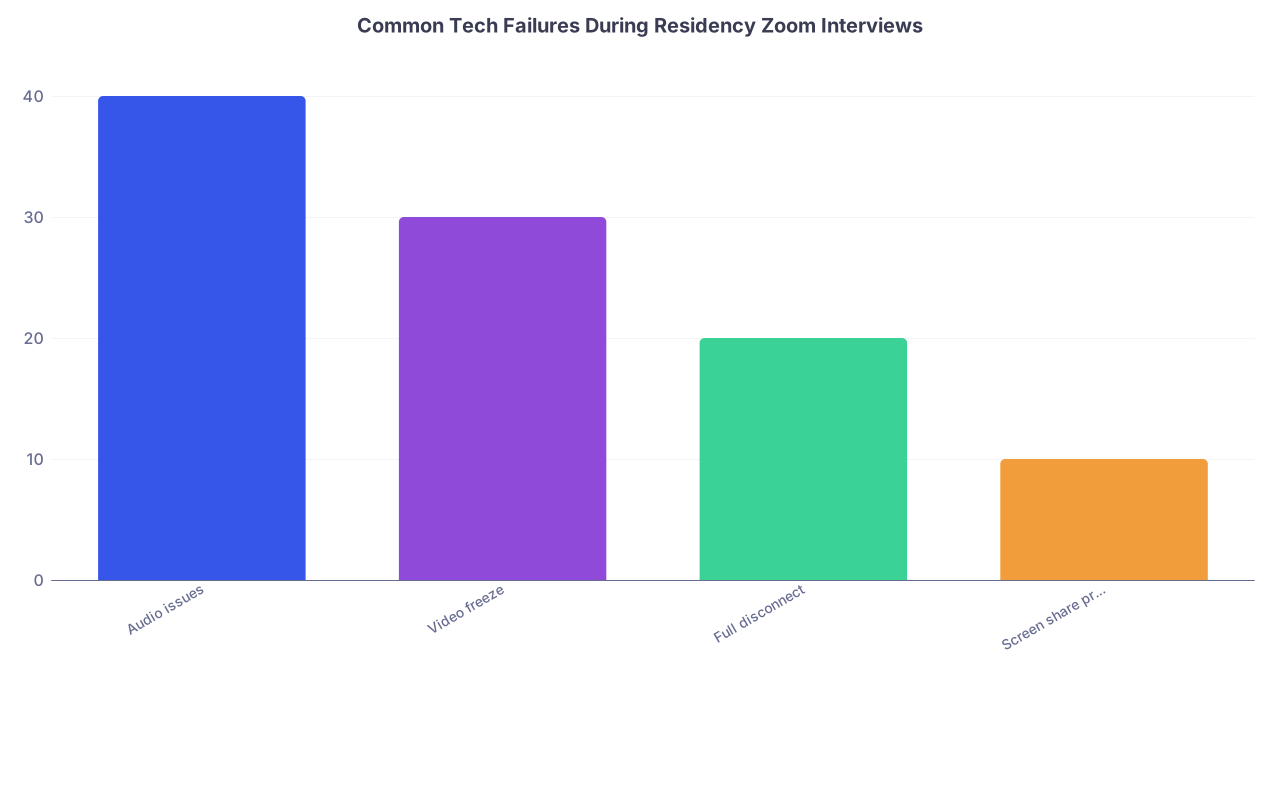
| Category | Value |
|---|---|
| Audio issues | 40 |
| Video freeze | 30 |
| Full disconnect | 20 |
| Screen share problems | 10 |
10. Practice the Failure Scenarios Before the Real Thing
If you only ever practice “perfect” interviews, you will be blindsided when things fail.
Run a 20–30 minute deliberate chaos mock session with a friend:
- Have them:
- Mute themselves mid-question
- Pretend your audio cut out and say, “We cannot hear you”
- Say “Your video froze” even if it did not (to see how you respond)
- Randomly “disconnect” you by leaving the meeting and rejoining
Your job:
- Practice your exact scripts
- Practice switching to your phone within 60–90 seconds
- Practice maintaining your tone and pacing after each interruption
You are building muscle memory. When the real thing happens, your brain will say, “We have seen this before.”

| Step | Description |
|---|---|
| Step 1 | Tech problem occurs |
| Step 2 | Quick reset: mute/unmute, rejoin, switch device |
| Step 3 | Brief apology + continue interview |
| Step 4 | Switch to backup device/hotspot |
| Step 5 | Email/call coordinator |
| Step 6 | Offer reschedule or phone alternative |
| Step 7 | Can you fix in 60 sec? |
| Step 8 | Able to rejoin? |
FAQs
1. Will a tech failure automatically hurt my chances of matching at that program?
No. One or two tech hiccups, handled calmly and efficiently, rarely damage an application. Faculty know Zoom fails. What does hurt you is appearing disorganized, disappearing without explanation, or letting the glitch derail your professionalism. If you clearly communicated, returned promptly using a backup plan, and stayed composed, most committees simply shrug and move on.
2. Should I mention the tech failure in my post-interview thank-you emails?
Only if the disruption was major: you missed a full interview block, were disconnected for a significant portion of the day, or the program explicitly apologized and acknowledged the issue. In that case, a short, one-line acknowledgment embedded in your thank-you note is appropriate. Do not write a separate, lengthy apology email solely about a minor glitch.
3. Is it acceptable to complete an interview audio-only if my video will not work?
Yes. While video is preferred, most programs would rather have a stable audio-only conversation than a choppy video call. If repeated attempts to restore video fail, state this calmly and offer to proceed by audio: “My video seems to be unstable despite a few attempts to fix it. If you are comfortable proceeding with audio only, I am happy to continue that way.” This shows flexibility and focus on substance over form.
Open your interview calendar right now and schedule a 20-minute “tech failure drill” this week. Simulate a dropped call, an audio issue, and a video freeze with a friend — and practice your exact words and recovery steps until they feel routine.



