

It is 3:22 p.m. on your third Zoom interview of the week. You are answering what should be a strong question: “Tell us about a time you made a mistake.” You are halfway through your best ICU story when you see it:
One interviewer glances to a second monitor. Another is clearly typing. Someone’s camera is off “due to bandwidth” and has not said a word in six minutes. The chief resident looks exhausted.
You feel your momentum die. You start wondering: Are they even listening? Am I blowing this?
Here is the reality: on Zoom, panels get distracted. Often. Back-to-back interviews, EMR messages, their own kids in the background. You cannot control their environment. You can absolutely control how you pull them back in.
I am going to walk you through concrete techniques that work in the moment—when you notice attention drifting—and how to structure your entire Zoom presence so you lose fewer panels in the first place.
Step 1: Recognize the Red Flags Early (And Do Not Panic)
You cannot fix what you do not notice. Your first job is to detect panel disengagement quickly, without spiraling.
Common signs the Zoom panel is checking out:
- Eyes repeatedly shifting away from the camera to the side (likely at another screen)
- Delayed responses or awkward pauses after you finish answers
- Same “mmhmm” or “okay” filler from one person but no real follow-up
- People turning cameras off mid-room or suddenly going on mute and staying there
- Panelist clearly reading something else (scrolling eyes, different pace)
- No one writes when you say something important (big red flag)
There is a second set of signs that look like disinterest but often are not:
- Someone is staring off but nodding periodically (they may be focused on your voice)
- Writing a lot while you talk (they’re capturing your content, not ignoring you)
- Program director glancing to the side briefly (could be coordinating logistics)
- The quiet faculty with “resting annoyed face” who is actually very engaged
So you need to differentiate between normal Zoom quirks and actual disengagement.
Simple rule I use:
- If multiple panelists stop moving, stop nodding, and stop reacting for >20–30 seconds, treat that as disengagement and adjust.
- If one person looks tired but others are with you, keep going; do not chase that one face.
Step 2: Fix Your Baseline Setup So You Lose Fewer Panels
Half of “re-engagement” is not needing to re-engage so often. If your setup is bad, you are starting every answer at a disadvantage.
The non-negotiable Zoom fundamentals
If you get these wrong, it does not matter how good your stories are. People will drift.
Camera angle at or slightly above eye level
- Stack books under your laptop if you must.
- You want to look like you are eye-level with them, not staring down or up your nose.
Lighting: light your face, not your background
- Face a window or a simple ring light behind your monitor.
- Avoid:
- Bright window behind you → silhouette
- Overhead-only light → raccoon eyes
Framing: mid-chest to just above head
- Too close = intense and uncomfortable.
- Too far = you look small and flat, micro-expressions are lost.
Audio: this matters more than video
- Use wired earbuds or a simple USB mic if possible.
- Test for:
- Echo
- Background fan noise
- Mic rubbing on clothing
Background: boring is best
- Neutral wall, a plant, maybe one diploma or bookshelf.
- No bed in frame. No clutter. You want zero visual competition with your face.

One more overlooked factor: internet stability. Zoom lag destroys conversational rhythm. If your audio cuts in and out, panelists disengage simply because listening is effortful.
- Use Ethernet if possible.
- If Wi-Fi-only, kick other devices off streaming during your interview.
- Have a phone hotspot ready as backup and know how to switch quickly.
Step 3: Use Your Voice and Body to Hold Attention
On Zoom, tiny changes in your delivery have outsized impact. Monotone kills attention faster online than in person.
Fix your voice: micro-variation, not theater
You do not need TED talk theatrics. You do need controlled variation:
Pace: Default = slightly slower than normal conversation
- Speed up for brief excitement: “Suddenly the patient’s pressure crashed…”
- Slow down for key takeaways: “This is where I realized….”
Volume:
- Normal baseline; briefly lift your volume for:
- “The key moment was…”
- “What I took away from this was…”
- Normal baseline; briefly lift your volume for:
Pauses:
- One-beat pause before your main point.
- One-beat pause after a strong sentence to let them react and re-focus.
Fix your body language: intentional, not static
- Sit slightly forward in your chair during answers (engaged posture).
- Use small hand gestures that stay in frame. Some movement is good. Wild gesturing is not.
- Nod while listening to signal you are tracking, which subconsciously encourages them to mirror.
- Look into the camera when you say something important, not at their faces.
You do not need to stare into the camera 100% of the time. That looks robotic. But:
- When you start your answer → look at camera for 2–3 seconds
- When delivering your main point → camera
- When finishing your answer → camera
The rest of the time, it is fine to look at their faces on screen.
Step 4: Re-Engage in the Moment with Tactical Shifts
Now the core problem: you are mid-answer, and you feel the panel slipping. Here is how you pull them back without looking desperate.
Technique 1: Insert a brief, concrete “scene”
Stories cut through Zoom fatigue. Abstract talking loses people. So when you sense drift:
- Stop listing traits or lessons in abstract.
- Drop them into a moment.
Example:
You catch them drifting while explaining “I learned to communicate across teams.” Shift to:
“Let me make that concrete for you. It was 2 a.m. in the MICU, and we had a septic shock patient with a MAP in the 40s. The nurse looked at me and said, ‘We are maxed on norepi. What is next?’ That was the moment I realized my communication had to be very, very specific…”
That “2 a.m. in the MICU” phrase plus a short quoted line pulls people right back into your world.
Technique 2: Use a “You-focused” pivot
Panels re-engage when something is obviously relevant to their program.
You are answering, you see eyes wandering. Shift with a line like:
- “This is actually one of the reasons your program specifically stood out to me…”
- “From what I have seen about your night float structure, this experience would be directly relevant because…”
- “Talking with your current residents, it sounds like this kind of interdisciplinary tension comes up a lot here, and that is exactly what I learned to manage.”
Now they are listening for their name in the story. People always snap back when it becomes about them.
Technique 3: Ask a micro-question mid-answer
Careful here. I am not telling you to interrogate the panel. But one short, answerable question can reset attention.
Use it particularly in longer responses (leadership, conflict, “tell me about yourself”).
Examples:
- “You probably see this on your rotations as well—surgical vs medicine priorities clashing. We had a similar situation when…”
- “I imagine your interns have had nights where cross-cover is overwhelmed. One night on wards…”
Or explicitly:
“I am not sure if this is something you see in your ICU as well, but we had persistent issues with handoff between residents and night nurses. In one case…”
You do not need them to answer out loud. The question simply forces their brains to process, and that is often enough.
Step 5: Rebuild Attention Between Questions
Between questions is prime territory. This is where many applicants slump, stare blankly, or fiddle with a pen. All of that signals low energy and invites distraction.
How to behave between questions
- Maintain neutral pleasant expression, not frozen smile. Relax your face when they talk.
- Keep your posture open: shoulders down, both feet on the ground.
- When they finish asking, give a micro-nod: “That is a great question. Let me think for a second.” Then pause 1–2 seconds. Controlled, not panicked.
That little verbal bridge and micro-pause makes you look thoughtful instead of stunned. Panels stay with you if they trust you will land the plane.
Step 6: Structure Answers That Naturally Hold Attention
A lot of distraction comes from poor answer architecture. If you ramble, panels leave. They just do it silently behind their monitor.
You do not need a fancy acronym obsession, but you need a reliable spine.
Use a tight, three-part structure for most behavioral questions:
- Setup (1–2 sentences)
- Time/place
- Role
- Stakes
- Action (2–4 sentences)
- What you did, stepwise
- Include 1–2 concrete details
- Result + Reflection (2–3 sentences)
- Outcome
- What you changed or learned
- How it applies to residency / their program
Notice the length. If your answer is longer than ~60–75 seconds, they will wander. If you must go longer (complex situation), insert deliberate signposts to keep them with you:
“There were really three parts to this. First was calming the family. Second was coordinating with the ICU team. Third was fixing the system issue that caused the delay.”
When you number things, people subconsciously track, “We are on 2 of 3.” That lowers fatigue.
Step 7: Use the Chat and Tech Wisely (Not Gimmicky)
You are not going to save a dying interview by spamming the chat. But there are subtle technical choices that support engagement.
Name and title
- Set your Zoom name to:
First Last, MS4 (Home Institution)- Example:
Jane Patel, MS4 (UVA)
- Example:
This helps the panel quickly remember who you are among a long day of applicants.
Eye-contact hack
- Drag the Zoom window up directly under your camera.
- Shrink it so that the main speaker’s face is close to your webcam.
You will naturally look closer to the camera when watching them, reducing the “eyes down” problem.
Note-taking
If you want to jot notes, don’t stare down at a notebook for 10 seconds at a time. Looks like you are on your phone.
Better:
- Use a sticky note on the side of your monitor.
- Or type briefly while maintaining mostly forward gaze.
- Literally say: “I am just jotting a quick note about that, thank you.”
Name the behavior and you disarm suspicion.
Step 8: Handle Specific Difficult Panel Behaviors
Let us talk about some concrete annoying-but-common Zoom panel dynamics and exactly what to do.
1. The silent, camera-off panelist
There is always one. No camera, no expression, nothing.
Your move:
- Do not fixate on them. You cannot win here.
- Focus 80–90% of your visual energy on the most responsive faces.
- At the end of a good answer, you can say, addressing the group:
“I am happy to go into more detail, or if anyone has a specific perspective from your ICU or clinic, I would love to hear it.”
That invites participation without calling out the ghost box.
2. The multitasker who keeps looking away and typing
Annoying, yes. But sometimes they are taking typed notes for the committee.
Strategy:
- Assume good intent unless multiple people are clearly gone.
- Emphasize clear recap sentences that are easy to type:
- “So, in summary, that experience taught me three things:…”
You are actually doing them a favor by giving nice, quotable lines to record.

3. The hostile or flat-affect interviewer
Sometimes the disinterest is not about Zoom. It is their face. I have seen applicants wreck themselves by over-reacting to one stone-faced surgeon.
Here is what you do:
- Anchor on the most engaged person as your main visual feedback.
- Occasionally glance at the flat interviewer (you cannot ignore them), but do not chase their approval.
- When you refer to something in their domain, nod lightly in their direction:
“Especially on trauma call, where the stakes are highest…” (brief glance toward them)
That respects them without feeding the insecurity spiral.
Step 9: Ask High-Engagement Questions Back to the Panel
Your questions to them are a massive opportunity to wake them up. Stop asking generic things they have answered 20 times.
Bad (overused, low-engagement):
- “What do you like most about your program?”
- “What type of resident succeeds here?”
- “How is the work-life balance?”
Better: specific, story-inviting questions that pull them into a narrative:
- “Tell me about a resident in your program who struggled early but thrived by PGY3. What changed for them here?”
- “What is a recent change the program made based on resident feedback, and how did that process work?”
- “If I were your intern on a rough call night, what would support from the senior and attending actually look like, hour by hour?”
This not only re-engages them; it also gives you real information.
| Situation | Low-Engagement Question | High-Engagement Question |
|---|---|---|
| Culture fit | What is the culture like? | Tell me about a recent challenge the team faced and how people reacted. |
| Resident support | How do you support residents? | Can you share a specific time the program stepped up for a resident? |
| Education structure | How is teaching structured? | Walk me through what a typical teaching moment looks like on rounds. |
| Feedback | How do residents get feedback? | What is the last piece of tough feedback a resident received and changed? |
| Program changes | Have there been any changes recently? | What is one change in the last year that you are most proud of? |
These prompt their stories, which tends to energize even a tired panel.
Step 10: Manage Your Own Anxiety So You Stay Present
If you freak out every time someone looks away, you will tank your own performance.
You need a quick, repeatable reset protocol you can use during the interview.
Use this 30-second mental sequence when you notice distraction and feel your chest tighten:
Physical anchor
- Press your feet firmly into the floor. Feel the contact.
- Let your shoulders drop one inch.
Breath reset
- Inhale quietly through your nose for 4 seconds.
- Hold 1 second.
- Exhale slowly through your mouth for 6 seconds.
Cognitive reframe (one sentence)
- Say to yourself: “Their distractions are about their day, not my worth.”
- Yes, it is a bit cheesy. It works anyway.
Micro-intent
- Decide one thing for your next answer:
- “I am going to tell one concrete story.”
- “I am going to land this answer in under 60 seconds.”
- “I am going to connect this to their program directly.”
- Decide one thing for your next answer:
Then move on. You do not have the bandwidth to psychoanalyze their expressions mid-interview.
Step 11: Practice Re-Engagement Intentionally Before Interview Day
You cannot improvise this under pressure. You need reps.
Solo practice drills
60-second answer drill
- Record yourself answering common questions with a timer visible.
- Goal: clear beginning, middle, end in 45–75 seconds.
- Watch for:
- Long, meandering intros
- Overly detailed medical minutiae
- Flat energy
Re-engagement pivot drill
- Mid-answer, at a random time stamp, practice inserting:
- A concrete sensory detail (“It was 3 a.m., the pager would not stop…”)
- A “you-focused” line (“This is exactly why your night float setup appealed to me…”)
- Train your brain to have those pivots ready.
- Mid-answer, at a random time stamp, practice inserting:
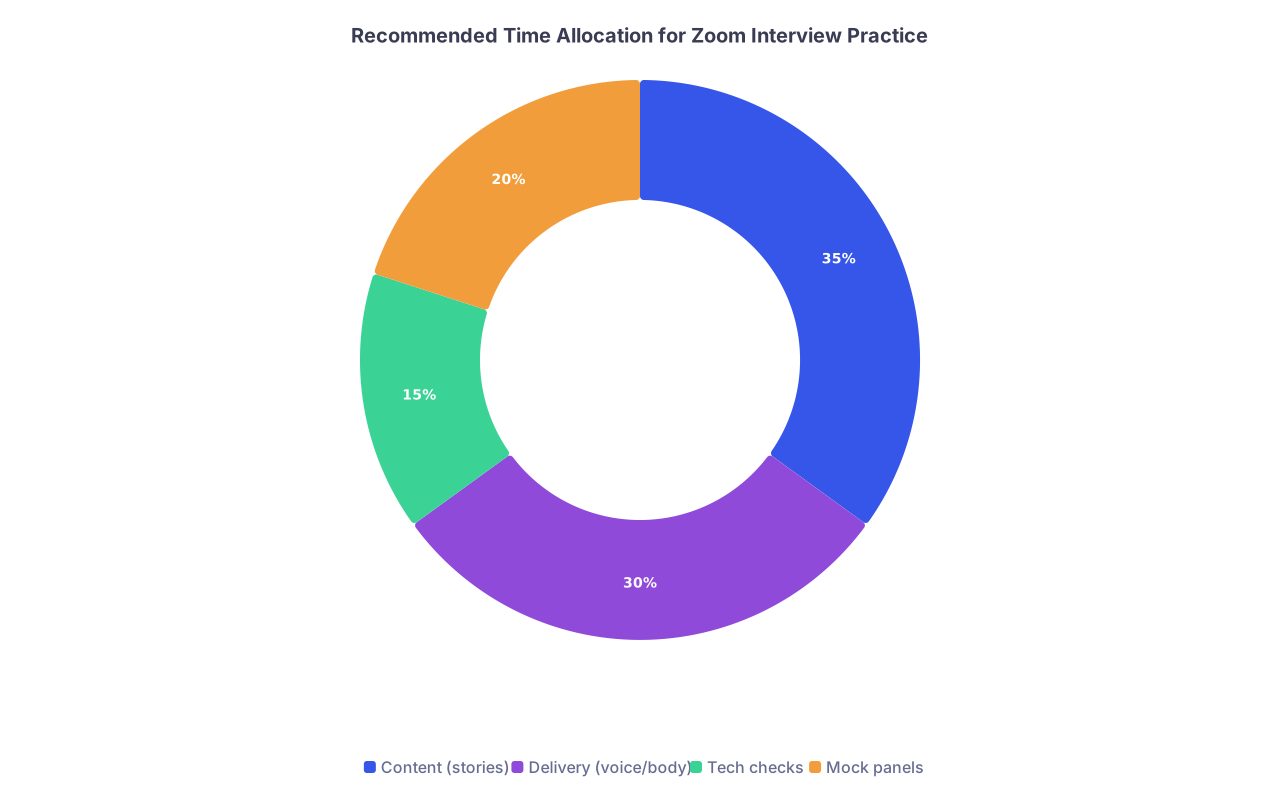
| Category | Value |
|---|---|
| Content (stories) | 35 |
| Delivery (voice/body) | 30 |
| Tech checks | 15 |
| Mock panels | 20 |
Mock interviews with a “distractor”
Ask a friend, resident, or advisor to:
- Do a Zoom mock interview.
- Intentionally:
- Look away for 20–30 seconds randomly.
- Type while you are talking.
- Turn their camera off once.
Your job is to notice without flinching and deploy one re-engagement technique each time. Get feedback afterwards on what came across as natural vs forced.
Step 12: Accept What You Cannot Control—and Maximize What You Can
You are not going to convert every exhausted, Zoomed-out panel into rapt listeners. Sometimes you are their 14th interview of the day and they are spent.
But you can:
- Present yourself clearly, confidently, and concisely.
- Structure answers that naturally command attention.
- Use targeted techniques—stories, you-focused pivots, micro-questions—to pull them back when they drift.
- Ask questions that activate their stories, not just yours.
- Maintain your own composure even when their faces are not giving you much.
That combination is what separates an average Zoom interview from a memorable one.

| Step | Description |
|---|---|
| Step 1 | Notice disengagement |
| Step 2 | Maintain course, focus on engaged faces |
| Step 3 | Adjust answer delivery |
| Step 4 | Add concrete story detail |
| Step 5 | Use you-focused pivot |
| Step 6 | Ask micro-question |
| Step 7 | Summarize key takeaway |
| Step 8 | Observe panel reaction and continue |
| Step 9 | Single person or whole panel? |
Your Next Action Today
Do not just nod along and then forget this on interview morning. Take 15 minutes today and do this:
- Open Zoom on your laptop.
- Hit record and answer one common question:
- “Tell me about yourself”
- At the 30-second mark, intentionally insert:
- A concrete scene (“It was my first night on call…”)
- A you-focused line (“This is part of why your program’s X stood out to me…”)
- Stop at 75 seconds.
- Watch it back once. Write down:
- One thing you will keep
- One thing you will change
That single practice rep will do more for your real interview performance than reading another list of tips.


