
Should I Log In Early to My Virtual Residency Interview Room?
What actually happens if you click the Zoom/Thalamus/VidCruiter link too early and the PD or coordinator is already in there with another applicant?
Here’s the answer you’re looking for:
Yes, you should be “early.” But there’s a right kind of early and a wrong kind of early.
Let’s break it down so you don’t look disorganized, intrusive, or clueless on one of the most important days of your career.
The Short Answer: Yes… But Aim for the Right Window
You should absolutely be ready and “virtually present” before your scheduled time. But that doesn’t mean barging into the main Zoom room 25 minutes early while they’re debriefing another applicant.
Here’s the simple rule I give students:
- Be technically ready: 30–40 minutes before
- Be logged into the platform: 15–20 minutes before
- Join the actual interview room: 5–10 minutes before (unless the program gives a different instruction)
That timing makes you look prepared, not anxious or disruptive.
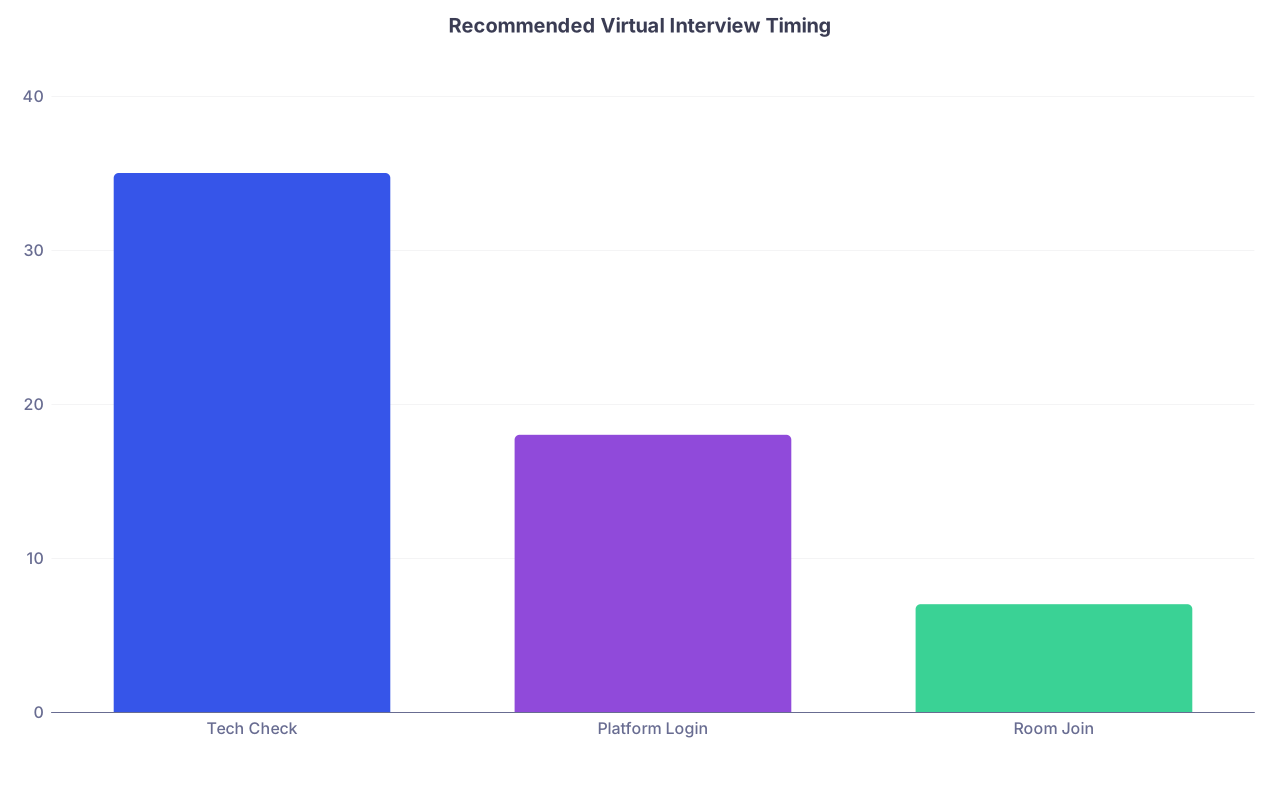
| Category | Value |
|---|---|
| Tech Check | 35 |
| Platform Login | 18 |
| Room Join | 7 |
Most programs are expecting people to start appearing in the waiting room a bit early. That’s normal. What they don’t want is repeated popping in and out, or you accidentally entering a room still in use.
What “Early” Actually Means (And What It Doesn’t)
“Early” is one of those vague words that freaks people out. So let’s define it.
1. Early in your day: 30–40 minutes before
This is your private prep time. No one sees you yet.
By 30–40 minutes before your first event (orientation, pre-brief, or first interview), you should already:
- Have your computer restarted (yes, really)
- Be plugged in or at 100% battery
- Close everything you don’t need: email, Slack, Spotify, random browser tabs
- Open your interview platform (Zoom, Webex, Thalamus, ERAS Interview, etc.)
- Test audio and video inside the app
- Check your camera angle and lighting
- Pull up your notes and program sheet
This is not “join the room” time. This is “if something breaks, I have time to fix it” time.
2. Early on the platform: 15–20 minutes before
If the program uses a centralized portal (Thalamus, Zoom day link with breakout rooms, etc.), you should:
- Be logged into the platform
- Confirm you see the right links/schedule
- Confirm time zones match what you think is happening
If they have a general “main room opens at 7:45 AM” instruction, you follow that, even if you’re ready earlier. Don’t ignore explicit instructions to do your own thing.
3. Early to the actual interview room: 5–10 minutes before
This is where people get confused.
If you have a specific time and link for your individual interview (e.g., “Interview with Dr. Smith, 10:30–11:00 AM, Zoom link X”), joining 5–10 minutes early is ideal. Not 20. Not right on time.
That extra 5–10 minutes gives you:
- A buffer if Zoom decides to update
- Time to react if your mic suddenly stops working
- A calm moment in the waiting room to breathe and center yourself
Programs are used to seeing people in the waiting room before the official start. That’s fine. They click “admit” when they’re ready.
What If Someone Is Already in the Room?
This is what you’re actually worried about: clicking the link at 10:22 for a 10:30 interview and accidentally landing in the tail end of someone else’s session.
Here’s what usually happens in reality:
- Most programs use a waiting room
- You sit in the waiting room until they’re ready
- You never see the other applicant; you just see a generic “please wait” message
If the program’s tech is lazy or set up weirdly, you might land directly in the room. If that happens and you see the PD or interviewer already with someone else, here’s exactly what to do:
- Immediately mute yourself and turn your camera off if it’s not already.
- Say nothing.
- Click “Leave Room” right away.
- Re-join 3–4 minutes before your scheduled time instead.
You don’t need to apologize in a later email. If anyone mentions it (they usually won’t), you can say:
“I joined a bit early to make sure everything was working, and I realized another interview was in progress, so I stepped out.”
That’s it. Calm, normal, professional.
How Programs Actually Interpret Your Timing
You’re being judged all day, including on how you handle basic logistics. Here’s how your join time reads to them.
If you join 10+ minutes early
They might think:
- “They’re prepared and really don’t want tech issues.” (good)
- Or, if it’s extreme (25–30 minutes early to every single room): “They’re anxious and can’t read instructions.” (neutral to mildly negative)
Occasionally, they’ll admit you early and just do small talk. Sometimes they’ll leave you in the waiting room. Either way is fine. You’re not being graded on who speaks first.
If you join 0–2 minutes before start
This is risky.
If everything goes perfectly, you look “on time.” But on interview days, tech almost never goes perfectly:
- Your audio fails for 30 seconds
- Your camera doesn’t switch to the right one
- Your laptop fans spin up and you need to move
- Zoom decides it must update. Right now.
They’re now starting late because of you. And yes, that gets noticed.
If you join late
You’re digging out of a hole the second they see your face.
Program people are not dumb. They know sometimes the platform breaks. They also know that half of “tech issues” are just poor planning.
Here’s the difference in how it reads:
- Late but you emailed/called the coordinator 10+ minutes before with real issues → unavoidable problem, neutral
- Late because you “had another interview” but didn’t warn them ahead → way less forgivable
- Late because your Wi-Fi died and you’d done no prep contingency → looks like lack of judgment
On virtual interview day, your timing is part of your professionalism score whether anyone says that out loud or not.
How to Time It Step-by-Step (Sample Morning)
Let’s say your schedule looks like this (very typical):
- 8:00–8:30 AM: Welcome/overview
- 8:35–9:05 AM: Interview 1
- 9:10–9:40 AM: Interview 2
- 9:45–10:15 AM: Interview 3
- 10:20–11:00 AM: Resident Q&A
Here’s how I’d tell you to run it.
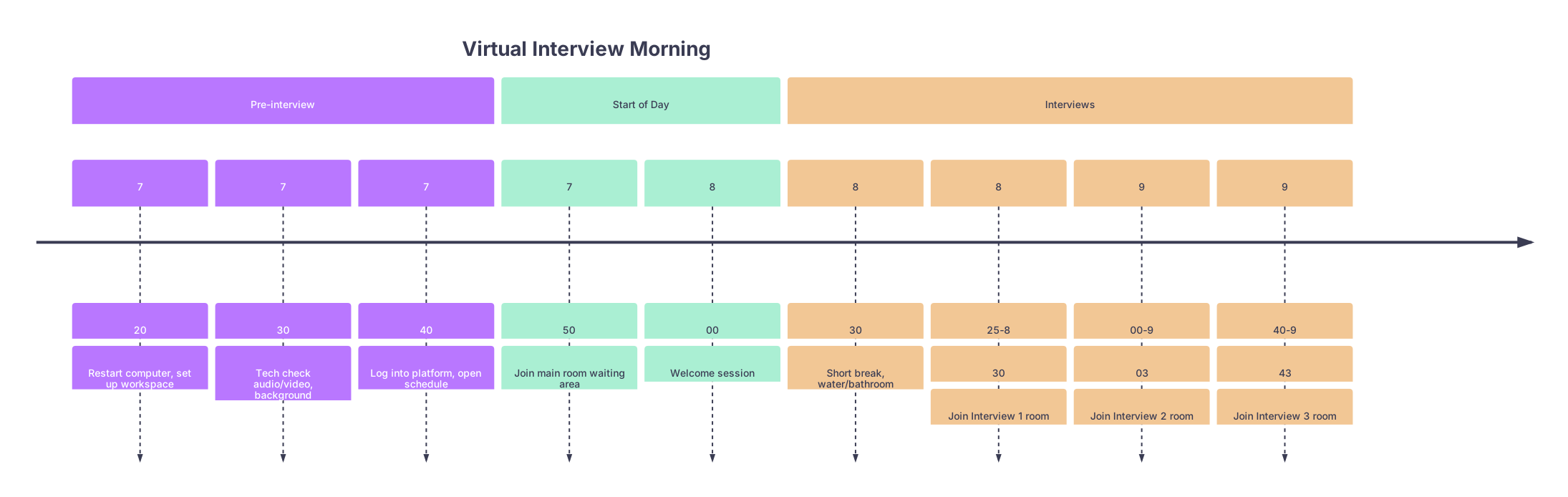
| Period | Event |
|---|---|
| Pre-interview - 7 | 20 |
| Pre-interview - 7 | 30 |
| Pre-interview - 7 | 40 |
| Start of Day - 7 | 50 |
| Start of Day - 8 | 00 |
| Interviews - 8 | 30 |
| Interviews - 8 | 25-8 |
| Interviews - 9 | 00-9 |
| Interviews - 9 | 40-9 |
Notice a few things:
- You’re not first touching your computer at 7:55
- You aim to be in each interview room 5ish minutes early
- You’re not hovering in a specific interview room 20 minutes in advance
Just solid, boring, professional timing.
Tech & Platform Realities You Should Plan Around
Some platforms are kind to early people. Some are not.
| Platform | What Happens If You're Early | Risk Level |
|---|---|---|
| Zoom w/ Waiting Room | You sit in waiting room until admitted | Low |
| Zoom w/o Waiting Room | You may drop into active session | Medium |
| Thalamus | Usually waiting room-style per room | Low |
| ERAS Interview | Structured access by time slot | Low |
| Webex/Teams | Depends on settings; can see others | Medium |
If the instructions mention:
- “You’ll be placed in waiting rooms between interviews” → you can safely click a bit early
- “Do not join your interview room until your scheduled time” → they’ve had early intrusions before, respect that
- “You’ll be moved automatically between rooms” → you probably won’t click individual links at all once you’re in the main day link
When in doubt, obey their specific instructions over any generic advice—even mine.
How Early Is “Too Early”?
Here’s my cutoff:
- Joining the platform 20–30 minutes early? Great.
- Sitting in the main room 15 minutes before the official “day start”? Usually fine, especially if they said it opens early.
- Clicking into an individual interview room 15–20 minutes early when you’re clearly not on the schedule yet? That’s pushing it.
Programs are trying to juggle faculty who are clinically busy. They might be using the same link for back-to-back applicants. Don’t make their logistics harder.
If you’re tempted to join way early because you’re terrified of tech failing, you’re better off:
- Checking your connection on a separate “test meeting”
- Having a hotspot backup ready
- Confirming your audio/video in the app’s settings
That does more for your safety than hovering in a faculty member’s personal Zoom room for 20 minutes.
Exact Recommendations You Can Just Follow
If you want a simple rule set you don’t have to second-guess, use this:
- Be desk-ready: 45 minutes before first scheduled thing
- Be computer-ready (restarted, apps open, notes up): 35 minutes before
- Be on the platform: 20 minutes before
- Join the main day link: 10–15 minutes before or as instructed
- Join individual rooms: 5–8 minutes before your scheduled interview time

If the program gives different numbers, follow theirs.
Common Mistakes Around Early Logins (And How to Avoid Them)
I’ve watched people tank the professionalism part of their interview day over tiny, avoidable timing errors. Here are the greatest hits.
Cutting it close between back-to-back interviews
They leave one Zoom room at :29 and try to join the next one at :30 on the dot. Then something breaks. Better: leave at :27–:28 if the conversation is clearly done and be in the next waiting room by :25–:26.Not reading time zones
Classic. Program says “All times Central,” student shows up “early” at 7:50 PT for an 8:00 CT start and is actually late. Confirm time zone in the email and on your calendar.Popping in and out of the same room repeatedly
Don’t click the same link, see a waiting room, panic, leave, and rejoin five times. Join, stay put, and let them run their schedule.Logging in from a new device at the last second
Using your laptop all morning, then switching to your phone for one interview 2 minutes before because you “wanted to walk around.” Audio, video, and naming issues pop up. Keep your setup consistent unless something breaks.
What If You’re Late Despite Doing Everything Right?
Sometimes the internet dies. The platform crashes. Your building loses power.
If you’ve genuinely done everything correctly and you’re still late:
- Email or call the coordinator as soon as it’s clear there’s a problem.
- Keep the message short: what happened, what you’re doing, your backup plan.
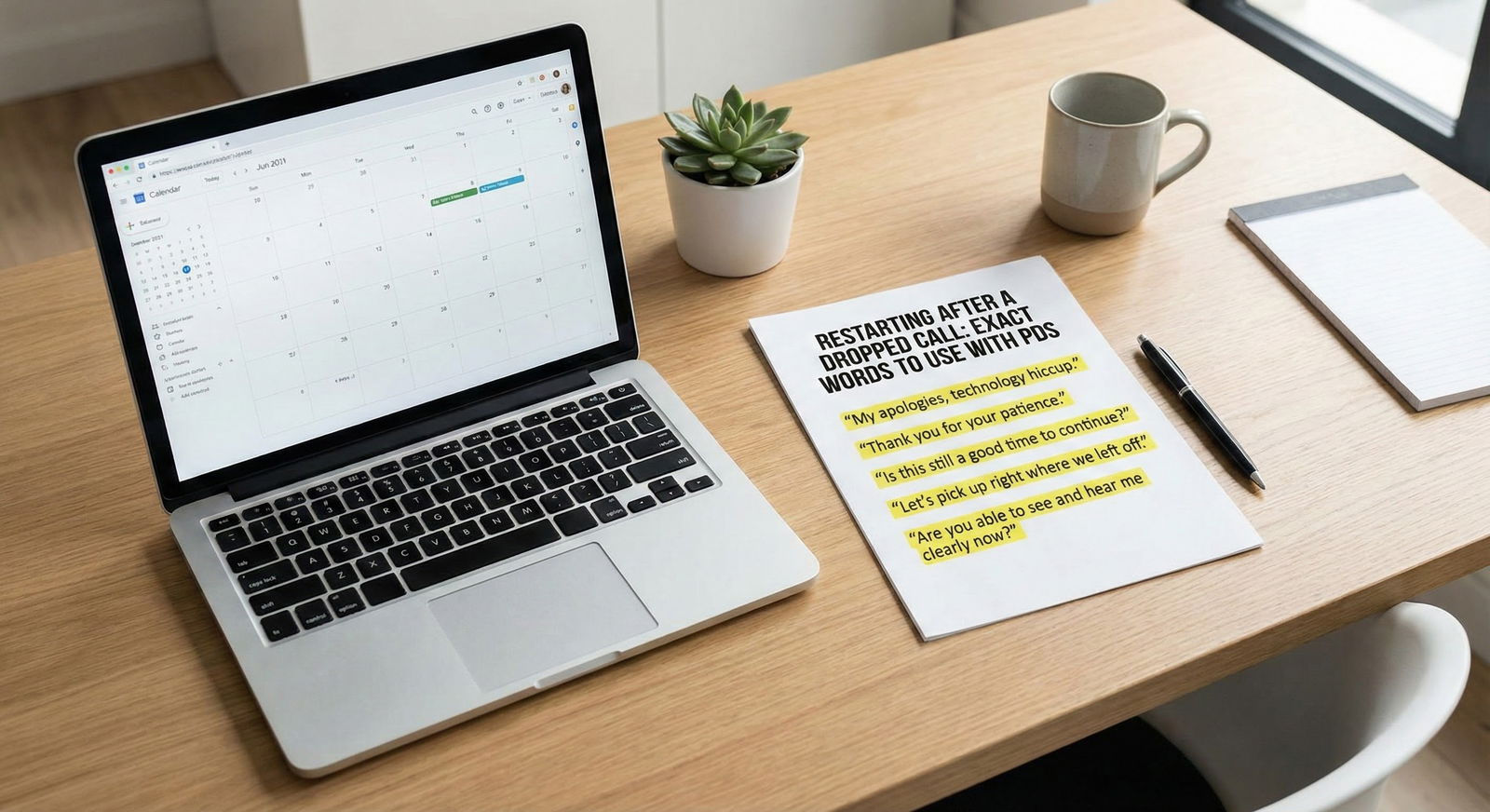
- When you finally join, you can do a one-sentence acknowledgment:
“Thanks for your flexibility; my Wi-Fi dropped suddenly, but I’m all set now.”
Then move on. Don’t keep apologizing. That just drags attention back to the problem.
FAQ: Virtual Residency Interview Timing
1. Will programs think I’m weird if I’m in the waiting room 10 minutes early?
No. They’ll think you’re prepared. Ten minutes early in a waiting room is completely normal. You’re not being graded for how you use that time; they’ll just admit you when they’re ready.
2. What if my previous interview runs long and I can’t join the next room early?
This happens. Don’t interrupt a clearly engaged, positive conversation just to be “early” to the next link. Once you’re released, join the next room immediately and, if truly late, briefly say: “Apologies for the slight delay; my prior interview ran over a bit.”
3. Should I email the coordinator to ask how early I can join?
Usually, no. If their instructions are vague, you can safely use the 5–10 minute rule for individual rooms. Email only if their instructions conflict (e.g., “Don’t join early” vs a shared link that looks like it might have back-to-back use).
4. Can I log in on my phone as backup and keep that open early too?
You can have your phone ready as a backup, app installed, and link accessible. But don’t log into the same meeting from two devices simultaneously unless your primary device has failed; it can cause echo and confusion.
5. What if the host hasn’t started the meeting yet when I join early?
You’ll see a message like “Waiting for host to start this meeting.” That’s fine. Stay there. Don’t leave and rejoin ten times. It just means they haven’t opened the virtual doors yet.
6. How do I handle back-to-back interviews using the same link?
If they’re using one link and moving you between breakout rooms, you just stay put. Join the main link 10–15 minutes before the day starts, keep that window open, and follow instructions from the coordinator. Your “early/late” behavior is judged by being present and responsive in that main session, not by clicking separate links.
Key points:
- Yes, log in early—but aim for 5–10 minutes early to each interview room, not 20–30.
- Be fully “platform-ready” 15–20 minutes before and computer-ready 30–40 minutes before.
- If you ever accidentally drop into someone else’s interview, leave immediately, rejoin closer to your time, and don’t make it a big deal.