
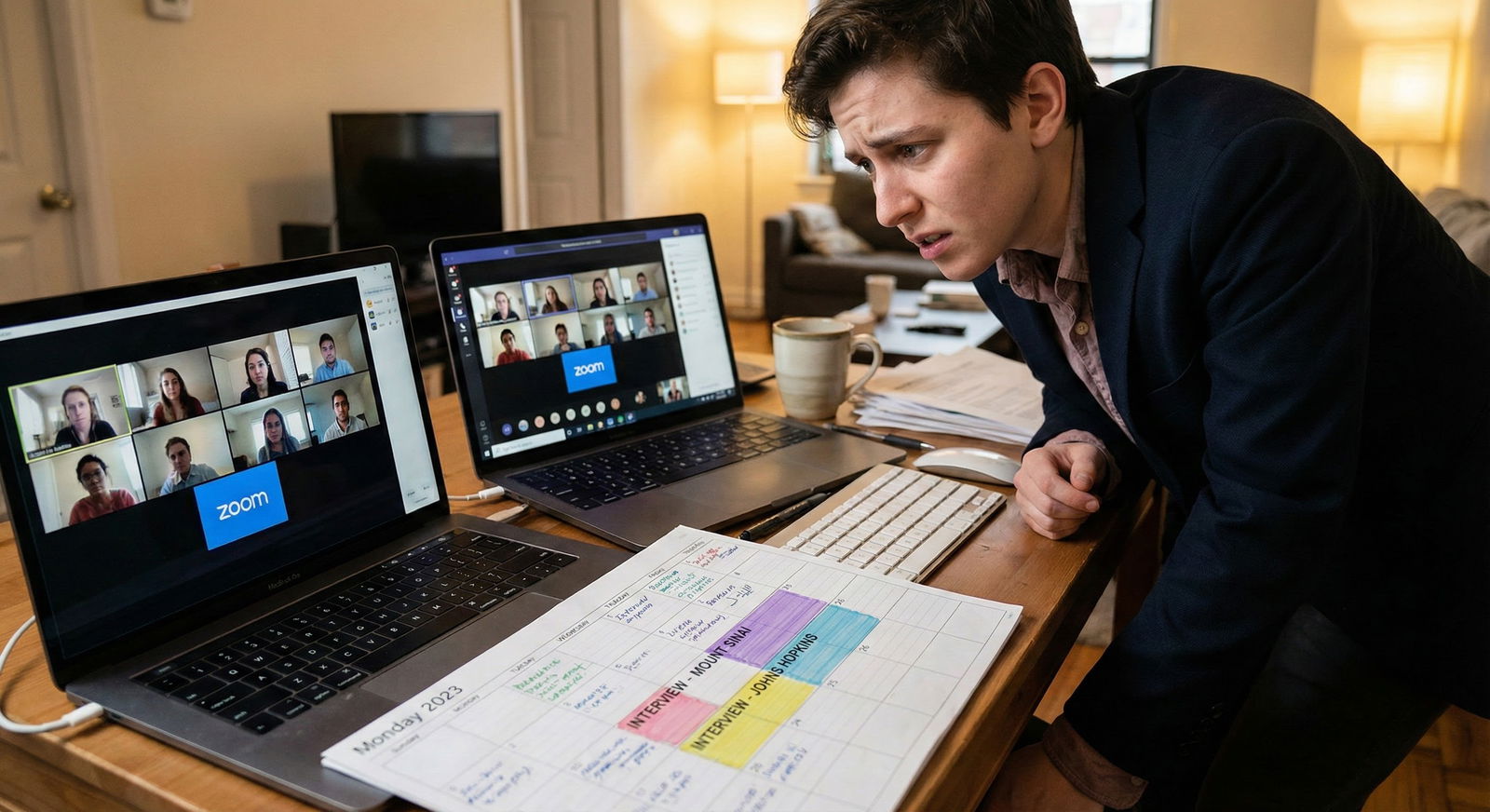
Most programs don’t care about your internet quality—until it blocks them from seeing who you are.
That’s the line. They’re not grading your Wi‑Fi speed. They are judging how well you handled the fact that your internet might suck that day.
Let me break down what really matters, what doesn’t, and how to avoid being “the laggy applicant” everyone remembers for the wrong reason.
Quick Answer: Are They Judging My Internet?
Here’s the blunt truth:
- No, programs are not docking you points because your landlord bought the cheapest router on Amazon.
- Yes, your tech issues can absolutely hurt your interview if they prevent real conversation, break the flow, or eat up half your allotted time.
Programs are evaluating:
- Your communication skills
- Your professionalism
- Your judgment and preparation
- Your ability to stay calm when things go wrong
Bad internet just becomes a problem when it interferes with any of those.
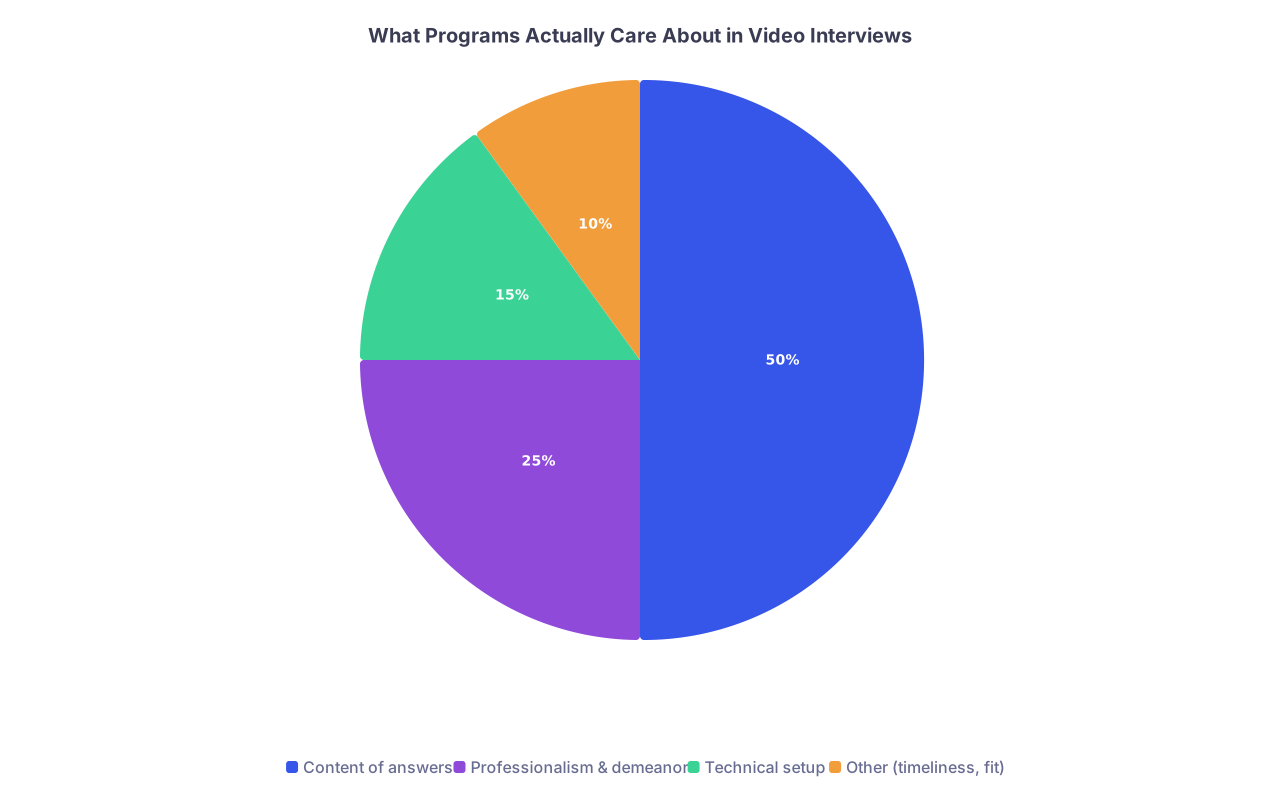
| Category | Value |
|---|---|
| Content of answers | 50 |
| Professionalism & demeanor | 25 |
| Technical setup | 15 |
| Other (timeliness, fit) | 10 |
Nobody’s sitting there saying, “Her download speed is clearly under 50 Mbps, hard pass.” But they will notice if:
- Every sentence cuts out
- They have to repeat every question
- You’re frozen with your mouth half open for 30 seconds at a time
- You show up clearly unprepared for a virtual format
So the target isn’t “perfect internet.” The target is “good enough that tech doesn’t get in the way of the interview.”
What Counts as “Good Enough” Internet for Residency Interviews?
Let’s be concrete.
Minimum bar
If you can:
- Hear and see them clearly
- Be heard and seen clearly
- Maintain a stable connection without frequent drops
…you’re fine. That’s it.
- Gigabit fiber
- A gaming headset
- A $200 ring light and dedicated webcam
I’ve watched applicants match at very competitive programs over connections that were obviously not premium, but they were stable and usable.
When internet becomes a real problem
Your internet starts to hurt you when:
- Audio keeps cutting in and out
- Video freezes every 15–30 seconds
- You get dropped from the call repeatedly
- There’s a multi-second delay making conversation awkward
If the entire interview turns into:
“Sorry, could you repeat that?”
“Wait, you’re frozen.”
“We’ll give them a minute to reconnect…”
…that’s where it starts affecting how much they can actually get to know you. Not because they’re mad at your router. Because they literally can’t evaluate you properly.

What Programs Are Actually Judging in a Virtual Interview
Programs are using the virtual interview to answer a few basic questions:
- Do I want this person taking care of my patients?
- Will they work well with my residents and faculty?
- Are they thoughtful, reliable, professional?
Your internet connection affects how well they can see those things—but it’s just one piece of the environment. Think of it like this:
| Factor | How It’s Judged |
|---|---|
| Content of answers | Directly evaluated |
| Professionalism | Strongly evaluated |
| Body language / eye contact | Moderately evaluated |
| Background & lighting | Mildly evaluated (basic professionalism) |
| Internet/video quality | Evaluated only if it disrupts |
I’ve heard PDs say this outright on Zoom sessions: “We understand people have varying internet. We don’t penalize for that. We do expect you to plan as best as you can.”
So yes, they’re human. They get that you might live with three roommates and spotty Wi‑Fi. But they’ll notice if you made zero effort to work around it.
How Much Do Tech Glitches Actually Hurt?
Let’s be specific.
Things that almost never hurt you long-term
- A brief freeze or lag once or twice
- A single dropped call that’s quickly reconnected
- Needing to turn off HD video to stabilize the call
- Saying, “I’m so sorry, my internet is spotty today, but I really want to make sure you can hear me—please let me know if I cut out.”
Programs have seen worse. They had faculty trying to interview from clinic break rooms on hospital Wi‑Fi during the first Zoom cycle. Nobody expects perfection.
Things that can hurt your impression
- You’re 10+ minutes late because you “were updating Zoom” or “Zoom wouldn’t connect” and you didn’t test anything beforehand
- You spend half the interview troubleshooting instead of, you know, interviewing
- You clearly didn’t think ahead about backup options (phone hotspot, different device, alternative location)
- You get visibly flustered, frustrated, or disrespectful when tech fails
Technical issues are forgivable. Poor planning and poor professionalism are not.

| Step | Description |
|---|---|
| Step 1 | Tech problem occurs |
| Step 2 | Stay calm and acknowledge briefly |
| Step 3 | Offer quick fix: turn off HD, move closer to router |
| Step 4 | Continue interview |
| Step 5 | Use backup: phone hotspot or phone audio |
| Step 6 | Email/Chat coordinator if needed |
| Step 7 | Reschedule if totally impossible |
| Step 8 | Can they hear/see me at all? |
How To Look “Prepared and Professional” Even With Meh Internet
Here’s what you can control. And this is what programs do judge.
1. Test the setup early – not five minutes before
At least a few days before your first interview:
- Join a test Zoom/Teams/Thalamus link with a friend
- Check: audio, video, camera angle, lighting, and background
- Move around your home until you find the most stable connection spot
If video looks a little soft but doesn’t freeze, you’re fine. Stability > sharpness.
2. Prioritize audio over video
If your connection is shaky, protect audio first. If they can hear you clearly, you can still have a decent interview even if the video is a bit choppy.
You can say:
“Just so you know, my internet is a bit unstable today. If needed, I’ll turn off my video briefly so the audio stays clear—please let me know if anything cuts out.”
If the call is really struggling, turn off HD video. Worst case, switch to audio-only with a clear explanation and a quick apology.
3. Have a backup internet plan
You don’t need a second ISP. You just need a backup path.
Common backups:
- Phone hotspot
- Different Wi‑Fi (library, friend’s place, quiet hospital room with strong signal)
- Wired connection via Ethernet if possible
Do not wait until you’re mid-freeze to think, “Maybe I should try my hotspot.” Know your backup plan ahead of time.
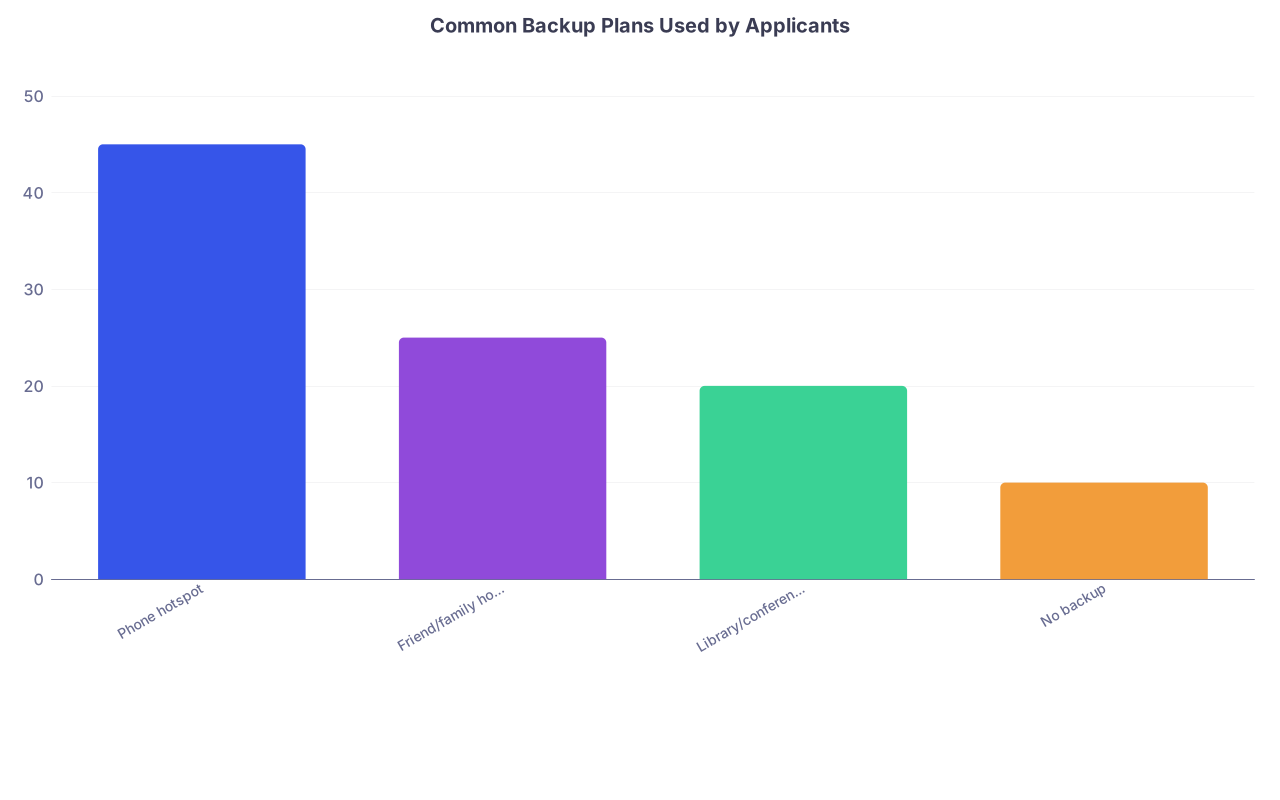
| Category | Value |
|---|---|
| Phone hotspot | 45 |
| Friend/family home | 25 |
| Library/conference room | 20 |
| No backup | 10 |
4. Control what you can around the tech
Even if your internet isn’t amazing, you can still look put-together:
- Quiet, non-chaotic background (or a neutral virtual background if your real one is bad)
- Good enough lighting so they can see your face
- Camera at eye level
- No loud notifications going off constantly
Every one of these signals: “I took this seriously.”
5. Handle issues like a professional, not a panicked MS3
If something goes wrong—and it will for someone every interview day—your response is the real test.
Good responses sound like:
- “I’m so sorry, I think my connection briefly cut out. Could you please repeat the last part of your question?”
- “I’m going to turn off my video for a moment so the audio is stable—please let me know if that helps on your end.”
- [After reconnecting] “Thanks for your patience; my connection dropped for a second. I really appreciate you bearing with me.”
This shows emotional control, respect for their time, and problem-solving. Those are the exact traits they want in a resident at 3 a.m. on call.
What If My Internet Is Objectively Bad and I Can’t Fix It?
Then you treat it like any other constraint in medicine: you plan around it.
Here’s what I’ve seen work:
- Ask a friend, partner, or family member if you can reliably interview from their place
- Book a quiet room at a medical school, hospital, or public library with private study rooms
- If you’re international with very unstable infrastructure, email the program coordinator ahead of time:
“I’ll be interviewing from [country/region], where the internet can sometimes be unpredictable. I’ll do everything I can to make sure things run smoothly, but I wanted you to be aware in case there are unavoidable brief interruptions.”
That kind of heads-up is usually appreciated, not penalized.
What you don’t do: shrug, pray, and then act shocked when your connection fails on four interviews in a row.
Red Flags vs. Reality: What Programs Remember
Let’s draw a hard line between “unfortunate” and “problematic.”
Unfortunate (usually forgiven):
- You get dropped once
- Your video is a little grainy
- There’s a 3–4 second lag sometimes
- You’re clearly trying, stay courteous, and still manage a full conversation
Problematic (can hurt you):
- Chronic unpreparedness (late repeatedly, never tested the platform)
- Total chaos behind you (people walking around, loud noise, no attempt to fix it)
- Visible irritation, eye-rolling, or blaming the program (“Your platform doesn’t work”)
- You lose >50% of your interview time to tech and don’t offer reasonable solutions
Is that “judging your internet quality”? Not really. It’s judging how you respond when your internet quality isn’t ideal.
FAQ: Do Programs Judge My Internet Quality During Residency Interviews?
1. Will I be ranked lower just because my internet was laggy?
If the lag was minor and you still had a coherent conversation, almost certainly not. If they couldn’t really interview you at all because of tech, then yes, your file may end up weaker—not out of spite, but because they didn’t get enough information to advocate for you.
2. Should I email the program if my internet crashes during the interview?
Yes, if you get completely kicked out and can’t rejoin quickly. Email the coordinator as soon as you can, briefly explain the issue, and ask if you can reschedule missed portions or switch to phone audio. Keep it short, calm, and professional.
3. Is it better to use a phone on strong LTE/5G or a laptop on shaky Wi‑Fi?
Use whatever gives you a more stable connection with decent audio. A phone on strong cellular is often better than a laptop on unstable home Wi‑Fi. Just prop the phone at eye level and plug it in so the battery doesn’t die mid-interview.
4. Do programs mind if I turn off my video to improve audio?
If the connection is bad, turning off video to preserve audio is a smart move, and most interviewers will respect that. Explain what you’re doing in one sentence, confirm they can hear you clearly, and continue. It’s better than 30 minutes of broken, delayed conversation.
5. How early should I log in on interview day to catch tech issues?
Aim for 15–20 minutes early. That gives you time to handle updates, audio glitches, or login problems without cutting into your actual interview block. Programs notice when you show up calm and ready instead of breathless and frazzled from Zoom wars.
Key points to keep in your head:
- Programs don’t care about perfect internet. They care about being able to talk to you like a normal human.
- Your professionalism in handling tech issues is what gets judged, not your bandwidth.
- A little planning—a test run, a backup plan, and a calm attitude—turns “bad Wi‑Fi” from a liability into a minor, forgettable hiccup.



