
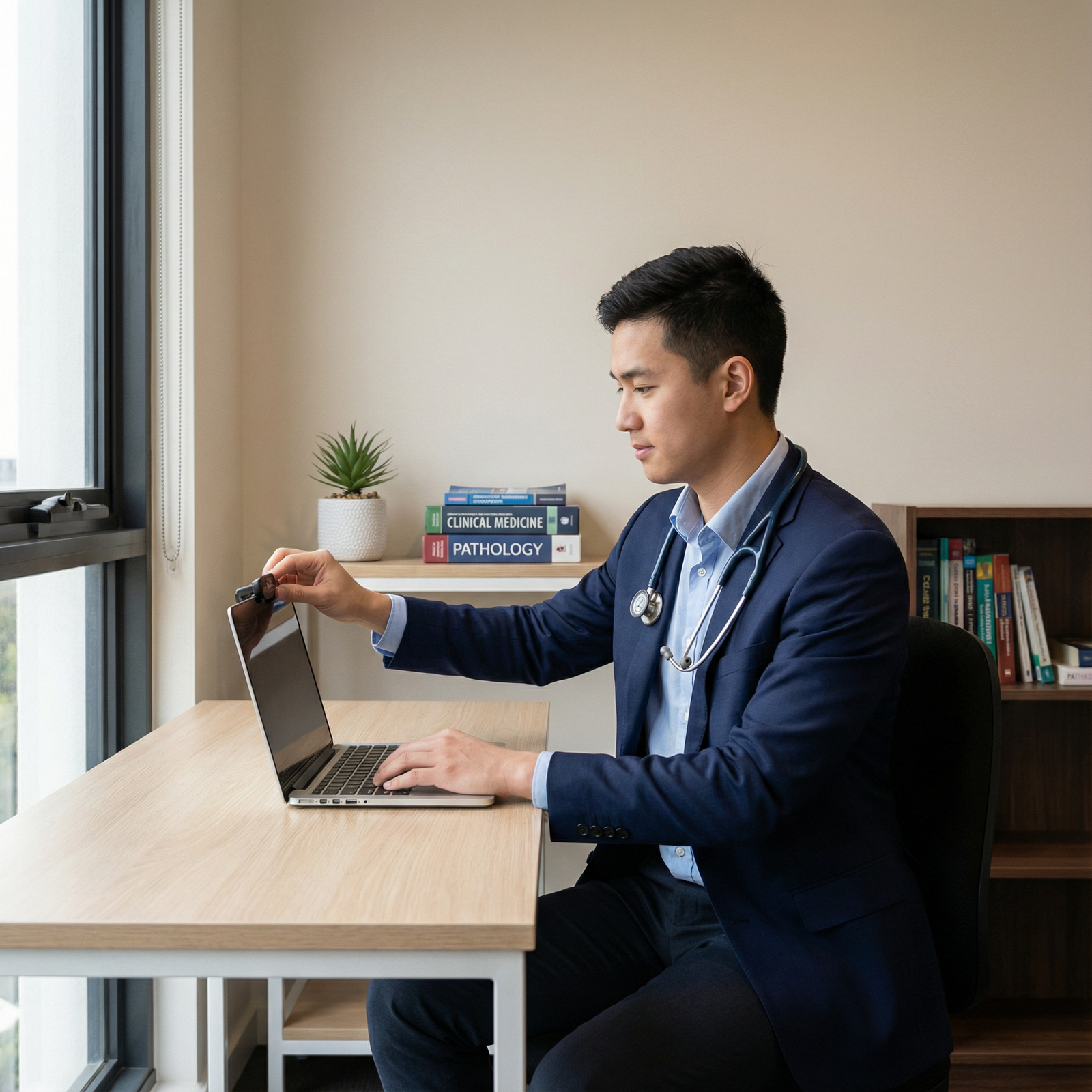
You can crush virtual residency interviews even if five other people live in your 800‑square‑foot apartment. The idea that you need a perfect, quiet condo to look “professional” on Zoom is wrong.
You need control, not perfection.
If you’re reading this, you’re probably in one of these situations:
- Living with parents and siblings who do not fully get why “one hour of quiet” is actually mission critical
- Sharing a tiny apartment with roommates who work odd shifts
- Married / partnered with kids, and the only door that locks is the bathroom
- Living in on-campus housing or student apartments with paper-thin walls
I’ve watched students match at very competitive programs from kitchens, closets, and parked cars. The ones who struggled didn’t fail because of noise. They failed because they didn’t plan.
Here’s how you handle this without losing your mind or sabotaging your chances.
Step 1: Get Real About Your Constraints (Not Your Ideal)
Stop fantasizing about a quiet home office. You do not have one. Wishing you did just wastes time.
Your job is to answer three questions honestly:
What times is your home actually quietest?
Early morning before people wake? Midday when kids are at school? Evenings when roommates work?What physical spaces can be controlled, even partially?
A bedroom, walk‑in closet, car, corner of the living room, shared office space nearby?What are your non‑negotiables?
For residency interviews, these are:- Reliable internet
- You can be clearly seen and heard
- Background is not chaotic or wildly unprofessional
- No constant, intrusive interruptions
Notice what’s not on that list: silence, big desk, separate office, fancy chair.
You’re not aiming for “perfect YouTube studio.” You’re aiming for “attending can focus on your answers, not your background.”
Step 2: Pick Your Best “Interview Zone” (Even If It’s Weird)
You need a primary plan and a backup plan.
Here’s the decision tree I’ve seen work well:

| Step | Description |
|---|---|
| Step 1 | Need interview space |
| Step 2 | Use bedroom/office |
| Step 3 | Convert to micro-office |
| Step 4 | Use car interview setup |
| Step 5 | Reserve room |
| Step 6 | Best corner + strict house rules |
| Step 7 | Private room with door? |
| Step 8 | Closet or nook? |
| Step 9 | Quiet car with power/Wi-Fi? |
| Step 10 | Public space: library/office? |
Let’s talk through real-world setups I’ve seen work:
Bedroom setup
The classic. Works if:- Door can close
- You can position camera so they see a blank wall, tidy shelf, or made bed
- Others respect a “do not enter” sign for that time block
If your bed is right behind you, make it perfectly and keep it uncluttered. No laundry heaps. No posters that scream “undergrad dorm.”
Closet / micro‑office setup
Sounds ridiculous. Works insanely well.- Small walk‑in or deep closet
- Laptop on a crate or box at eye level
- Light source in front of you (ring light or desk lamp)
- Clothes around you dampen sound
I’ve had students in NYC do all their interviews from a converted closet and get zero comments about it—because it looked clean and the audio was crisp.
Car setup
This is the emergency option, but it can be solid if done right:- Parked in a quiet, safe spot
- Laptop on dashboard mount or steering wheel desk
- Phone hotspot tested and stable
- Device plugged into car power (or full battery plus backup power bank)
- Sunshade or positioning so you’re not squinting into harsh light
Do not do this if your cell signal is garbage or weather is extreme.
Borrowed space / campus / work office
Strong option if your home is chaos:- University library private room
- Hospital conference room
- Friend’s quiet apartment for the day
The catch: reserve early and confirm you have:
- Wi‑Fi login
- Power outlets
- A backup space if maintenance suddenly decides to start drilling
Living room corner with rules
This is last resort if you have no private room:- Choose a corner with the plainest background
- Arrange furniture to create a “wall” behind you if possible
- Use headphones and a directional mic to cut down noise
- Post strict time rules with everyone in the house
The “weird” looking solution that you control is always better than the “normal” looking space you cannot.
Step 3: Lock In Your Household Support (With Scripts)
You cannot “hope” your housemates remember you have an interview. Hope is not a strategy.
You need:
- A clear schedule they can see
- Specific asks (not vague “keep it down”)
- Backup plan if someone slips
Do this 3–5 days before your interview:
Post your schedule physically
Piece of paper on the fridge or front door:- “Interview – Tuesday 8:30–11:30 AM – DO NOT knock / loud noise near [room]. Critical for residency match.”
Have an actual conversation (not a text)
Here’s a script that works better than “please be quiet”:“Hey everyone, I have a really important residency interview on Tuesday from 8:30 to 11:30 AM. This literally impacts where I’ll train for the next 3–7 years. During that time, I need:
• No music or TV in the living room
• No vacuuming or dishwashing
• Please don’t open my door unless there’s an emergency.I’ll stay in [room/space]. In return, I’ll do [dishes/errands/childcare] before/after to make it easier on everyone. Is there anything I can do to make this work better for you?”
You’re tying it to something real (“3–7 years”), giving specifics, and offering something in return. That’s how adults negotiate.
Day-of reminder
Morning of the interview, thirty seconds:“Quick reminder—my interview is from 8:30–11:30. That’s when the program director will likely be on. Thank you again for helping me with the noise.”
If you have small kids, you need a bit more:
- Arrange childcare coverage for the full block
- If your partner or family is watching the kids, ask them to take them outside or to another location if possible
- If not, at least keep them at the farthest end of the home and pre-load distractions (favorite show, new toys, snacks ready)
The goal is not zero noise. The goal is zero chaotic interruptions.
Step 4: Minimize Noise and Visual Chaos With Cheap Fixes
You can’t rebuild your house before interview season, but you can blunt the edges.
Sound control
Priorities:
- Headphones – Non-negotiable in a crowded home. Over‑ear or good earbuds. Cuts echo, reduces how loud you need to play interviewers’ voices.
- Mic – A simple USB mic or headset mic is a big step up from a laptop mic 6 feet away. Even a $20 wired headset is better than raw laptop audio in a noisy place.
- Soft surfaces – If you’re in a hard, echoey room, add:
- A blanket over the door
- A towel on the desk
- A rug or folded blanket on the floor
- Clothes hanging near you (closet win again)
If there’s predictable noise (trash pickup, neighbor’s leaf blower), try to schedule around it. If you can’t, warn the interviewer once, briefly, if it happens:
“Just to mention, there may be a brief noise from outside in a minute—the garbage truck comes at the same time every Tuesday. I apologize in advance.”
Say it once. Don’t keep apologizing.
Visual control
Your background needs to say “adult with their life somewhat together,” not “chaos” or “frat house.”
Keep it boring:
- Plain wall, tidy bookshelf, curtain, or a door is fine
- Remove obvious clutter, dish piles, laundry, political posters, or anything that looks unprofessional
- If you’re forced into a busier background, move the camera closer to your face so less is visible
Avoid fake virtual backgrounds if your computer is underpowered; they glitch and distract. A simple blurred background is acceptable if it looks stable and doesn’t cut off half your hair.
Step 5: Fix the Tech Before It Embarrasses You
The mistake I see constantly: students test their setup in the middle of the day when the house is quiet, then interview at 8 AM when four people start streaming Netflix.
You need a stress test under real conditions.
Internet
- If you can, use ethernet (cable directly from router to laptop).
- If not, pick the room with the strongest Wi‑Fi, even if it’s less “ideal” otherwise.
- Run a speed test during the time of day you’ll actually interview: you want:
- At least ~5 Mbps upload and 10 Mbps download for a stable video call
- Tell your household:
- “From 8:30–11:30 Tuesday, please avoid streaming or big downloads. It can make my interview freeze.”
If your home internet is truly trash, consider:
- Campus Wi‑Fi in reserved room
- A trusted friend’s place
- Phone hotspot only if you’ve done test calls and it’s stable
Power and hardware
Checklist the night before:
- Laptop fully updated and restarted
- Charger plugged in and within easy reach
- Backup: second device ready (tablet or phone with Zoom/Teams installed and charged)
- Phone on silent with Do Not Disturb on, but used as backup hotspot if Wi‑Fi dies
Full mock interview in the real setup
Do not “just join a test meeting” alone. Ask someone (friend, mentor, sibling) to do a mock video call from your actual interview spot, at a similar time of day.
Have them critique:
- Lighting: can they see your face clearly? Any harsh shadows?
- Background: anything distracting or awkward?
- Audio: do you sound clear or echoey / muffled? Is background noise intrusive?
- Framing: are you centered, with eyes around top third of the screen?
If they say, “Looks fine,” push them: “If you had to complain about something, what would it be?” Fix that.
Step 6: Plan for Inevitable Interruptions (Because They Will Happen)
Someone is going to knock on the door. A kid may scream. A roommate might forget.
You’re not judged for living with humans. You’re judged for how you handle the disruption.
Your job is to be calm, brief, and composed.
Door knock / background person
If it happens once:
“I apologize for that interruption, I’m interviewing from a shared home space today. One moment.”
Turn, quietly signal them away, close/lock the door if needed, then:
“Thank you for your patience. I was saying…”
Do not launch into a long explanation about your living situation. That makes it more awkward than the knock.
Sudden noise (blender, baby crying, loud TV)
If it’s brief, just keep going. Programs understand people live in real homes.
If it’s ongoing and you truly cannot hear:
“I apologize, there’s a sudden noise in the background and I’m having trouble hearing you clearly. Would you mind repeating the question?”
If it continues for more than ~30 seconds and you can’t function:
“I’m very sorry about this—let me take 10 seconds to close another door / adjust my setup so I can hear you properly.”
Quickly fix it. Sit back down. Move on.
Tech crash
If your connection drops or your device freezes:
Rejoin the meeting as fast as humanly possible.
When you’re back:
“I’m sorry about that, my connection dropped briefly. Thank you for waiting. I’m ready to continue.”
If you cannot get back in, immediately:
- Email the coordinator from your phone
- Include:
- Explanation (brief)
- Confirmation you’re trying to rejoin
- Phone number they can call if needed
Programs have seen all of this since COVID. The ones you want to train at will handle it like adults.
Step 7: Manage Your Own Headspace in a Crowded House
There’s a separate problem no one talks about: mental noise.
Even if the house is quiet, your brain might be screaming:
- “What if my nephew barges in?”
- “What if my dad starts vacuuming again?”
- “What if the internet dies?”
You deal with this like a professional:
Control what you can the day before
- Prepare clothes, notes, water, tech, and room setup
- Walk through your entrance: from turning on computer to joining the call
Save a 15–20 minute buffer before the interview
- Last tech check
- A few deep breaths
- Remind the house one final time: “Going in now”
Have your one-sentence “home situation” line ready if it comes up Sometimes interviewers ask, “Is everyone doing virtual school/work from home?”
You can respond:“Yes, I’m currently living with family / roommates, so I’ve carved out this space and time slot where they help keep things quiet. It’s been an adjustment but it’s taught me a lot about planning and communicating clearly.”
Short. Mature. Not a pity story.
Sample Schedules and Strategies in Different Home Situations
| Situation | Primary Space | Backup Space | Key Tactic |
|---|---|---|---|
| Parents + siblings at home | Bedroom | Car | Family meeting + posted schedule |
| Roommates in small apartment | Bedroom / closet | Library room | Noise rules + headphones/mic |
| Partner + toddler | Bedroom / office | Friend’s place | External childcare for interview |
| On-campus shared housing | Study room / closet | Hospital office | Early room reservations |
| No private room at all | Living room corner | Car / campus room | Physical barriers + strict time rules |
Quick Visual: What Actually Matters Most
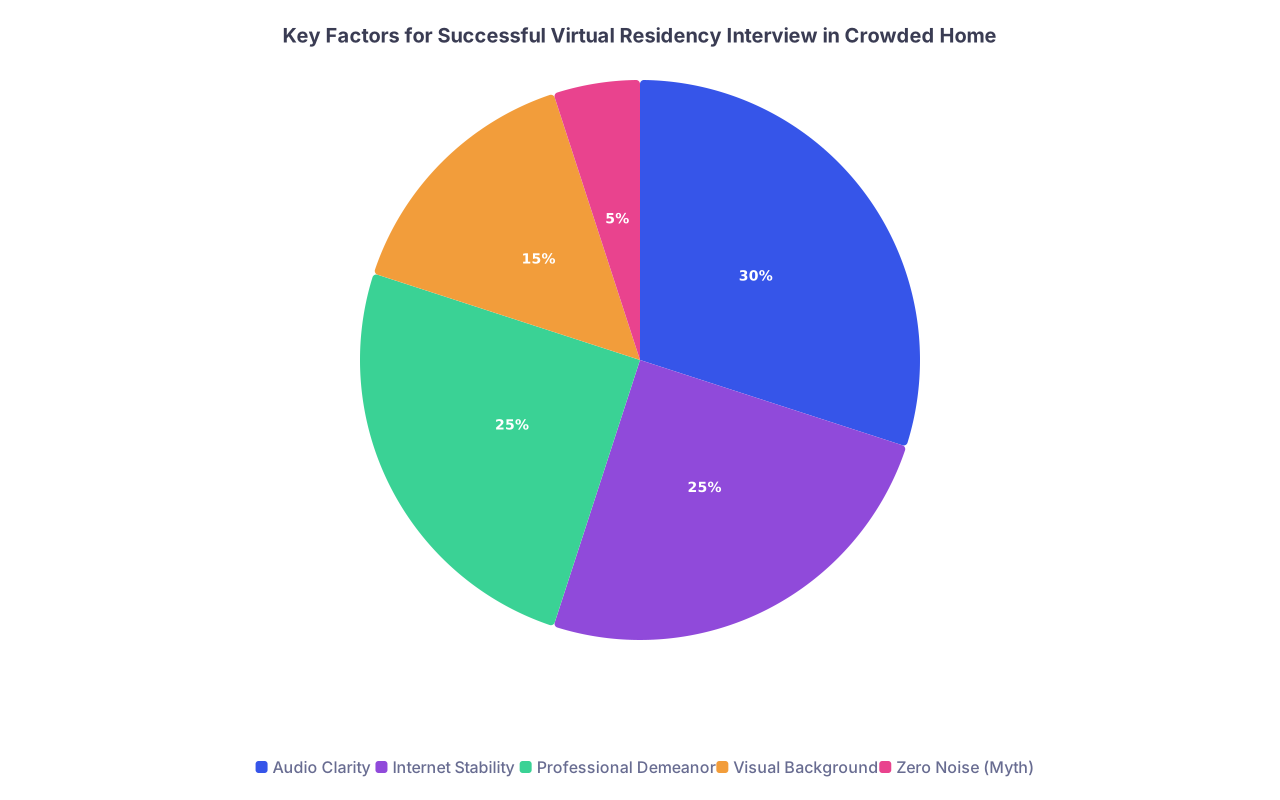
| Category | Value |
|---|---|
| Audio Clarity | 30 |
| Internet Stability | 25 |
| Professional Demeanor | 25 |
| Visual Background | 15 |
| Zero Noise (Myth) | 5 |
Programs care far more about how well they can hear you and how you conduct yourself than about whether a baby babbled once in the background.
Common Mistakes to Avoid in Shared Spaces
I’ve seen these tank otherwise strong applicants:
- Believing “it’ll probably be fine” and not doing a full mock run
- Relying on virtual backgrounds with weak hardware → glitchy, distracting
- Allowing partners or roommates to “just be in the room but quiet”
- Leaving pets loose—door scratching and barking are more distracting than you think
- Over‑apologizing for every tiny noise and derailing your own momentum
- Ignoring your angle and lighting so you look like a silhouette or a chin-only shot
Do the boring prep once. Then reap the benefits all interview season.



