

It’s a Saturday morning. You’re in your apartment, blazer on over scrub pants, logged into your third virtual residency interview of the season. The faculty panel pops up. You smile. Or at least you think you do. Your camera is a little low, your eyes keep flicking to your own image, and you’re unconsciously bouncing your leg so hard your chair is vibrating.
Two weeks later, you get the “we will not be ranking you” email and you have no idea why.
Let me be blunt: applicants are losing interview points every year not because of what they say, but because of how they look saying it on Zoom. And the worst part? They don’t even know it happened.
This isn’t in-person interview body language 101. Video changes the rules. Some habits that were harmless or even positive in person become distracting, awkward, or downright off-putting on screen.
You’re smart enough to not tank your entire season over fixable body language mistakes. So let’s go through the traps one by one.
Pitfall #1: “Dead Eyes” and the Camera Mismatch
On video, eye contact is fake. You’re trying to look at a human, but the “eye” they see is a tiny black circle on your laptop bezel. Most applicants get this wrong.
Common mistakes:
- Staring at your own video tile instead of the lens
- Glancing to the side monitor with notes or a second screen
- Dropping your gaze every time you think
- Looking just slightly below the camera so it feels “off” to the interviewer
I’ve watched interview recordings where the content was fantastic, but it felt like the applicant was talking to my forehead. Or worse, ignoring me.
What it looks like to them
On their side:
- You seem distracted
- You look unsure or evasive when you look away mid-answer
- Your connection feels colder and more distant than it actually is
That subtle disconnect is enough to move you from “top tier” to “solid middle.”
How to avoid it
Reposition your screens
- Put your interview window as close to the camera as physically possible.
- If you use a second monitor, don’t put the interview window there. That’s how you get the constant sideways gaze.
Use the “post-it under the lens” trick
- Put a small dot or arrow right under the camera to pull your eyes there when giving key parts of answers.
- Don’t stare at the camera 100% of the time—that looks robotic—but hit it on important lines and while they’re speaking.
Disable self-view once you’re framed correctly
- Your own face is a distraction.
- Check your framing at the start, then hide your self-view so you’re not constantly glancing at yourself.
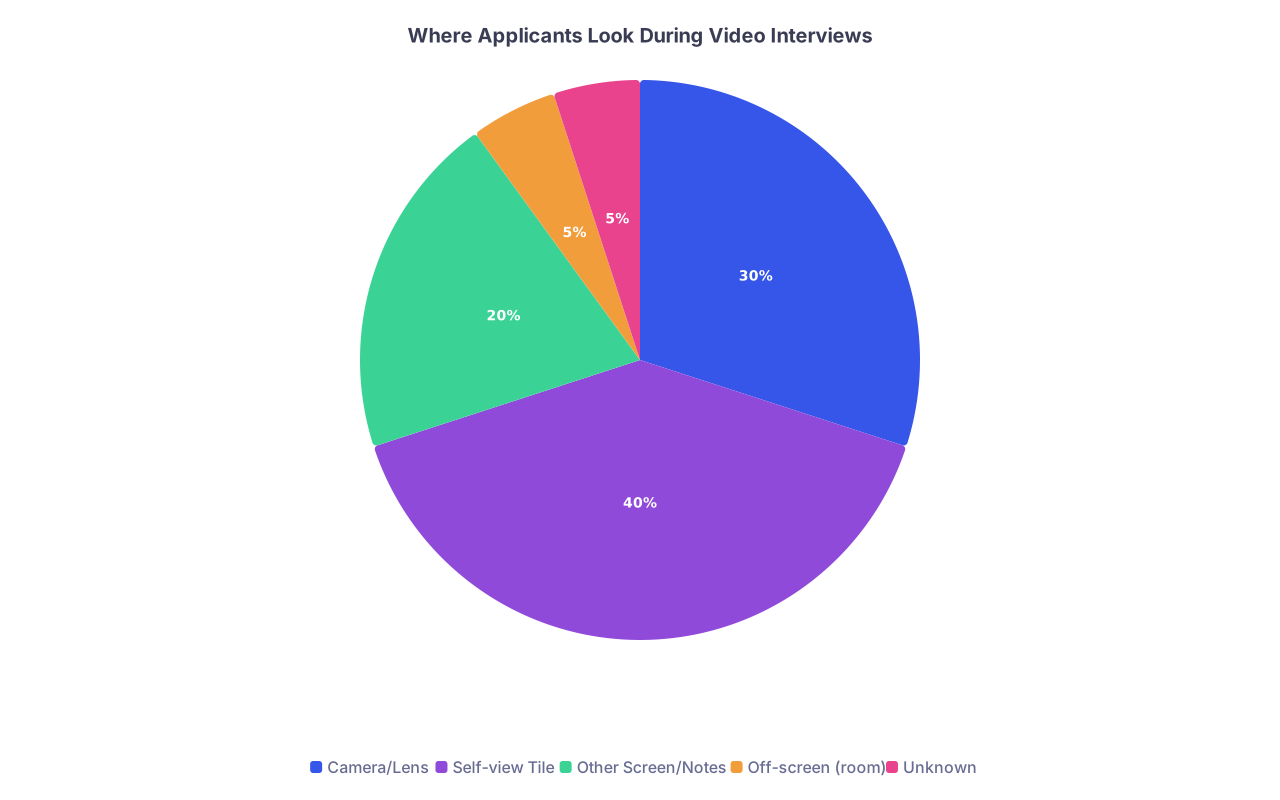
| Category | Value |
|---|---|
| Camera/Lens | 30 |
| Self-view Tile | 40 |
| Other Screen/Notes | 20 |
| Off-screen (room) | 5 |
| Unknown | 5 |
If you remember nothing else: when you’re making a key point or answering a values-based question (“Why this specialty?”, “Tell me about yourself”), talk to the lens, not the little box with your face.
Pitfall #2: The “Floating Head” or “Giant Face” Framing
In person, they see your whole body. On video, you’re a rectangle. Your framing is your body language.
Applicants wildly underestimate how much this matters.
Bad framing I see constantly:
- Nostril Cam: Laptop sitting on the desk, camera pointing up your nose. You look like a bored teenager in homeroom.
- Giant Face: Your face takes up 80% of the screen. Every blink, twitch, or lip lick is magnified.
- Floating Head: You sit too far back and look like a tiny, far-away head with shoulders barely visible.
- Cut-off Chin or Forehead: Gives a rushed, unprepared vibe, even if your answers are polished.
Why framing is a big red flag
Faculty won’t say, “We didn’t rank them because of their webcam angle.” But here’s what they will say:
- “They seemed a bit unpolished.”
- “I didn’t feel like I got a sense of them.”
- “They looked uncomfortable on screen.”
They won’t always know why they felt that way. But your framing did part of that damage.
Safe, reliable framing
Aim for this:
- Top of your head near the top of the frame
- Chest to a bit above mid-torso visible
- You centered, not off to one side
- Eye line about one-third down from the top of the frame
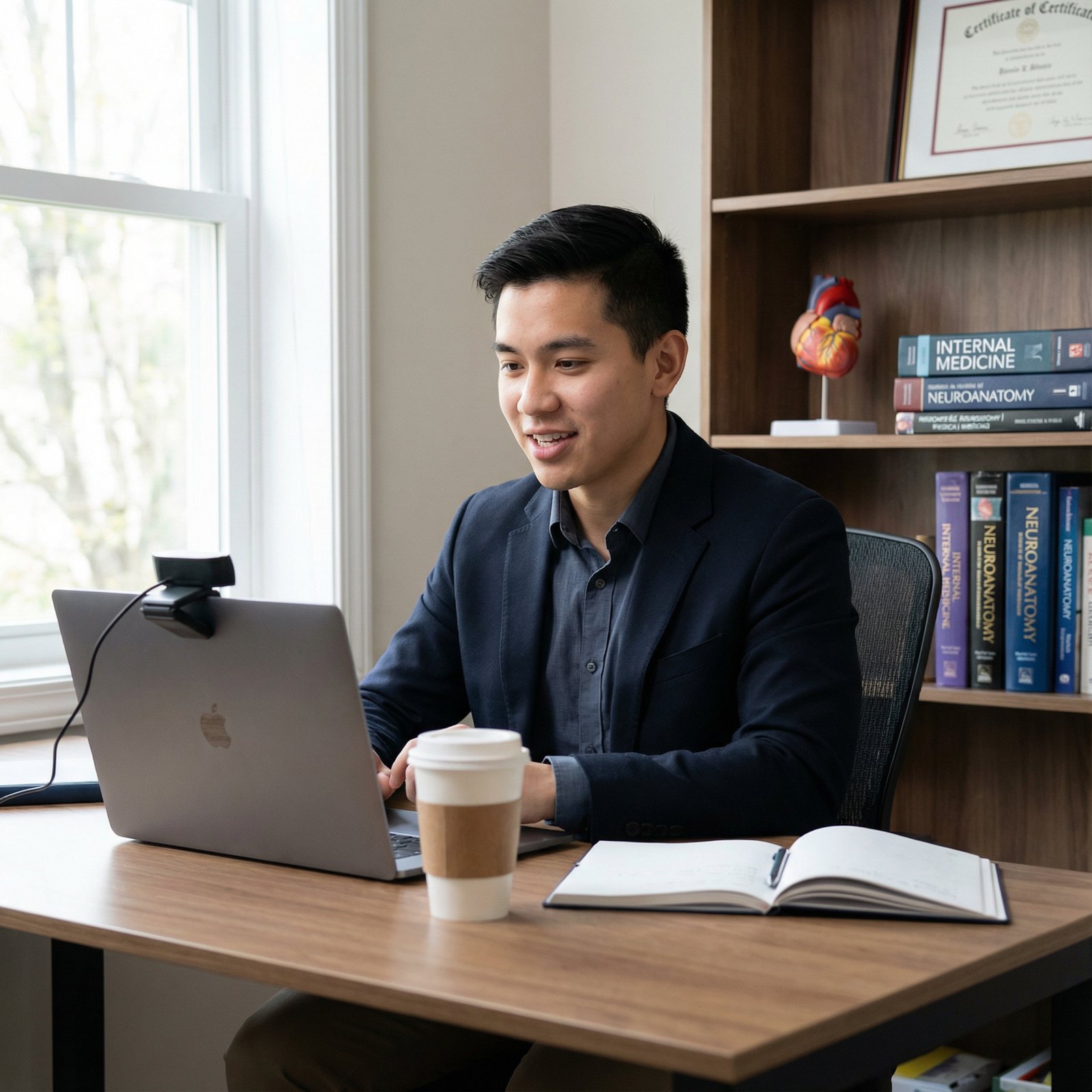
Raise your laptop with books or a stand so the camera is at eye level. If I can see straight into your nostrils, you just cost yourself points.
Pitfall #3: Fidgeting That Looks Ten Times Worse on Camera
Everyone is nervous in residency interviews. But on video, nervous habits are exaggerated and looped directly into the interviewer’s eyeballs.
Things that are mildly distracting in person become unbearable on a 13-inch screen.
High-risk fidgets on video:
- Chair swiveling or rocking
- Pen clicking, tapping, or spinning
- Constant cup/bottle sipping and putting it down
- Repeated hair touching or adjusting hijab/headwear
- Face touching (nose rub, lip picking, scratching)
- Keyboard tapping or mouse clicking on mute
On recordings, I’ve seen applicants spend half their interview adjusting earbuds and touching their face. They looked anxious, scattered, and not ready for a heavy clinical workload—even if their answers were strong.
How this gets interpreted
Faculty won’t say “too much chair swiveling.” They’ll say:
- “Seemed very anxious”
- “Didn’t project confidence”
- “Seemed distracted / checked out at times”
You do not want those notes next to your name when they build the rank list.
How to shut this down
- Use a non-swivel, non-rocking chair if possible. If not, plant your feet flat and consciously lock your lower body.
- Remove fidget toys from reach. Pens, stress balls, AirPods cases—put them out of arm’s distance.
- Plan your hands. Either lightly resting on the desk or gently steepled in your lap. Give them a home.
| Problem Habit | Replace With |
|---|---|
| Pen clicking | Hand resting flat on desk |
| Chair swiveling | Fixed chair or feet flat, core tight |
| Hair touching | Style pinned back before interview |
| Bottle sipping | One glass of water off to the side |
| Face touching | Hands interlaced loosely in lap |
Before your next real interview, record a mock and watch it at 1.25x speed. Your fidgets will jump out and punch you in the face. Then fix them.
Pitfall #4: Overdoing or Flattening Your Facial Expressions
Video compresses nuance. A little smile looks smaller. A tiny frown looks harsher. Subtlety gets lost.
So applicants tend to go in two bad directions:
Stone Face Mode
- Minimal smiling.
- Neutral expression the entire time.
- You think you’re being “professional”; you actually look shut down and disinterested.
Over-Animated Mode
- Big exaggerated nodding.
- Eyebrows constantly up.
- Smiles that jump in and out so fast they feel fake.
What interviewers actually want
They don’t want a clown, and they don’t want a robot. They want:
- A baseline warm, relaxed face
- Occasional natural smiles, especially when talking about patients, your team, or the specialty you love
- Real, visible concern or gravity when discussing mistakes or hard situations
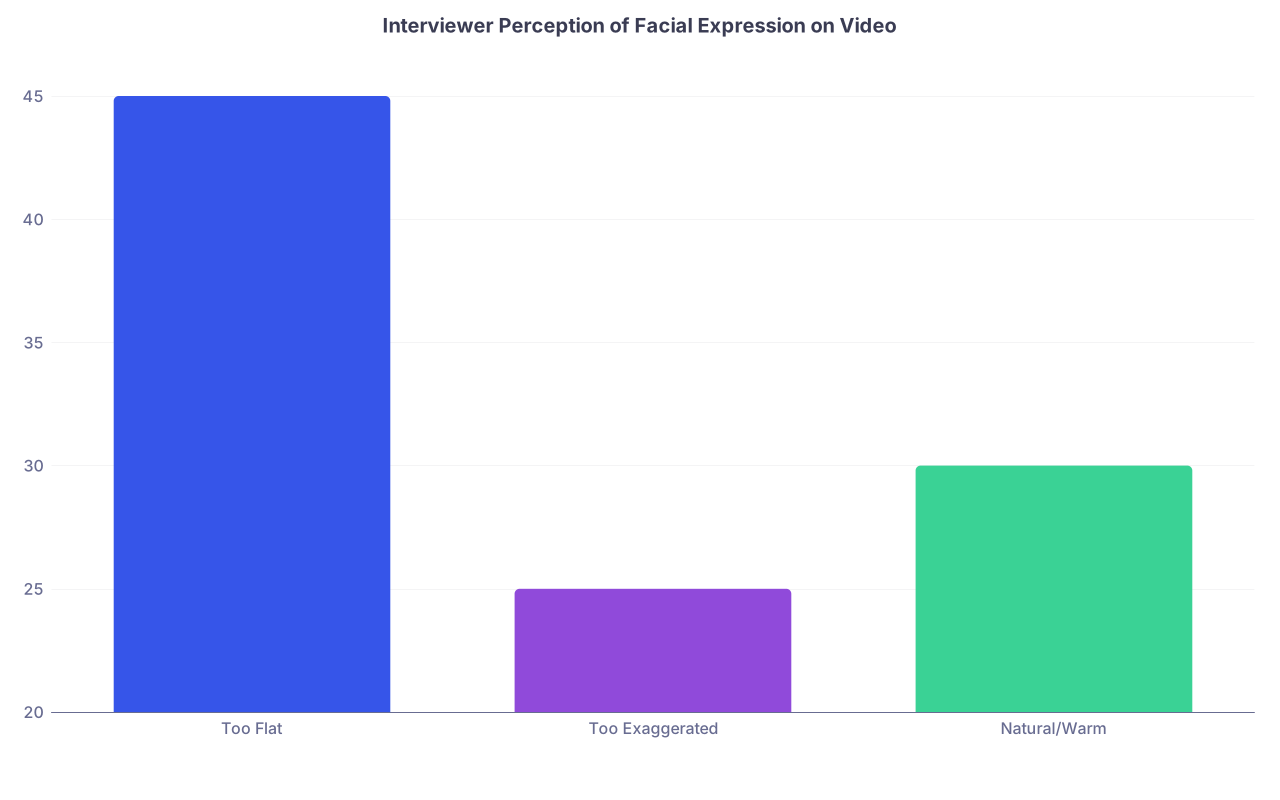
| Category | Value |
|---|---|
| Too Flat | 45 |
| Too Exaggerated | 25 |
| Natural/Warm | 30 |
How to land in the “natural” zone
- Start the call already smiling. Not a grin. Just a slight, genuine smile. It sets your face in the right direction.
- Use smaller, slower nods. The big bobblehead nods that feel normal in person look ridiculous on Zoom.
- Let yourself react. If they say something genuinely funny, smile. If they describe a tragedy, let your face register concern. Don’t freeze in “neutral.”
If you watch your recording and you look bored by your own story, imagine how the faculty will feel.
Pitfall #5: Awkward Posture and the “Stiff Torso”
In-person, you naturally shift. Adjust. Turn toward the speaking person. Video kills that feedback loop. So people default to extremes.
I see two main posture disasters:
The Board
- Back ramrod straight, shoulders tense up to your ears.
- No movement. Ever.
- You look terrified, or like you’re sitting in front of a disciplinary committee.
The Slump
- Leaning back in a gaming chair.
- Sunken shoulders, chin slightly forward.
- Gives off “I rolled out of bed and logged on” energy.
What programs read from your posture
They’re subconsciously asking:
- Does this person look like they can handle high-stress situations without falling apart?
- Do they seem approachable and collegial?
- Do they look like they take this seriously?
Stiff + frozen = not adaptable. Slumped + casual = not fully invested.
The posture that works
- Sit with your back supported but not glued to the chair.
- Slight lean forward when you’re speaking or especially engaged.
- Shoulders down and relaxed, not creeping toward your ears.
- Head neutral, not tilted way back or down.

| Step | Description |
|---|---|
| Step 1 | Check Posture |
| Step 2 | Adjust to Upright |
| Step 3 | Relax Shoulders, Small Lean Forward |
| Step 4 | Raise or Lower Camera |
| Step 5 | Posture Acceptable |
| Step 6 | Leaning Back? |
| Step 7 | Too Stiff? |
| Step 8 | Chin Angle Neutral? |
Do a quick posture check on every “Tell me about a time…” behavioral question. Those stories should bring you a bit forward, like you’re back in it.
Pitfall #6: Using the Wrong Amount of Hand Gesture on Camera
Hands can humanize you—or hijack the entire screen.
On video, hands that occasionally enter the frame near your chest can make you look engaged and dynamic. Hands waving near your face or off to the side look frantic.
Hand problems I see:
- Hands constantly flying into frame at face level
- Hands never visible, giving off “t-rex arms glued to torso” vibe
- Hands used to cover your mouth while you think or laugh
- Repeated self-touch: adjusting glasses, rubbing your forehead, tugging your ear
How to calibrate your hands
- Keep hands primarily between your lower chest and bottom of the frame.
- Use gestures mainly on transitions or key points, not on every single word.
- If you’re a big gesturer, pull your chair a bit further from the desk so your hands stay lower and calmer in the frame.
- If you’re super still, deliberately bring one hand up occasionally for emphasis—otherwise you can look checked out.
Record two versions of a common answer: one with hands hidden in your lap and one with natural, mid-level gestures. Compare. You’ll see how much more alive you look in the second one.
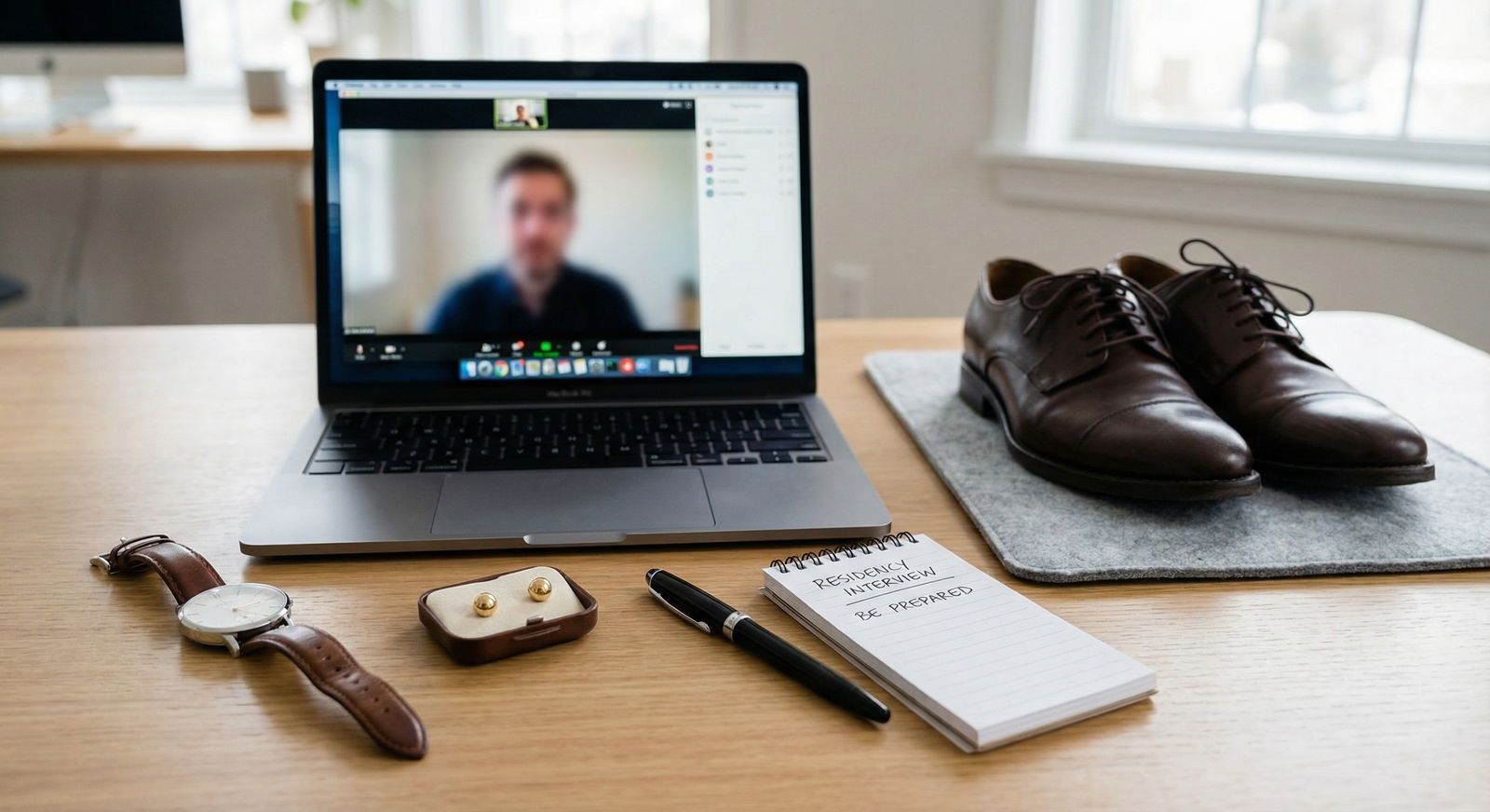
Pitfall #7: Lighting and Background That Sabotage Your Body Language
You can have perfect posture, great facial expressions, and good eye contact—and still look sketchy—if your lighting and background are wrong.
And yes, this is body language. Because your environment is saying things about you before you open your mouth.
Lighting mistakes:
- Bright window behind you: your face is a dark silhouette.
- Overhead light only: harsh shadows under your eyes, “I haven’t slept in 3 years” look.
- Single lamp from the side: one side of your face in shadow, slightly “villain monologue” effect.
Background mistakes:
- Visible bed with rumpled sheets
- Cluttered shelves, piles of laundry, trash cans in frame
- Distracting art/posters that pull attention away from you
- Busy virtual backgrounds that glitch as you move
How this reads to a program
They won’t say “we rejected the applicant for bad lighting.” They’ll say:
- “Didn’t seem prepared for a professional setting.”
- “Came across less polished than others.”
- “Hard to connect, I couldn’t see their expressions clearly.”
You’ve just deliberately made yourself harder to like.
Simple fixes that don’t cost much
- Face a window, with the light coming toward your face.
- If no window, use a desk lamp behind your screen, slightly above eye level.
- Keep background simple: blank wall, bookshelf, or tidy corner.
- If you must use a virtual background, pick a very plain one and sit still. But real, neat background is better.
Pitfall #8: Latency Body Language—Talking Over and Awkward Pauses
This one’s unique to video. The tech delay messes with turn-taking, which messes with your apparent social skills, even though it’s not your fault.
What goes wrong:
- You start answering just as they start talking, then both stop, then both start again.
- You jump in too quickly after they finish, before their audio fully lands.
- You look confused because you’re hearing them half a second late.
If this happens once, fine. If it happens all interview, it makes you seem less attuned and less easy to talk to.
Body language tweaks that help
- Nod and wait half a beat after they finish before you speak.
- Use a small gesture (like a slight lean forward and opening your lips) before you actually start talking—this signals that you’re about to take the turn.
- If there’s persistent overlap, you can calmly say once: “There seems to be a slight delay on my end, so I might pause a bit before responding.”
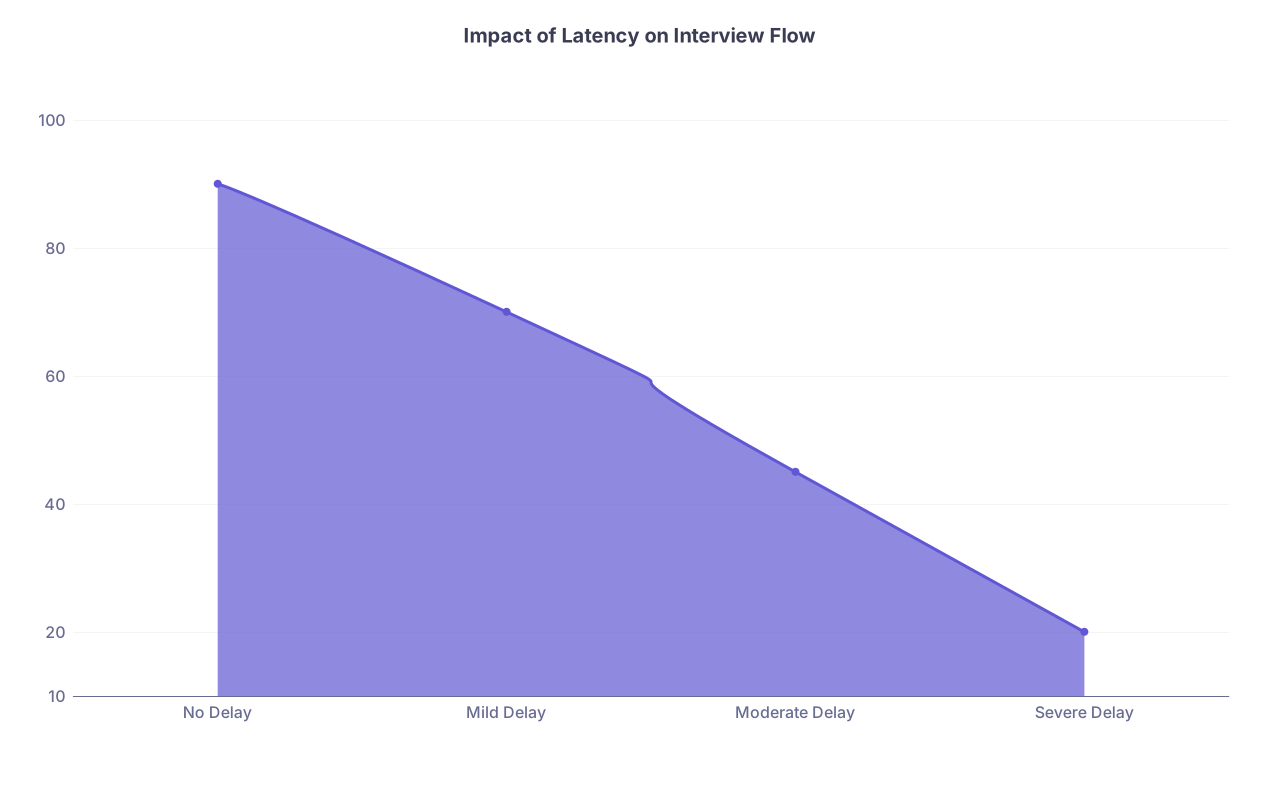
| Category | Value |
|---|---|
| No Delay | 90 |
| Mild Delay | 70 |
| Moderate Delay | 45 |
| Severe Delay | 20 |
(Values represent rough “conversation smoothness” out of 100.)
You can’t fix their Wi-Fi. But you can control your pace, pauses, and visual signals that you’re listening.
Pitfall #9: “Zoom Casual” Energy in a High-Stakes Setting
There’s one more subtle body language failure: treating this like a random school Zoom session instead of a job interview that controls your next 3–7 years.
It shows up as:
- Logging on just in time, slightly breathless
- Slouching in your comfortable home clothes below a half-hearted blazer
- Sitting like you’re alone in your room, not across from a PD
- Casual, “hanging out” posture during breaks or when multiple interviewers appear
Programs are comparing you to people who are sitting up straight, already in focused mode the second the camera turns on.
How to avoid Zoom Casual
- Be in position, framed, and still 5–10 minutes before the start.
- Treat every moment you’re visible—pre-interview, between rooms, group sessions—as “on stage.”
- Hold your posture and facial engagement until you are fully logged off, not just when you’re mid-answer.
You’re not “being fake.” You’re honoring the seriousness of the process.
FAQ: Body Language in Video Residency Interviews (5 Questions)
1. Is it better to stare directly at the camera the whole time?
No. That looks unnatural and slightly unsettling. Treat the camera like you would real eye contact: you look “at” the person frequently, but you also glance away to think. Aim to look at the camera when:
- You’re answering personal or values-based questions
- You’re making a key point
- They’re speaking and you’re listening intently
In between, brief glances at their video window are fine—as long as it’s close to the camera.
2. What should I do with my hands if I tend to over-gesture?
First, pull the camera back slightly so your upper torso and hands have space in the frame. Then:
- Rest your hands lightly on the desk or interlaced in your lap as a default
- Use smaller, slower gestures near chest level, not near your face
- Practice one or two answers on video intentionally using only 30–40% of your normal movement; that usually looks just right on camera
3. Is it unprofessional to occasionally look down at notes?
A quick, rare glance at a short list (like your 2–3 “must-mention” stories) is acceptable. But constant down-gazing kills your connection and makes you look scripted. If you need notes:
- Keep them very short (bullet words, not full sentences)
- Place them near the camera, not flat on the desk
- Use them as safety nets, not scripts
4. How do I handle it if my setup is less than ideal (small space, no office, etc.)?
You don’t need a perfect home office. You do need effort and intention:
- Pick the least cluttered wall you have, even if it’s just a corner
- Sit 2–3 feet from the wall so it blurs slightly behind you
- Use a cheap clip-on or desk lamp bounced off the wall in front of you for softer light
Programs will absolutely forgive a small or modest space. They’re far less forgiving of visible mess, bad lighting, and obvious lack of care.
5. What’s one quick way to test if my body language is “resident-ready”?
Record a 5-minute mock interview answering:
- “Tell me about yourself”
- “Why this specialty?”
Then watch it back with this question in mind: Would I want this person as my co-resident at 3 a.m. on call?
Pay attention to your face, posture, and fidgeting, not just your words. If you come off as tense, distracted, or disengaged, that’s exactly what you need to fix before the real thing.
Today’s next step is simple:
Set up your laptop, hit record, and answer one interview question on camera—“Tell me about yourself.” Then watch only on mute. No sound. Just your body language.
If you wouldn’t rank that silent version of yourself highly, you’ve got work to do.



