
The way you spend the 90 minutes before a virtual residency interview will make or break how you come across on camera.
Most applicants blow this. They roll out of bed 45 minutes before, skim their notes, throw on a jacket, and wonder why they look flat and anxious on screen. You are not going to do that.
You’re getting a minute‑by‑minute plan—backed by what actually works on interview days. Follow it as written the first time. Then tweak if you need to.
The Day Before: Lock Down the Logistics
If you wait to “test everything” the morning of, you’re already behind. The night before is your systems check.
At this point (evening before), you should:
Confirm time and platform (10–15 minutes)
- Double‑check:
- Time zone (yours vs program’s)
- Platform: Zoom / Thalamus / Webex / Teams / proprietary portal
- Whether you need an account or app download
- Open the link and make sure it actually works and doesn’t require some last‑minute plug‑in install.
- Double‑check:
Tech and backup check (15–20 minutes)
Do this early evening, not at midnight when you’re tired.- Test:
- Camera (framing: shoulders and head, minimal ceiling)
- Microphone (no weird echo or static)
- Speakers or headphones
- Internet speed (run a speed test; aim for >10 Mbps upload)
- Backups:
- Second device charged (laptop + tablet, or laptop + phone)
- Hotspot enabled/tested on your phone
- Backup audio: wired headphones nearby
- Test:
Set up the physical environment (20–30 minutes)
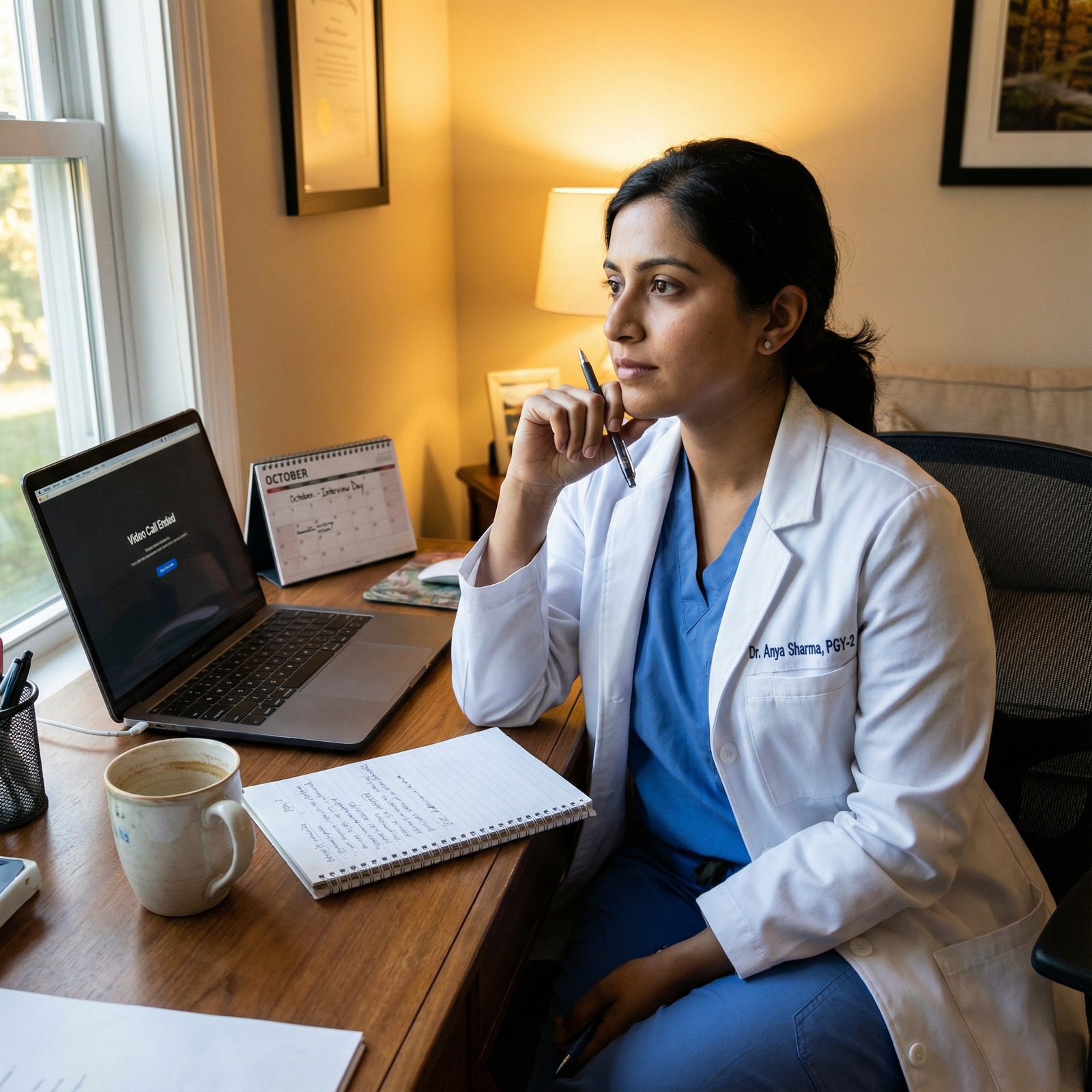
- Background:
- Neutral wall, bookcase, or simple artwork
- Remove messy piles, laundry, distracting posters
- Lighting:
- Face the window if daylight
- Or put a lamp/ring light behind your laptop pointing at your face
- Avoid bright window behind you (guaranteed silhouette)
- Framing:
- Camera at or slightly above eye level (use books/boxes under laptop)
- Sit where you’ll sit tomorrow; check how your chair height looks
- Background:
Lay out clothing and materials (10–15 minutes)
- Full outfit, not just top:
- Jacket/blazer + shirt/blouse
- Comfortable, non‑noisy pants
- Socks/shoes or at least socks so your feet aren’t freezing
- On the desk:
- Printed or digital one‑page program notes (bullet points, not essays)
- List of 5–7 questions for faculty and residents
- Water bottle or glass
- Tissues
- Pen + small notebook (not giant legal pad)
- Full outfit, not just top:
Set alarms and notifications (5–10 minutes)
- Set:
- Wake‑up alarm
- “Start warm‑up” alarm (about 90 minutes before interview sign‑in)
- “Log in to platform” alarm (25–30 minutes before sign‑in)
- Silence:
- Social media notifications
- Email pop‑ups on the interview device
- Smartwatch message alerts
- Set:
At this point, the night before, your only job is to calm down, eat a normal dinner, and go to bed at a realistic time. No new deep research. No late‑night rewriting of answers. That always backfires.
Morning Timeline: 90 Minutes Before Sign‑In
For this, I’m going to assume your official “check‑in” time is 9:00 AM on Zoom/Thalamus/etc.
Adjust the clock if yours starts earlier or later, but keep the same relative structure.
T‑90 Minutes: Wake Up and Reboot Your Brain
7:30 AM – Get out of bed
- Get vertical right away. Don’t scroll.
- Open curtains or turn on bright lights to reset your brain.
7:32–7:40 AM – Bathroom + light stretch
- Wash your face with cool water.
- Brush teeth, basic hygiene.
- 3–5 minutes of stretching:
- Neck rolls
- Shoulder rolls
- Quick forward fold
- You’re not “working out.” You’re telling your nervous system: we’re awake now.
7:40–7:45 AM – First hydration
- A full glass of water.
- If you drink coffee/tea, start it now so you’re not still sipping right before talking.
- Avoid energy drinks. They push you into shaky, over‑amped territory on camera.
T‑75 Minutes: Light Fuel, Not a Feast
7:45–7:55 AM – Breakfast
At this point you should be eating like you have a long operating day, not like it’s a brunch date.
- Goal: steady blood sugar, no food coma, no GI emergency.
- Good options:
- Toast + nut butter
- Yogurt + handful of fruit
- Oatmeal
- Banana + string cheese
- Avoid:
- Greasy foods (bacon, fast food breakfast)
- Massive portions
- Trying new protein powders or supplements
7:55–8:00 AM – Caffeine window
- Drink your coffee or tea.
- Cap it at your normal amount. This is not the day to experiment with triple shots.
- Finish most of it now so you’re not chugging right before you log on.
T‑60 Minutes: Shower + Voice and Face Ready
8:00–8:10 AM – Quick shower
If your hair and skin situation demands more time, shift this earlier, but keep it efficient.
- Warm, not steaming hot (too hot = flushed face on camera).
- You’re aiming for:
- Awake
- Clean
- Not rushed
8:10–8:20 AM – Dressing the top part of the outfit
At this point, you should:
- Put on:
- Shirt/blouse (iron or steamed ahead of time)
- Jacket/blazer
- Undershirt if needed (cuts down sweat marks)
- Leave pants and shoes for later if you want, but they should be within arm’s reach.
Check in the mirror for:
- Collar sitting correctly
- No stains or weird patterns that moiré on camera (tiny stripes can flicker on video)
8:20–8:25 AM – Basic grooming and face prep
- Hair: deliberate style, not just “whatever happened after towel.”
- Facial hair: trimmed, no random neck patches.
- Skin:
- If oily, lightly powder T‑zone or use blotting paper.
- If dry, light moisturizer.
- Lips: a bit of balm. Dry, cracking lips are distracting on camera and feel awful after 3 hours of talking.
T‑40 Minutes: Warm Up Your Voice and Face
This is the part almost everyone skips. It’s also the difference between sounding flat vs alive.
8:25–8:30 AM – Vocal warm‑up
You’re not auditioning for Broadway, but your voice is your main tool.
Do this away from roommates if you’re self‑conscious:
- 1 minute: gentle humming, sliding up and down in pitch.
- 1 minute: tongue twisters at slow speed:
- “Red leather, yellow leather.”
- “Unique New York.”
- 2–3 minutes: read a random paragraph from your notes or email out loud, focusing on:
- Clear consonants
- Full sentences, not trailing off
You’re telling your brain: “We’re going to be speaking clearly and confidently today.”
8:30–8:35 AM – Facial/energy warm‑up
- 5 big, exaggerated smiles (yes, you’ll feel ridiculous).
- Raise eyebrows high, then relax, 5–10 times.
- 3 deep breaths:
- In for 4 seconds
- Hold for 4
- Out for 6–8
- One posture reset:
- Stand tall, shoulders back and down, then sit again.
T‑30 Minutes: Tech and Frame Final Check
Now we move to the workstation.
8:35–8:40 AM – Sit at your station exactly as you’ll be on camera
At this point you should be:
- In your interview shirt/jacket
- Sitting in your interview chair
- With your laptop on the stand/stack you tested last night
Do a quick 5‑point tech check (actually do this, don’t just think about it):
- Camera on – check:
- Framing: head and upper torso visible.
- Headroom: ~1–2 inches between top of head and frame.
- Lighting:
- No deep shadows over your eyes.
- Background not brighter than your face.
- Audio:
- Open a test meeting or use the platform’s “test speaker and mic” setting.
- Say a full sentence or two. Make sure your voice isn’t too quiet or clipping.
- Background:
- No distracting movement in the visible frame (pets, roommates, TV).
- No inappropriate posters, open closet packed with clothes, etc.
- Notifications:
- DND on your interview device.
- Disable pop‑ups that might show over your screen share.
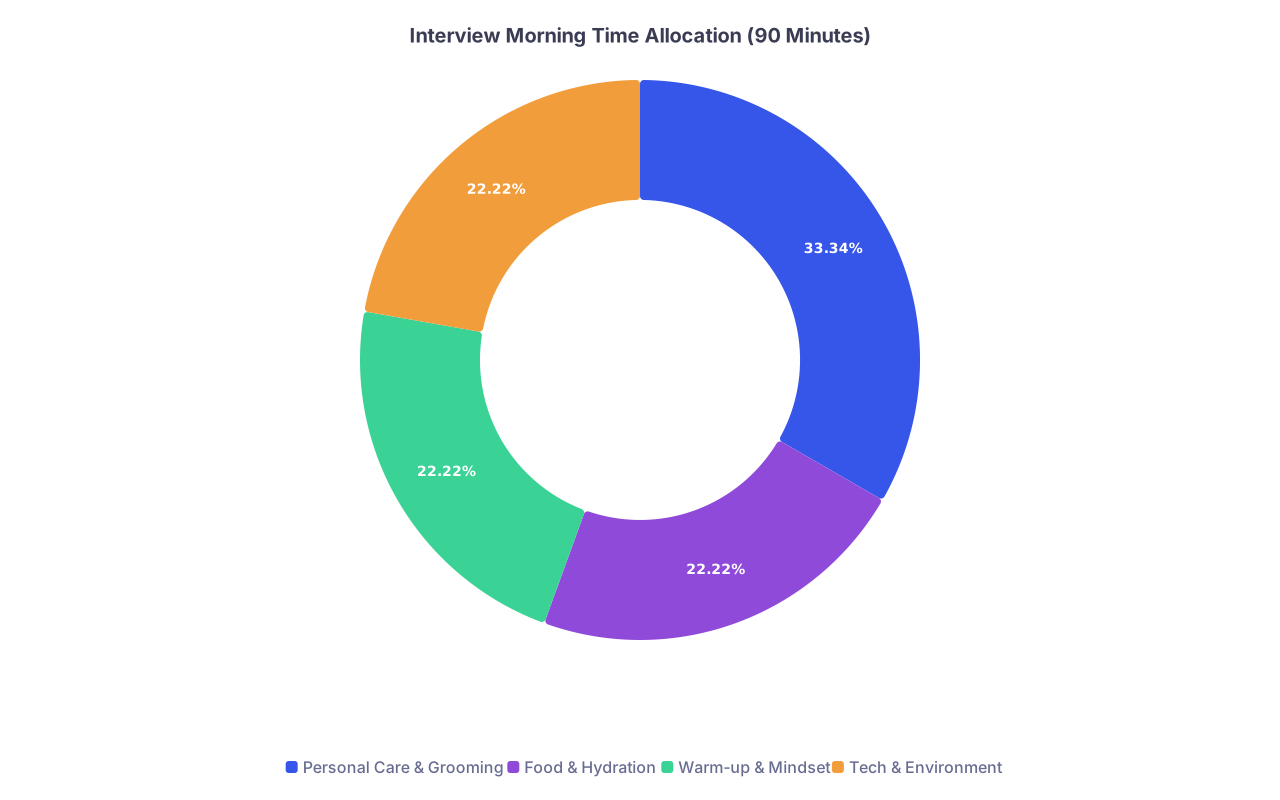
| Category | Value |
|---|---|
| Personal Care & Grooming | 30 |
| Food & Hydration | 20 |
| Warm-up & Mindset | 20 |
| Tech & Environment | 20 |
T‑25 Minutes: Materials and Backup Prep
8:40–8:45 AM – Arrange your “on‑desk” layout
At this point, when you look down at the desk you should see:
- Laptop centered
- To the right (if right‑handed):
- Pen + small notebook
- Printed one‑page summary of the program:
- Key rotations
- Unique features (e.g., county hospital, VA, research tracks)
- Your questions list
- To the left:
- Water bottle or glass
- Tissues
- Off to the side but in reach:
- Phone (on silent/airplane but accessible in case of true tech emergency)
Nothing that crinkles loudly. No snacks. No huge stack of papers you’ll never use.
8:45–8:48 AM – Quick backup check
- Backup device (tablet/phone) plugged in or at >80% battery.
- Email from program with tech contact or coordinator phone number visible:
- Write the phone number on your notepad in big letters.
- If your platform uses a specific app (Thalamus, Zoom), confirm you’re logged in on backup too.
T‑20 Minutes: Mental Switch from “Prep” to “Perform”
This is where most people panic and start over‑reviewing answers. You’re not doing that.
8:48–8:55 AM – Targeted review, not cramming
At this point you should be glancing, not studying.
Spend 7 minutes on:
Program cheat sheet (3 minutes)
- 2–3 specific things you genuinely like (not generic “strong clinical training”).
- 1–2 specific questions you want to ask each:
- Faculty
- Residents
Your spikes (2 minutes)
- 2–3 things that make you unique or memorable:
- Research theme
- Leadership roles
- Major interest (global health, medical education, QI)
- Rehearse one sentence to introduce each naturally.
- 2–3 things that make you unique or memorable:
Red‑flag topics (2 minutes)
- USMLE delay, grade issues, leaves of absence.
- One clear, concise, non‑defensive way you’ll explain each if asked.
Close the notes. You’re done “preparing.” Now you’re positioning yourself to show up well.
T‑10 Minutes: Calm the System, Set the Tone
8:55–8:58 AM – Breathing and posture reset
- Sit in your interview chair.
- Plant both feet on the floor. No cross‑legged, no spinning.
- Do 3–4 cycles of:
- Inhale through the nose for 4
- Hold for 4
- Exhale through the mouth for 6–8
- On the last exhale, intentionally drop your shoulders.
Then:
- Lean slightly forward from the hips, not the shoulders. This reads as engaged on camera.
- Put both hands lightly on the desk or your lap.
8:58–9:00 AM – Camera presence rehearsal
Open the camera one more time (or stay in the test meeting):
- Smile gently (not forced) while looking directly at the camera lens for 5 seconds.
- Say, out loud, slowly:
- “Good morning, it’s nice to meet you. I’m [Name].”
- Watch your face as you say it:
- Are your eyebrows and eyes alive?
- Is your mouth moving clearly, or are you mumbling?
Lock that version of yourself in. That’s who’s walking into the interview room—with or without the software.
Official Check‑In Time: Logging On Early (But Not Awkwardly Early)
Most programs will give a check‑in window, e.g., “Please join the main room between 9:00–9:05 AM.”
9:00–9:02 AM – Log in
At this point you should:
- Have everything already open:
- Platform app or browser
- Calendar/schedule if sent
- Click the link and join.
- Immediately:
- Confirm your Zoom/Thalamus display name is professional:
- “First Last, MD” or “First Last – Applicant”
- Check mic status:
- Muted in the main room until you’re addressed.
- Confirm your Zoom/Thalamus display name is professional:
If there’s a waiting room, fine. Don’t alt‑tab into other apps. Stay there, breathe, and glance at your questions list one more time if you must.
Between Sessions: Mini Resets You’ll Actually Use
Programs almost always build in 5–10‑minute breaks between sessions. Most people waste them.
Here’s how to use them intentionally, without overcomplicating it.
5–10 Minute Break Script
Minute 1–2: Physical reset
- Stand up.
- Roll your shoulders back 5–10 times.
- Quick neck stretch left/right.
- Shake out hands and forearms to reduce tension.
Minute 3: Hydration + bathroom if needed
- Small sip of water (not half the bottle).
- Quick bathroom trip if you need it. You do not want to be distracted by discomfort.
Minute 4: 1 question refinement
- Look at your questions list.
- Circle or star 1–2 you really want to ask in the next session:
- If it’s a PD: ask about vision, curriculum, mentorship.
- If it’s a resident: ask about culture, call days, support.
Minute 5 (and 6–7 if you have them): Recentering
- One deep breath cycle: 4–4–6.
- Quick posture reset when you sit back down:
- Hips back in the chair.
- Lean slightly forward.
- Hands visible, not fidgeting with something off‑camera.
Do not start doom‑scrolling email or texting friends about how it’s going. Your brain will go sideways.
Common Morning Mistakes and What To Do Instead
Let me be blunt: these are the predictable failure modes I’ve seen year after year.
| Mistake | Better Choice (Same Time Cost) |
|---|---|
| Last‑minute deep program research | 7‑minute focused review of cheat sheet |
| Skipping breakfast | Light, simple breakfast + water |
| No vocal warm‑up | 5‑minute voice and facial warm‑up |
| Tech check at log‑in time | Full test 30 minutes prior |
| Checking social media pre‑interview | 5 minutes of breathing + posture reset |
A few you should avoid on purpose:
Pajama bottoms “because they can’t see”
You behave the way you’re dressed. If you’re half‑dressed, your brain knows it. And yes, occasionally you will have to stand up.Heavy makeup changes you never wear
The goal is “you, rested and polished,” not unrecognizable. Intense contouring or experimental looks can read as odd on webcam.Super‑intense workouts right before
You don’t want to be flushed, sweaty, and a little dizzy at T‑10. If your routine demands a workout, push it earlier and keep it moderate.Blasting pump‑up music right before logging in
Fine earlier in the morning. But if your heart rate is already high from nerves, adding adrenaline 5 minutes before you’re on camera is a mistake.
Optional Night‑Before to Morning Timeline (At a Glance)
Here’s how the whole thing looks in order, if you want a compact mental model.
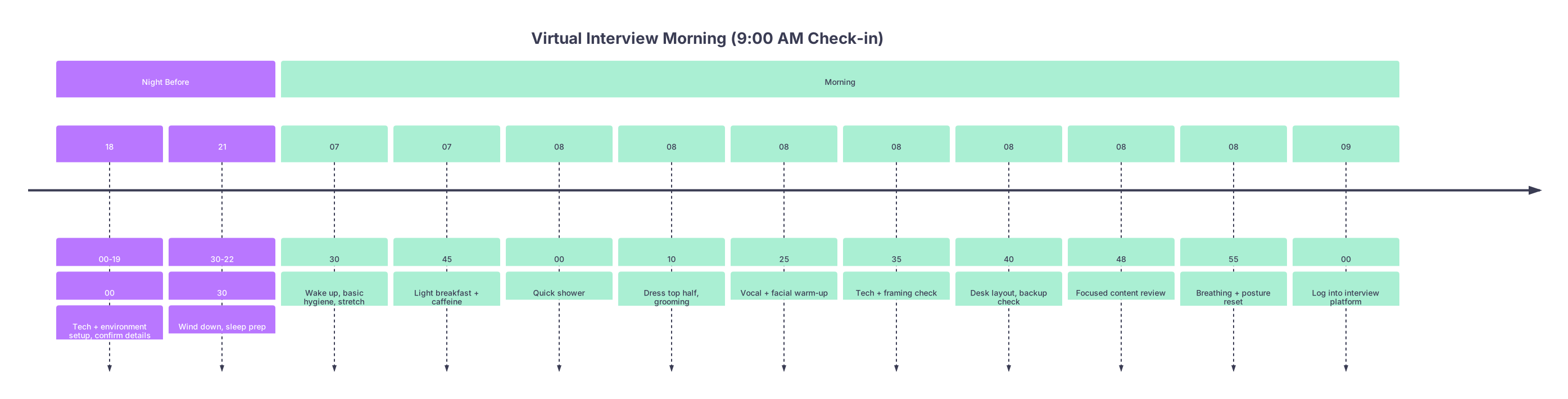
| Period | Event |
|---|---|
| title Virtual Interview Morning (9 | 00 AM Check-in) |
| Night Before - 18 | 00-19 |
| Night Before - 21 | 30-22 |
| Morning - 07 | 30 |
| Morning - 07 | 45 |
| Morning - 08 | 00 |
| Morning - 08 | 10 |
| Morning - 08 | 25 |
| Morning - 08 | 35 |
| Morning - 08 | 40 |
| Morning - 08 | 48 |
| Morning - 08 | 55 |
| Morning - 09 | 00 |
If Your Interview Is in the Afternoon
Same structure. Just slide it.
Key adjustments:
- Don’t spend the entire morning psyching yourself out.
- Do a mini routine 90 minutes before your check‑in, even if you’ve been up since 7:00 AM:
- Light snack 90–60 minutes before (not a big lunch 20 minutes before).
- Quick face wash and grooming refresh.
- 5‑minute vocal/facial warm‑up.
- 30‑minute tech check again; apps sometimes auto‑update mid‑day.
The Bottom Line
Keep three things in your head:
- Your brain is not the only thing interviewing. Your voice, posture, and environment do a lot of talking. The morning routine is how you control them.
- You don’t need complicated rituals. You need consistent, repeatable steps: fuel, clean up, warm up, tech check, calm down, log in.
- You win interview day by eliminating avoidable chaos. No last‑minute scrambling, no tech surprises, no “I forgot to eat” crashes halfway through.
Run this routine once exactly as written. Then adjust the timing a bit to fit your life. But keep the structure. It works.



