

What actually happens if your internet dies in the middle of your residency Zoom interview and you just… disappear from the screen?
Because that’s the nightmare, right? You’re finally talking to the program director, you just got a good question, you start answering—and then your screen freezes on some cursed half‑blink face and everything cuts out.
You sit there staring at the spinning wheel, convinced you just destroyed your chances at ever matching there. Or anywhere.
Let’s walk straight into that worst‑case scenario, because pretending it can’t happen doesn’t help. It can. It does. I’ve seen it. People still match.
First: What Programs Actually Think When Your Wi-Fi Dies
They don’t think, “This person is unreliable and unprofessional.”
They think, “Zoom again. Tech issues. Of course.”
Everyone is living on these platforms. Faculty have had their own screens freeze in conferences, in M&M, in grand rounds, mid‑lecture to 100 people. They’ve had kids run into frame, lawn crews start leaf‑blowing outside, and their own routers die.
Your brain says: “They’re going to think I’m incompetent.”
Reality: “They’re mildly annoyed at technology, not you.”
A few truths that should cut through some of the anxiety:
- You’re not the first or last applicant this cycle with a glitchy connection.
- Programs plan for this. They literally talk about it in pre‑interview meetings.
- Most of them would rather see how you recover than judge you for the problem itself.
I’ve heard PDs say, almost word‑for‑word: “We don’t penalize tech issues. We penalize how people handle them if they’re rude or vanish without explanation.”
So the Wi‑Fi drop isn’t the issue. The silence is.
The Worst-Case Scenario (And What To Do In The Moment)
Let’s actually script this out, because when you’re panicking, you don’t think clearly. Having a mental “if this, then that” helps.
Scenario 1: Your screen freezes / you get kicked out of Zoom
You’re mid‑answer. Screen freezes. Zoom kicks you back to the home screen or just hangs forever.
Your brain: “It’s over.”
What you actually do:
Try rejoining immediately. No overthinking. Just hit reconnect, re‑enter the meeting ID, click the invite link—whatever gets you back the fastest.
If you can’t reconnect within ~1 minute, email AND (if you have it) call.
Keep a draft ready before interview day. Something like:
Subject: Technical Issue During Interview – [Your Name]
Dear Dr. [Last Name] / Residency Coordinator,
I’m currently scheduled for an interview this morning and my internet connection just dropped. I’m actively trying to reconnect to Zoom. If I’m unable to reconnect right away, I wanted to let you know what’s going on and that I’m very eager to continue the interview.
I’m reachable at [your phone number] if there’s an alternate way to connect.
Sincerely,
[Your Name]
AAMC ID: [#######]
You send that to the coordinator and/or the generic residency email address. If they shared a phone number in the invitation or confirmation email, you call and say something simple like:
“Hi, this is [Your Name], I’m scheduled to interview this morning. My internet just went down and I’m working on reconnecting to Zoom—just wanted to make sure you’re aware and see if there’s another way to join if it doesn’t come back up.”
They won’t be mad. They’ll be relieved you communicated.
Scenario 2: You get back into the Zoom room
You’re back. Your heart rate is at 170. You have no idea what your face looks like.
You do not pretend nothing happened. You also don’t grovel for five minutes.
You say something like:
“Thanks so much for your patience—I’m really sorry, my Wi‑Fi dropped for a minute there. I’ve reconnected and I think we’re stable now.”
Then you stop. Let them lead.
Some will say, “No worries at all, that’s been happening all year. Where were we?”
Others might repeat their question or say, “Why don’t you start again?”
It feels enormous to you. For them, it’s a 10‑second blip.
How Bad Is It Really? (Honest Answer)
Short version: A Wi‑Fi drop, handled professionally, is basically neutral.
Not ideal. Not fatal.
There are things that actually hurt your application: trash‑talking other programs, saying you’re not interested in research at a research‑heavy place, being rude to staff, having no idea what the program even is.
A tech interruption? That’s background noise.
Where people get into trouble is:
- They panic and never come back or email.
- They rejoin and spend 10 minutes apologizing instead of just moving on.
- They get visibly angry, slam their desk, swear at their computer on camera.
- They say something like, “Sorry, my internet is terrible at home, it’s always like this,” and now it sounds like you didn’t prepare at all.
You’re not being graded on having perfect internet. You’re being graded on how you recover.
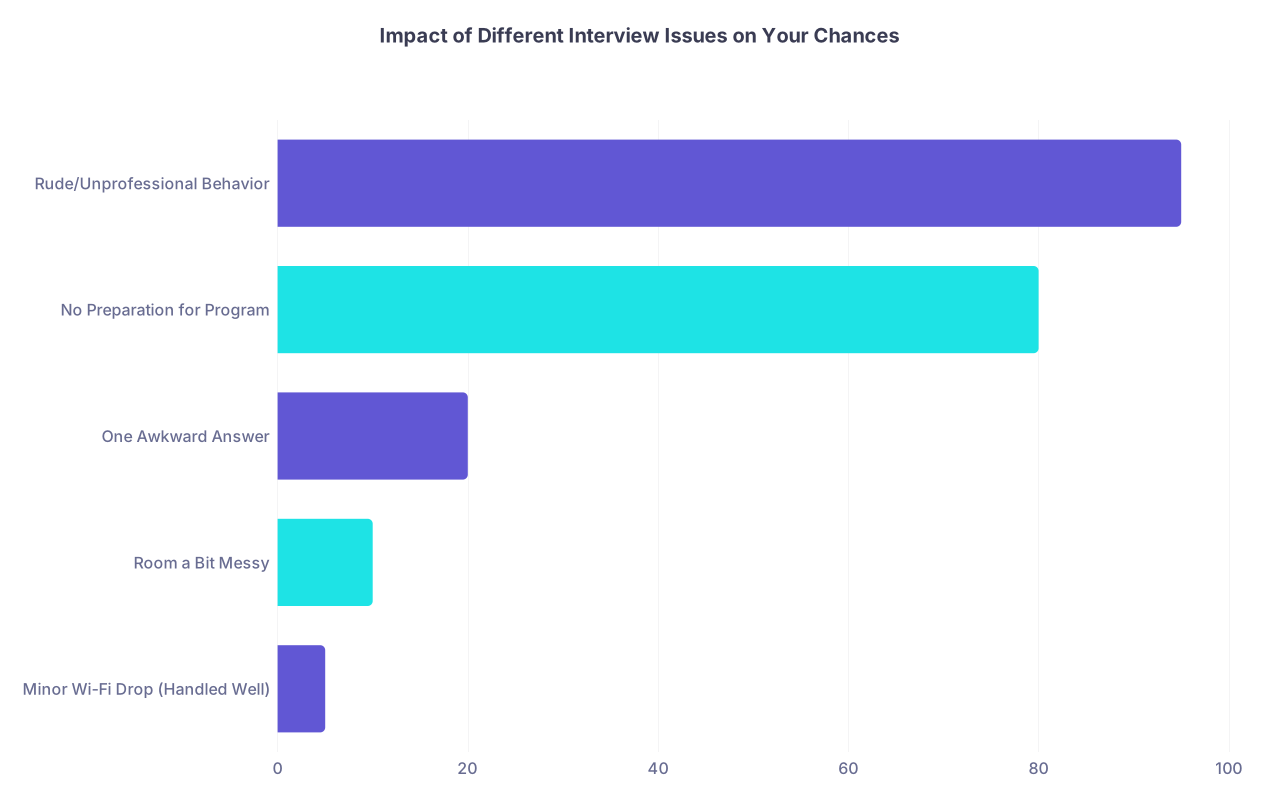
| Category | Value |
|---|---|
| Minor Wi-Fi Drop (Handled Well) | 5 |
| Room a Bit Messy | 10 |
| One Awkward Answer | 20 |
| No Preparation for Program | 80 |
| Rude/Unprofessional Behavior | 95 |
Interpretation: Tech issues = small bump. Being unprepared or unprofessional = crater.
How To Prepare When You’re Already Anxious About Tech
You’re probably already clenching thinking, “Okay, but how do I prevent this from happening in the first place?”
You can’t guarantee perfect internet. You can make a failure less likely and less catastrophic.
Here’s what a realistic prep plan looks like—not the fantasy “my Wi‑Fi never goes down” version.
1. Know Your Connection’s Weaknesses
If your Wi‑Fi has a history of randomly dying at 11 a.m., don’t pretend that will magically stop on interview day.
- Run a speed test (just Google “internet speed test”). You ideally want at least 10 Mbps upload.
- Try a full mock Zoom call at the same time of day as your interview. Camera on, background on, maybe share screen. See if it holds.
If it’s shaky, you don’t shrug and hope. You move to backup options.
2. Real Backups (Not Just Vibes)
These are the actual, concrete backups that save people when things go sideways.
- Ethernet cable: If you can plug your computer directly into the router, do it. That one cable will calm your soul.
- Phone hotspot: Test this beforehand. Turn on hotspot, connect your laptop, run Zoom for 10–15 minutes. Watch for stability. On interview day, keep your phone plugged in and hotspot ready as “Plan B.”
- Alternate location: Library study room, quiet office at your med school, friend’s place with better Wi‑Fi. Yes, it’s annoying to arrange. Yes, it can be the difference between an okay stress level and pure panic.

| Step | Description |
|---|---|
| Step 1 | Interview Day Internet Check |
| Step 2 | Use Home Setup with Ethernet |
| Step 3 | Plan B: Hotspot Ready |
| Step 4 | Reserve Quiet Room Elsewhere |
| Step 5 | Use Best Available + Communicate Early |
| Step 6 | Wi-Fi Stable? |
| Step 7 | Phone Hotspot Reliable? |
| Step 8 | Alternate Location Available? |
That “communicate early” piece could be emailing the coordinator a week before and saying:
I’ll be interviewing from home and my building’s internet can occasionally be unstable. I’ll have a hotspot backup ready, but if any issues occur, I’ll reconnect or call immediately. Just wanted you to be aware.
It won’t hurt you. If anything, it makes you look organized.
3. Device + Zoom Check
The boring but necessary part:
- Update Zoom before interview week, not 10 minutes before your slot.
- Restart your computer the morning of, so it’s not sitting on 57 weird background processes.
- Close literally everything you don’t need: Spotify, Netflix, random tabs, email notifications.
Then take 5 minutes and actually test: join a test meeting, check your audio, camera, background.
You want your stress focused on content, not “Why is my mic not working?”
What If Everything Fails and You Miss the Whole Interview Block?
Here’s the worst‑worst case that your brain probably loops at 2 a.m.:
Your power goes out.
Your router dies.
Your building’s internet crashes.
Your hotspot doesn’t connect.
You miss the entire interview block.
First, this is rare. Like really rare. But fine, let’s go there.
What you do next matters way more than what just happened.
You send a calm, factual email as soon as you reasonably can:
Subject: Request to Reschedule Interview – [Your Name]
Dear [Coordinator Name] / Dr. [Last Name],
I was scheduled to interview today at [time, time zone], but due to an unexpected [power outage / building-wide internet outage], I was unable to join the Zoom session despite multiple attempts and backup plans.
I’m very interested in your program and deeply regret missing the opportunity to speak with you today. If there’s any possibility to reschedule, even for a shorter or partial interview, I’d be extremely grateful.
Thank you for your consideration and understanding.
Sincerely,
[Your Name]
AAMC ID: [#######]
Phone: [###-###-####]
Do some programs say no? Yes. They’re overscheduled and overloaded.
Do some say yes? Also yes. I’ve seen it happen more than once.
And here’s the part your anxiety doesn’t want to hear but needs to: even if that one program says no, that’s not your entire Match. It’s one data point in a chaotic process.
You don’t fail the Match because the power blinked for 20 minutes on a Tuesday.
How To Talk About It If It Happens
If your Wi‑Fi disaster is minor (5–10 minutes, you rejoin, finish your day), you do not need to write some dramatic post‑interview email apology novel.
Optional follow‑up (very short) if it feels right:
Dear Dr. [Last Name],
Thank you again for the opportunity to interview today. I appreciated learning more about [specific program detail].
Also, thank you for your patience with the brief technical issue earlier. I’m grateful we were able to reconnect.
Best regards,
[Your Name]
That’s it. No over‑explaining. No recounting events like a police report.
If you missed the entire day and they reschedule you, you don’t start the rescheduled day by re‑apologizing to every single interviewer. Acknowledge it once if they bring it up:
“Thank you again for accommodating the reschedule—my building had a complete outage that morning, and I really appreciate the chance to be here today.”
Then move on and interview like a normal human.
Quick Reality Check: You’re Not Being Graded on Perfect Tech
Programs are trying to answer:
- Do I want this person on my team at 3 a.m. when stuff goes wrong?
- Are they reasonable, adaptable, not a jerk?
A tech failure that you handle calmly actually shows them something useful: you can stay functional when things go wrong.
We love to imagine they have a secret spreadsheet column that says:
“Internet dropped = -15 points.”
They don’t. What they do have are gut impressions:
“She handled that Wi‑Fi thing really well.”
“He completely melted down and blamed everyone else.”
Guess which one matters.

What You Can Actually Control (And What You Can’t)
You cannot control:
- Your city’s power grid
- Your neighbor starting a surprise construction project
- Your building’s fiber line getting cut two blocks away
You can control:
- Having a wired connection or the best Wi‑Fi possible
- Testing your hotspot and having it ready
- Knowing exactly what you’ll do if the call drops (rejoin → email → phone)
- How you speak and act when things go sideways
That’s it. And that’s enough.
If you walk into interview day with that plan already decided, your anxiety has less room to spin elaborate disaster scenarios, because you’ve already answered, “Okay, and then what?”
Tiny Prep Checklist for Your Sanity
Just to have it in one place, here’s a minimal, honest checklist. Not fantasy. Just “good enough to sleep at night.”
| Item | Status |
|---|---|
| Speed test done (Wi-Fi stable enough) | |
| Ethernet cable or best-location choice | |
| Phone hotspot tested with Zoom | |
| Backup location considered / arranged | |
| Coordinator email + phone saved | |
| Draft tech-issue email written |
Print that. Or copy it into your notes app. Check it off the day before. Then go worry about your answers, not your router.
FAQs

1. Will a Wi-Fi drop automatically ruin my chance at that program?
No. Not by itself. Programs are used to this happening. If you reconnect quickly, apologize once, and move on, it’s usually a non‑issue. They care far more about how you interact, your fit with the program, and your answers than a 2‑minute glitch.
2. Should I mention my bad internet in advance to the coordinator?
If your building is notoriously unstable, a short heads‑up can actually help, especially if you’re using a hotspot or alternative setup. Just don’t overshare or sound like you’re not prepared. A single, short email saying you have backups ready and will reconnect/call if issues arise is enough.
3. What if Zoom crashes but my Wi-Fi is fine?
Treat it the same way. Reopen Zoom, rejoin the meeting. If it keeps failing, restart your computer and try again. If you’re out more than a couple minutes, send that pre‑written “technical issue” email and offer your phone number as an alternate contact.
4. Is using a phone hotspot for the whole interview day okay?
Yes, if it’s stable and you’ve tested it. Many people have done full interview days on hotspots because of home internet issues. Plug your phone in, disable random background data‑heavy apps, and try to sit where you know the cell signal is strong. Programs can’t see your data source; they only see whether your video and audio work.
5. Should I turn my camera off if my connection is unstable?
As a last resort, yes. If your video keeps freezing but audio is okay, you can say, “Would you mind if I turn my camera off for a moment? My connection seems a bit unstable and I want to be sure you can hear me clearly.” Most interviewers will say yes. It’s not ideal, but it’s better than constant disruptions.
6. How long should I wait before emailing if I get kicked out?
If you can’t rejoin within about one minute, send the email while you keep trying to reconnect. That shows you’re not just vanishing. You can always say when you rejoin, “I’m back—thank you, I sent a quick email when I got disconnected just to let you know what was happening.”
Years from now, you won’t remember whether your Wi‑Fi glitched for 90 seconds in one random interview. You’ll remember that you showed up, did your best under imperfect conditions, and kept going anyway.



