The fastest way to tank an otherwise strong interview season is sloppy email and chaotic follow‑up.
You can crush every interview day and still get quietly dropped from rank lists because you looked disorganized, desperate, or unprofessional in your inbox behavior. I’ve watched it happen. Not because someone was rude—because they were late, inconsistent, or confusing.
Here’s how you prevent that, week by week and day by day, during interview season.
Big Picture: Your “Interview Season Engine”
At this point in the year (roughly October–January), you should treat your email and calendar like clinical tasks. Not optional. Not “when I have time.” Daily.
Your engine has 5 parts:
- One master calendar (no exceptions)
- One primary email address for ERAS/Thalamus/interviews
- A weekly review ritual (30–45 minutes)
- Daily 10–15 minute check-in blocks
- Standardized templates and tracking sheet
Let’s map this into a concrete routine.
Week 0: Pre‑Season Setup (Do This Once, Before Interviews Explode)
If you’re already in the middle of interview season and feel behind, still do this now. Consider this your reset week.
Step 1: Lock In Tools (1–2 hours)
At this point you should:
- Pick one calendar:
- Google Calendar or Outlook. Not both. Sync it with your phone.
- Confirm one email inbox for all programs:
- Ideally the same one you used for ERAS.
- Set that account up on:
- Your phone (push notifications on for email from “.edu”, “.org”, “.gov”).
- Your laptop with desktop notifications during the day.
| Tool Type | Recommended Use |
|---|---|
| Calendar | Track interview dates |
| Spreadsheet | Track programs & emails |
| Email Filters | Separate program messages |
| Templates Doc | Store follow‑up drafts |
| Cloud Backup | Save notes & schedules |
Step 2: Build Your Tracking Sheet (30–45 minutes)
This is where most people blow it. They try to “remember” who they emailed and when. That fails by week 3.
Create a simple spreadsheet (Sheets/Excel/Notion, whatever you like) with these columns:
- Program Name
- Specialty
- City / Time Zone
- Interview Platform (Zoom, Thalamus, in‑house portal)
- Interview Date(s)
- Pre‑Interview Social? (Y/N + date/time)
- Coordinator Name & Email
- PD Name & Email
- Thank‑You Sent? (Y/N + date)
- Post‑Interview Follow‑Up Sent? (Y/N + date)
- Ranking Notes / Impressions (short bullets)
- Status (Invited / Waitlisted / Declined / Completed)
You’ll touch this sheet every week. Probably every day.
Step 3: Create Email Folders + Filters (20–30 minutes)
At this point you should tame your inbox:
- Create folders/labels:
- “01 – Invitations”
- “02 – Confirmed Interviews”
- “03 – Scheduling Issues”
- “04 – Thank You Sent”
- “05 – Post‑Interview Follow‑Up”
- Set basic filters:
- Anything with “Interview Invitation”, “Interview Offer”, “Thalamus”, “ERAS message” → label “Invitations”.
- Anything from specific coordinator addresses → star/flag automatically.
This stops the “I missed the invite and it expired” disaster.
Weekly Routine Overview: October–January
Once interviews start, your life resets into a weekly cycle.
At this point in the season, your anchor is the Weekly Review. Same time, same day, every week. I like Sunday late afternoon or Friday evening before you mentally check out.
Your Core Weekly Blocks
- Weekly Review (30–45 minutes)
- Big picture: schedule, conflicts, pending responses, follow‑ups.
- Template Maintenance (15–20 minutes)
- Update your email templates so you’re not rewriting from scratch under stress.
- Interview Prep Scheduling (20–30 minutes)
- Slot specific prep for each upcoming interview (program research, questions).
We’ll walk through what each week should look like in more detail.
Week-by-Week: Early, Mid, and Late Interview Season
Weeks 1–2 of Interview Season: Stabilize the System
At this point you should be:
- Saying yes to most reasonable invites
- Learning each program’s tech platform
- Establishing your follow‑up rhythm
Weekly Review Tasks:
- Calendar sanity check
- Enter all new interviews with:
- Time zone
- Platform
- Link/event attachment
- Add:
- 24‑hour reminder
- 90‑minute pre‑interview block (log in early, tech check, mindset)
- Enter all new interviews with:
- Tracking sheet update
- Log every new program.
- Mark interviews as “Completed” within 24 hours of finishing.
- Email backlog clean-up
- Respond to:
- Any unscheduled invites
- Any coordinator requests for confirmation, forms, or tech checks
- Flag emails that need decisions (accept/decline/waitlist).
- Respond to:
Common mistakes to avoid in these first weeks:
- Accepting overlapping interviews “for now” and hoping to sort it out later. Coordinators remember that.
- Ghosting an invite you don’t want instead of sending a brief, polite decline.
- Forgetting time zones and showing up an hour late. That one sticks.
Weeks 3–6: Peak Volume, Maximum Risk for Mistakes
This is when people crack. They start sending sloppy follow‑ups, duplicate emails, or mixing up program names.
At this point you should assume:
- You’ll be a little tired.
- Your memory is worse than you think.
- Systems save you, not willpower.
Weekly Review Tasks:
- Conflict resolution
- Look 2–3 weeks ahead for:
- Overlapping interviews
- Too many interviews in one week (e.g., 5+ full days)
- Decide now which ones you’ll:
- Keep
- Regretfully decline
- Attempt to reschedule (once, politely)
- Look 2–3 weeks ahead for:
- Follow‑up audit
- Use your spreadsheet to answer:
- Who interviewed me this past week?
- Who have I already sent thank‑you notes to?
- Who’s missing?
- Complete any missing thank‑you notes within 48 hours of realizing.
- Use your spreadsheet to answer:
- Program communication list
- List programs that:
- Are still top interest but haven’t sent an invite.
- Need clarification (e.g., “You’re on our waitlist” emails).
- Plan if and when you’ll send a brief interest/update email.
(Once. Not weekly. You’re not a newsletter.)
- List programs that:
Mid‑Season Email Behavior Rules:
- One email thread per topic (scheduling, tech issue, update) per program.
- No “just checking in again” unless:
- It’s been >5 business days
- And it’s time sensitive (e.g., conflicting interview holds)
Weeks 7+ and January: Refinement and Ranking Mindset
By this point:
- You’ve completed the bulk of your interviews.
- Now follow‑up mistakes tend to be emotional—over‑sharing, “love letters,” or contradictory messages to different programs.
Weekly Review Tasks:
- Rank list notes
- For each completed interview, jot quick bullets:
- Pros
- Cons
- Red flags
- Gut feeling right after
- Keep this in your tracking sheet; you’ll forget details shockingly fast.
- For each completed interview, jot quick bullets:
- Targeted follow‑up
- For genuinely top programs (not all 25 of them):
- Send one clear, professional follow‑up/interest email if appropriate in your specialty.
- Do not send “You’re my #1” emails to multiple programs. People talk.
- For genuinely top programs (not all 25 of them):
- Clean‑up communication
- Make sure:
- Any reschedule threads were closed politely.
- Any late decisions (declines) were communicated respectfully.
- Make sure:
Day-by-Day: Your Interview Week Routine
Now let’s get practical. Here’s what a stable email/follow‑up routine looks like inside any given interview week.
I’ll assume a typical week during peak season: 2–3 interviews spread across weekdays.
Daily Email Checkpoints (Every Single Day)
At this point you should block:
- Morning: 10–15 minutes
- Evening: 10–15 minutes
No scrolling. No inbox wandering. Purposeful.
Each checkpoint, do this:
- Scan for urgent scheduling emails
- Subject lines:
- “Interview Invitation”
- “Schedule Change”
- “Reminder: Action Needed”
- Respond same day to:
- New invites (accept/decline/waitlist)
- Requests to confirm attendance
- Tech/schedule change notices
- Subject lines:
- File and track
- Move messages into your program folders.
- Update your tracking sheet:
- New invite? Add.
- Reschedule? Update date.
- Reply to non‑urgent but necessary items
- Social invites
- Optional surveys
- “Send us a headshot / photo / CV” requests
Don’t wait three days on anything from a program. It looks disinterested at best, disorganized at worst.
The 24-Hour Interview Cycle: Before, Day‑Of, After
Here’s the micro‑timeline around each interview to keep follow‑up tight and error‑free.
T‑24 Hours: Pre‑Interview Confirm & Check
At this point (the day before) you should:
- Open the original invite email:
- Confirm:
- Date
- Time with correct time zone
- Platform & link
- Add the direct link into your calendar event notes if it is not already there.
- Confirm:
- Confirm the point of contact:
- Coordinator name + email
- Prep your thank‑you list:
- Open a note or doc titled:
“Program – [Name] – Interview [Date] – Thank You” - Add:
- PD name
- APD/faculty names you expect to meet (if shared)
- Residents you know you’ll speak with (if known)
- Open a note or doc titled:
This way, you’re not scrambling after trying to remember “the attending with the blue tie who liked running.”
Interview Day: Light Touch Only
While on the interview day itself:
- Don’t email unless you must.
- Exceptions:
- Tech issue (can’t log in, link broken).
- Last‑minute emergency (illness, family event).
If that happens:
- Email the coordinator and use any backup phone/contact noted.
- Keep it extremely concise:
- Identify yourself
- State the issue
- Propose a solution or ask for guidance
No essays. They’re busy.
T+0–24 Hours: Thank‑You Window
At this point—same day or next morning—you should send your thank‑you messages.
Rules that keep you out of trouble:
- One short, specific note per faculty member you interviewed with.
- Use the correct name, title, and program. Triple‑check.
(Yes, I’ve seen “Loved learning about [wrong program name]” forwarded with a sigh.) - If you don’t have individual emails:
- Send one consolidated thank‑you to the coordinator addressing the team, or
- To the PD and mention the team specifically.
Email Templates: Use Them, Don’t Wing It
You should not be drafting from scratch at midnight after 8 hours on Zoom. That’s when you type “Dear Dr. [Insert Name]” and forget to insert the name.
Create a simple doc with:
- Invite accept
- Invite decline
- Reschedule request
- Pre‑interview question (rarely needed)
- Thank‑you note skeleton
- Post‑interview interest/update
Example: Clean Thank‑You Skeleton
Subject: Thank you – [Your Name], [Specialty] Interview [Date]
Dear Dr. [Last Name],
Thank you for taking the time to speak with me yesterday during my interview at [Program Name]. I especially appreciated our discussion about [specific topic] and your perspective on [brief detail that shows you were present].
Our conversation reinforced my interest in [Program Name], particularly [1–2 concrete aspects: curriculum structure, patient population, mentorship, etc.].
Thank you again for your time and for sharing more about the program.
Best regards,
[Your Name]
AAMC ID: [Number]
Paste, customize, send. No poetry contest. Just professional and specific.
Common Follow‑Up and Email Mistakes (And When They Happen)
Here’s where people trip at different points in the season.
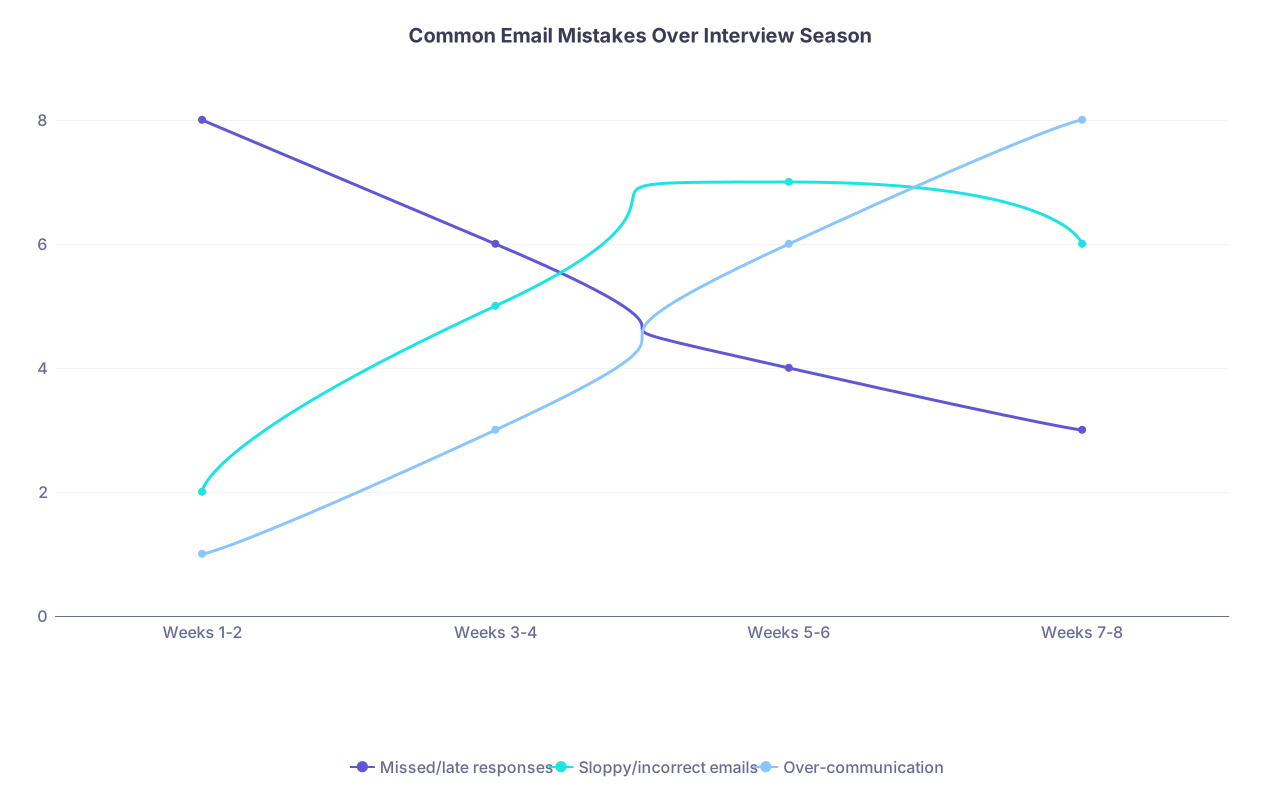
| Category | Missed/late responses | Sloppy/incorrect emails | Over-communication |
|---|---|---|---|
| Weeks 1-2 | 8 | 2 | 1 |
| Weeks 3-4 | 6 | 5 | 3 |
| Weeks 5-6 | 4 | 7 | 6 |
| Weeks 7-8 | 3 | 6 | 8 |
Early Season Mistakes (Weeks 1–2)
- Missing entire invites because:
- No filters
- No daily checks
- Double‑booking days because:
- No central calendar
- Ignoring administrative emails with forms/portals that must be completed before interview day.
Fix: the Week 0 setup and non‑negotiable morning/evening check.
Mid‑Season Mistakes (Weeks 3–6)
- Mixing up program names in emails.
- Sending duplicate thank‑you notes to the same faculty because you did not track.
- Forgetting to respond to reschedule offers.
- Over‑following up on invites from dream programs (“Just checking in again x3”).
Fix: strict tracking sheet + weekly review + one follow‑up rule.
Late Season Mistakes (Weeks 7+)
- Overly emotional or strategic emails:
- “You’re my #1” sent to multiple programs.
- Long, rambling life stories in follow‑ups.
- Inconsistent messaging:
- Telling a mid‑tier program “I’m ranking you very highly” then sending another saying “I’ll rank you #1” somewhere else.
Fix: rank list clarity, limit “love letters,” and stay accurate. You’re signing your name to these.
Visual Timeline: A Standard Interview Week
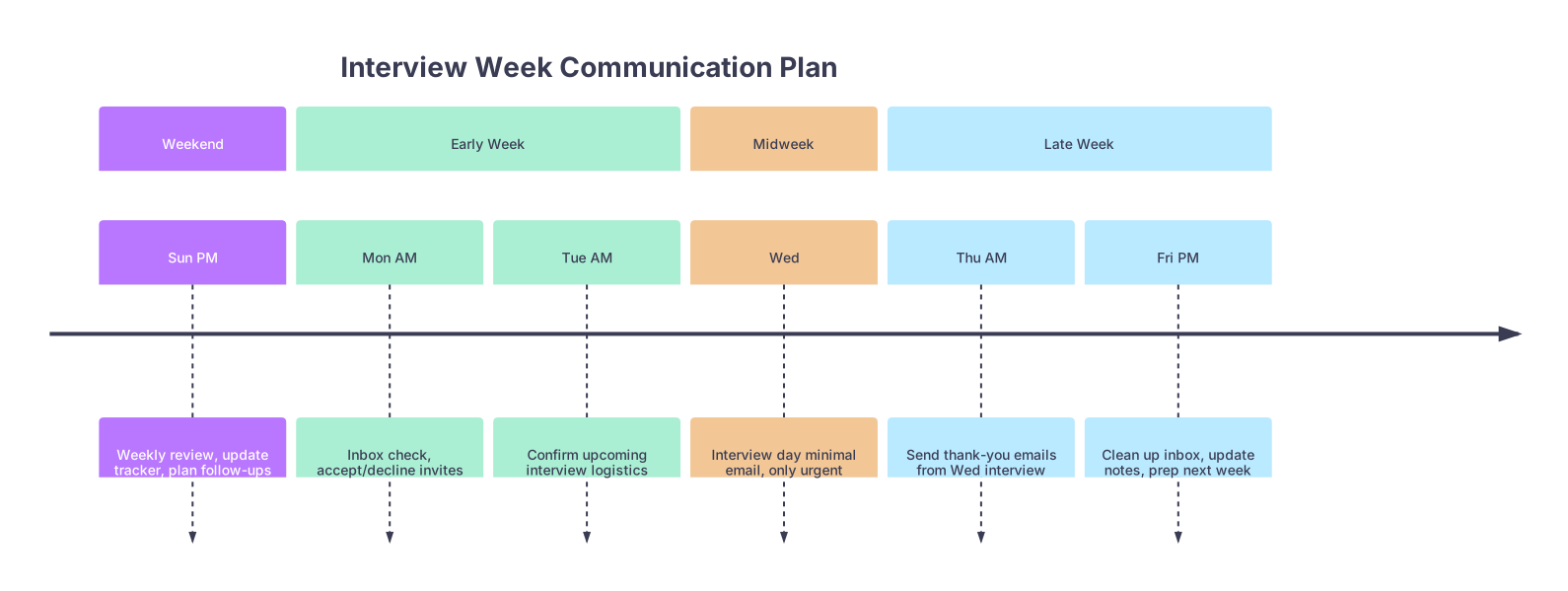
| Period | Event |
|---|---|
| Weekend - Sun PM | Weekly review, update tracker, plan follow-ups |
| Early Week - Mon AM | Inbox check, accept/decline invites |
| Early Week - Tue AM | Confirm upcoming interview logistics |
| Midweek - Wed | Interview day minimal email, only urgent |
| Late Week - Thu AM | Send thank-you emails from Wed interview |
| Late Week - Fri PM | Clean up inbox, update notes, prep next week |
Guardrails: How Often to Email Programs
You want to look engaged, not needy. Here’s a simple rule-of-thumb cadence that keeps you safe.
| Situation | Reasonable Frequency |
|---|---|
| Scheduling / reschedule | Until resolved (same thread) |
| Thank-you after interview | Once per interviewer |
| Interest/update pre-invite | At most once per season |
| Post-interview interest update | At most once per program |
| Unanswered invite/schedule email | One polite follow-up |
If you’re emailing the same program contact more than 3–4 times in total across the entire season, you’d better have practical reasons (scheduling changes, genuine updates), not anxiety.
Small Habits That Prevent Big Screwups
These are minor, but they save people every year:
- Use subject lines that make sense
- “[Your Name] – [Specialty] Interview [Date] – Scheduling Question”
- Paste your AAMC ID in your default signature
- Saves coordinators time. Makes you look like you’ve seen this rodeo before.
- Read every email twice before sending
- Once for content, once just for:
- Program name
- Recipient name/title
- Date/time references
- Once for content, once just for:
- Never send important emails from your phone keyboard if you’re exhausted
- Draft on your laptop when possible, then send.
- Bcc yourself on critical emails
- For record‑keeping. Then drag to the right folder.
Where Charts and Systems Meet Reality
This isn’t about building a pretty spreadsheet or a color‑coded calendar. It’s about not creating unnecessary reasons for a program to drop you in a crowded field.
You’re competing with applicants who:
- Respond within 12 hours
- Show up on time in the right time zone
- Send clean, specific thank‑yous
- Don’t clog inboxes with repeated “checking in” messages
They’re not magically better. They just run a routine.
To recap the essentials you actually need to remember:
- Lock your system early and use it daily – one calendar, one inbox, one tracking sheet, two email check-ins every single day.
- Anchor your week with a review – 30–45 minutes to update your tracker, sort invites, plan thank‑yous, and prevent conflicts before they happen.
- Timebox your follow‑up – thank‑yous within 24 hours, one polite follow‑up when needed, and no drama emails late in the season.
Run that, and your email behavior will quietly signal what programs want most: a resident who’s reliable, organized, and not a headache.