
It is June 10. ERAS opens in three weeks. You have a “final” draft of everything… supposedly. Your experiences are in. Personal statement “done.” Letters requested. You are tired of looking at your application.
This is exactly when people blow it.
At this point you should not be “adding one more sentence” to your personal statement. You should be running a systematic, boring, line‑by‑line audit of your entire ERAS profile to catch every hidden problem before it goes live.
I am going to walk you through what to do:
- Week by week from early June to ERAS opening
- Then a tighter, day‑by‑day pass in the last 7–10 days
- With specific red‑flag checks for each application section
You are not polishing now. You are hunting errors.
Big Picture: Your June–July Audit Timeline
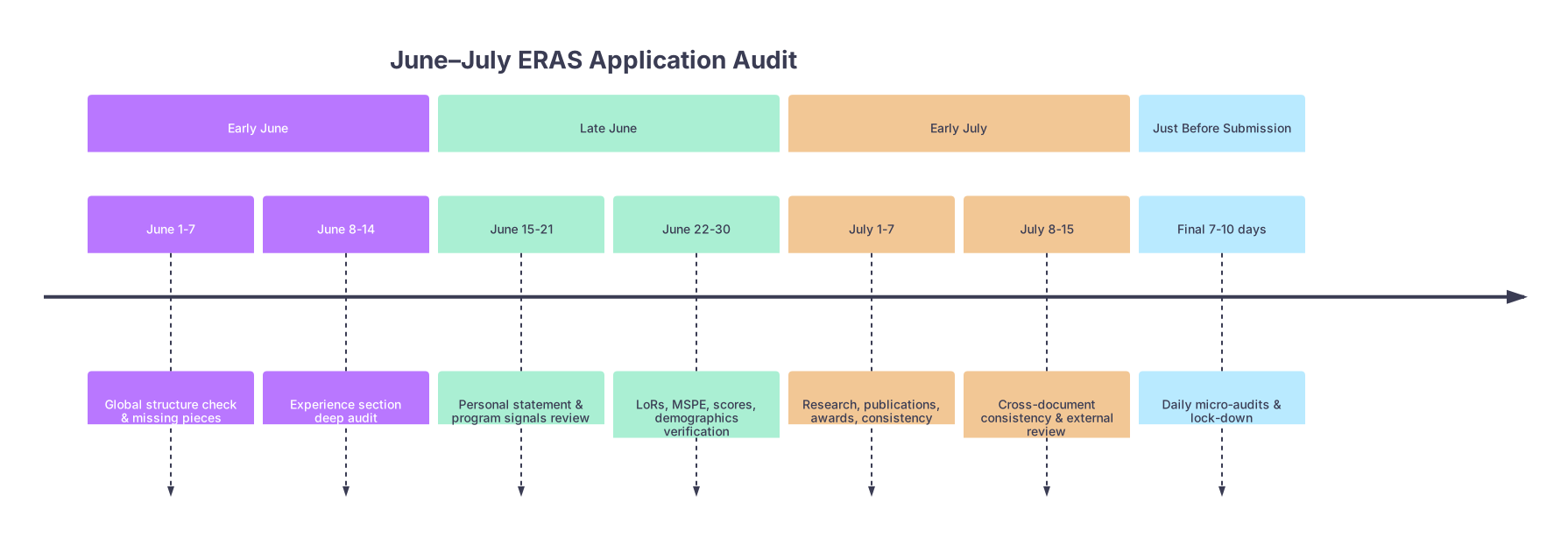
| Period | Event |
|---|---|
| Early June - June 1-7 | Global structure check & missing pieces |
| Early June - June 8-14 | Experience section deep audit |
| Late June - June 15-21 | Personal statement & program signals review |
| Late June - June 22-30 | LoRs, MSPE, scores, demographics verification |
| Early July - July 1-7 | Research, publications, awards, consistency |
| Early July - July 8-15 | Cross-document consistency & external review |
| Just Before Submission - Final 7-10 days | Daily micro-audits & lock-down |
At this point in the cycle, your mindset shifts:
- Early June: “Is anything missing or structurally wrong?”
- Late June: “Is any section internally inconsistent or sloppy?”
- Early July: “Does everything match across documents?”
- Final week: “Can a stranger read this without tripping on anything?”
You will proceed in that order. Skipping straight to “typo hunting” while your experiences are misordered is a waste of time.
Early June (June 1–14): Structural and Completeness Audit
June 1–7: Global Pass – Is Anything Big Missing or Mis‑shaped?
At this point you should log into ERAS and do a non‑editing read‑through of the entire application in preview/PDF mode. Not the edit screens. The compiled version.
You are checking for:
Section completeness
- Demographics: every required field filled, nothing obviously wrong
- Education: degrees, dates, institutions all present
- Experiences: at least your core clinical, leadership, research roles accounted for
- Publications and presentations: anything significant present
- Licensure/Exams: Step/COMLEX entries correct
Obvious structural problems
- 20+ experiences all marked as “most meaningful” → amateur signal
- Huge gaps in chronology (e.g., nothing listed between 2019–2021)
- Experiences clearly out of order by date
Specialty targeting
- If you are dual‑applying (e.g., IM + Neuro):
- Separate personal statement drafts exist
- Separate program preference lists at least drafted on paper or spreadsheet
- If you are categorical vs prelim/transition year:
- At least a rough list of where each type will go
- If you are dual‑applying (e.g., IM + Neuro):
Do a 30–45 minute silent read‑through. No editing. Just a notebook list: “Fix dates on #3, add gap year description, remove redundant scribe job,” etc.
Then and only then start correcting structure.
June 8–14: Experience Section Deep Audit
This is where most hidden errors live. People sabotage strong applications here with:
- Wrong dates
- Inflated hours that make no sense
- Duplicate or nearly duplicate entries
- Vague or cliché descriptions
At this point you should spend an evening on just the experiences tab. Slowly.
Key checks:
Chronology and Dates
- Sort your experiences by start date and walk through your life year by year.
- Every gap longer than ~3–4 months after college graduation should be explainable.
- Date ranges must not overlap in impossible ways (e.g., “full‑time” positions that are clearly concurrent with other full‑time positions).
Hours and Level of Involvement
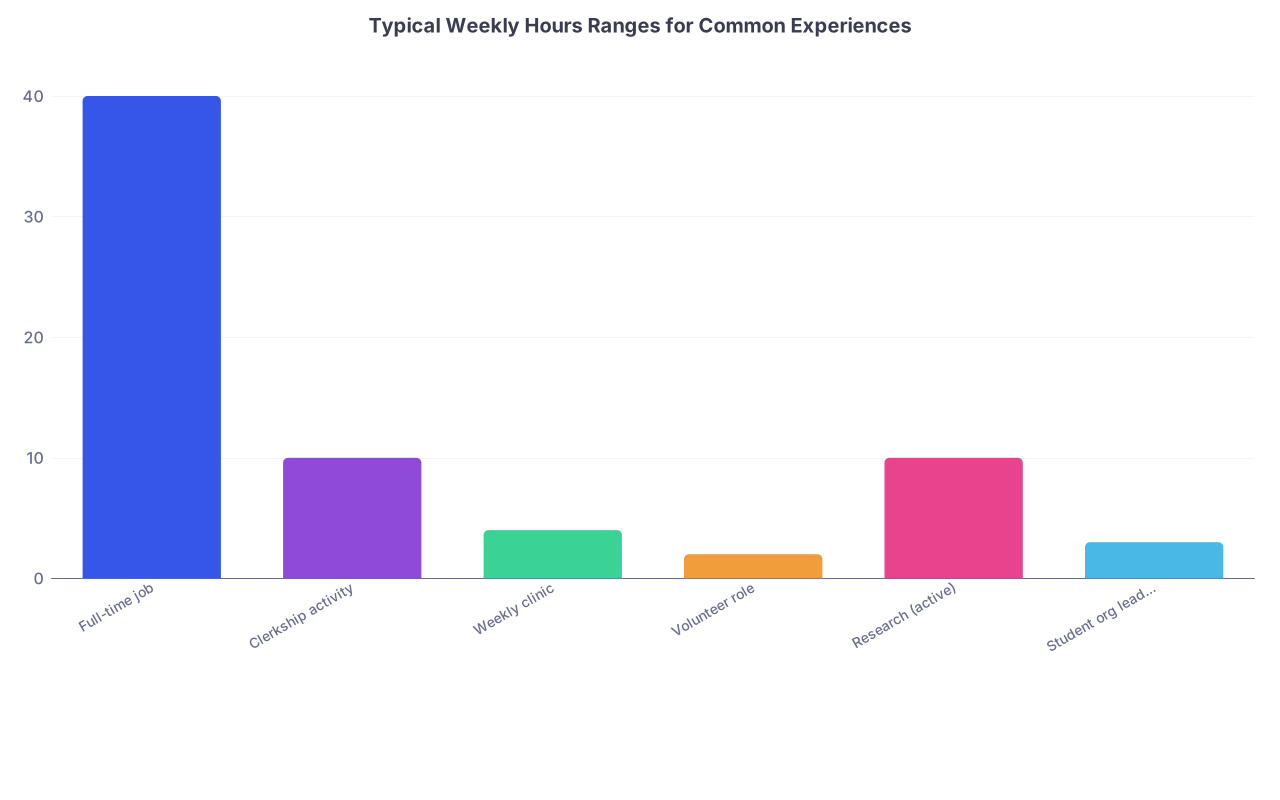
| Category | Value |
|---|---|
| Full-time job | 40 |
| Clerkship activity | 10 |
| Weekly clinic | 4 |
| Volunteer role | 2 |
| Research (active) | 10 |
| Student org leadership | 3 |
If your entries say you worked:
- 60+ hours / week research plus 40 hours / week clinical during MS2 → no one believes that.
- “100 hours per week” consistently → looks fabricated or clueless about clinical reality.
Keep it believable. Use rough averages. If unsure, under‑estimate slightly.
- Role, Setting, and Outcome Clarity
Every experience description should answer, in some form:
- What did you actually do?
- Where and with whom did you do it?
- What changed because you were there?
If your bullets read: “Improved communication skills, learned teamwork, developed empathy” – that is filler. Replace with concrete actions and outcomes:
- “Pre‑rounded on 4–6 IM patients daily; presented concise plans on attending rounds.”
- “Led weekly 6‑student peer‑teaching session for MS1 neuroanatomy; built practice questions bank (60+ items).”
- Redundant Entries
Common mistake: 3 separate entries for the same free clinic:
- “Volunteer, 2021–2022”
- “Clinic Coordinator, 2022–2023”
- “Student Leader, 2023–2024”
This is not always wrong, but usually better as:
- One longitudinal entry with clearly labeled phases in the description.
Audit rule: if an attending could read your experiences and say “This is confusing; were they a volunteer or a leader?” you have a problem.
Late June (June 15–30): Personal Statement, Signals, and Documents
June 15–21: Personal Statement and Program Signaling
At this point you should freeze your personal statement structure. No more adding random sentences. Only surgical edits.
Personal Statement Audit Checklist
Hook and ending alignment
- Opening anecdote matches the specialty.
- Ending circles back without cliché “I look forward to growing as a …” fluff.
Tone problems
- Overly negative: ranting about other specialties, bad attendings, or your school.
- Defensive: half the statement explaining one bad grade or one leave of absence.
- Arrogant: “I will be an exceptional surgeon due to my natural talent.”
Redundant content
- Repeating what is already in your experiences in the same wording.
- Listing every hobby or accomplishment. That is what ERAS fields are for.
Specialty clarity
- OB/GYN statement that never mentions women’s health.
- EM statement that reads like generic “I love variety” internal medicine fluff.
Do a word search for clichés: “lifelong passion,” “always knew,” “ever since I was a child.” If more than one survives, trim.
If dual‑applying, print both statements and read back‑to‑back. They must not sound like “find and replace” jobs.
Program Signaling Strategy (if applicable)
If your specialty uses signals (e.g., EM, ENT, some IM subs):
- Draft your target list now.
- Check for:
- Over‑concentration in one geographic area that you are not actually able to live in.
- Wasting signals on ultra‑reach programs with no connection, no Step 2, and weak letters.
You should be cross‑referencing your signals with:
- Where you have rotated
- Where your school historically matches
- Where your letters are from
Not blindly signaling every big‑name program.
June 22–30: LoRs, MSPE, and Scores
This week is about verifying what you cannot directly edit.
Letters of Recommendation (LoRs)
You cannot edit content. But you can make serious mistakes in:
- Who is assigned to which program
- Using generic letters when specialty‑specific are available
- Forgetting to assign letters at all
At this point you should:
List letters on paper or spreadsheet
- Letter A: IM Chair, strong
- Letter B: Community IM, solid contact
- Letter C: Research mentor, medicine‑adjacent
- Letter D: Away EM rotation
Match them to program types
- Categorical IM: A + B + C (maybe D if strong and relevant)
- EM: D + EM‑specific + Chair EM if you have it
- Prelim/TY: mixture but still coherent
Common hidden error: assigning an EM‑focused letter to Psychiatry programs because “it’s my strongest letter.” It looks sloppy and unfocused.
MSPE and Transcripts
You usually cannot see the final MSPE yet. But you can:
- Confirm that all core clerkship grades are in and correct.
- Verify with your dean’s office that no unresolved professionalism flags are pending.
- Double‑check that your transcript does not show an unaddressed LOA or withdrawal that you forgot to explain in ERAS.
If you have any anomaly (LOA, remediation, Step failure):
- Draft your explanation in the ERAS “Education / Additional Information” section now.
- Have a trusted dean or advisor review for tone: factual, concise, not groveling.
Exams and ID Numbers
Common stupid but real errors I have seen:
- Wrong USMLE ID typed in once, propagated everywhere.
- Reporting incomplete scores or mis‑categorized exams.
At this point you should compare:
- What ERAS shows
- What the NBME/NBOME portal shows
Every number, every pass/fail status must match exactly.
Early July (July 1–15): Research, Publications, Awards, and Consistency
July 1–7: Research and Publications Audit
Research entries are landmines for credibility. Faculty notice inflated or sloppy claims here immediately.
Key checks:
Authorship Accuracy
- Are you actually an author on the paper or abstract?
- Is the order correct? Did the attending change it last‑minute?
Status Categories
- “Published,” “In press,” “Accepted,” “Submitted,” “In preparation” are not interchangeable.
- If it is still “in preparation” in July before ERAS, leave it as that. Do not magically upgrade to “submitted” unless you genuinely hit “submit.”
Journal and Conference Names
- Spelled correctly
- Real venues (not weird predatory journals that make your CV look suspect)
Matching CV and ERAS
If you maintain a separate CV (you should), cross‑check line by line. Month and year, journal names, titles. They must match.
July 8–15: Cross‑Document Consistency and Outside Eyes
At this point you should do a boring but critical consistency pass across:
- ERAS entries
- Personal statement(s)
- CV (if you use one for mentors / home programs)
- Any “why this program” notes if required in supplemental apps
Look for mismatches:
- Different start/end dates for the same job.
- Different reported responsibilities for the same leadership role.
- Research project described as basic science in one place, clinical outcomes in another.
Then bring in outside readers. But strategically.
Who to ask
- One person who knows you well (advisor, mentor)
- One person who does not know you well (senior resident, friend from another school)
What to ask them to do
- Read the compiled ERAS PDF and your personal statement.
- Answer: “What is the 2–3 sentence story of this applicant?”
- Flag anything that feels inconsistent, confusing, or like over‑selling.
If their “story” does not match what you think you are presenting, that is a signal. Fix the experiences and statement to align.
Final 7–10 Days Before Submission: Daily Micro‑Audits
This is where people either sharpen the application or ruin it with last‑minute thrashing.
At this point you should stop making structural changes and focus on:
- Typos
- Small clarity edits
- Correct attachments and assignments
Think of it as a pre‑flight checklist.
7–10 Days Out: Section‑by‑Section PDF Review
Print (or PDF‑annotate) your full ERAS application. Pen in hand. One section per day.
Day 1: Personal Information & Education
- Name, address, phone, email correct and professional.
- No old or joke email addresses.
- Education entries: correct degrees, honors, dates.
Day 2: Experiences
- Scan for spelling issues, inconsistent capitalization.
- Tense: past roles in past tense, current roles in present tense.
- No obvious copy‑paste artifacts (“Lorem ipsum” level mistakes happen. I have seen them.)
Day 3: Research and Publications
- Every title spelled correctly.
- Journal names in proper case.
- Status updated as of now, not aspirational.
Day 4: Personal Statement
- Read out loud. Slowly.
- Any sentence that you stumble over, rewrite or cut.
- Check for double spaces, weird formatting, strange line breaks (ERAS formatting can be unforgiving).
Day 5: Letters and Assignments
- For a sample of programs of each type (home, away, academic, community), preview:
- Correct personal statement version selected
- Correct letters attached
- Any program‑specific questions answered coherently
Final 3–4 Days: Lockdown and Sanity Checks
In the last few days, you should not be rewriting. You should be confirming.
Focus on:
Password / Login / Technical
- You can log in without issues.
- Multi‑factor or backup codes saved.
- ERAS token activated correctly (for DOs and others who need it).
Program List Reality Check
Create a simple table and sanity‑check your distribution.
| Category | Count | Notes |
|---|---|---|
| Home region | 12 | Strong preference |
| Other geographic | 18 | Open to relocate |
| Academic-heavy | 15 | Research interest |
| Community-heavy | 15 | Bread-and-butter |
| Ultra-competitive | 5 | True reaches only |
If 80 percent of your list is “ultra‑competitive coastal flagships” with no connection and average scores, you have a strategic error, not just a typo problem.
- Final “One Sitting” Read
Set aside one uninterrupted block of 60–90 minutes.
- Open the ERAS preview.
- Pretend you are a tired PD on a Sunday night, skimming 60 files.
- Read your application as a whole:
Ask yourself:
- Does my story make sense?
- Would I invite this person to interview purely based on what is here?
- Where does my eye snag or get confused?
Mark those spots. Fix them. Then stop.
Day Before Submission: Do Nothing Big
On the final day before you actually hit submit:
- Do not rewrite your personal statement.
- Do not re‑order your entire experiences list.
- Do not add the half‑baked “in preparation” case report from last week.
You can:
- Correct a typo
- Update a publication status if it truly changed
- Swap a single program signal if new, real information emerged
But that is it. The damage people do in last‑minute panic far outweighs any gains.
Common Hidden Errors to Hunt Explicitly
Here is a non‑exhaustive but high‑yield punch list. Consider this your “June–July ERAS bug hunt.”
- Wrong or inconsistent dates
- Impossible weekly hours
- Duplicate experiences or research entries
- Mis‑assigned letters to the wrong specialty
- Personal statement referencing the wrong specialty or program (“I am excited about Internal Medicine” in a Peds PS – it happens)
- Typos in program or hospital names
- Cliché‑filled personal statements that say nothing specific about you
- Missing explanation for big red flags (LOA, fail, long gap)
- CV and ERAS not matching on key items
- Unprofessional email address, voicemail, or photo (if you use one)
If you systematically go hunting for these now, you will be ahead of a depressing number of your peers.
FAQs
1. How many times should I have someone else read my ERAS application?
Twice is usually enough if you pick the right people. One content‑savvy mentor who knows your specialty and one non‑specialist who reads for clarity and professionalism. Beyond that, extra readers tend to create conflicting opinions and last‑minute chaos rather than meaningful improvements.
2. Should I keep updating experiences and publications right up until I submit?
You should update for real achievements that are clearly defined (paper accepted, started a new formal role) but stop changing structure in the final 1–2 weeks. Constant tinkering near the deadline is how dates get scrambled and descriptions become incoherent. Lock format early July, then only adjust statuses and small details.
3. Is it better to remove a weak or messy experience entirely?
Often yes. A cluttered experiences section with marginal, vaguely described roles hurts more than it helps. If an entry is low‑impact, hard to explain, or creates awkward questions (like a “research position” where you barely showed up), it is usually cleaner to cut it and let your strongest, clearest work define you.
Key points:
- Use June for structure and completeness; use July for consistency and micro‑edits.
- Audit experiences, letters, and research with brutal honesty; unrealistic hours, mis‑assigned letters, and inflated publications are signal‑killers.
- In the final week, stop rewriting and focus on a clean, coherent, typo‑free application that tells one clear story about who you are as a future resident.
That is how you use June–July before ERAS without quietly sabotaging yourself.