The way most applicants handle a virtual interview glitch is wrong—and it costs them interviews they could have saved.
You do not fix a glitchy interview by apologizing vaguely and hoping they “understand.” You fix it with a clear, fast, professional repair that makes their lives easier and shows you are the kind of resident they want on call at 3 a.m.
This is exactly how you do that.
Step 1: Decide If You Actually Need To Email
Not every hiccup deserves a follow-up. Some do. Some absolutely do not.
Ask yourself three questions:
- Did the glitch significantly affect your ability to communicate?
- Did you miss any portion of the interview (late entry, disconnected, dropped mid-question)?
- Did the glitch create any potential misunderstanding about your interest, professionalism, or tech reliability?
If you answer yes to any of these, you email. If all are no, you probably skip the “I’m sorry my video froze for 3 seconds” message and just send a normal thank-you.
Here is how I’d categorize it.
| Scenario | Follow-Up Needed? |
|---|---|
| Brief audio cutout, but conversation continued smoothly | No, just standard thank-you |
| You dropped from the call for >1 minute | Yes |
| You missed or cut short a faculty interview | Yes |
| Your device crashed and you rejoined clearly flustered | Yes |
| You could not answer a question due to tech | Yes |
If in doubt, lean toward emailing. The risk of a brief, professional clarification is low. The risk of leaving an awkward gap unaddressed is much higher.
Step 2: Time It Correctly
You are not writing a Shakespearean apology. You are doing damage control.
Here is the timing rule:
If the glitch was major (missed interview segment, call dropped, could not reconnect):
Email the same day, within a few hours if possible.If the glitch was moderate (significant lag, audio issues, had to switch devices):
Email within 24 hours.If you already planned a thank-you email:
You can combine your thank-you + glitch repair into one concise message.
Do not wait three days. People forget details, and your follow-up looks like a nervous afterthought instead of a professional response.
Step 3: Know Exactly What Your Email Must Do
A good post-glitch email has four jobs:
- Acknowledge the specific issue (briefly, without drama).
- Take responsibility without groveling.
- Reassure them: your interest is strong, and your reliability is solid.
- If needed, offer a concrete solution (short follow-up, resend materials, answer missed question).
If your email is just, “I’m so sorry about the issues,” you are wasting the opportunity. Programs need to walk away thinking:
“Yes, there was a glitch. But this candidate handled it exactly how a reliable resident would.”
That is the bar.
Step 4: Use The Right Email Structure (Template Included)
Here is the basic structure you will use, with variations for different glitch types.
Core Template You Can Adapt
Subject options (pick one, keep it simple and professional):
- “Follow-Up After Today’s Interview – [Your Name]”
- “Thank You and Brief Follow-Up – [Your Name], [Specialty] Interview”
- “Follow-Up Regarding Technical Issue – [Your Name]”
Email body:
- Greeting + gratitude
- Neutral description of what went wrong (1–2 lines)
- Ownership + reassurance
- Specific repair (what you’re offering or clarifying)
- Reaffirm interest + appreciation
Example you can modify:
Dear Dr. [Last Name],
Thank you again for the opportunity to interview with the [Program Name] residency today. I appreciated our conversation about [brief specific detail].
I wanted to briefly acknowledge the technical issue when my connection dropped during our discussion. I am sorry for the interruption and appreciate your patience while I reconnected.
I remain very enthusiastic about [Program Name], particularly because of [1–2 specific program features you mentioned or learned]. If there is any information I can clarify or provide to supplement what we were not able to discuss due to the connection problem, I would be glad to do so.
Thank you again for your time and understanding.
Sincerely,
[Your Full Name]
[AAMC ID or ERAS ID, optional but helpful]
That is the baseline. Now let us handle the more painful scenarios.
Step 5: Handle The Common Glitch Scenarios (With Scripts)
Scenario 1: You Were Late Due To Tech (Could Not Log In, Link Did Not Work)
This is high-risk because programs are allergic to unreliability. Your job is to show:
- You took it seriously
- You acted quickly
- You learned from it
Use something like this:
Subject: Follow-Up After Today’s Interview – [Your Name]
Dear Dr. [Last Name],
Thank you for the opportunity to interview with the [Program Name] residency today. I appreciated the chance to learn more about your program and to speak with you about [specific detail].
I also wanted to acknowledge my late arrival to the session due to the unexpected difficulty accessing the meeting link. I apologize for the disruption and am grateful for your flexibility in allowing me to join after the session began.
I tested my setup again afterward and confirmed that the issue has been resolved on my end. If there is any information that would be helpful to supplement what we were not able to cover, I would be glad to provide it by email or in a brief follow-up conversation.
I remain very interested in [Program Name], especially because of [specific reason]. Thank you again for your time and understanding.
Sincerely,
[Name]
Notice what you are doing:
- You do not rant about Zoom, hospital Wi‑Fi, or your ISP.
- You focus on impact, not excuses.
- You offer a way to fill any gaps.
Scenario 2: Your Video/Audio Was Terrible Most of the Time
Here, they may be wondering if you are disorganized or just unlucky. You tackle that head-on and offer a repair.
Subject: Follow-Up Regarding Technical Difficulties – [Your Name]
Dear Dr. [Last Name],
Thank you again for speaking with me during my interview day with the [Program Name] residency. I appreciated hearing more about [specific topic].
I wanted to follow up regarding the audio/video problems during our conversation. I am sorry that the connection issues made parts of our discussion difficult. I have since troubleshot my equipment and connection to prevent this from recurring.
Because portions of our conversation were affected, I wanted to briefly reiterate that I am very interested in [Program Name], particularly for [1–2 specific reasons]. If it would be helpful, I would be glad to answer any questions by email or in a short follow-up call so that you have a complete picture of my application.
Thank you for your understanding and for the opportunity to interview.
Sincerely,
[Name]
That line—“so that you have a complete picture of my application”—is doing quiet work for you. It tells them:
“Do not write me off based on a glitchy impression.”
Scenario 3: You Got Disconnected And Missed Part Of An Interview
This one can usually be salvaged if you act quickly and offer something concrete.
Subject: Follow-Up After Disconnection During Interview – [Your Name]
Dear Dr. [Last Name],
Thank you for the opportunity to interview with the [Program Name] residency today. I was especially interested in our discussion about [specific aspect].
I am writing to briefly follow up regarding the unexpected disconnection during our interview. I apologize for the interruption and for any difficulty this caused with your schedule.
Because the call ended before we could complete our conversation, I wanted to express again my strong interest in [Program Name] for [specific reasons]. If it would be possible to answer any remaining questions by email, or to schedule a brief follow-up (even 10 minutes), I would greatly appreciate the chance to complete our discussion.
Thank you again for your time and understanding.
Sincerely,
[Name]
Will every program grant a follow-up mini-interview? No. But some will, especially if the glitch was obviously not you streaming Netflix on hospital Wi‑Fi.
Step 6: When You Completely Bombed The Tech (And Feel Sick About It)
Sometimes everything fails:
- Laptop update reboots mid-interview
- Audio does not work at all, you are lip-syncing like a bad dub
- You end up on your phone, vertical, with hospital noise in the background
You still send a calm, concise, non-desperate email. Do not write a three-paragraph apology spiral. Programs do not have time and it makes you look unsteady.
Use:
Subject: Follow-Up and Appreciation – [Your Name]
Dear Dr. [Last Name],
Thank you for taking the time to interview me for the [Program Name] residency today. I appreciated learning more about [concrete point].
I want to acknowledge the significant technical problems on my end during the interview and to apologize for the disruption. I recognize that this affected the flow of our conversation and may have made it difficult to gain a clear sense of my background and fit with the program.
I have already corrected the underlying issue with my device and connection. If it would be helpful, I would be grateful for the opportunity to answer any remaining questions by email or in a brief follow-up conversation, so you have complete information about my candidacy.
Regardless, I remain very impressed by [Program Name], especially [specific reasons], and I appreciate the consideration you have already given my application.
Sincerely,
[Name]
You are not begging. You are giving them a professional, low-friction option to reassess you if they choose.
Step 7: Who You Should Email (And How Many People)
Do not spam the entire program.
General rule:
If the glitch affected a specific interviewer only
→ Email that person.If the glitch affected the whole interview day (orientation, breakout failure, platform mess)
→ Email the program coordinator and/or program director, not ten faculty individually.If you are unsure who to email
→ Start with the coordinator; they can forward if needed.
Example coordinator-focused email:
Subject: Follow-Up Regarding Technical Issues – [Your Name]
Dear [Coordinator Name],
Thank you again for organizing today’s interview day for the [Program Name] residency. I am writing to briefly follow up regarding the technical problems during my session with Dr. [Last Name].
My connection dropped midway through the interview, and although I was able to reconnect, I am concerned that this may have limited Dr. [Last Name]’s ability to fully evaluate my application. If it would be possible to provide additional information by email, or to arrange a brief follow-up conversation, I would be very grateful.
I appreciate your help and the effort involved in coordinating these virtual interviews.
Best regards,
[Name]
One email. Targeted. Respectful. Done.
Step 8: Combine With Your Thank-You (So You Do Not Look Neurotic)
Do not send:
- One email: “Thank you for the interview!”
- Second email 2 hours later: “Sorry about the tech issues.”
- Third email: “Just wanted to clarify one more thing…”
That screams anxious and disorganized.
Instead, if the glitch was not catastrophic, you merge both:
Dear Dr. [Last Name],
Thank you for speaking with me today as part of the [Program Name] residency interview day. I enjoyed our discussion about [specific detail].
I also appreciate your patience with the brief audio issue that occurred during our conversation. I apologize for the interruption and have addressed the problem with my setup.
Our conversation reinforced my strong interest in [Program Name], especially [specific reasons]. Thank you again for your time and consideration.
Sincerely,
[Name]
One email. Covers gratitude + glitch. Professional and efficient.
Step 9: What Not To Do (Common, Costly Mistakes)
These are the things that actually hurt you more than the glitch itself.
Do not:
Blame the program’s platform
“Zoom kept crashing on your end” is not a good look.Over-explain your tech
They do not need to know driver versions, router models, or your neighbor’s Wi‑Fi.Over-apologize
One clear apology is enough. Four is insecurity.Get defensive or passive-aggressive
“As you know, virtual platforms are often unreliable” reads as, “Not my fault.”Write a novel
If your email scrolls, it is too long. Keep it to 2–3 short paragraphs.Ask directly if this will hurt your ranking
You cannot win that conversation.
Focus on solutions, not drama.
Step 10: A Simple Pre-Interview Tech Checklist (So This Never Happens Again)
You are in residency-application season. You do not have time for avoidable disasters.
Use a simple pre-interview protocol:
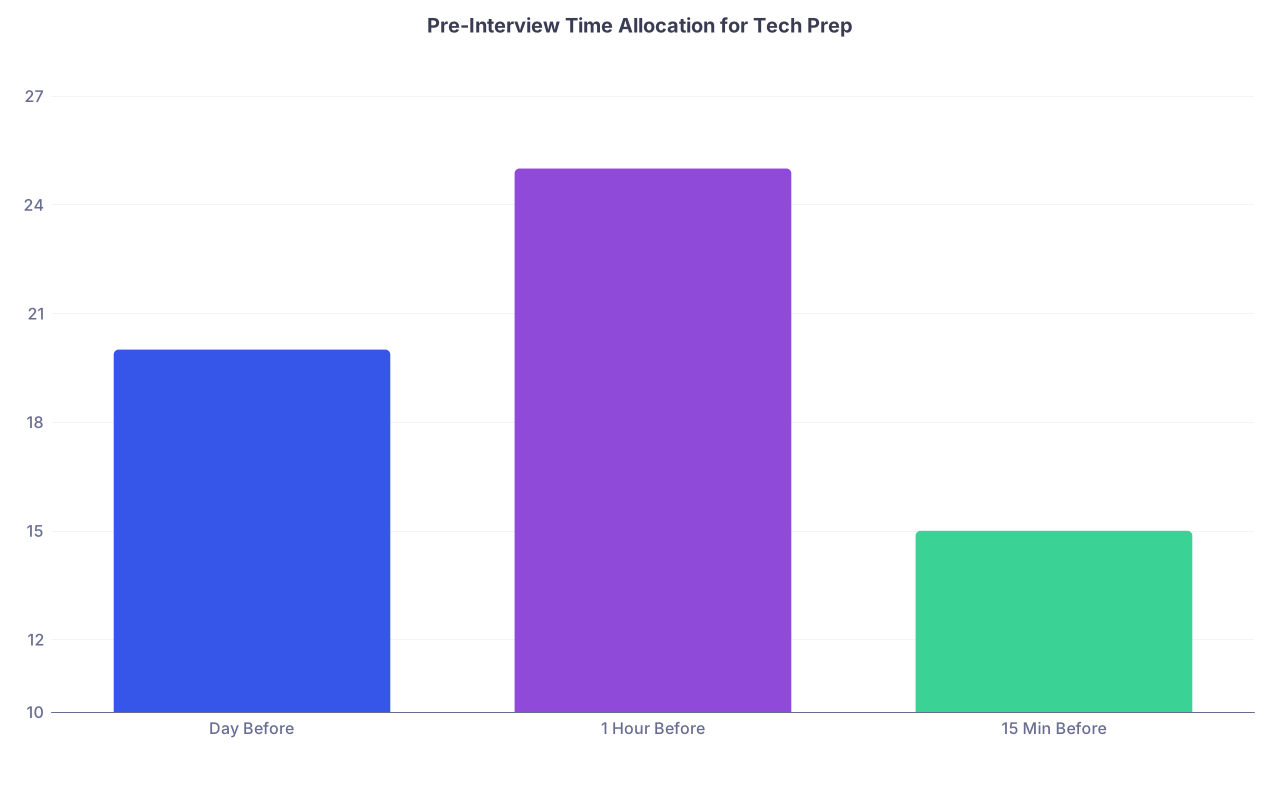
| Category | Value |
|---|---|
| Day Before | 20 |
| 1 Hour Before | 25 |
| 15 Min Before | 15 |
The day before:
- Test the exact platform (Zoom, Webex, Thalamus, Teams) with a friend.
- Confirm:
- Camera works
- Mic and speakers are clear
- Your name displays correctly
- Update the app ahead of time (not 5 minutes before).
One hour before:
- Restart your device.
- Plug in your laptop.
- Close everything not needed (email, streaming, background apps).
- Move to the strongest, most stable internet source:
- Best: wired ethernet
- Second best: strong private Wi‑Fi near router
- Avoid: hospital guest Wi‑Fi, cellular hotspots if possible
Fifteen minutes before:
- Log in early if allowed.
- Check lighting and background (no clutter, no bed if you can avoid it).
- Do a quick sound check (speak; watch indicator move).
This is boring. It is also what separates “smooth interview” from “I am now writing a repair email while mildly panicking.”
Step 11: How Programs Usually See These Glitches (Reality Check)
Here is the truth from the program side.
- Mild glitches are normal. They saw this all of 2020–2024. No one cares if you froze once.
- What they actually judge:
- Did you look prepared overall?
- Did you remain calm?
- Did you communicate effectively despite the glitch?
- Did you follow up appropriately if it materially affected the interview?
I have seen applicants:
- Completely drop from a call,
then send a composed, clear email with an offer for a short follow-up,
and still match at that program.
And I have seen others:
- Show up flustered, late, blaming tech,
send a frantic multi-paragraph apology,
and get quietly moved down the rank list.
The difference is not the glitch. It is the response.
Quick Decision Flow: Do You Email, And What Do You Say?
Use this mental flowchart before you type anything:

| Step | Description |
|---|---|
| Step 1 | Interview Glitch Occurs |
| Step 2 | Skip extra glitch email Send normal thank-you only |
| Step 3 | Email interviewer or coordinator Offer brief follow-up |
| Step 4 | Send combined thank-you + repair email |
| Step 5 | Minor brief issue One-line acknowledgment in thank-you |
| Step 6 | Was communication significantly affected? |
| Step 7 | Missed or cut short an interview segment? |
| Step 8 | Audio/Video poor most of time? |
This is all you need. Do not overcomplicate it.
FAQs
1. Will a virtual interview glitch ruin my chances of matching at that program?
Usually no. A single glitch almost never kills your application by itself. Programs care much more about your overall performance, your file, and how you handled the situation. If you responded calmly in the moment, followed up once with a concise, professional email, and did not come across as disorganized or defensive, most programs mentally discount the glitch. It becomes a footnote, not the headline.
2. Should I send separate thank-you and “sorry for the glitch” emails?
In most cases, no. Combine them. One well-structured email that thanks the interviewer, briefly acknowledges the issue, and reinforces your interest looks polished and efficient. Separate emails for the same interaction make you look anxious and increase inbox clutter for busy faculty who are already drowning in messages during interview season.
3. What if the program never responds to my follow-up or offer for a brief second conversation?
Assume silence is neutral, not hostile. Program directors and coordinators are overwhelmed during interview season. Many will not reply even when they appreciate the professionalism of your message. You do not send a second “just checking in” email. You sent one clear, respectful follow-up and that is enough. At that point, their evaluation will be based on your application and the portion of the interview they did see—not on whether they answered your email.
Key points to walk away with:
- Only email when the glitch actually affected the interview—and keep it short, specific, and professional.
- Focus on responsibility and solutions, not excuses or drama: acknowledge, reassure, offer a simple way to complete the picture.
- Your response to the glitch matters more than the glitch itself, and one well-written follow-up can fully repair a rough virtual interview day.