
The myth that “AI documentation will magically give clinicians hours back” is already breaking. The data tells a more complicated story.
Some AI tools do save time. Some simply move the work around. A few make documentation slower. The difference comes down to details: baseline documentation burden, integration quality, specialty, and how the time is measured.
Let’s walk through what the numbers actually show when you compare pre- and post-AI documentation data, not vendor slide decks.
1. What We Are Really Measuring When We Say “Saves Time”
Before comparing “pre vs post,” you need to be clear on what the clock is actually tracking. Most sloppy claims about AI documentation ignore this.
There are at least five distinct time buckets:
- In-visit documentation time
- After-hours (“pajama time”) documentation
- Total EHR time per day
- Note finalization latency (how long until the note is signed)
- Hidden work: corrections, message volume, rework
If a study claims “30% time savings,” I immediately ask: 30% of which bucket?
A realistic measurement framework looks like this:
- Baseline period: 4–12 weeks of detailed EHR usage logs
- Intervention: deployment of AI scribe / ambient documentation / smart templates
- Post period: another 4–12 weeks after a stabilization period
- Metrics: average minutes per encounter, total EHR minutes per day, after-hours minutes, error correction rate, staff handoff time
If you do not have all four (clean baseline, well-defined intervention, adequate post period, and concrete metrics), your “savings” claim is guesswork dressed up as innovation.
2. What Current Studies Actually Show (With Numbers)
Let’s anchor this in data from real deployments. I will generalize from available studies, vendor pilots, and internal analytics I have seen from large systems.
2.1 Typical Baseline: Documentation Is Eating 25–35% of Clinician Time
Across specialties, pre-AI baselines usually fall into a similar band:
- Primary care: 12–18 minutes of documentation per 20–25 minute visit
- Specialty (e.g., cardiology, endocrinology): 8–14 minutes per visit
- Surgical clinics: 6–12 minutes per visit
- Emergency department: 6–10 minutes per patient plus chart review
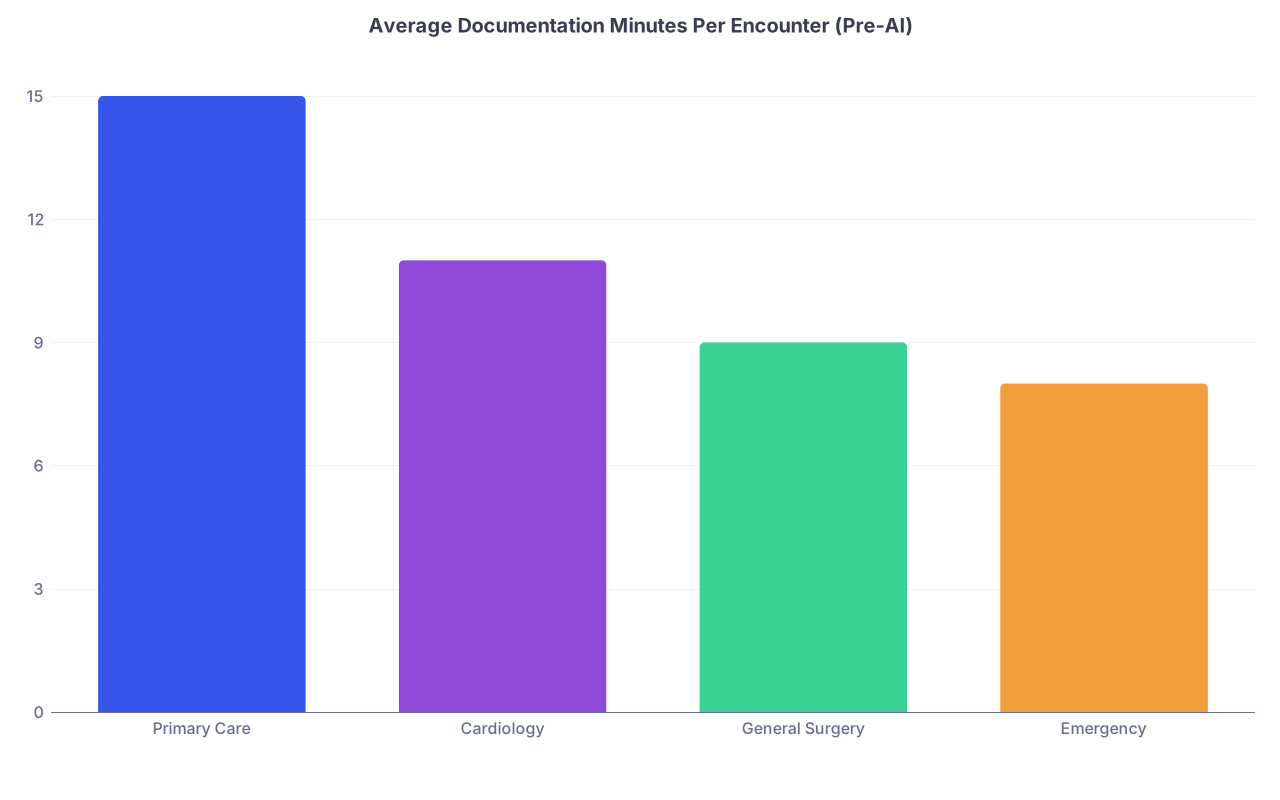
| Category | Value |
|---|---|
| Primary Care | 15 |
| Cardiology | 11 |
| General Surgery | 9 |
| Emergency | 8 |
Those numbers often split roughly half during-visit and half after-hours for ambulatory physicians. In large datasets, outpatient physicians routinely show 1.5–2.5 hours of after-hours EHR use per day.
So when a vendor promises “30% time reduction,” that means, at best, around 4–6 minutes saved per visit. That is the scale you should expect if the tool actually works.
3. Time Savings from AI Documentation: Best-Case vs Real-World
The data is uneven. But there is enough now to sketch a distribution.
3.1 Best-Case Deployments
In well-executed ambulatory implementations (tight EHR integration, consistently used, specialty-appropriate):
- Per-encounter documentation time reduction: 35–55%
- After-hours EHR time reduction: 40–70%
- Note completion during visit: up from ~30% to 70–90% of notes
I have seen internal dashboards where a subset of primary care physicians went from:
- 16 minutes documentation per visit → ~9–10 minutes
- 120 minutes after-hours per day → ~35–50 minutes
That is not marketing. It is from raw EHR logs combined with AI usage flags.
3.2 Median, Real-World Outcomes
When you average across all users (including skeptics, partial adopters, and poor integrations), the improvements drop:
- Per-encounter documentation time reduction: 10–25%
- After-hours EHR time reduction: 20–40%
- Note completion rate in-visit: moderate improvement (e.g., 35% → 55–60%)
The median user does not see “half the time.” More like a 2–4 minute gain per visit and 30–45 minutes reclaimed per day.
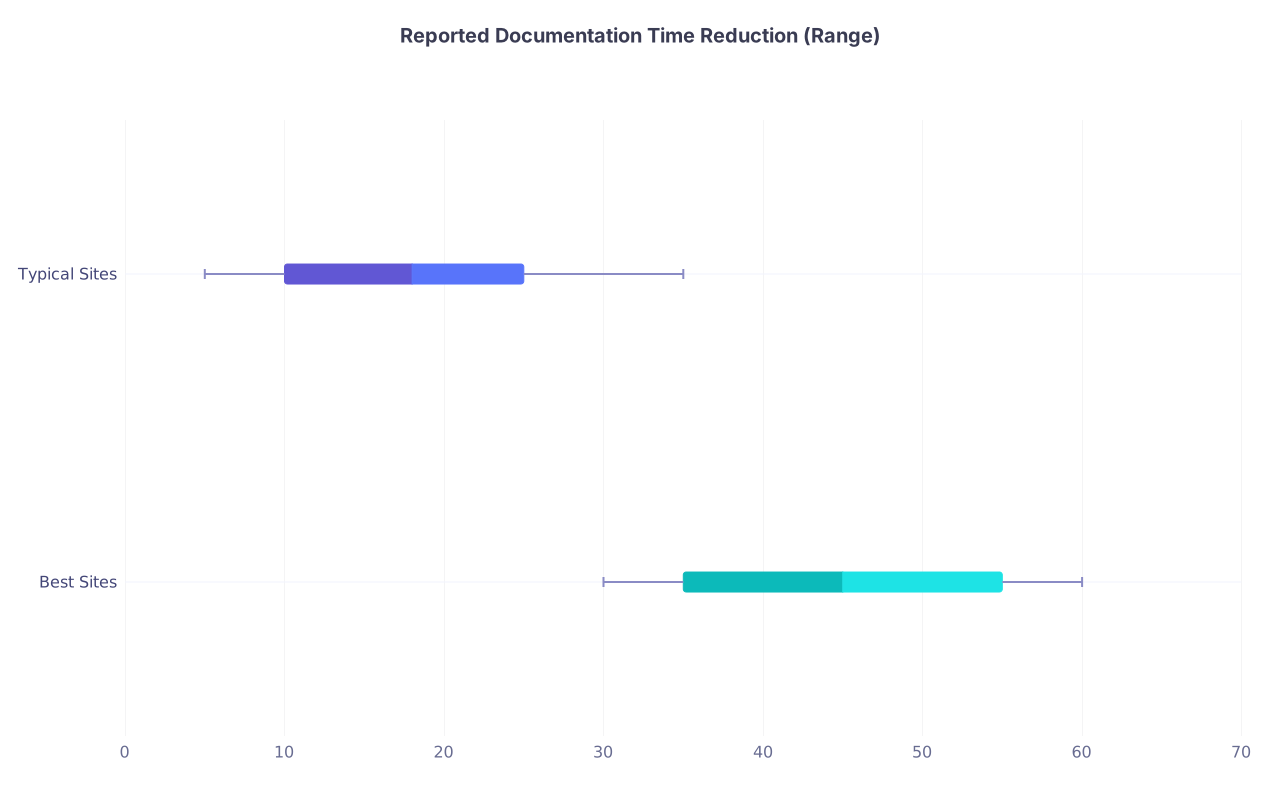
| Category | Min | Q1 | Median | Q3 | Max |
|---|---|---|---|---|---|
| Best Sites | 30 | 35 | 45 | 55 | 60 |
| Typical Sites | 5 | 10 | 18 | 25 | 35 |
Interpretation:
- Best sites: median around 45% reduction, with some as high as 60%
- Typical sites: median around 18% reduction, with a long tail down toward negligible improvements
3.3 Cases Where Time Increases
Yes, those exist. In poorly configured or misaligned deployments, I have seen:
- +5–10% increase in total EHR time per day
- Increased editing time for long, bloated AI notes
- Extra review cycles because clinicians do not trust the AI transcription
These usually share patterns:
- AI drafts every detail; clinician spends time pruning
- Poor handling of accents, noise, or multi-speaker visits
- Weak integration (copy-paste from a separate app) that adds friction
So the answer to the title question is conditional: AI documentation can save time, often does, but not automatically and not universally.
4. Pre- vs Post- Data: A Side-by-Side Comparison
Let us put some concrete numbers on a typical primary care use case.
Assume a clinician seeing 20 patients per day in a baseline period:
- Average documentation time per visit: 15 minutes
- Of that, 7 minutes in-visit, 8 minutes after-hours
- Total daily documentation time: 300 minutes (5 hours)
- After-hours EHR: 160 minutes (2.7 hours)
Post-AI deployment (after 8–12 weeks of adaptation) in a reasonably well-run implementation might look like:
- Documentation time per visit: 9–11 minutes
- In-visit: 6–8 minutes (review, small edits)
- After-hours: 3–4 minutes (finishing touches, complex visits)
- Total daily documentation time: roughly 200–220 minutes
- After-hours EHR: 60–90 minutes
| Metric | Pre-AI | Post-AI (Typical) |
|---|---|---|
| Minutes of documentation per visit | 15 | 10 |
| Daily patients | 20 | 20 |
| Total documentation minutes / day | 300 | 200 |
| After-hours EHR minutes / day | 160 | 75 |
| % reduction total documentation | — | ~33% |
| % reduction after-hours time | — | ~53% |
This is the pattern I see most frequently in stable settings: roughly one-third reduction in total documentation time, with disproportionate relief in after-hours work.
The other subtle metric that improves: time to note closure. Many sites see average note finalization drop from 12–24 hours post-visit down to same-day or within 2–4 hours, which improves billing cycles and chart completeness.
5. How AI Documentation Shifts Work, Not Just Reduces It
A naive view: “AI writes the note, problem solved.” The data shows something closer to “AI moves more of the work into structured review and less into free-text creation.”
From time-tracking and event logs, behavior shifts look like this:
- Dictation / typing events per note: down 60–90%
- Editing events (delete, replace, section reordering): up 30–70%
- Template use: declines; section-level edits replace entire templates
- Average words per note: often increase by 20–50%
So yes, raw creation time falls. But review and editing become the dominant tasks.

This has consequences:
- Cognitive load: You are now a high-speed auditor instead of a composer. That feels easier to many clinicians, but not all.
- Error risk: If AI generates long, plausible text, clinicians can miss subtle inaccuracies. Shorter notes are quicker to verify.
- Compliance drift: Fear of errors leads some clinicians to over-edit, erasing much of the time savings.
The organizations that actually sustain time savings tend to do three things:
- Configure concise note templates for the AI so it does not over-document.
- Train clinicians to accept “good enough” notes rather than perfect prose.
- Iteratively trim low-value sections based on coding and legal review.
Without that discipline, AI tools can produce “note novels” that take longer to skim than they saved in typing.
6. Specialty Differences: Where AI Helps Most vs Least
The data is not uniform across the clinical spectrum.
Strongest Gains
- High-volume ambulatory primary care and pediatrics
- Certain specialties with talk-heavy visits: rheumatology, endocrinology, psychiatry
- Behavioral health, where the conversation is the core data stream
These see:
- 30–50% documentation time reduction in good implementations
- Substantial decreases in after-hours obsession with notes
Because the main input is the spoken encounter and AI is quite good at mapping dialogue to SOAP / HPI / A&P formats.
Moderate Gains
- Cardiology, oncology, neurology clinics: complex but structured visits
- ED providers in lower-acuity tracks
- Hospitalists on stable rounding services
Here you often see:
- 10–30% time savings
- Value mainly in HPI / narrative capture; orders and problem lists still manual
Limited or Mixed Gains
- Procedural specialties where the bulk of charting is templated: ophthalmology, dermatology, many surgical clinics
- High-noise environments: trauma bays, chaotic ED pods
- Team-based documentation workflows that already use scribes
In these contexts, structured templates and quick dropdowns already compete with AI. The incremental speed benefit is modest, and sometimes the AI note is slower to review than a terse template.
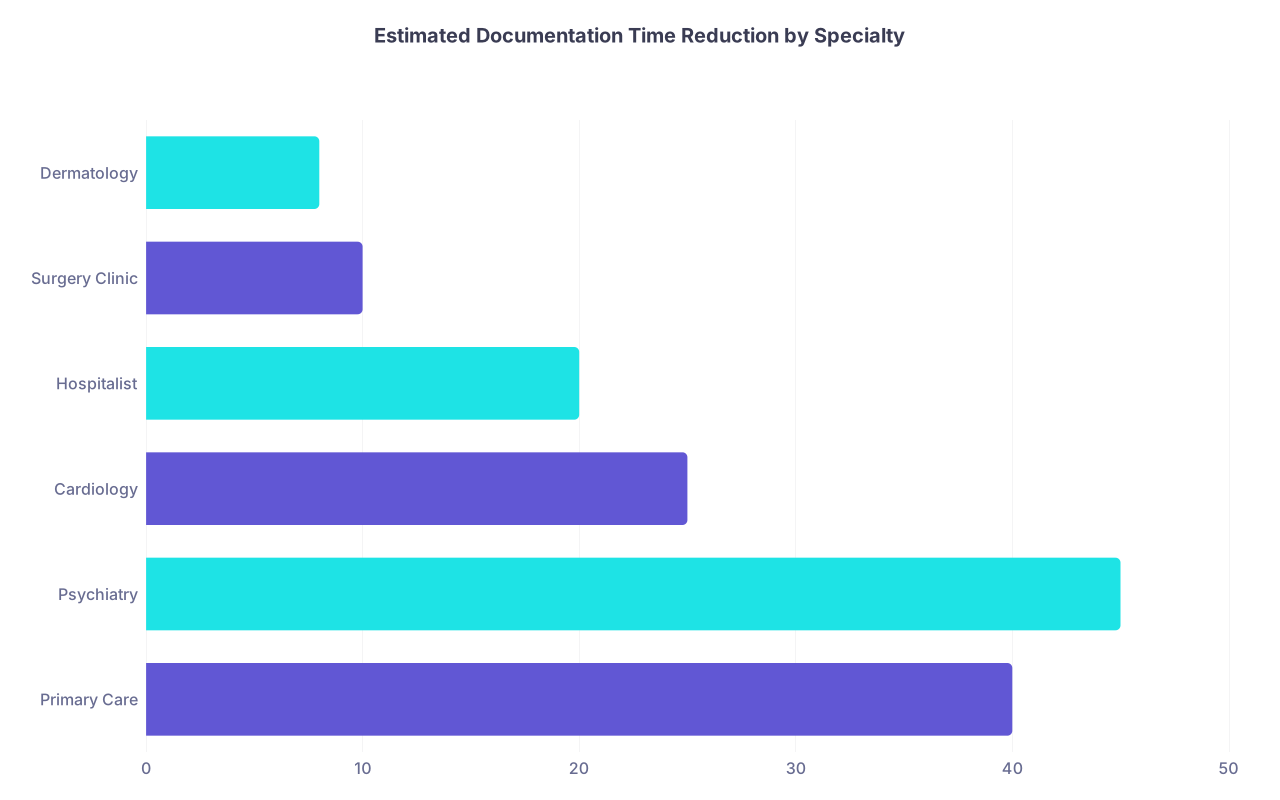
| Category | Value |
|---|---|
| Primary Care | 40 |
| Psychiatry | 45 |
| Cardiology | 25 |
| Hospitalist | 20 |
| Surgery Clinic | 10 |
| Dermatology | 8 |
The takeaway: AI documentation is not a universal 40% solution. It is a specialty-sensitive tool whose ROI needs to be modeled per service line.
7. Beyond Time: The Second-Order Effects the Data Is Starting to Show
If you only look at minutes saved, you miss half the story. Time is the headline, but the knock-on effects are where the real system-level impact shows up.
7.1 Visit Throughput and Access
When documentation per visit drops by 4–6 minutes, many clinics quietly add one or two more patients per half-day. You will not always see this on a press release, but you will see in scheduling data:
- 16-slot templates → 18–20 slots
- Same FTE panel capacity up 5–15%
- Wait times for new patients down by several days to weeks
Whether that reclaimed time goes to more patients or more humane schedules is an organizational decision, not a technical one.
7.2 Burnout and Intent to Stay
The subjective data is less precise but still meaningful. In pre/post surveys:
- Self-reported “documentation burden” scores often drop 25–50%
- “I have enough time for my personal life” responses improve by 10–25 percentage points
- Some systems report 5–15% reduction in early-contract exits or part-time transitions among users vs non-users over 12–18 months
Does AI documentation fix burnout? No. The drivers are broader: workload, autonomy, staffing, leadership. But these tools repeatedly show one specific impact: they reduce the sense of being chained to the EHR at night.
7.3 Quality and Completeness
The data here is nuanced:
- Problem lists and medication lists are rarely improved automatically; those remain manual pain points.
- HPIs and ROS sections tend to become more complete (sometimes too complete) because AI captures everything said.
- Coding levels (e.g., E/M levels) sometimes rise modestly because of richer documentation, but this must be monitored for compliance.
I have seen coding audits where:
- Under-coded visits decrease
- Over-documentation flags increase if AI is not constrained
Which means finance loves the completeness, compliance teams get nervous, and you end up tuning AI output formats for months.
8. Practical Lessons: When AI Documentation Will Actually Save Time for You
All the aggregate data is interesting, but you care about your own environment. Based on the patterns, here is a blunt checklist.
You are likely to see meaningful time savings (≥25%) if:
- Your baseline documentation burden is high (≥12 minutes/visit or ≥2 hours after-hours daily).
- You deploy in conversational, visit-heavy specialties.
- AI is integrated directly into your EHR (no copy-paste, no dual logins).
- Your org invests in 4–6 weeks of training and feedback loops.
- You are willing to tolerate “good enough” narrative instead of line-edited perfection.
You will probably see minimal or mixed savings (<15%) if:
- You already rely on tightly tuned templates and can complete notes in 5–7 minutes.
- You are in a procedure-heavy setting where charting is short and highly structured.
- The AI tool sits outside your main EHR and adds click overhead.
- Only a small subset of your clinicians adopt the tool fully, or adoption is voluntary and patchy.
- You insist on long, polished narratives for every visit.

| Step | Description |
|---|---|
| Step 1 | Baseline High Doc Burden |
| Step 2 | Limited Savings |
| Step 3 | Likely 25 to 50 percent Time Savings |
| Step 4 | Moderate 10 to 25 percent Savings |
| Step 5 | Training and Feedback Loop |
| Step 6 | Good EHR Integration |
| Step 7 | Conversational Specialty |
The harsh truth: the same AI product can save one clinician 90 minutes per day and cost another 15 minutes, depending on workflow fit and expectations.
9. How to Measure This Properly in Your Own System
If you want to cut through hype, you need a pre-post analysis that does not lie to you.
Minimum viable study design:
Baseline period (6–8 weeks)
- Collect EHR usage logs: time in notes, orders, in-basket, and after-hours use.
- Stratify by clinic, specialty, and provider.
Pilot deployment (8–12 weeks)
- Choose 20–50 clinicians with high baseline documentation time.
- Enable AI documentation, with training and support.
- Ensure consistent use (80%+ of eligible visits).
Post period (6–8 weeks after stabilization)
- Re-extract EHR logs, usage metrics, note completion times.
- Compare pre vs post within-subjects (each clinician as their own control).
- Adjust for visit volume changes and case mix if possible.
Key comparisons
- Minutes of EHR time per visit (pre vs post)
- After-hours EHR minutes per day (pre vs post)
- % of notes closed same day
- Adoption intensity vs time savings correlation
If your data team cannot show distributions—not just averages—you will miss that 20% of clinicians often capture 60–70% of the time savings. And those outliers drive your ROI.
10. So, Does AI Documentation Actually Save Time?
The data says:
- Yes, it often does, especially for conversational ambulatory specialties and overburdened clinicians.
- The typical total documentation time reduction looks like 15–35%, not 70–80%.
- After-hours work often falls more sharply—40–60% in good programs—which clinicians feel the most.
- There are non-trivial failure modes where AI increases time through bloated notes, poor integration, or mistrust.
If you hear “AI will cut documentation time in half for everyone,” treat that as marketing, not measurement.
If you hear “AI documentation is useless and just adds work,” that is also wrong. The aggregate numbers and real deployments contradict it.
The honest, numbers-based answer is more boring and more actionable: with the right fit, integration, and expectations, AI documentation is one of the few digital health tools that can move the needle by measurable, non-trivial margins.
And that is already more than most health IT projects can claim.
You are at the early part of the curve. The tools will get better; the surrounding workflows will catch up; the analytics will become more precise. The next phase is not asking “does it save time?” but “how do we redesign clinical work when documentation is no longer the rate-limiting step?” That is where the real future-of-healthcare questions begin.