
It is 2:13 a.m. You are on call. The floor is full. Your census is absurd for July.
Your pager fires:
- “Pt 742 BP 80/40, HR 128, please come”
You stand up. It fires again before you take two steps: - “Can we get something for sleep?”
Then: - “K 2.9”
- “Family wants update”
- “Pt in 621 pulled out IV”
- “New fever 38.9”
You are now officially behind. Your brain wants to help everyone, right now. If you chase each page in the order it arrives, you will miss something important. That is how bad nights become dangerous nights.
You do not need more “time management tips.” You need a hard algorithm. A way to decide, under pressure, who and what gets your attention first. That is what we will build.
Step 1: Accept the Reality – You Are a Limited Resource
You cannot be in four rooms at once. You cannot respond to every page in under 60 seconds. The myth that “a good intern answers every page instantly” is how people burn out and make errors.
On a heavy service, your job is not to answer pages in order.
Your job is to:
- Keep people from dying or crashing.
- Prevent avoidable deterioration.
- Keep the machine running (orders, meds, basic tasks).
- Only then—service the “nice to haves.”
You need a mental sorter that runs automatically.
Step 2: Use a Simple, Ruthless Priority System
I use a four-level system. Call it whatever you like. I will call it:
- Red – Critical / Life-threatening
- Orange – Time-sensitive / Could deteriorate
- Yellow – Routine but necessary
- Green – Non-urgent / Comfort / Admin
When the pager goes off, your first move is not to walk. Your first move is to classify.
Red – You Move Now
These are “drop everything” pages. If you are in a room, you excuse yourself and go. You do not finish your note. You do not scroll one more lab.
Red issues include:
- Unresponsive patient
- New chest pain concerning for ACS
- Severe respiratory distress, new O2 requirement jump, sats in the 80s
- Hypotension (SBP < 90) with concerning context
- Active seizure
- Rapid neurologic changes (new focal deficit, confusion in a high-risk patient)
- Massive bleeding / large hematemesis / melena with hypotension or tachycardia
- Anaphylaxis signs (tongue swelling, wheeze, hypotension)
- “You need to see this patient now” from an experienced nurse
If you are not sure whether it is red or orange, it is red.
Orange – Time Sensitive
These can wait 5–30 minutes if needed, but not hours. They can become red if you stall.
Orange issues:
- New fever in an at-risk patient (immunocompromised, post-op, indwelling device)
- Sustained SBP 80–90 but patient mentating and not obviously crashing
- HR > 130 sustained without explanation
- New oxygen requirement of 1–3 L but patient comfortable
- Critical labs without immediate symptoms (K 2.7, Na 118, lactate 4.2, Hgb 6.8, etc.)
- Possible sepsis without shock (fever, tachycardia, borderline BP)
- New significant pain not relieved with current regimen
- High glucose in DKA risk patient
- Agitated delirium with risk to self/staff but not actively violent yet
These demand a thoughtful plan, but you can stack them and batch when safe.
Yellow – Routine / Operational
Necessary to keep the day (or night) functioning, but not going to harm the patient if delayed a bit.
Yellow examples:
- Med reconciliation clarifications
- Diet changes (NPO to clears, etc.) that are not pre-op urgent
- Reordering a missed daily med that is non-critical
- Pain control updates in a stable patient
- Bowel regimen for a mildly uncomfortable but stable patient
- Clarifying daily lab orders
- Routine pre-op orders for tomorrow
You will often handle these in chunks between red/orange fires.
Green – Low Priority / Deferrable
These are pages that, if you are drowning, can safely be deferred, batched, or delegated.
Green examples:
- “Something for sleep” in a medically stable patient
- “Patient wants to know when they can go home” at 3 a.m.
- Rewriting a PRN order that is not urgently needed
- Faxing forms, non-urgent documentation needs
- Small non-dangerous issues that truly can wait till day team (itching from tape, etc.)
On a nightmare call, some green items wait until 5 a.m. or get signed out.
Step 3: Build a 10-Second Script for Every Page
You need to stop reacting and start interrogating. When your pager goes off and you call back, you do not say, “OK, I will come see.” You use a standardized mini-script to classify quickly.
Example general script (adapt to your style):
- “This is Dr. X returning a page. Which patient and room?”
- “What exactly is the concern?”
- Ask 1–2 targeted safety questions, depending on complaint.
For common scenarios:
Shortness of breath / oxygen issue
- “What are vitals now? O2 sat, RR, BP, HR?”
- “How much O2 are they on and what were they on earlier?”
Hypotension
- “Current vitals? Mental status OK? Urine output?”
- “Any recent meds—opiates, antihypertensives, diuretics?”
Chest pain
- “Describe the pain. Any radiation, diaphoresis, SOB, nausea?”
- “Can you get a stat EKG and vitals now while I am coming?”
Fever
- “What is the T, HR, BP?”
- “Any hypotension or change in mental status?”
- “When was the last set of labs or cultures?”
Pain
- “Vitals stable? Any change from baseline?”
- “Has anything been given yet and did it help?”
Your goal:
- Classify Red / Orange / Yellow / Green
- Decide:
- Go immediately
- Put on short to-do list for the next 30–60 minutes
- Batch with other tasks
- Defer or sign out
Step 4: Use a Visual Triage Board (Paper or Digital)
If you keep everything in your head, you will miss something. On busy nights I carried a half-sheet triage board in my coat pocket.
Make three columns on a folded paper or a small notebook page:
- NOW (Red)
- SOON (Orange)
- LATER (Yellow/Green)
When a page arrives:
- Classify it.
- Jot one line under the right column:
- “742 – SBP 80/40 – on 2L – see now”
- “615 – K 2.9 – replete/tele/order labs”
- “803 – sleep med request – LATER”
Constantly update this. Cross things off. Move items up if they deteriorate.
If your hospital uses secure messaging (Teams, Epic chat, Voalte, etc.), do the same mentally but still keep your written board. Chats are ephemeral and hard to scan under pressure.
Step 5: A Real Algorithm – From Page to Action
Let me put this into a more structured flow.

| Step | Description |
|---|---|
| Step 1 | Pager goes off |
| Step 2 | Call back quickly |
| Step 3 | Get vitals and brief story |
| Step 4 | Classify RED |
| Step 5 | Classify ORANGE |
| Step 6 | Classify YELLOW |
| Step 7 | Classify GREEN |
| Step 8 | Go see now |
| Step 9 | Plan and see within 30 min |
| Step 10 | Batch with other tasks |
| Step 11 | Defer or sign out |
| Step 12 | Red flags? |
| Step 13 | Time sensitive? |
| Step 14 | Necessary task? |
There. That is your skeleton. Now let’s put some muscle on it.
Step 6: What To Do When You Have Multiple Reds and Oranges
The nightmare: you get two (or more) red-level pages at once.
Example:
- 741: “Pt unresponsive, not waking up”
- 712: “SBP 70/40, HR 140, MAP 50”
You cannot teleport. Here is the process.
Ask the nurse at each call: “Is there a rapid response or code button on your unit?”
- If so, and the situation sounds emergent, you can say:
- “Please hit rapid/code, I am on my way but may be delayed 1–2 minutes from another emergency.”
- This brings help faster than you sprinting alone.
- If so, and the situation sounds emergent, you can say:
Pick the highest immediate risk.
- Actively unresponsive without explanation → first.
- Profound hypotension with signs of shock → also first.
- If tie, choose the one with less support already present (no rapid team or fewer staff at bedside).
Enlist backup early
- Call your senior: “I have two critical patients at once – one hypotensive, one unresponsive. I am going to 741 for unresponsive. Can you go toward 712 hypotension?”
- You are not bothering them. This is their job.
Do a 60–90 second stabilization, then move
With the first patient, you do the bare essentials:- ABCs, quick neuro check or focused exam
- Order or call for immediate rescue: O2, IV access, fluids, EKG, dextrose if needed, narcan if appropriate
- Hand off to the rapid/code team as they assemble
Then move to the second red-level patient.
You will feel like you are abandoning someone. You are not. You are creating a bridge until a team can fully manage both.
Step 7: Create Standard Mini-Protocols for Common Pages
The way you save time on heavy services is by standardizing. You should not be “freestyling” a response to every “fever” or “hypertension” page. You need default mini- protocols that you adjust, not reinvent.
Example: Fever Page
Page: “Mr. X in 612 with T 38.9.”
Your default workflow:
- Call back, get:
- Full vitals
- Mental status changes?
- O2 requirement changes?
- Classify:
- Fever + hypotension OR tachy >120 OR confusion → Orange (almost Red if unstable).
- Fever alone in otherwise low-risk → Orange or high Yellow.
- On the phone, you can say:
- “Please get a full set of vitals, ensure two working IVs, and draw labs: CBC, BMP, lactate, blood cultures if not done, and urine if indicated. I will place orders now and then come see him within 30 minutes.”
- Place standard orders while walking or at workstation.
- See patient, refine plan.
You did not walk to the bedside blindly. You acted while moving.
Example: “Something for Sleep”
Page: “Can we get something for sleep for Ms. Y?”
Your workflow:
- Quickly check:
- Age, comorbidities, current meds, last night’s sleep meds
- Ask nurse:
- “Any delirium signs? Confusion, pulling lines, hallucinations?”
- “How are vitals? Any low BP or respiratory depression concerns?”
- Classify:
- Stable, no delirium, no red flags → Green.
- If you have 10 fires, respond:
- “I am tied up in several critical issues right now. If it is safe, could we try non-pharmacologic measures for the next hour? If she is still awake and uncomfortable, I will put in a small dose of melatonin/trazodone when I get a break.”
Or if service expects meds: - Enter a simple, safe sleep order per your attending’s usual practice and move on without going to bedside unless something is off.
- “I am tied up in several critical issues right now. If it is safe, could we try non-pharmacologic measures for the next hour? If she is still awake and uncomfortable, I will put in a small dose of melatonin/trazodone when I get a break.”
The key: you did not treat this like a code. You made it a short, standardized decision.
Step 8: Tools: Use a Time Block and Batch Approach
On a high-page night, your work happens in cycles:
- Stabilize Reds
- Knock out a few Oranges
- Batch 4–5 Yellows/Greens
- Re-scan for new Reds
I like 30–60 minute “blocks.” At the start of a block, look at your triage board:
- Are there any Reds? Handle now.
- Which Oranges are due within the next 30 minutes? Plan route:
- “I will see 615 (K 2.9 → repletion orders + check rhythm), then 612 (fever → exam, cultures if needed), then 703 (new O2 2L).”
- On the way, handle simple Yellows/Greens in the same hall:
- “While I am on 6 West, I will also sign those pain orders and check that diet change.”
This is how senior residents seem “fast.” They are not faster. They batch.
Step 9: Communicating Triage to Nurses Without Alienating Them
If you are not careful, triage sounds like “I do not care about your patient.” That is how you destroy your relationships with nurses, who are your lifeline.
You need two things:
- Respect their concern.
- Explain your priority load.
Examples of actual phrases that work:
“I hear you; I agree that is important. Right now I am at a bedside with a very hypotensive patient. As soon as I stabilize them, I will come to see Ms. Y. If anything changes or she looks worse, please call me back immediately.”
“That sounds like a good idea. I have three more urgent issues in front of that; can I safely see him in the next 45 minutes? If not, tell me what you are most worried about so I can reconsider.”
“Thank you for calling about this. Let me place the order now, and I will physically come by after I finish a rapid response I am involved in.”
You are transparent about your bandwidth. Nurses on busy services know the score. What they hate is silence or dismissiveness.
Step 10: Know Your Institution’s Safety Net
Your triage algorithm plugs into your local systems. You need to know:
How to activate:
- Rapid Response
- Code Blue
- Behavioral emergency / security
When to escalate to:
- Your senior
- Your attending
- The ICU fellow/consultant
General rule I give interns:
If you think “Should I call my senior?” you probably should.
Your algorithm should never block you from getting help. It just buys you the 2–5 minutes of structure before everyone else arrives.
Step 11: Track Your Failure Points and Fix Them
Your first month, you will misclassify pages. Everyone does.
You will treat something as Yellow that should have been Orange. Or let an Orange sit too long and watch it turn Red. The key is to run a brief personal debrief after each rough call or shift.
Ask yourself:
- Which pages did I respond to too slowly?
- Where did I over-respond and waste time on something low-yield?
- Which patterns keep burning me? (e.g., “vague shortness of breath at 1 a.m.” always worse than it sounds, or “pain page in post-op day 0 is often masking something else.”)
Write down actual rules for yourself:
- “Any SOB page with new O2 requirement gets vitals + me at bedside within 15–30 minutes at most.”
- “Any immunocompromised fever is Orange by default.”
- “Any time a nurse who never pages says ‘something looks off,’ I treat it as Orange/Red.”
Over time your internal classifier gets sharp.
Step 12: A Concrete Example Night, Walked Through
Let us run through a realistic 30-minute block.
Time: 10:00 p.m., busy medicine service, you have 18 patients.
Current triage board:
NOW (Red):
- 742 – SBP 82/48, HR 132, new 2L O2 – “looks pale and clammy”
SOON (Orange):
- 615 – fever 39.1, HR 118, BP 100/60, on chemo
- 703 – K 2.8, asymptomatic
- 621 – new confusion, pulling lines
LATER (Yellow/Green):
- 634 – pain 8/10, vitals stable, post-op day 2
- 689 – wants sleep medication
- 690 – family asking for updated plan for tomorrow
Your moves:
742 (Red) – go now. While walking:
- Ask nurse to:
- Put patient on monitor
- Get full vitals, check mental status
- Bring crash cart nearby if worried.
In room:
- ABCs, quick scan for bleeding, sepsis, ACS, PE, arrhythmia
- Order:
- Bolus fluids
- Labs including lactate
- EKG
- CXR if needed
- Call rapid response if unstable. Alert senior.
You stabilize enough that RR or ICU team is now involved. Time: 10:15 p.m.
- Ask nurse to:
Re-scan board + new pages:
- New page: 634 pain still 8/10
- New page: 650 – blood sugar 410 in known diabetic, asymptomatic
Update board:
- NOW: none (RR at 742)
- SOON (Orange): 615 fever; 621 confusion; 703 K 2.8; 650 glucose 410
- LATER: 634 pain; 689 sleep; 690 family
Plan next 30 minutes:
- 615 fever (chemo) – sepsis risk, go first.
- 621 confusion – possible delirium, stroke, infection. Second.
- 703 K 2.8 – can start repletion orders now, see third.
- 650 glucose 410 – order insulin protocol now, see with 703 if time.
Rapid moves:
- From workstation, before walking:
- Place orders for:
- 703: KCl repletion + telemetry + repeat BMP
- 650: Insulin per protocol, repeat glucose, fluids if needed
- Place orders for:
- Then go see 615:
- Exam, cultures, start broad-spectrum antibiotics as per standard.
- Directly from 615 to 621, same hall:
- Full neuro and delirium workup basics, check labs, maybe CT head if focal signs.
- From workstation, before walking:
Between rooms, if 634 (pain) nurse catches you:
- “I will put in an increased dose of her PRN now; if it doesn’t help, I will come examine her after I finish a couple of high-risk patients.”
You just turned a chaotic cluster of ten pages into a structured route with orders placed in advance, emergencies prioritized, and non-urgent issues acknowledged but delayed.
That is the skill.
Step 13: Protect Your Brain: Mental Rules That Reduce Noise
To survive heavy services long-term, you need a few personal rules:
No multitasking during resuscitation.
Phone stays in pocket. You are at the bedside fully.10-second pause rule.
Before you bolt to a room for any page that sounds serious, stop for exactly ten seconds:- Ask for current vitals.
- Think: “Red, Orange, Yellow, or Green?”
Then move.
Never trust “they’ve always been like this” on a night page.
If the nurse is worried, something changed.If your gut feels uneasy, upgrade priority.
Your intuition will often notice patterns your conscious brain cannot yet label.
Step 14: Build This Into Your Team Culture
You should not be the only person triaging. Your team can help:
At sign-out:
- Explicitly say:
- “These three patients are likely to page for pain/fever/behavior. Here is my threshold for worry. Here is what I’d do first.”
- Flag landmines:
- “If 603 spikes a fever, I want them treated as sepsis-priority.”
- Explicitly say:
With seniors:
- Tell them your triage load when you call:
- “I have one hypotensive patient I am going to now, two febrile neutropenic patients to see in the next 30 min, and I am getting multiple pain/sleep pages. I need help with either seeing one of the Oranges or handling some Yellows.”
- Tell them your triage load when you call:
With nurses:
- Use consistent language:
- “This is high priority; I am coming now.”
- “This is medium priority; I will come in 30–45 minutes unless things change.”
- “This is low priority; I may address this closer to the morning unless the patient is more uncomfortable.”
- Use consistent language:
Once they see you are consistent, they will work with your algorithm, not against it.
A Quick Visual Summary: Task Types vs Priority
| Page Type | Usual Priority |
|---|---|
| Unresponsive / seizure / code | Red |
| Hypotension with symptoms | Red |
| New severe SOB / high O2 needs | Red |
| Fever in high-risk / neutropenic | Orange |
| New confusion / delirium | Orange |
| Critical lab (K < 3, Hgb < 7) | Orange |
| Moderate pain, stable vitals | Yellow |
| Med reconciliation / routine labs | Yellow |
| Sleep meds / minor discomfort | Green |
| Family update at night, stable pt | Green |
And if you want to see your time breakdown on a typical brutal call night:
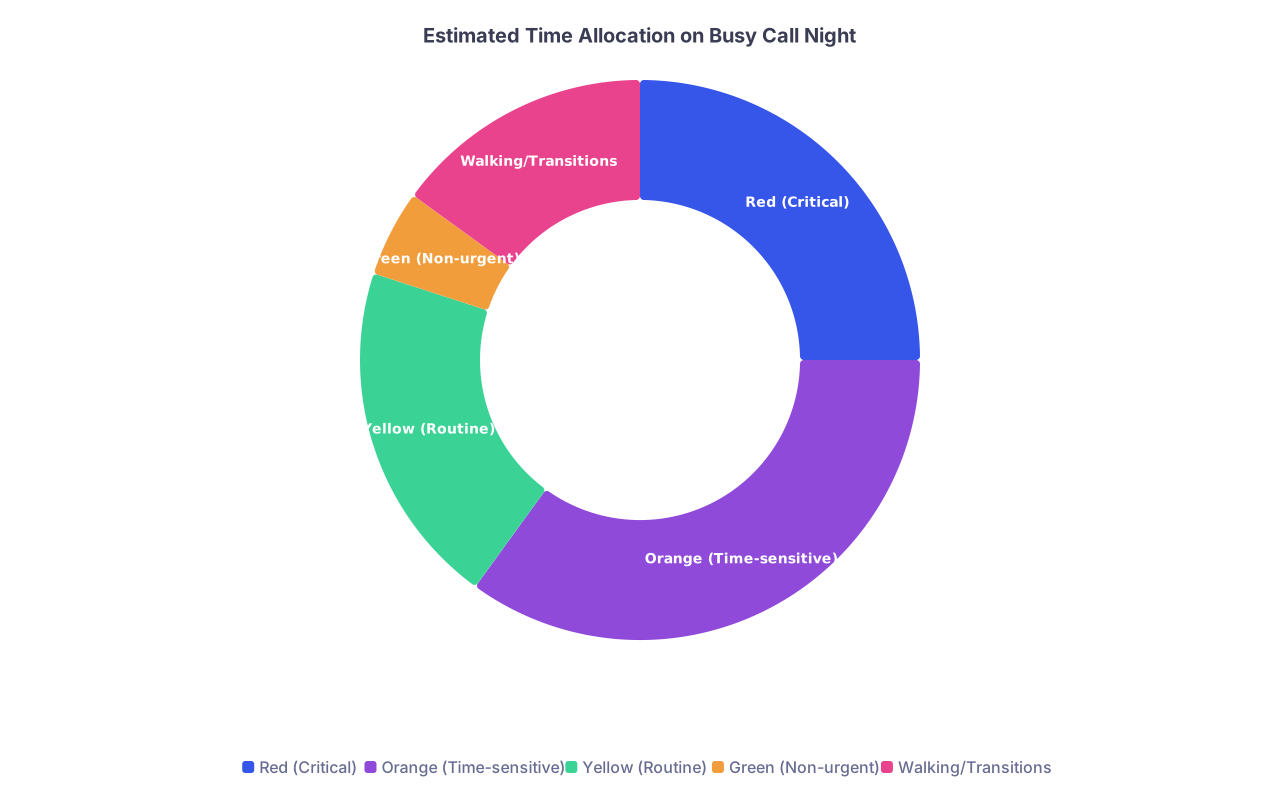
| Category | Value |
|---|---|
| Red (Critical) | 25 |
| Orange (Time-sensitive) | 35 |
| Yellow (Routine) | 20 |
| Green (Non-urgent) | 5 |
| Walking/Transitions | 15 |
One Last Piece: Your Emotions During All This
You will feel guilty. Every intern does. Guilty for not answering every page fast enough. Guilty for making people wait for pain meds. Guilty for not updating every family at 11 p.m.
Here is the hard truth: on some services, you physically cannot satisfy everyone. If you try, you will either:
- Burn out, or
- Miss the one patient who is actually dying.
Triage is not cruelty. It is how you do your real job: keep people safe in a broken system.
Your goal is not perfection. Your goal is to build a repeatable way to decide:
- Who gets me now?
- Who gets me later?
- Who gets orders only?
- Who gets signed out?
Do that consistently and honestly, and you will be a safe intern, which is exactly what your team and your patients need from you.
Your Next Action Today
Take a half-sheet of paper or open a notes app and create your triage template:
- Three columns: NOW / SOON / LATER
- Under each, write 3–5 example page types from your own service.
Then, on your very next call shift, use it in real time for two hours. Force yourself to classify every page before you move.
You will feel clumsy at first. By the end of the night, you will feel less like you are drowning and more like you are steering the boat. That is the point.