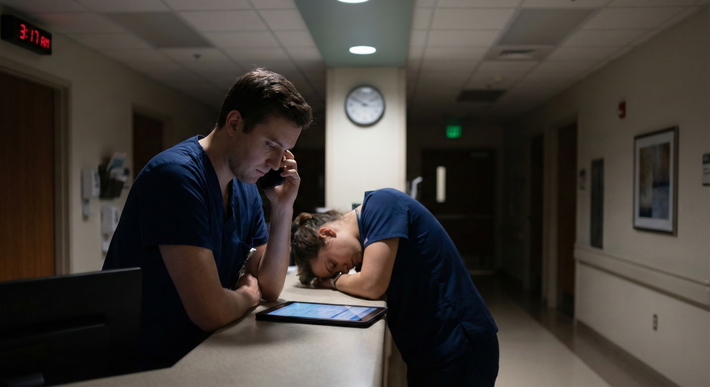
You are not drowning because there are too many messages. You are drowning because you do not have a system.
Inbox/result management is where PGY1s quietly fail. Not on rounds. Not in code situations. In the EHR, at 4:45 pm, with 27 unchecked critical results and three angry portal messages from yesterday.
Let me walk you through how to stop that from happening.
The Ugly Reality: Why PGY1s Get Burned by the Inbox
As an intern, no one teaches you “inbox medicine.” They assume you will figure it out. That is how results get missed and complaints get filed.
Typical PGY1 pattern:
- Logs in at 5:30 am, immediately sucked into overnight labs and pages
- Glances at inbox “when there is time” (there is never time)
- Handles only what screams loudest (critical labs, “STAT” messages)
- Leaves “hard” items (abnormal imaging, culture results, confusing portal messages) for later
- Forgets about “later”
- Attending finds missed result or message three days later
This is not about intelligence. It is about workflow.
You need a deliberate daily routine that treats inbox and results as a real clinical task with structure, timing, and rules. The same way you learned to pre-round.
Core Principles: How to Think About Inbox and Results
Before tactics, you need the right frame. There are three principles that separate the residents who stay on top of things from the ones who are always catching up.
1. Time-blocked, not random
Inbox is not something you do “when you get a second.”
You build specific blocks into your day where you deal with:
- Labs/diagnostics
- Messages/portal communications
- Follow-up tasks from those results
You defend those blocks. If you treat inbox like background noise, it will expand to fill and fragment your entire day.
2. Safety before perfection
Your number one goal is safety:
- No critical result goes unacknowledged
- No time-sensitive finding (positive blood culture, new PE on CT, rising creatinine) gets buried
- No discharge follow-up result (e.g., positive culture after discharge) disappears into the void
Perfect notes, perfect phrasing, perfectly worded portal replies? Nice to have. Not the point. Your system must surface dangerous stuff early and automatically.
3. Decide once, not 27 times
Cognitive load kills you. You open the same abnormal result five times because you never fully decided what to do with it the first time.
New mantra: “Touch it once. Decide the plan. Document the plan. Close or track.”
If you do not know the plan, your “plan” is: get help now (attending/senior) and document the discussion. Then track the follow-up.
A Daily Review Routine That Actually Works (Step-by-Step)
Let me break down a realistic daily routine for a typical inpatient PGY1 on wards. Then we will tweak it for clinic-heavy days.
Step 0: Use the EHR like an adult, not like a victim
Whatever system you use (Epic, Cerner, Meditech, Allscripts), there are three functions you must master:
- Result filters/sorting – by date, severity/flag, type (labs vs imaging vs micro)
- Routing and delegation – sending to attendings, pool users, or messaging your team
- Tasking or “reminders” – some systems let you flag or create tasks tied to a result
Ask a senior or your unit “super user” for a 15-minute crash course on your specific EHR’s inbox and result management tools. That 15 minutes will save you hours every week.
The Time Blocks: When You Review What
Here is the skeleton of a solid PGY1 day from an inbox/results standpoint.
| Time Block | Duration | Focus Area |
|---|---|---|
| Pre-round (05:30) | 15–20 min | Overnight labs/critical |
| Mid-morning (10:30) | 10–15 min | New imaging/micro/hot labs |
| Pre-lunch (12:30) | 10–15 min | Messages/portal + results |
| Mid-afternoon (15:30) | 10–15 min | New results since rounds |
| End-of-day (17:30) | 15–20 min | Final sweep + handoff items |
This is not rigid. Call days will blow it up. But you aim to hit at least three of these blocks consistently: early, mid-day, and end-of-day.
Let’s drill each one.
1. Early Morning: Safe-to-Round Check (Labs First)
Goal: By the time you start pre-rounding, you know:
- Who is actively crashing
- Which overnight labs/imaging need immediate action or escalation
- Which patients you need to see first
How to run it (15–20 minutes)
Open your team/firm list.
Open labs/results view filtered to last 12–24 hours.
Sort by:
- Critical/flagged
- Then by time
Rapid triage:
CRITICAL abnormal (K 2.8, Na 120, Hb 6.5, lactate jump, rising troponin, etc.):
- Check vitals and nursing notes
- Call RN if unclear
- Put in immediate orders (recheck, replacements, stat imaging if obvious)
- Document a quick note or at least a timestamped EHR comment if your system allows
- Flag for attending discussion on rounds
SIGNIFICANT abnormal (Cr bump, worsening leukocytosis, hypotension overnight):
- Jot quick notes on your pre-round list
- You will address these in person on pre-rounds and finalize plan after seeing the patient
Check overnight radiology:
- New CTs, MRIs, ultrasounds from overnight
- Read impressions, not just the first line
- For anything major (new PE, new abscess, unexpected mass), do NOT say “I will wait for rounds.”
- Call senior/attending if high-stakes
- Initiate obvious management steps (anticoagulation if not contraindicated, IR consult, etc.)
Look quickly at microbiology:
- New positive blood cultures
- New organism specs/sensitivities
- New C. diff, MRSA, etc.
For micro, the biggest danger is: the patient went home yesterday and you never check post-discharge results.
That needs a separate section. We will get to it.
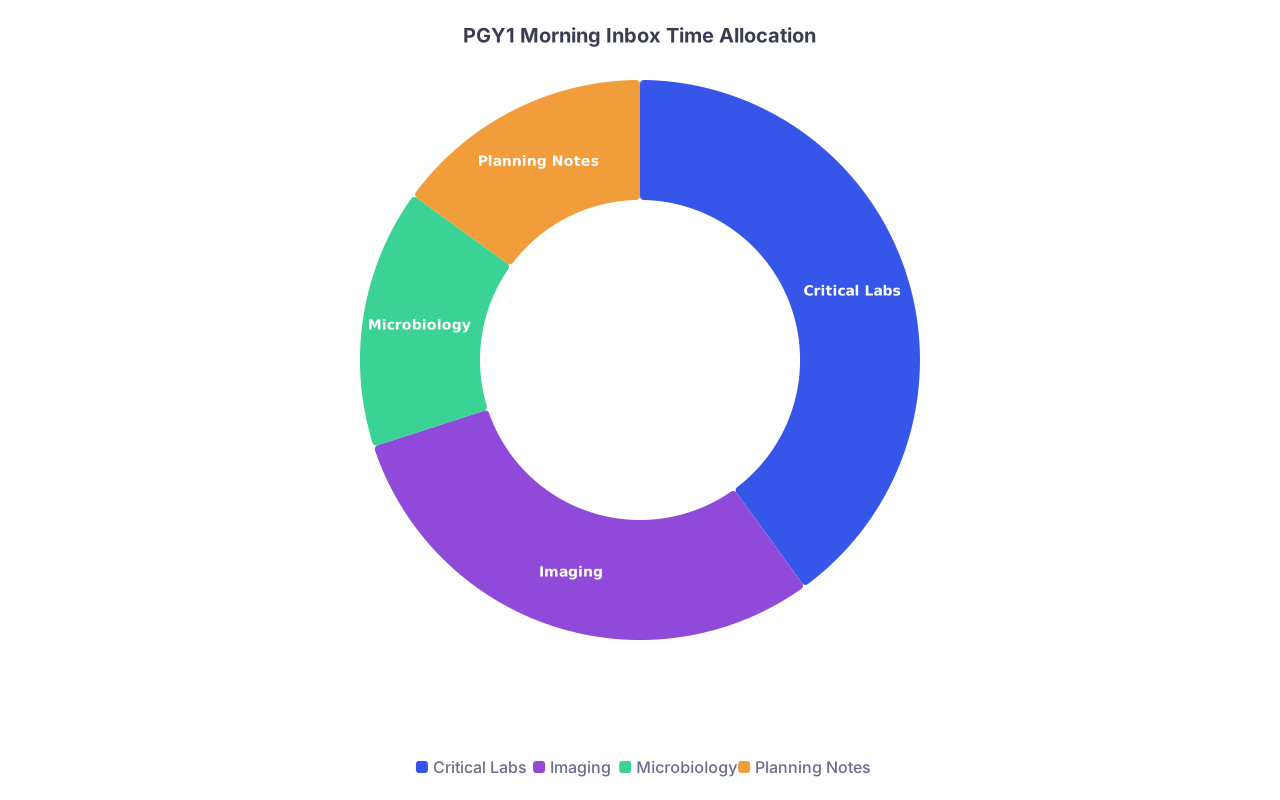
| Category | Value |
|---|---|
| Critical Labs | 40 |
| Imaging | 30 |
| Microbiology | 15 |
| Planning Notes | 15 |
2. Mid-Morning: Imaging and Micro Deep Dive
By 10:30–11:00, rounds are in full swing or finishing. This block is short and clinical.
Goal: Make sure new imaging/micro from the last 3–4 hours is seen and acted on.
What you do:
- Filter results to last 4–6 hours, imaging/micro only
- Read full radiology impressions (and comparisons) for:
- CTs
- MRIs
- V/Q scans
- Echocardiograms
- For each significant study:
- Decide: Does this change management right now?
- If yes, page senior/attending if not already aware
- Place necessary orders or consults
For micro:
- New positive blood/urine/wound cultures:
- Confirm the patient’s location (still inpatient? discharged?)
- If inpatient: adjust antibiotics, consult ID if needed, document focused plan
- If discharged: this goes into your post-discharge follow-up workflow (see below)
Do not rely on “the lab will call” for important results. Many systems still do. Many also fail.
3. Pre-Lunch: Messages and Portal Replies
This is where PGY1s either stay safe or get absolutely buried.
By mid-day, you should take a pass at:
- EHR inbox messages (nurse messages, interdepartmental, discharge-related)
- Patient portal messages if you are in a clinic block or co-following patients longitudinally
Triage rule for messages
Every message falls into one of these buckets:
Requires action today; can be done now in < 3 minutes
- Simple med refills
- Clarification for nursing (“Is it okay to hold PM metoprolol if BP < 100?”)
- Quick lab follow-up (“Please inform patient potassium improved, continue same dose.”)
Requires action today; takes > 3 minutes
- Interpreting multiple test results with explanation
- New complex symptom questions from portal
- Changing care plan, scheduling urgent visit
- Insurance/PA hassles that directly impact treatment
Routine, can be done by end of week or delegated
- Non-urgent form completions
- Requests for letters that are non-urgent
- Administrative strange requests
Misrouted / not for you
- Belongs to another service
- Belongs to clinic rather than inpatient team
- Belongs to attending
Rule: When you open a message, you decide which bucket immediately and act:
- Bucket 1: Do it, document it, close it.
- Bucket 2:
- If you can, start now; if not, create a clear task/reminder for your afternoon or end-of-day block.
- If complex clinical decision: involve senior/attending sooner rather than later.
- Bucket 3: Route to the correct pool/person or set a lower-priority personal reminder.
- Bucket 4: Re-route with one clearly written line. Do not let it sit in your inbox.
4. Mid-Afternoon: Second Results Pass + Task Catch-Up
This is your damage control round.
Goal: Make sure nothing major has emerged during the chaos of the day and that all high-priority tasks from earlier blocks are being closed.
What this looks like, realistically:
- Filter results since your last check (imaging + critical/high-priority labs)
- Review micro one more time, especially culture updates and sensitivities
- Scan your own “tasks/reminders” list for:
- Bucket 2 items from earlier inbox work
- Follow-up checks (“Recheck BMP after diuresis,” “Repeat troponin now”)
During this block, you often:
- Adjust antibiotics based on new sensitivities
- Change diuretic plans based on afternoon labs
- Order additional imaging based on partial results earlier
- Update handoff notes with any new developments
5. End-of-Day: The Non-Negotiable Final Sweep
If you skip everything else, do not skip this.
End-of-day review (15–20 minutes) is how you:
- Protect your patients overnight
- Protect your co-interns and cross-cover residents
- Protect yourself medicolegally
You run three checklists:
- Results checklist – “Is there any critical or significant result I have not addressed?”
- Inbox/messages checklist – “Are there any time-sensitive messages still untouched?”
- Handoff checklist – “Have I communicated all relevant new problems or pending items to the night team?”
I am not exaggerating: over years, almost every bad outcome story based on missed results could have been prevented by a disciplined end-of-day sweep.
How to run the final sweep
Open:
- Results: Filter today + your team/panel
- Inbox/messages: Sort by unread / priority
- Task/reminder list
Handle in this order:
- Any critical imaging or labs that came in late (especially CTs, troponins, CBCs with major changes)
- Any positive blood cultures or serious micro findings
- Any clinic follow-up results from recent discharges, if that is in your workload
- Messages flagged as urgent
For each problem:
- Decide: needs action now vs communicate for follow-up
- Place orders or consults
- Update sign-out: “New CT with moderate pericardial effusion at 16:00, stable vitals, cards consult called, watch for hypotension, low threshold to re-evaluate.”
Before logging off:
- Make sure your sign-out reflects:
- New concerns
- Pending critical labs/imaging expected overnight
- Active drips/pressors/complex pain regimens
- Make sure your sign-out reflects:
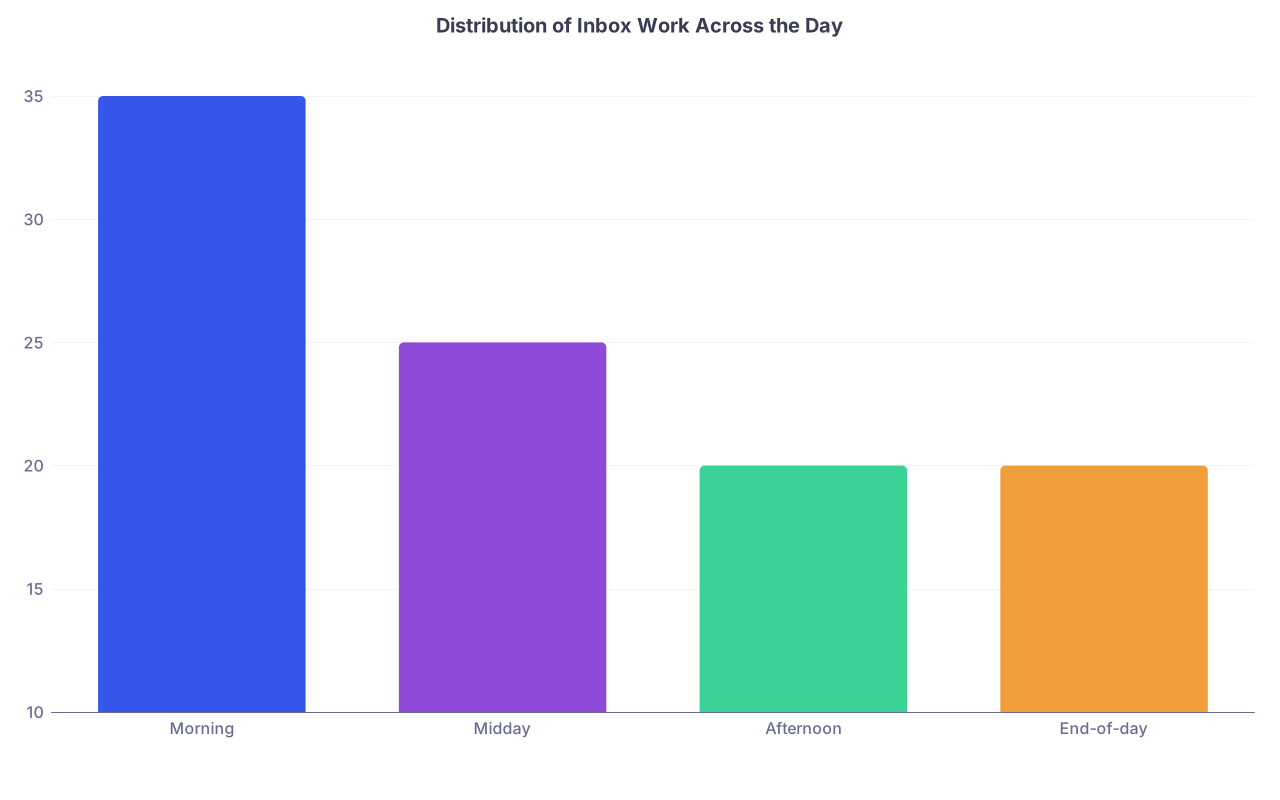
| Category | Value |
|---|---|
| Morning | 35 |
| Midday | 25 |
| Afternoon | 20 |
| End-of-day | 20 |
Post-Discharge Results: Where Interns Get Burned
This is the landmine.
Patient is discharged on Monday. Blood culture drawn Sunday grows gram-negative rods on Tuesday.
If no one checks, follows up, and documents, that is how you end up in M&M. Or worse.
You need a post-discharge result protocol. Even if your program has one, you personally must understand how it works and where things fall through.
Questions you must get answered in your system
Ask your chief, attending, or clinic director:
- Who is responsible for results that return after discharge from the hospital?
- Where exactly do those results go in the EHR?
- How are critical values handled after discharge?
- For clinic patients: who covers portal messages and results when you are off or in a different rotation?
Then you build your personal habit around that.
Typical safe pattern on inpatient:
End-of-day or early-morning, pull a results report filtered to “discharged in last 7 days” (if your system allows).
Filter to microbiology, imaging, critical labs.
For each:
- Confirm: Is this expected / already acted on?
- If new and clinically meaningful:
- Decide: call patient, call PCP, arrange ED return, or message outpatient team.
- Document clearly:
- That you saw the result
- What you did
- Who you notified
If your system routes all post-discharge results to an “attending pool” or to the PCP, you still need to be aware in clinic settings: your name may still be attached. Review how your clinic handles covering tasks when you rotate off.
Documentation: How Much and Where
You do not need a full note for every mildly abnormal lab. But for anything that could matter later, you MUST leave a trail.
At minimum, document when:
- You act on a critical lab or imaging result
- You change management due to a new result
- You contact a patient or family about a significant result
- You decide to not act (e.g., “No change in management – discussed with attending”)
Where you document:
- Inpatient: brief addendum to your progress note, or a separate brief “Result follow-up” note if your hospital uses that structure
- Outpatient: quick telephone encounter or “message encounter” with your summary + plan
Example of adequate documentation:
“1/6/26 17:12 – Positive blood cultures with E. coli from 1/4/26. Patient discharged 1/5/26. Called patient, currently afebrile but endorses new rigors. Advised ED return for re-evaluation and possible admission. ED notified via message. Discussed with Dr. Smith (attending). – J. Lee, MD PGY1”
That is how you show you did your job.
Using Tools: Lists, SmartPhrases, and Shortcuts
You should not be reinventing the wheel for every result or message. Build micro-systems.
SmartPhrases / templates
Create brief templates in your EHR for:
- Communicating normal results to patients
- Communicating mildly abnormal but non-dangerous results
- Documenting patient notification for significant results
Example phrases:
.normalresult:
“We received your recent [test]. The result was within normal limits. No change in your current treatment plan is needed. We will continue to monitor as discussed at your last visit.”.abresultmonitor:
“Your [test] showed a mild abnormality: [brief explanation]. At this time, no urgent action is required. Our plan is [monitoring / repeat testing / upcoming visit]. Please seek urgent care if you develop [specific red flag symptoms].”
These save time and keep your inbox moving.
Lists and trackers
Some EHRs have built-in trackers. If yours does not, use:
- A simple paper list in your pocket (yes, old school works)
- A secure, program-approved digital list (if allowed) of “Critical follow-ups”
Categories that deserve tracking:
- Newly started high-risk meds (warfarin, DOACs in very old or CKD, lithium, clozapine) and their necessary labs
- New significant imaging findings needing outpatient follow-up (solid pulmonary nodules, adrenal masses, incidental aneurysm)
- Patients you were specifically worried about at discharge
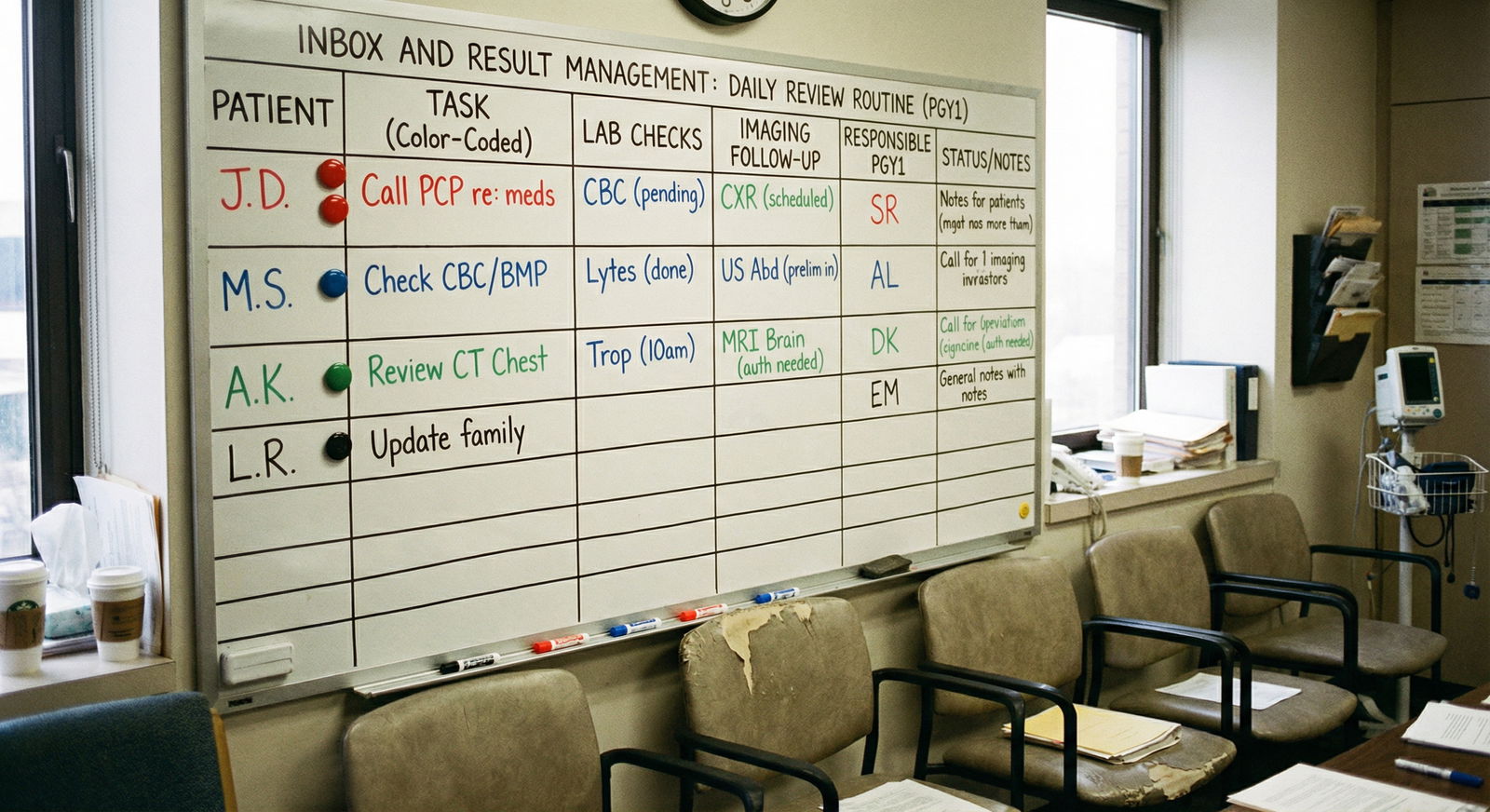
Adapting This to Outpatient / Clinic-Heavy Rotations
Clinic rotations are a different beast. The inbox is relentless, and you cannot hide behind “rounds.”
You need a slightly different structure:
Start of day (before first patient) – 20 minutes
- Tackle overnight/late results on yesterday’s patients
- Handle urgent portal messages and nurse pool messages
Mid-session micro-breaks – 3–5 minutes every 2–3 patients
- Clear quick tasks (Bucket 1 from earlier)
- Flag complex issues to discuss with preceptor or for end-of-session
Lunch or mid-day block – 15–20 minutes
- Deep dive on abnormal results
- Make follow-up calls that cannot wait
End-of-session – 20–30 minutes
- Close the loop on all labs/imaging ordered that day if resulted
- Call or message patients as needed
- Place follow-up orders/appointments
- Document contact and plans
The tricky part: when you leave that clinic rotation, you will often still have results coming back for weeks.
You must clarify:
- Who owns results that return after you rotate off?
- Are they routed to the attending, the clinic “results pool,” or still to you?
In many well-run clinics, attendings or pooled staff take over. In poorly structured ones, your name remains attached and no one actually looks unless you do.
Resist the temptation to ignore that. If you are still getting results routed to you, you are still responsible for processing or re-routing them appropriately.
Working with Nurses and Staff: Do Not Be a Hero, Be a Teammate
You are not supposed to handle every tiny inbox task personally. Smart residents learn how to align with nurses and clerical staff.
Things you can do to make everyone’s life easier:
Be explicit in your notes and orders:
- “Nursing: Please page MD if systolic BP < 90 or > 170.”
- “Call patient with normal result, no change to meds needed.”
Ask clinic/team nurses:
- “Which kinds of results can you autonomously notify patients about as ‘normal’?”
- “What wording do you prefer so that you can safely convey my plan without having to track me down?”
This allows staff to close the loop on simple results and messages without re-triaging everything to you.

| Step | Description |
|---|---|
| Step 1 | Result posts |
| Step 2 | Lab calls nurse or MD |
| Step 3 | Immediate clinical action |
| Step 4 | Document and notify attending |
| Step 5 | Nurse can notify patient |
| Step 6 | Standard message or script |
| Step 7 | Resident reviews |
| Step 8 | Plan with attending if needed |
| Step 9 | Patient contact and documentation |
| Step 10 | Critical value |
| Step 11 | Simple normal or mild change |
Handling Volume and Avoiding Burnout
Let me be blunt. Some of you will be in systems where:
- There is no good pooling of results
- Attendings dump work downward
- Admin expects fast replies to every portal message
- Your name gets attached to thousands of patients you barely met
You cannot fix that as a PGY1. But you can protect yourself from drowning.
Key survival strategies:
Aggressive batching
- Turn off non-critical EHR popups while pre-rounding or writing notes
- Do inbox in blocks, not every 90 seconds
Negotiate expectations early
- Ask clinic preceptor: “How quickly do you expect portal messages and labs to be addressed?”
- Clarify: “Who covers when I am on nights or ICU?”
Use “one level up” for uncertain decisions
- If you are not sure what to do with an abnormal result, do not just sit on it.
- Quickly draft your interpretation and proposed plan and run it by your attending/senior:
- “K is 3.2, was 4.0 yesterday, on high-dose Lasix. I am planning to increase KCl and recheck in the morning – agree?”
Develop a threshold for inbox zero
- Inbox zero is not reasonable daily in some systems.
- Safety zero is: zero unreviewed critical results, zero urgent messages untouched, zero concerning findings undocumented.
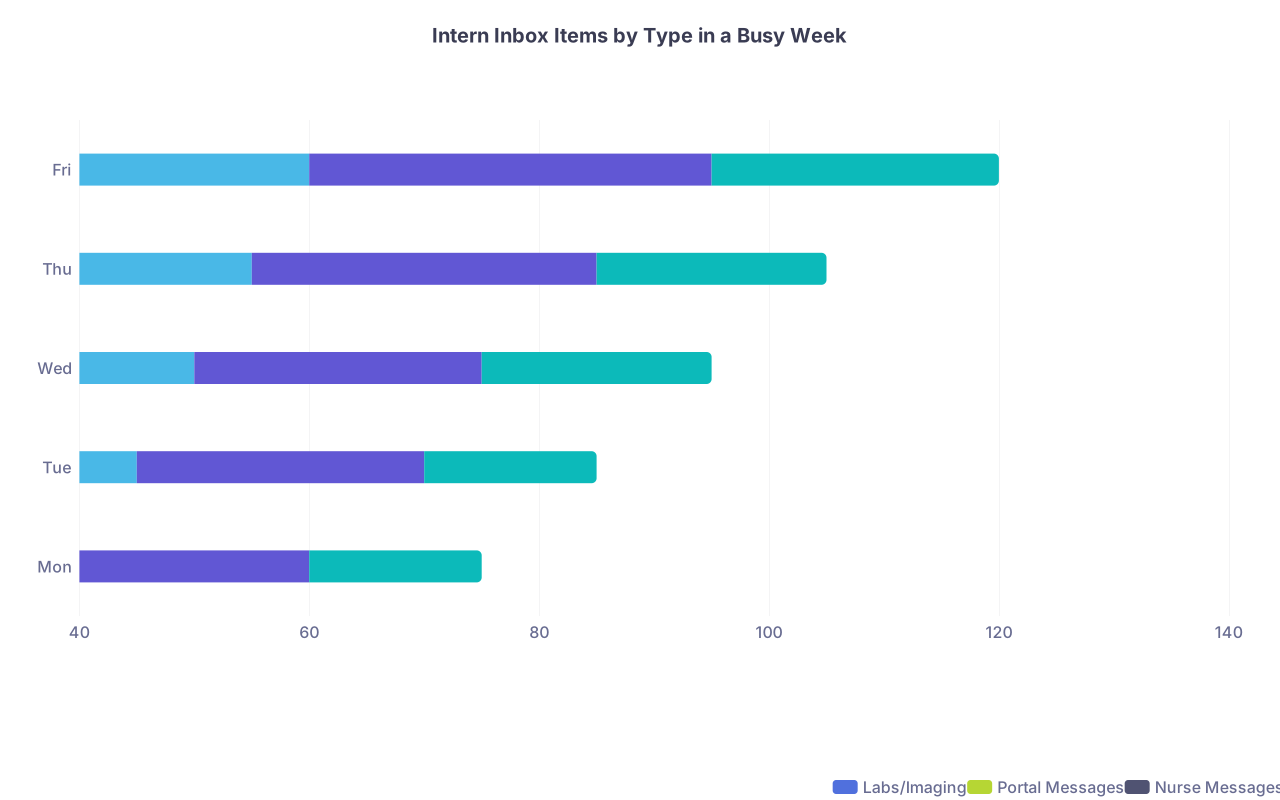
| Category | Labs/Imaging | Portal Messages | Nurse Messages |
|---|---|---|---|
| Mon | 40 | 20 | 15 |
| Tue | 45 | 25 | 15 |
| Wed | 50 | 25 | 20 |
| Thu | 55 | 30 | 20 |
| Fri | 60 | 35 | 25 |
Common PGY1 Mistakes and How to Fix Them
Let’s be specific. I see the same patterns every year.
Mistake 1: Letting “hard” stuff sit
Abnormal CT, tricky lab, weird patient message. You open it, feel overwhelmed, close it “for later.”
Fix: The second you feel that reaction, force yourself to:
- Write a one-line summary
- Draft a tentative plan
- Page your senior/attending with that draft
You convert anxiety into an active step. And you stop the mental pileup.
Mistake 2: Assuming “someone else is watching”
“Surely radiology will call.”
“Surely the lab will call.”
“Surely the attending sees all these.”
Maybe. Maybe not. You do not stake your license on “surely.”
Fix: Assume no one else is watching unless your system has a clear, documented, reliable pathway that you understand. If in doubt, review yourself and over-communicate.
Mistake 3: Ignoring post-discharge results
Especially in July–August, I see interns shocked that they are responsible for labs from patients who are no longer in the hospital.
Fix: Build that “discharged last 7 days” review habit early. Ask exactly who owns that space. Take it seriously.
Mistake 4: Doing inbox reactively all day
Answering messages the second they appear, constantly interrupting your other work.
Fix: Turn it into a scheduled, batched task. If your attending asks why you did not reply to a non-urgent portal message within 45 minutes, you calmly say, “I batch inbox checks three times a day to make sure I give safe and consistent responses.”
That is not laziness. That is professionalism.

Putting It All Together
Build your daily routine around four anchors:
- Early morning – safety sweep of overnight labs/imaging; identify who can and cannot wait.
- Mid-day – results refinement and first real pass at messages; start hard tasks and involve seniors early.
- Afternoon – follow-up on new results and close open clinical loops; adjust orders and update handoffs.
- End-of-day – non-negotiable final sweep of results, inbox, and sign-out; no critical item left floating.
If you do that consistently, three things happen:
- Your patients are safer.
- Your attendings trust you more, faster.
- You stop living with that background dread that you “might have missed something huge.”
That is what you are really building in PGY1: not just medical knowledge, but systems that keep you and your patients out of trouble. Inbox and result management is one of the first real tests of that.
Stay systematic. Touch things once. And never, ever skip the end-of-day sweep.