What do you do when you’re finally off call at 11:45 p.m.—exhausted, wired, and you open a “sleep mindfulness” app that somehow keeps you up another 90 minutes?
This is the trap too many physicians are walking into. You reach for an app to help you rest, and the features baked into that app quietly shred what little sleep you have left.
Let me be blunt: not all mindfulness tools are benign. Some are directly hostile to sleep, especially in the hands of a sleep-deprived doctor who’s desperate for relief.
You’re in medicine. Your cognitive performance, your ethical judgment, and your patients’ safety depend on your brain actually recovering. So you don’t get to casually screw around with your sleep architecture because an app designer wanted more “engagement.”
Let’s go through the specific mistakes I see physicians make with mindfulness apps—and the app features that sound therapeutic but are absolutely not sleep-friendly.
The First Big Mistake: Treating Your Phone as a Sleep Aid
The fastest way to sabotage your own rest is simple: you bring your phone into the bed and call it “mindfulness.”
Yes, even if it’s a meditation app. Yes, even if it’s “dark mode.” Yes, even if it’s “only audio.”
You’re making three errors at once: light, arousal, and conditioning.
1. Blue light and late-night screen checking
If you’re opening, closing, or toggling the app within 30–60 minutes of your intended sleep time, you’re doing this wrong.
The mistake: “I just need to pick a track; it’ll only take a second.”
That “second” means:
- Brightness spikes
- Blue light hitting melanopsin-containing cells in your retina
- A small but real delay in melatonin onset
You can argue with circadian biology all you want; it doesn’t care.
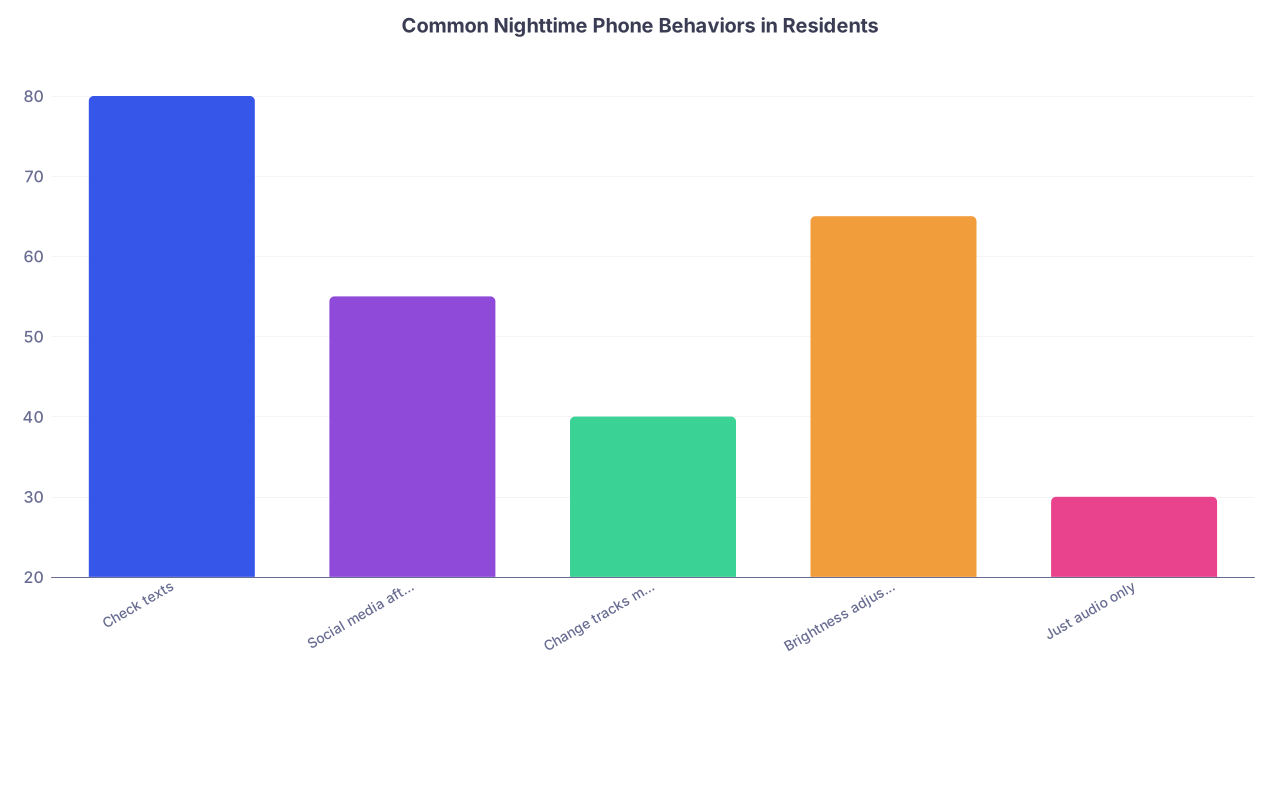
| Category | Value |
|---|---|
| Check texts | 80 |
| Social media after app | 55 |
| Change tracks mid-session | 40 |
| Brightness adjustments | 65 |
| Just audio only | 30 |
These numbers wouldn’t surprise me on any residency survey. And every one of those behaviors is wrapped in, “But I was just trying to use my mindfulness app.”
2. Turning the bed into a tech hub instead of a sleep cue
Big conditioning mistake here.
Your bed should cue one thing: sleep (and sex). That’s it. Not “scrolling through a library of nature sounds,” not “browsing new meditations,” not “checking your Calm streak.”
If your brain learns that bed = decision-making, screen, choices, and content catalog, you’re actively training yourself to be more awake in bed.
I’ve watched attendings in their 40s complain about “new-onset insomnia” when the only real new-onset variable was their phone on the pillow with a meditation app running.
The fix is boring and strict:
- Set up any tracks, playlists, or timers before you get in bed
- Put the phone face down, away from arm’s reach
- Use a simple audio-only routine you don’t have to think about
If your app design makes that hard? That’s not “mindfulness.” That’s a product trying to keep you engaged.
Sleep-Harmful Features Hiding in “Mindfulness” Apps
Here’s where people get burned. The app’s marketing screams calm and evidence-based, while the actual UX is built like a dopamine trap.
1. Streaks, badges, and “progress” dashboards
This is the most unethical piece of gamification I see in wellness apps for physicians.
You’re already living inside metrics. RVUs, relative value units. Press Ganey. HCAHPS. Step scores. Board pass rates. Then your “relaxation” app decides to add:
- Daily streaks
- “Don’t break the chain!” badges
- Time-based milestones
- Leaderboards (yes, I’ve seen this in “mindfulness” apps)
You know what streaks do to sleep?
They push you to open the app when you should be going straight to bed, just so you don’t lose a fake number on a screen. Or they make you feel guilty and restless when you miss a day—right before sleep.
I had a fellow tell me, “I was exhausted on call but did a 30-minute session at 1 a.m. because I didn’t want to lose my streak.” That’s not mindfulness. That’s compulsive behavior masquerading as self-care.
If an app makes you feel:
- Pressured to “log” a session
- Anxious that you missed a day
- Competitive with others for “calm time”
…it’s the wrong tool for a brain already running hot from residency or practice.
2. Achievement-based content unlocking
Another nasty design choice: “advanced content” unlocked only after a set number of days or minutes.
Sounds motivating. It’s not. It’s manipulative.
For a physician:
- You might stay up late to hit the unlock threshold
- You might push longer sessions when you’re already sleep-deprived
- You start treating rest like another exam to pass
Mindfulness that keeps you from turning off the light is malpractice in app form.
Noisy “Relaxation”: Audio Features That Backfire
Not all sounds help sleep. Many mindfulness app features are built for general relaxation or daytime stress, not sleep induction. That difference matters.
1. Dynamic or stimulating “sleep stories”
You know the style. Famous actor voice. Beautiful narrative. Rich soundscape.
Here’s the problem: they’re too engaging.
They trigger narrative tracking and imagery. That’s mental work. Your attention system lights up; you follow the plot, anticipate what’s next, respond emotionally to the story.
For an overcooked physician brain, this can feel good—like a distraction from the day—but it keeps you in a lighter sleep stage longer or delays sleep onset altogether.
If you routinely:
- “Rewind” a story because you missed a part
- Notice you’re invested in “how it ends”
- Choose stories by narrator, genre, or plot
you’re not using sleep content. You’re using bedtime entertainment.
That’s fine on vacation. Not fine before a 6 a.m. OR start.
2. Notifications and mid-night interruptions
Massive rookie mistake: leaving notifications or in-app prompts on.
Push notifications from a mindfulness app between 10 p.m. and 7 a.m. should not exist. Yet many apps send:
- “Don’t forget your nightly wind-down”
- “New sleep track released!”
- “Special challenge starts tomorrow”
at random evening hours.
You wake briefly, you see a glow, you glance, your brain engages. That mini-wake may not feel dramatic, but it fragments sleep and, in people already on the edge, can push them into chronic insomnia patterns.
Turn off every single notification. Or better: delete apps that don’t let you suppress them completely.
3. Poorly timed or looping audio
Several sleep apps:
- Have tracks that end abruptly after 10–15 minutes
- Switch to the next track with a small “ding” or change in tone
- Loop with a noticeable gap or volume jump
What does that create? Micro-arousals.
A resident once told me, “For some reason I always wake up at 2 a.m. when the ocean sounds restart.” That’s not mysterious. That’s a badly designed loop.
If you insist on app-based audio, you want:
- Consistent, low-volume, non-dynamic sound
- No tracked “end” you can anticipate
- No voices suddenly appearing in the middle of the night
Your brain will wake partially for that shift, especially under chronic stress.
The Chronic Mistake: Using Apps to Avoid Real Restorative Behaviors
The worst damage isn’t the blue light or the sound design. It’s the psychological crutch.
1. Using mindfulness apps as anesthesia, not practice
There’s a difference between learning mindfulness skills and using an app as a sedative.
You’re making a critical error if:
- You “can’t fall asleep” without the app now
- You reach for the phone the second you wake up at 3 a.m.
- You keep flipping tracks when “this one isn’t working”
That’s not training your nervous system. That’s building dependence on a gadget.
And dependence on any external sleep cue—especially one as loaded as a smartphone—makes you more vulnerable. Lose your phone, have a dead battery, forget your charger on a call shift? Now your insomnia spikes, because your brain thinks the only way down is through that app.
Ethically, as a physician, you know what dependence looks like in patients. Do not quietly reproduce a digital version in your own life and call it wellness.
2. Using the app to bypass addressing real causes of poor sleep
This is the uncomfortable part.
If your sleep is wrecked by:
- Chronic 28-hour call
- Rotating nights and days
- Unprocessed moral injury, burnout, or trauma
- Caffeine abuse, late-evening charting, constant EMR checking
no mindfulness app is going to “fix” that. At best, it gives you a marginal benefit. At worst, it delays you from making necessary structural changes or getting professional help.
I’ve watched people say, “I’m fine, I use a sleep app,” while they’re:
- Nodding off in sign-out
- Forgetting orders
- Making judgment errors they would never have made as an intern
Relying on an app becomes part of the denial system. A way to say, “I’m doing something about it,” while nothing meaningful changes.
Ethically Murky Territory: Data, Privacy, and Vulnerability
You’re not just a user. You’re a physician with a professional license, a DEA number, and a vulnerability profile that’s incredibly attractive for data mining.
1. Sleep and mood tracking that isn’t really for you
Many mindfulness apps now:
- Track minutes meditated
- Ask about your mood before bed
- Log sleep times and insomnia symptoms
- Offer “insights” from your patterns
Sounds helpful. But read the privacy policy. Slowly.
Ask yourself:
- Who sees this data?
- Is it being sold, aggregated, or shared with third parties?
- Could any of this be de-identified poorly or re-identified?
- What happens if this data ever crosses paths with insurers, credentialing bodies, or employers?
If you’re logging, “Awake at 3 a.m., anxious, can’t turn off thoughts,” that’s not trivial information about your professional fitness.
I’m not being paranoid here; I’m being practical. You live in a system that already judges you on incomplete data. Don’t throw your raw mental-health and sleep-fragmentation logs into unknown servers without thinking.
| Red Flag | Why It Matters |
|---|---|
| Vague data sharing | Hard to know where your data goes |
| Third-party analytics | Profiling and targeted marketing |
| Weak de-identification | Easier to re-link to your identity |
| No data deletion path | You lose control over past entries |
| Single sign-on (social/email) | Cross-service tracking risk |
2. Subtle self-stigmatization
If your app dashboard is regularly showing:
- “You slept poorly 18 out of the last 30 nights”
- “Your anxiety ratings are trending up”
- “You’ve missed several sessions this week”
and you’re already burned out, this isn’t feedback. It’s shame fuel.
That pre-sleep moment when you open the app and see your “bad stats”? That’s the last thing your nervous system needs.
I’ve seen residents start hiding their struggles more because “the app says I’m a mess; I can’t let anyone else see that.” The data that might have pushed them toward help instead just becomes another thing to be ashamed of.
Practical Guardrails: How to Use Mindfulness Without Wrecking Sleep
Let’s flip this into guardrails. Not fluffy “tips”—actual rules that prevent the common mistakes.

| Step | Description |
|---|---|
| Step 1 | Decide to use app |
| Step 2 | Set audio before bed |
| Step 3 | Use for daytime practice |
| Step 4 | Screen off and face down |
| Step 5 | Use single familiar track |
| Step 6 | Disable notifications first |
| Step 7 | Phone away from bed |
| Step 8 | Skill building not sleep aid |
| Step 9 | Within 60 min of sleep? |
| Step 10 | Notifications off? |
1. Non-negotiables for sleep-protective app use
- No screen interaction in bed. Set everything up before you lie down.
- Phone out of arm’s reach, face down, with all notifications off.
- One familiar track or sound, no hunting, no browsing, no decisions.
- No streaks, challenges, leaderboards, or “goals” around bedtime use.
If your current app makes any of that difficult, the problem is the tool, not you.
2. Separate daytime mindfulness from nighttime sedation
You want to actually learn the skill? Do mindfulness during the day:
- Between cases
- Before clinic
- During lunch
- Post-shift, but at a desk or chair, not in bed
Use the app as scaffolding to learn techniques that you can later run without the phone at night. Breath work. Body scanning. Basic open monitoring.
Nighttime is not for “exploring new content.” It’s for shutting down with the simplest, lowest-stimulation routine possible.
What To Watch For When Choosing a Mindfulness App
Here’s the simple filter: If the app seems obsessed with your engagement more than your rest, it’s not built for your nervous system.
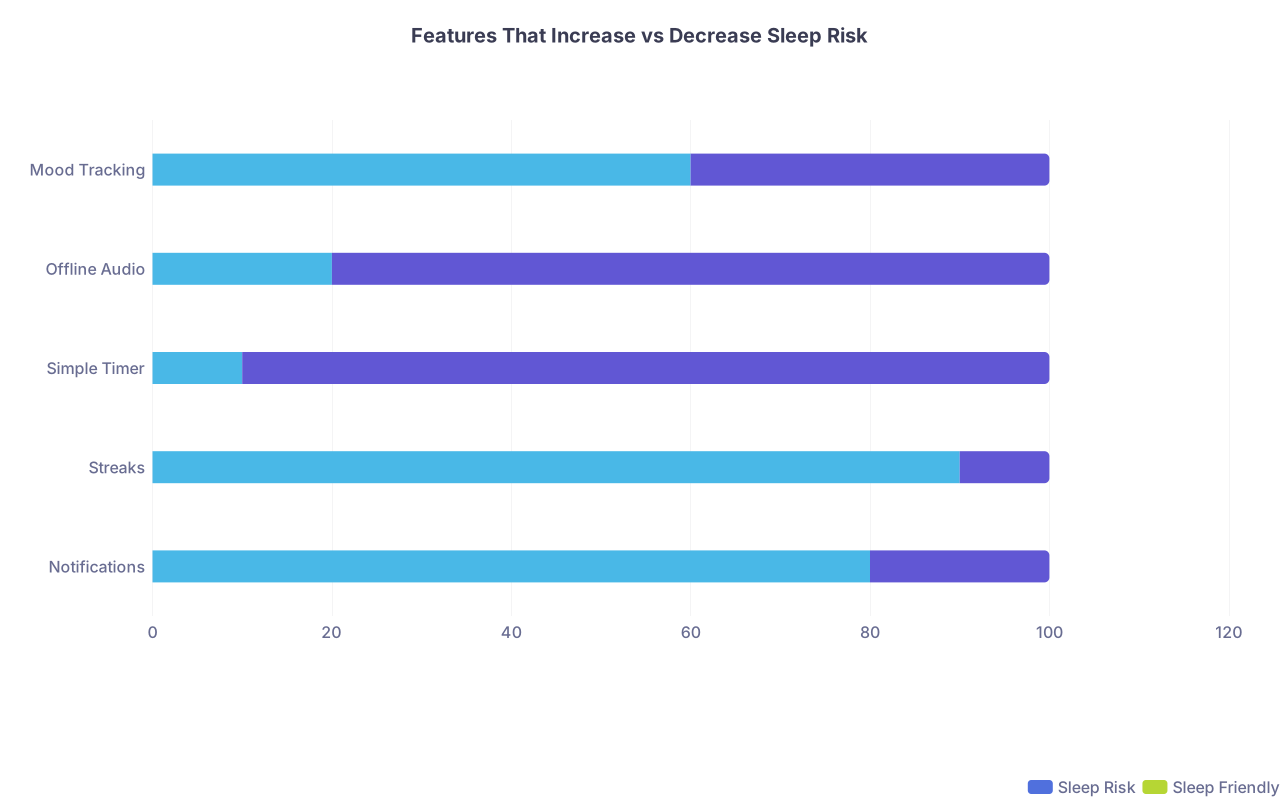
| Category | Sleep Risk | Sleep Friendly |
|---|---|---|
| Notifications | 80 | 20 |
| Streaks | 90 | 10 |
| Simple Timer | 10 | 90 |
| Offline Audio | 20 | 80 |
| Mood Tracking | 60 | 40 |
Look for:
- Ability to fully disable notifications
- No forced streaks or daily “pressure”
- Simple offline audio you can trigger without browsing
- Transparent, conservative data practices
- No “late-night reminders” or gamified bedtime prompts
And yes, sometimes the right solution is not an app at all.
A cheap white-noise machine + a 5-minute memorized breathing exercise you do in the dark will beat most sleep-mindfulness apps for physicians. Every time.

The Ethical Layer: You, Your Patients, and Your Brain
This sits squarely in personal development and medical ethics because your sleep isn’t just personal wellness—it’s a patient safety issue.
A few realities:
- Chronic sleep fragmentation degrades executive function and moral judgment
- App-driven “sleep aids” that worsen fragmentation are not neutral—they’re harmful tools
- As a physician, normalizing inadequate, low-quality sleep as “handled” because you use an app is ethically dangerous
You would never accept, “I’m fine, I take something at night,” as a full solution in a patient with objectively impaired functioning and risky work to do the next day.
Don’t accept “I’m fine, I use a mindfulness app” from yourself if your brain is slipping.
Sometimes the right move isn’t a different app. It’s:
- A brutally honest look at your schedule
- Saying “no” to yet another committee or extra clinic day
- Getting CBT-I (cognitive behavioral therapy for insomnia) with an actual clinician
- Addressing depression, PTSD, or moral injury head-on
None of that lives inside an app. And none of it should.

FAQs

1. Is it always bad to use a mindfulness app before bed?
No, but there are conditions. If you can set a simple audio track before getting into bed, keep the screen off, have all notifications disabled, and avoid browsing or checking stats, it can be neutral or mildly helpful. The problems start when the app requires screen interaction, decisions, or engages you with stories, streaks, or metrics right before—or after—you lie down.
2. Are sleep stories actually harmful for physicians?
They can be. For someone already overstimulated and sleep-deprived, engaging narrative content keeps the cognitive and emotional systems online when they should be powering down. If you find yourself caring about the plot, the narrator, or how the story ends, it’s not serving as a sleep aid; it’s functioning as bedtime entertainment and may delay or lighten your sleep.
3. What’s the safest way to incorporate mindfulness into my schedule?
Do the skill-building away from your bed and away from your phone whenever possible. Short, daytime sessions—3–10 minutes—between patients, after sign-out, or before heading home are ideal. Use an app early on if you need guidance, but aim to internalize a few simple practices (like a breath count or brief body scan) that you can run in silence, eyes closed, with no device, when you’re actually in bed.
4. How do I know if a mindfulness app is making my sleep worse?
Red flags: you’re staying up later “to get a session in,” waking up at night and immediately reaching for the app, feeling anxious or guilty when you miss days, or noticing more fragmented, shallow, or non-restorative sleep despite using the app. If you’re checking your “stats” frequently or your pre-sleep anxiety increases because of what the app shows you, it’s a bad sign.
5. What should I do if I’m already dependent on an app to fall asleep?
Treat it like you would any other unhelpful dependence: with a taper and a plan. Gradually reduce the volume and importance of the app over weeks—shorter tracks, simpler sounds, phone farther away. At the same time, build non-digital sleep hygiene: consistent wind-down routine, no screens for 30–60 minutes pre-bed, and a memorized, device-free relaxation technique. If anxiety spikes when you try to change this pattern, that’s your cue to consider CBT-I or talking with a mental health professional rather than chasing another “better” app.
Key points:
- The wrong mindfulness app features—streaks, stats, notifications, engaging stories—quietly wreck physician sleep instead of helping it.
- Any “sleep aid” that increases screen time, decision-making, or arousal in bed is a trap, not a tool.
- Use apps to learn skills during the day, protect your nights from your phone, and deal honestly with the real causes of your poor sleep instead of hiding them under a glossy wellness interface.