
The way residency work hours are counted is a mess of half-truths, creative math, and misunderstood rules. If you do not understand the system, your hours will get “rounded” away and you’ll be the one paying for it in sleep and sanity.
Here’s the straight answer: there is a clear framework (ACGME rules), but how hours are actually counted depends on three things:
- what “counts” as work,
- how your program records it, and
- what you are willing to report.
I’ll walk you through all three.
1. The Rules You’re Supposed To Be Living Under
Let’s start with the official structure. This is what the ACGME (the main accrediting body in the US) expects for most specialties.
| Rule Type | Standard Limit |
|---|---|
| Weekly hours | ≤ 80 hrs/week, averaged over 4 weeks |
| Single shift length | Up to 24 hrs + 4 hrs for transitions |
| Days off | 1 day off in 7, averaged over 4 weeks |
| Time between shifts | 8–10 hrs suggested; ≥ 14 after 24+ hrs |
Here’s what those actually mean in practice:
80-hour limit: This is not per week in isolation. It is 80 hours per week, averaged over a 4-week block. So one brutal 95-hour week can get washed out by a lighter 65-hour week and still be “compliant.”
24+4 rule: You can do clinical work for up to 24 consecutive hours. You’re allowed up to 4 extra hours for “transitional activities” (notes, handoffs, communicating with consultants). Those 4 hours are still work hours and must be counted.
Day off: You’re supposed to get 1 full 24-hour period off each week (again, averaged over 4 weeks). “Post-call home at 11 a.m.” is not a day off. That’s a partial day. Programs cheat this all the time in their mindset, even if they don’t admit it on paper.
Between-shift rest: Not as rigidly policed as the others, but if you work a 24+ hour call, you should have 14 hours off before your next shift. After a normal shift, 8–10 hours off is the expectation.
That’s the skeleton. Now let’s talk about the actual flesh-and-blood question: what counts as work in the first place?
2. What Actually Counts As “Work Hours”
Here’s the rule of thumb: if you’re doing something because you are a resident, under the control or expectation of your program, it probably counts as work hours.
Let’s go through the common gray zones. I’ll be blunt about what should count and what programs often try to ignore.
Things that clearly count
These are non-negotiable:
In-house clinical work: Any time you are in the hospital or clinic seeing patients, writing notes, calling consults, rounding, admitting, cross-covering, etc.
Night float: Every hour you’re on assigned night duty.
Home call when you’re in the hospital: The second you step into the hospital for a consult, admission, delivery, or code, that time counts. The total time you’re physically there counts as work hours.
Required didactics: Morning report, noon conference, grand rounds, journal club, simulation sessions, mandatory workshops, etc. If it’s on your official schedule and you’re expected to attend, it counts.
Required meetings: Program meetings, CCC, semiannual evaluations where you had to show up during your normal “off” time, remediation meetings, professionalism hearings, etc.
Required online modules: Mandatory EMR training, compliance modules (HIPAA, OSHA, billing, coding), required online lectures if they’re part of your curriculum.
Gray zones programs love to fuzz
This is where residents get shortchanged if they are not careful.
Pre-rounding before your “start time”
If the schedule says your shift is 6 a.m.–6 p.m. but you show up at 5 a.m. to pre-round because the workload makes it impossible otherwise, that 5–6 a.m. is still work. You are not doing that for fun.
You should record your actual arrival time, not the “scheduled” time.Staying late to finish notes
If you were scheduled until 5 p.m. but charting and calls keep you there till 7:30 p.m., your end time is 7:30 p.m. Full stop.
Programs sometimes talk like, “The shift is 7–5” as if you vanished at 5. That’s not how the rules work. You log when you leave.Working from home (charting, messages, orders)
This is one of the most abused areas now that EMRs are everywhere. If you:
- Finish notes from home,
- Reply to patient messages,
- Do inbox work,
- Call patients or families,
those are work hours. You’re still performing clinical duty at the program’s expectation.
You are supposed to track this time as part of your duty hours. Some residents underestimate it. Ten “quick” 20-minute note sessions throughout the week is more than 3 hours of uncounted work.
- Home call when you’re awake and working
Home call logic is simple:
- Time asleep at home: not counted.
- Time awake and working (phone calls, orders, triage, telemedicine, documentation): counts as work hours.
- Time physically in the hospital: counts as work hours.
If you’re up from 1–3 a.m. taking calls and then still show up at 7 a.m. like a normal day, that overnight 2 hours plus your next day count toward the 80.
Travel between clinical sites
Driving between clinic and hospital during your assigned workday? That time is work. You’re on duty.Mandatory research time or QI projects
If your program “requires scholarly activity,” and you’re doing that work in a structured rotation or during protected time, that’s work. If they tell you “do it on your own time,” it’s still a gray zone but ethically it should count. The ACGME does not expect residents to donate unpaid professional labor.Board review sessions if required
If board prep sessions are mandatory and part of the program curriculum, they are work hours. If they are optional and purely for your benefit, they aren’t.
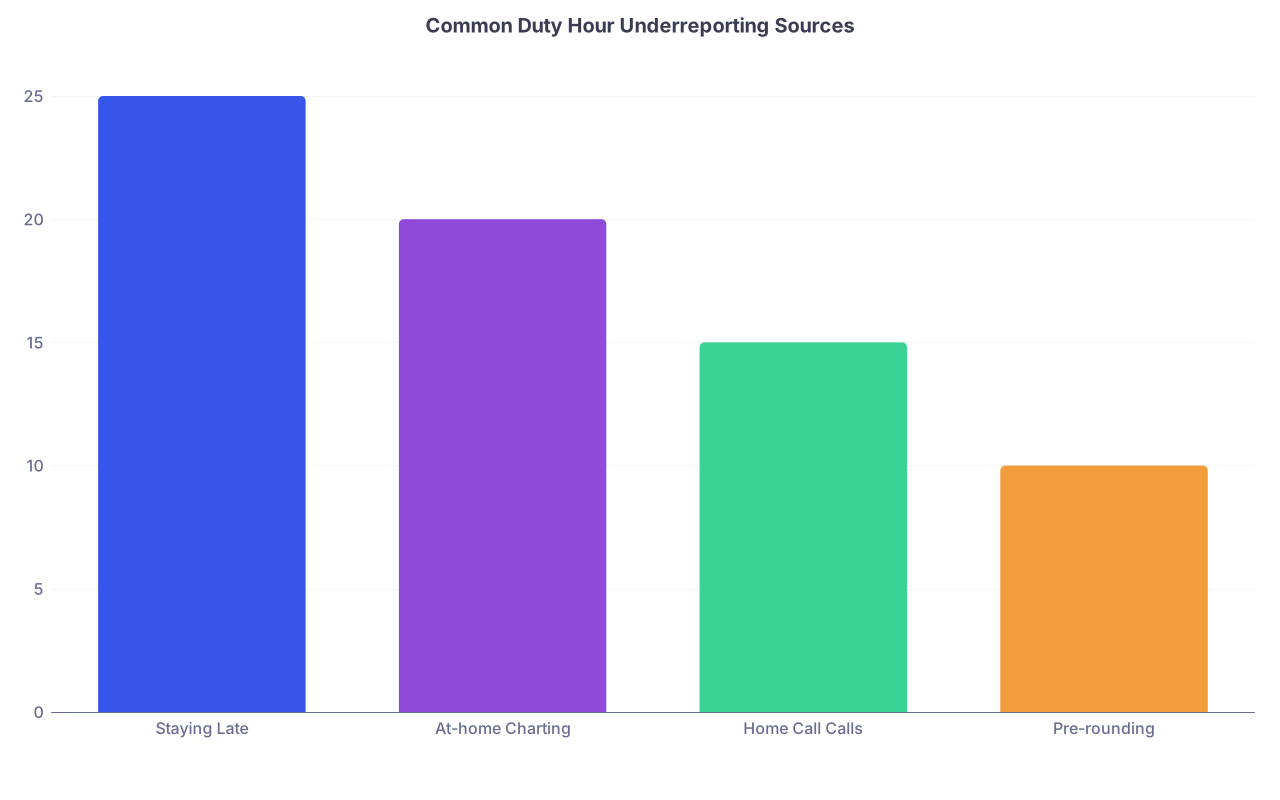
| Category | Value |
|---|---|
| Staying Late | 25 |
| At-home Charting | 20 |
| Home Call Calls | 15 |
| Pre-rounding | 10 |
3. How Hours Are Actually Logged (And Manipulated)
Most programs now use some sort of online duty-hour system: MedHub, New Innovations, Typhon, or an internal EMR-linked tool. These systems usually require:
- Total hours per day, or
- Start/end times per shift, or
- Call type logged (night float vs 24-hr call, etc.)
Here’s what actually happens on the ground.
The ideal (almost no one lives here)
You log:
- Your real arrival and departure times,
- At-home work time,
- Home call time awake/working,
and the program monitors for violations, then makes systemic changes: adds a float, modifies caps, reduces clinic sessions post-call.
Some elite programs do this. They adjust rotations when they see a pattern of violations. You’ll know because they proactively say, “We saw too many residents over 80 hours on X rotation; we’re adding a swing resident.”
The common reality
You’ll hear phrases like:
- “Try not to log more than 80; it makes us look bad.”
- “You can put down your scheduled hours.”
- “If you’re just finishing a couple of notes at home, no need to log it.”
- “We’re technically in compliance if you average it over the block.”
This leads to:
- Residents self-censoring hours.
- Shifts magically ending on the schedule time, not real time.
- At-home work completely uncounted.
And then the same people wonder why burnout is rampant.
Pattern of “soft pressure” to underreport
I’ve seen residents told:
- “We get in trouble if you report violations.”
- “The ACGME will think we’re a problem program.”
- “We’re trying to get continued accreditation; do not blow this up over a few hours.”
You are not responsible for protecting your program from the truth. Duty hours are a safety standard, not a loyalty test.
4. How Violations Are Calculated
This is where the math matters. You need to know how your reported hours turn into a “violation” in the system.
Typical flags:
More than 80 hrs/week averaged over 4 weeks
Example: Over 4 weeks, your logged hours are: 88, 84, 78, 76.
Average = (88+84+78+76) / 4 = 81.5 → violation.Too many extended shifts > 24+4 hours
If you log shifts where your start/end time exceeds 28 total hours, systems flag that.Insufficient time off between shifts
If you log leaving at 10 p.m. and starting again at 5 a.m., that’s only 7 hours off. Enough of those will get flagged.No day off in 7, averaged over 4 weeks
If your schedule has you working some form of shift every day for 14 straight days, and your program doesn’t stagger a full 24-hour off period, that is a violation.

| Step | Description |
|---|---|
| Step 1 | Log duty hours |
| Step 2 | 80 hr violation |
| Step 3 | Max shift violation |
| Step 4 | Day off violation |
| Step 5 | Rest violation |
| Step 6 | No violation flagged |
| Step 7 | Any week avg > 80 hrs? |
| Step 8 | Any shift > 28 hrs total? |
| Step 9 | No day off in 7? |
| Step 10 | Short rest interval? |
5. Practical Strategy: How YOU Should Track and Report
Here’s the framework I recommend if you want to be honest without being reckless.
Step 1: Track real hours for yourself
Do not rely on memory. You’ll forget.
Use:
- A simple phone note,
- Google Sheet,
- Time-tracking app (Toggl, Hours, etc.).
Log:
- Arrival time,
- Departure time,
- At-home work: start and end blocks,
- Home call: any sustained period of calls/pages where you’re truly awake and working.
After a couple of weeks, you’ll see patterns:
- The “7–5” ward shift is actually 6–6:30.
- At-home charting is adding 3–5 hours/week.
- Certain rotations are consistently >80 hours.
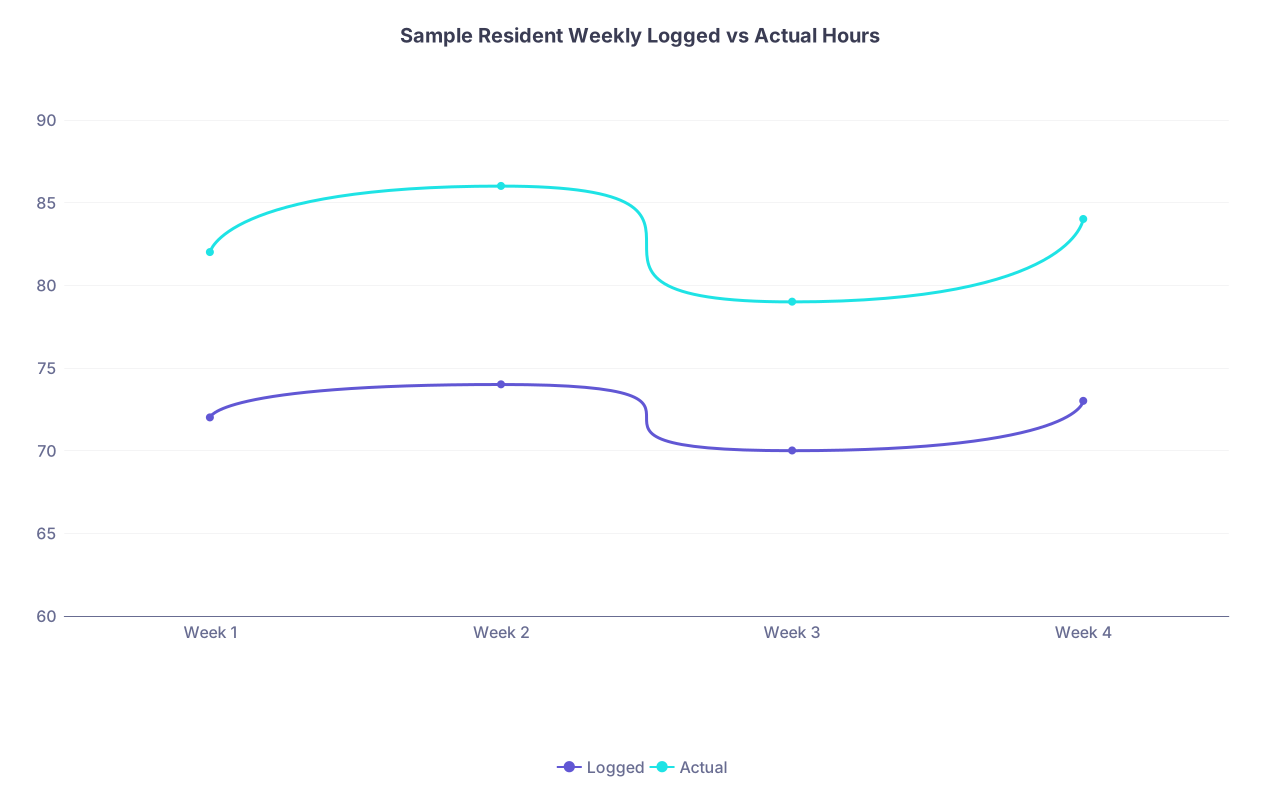
| Category | Logged | Actual |
|---|---|---|
| Week 1 | 72 | 82 |
| Week 2 | 74 | 86 |
| Week 3 | 70 | 79 |
| Week 4 | 73 | 84 |
Step 2: Decide your reporting posture
You have three options. I’ll be blunt:
Underreport to keep the peace
You put down scheduled hours, ignore at-home work, round down everything.
Short-term: less friction. Long-term: nothing improves, and you normalize unsafe workloads.
I do not recommend this as your default.Report absolutely everything, all the time
You log your true reality to the minute.
Short-term: may trigger a lot of “violations,” possibly meetings, potentially some political heat.
But this is the only way leadership sees real data. It’s also what the system is designed for.Hybrid with clear red lines
You may not log every stray 5 minutes, but you:
- Always log real arrival/departure times.
- Always log at-home work that’s >15–20 minutes.
- Always log home call work when awake.
- Do not doctor hours to avoid violations.
This is the most sustainable for many residents who don’t want full-on war but refuse to lie.
Step 3: Use patterns, not one-off complaints
If you’re going to bring it up, do it intelligently.
You can say:
- “My actual tracked hours on this rotation have averaged 86–90 for three weeks. Here’s the log.”
- “Home call is generating ~4 extra hours/night of awake work twice a week, which is not being acknowledged.”
- “Our ‘post-call days’ still have mandatory clinic sessions; we’re never getting a 24-hour off period.”
Specific patterns backed by numbers are much harder to dismiss as “you’re just slow.”
6. Common Myths About Residency Work Hours
Let me kill a few lies I hear over and over:
“If you’re just charting from home, it doesn’t count.”
Wrong. Work is work, regardless of geography.“You don’t need to log pre-rounding; that’s just preparation.”
If you are actively caring for patients, reviewing charts, writing notes, or placing orders because your job requires it, that’s work.“We’d lose accreditation if you report violations.”
Programs are not punished for having violations. They’re judged on how they respond to them. Hiding them is what gets them in deeper trouble.“It’s unprofessional to complain about hours.”
Trying to follow national safety standards is not a character flaw.“Everyone else is fine with this; it’s just you.”
I’ve seen this line used as a silencer. When programs actually survey residents anonymously, the truth leaks out.
7. How This Plays Out Across Different Rotations
Not all rotations are created equal. Here’s the rough reality:
| Rotation Type | Hour Pattern (Realistic) |
|---|---|
| Inpatient wards | 70–90 hrs/week, early pre-rounding |
| ICU | 75–95 hrs/week, heavy 24+ calls |
| Night float | 60–75 hrs/week, flipped schedule |
| Outpatient | 45–60 hrs/week, inbox after hours |
| Electives | 40–60 hrs/week, more variability |
You’ll see:
- Wards/ICU: Problem is total hours and rest.
- Night float: Total may be technically compliant, but sleep and circadian destruction make it brutal.
- Clinic: Official hours look benign, but inbox plus results review at home quietly swell your week.
Once you see this, you stop asking “why am I so tired?” and start seeing exactly where your hours are bleeding.

FAQ: Residency Work Hours and Counting Rules
1. Do I really have to count time spent finishing notes from home?
Yes. If you’re doing clinical documentation, answering patient messages, or dealing with EMR work because of your resident role, that is work time and should be counted. The location doesn’t matter; the nature of the activity does.
2. Does pre-rounding before my official shift start count as duty hours?
Yes. If you’re reviewing charts, examining patients, writing notes, or preparing for rounds because your workload demands it, that’s work. Your duty hours should start when you begin that work, not when someone printed the schedule.
3. When I’m on home call, what exactly counts as work hours?
Any period when you’re awake and performing clinical tasks counts: taking phone calls, writing orders, documenting, reviewing labs, or driving into the hospital. Time fully asleep at home does not count. Time physically in the hospital on home call always counts.
4. Are required conferences and didactics included in duty hours?
Yes. Morning report, noon conference, grand rounds, and any mandatory teaching sessions or simulations during or outside your “clinical” hours are duty hours. They are part of your required educational experience.
5. What if my program pressures me to underreport or “round down” hours?
That’s a red flag. You’re supposed to report accurately. If there’s consistent pressure to underreport, document it privately and consider raising it anonymously through your GME office, resident union (if present), or ACGME survey comments. Your first line is often your chief residents or program director—if they’re part of the pressure, go higher.
6. Can my program get in trouble if I honestly report frequent duty hour violations?
Programs are evaluated on how they respond to violations, not on the mere existence of them. ACGME expects some violations in heavy rotations. Systematically hiding them is worse than having them. Honest reporting actually gives your program data to justify more staff or schedule changes.
7. How can I personally monitor if I’m consistently going over 80 hours?
Keep a simple log for 4–6 weeks: arrival time, departure time, at-home work, and home call work. Add your total hours per week and average them over 4 weeks. If you’re above 80 on average, you’re in violation territory—whether the official system shows it or not.
Key Takeaways:
- Work hours are based on what you actually do, not what the printed schedule says—clinical work, at-home charting, home call work, and required teaching all count.
- The 80-hour rule, 24+4 limits, and day-off requirements are averaged over 4 weeks, which makes it easier for programs to look compliant while individual weeks are brutal.
- If you do not track and honestly report your real hours, nobody upstream will ever see the problem clearly enough to fix it.