
It is 8:37 p.m. You are on hour 11 of a “12‑hour” day that has not been 12 hours in months. The cross-cover pager is already going off, you still have two notes unfinished, and your senior just said, “We should run the list again before sign-out.” You know you are close to duty-hour limits this week, but you have no idea how close. Your QI project is stalled, your studying is sporadic, and your laundry pile is starting to look like a structural hazard.
You are not lazy. You are not disorganized. You are in residency. And residency, by default, will eat every available hour and every available ounce of attention unless you put hard structure around it.
This is where checklists stop being cute and start being survival tools.
What you need is not more vague advice about “wellness.” You need concrete, repeatable checklists that:
- Keep you within work-hour rules without guessing
- Protect time for real learning, not just scut
- Force you to do the boring life maintenance that prevents eventual collapse
So I am going to give you those. System by system.
Core Principle: Run Your Life Like You Run a Code
In a code, you do not “just do your best.” You follow a script. You use checklists. You call time. You assign roles.
Your residency life needs the same:
Predefined checklists for:
- Before shift
- During shift
- End of shift
- Weekly reset
- Monthly career/education review
Hard stop rules for:
- Work hours
- Study time
- Sleep minimums
Simple tracking:
- One place (not ten apps)
- Takes <2 minutes per day
We will build that out now.
Checklist 1: Daily “Before Shift” Control Panel
You wake up, grab your phone, and immediately get sucked into emails and group chats. Bad start. You need a 5‑minute pre-shift checklist that sets work, education, and life boundaries before the hospital does it for you.
Run this before you leave home (or before you log onto a night shift).

A. Hours & Fatigue Check
Ask and answer, in writing (notes app, paper, whatever you actually use):
- How many hours did I work in the last 24 hours?
- In the last 7 days?
- In the last 28 days?
If you do not know, that is your first problem. You need a simple tracker. Use a plain table like this in your notes app:
| Date | Start | End | Total Hours | Call? (Y/N) |
|---|---|---|---|---|
| 1/3 | 6:30 | 18:30 | 12 | N |
| 1/4 | 6:45 | 19:15 | 12.5 | N |
| 1/5 | 6:30 | 21:00 | 14.5 | Y |
| 1/6 | 12:00 | 7:30 | 19.5 | Y |
| 1/7 | Off | Off | 0 | N |
Quick rules of thumb (yes, there are edge cases, but use this as your alarm system):
If you are on track to exceed 80 hours in a week, you must:
- Tell your chief / program coordinator
- Cut non-critical “extra” work (unnecessary pre-rounding, staying late to “help” when not needed)
If you slept <5 hours in the last 24 hours:
- You do not volunteer for extra procedures or late add-on tasks
- You use your team and ask for help early
B. “Today’s Non-Negotiables” (3 Items Max)
Write exactly three must-do items for today, outside of routine clinical care:
- 1 work item (e.g., “Finish QI data extraction for 3 patients”)
- 1 education item (e.g., “Review AKI and FEN for 20 minutes”)
- 1 life item (e.g., “Text parents / pay bill / 10‑minute walk”)
That is it. Not a wish list. A contract with yourself.
Checklist 2: “During Shift” – Protecting Hours and Learning
During the chaos is where people usually lose the plot. You get pulled into page triage, discharges, admits, calls, and then realize you did nothing you planned.
You need micro-checklists you can run in under 60 seconds.
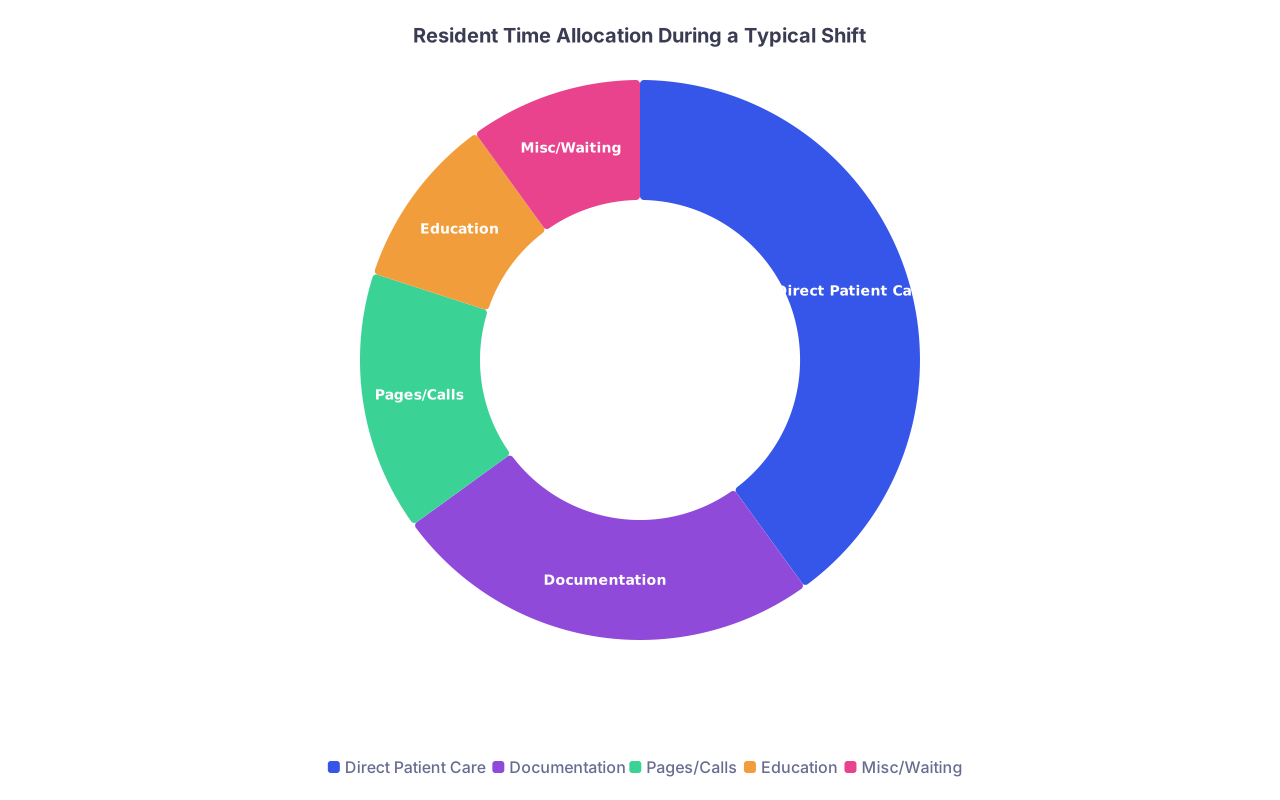
| Category | Value |
|---|---|
| Direct Patient Care | 40 |
| Documentation | 25 |
| Pages/Calls | 15 |
| Education | 10 |
| Misc/Waiting | 10 |
A. Start-of-Day Huddle (5 minutes)
You likely already have a team pre-round or sign-out. Add this silent checklist for yourself before you walk into the first room:
- Do I know who is sickest and who needs to leave first (discharges)?
- Do I know the one question I want answered on rounds today?
- Example: “How do we decide when to start anticoagulation after GI bleed?”
- Have I blocked one micro-learning block (10–15 minutes) in my mind?
- “After noon conference” or “While waiting for CT results”
You do not need to announce all this. You need to internally commit to it.
B. Mid-Shift “Reset” – The 2:00 p.m. Check
Set a recurring alarm: 14:00 (or the midpoint of your shift). When it goes off, you run this 60‑second checklist:
- How many unread pages on my pager / secure chat?
- How many discharges still pending simple tasks (scripts, instructions, paperwork)?
- Any patient whose status has changed but no note/update yet?
- Did I do today’s education non-negotiable?
- If not done: when in the next 4 hours will I do it?
You do not “hope” you will study or discuss a topic. You look at the clock and assign a time.
C. Active Hours Protection Checklist
Every time someone asks, “Can you just…” near the end of your shift, run this 3‑question filter in your head:
- Is this patient-safety critical right now?
- Is there no one else reasonably available to do it?
- Will doing this push me over hours or make me unsafe for tomorrow?
If 1 and 2 are “yes” and 3 is “no” → you do it.
If 3 is “yes” → you say, “I am at my duty-hour limit. We need another solution.” That is not laziness. That is compliance and safety.
Checklist 3: End-of-Shift “Clean Exit” Protocol
The last 30–45 minutes of a shift are where your hours get quietly destroyed by “just one more” tasks.
You need a clean exit checklist you start 30 minutes before scheduled sign-out. Not at sign-out. Before.

A. 30-Minute Warning Checklist
At “T‑30” to sign-out, run this:
- Have I updated:
- Problem lists for all sick patients?
- Code status / goals of care where relevant?
- Are all STAT / urgent orders placed and acknowledged?
- Are all critical callbacks (labs, imaging) anticipated in sign-out?
- Any families waiting for a callback today?
- Notes:
- “Must be done before I leave”
- “Can reasonably be finished tomorrow”
If something is not urgent, not safety-critical, and will push you over hours, it becomes tomorrow’s work or is shared with the team.
B. 10-Minute Documentation Triage
With 10 minutes left:
- Rapidly sort open notes into:
- Now: Admits, complicated discharges, major changes
- Tomorrow: Stable SOAP notes / progress notes you can finish early tomorrow (if allowed by your program policies)
- Delegate / Clarify: Tasks someone else already partly did
You are not aiming for perfection. You are aiming for safe, accurate, time-compliant documentation. Those are not the same thing.
C. Post-Shift Micro-Reflection (2 minutes)
Before you walk out of the building (or before you crawl into bed for nights), capture:
- One thing you did well today
- One thing you want to improve
- One learning gap to look up this week
Write it down in a short “Residency Log” note. Over time, this log becomes your personal curriculum and your proof that you are learning, not just surviving.
Checklist 4: Weekly “Systems Check” – Hours, Education, Life
Residency is not lost in one brutal shift. It erodes over weeks. A weekly reset prevents that.
Pick a fixed time. Sunday afternoon. Post-call post-nap. Whatever. Non-negotiable 20–30 minutes.

| Step | Description |
|---|---|
| Step 1 | Start Weekly Reset |
| Step 2 | Review Work Hours |
| Step 3 | Check Education Progress |
| Step 4 | Life Maintenance Tasks |
| Step 5 | Plan Next Week |
| Step 6 | Set 3 Weekly Priorities |
| Step 7 | End |
A. Weekly Work Hours Audit (10 minutes)
Use your hours log. Calculate:
- Total hours this week
- Average hours per day on service days
- Number of 24‑hour (or equivalent) calls / nights
If you are:
80 hours → This is a reportable problem, not a personal failing. Email your chief/residency office with facts:
- Dates, hours, reasons (e.g., “Unexpected influx of ED holds,” “Chronic understaffing on nights”)
- Consistently 70–80 hours → Plan proactive protection for next week:
- Identify 2–3 tasks you habitually take on that do not need to be you (e.g., “I always help the other team with their discharges after 6 pm”)
B. Education Checklist – Are You Actually Learning?
Once a week, ask:
- How many conferences did I attend?
- How many topics did I intentionally review or read about?
- Do I have a clear plan for my next exam / in-service?
Build a simple tracking table:
| Week | Conferences Attended | Topics Reviewed | Practice Questions Done |
|---|---|---|---|
| 1 | 3 | 4 | 40 |
| 2 | 2 | 2 | 20 |
| 3 | 4 | 5 | 60 |
If you see zeros more than 2 weeks in a row, that is a red flag. Fix it by scheduling micro-learning:
- 10–15 minutes:
- After sign-out while waiting for your ride
- During night-shift lulls
- Right after lunch
C. Life Maintenance Checklist – Prevent Collapse
Once a week, run this brutally honest checklist:
Sleep:
- How many nights did I get ≥7 hours?
- Any run of 3 nights with <5 hours? That is danger territory.
Physical health:
- How many days did I move my body on purpose? (A 10‑minute walk counts.)
- Any new pain, injuries, headaches that keep recurring?
Admin life:
- Bills paid?
- Licensure / step 3 / certifications up to date?
- Inbox (email + EMR) triaged at least once?
If one of these is consistently neglected, you treat it like a clinical problem: identify cause, create an intervention, and follow up next week.
Checklist 5: Monthly “Big Picture” – Career, Burnout, and Boundaries
Once a month (put it in your calendar), do a longer reset: 30–45 minutes.
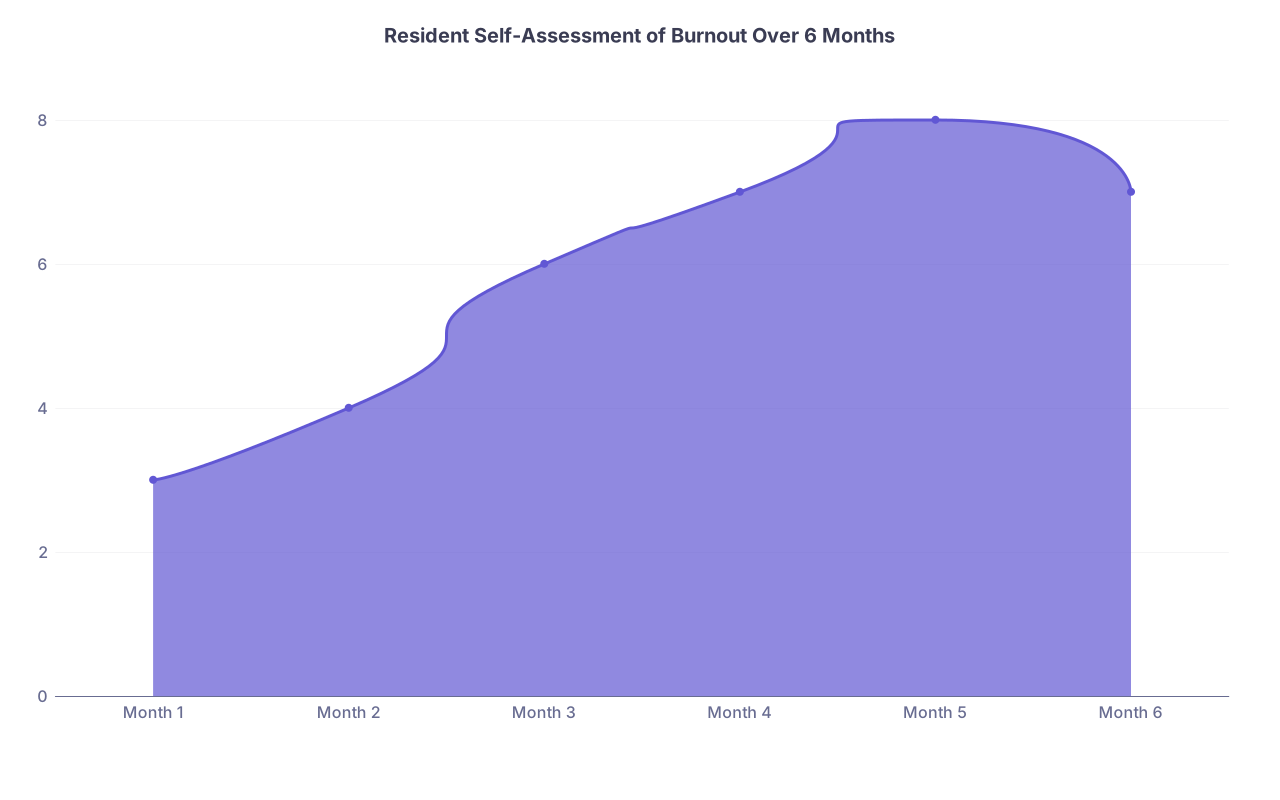
| Category | Value |
|---|---|
| Month 1 | 3 |
| Month 2 | 4 |
| Month 3 | 6 |
| Month 4 | 7 |
| Month 5 | 8 |
| Month 6 | 7 |
Use a 1–10 scale where 1 = thriving, 10 = completely burned out.
A. Burnout & Boundaries Checklist
Answer these:
- Burnout score (1–10) this month: ___
- Do I dread going to work most days? Y/N
- Am I more irritable with patients / staff / family? Y/N
- Have I lost interest in things I used to enjoy? Y/N
- Any thoughts like “If I got hit by a bus, at least I could rest”? Y/N
If your score is ≥7 or you answer “Yes” to 2+ of those questions:
- You must escalate:
- Talk to someone: trusted co-resident, chief, program director, or mental health professional
- Consider adjusting schedule: clinic-heavy vs ward-heavy blocks, time off if possible
- Strip your life of nonessential obligations for 1 month (committees, extra call for cash, etc.)
Burnout does not get better with willpower. It gets better with structural changes.
B. Career & Competency Checklist
Each month, quickly rate your confidence (1–5) in:
- Clinical decision-making
- Communication with patients / families
- Procedures (if applicable)
- Efficiency / time management
Pick one domain with the lowest score and set a concrete target:
- “I will staff 3 family meetings with my attending this month and ask for feedback.”
- “I will do 10 central lines this month and track them.”
- “I will read one chapter per week on my weakest organ system.”
Checklist 6: Practical Tools to Keep It All Running
Now there is a risk here: you collect checklists and then never use them. That is pointless.
So you need to embed these into tools you already use daily.

A. Where to Keep Your Checklists
Use one of the following (not all):
- Notes app folder:
- Pin notes: “Daily Checklist,” “Weekly Reset,” “Hours Log”
- Task manager (Todoist, TickTick, etc.):
- Set recurring tasks for weekly/monthly checklists
- Paper index card in your white coat:
- Laminate a little 2‑sided card with “Before / During / End of Shift” prompts
If you are not going to open it in a code situation or on post-call delirium, it is too complicated.
B. Time-Boxing Your Life
You cannot “fit things in.” You must time-box.
Create a simple default weekly schedule template for a typical ward block:
| Time | Mon–Fri (On Service) | Sat–Sun (Off/Light Call) |
|---|---|---|
| 5:30–6:30 | Wake, breakfast, commute | Sleep / slow morning |
| 6:30–18:30 | Work | Variable / call / off |
| 18:30–19:30 | Commute, decompress | Errands / social / rest |
| 19:30–20:00 | 20 min study / Qbank | 30–45 min study (if awake) |
| 20:00–22:00 | Dinner, life tasks, relax | Social / hobbies / rest |
| 22:00–5:30 | Sleep | Sleep |
Block study like a recurring meeting. Even if you only hit 50% of them, that is still far better than “whenever I have time,” which usually means “never.”
How To Actually Start Using These (Not Tomorrow. Today.)
You do not need to implement everything at once. That is how people fail: they build a perfect system they cannot sustain.
Here is the stepwise protocol.
Step 1 – Start With Hours (Today)
- Create a simple hours log (table above) in your phone.
- Log today and the last 3 days from memory.
- Set a daily alarm at the time you usually leave work:
- “Log hours now – 30 seconds.”
Step 2 – Add a 3‑Item Morning List (Tomorrow Morning)
Before leaving for work tomorrow:
- Write down:
- 1 work task
- 1 education task
- 1 life task
Do not add more. You are building a reflex.
Step 3 – Run the 30-Minute End-of-Shift Checklist (Next Shift)
Thirty minutes before sign-out tomorrow, stop and:
- Check for:
- Sickest patients updated
- Urgent tasks done
- Notes triaged
Aim to walk out within 15 minutes of sign-out. If that feels impossible, that becomes data for your chiefs / PD.
Step 4 – Schedule Your Weekly Reset (Next Off Day)
Open your calendar right now and:
- Create a 30‑minute event:
- Title: “Weekly Resident Reset”
- Recurrence: Weekly
- Location: Home / coffee shop
During that time, run:
- Hours audit
- Education tracking
- Life maintenance checklist
That is enough to materially change your trajectory.
FAQ (Exactly 4 Questions)
1. My program culture is “stay until the work is done,” and people who leave on time are judged. How do I use these checklists without being labeled lazy?
You anchor your decisions in duty-hour rules and patient safety, not personal preference. When you approach your senior or attending, phrase it like: “I am at 78 hours this week and we still have X, Y, Z to do. I want to be sure we stay compliant. Which of these should I prioritize, and what can be handed off?” You are asking for guidance, not refusing work. If the culture is consistently unsafe or dismissive of hours, this becomes a pattern you document and, if needed, escalate to the program director or GME office. Programs take citations seriously. No one wants an ACGME problem on their record.
2. I am on a brutal ICU / night block and can barely sleep, let alone do weekly checklists and studying. Is this realistic?
You scale down, not give up. On genuinely brutal blocks, your checklists shrink to the absolute minimum: log hours (30 seconds), 3‑item morning list (1 minute), and a 2‑minute end-of-shift reflection. That is it. Education becomes survival-mode: listen to a 10‑minute podcast on rounds commute, skim one article. The full weekly reset returns on lighter rotations. The key is continuity of some structure, so you do not fully disintegrate into chaos and then try to rebuild from zero later.
3. I keep making beautiful checklists and then ignoring them after a week. How do I make this stick?
Stop optimizing the tool and shrink the habit. Most residents over-design systems they cannot maintain post-call. Instead: choose one medium (phone notes, small notebook, or one app). No redesigning for 3 months. Then tie the checklist to existing triggers: start-of-shift, pager handoff, commute. You are not relying on motivation; you are attaching checklists to things you already do. And keep them ugly and short. If a checklist takes more than 60–90 seconds to run, you will abandon it.
4. How do I balance duty-hours compliance with wanting more experience (procedures, complex cases) that often show up at the end of my shift?
You decide in advance how much extra you will tolerate and under what conditions. For example: “I will stay up to 30 minutes late no more than twice a week, and only for high-yield procedures (LP, central line, emergent intubation).” Then you run the 3‑question filter: safety-critical, no other operator, and will not push me over hours or into unsafe fatigue for tomorrow. Document these occasional extras in your hours log. If “extra” becomes routine, it is no longer education; it is exploitation. At that point, you adjust and seek more structured opportunities for procedures during regular hours.
Open your notes app right now and create a single new note titled “Resident Checklists.” Copy just three headers into it: “Daily – Before Shift,” “Daily – End of Shift,” and “Weekly Reset.” Under each, add the 3–5 bullets you know you can actually do tomorrow. That is your starting line.