
Most MS4s prepare for Match emotionally; the smart ones prepare logistically. The relocation binder is the difference.
You are about to compress a cross‑country move, licensing, HR onboarding, and financial chaos into about 10–12 weeks. During peak exam season. While finishing rotations. If you try to keep this all in your head or in random email threads, you will miss critical deadlines, bleed money, or both.
A structured residency relocation binder is not “Type A overkill.” It is how you avoid being the person frantically calling GME on June 28 because your credentialing was never completed and IT has not created your login.
Let me walk you through how to build this before Match Day, so that on Monday at 11:01 a.m., you are plugging information into a system that already exists.
Step 1: Pick the Actual Format (Paper, Digital, or Hybrid)
You need to decide how you will interact with this thing in real life. On a busy inpatient month. In a hotel lobby. In front of DMV staff who could not care less how stressed you are.
I recommend a hybrid system:
- One physical 1.5–2” binder with tabbed sections
- A mirrored digital structure in a cloud folder (Google Drive, OneDrive, Dropbox)
Physical because:
- You will sit in HR offices filling forms on paper.
- Some credentialing packets arrive as physical mail.
- It is easier to flip to a tab while on the phone with a staffer.
Digital because:
- You will scan and upload everything six different portals will demand.
- Your bags will get lost or soaked at some point.
- Multiple devices, multiple locations.
Minimal hardware and supplies
You do not need a Staples sponsorship. You need:
- 1.5–2” D‑ring binder (anything smaller will burst)
- 10–12 tabbed dividers
- Clear sheet protectors (20–40)
- A small portable scanner app on your phone (Adobe Scan, Genius Scan, etc.)
- Sticky notes + a pen that lives in the binder
Create the same folder structure in your cloud drive that you are about to build in the binder. Same names. Same order. No creativity here—consistency wins.
Step 2: Core Sections Your Binder Must Have
You are building this before you know where you are going. So you build it by category, not by city.
Here is the skeleton I recommend:
- Program & Contact Info
- Licensure & Credentialing
- HR & Employment
- Housing & Neighborhoods
- Moving Logistics
- Finances & Cost of Living
- Vehicles & Transportation
- Health Care & Insurance
- Personal Documents & Legal
- Checklists & Timelines
You will not fully populate all of these pre‑Match. That is fine. The value is having the scaffolding ready when the avalanche of information hits during Match Week.
| Section # | Binder Tab Title |
|---|---|
| 1 | Program & Contacts |
| 2 | Licensure & Credentialing |
| 3 | HR & Employment |
| 4 | Housing |
| 5 | Moving |
| 6 | Finances |
| 7 | Transportation |
| 8 | Health & Insurance |
| 9 | Personal Documents |
| 10 | Checklists & Timelines |
Now let me break down what actually lives in each section—and what you can prep before Match Day.
Section 1: Program & Contact Info
You will use this section more than you expect.
What you can set up pre‑Match
Create a 1–2 page template that you will copy for each program you might match at. Something like:
- Program name
- Hospital system / main site
- GME office phone and generic email
- Residency coordinator name + direct email + phone
- Program director name + email
- Residency office mailing address
- IT/Help Desk general number
- Occupational Health / Employee Health contact
- Parking office contact
- Security / ID badge office contact
Just make the template now in a Word/Google Docs file and print a few blank copies. Put a few in sheet protectors in the front of the binder.
After Match:
- You fill one out for your program, highlight key numbers, and tape a copy near your desk or on your laptop.
Why this matters
When Employee Health sends you a vague email about “incomplete forms,” you will not be digging through your inbox for the coordinator’s phone number. You will flip a tab, call, and keep moving.
Section 2: Licensure & Credentialing
This is where residents either look competent or look lost.
Your residency program will guide you through the specifics of your state and training license, but you can pre‑build 70% of this section.
Pre‑Match tasks
Start a “Licensure Master Sheet” with:
- Full legal name (exactly as on your ID)
- All prior names used (if relevant)
- Date and place of birth
- Social Security Number (do not print this; only handwritten or digital)
- Medical school details: full name, address, contact for registrar
- Expected graduation date
- USMLE/COMLEX ID numbers
- Attempt history (Step 1, Step 2 CK/CE, Level 1/2, dates and scores)
- Any past licenses (CNA, RN, EMT, etc.) and states
- Disciplinary/Legal questions – pre‑write honest, concise explanations if needed
You can also:
- Download a few sample state training license applications (from states where you ranked programs) to see common questions and documents required: passport photos, notarization, transcripts, exam score reports, etc. You are not filling them out; just studying them.
Print or list what you may be asked for:
- Notarized identity documents
- Official medical school transcript
- MSPE/Dean’s letter
- USMLE/COMLEX transcripts (order via FSMB/NBOME)
- Passport‑style photos
- Background check / fingerprinting instructions
Use sheet protectors to hold blank passport photos once you get them done (yes, pre‑Match if you want to be aggressive).
After Match
As soon as your program emails state license/credentialing instructions, all that paperwork lives in this tab. Do not scatter it in your email, downloads folder, phone screenshots, and the backseat of your car.
Section 3: HR & Employment
HR is where details get missed. Employment requirements are different for each program, but your prep work is similar.
Pre‑Match prep
Create placeholders for:
- Offer/appointment letter
- Contract or training agreement
- Salary and benefits summary
- Required pre‑employment forms (I‑9, W‑4, direct deposit)
- Required documents:
- Passport or ID + Social Security card
- Work authorization documents if on visa
- Immunization records
- BLS/ACLS certificates
You can absolutely gather and print or scan:
- Copy of your passport photo page
- Copy of driver’s license
- Copy of Social Security card (store securely)
- Current BLS/ACLS certificates (if you already renewed)
- Current CV
- Most recent immunization record from student health
Drop these into sheet protectors and mirror them digitally in an encrypted folder if you are smart.
Why do this now?
I have seen residents scrambling for a Social Security card they have not seen in years, four days before their HR onboarding. You will not be that person if you take two hours now to find, scan, and file everything.
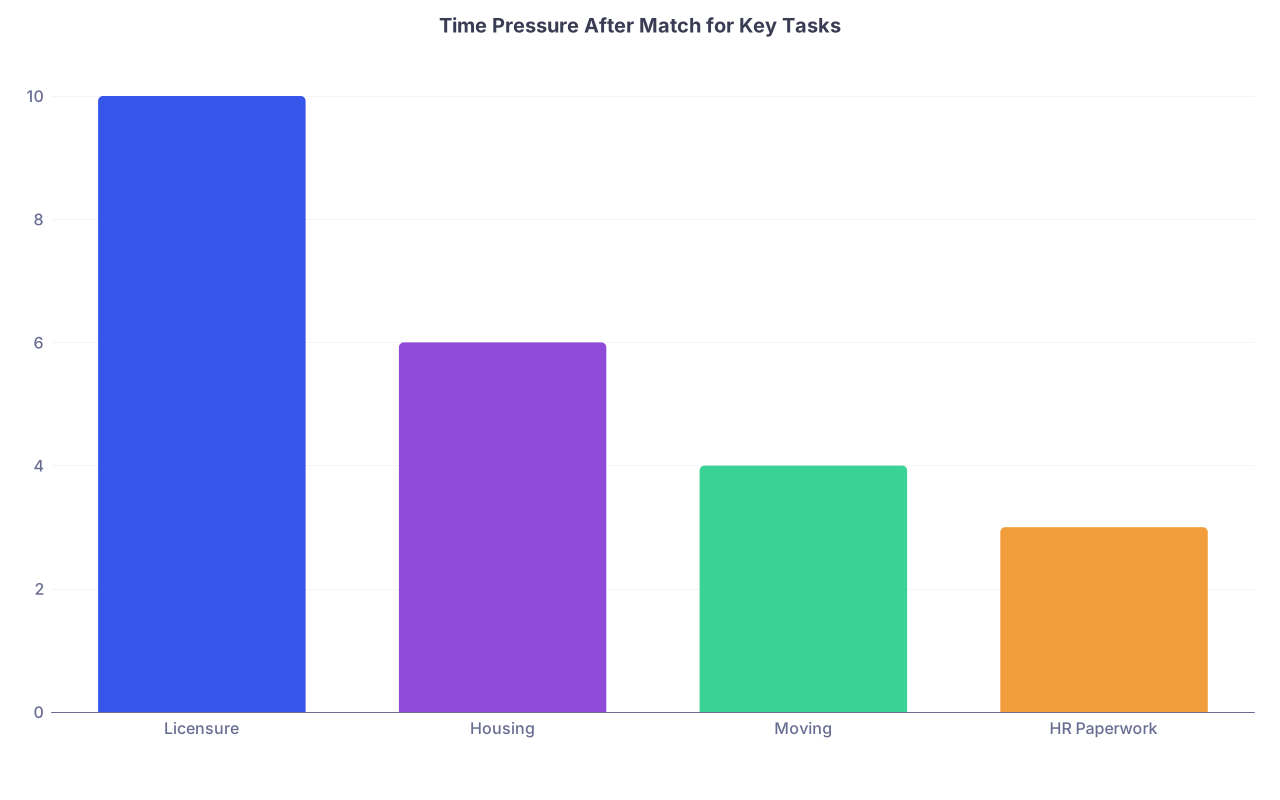
| Category | Value |
|---|---|
| Licensure | 10 |
| Housing | 6 |
| Moving | 4 |
| HR Paperwork | 3 |
Section 4: Housing & Neighborhoods
This is the section that will keep you from signing a disastrous lease 50 minutes from the hospital because you panicked.
Pre‑Match research framework
You do not know the city yet, but you know what to look for.
Create a one‑page “Housing Criteria” sheet where you rank:
- Max budget (range for low, medium, high COL cities)
- Preferred commute time (door‑to‑door)
- Parking needs (garage, street, reserved)
- Safety preferences (specific crimes that are dealbreakers)
- Proximity to:
- Main hospital
- Clinics/rotations sites
- Grocery stores
- Gym
- Acceptable roommates vs must live alone
Then create a simple data sheet for each potential program city that you can partially prefill:
Columns to include:
- Neighborhood name
- Commute time in rush hour vs off‑peak
- Average 1BR/2BR rent
- Notes on safety (pull from city crime maps, Reddit, current residents)
- Parking situation
- “Would live here?” Y/N/Maybe
You can print blank versions of this table now and fill after Match.
Also pre‑build a standard list of questions to ask current residents about housing:
- Where do most interns live?
- Any neighborhoods to avoid for safety or commute?
- Typical rent range for PGY‑1s?
- Is on‑call parking available and safe walking at night?
- How bad is winter driving / public transit coverage?
Slip that list into the front of the Housing tab. When you are on the phone with a current resident on Match Week, you will actually remember to ask.
After Match
You will quickly fill this tab with:
- Printouts of apartment listings
- Notes from calls with landlords
- A simple pros/cons sheet per option
- Rough floorplans or photos
This is where the binder saves you: everything about a specific apartment lives behind one paperclip or one sheet protector. No mental juggling.
Section 5: Moving Logistics
Residents underestimate moving. And overpay for it. Consistently.
This section is about decisions: what you will move, how, and when.
Pre‑Match baseline work
- Make an inventory template.
Just a basic breakdown:
- Furniture (bed, desk, couch, table, etc.)
- Kitchen items
- Books and study materials
- Clothing (seasonal)
- Electronics
- Misc / sentimental items
Print a blank copy. Not to fill now, but to structure your thinking once you know how far you are moving.
- Create a “Move Options” comparison sheet:
- Full‑service movers
- U‑Haul / Penske / Budget truck
- PODS / U‑Pack / container service
- “Ship everything + fly”
- “Sell everything + rebuy”
For each, plan to compare (columns):
- Estimated cost
- Distance sweet spot (when it makes sense)
- Time flexibility
- Physical effort required
- Risk to belongings
You can also park a short checklist here (pre‑printed):
- Book movers / truck
- Reserve elevator / loading dock
- Arrange renter’s insurance effective date
- Set up utilities start/stop dates
- Mail forwarding with USPS
- Update address with med school, banks, etc.
You will refine the dates after Match, but the structure is in place.

Section 6: Finances & Cost of Living
Money will blindside you if you are not deliberate. Moving for residency is expensive—people burn through $5,000–$10,000 easily.
Pre‑Match financial prep for the binder
Build 3 simple tools and print them:
Moving Budget Worksheet
- Travel (flights/gas/hotels)
- Truck/movers/containers
- Security deposit + first month rent
- Furniture purchases
- Utility deposits
- Licensing and application fees
- Parking passes
- Misc (DMV fees, ID badge replacement, uniforms, etc.)
Post‑Match Cash Flow Timeline
- Match Day date
- Anticipated move‑in date
- Program start date
- First paycheck date (call last year’s interns or look up if possible)
- Credit card statement due dates
- Loan grace period end date
Cost of Living Snapshot Page For each city where you ranked programs high, you can loosely pre‑research:
- Average 1BR rent near hospital
- State income tax rate
- Gas prices
- Rough grocery cost index
- Parking fees at hospital (monthly)
Even rough numbers help you not be shocked when your new city eats your stipend alive.
You can also store:
- Student loan servicer info and logins
- Any documentation you might need for income‑based repayment after residency starts
- A list of credit cards and their limits (not full numbers) for planning large moving expenses
Section 7: Vehicles & Transportation
Vehicle issues are the stuff of pure administrative hell: DMVs, emissions, registrations, insurance, parking permits. All with different rules by state and sometimes county.
Pre‑Match setup
Create two separate checklist templates:
If you have a car:
- Current registration expiration date
- Current insurance policy declarations page (print and file)
- Lienholder/bank info if car is financed
- State‑to‑state registration requirements (you can Google for a few likely states now)
- Emissions/safety inspection requirements in common Match states (CA, NY, TX, etc.)
If you do not have a car:
- Public transit options for major systems (subway, bus, commuter rail)
- Costs of monthly passes
- Hospital‑provided shuttles or rides at night
- Expected Uber/Lyft costs for commute if used regularly
Clip in a copy of your current auto insurance declarations page and registration now. You will need these when you change states.
After Match, this section will hold:
- Parking permit applications
- Resident parking maps
- New driver’s license/ID appointment confirmations
- New insurance quotes
Section 8: Health Care & Insurance
You will be working in a hospital and yet it is surprisingly easy to end up without a functioning primary care setup for yourself.
Pre‑Match organization
Start with what you already have:
- Current health insurance card copy
- Vaccination records (make sure they are all in the HR section too)
- List of chronic meds and dosages
- Names/contact of current PCP, specialists, therapist, dentist
Place copies in this tab, and mirrored in your digital folder.
Prepare a one‑page “Health Logistics” template for your new city:
- PCP options (ideally outside your hospital system for privacy, or within if benefits demand it)
- In‑network urgent care near your home
- In‑network pharmacy near hospital and home
- Local dentist
- Mental health resources (resident wellness, external therapists)
You can half‑fill this using generic searches post‑Match, but having the template reminds you to do it at all.
Also reserve a sheet protector for:
- Accepted resident health plan summary once you choose it
- Any documentation about fertility preservation, disability insurance, or life insurance you might opt into
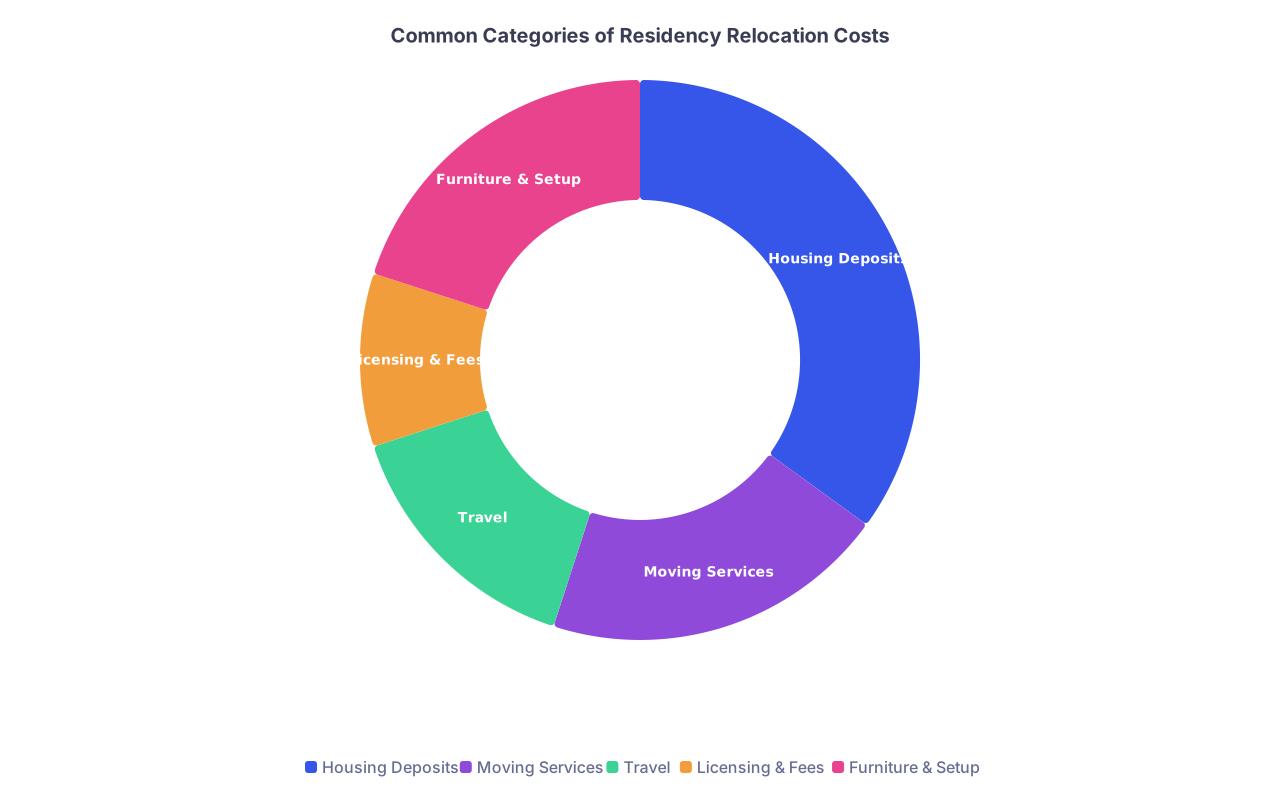
| Category | Value |
|---|---|
| Housing Deposits | 35 |
| Moving Services | 20 |
| Travel | 15 |
| Licensing & Fees | 10 |
| Furniture & Setup | 20 |
Section 9: Personal Documents & Legal
This is the “do not lose” section. Handle it carefully. But you need it.
Documents to gather pre‑Match
You do not store originals of everything here (for security), but you do want high‑quality copies and a clear record of where originals are.
Include copies of:
- Birth certificate
- Passport photo page
- Social Security card (be thoughtful—some people keep this only digital/secure)
- Any name change documents (marriage, court orders)
- Visa/immigration documents if applicable (I‑20, DS‑2019, EAD, green card, etc.)
- Existing professional licenses (EMT, RN)
- Any legal agreements relevant to your move (custody, support orders, etc.)
Also include a discreet note listing where physical originals are stored:
- “Fireproof box, parents’ house, closet left shelf” is better than “somewhere at home”
If you are extremely organized, this is also where you can place:
- Basic will or healthcare proxy if you have one (yes, residents sometimes do)
- List of emergency contacts
Mirror this section digitally in encrypted storage.
Section 10: Checklists & Timelines
This is the dashboard. The part that turns your binder from a pile of paper into an actual system.
Pre‑Match timeline
Use a simple timeline that assumes:
- Match Day mid‑March
- Move late June
- Residency start July 1
Then adjust once you have actual dates.
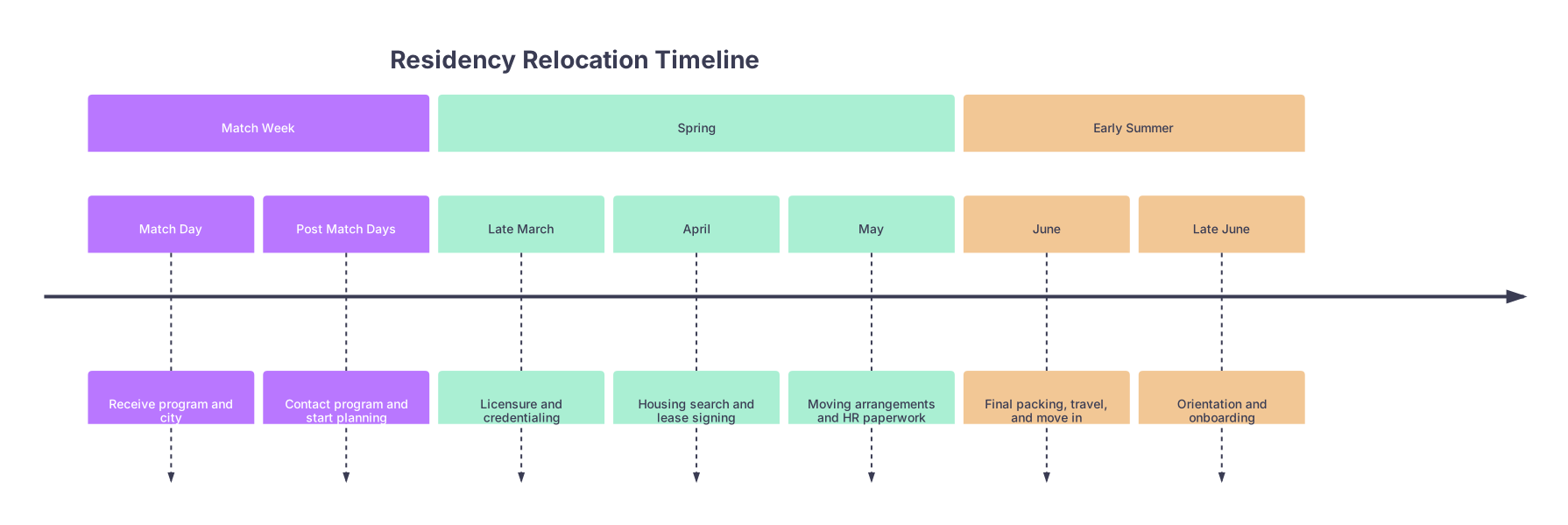
| Period | Event |
|---|---|
| Match Week - Match Day | Receive program and city |
| Match Week - Post Match Days | Contact program and start planning |
| Spring - Late March | Licensure and credentialing |
| Spring - April | Housing search and lease signing |
| Spring - May | Moving arrangements and HR paperwork |
| Early Summer - June | Final packing, travel, and move in |
| Early Summer - Late June | Orientation and onboarding |
Now, create 3 checklist pages:
Match Week Checklist
- Confirm Match results
- Email/call program coordinator
- Ask about:
- Start date
- Orientation dates
- Licensure instructions
- HR onboarding schedule
- Get resident class email/GroupMe/Slack info
- Ask current residents about:
- Neighborhoods
- Typical schedule
- Parking
- Start basic housing research
60–90 Days Before Start Checklist
- Submit state license application
- Complete hospital credentialing packet
- Finalize housing and sign lease
- Book move (truck/movers/containers)
- File mail forwarding
- Update address with school, banks, loan servicers
- Decide on car vs transit plan and act (sell/buy/ship)
- Complete HR forms and schedule Employee Health visit
30 Days Before Start Checklist
- Confirm move‑in date and keys
- Confirm utility start dates
- Confirm HR and orientation dates and locations
- Buy scrubs, white coats, shoes if not provided
- Review and organize call rooms / parking access info
- Save critical contacts in your phone (coordinator, chief, IT, security, employee health)
Pre‑printing these now means that on Match Day you are not reinventing the wheel. You are circling items with a pen.
How to Actually Use the Binder on and After Match Day
Having the binder is one thing. Using it intelligently is another.
Match Day: 11:01 a.m. and beyond
Once the email hits:
Go to the Program & Contacts tab.
- Fill in every detail you can get from the website and your Match email.
- Add your coordinator and chief residents to your phone immediately.
-
- Print (or digitally save then print) a map of the hospital and nearby neighborhoods.
- Start filling in the housing criteria and neighborhood sheets that afternoon or weekend.
Add at least one written question list to the front pocket:
- “Questions to ask coordinator”
- “Questions to ask interns”
You are shifting from emotional processing to logistical execution. The binder makes that pivot concrete.
First 2 weeks after Match
Your main tasks:
- Populate Licensure & Credentialing with every email, form, and instruction you get.
- Track due dates in the Checklists & Timeline section.
- Start building out Housing options and Moving options, side by side.
I have watched residents who did this calmly sign a good lease by early April while classmates were panic‑choosing apartments in late May because licensing/HR ate their bandwidth.
May–June: Execution phase
At this stage, the binder should be thick with:
- Confirmed lease agreement
- Moving booking confirmations
- License application receipts
- HR onboarding summaries
- Parking permit approvals
Use sticky notes as “live flags”:
- “Waiting on fingerprinting appointment”
- “Need to resend immunization titers”
- “Call landlord about earlier move‑in”
When a task is complete, you either:
- Remove the sticky note, or
- Move it to the back with a checkmark if you are the sentimental type
Advanced Moves: What High‑Functioning Residents Add
If you really want to push this system, here are a few upgrades I have seen work extremely well.
Add a “City Orientation” mini‑section
Not huge. Just:
- Printed transit map
- Printed map with hospital, home, key grocery stores marked
- List of 24‑hour pharmacies
- List of crucial phone numbers (police non‑emergency, hospital main line, on‑call supervisor number, etc.)
Build a “PGY‑1 Survival” subsection
You will be grateful July 5.
Include:
- Copies of rotation schedules
- Call schedules
- Key clinical protocols your program sends (sepsis, stroke, STEMI)
- List of essential apps and logins (Epic, Citrix, email, paging, etc.)
This is edging out of relocation territory and into “intern year prep,” but the boundary is fuzzy in real life.
Common Mistakes the Binder Prevents
Let me be blunt about what I have watched people screw up:
- Losing track of multiple overlapping licensing and credentialing deadlines
- Forgetting to schedule Employee Health until every slot before orientation is gone
- Realizing too late that their new state requires car inspection before registration, but the inspection centers are booked out three weeks
- Signing a lease a 40‑minute commute away because “it looked nice” without checking actual traffic patterns
- Underestimating moving costs by thousands because nothing was budgeted or compared
- Arriving in the new city without confirmed utilities and sleeping in a hot, dark apartment
- Starting residency with no local PCP, then getting sick on nights with no idea where to go
A relocation binder does not make residency easy. It makes the chaos legible. Which is enough.
Final Thoughts
Three points to keep:
- Build the structure now, not the details. Tabs, templates, and checklists are what matter before Match Day.
- Mirror everything physically and digitally. Redundancy is cheaper than lost documents and panicked phone calls.
- Treat the binder as a living tool, not a trophy. Write in it, flag pages, and let it look used. That is the point.