
The worst way to read your Match email is the way most people do it—eyes go to the specialty, brain explodes, and everything else in the message turns into static.
Let me break this down specifically: on Match Day, those first 60–90 seconds after you open that email are not for screaming, FaceTiming your mother, or composing a tweet. They are for extracting critical information quickly and cleanly so you can make smart decisions about travel, housing, onboarding, and even backup plans if things are not what you expected.
You do not need a script. You need a system.
This is the guide I wish more students had read before Match Day instead of after they realized they glossed over something huge—like a required drug screen in 48 hours, or a June 15 start date when they already booked a post-grad month in Europe.
Step 1: Open the Email with a Structured Checklist in Mind
On Match Day morning, you will not be thinking clearly. Adrenaline murders nuance. So you walk in with a pre-built mental checklist.
Here is the order I would force myself to scan, every time:
- Identity and specialty: “Did I actually match into what I applied for?”
- Institution and program name: “Where exactly am I going?”
- Track and program code: “Which version of this program?”
- Location details: “Which city / which hospital system?”
- Start date and contract expectations
- Immediate action items and deadlines
- Onboarding links and portals
- Who to contact, for what, and how quickly
If you do not anchor your brain to a sequence like this, you will latch onto one word (“Harborview!” or “Prelim!”) and ignore the rest.
Keep a small notepad or a blank Notes page open next to you. You are going to jot down data, not just vibes.
Step 2: Confirm the Core – Who You Are, What You Matched Into
You would be horrified how often I have seen people misinterpret their own Match result in the first minutes because they were too keyed up.
Start with:
- Your name and AAMC/NRMP ID (if present)
- The specialty line
- The program type (categorical, advanced, primary care, prelim, TY, etc.)
You are looking for three things:
- Specialty aligns with what you matched in NRMP (or SOAP)
- Position type is what you expected
- There is no ambiguity about whether this is your PGY-1 or PGY-2 home
Concrete example lines you might see:
- “You have matched: Internal Medicine – Categorical”
- “You have matched: Anesthesiology – Advanced (PGY-2 position)”
- “You have matched: General Surgery – Preliminary One-Year”
If you see “advanced” and you did not also match a TY/prelim year, red flag. That means your PGY-2 is secured, but your PGY-1 depends on a separate Match result. Many people know this from Monday’s NRMP email, but in the chaos, they forget the implications.
If this is a SOAP situation, read even more literally. SOAP offers can be for a variety of track types and you cannot assume “Internal Medicine” means “categorical” unless those words are actually present.
Write down:
“Specialty: ______; Track: ______; PGY year: ______”
If anything about this line conflicts with what you believe you matched into based on NRMP’s official Match results (from Monday’s email or the R3 system), default to the NRMP record and then clarify with the program later. NRMP is the legal source of truth; the program email is usually right, but not legally binding.
Step 3: Decode the Program Name, Track, and Site Correctly
Next, you tackle what I call the “label soup.” Program names are often longer and more confusing than students expect. You are parsing three layers:
- Institution name
- Program name / specialty
- Track or site descriptor

Example:
“University of Michigan – Internal Medicine – Categorical – University Hospital Track”
Do not just see “Michigan IM” and stop reading. Is it:
- Main academic campus vs. affiliate community hospital?
- A specific track (e.g., primary care, research, VA-heavy, rural)?
Programs may include descriptors like:
- “Primary Care Track”
- “Physician-Scientist Track”
- “Community-Based Track”
- “VA Track”
- “Med-Peds” vs “Categorical IM”
Your priority is to confirm:
- This matches the track you ranked (or accepted through SOAP)
- You are not misreading an affiliate or satellite as the main campus if you cared about that distinction
- There is no surprise track assignment you never discussed (rare, but I have seen someone surprised by a “Rural Track” line they did not fully appreciate during the season)
Write down the exact program name as they style it. You will need that for licenses, applications, and future paperwork.
Example note:
“Program: NYU Grossman School of Medicine – Emergency Medicine – Categorical – Brooklyn Campus”
If the program has multiple sites in different cities (think “Kaiser” or big systems with regional campuses), verify the geographic site is what you expect. Many students gloss over “Northwest Campus” vs “Main Campus” and only realize later they are actually two hours away from the city they thought they would be in.
Step 4: Read the Location Line Like a Landlord, Not a Tourist
Location is not just “cool city vs. boring city.” Location dictates:
- State medical license process and timing
- Cost of living
- Commuting and parking realities
- Whether you will need a car
- Proximity to support networks (or lack thereof)
Look carefully for:
- City and state listed (some emails will name the primary hospital instead of the city)
- Whether your training is primarily at one hospital or a multi-hospital system
- Any mention of “our suburban/affiliated sites” that might change where you live
If the email says:
“You will be training primarily at Mercy Hospital, with rotations at St. Luke’s, County General, and the VA Medical Center,”
what you should translate in your head is:
“Multiple sites: I may need to commute and parking may be a serious issue. I should not sign a lease 45 minutes away from all of them just for cheap rent.”
Do not obsess over exact commute times on Match Day—that is for later. But do flag:
- City
- State
- Number of main sites
- Any mention of satellite clinics more than ~30–40 minutes away
Write:
“Location: City, State; Sites: Mercy (primary), St. Luke’s, County, VA.”
Step 5: Zero In on Start Date and Appointment Type
Everyone loves to skip this part. It is always in the middle of the email, buried like a footnote.
You look for:
- Contract or appointment start date
- Orientation dates (often earlier)
- Whether the PGY-1 and PGY-2 start dates differ (for advanced programs)
- Duration of preliminary or transitional positions
Typical wording:
“Your appointment as a PGY-1 resident is expected to begin on June 24, 202X, with mandatory orientation beginning June 17, 202X.”
Do not tell yourself “Oh, they will tell me this later.” This is them telling you. This is the date your life moves.
And it has implications:
- Board exam scheduling: You cannot push Step 3 or COMLEX if they expect you to have it before a certain point.
- Vacation and travel plans: If you booked a post-grad trip through late June and your orientation starts mid-June, you now have a problem.
- Current lease end date: If your lease ends July 31 and residency starts June 24, that gap needs a plan.
Write:
“Orientation: June 17; Start: June 24; PGY year: 1 (or 2).”
For advanced positions, you may see:
“Your PGY-2 appointment in Anesthesiology begins July 1, 202X.”
That means you are responsible for a PGY-1 elsewhere, and the dates may not align perfectly. Plan accordingly.
Step 6: Extract the Action Items and Deadlines Immediately
This is where students get burned.
Programs often include early, time-sensitive tasks right in that first communication. They assume you are reading carefully. Many of you will not be.
Look specifically for:
- “Please complete X within Y days.”
- “By [date], submit…”
- “You must respond to this email to confirm…”
- “Background check and drug screening to be completed by…”
- “Please upload the following documents to our portal…”
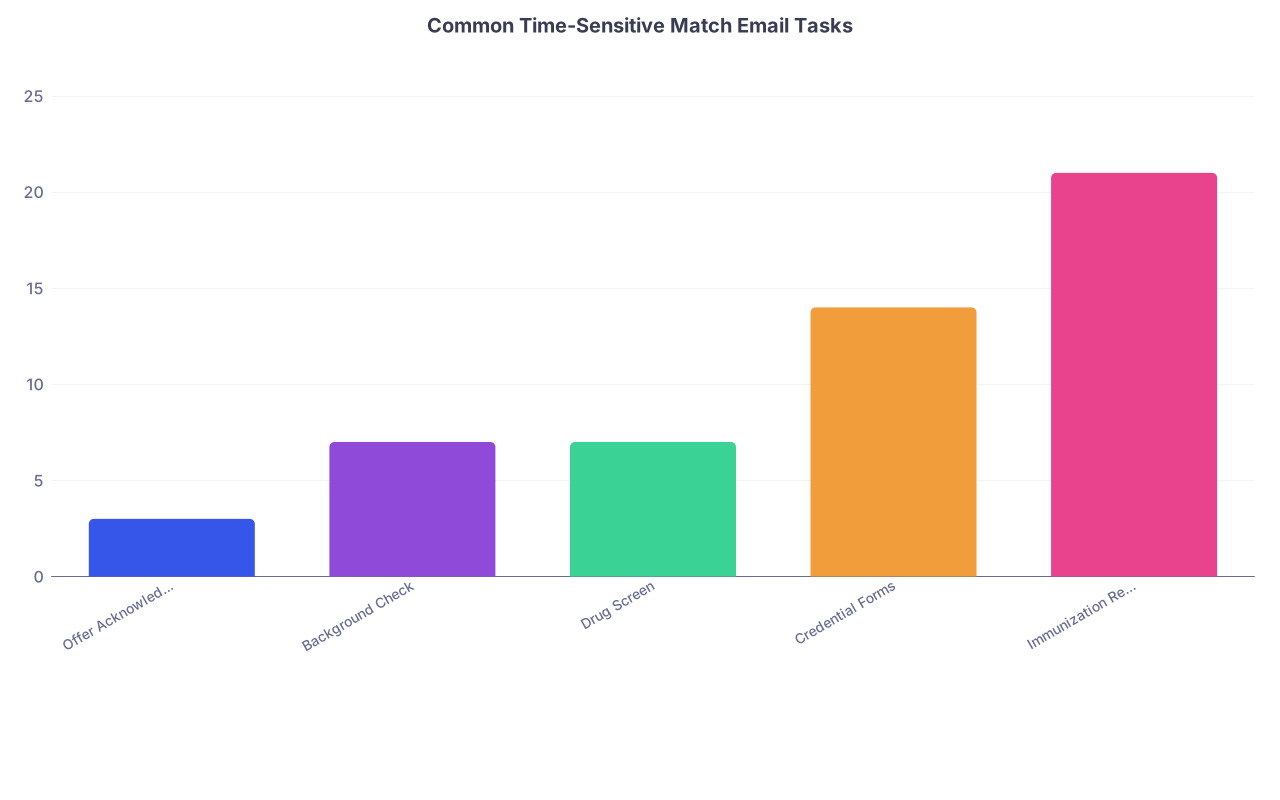
| Category | Value |
|---|---|
| Offer Acknowledgment | 3 |
| Background Check | 7 |
| Drug Screen | 7 |
| Credential Forms | 14 |
| Immunization Records | 21 |
Here is how I interpret that chart for you: some tasks are on the order of days, not weeks. You do not have the luxury of ignoring your inbox for a month.
Common urgent items:
- Signing an “intent to accept” or acknowledgment form (yes, Match is binding, but they still want your formal acceptance)
- Registering in the hospital HR system or residency management system (New Innovations, MedHub, etc.)
- Initiating background checks via an external vendor (e.g., Certiphi)
- Scheduling a physical exam or drug screen within a short window
- Uploading immunization records and titers
Do not try to memorize them. Write them down as tasks with deadlines. Example:
- Respond to email confirming acceptance – by March 18
- Complete Certiphi background check – link in email, by March 25
- Schedule employee health physical – call number in email, within 10 days
If you see a link—especially an external one—copy it into your notes. Systems lock and emails get buried.
Step 7: Distinguish Between Formal Offer Language and Fluff
Some emails are extremely formal: quasi-legal appointment notices with contract-like phrasing. Others read like marketing brochures with a welcome paragraph and a link to “learn more about our program culture.”
You care about which sentences carry legal or practical weight.
Sentences that matter:
- “This letter confirms your appointment as a Resident Physician in [Specialty], PGY-[X], at [Institution], beginning on [Date].”
- “Your appointment is contingent upon successful completion of [background check / drug screening / graduation].”
- “Failure to complete the required onboarding steps may result in withdrawal of this offer.”
Sentences that are nice but not critical:
- “We are thrilled to welcome you to the [Program] family.”
- “Our program prides itself on collegiality and work-life balance.”
- “We have a strong commitment to diversity and resident wellness.”
I am not telling you to ignore the warm and fuzzy content. Emotionally, that is the part you will want to reread later. But on Match Day, your brain time is better spent locking down the concrete.
Step 8: Save, Screenshot, and Back Up Everything
Now the unsexy part.
Your Match email is a primary document. You want it in multiple places, because six months from now when GME asks you for proof of something, you do not want to be crawling through an old, bloated inbox under a mountain of spam.
Do this:
- Screenshot the entire email (on phone or computer).
- Save as PDF if your email client allows.
- Forward the email to a personal email account if it came to a school email that might expire.
- Store it in a clearly named folder: “Residency – Match Docs.”
This is not paranoia. I have watched a resident, three months into PGY-1, try to recall whether her start date was actually June 19 or June 26 because her school email had been deactivated and HR was quoting one thing while she remembered another.
You are creating a personal, controlled archive of your training life. Start on day one.
Step 9: How to Handle Surprises and “I Did Not Expect This”
Sometimes the email does not match your expectations psychologically, even when it matches your NRMP result technically.
Common shockers:
- You forgot that Program X has a community-based track you ranked, and you got that instead of the main site.
- You underestimated the cost-of-living realities now hitting you in the face.
- You forgot that your advanced position starts a year later than your TY, or vice versa.
- You matched to your lower choices and you emotionally want to “double check everything” for a miracle.
Here is the harsh truth: on Match Day, the email is informational, not negotiable. You are not renegotiating track, site, or start date by replying “Hey, is there any chance…?”
The productive approach:
Verify:
- Cross-check NRMP R3 system with the program email.
- Confirm track and site using the NRMP program code from your rank list.
Clarify (later, not in the first 10 minutes):
- If something truly appears inconsistent (e.g., they list you as prelim when NRMP says categorical), your dean’s office and NRMP support are the first calls.
- If everything is consistent but you are just disappointed, your first call is to your support system, not the PD.
Adjust:
- If the location or dates clash with pre-made plans, start mapping what needs to shift: leases, travel, exam dates.
Take a breath before sending any email to the program that sounds even vaguely like you are questioning the Match. Clear, brief questions about logistics are fine. Emotional venting is not.
Step 10: Build a One-Page Summary from the Email
After you have read the email carefully once or twice, your goal is to compress its actionable content into one clean page. That becomes your quick reference document for the next few months.
Template:
- Program: [Full program name, specialty, track]
- Institution: [University / hospital system]
- City / State:
- PGY Level: [1 / 2 etc.]
- Appointment type: [Categorical / Advanced / Prelim / TY]
- Orientation start: [Date]
- Appointment start: [Date]
- Primary sites: [Hospital A, B, C]
- Onboarding portal: [Link, login instructions]
- Immediate tasks:
- [Task] – due [date]
- [Task] – due [date]
- Key contacts:
- Program coordinator – [name, email, phone]
- GME office – [email / phone]
| Field | Example Value |
|---|---|
| Program | UCSF – Internal Medicine – Categorical |
| City/State | San Francisco, CA |
| PGY Level | PGY-1 |
| Orientation Start | June 17, 202X |
| Start Date | June 24, 202X |
| Primary Sites | Moffitt, Mount Zion, SFVA |
| Onboarding Portal | medhub.ucsf.edu (credentials to be emailed by HR) |
| Immediate Tasks | Accept offer by Mar 18; start background check by Mar 25 |
| Program Contact | Jane Doe, Coordinator – [email protected], (415) 555-0123 |
This is not busywork. This is how you prevent small details from falling through the cracks while you are juggling celebrations, graduation, and possibly relocation across the country.
Step 11: Reading Faster Without Missing the Traps
You want to be able to interpret all of this in a few minutes, not an hour. So you read strategically.
Pass 1: Skim for structure
Scan down the email before deeply reading anything:
- Locate the “you have matched” line.
- Find any bolded or underlined dates.
- Locate any bullet lists of requirements or tasks.
- Note where signatures and contacts live (usually at the bottom).
Pass 2: Read only the “hard” data
On the second pass, target:
- Specialty, program type, PGY level
- Institution / program name and track
- City / state
- Start dates and orientation dates
- Required tasks with explicit deadlines
Ignore fluff for now. You are collecting facts.
Pass 3: Read for tone and culture (optional, later)
When the adrenaline has settled and you have done the concrete work, then go back and read the intro paragraphs about the program’s philosophy, training environment, and values. That is when you can finally let yourself enjoy the welcome message without missing something critical in the fine print.
Step 12: Typical Match Email Anatomy – Know Where Things Hide
Most program emails follow a similar skeleton. Once you recognize it, you can scan faster.

| Step | Description |
|---|---|
| Step 1 | Greeting |
| Step 2 | Match Confirmation Line |
| Step 3 | Program and Track Details |
| Step 4 | Location and Sites |
| Step 5 | Start Date and Orientation |
| Step 6 | Conditions and Requirements |
| Step 7 | Onboarding Tasks and Deadlines |
| Step 8 | Welcome and Program Culture |
| Step 9 | Contact Info and Signatures |
Where people usually miss things:
- Between E and G: there is often one buried sentence about “contingent upon successful completion of…” that you mentally skip.
- In F: words like “must,” “required,” and “contingent” are legal landmines dressed as ordinary English.
- Near I: some coordinators tuck critical instructions after their signature line in a postscript.
Scan those zones with extra care.
Step 13: International, DO, and SOAP-Specific Nuances
If you are an international graduate, a DO, or coming through SOAP, some extra details matter more.
For IMGs:
- Look for any mention of visa sponsorship requirements or limitations. Even if not in the first email, any hint like “subject to visa approval” should make you extra vigilant about timelines.
- Confirm whether they expect ECFMG certification by a specific date.
For DO graduates:
- If the hospital system has specific requirements around COMLEX vs USMLE for privileging, those may be in onboarding documents later. For now, capture anything about “required exams before the start date.”
For SOAP matches:
- The email may double as both “offer” and “acceptance confirmation.” Make sure you have captured the exact track and length of appointment.
- Transitional vs prelim vs categorical distinctions are often more relevant here. Do not assume.
Step 14: When to Contact the Program and What to Ask
You do not need to respond instantly with a three-paragraph thank you. But you should respond within a couple of days with a brief, professional confirmation—especially if they explicitly asked for it.
Acceptable topics to email about in the first week:
- Clarifying orientation dates if not specified
- Asking when to expect formal contract documents or GME-level information
- Confirming where to submit immunization or health records
- Asking which license (training vs full) you are expected to obtain and in what timeframe
Bad topics to email about in the first week:
- Attempting to renegotiate track or site
- Complaining about call schedule or salary
- Asking detailed schedule questions before you have even seen the rotation grid (“How many ICU months will I get in PGY-3?”)
- Venting disappointment or shock
Think of the coordinator’s inbox that week: chaos. Do not be the person asking questions already answered in the email you barely skimmed.
Step 15: The Emotional Layer – Letting Yourself Feel It, But Not First
I am not telling you to be a robot. Match Day is charged. You are allowed to cry, scream, hug strangers, all of it.
I am telling you to delay that full-throttle reaction for about five minutes.
Order of operations:
- Open email.
- Run through checklist: specialty, program, track, location, dates, tasks.
- Jot down essentials.
- Screenshot / save.
- Close laptop or put down phone.
- Then go be human.
If you flip that order—emotion first, reading later—you will almost always miss something that creates unnecessary stress down the line.
Later that day or week, revisit the email when you are calm. Read the welcome message, open the program website, look at resident photos, and start picturing your life there. That part does matter for your sense of belonging. It just does not belong in the critical first read.
You only get one first look at your Match email, but you will live with the consequences of what is inside it for years. If you can train yourself to read it like a pro—structured, fast, and focused on what actually changes your life—you walk into residency with a little less chaos and a lot more control.
The email is just the opening move. Next comes deciphering your contract, planning the move, getting licensed, and surviving those first brutal weeks as an intern. With a clean grasp on what your Match email actually says, you are ready to tackle all of that. But that is a story for another day.