
If you are still free-typing most of your notes in residency, you are bleeding time.
Let me break this down specifically: a well-built SmartPhrase library (or dot phrases, templates, macros—whatever your EMR calls them) is the only realistic way to cut documentation time in half without cutting corners on patient care.
You do not need more “efficiency tips.” You need a system. A personal, portable, ruthlessly pruned SmartPhrase system that follows you from rotation to rotation and makes 80% of your notes a fill‑in‑the‑blanks exercise.
This is how you build that.
1. The Resident’s Real Documentation Problem
On paper, residency is about learning medicine. In reality, a third of your life is spent wrestling with the EMR.
You already know the pain points:
- Re-typing the same review of systems (ROS) fifty times a week.
- Re-building an assessment and plan from scratch on a COPD exacerbation, again, even though you wrote nearly the same plan three hours ago.
- Clicking through ten tabs to find the same data you always pull into your H&P.
- Getting paged about “incomplete notes” because a random required field was buried in a sub-template.
Here is the core issue: most residents use SmartPhrases like stickers, not like infrastructure. They have:
- A few long, bloated templates that are painful to modify.
- Random copied phrases from seniors with their habits and bad formatting baked in.
- No naming convention, no version control, no pruning. Just chaos.
The fix is not “make more templates.” The fix is: design a library with rules, categories, and a hierarchy. Then force your documentation workflow to run through that library.
2. Principles Of A High-Yield SmartPhrase Library
Before we get tactical, I want you to adopt four rules. If you ignore these, the rest will collapse into another mess of half-used phrases.
Rule 1: One Note Type = One Core Skeleton
Every recurrent note type in your life should have a “backbone” phrase:
- Inpatient H&P
- Inpatient daily progress note
- Discharge summary
- Consult note
- ED provider note
- Clinic note (new vs follow-up if you do much clinic)
Each of those gets exactly one primary skeleton SmartPhrase that you actually use. You can tweak it, but you do not maintain six different “IP_HP_GENERAL,” “IP_HP_SHORT,” “IP_HP_NIGHTFLOAT,” etc. That is how people drown.
Rule 2: Short, Modular, Disease-Specific Inserts
Do not bake every disease you ever see into the big template. That is why your H&P becomes a 6-page monster with 50 irrelevant sections.
Instead you build small, specific, modular SmartPhrases:
.dz_copdexac– COPD exacerbation A/P skeleton.dz_dka– DKA A/P skeleton.dz_sepsis– Sepsis A/P skeleton.dz_chfacute– Acute decompensated HF A/P skeleton.dz_stemi– STEMI admission A/P skeleton
Your core template has an “Assessment and Plan” section with a blank area where you paste or expand these disease blocks as needed.
The result: your notes read like they were written for that actual patient, not like you dropped a generic multi-system essay on every chart.
Rule 3: Aggressive Use of SmartLists and Placeholders
- SmartLists (pre-defined choice lists)
- Wildcards / prompts (places you jump through with Tab or F2)
- Data pulls (like pulling last BMP, latest weight, I/O totals, med lists)
You use them. Everywhere. That is what turns a 5-minute free-type into a 40-second edit.
You want your template to force you to fill in the thinking pieces, not retype the boilerplate.
Rule 4: Readable By Humans First, Auditors Second
I have seen “efficient” templates that were essentially unreadable spaghetti—dense, no spacing, random bolding, half-sentences. Attendings hate them. Consultants ignore them. Patients would be horrified.
Your notes must:
- Have consistent headings
- Use spacing and indentation
- Make it obvious where each problem’s plan starts and ends
- Avoid 10-line run-on paragraphs; short blocks, clean bullets
If your note looks like a ransom letter, fix the template.
3. Naming, Tagging, And Organizing: The Part Everyone Skips
This is the unsexy but crucial piece. Without a system, you will never find your templates fast, and you will not use them consistently.
A Concrete Naming Convention
I recommend a prefix-based naming scheme so your SmartPhrases cluster logically in the EMR search/autocomplete list.
Here is a simple, robust schema:
.np_– “note primary” – core skeletons.np_hp_ip– Inpatient H&P.np_prog– Inpatient daily progress note.np_dschg– Discharge summary.np_consult– Consult note.np_ed– ED provider note
.dz_– disease/problem-specific A/P modules.dz_copdexac.dz_chfacute.dz_afib_rvr.dz_uti_complicated
.hx_– detailed history modules.hx_sob– Dyspnea detailed HPI framework.hx_cp– Chest pain HPI.hx_fever– Fever workup HPI
.pe_– physical exam blocks.pe_general– normal exam.pe_neuro_focused.pe_ms_hip– Ortho/hip specific exam
.ed_– education and discharge instructions.ed_diet_dm– Diabetes diet counseling.ed_chf– Heart failure discharge instructions
.pr_– procedural notes.pr_lp– Lumbar puncture.pr_paracentesis.pr_cvc_ij
Suddenly when you start typing .dz_ you see all disease blocks; .np_ pulls your note skeletons. That kind of consistency is what makes the system feel frictionless.
| Prefix | Category | Example |
|---|---|---|
| .np_ | Core note skeletons | .np_hp_ip |
| .dz_ | Disease-specific A/P | .dz_sepsis |
| .hx_ | HPI patterns | .hx_cp |
| .pe_ | Physical exam blocks | .pe_neuro_focused |
| .pr_ | Procedure notes | .pr_paracentesis |
Versioning Without Losing Your Mind
You will absolutely tweak templates as you go. The attending on CCU wants a different structure. A QI project needs explicit VTE prophylaxis documented. Fine.
Do not create new permanent phrases every time. Use versioning.
Bad:.np_prog_old, .np_prog_new, .np_prog_attend_A, .np_prog_attend_B
Better:
- Keep one “active” main phrase:
.np_prog - Maintain a separate “dev” phrase if you must:
.np_prog_dev - Once you are happy with the dev version, overwrite
.np_progwith it - If you are paranoid, keep an archive with dates:
.np_prog_2025Q1for occasional rollback
You want your muscle memory to always go to the same code for your main notes.
4. Building The Core: Your 80/20 SmartPhrases
Let us walk through concrete builds.
A. Inpatient H&P Skeleton: .np_hp_ip
Goal: 90% set structure, 10% custom content.
You want sections like:
- Chief Complaint
- History of Present Illness
- Past Medical History / Surgical / Family / Social
- Medications / Allergies
- Review of Systems
- Physical Exam
- Labs / Imaging (auto-pulled or summarized)
- Assessment & Plan (with subheaders for each problem)
Your SmartPhrase backbone might look like this (conceptually, not exact EMR syntax):
- CC:
@CC@or a wildcard / prompt:***CC*** - HPI: a short scaffold with prompts:
- Onset:
*** - Duration:
*** - Associated symptoms:
*** - Relevant negatives:
*** - Prior episodes/workup:
***
- Onset:
- ROS: normal default with SmartList exceptions
- Exam:
.pe_generalembedded, with optional.pe_neuro_focusedetc - A/P: a blank block with headings where you drop in your
.dz_modules
So on an actual admission:
- Type
.np_hp_ip– entire skeleton appears. - Fill prompts in HPI and social history.
- Use
.dz_copdexacand.dz_chfacuteunder A/P. - Maybe add
.ed_inhaleror.ed_chffor anticipated counseling.
Time spent thinking? Same. Time spent typing? Slashed.
B. Progress Note Skeleton: .np_prog
This is where residents usually hemorrhage time. Bad progress notes are either:
- Walls of text that no one reads, or
- Pointless “copy-forward” clones with old data and no updated thinking.
Your progress note template should enforce structure and your daily clinical reasoning.
One structure I like:
- Interval Events / Subjective
- Objective
- Vital signs (pulled)
- I/O (pulled)
- Physical exam (short, focused)
- Labs (key labs only) / Imaging
- Assessment & Plan
- Problem 1: ***
- Problem 2: ***
- Disposition
Inside A/P, you do not pre-fill twenty dummy “Problem:” lines. That becomes clutter. Instead you leave a spot like:
“Problems:”***
Then when you round, you type:
.dz_sepsis.dz_afib_rvr.dz_ckd
Each block should include management elements you hit every time: antibiotics, source control, hemodynamics, labs to trend, follow-up cultures, etc. You delete what is not relevant and edit the rest.
C. Discharge Summary: .np_dschg
Here is where SmartPhrases can save your sanity at 4:30 pm.
This skeleton must include:
- Reason for admission
- Hospital course grouped by problem (not by day)
- Final diagnoses
- Key procedures
- Discharge condition and instructions
- Follow-up appointments
- Medication changes with rationale
What you can standardize heavily:
- Structure of each problem’s hospital course paragraph
- Standard phrase sets like:
- “Patient was treated with…”
- “Symptoms improved / lab values normalized by hospital day X…”
- “At discharge, patient was…”
You can also create short reusable hospital course mini-phrases:
.hc_pna_uncomp– “Admitted with community acquired pneumonia… treated with ceftriaxone and azithromycin… weaned from O2…”.hc_chf_exac– standard HF exacerbation course language
Drop those into the discharge summary under “Hospital Course by Problem” and edit specific details.
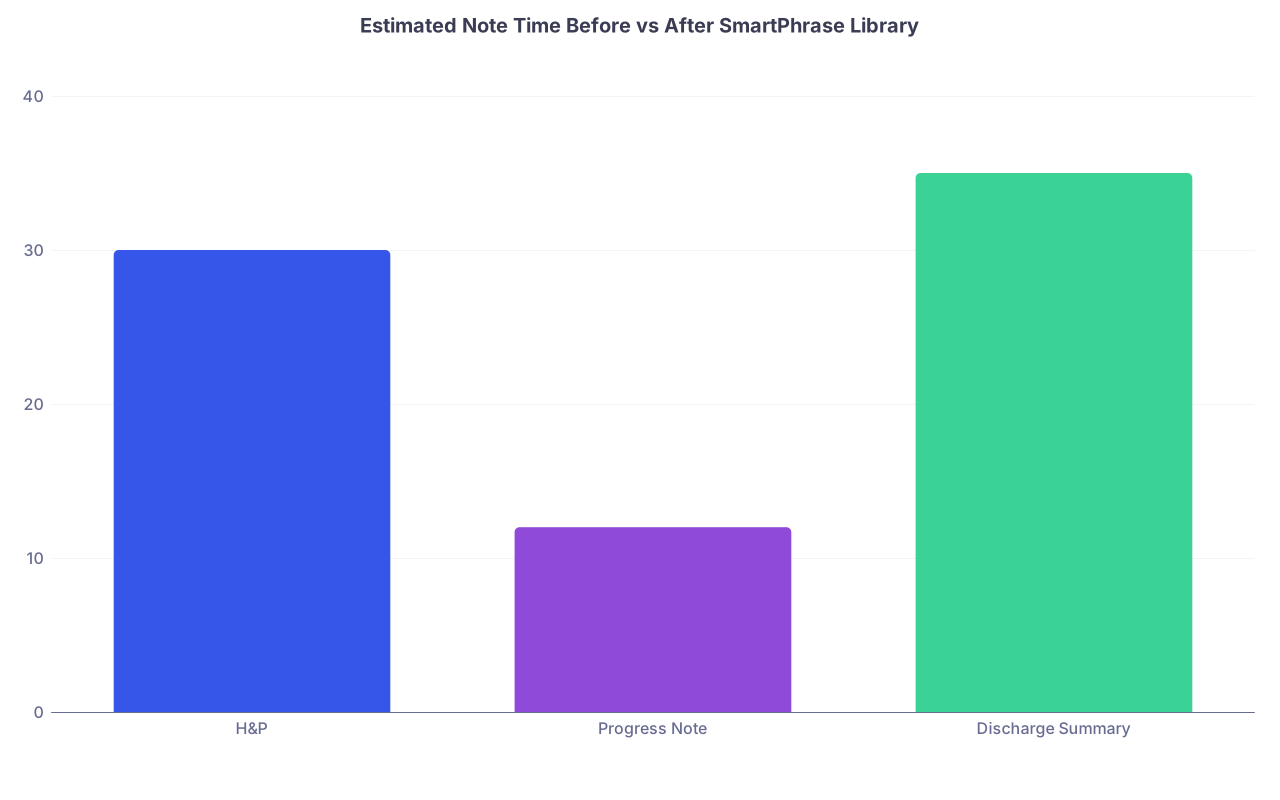
| Category | Value |
|---|---|
| H&P | 30 |
| Progress Note | 12 |
| Discharge Summary | 35 |
(Example: minutes per note before library; realistic goal is cutting roughly in half once your system is mature.)
5. Disease-Specific Blocks: Where The Real Time Savings Live
Your disease templates are not just time-savers. They are safety nets. They help you avoid missing standard elements of care when your brain is cooked on post-call day.
What Goes Into a Good .dz_ Block?
Take .dz_copdexac as a model. You want:
One-liner summary prompt
- “72M with GOLD III COPD, admitted with acute on chronic hypercapnic respiratory failure due to suspected COPD exacerbation.”
Diagnosis and severity
- Clear line about exacerbation vs other causes (PE, HF, pneumonia)
Current condition and goals
- “On 2L NC, goal SpO2 88–92% to avoid worsening hypercapnia”
Management checklist embedded right in the plan
- Bronchodilators:
*** - Systemic steroids: dose + duration
- Antibiotics: empiric choice with alternative, and stop date
- Noninvasive ventilation criteria if applicable
- Smoking cessation counseling
- Vaccines: pneumococcal, influenza
- Discharge planning: inhaler teaching, follow-up
- Bronchodilators:
Monitoring and follow-up
- “Trend VBG/ABG if worsening or not improving.”
- “Repeat CXR if concern for alternative process.”
You do not want a giant essay. You want a tight checklist with embedded phrases, ready to be made specific.
6. Quickly Capturing And Refining SmartPhrases On The Fly
You do not have a free weekend to sit and architect this from zero. You build this library while you work.
Here is how:
Step 1: Identify Repeats in Real Time
On rounds or at night, every time you notice:
- “I am typing almost the same plan I wrote three hours ago”
- “I am rephrasing the same discharge instructions again”
- “This procedure description is exactly the one I used yesterday”
Stop. Highlight. Save as SmartPhrase.
Most EMRs let you:
- Highlight existing text in a note.
- Right-click or use a menu option like “Save as SmartPhrase / Macro.”
- Name it immediately using your convention:
.dz_sepsis,.pr_paracentesis, etc.
Now instead of retyping it tomorrow, you expand it and customize.
Step 2: Weekly 10-minute Cleanup
Once a week (post-call afternoon, slow clinic, whatever), spend ten minutes doing this:
- Delete phrases you never used
- Fix formatting in the ones you used a lot but that look messy
- Merge near-duplicates
- Add missing prompts or SmartLists where you kept editing the same fields by hand
This is the boring maintenance that turns a random bucket of text into a sharp tool.

| Step | Description |
|---|---|
| Step 1 | Notice repeated content |
| Step 2 | Highlight text in note |
| Step 3 | Save as SmartPhrase with naming convention |
| Step 4 | Use SmartPhrase in next similar case |
| Step 5 | Identify common edits |
| Step 6 | Refine SmartPhrase weekly |
7. Specialty-Specific Angles And Pitfalls
Different rotations will stress-test your system in different ways.
Medicine / Hospitalist Services
Your bread and butter here:
- Disease blocks for the top 20 diagnoses you actually see: CHF, COPD exacerbation, PNA, sepsis, AKI, DKA, GI bleed, alcohol withdrawal, cirrhosis complications, etc.
- Procedure notes: paracentesis, thoracentesis, central line, arterial line.
- Brutally efficient progress note and discharge summary templates.
Pitfall: Over-templating. I have seen residents with 600-line H&Ps where 80% is irrelevant. You do not get points for volume. Trim aggressively.
ICU
ICU notes are long. They do not have to be slow.
Your templates should:
- Pull in key vent settings, vasoactive drips, sedation scales, last ABG.
- Build by organ system: Neuro, CV, Pulm, Renal, ID, Heme, Endo, Lines/Devices, Prophylaxis, Dispo.
- Have organ-system disease blocks:
.dz_ards,.dz_septic_shock,.dz_status_epilepticus.
Pitfall: Copy-forward of vent settings and drips without updating. Your template should remind you to update: embed a prominent ***UPDATED TODAY*** placeholder in each active organ system line so you are forced to scroll and edit.
Surgery
Surgical notes are more structured but repetitive:
- H&Ps focusing on indication for surgery, prior surgeries, anesthesia risk.
- Operative notes: you want a library of
.pr_macros for common procedures—lap chole, appy, hernia repair, etc—with standard steps and language. - Post-op progress notes: uncomplicated vs complicated post-op days.
Pitfall: Sloppy half-completed op notes with missing counts, missing specimens, or wrong side. Your macro should force explicit documentation of: side, specimen, estimated blood loss, drains, counts correct.
Pediatrics, OB/GYN, EM, Psych
Each is its own world, but the logic holds:
- Peds: disease blocks for bronchiolitis, FTT, febrile infant, asthma exacerbation, etc; growth and development phrasing; vaccination status.
- OB/GYN: labor course templates, post-partum notes, antenatal visit structure, surgical notes for C-section and D&C.
- EM: complaint-based HPI and MDM templates—
.hx_cp,.hx_headache,.dz_chestpain_lowrisk; risk documentation for “discharge vs admit” decisions. - Psych: structured mental status exam, suicide risk assessment, standardized phrasing for 5150 or similar holds, collateral information.
8. Avoiding The “Lazy Template” Trap
Attending physicians and coders both get very cranky when they see obvious template abuse. I have seen residents get direct emails from risk management after a bad incident where the note clearly did not match reality.
You absolutely must:
- Kill autopopulated normals you are not verifying. A “normal” neuro exam in an obtunded patient because you copied yesterday’s note is a medicolegal nightmare.
- Avoid “checkbox” notes that say nothing: “continue current management,” “stable,” “no changes.” At least a sentence of current status + plan rationale per active problem.
- Make sure critical time-based documentation (critical care time, sepsis bundles, stroke metrics) is specific and accurate. Templates can remind you; they cannot lie for you.
A safe template:
- Prompts you: “Neuro exam: ***”
- Includes helpful scaffolding: “Strength, sensation, reflexes, pupils, orientation”
- Leaves it blank until you type your actual findings.
An unsafe template:
- Autopopulates: “AAOx3, CN II–XII grossly intact, 5/5 strength throughout…”
- You do not edit because you are tired.
- The patient is actually delirious with focal deficits.
You can be efficient without being lazy. If a section is too dangerous to autopopulate, turn it into a prompt, not a default.
9. How This Actually Cuts Note Time In Half
Let me put numbers on this, since residents respond to data.
Before a real SmartPhrase system, a typical day on a busy inpatient service:
- 2–3 H&Ps: ~30 minutes each = 60–90 minutes
- 10–15 progress notes: ~10–12 minutes each = 100–180 minutes
- 1–2 discharges: ~25–30 minutes each = 25–60 minutes
You are at 3–5 hours of documentation, very plausibly.
Once you have:
- Stable H&P skeletons
- Refined progress note and discharge templates
- Disease-specific A/P modules for the top 20 diagnoses
- Procedure notes for everything you do twice
You realistically get to something like:
- H&P: 12–18 minutes each
- Progress note: 4–6 minutes each
- Discharge: 12–18 minutes each
You are not faster because you think less. You are faster because you only think once, then reuse the structure.
If you are not seeing that time savings after a month of using your library consistently, your templates are either:
- Too long (you are spending time deleting and scrolling), or
- Too generic (you are spending time rewriting from scratch anyway).
Tighten them.
10. A Concrete 2-Week Build Plan
You are drowning already, so let me give you something realistic.
Day 1–2
- Create your naming convention. Commit to it.
- Build bare-bones
.np_hp_ip,.np_prog,.np_dschgwith just headings and a few prompts. - Create
.pe_generaland 1–2 focused exams you use a lot.
Days 3–7
During work:
- Every time you write a solid A/P for a common diagnosis, highlight it → save as
.dz_XXXX. - Do the same with discharge instructions and any procedure you do.
End of each day (5 minutes):
- Clean formatting in 1–2 of the new phrases.
Weekend / Post-call half day
- Refine your top 5–7
.dz_blocks: COPD, CHF, sepsis, PNA, DKA, AKI, GI bleed. - Make sure each is short and checklist-like.
Week 2
- Force yourself to use your templates on every note, even if it feels slower at first.
- Each night, tweak the things that annoyed you during the day.
- By the end of week 2, you should have 15–25 real, usable phrases that cover the majority of what you see.
After a month, if you stick with this, you start feeling that strange sensation: finishing notes before sign-out and not taking a laptop home “just to finish documentation.”
FAQ (Exactly 6 Questions)
1. My attendings all want different note styles. How do I build one library that works for everyone?
You keep one core structure that is yours, then create a minimal set of toggles. For example, if one attending wants a problem-based A/P and another wants systems-based, your .np_prog can have both sections labeled, and you use one or the other depending on who you are with. Or you maintain a single alternate progress skeleton, .np_prog_sys, for a specific high-maintenance service. The worst thing you can do is maintain six fully distinct note ecosystems. One primary, one backup. That is it.
2. I am worried SmartPhrases will make my notes look “cookie-cutter” and get me in trouble.
Cookie-cutter notes come from lazy use, not from templates themselves. If you actually edit your disease blocks to match the patient, your notes will read more thoughtful, not less. Where people get burned is copying forward outdated exam findings and plans. Fix that by turning sensitive sections into prompts, not defaults. Compliance folks do not hate templates; they hate obviously inaccurate documentation.
3. How do I handle copy-forward safely with these templates?
Use copy-forward sparingly and visibly. If you copy yesterday’s note, you should immediately see clear markers to update: date/time, daily events, and active problems. Your templated A/P blocks should have day-specific items (labs to check, imaging to follow, anticipated disposition) that make it obvious when you did not update them. If your EMR allows, include a “Today:” bullet at the top of each active problem and force yourself to type something there every day.
4. I am on a rotation with almost no overlap with my usual diagnoses. Do I still use my library?
Yes, but this is when you expand it strategically. On, say, a heme-onc month, you will write similar notes for neutropenic fever, tumor lysis, transplant complications. Use the same capture-and-save method: when you finally craft a solid A/P for neutropenic fever, save it as .dz_neutropenic_fever. You do not need 50 oncology-specific templates, but you absolutely benefit from 5–10 high-yield ones you will see next year, too.
5. How do I balance detail vs brevity in disease-specific SmartPhrases?
If you are deleting more than 30–40% of a disease block every time you use it, it is too long. Aim for: brief one-liner, 4–8 bullet elements of the plan, and 2–3 monitoring/follow-up bullets. No essays. If you catch yourself embedding textbook-level explanations, strip them. Notes are for communication, billing, and medicolegal coverage, not for showing off how much you remember from UpToDate.
6. My institution’s EMR SmartTool system is terrible. Is this still worth it?
Yes. Even in clunky systems, you can usually save at least basic text macros. Worst case, you keep a personal “snippet bank” in a text expander app (if allowed by policy) or a secure, local note that you copy from. Is it as elegant as native SmartPhrases with data pulls and SmartLists? No. But the underlying principle—modular, reusable text blocks for common scenarios—still saves enormous time. The residents who refuse to build any system always end up charting two hours after sign-out. Do not be that person.
Key takeaways:
- Treat SmartPhrases as an organized library, not a pile of random templates. One core skeleton per note type, plus modular disease and exam blocks.
- Build your library from your actual daily work—capture, save, refine—so it reflects how you already think and practice.
- Use templates to speed up structure and boilerplate, not to replace live assessment; efficient does not mean lazy, and if you design this correctly, your notes will be faster and better.