
You are on hour 23 of a 28‑hour call. Two cross‑cover pages just hit, you still have three new admits to pre‑chart, and your attending wants “a clean progress note in before rounds” on a patient with a 15‑problem list.
You open the chart. Then you see it: that familiar, bloated EHR screen.
Sometimes it is Epic. Sometimes Cerner. Sometimes Meditech. Different skins, same battlefield.
If you treat each system like a black box you just “click through,” you will bleed hours. If you learn the specific levers each one gives you as a resident, you claw back 1–2 hours every shift. That is not an exaggeration. I have watched interns cut their daily note time in half in a month by being deliberate about this.
Let me break this down system by system, with a resident‑eye view: pre‑rounding, notes, orders, sign‑out, and call workflows in Epic vs Cerner vs Meditech.
1. First Principles: What “Optimized” Actually Looks Like
Most people say “I want to be faster in the EHR” and then just click faster. That is not a strategy.
Optimized resident workflow in any EHR usually means:
- You touch each patient’s chart as few times as possible per day.
- You enter data once and reuse it 3–4 times (notes, handoff, billing, discharge).
- You standardize 80–90% of your work with templates, macros, and prebuilt order sets.
- You cut hunting time (scrolling, searching, drilling into five tabs) with custom views, filters, and favorites.
Those principles do not change, whether you are stuck on an ancient Meditech Magic system or sitting at a shiny Epic Hyperdrive workstation.
The tactics do. Dramatically.
2. Epic: Weaponizing the System Most Residents Underuse
If you are on Epic and you are still free‑typing 80% of your notes, I am going to say it bluntly: you are wasting your life.
Epic is built for template and macro abuse. Residents who learn to bend it properly easily become “the efficient one” on service.
2.1 Core Layout Tweaks That Save Time Every Rounding Block
Inpatient view is where you live. Fix that first week of a new rotation.
Concrete moves:
Adjust your Patient List columns
Stop using the default junk. Right‑click the list header → “Customize Columns.” For a typical inpatient service, I want:
MRN, Room, Age, Sex, Attending, LOS, Primary Problem/Diagnosis, Code Status, Isolation, Diet, DVT ppx, Dispo, and at least one lab column (e.g., last creatinine or last WBC).
This lets you see who is crashing (new isolation, NPO, rising creat), who is languishing (LOS), and who is “home by tomorrow” material before you even open the chart.Use custom patient lists for your team structure
Build separate lists: “My Primary,” “My Cross‑Cover,” “New Admits,” “ICU Transfers.” Filter by provider or treatment team.
It sounds trivial until you are on night float and your pager goes off for “Patient in 10B,” and instead of fishing through 40 names, you click your “Cross‑Cover List” with 12 patients and immediately know who you actually own.Snapshot and Synopsis views for rapid pre‑rounds
Most Epic installs have a “Snapshot” tab. Configure it. You want: code status, weight trend, I/O summary, active lines/drains/tubes, last vitals set, last 3 creatinines, last Hgb, and active meds.
Then there is “Synopsis” for trends: BP, HR, O2, Cr, Hgb, glucose in one screen. Adjust the timeline to 24–72 hours when pre‑rounding.
Residents who live in these screens pre‑round on 15–20 patients in under an hour without jumping through 10 tabs each.

2.2 SmartPhrases, SmartTexts, SmartLinks: The Actual Time Machines
Where Epic crushes Cerner and Meditech is in note generation flexibility. Most residents barely scratch the surface.
You should have:
- 1–2 H&P templates per service (medicine, surgery, OB, etc.)
- 1–2 daily progress note templates per service (ward vs ICU)
- 1 cross‑cover/overnight event note
- 1 “bad news / family discussion” note
- 1 discharge summary skeleton
And you should rarely be typing full sentences more than once.
Specific tools:
SmartPhrases (
.something)
Your personal text blocks. Example:.im_res_hpi_pnafor your standard pneumonia HPI structure.
Build phrases for:- ROS templates (with common negatives already set)
- Plan boilerplate for common problems (e.g., HFpEF stable, COPD exacerbation, DKA)
- Standard attending‑requested sections (e.g., “Med Rec performed and reconciled with patient and pharmacy”)
SmartLinks (pulling data in)
These pull live data:.lastcbc,.lastbasic,.immuniz,.medlist,.pmh, etc. Combine them in your templates.
Example line in your template:
“Labs: WBC @LASTWBC, Hgb @LASTHGB, Plt @LASTPLT, Cr @LASTCREAT, Na @LASTNA, K @LASTK”
You hit your template and it auto‑fills updated values.SmartTexts
Larger template structures. Many departments have shared SmartTexts (e.g.,.IMPROGRESSNOTE). Start with those, then clone and edit them into your own version.
The right structure: Problem‐based Assessment & Plan, with each problem prebuilt as its own mini‑template.
Pattern I like for a medicine daily note:
- Subjective:
.im_subjective_ward - Objective: vitals auto‑pulled with SmartLinks, intake/output pulled, exam partially templated with blanks
- Assessment/Plan:
# Acute hypoxic respiratory failure –then your standard differential block ready# Sepsis secondary to …block with default plan elements (culture, abx, fluids, pressor consideration)
Your goal: For a stable follow‑up patient, you should be editing 30–40% of the note, not writing 100%.
| Feature | Epic | Cerner | Meditech |
|---|---|---|---|
| Personal text macros | Excellent | Good | Limited–Varies |
| Shared team templates | Excellent | Fair–Good | Often Poor |
| Data-linked phrases | Excellent | Moderate | Weak–Inconsistent |
| Ease of customization | High | Medium | Low–Medium |
2.3 Orders and “Signed and Held” Tricks
Residents lose massive time in Epic by re‑ordering the same core bundles over and over.
Fix that in two ways:
Favorites aggressively
Every common order you place more than twice in a week goes into favorites. Labs, imaging, consults, diet orders, DVT prophylaxis. Use folders: “Admit,” “Daily,” “Discharge,” “ICU.”
Example: an “Admit” favorites folder with: CBC, BMP, Mg, Phos, PT/INR, baseline troponin, EKG, CXR, diet, DVT ppx, telemetry, nursing communication orders.Use order sets, but prune them
Most Epic systems have massive “Pneumonia admit” or “DKA” order sets full of junk. First few times, go line by line and uncheck what your team never uses. Epic remembers your pattern.
So after 4–5 patients, you have a “lean” version of that order set for your account. That alone can shave 2–3 minutes per admit.
Huge underused feature: Signed and Held orders.
On rounds, when the attending says, “Let us get a CT today but only if the creatinine is under 1.5,” you can:
- Enter the CT order
- Set it to “Sign and Hold”
- Add a comment: “Release if Cr ≤ 1.5 today; otherwise notify team”
Later, you or the nurse release or cancel based on labs. You are not re‑typing that order at 14:30 when someone remembers.
2.4 In Basket and Secure Chat: Don’t Let Them Own You
Most residents live reactive in Epic’s In Basket and chat. That is a mistake.
For pure survival:
Create In Basket folders and filters
Separate “Results” from “Cosign,” “Refill,” “Patient messages.” Route as many refill/administrative messages to attendings/faculty pools as your program allows.
Bulk sign normal results in batches during one or two dedicated time blocks instead of constant interruptions.Use SmartPhrases in responses
Building a few canned replies for “patient updated,” “discussed with attending,” “will address in clinic” cuts cognitive load.Secure Chat discipline
Silence non‑urgent channels during focused tasks (admit H&P, family meeting). Check every 10–15 minutes, not every 30 seconds. That is not an Epic trick; that is how you protect your brain from being shredded by micro‑interruptions.
3. Cerner: Surviving PowerChart Without Losing Your Mind
Cerner can be aggressively mediocre from a usability standpoint, depending on your hospital’s build. But there are ways to make it less painful.
Key mindset: Cerner is about “organizing what you see” rather than deep personal customization. You get fewer knobs than in Epic, so you use the ones you do have well.
3.1 Layout: Patient Lists, Organizer, and MPage
The first mistake I see in Cerner: residents live in basically one screen and scroll forever.
You want to make three things your functional base:
Patient List
Build custom lists similar to Epic: your patients, cross‑cover patients, ICU transfers, etc. Add useful columns: room, attending, code status, isolation, LOS, last WBC/Cr if your site allows lab columns.Organizer / Task List
If your site uses it, this can centralize due meds, overdue tasks, and upcoming scheduled events. When configured correctly, it works like a day planner: “Who still needs a PT consult? Who is missing a discharge summary?”MPage (if available)
Many Cerner sites use MPage: a dashboard view with vitals, labs, meds in blocks. This is your best friend for pre‑rounding and cross‑cover, similar to Epic’s Synopsis.
Customize sections so you see:- A 24–72 hour vital sign graph
- Recent lab trends
- Active orders and meds
- I/O summary
You should be able to answer “Is this patient stable?” from MPage alone most of the time.
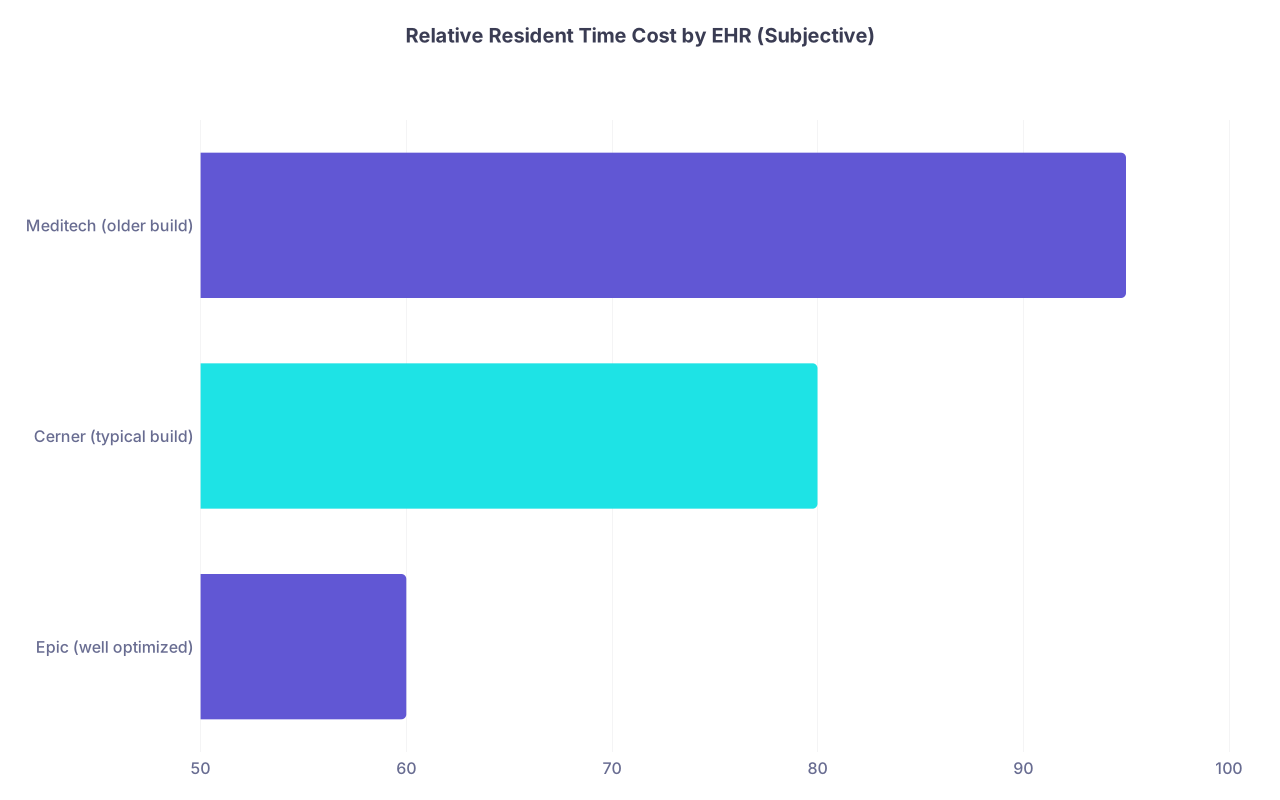
| Category | Value |
|---|---|
| Epic (well optimized) | 60 |
| Cerner (typical build) | 80 |
| Meditech (older build) | 95 |
(Values are arbitrary “minutes per 10 patients per day” for note + order work when poorly vs well optimized – the point is Cerner and Meditech punish you more for being disorganized.)
3.2 Documentation: Cerner Macros and Auto-Text
Cerner does not have Epic‑level SmartText power, but there are still tools:
AutoText (a.k.a. Quick Text)
These are your equivalent of SmartPhrases. Usually start with a.or some shortcut. For example:.improgfor your medicine progress note structure.
Go to the “AutoText” manager, build:- H&P skeletons
- Daily note skeletons
- Common exam blocks (normal cardio/pulm GI, etc.)
- Standard Assessment & Plan problem structures
Dynamic content
Some Cerner content allows insertion of dynamic fields (like latest labs, vitals). It is less polished than Epic’s SmartLinks, but if your site enables them, use them aggressively in IMP/PLAN.Note templates provided by your department
Many Cerner hospitals build official templates. Most are overkill with bloated sections to satisfy billing and quality departments. Strip them down. Create your lighter AutoText version that keeps mandatory components but is not 2,000 words long for a stable COPD exacerbation.
Cerner reality: you will be doing more editing and less auto‑magic than in Epic. So your structure matters more. Problem‑based, tight notes with clear headers and bullets. Avoid narrative bloat.
3.3 Orders: Favorites, PowerPlans, and Cloning
Cerner’s order workflow can be clunky, but you can still prevent duplicate work.
Favorites
Same rule: if you order something more than twice in a week, add it to favorites. Labs, meds, imaging, consults. Use naming that is actually readable under stress: “IM Admit Basic” rather than “Favorite 1.”PowerPlans (order sets)
Use them, but be ruthless. The sepsis/CHF/ACS PowerPlans at some institutions are monstrosities with 50+ items. First few uses, unselect half of them. Cerner will usually remember your preferences within that PowerPlan.Cloning orders / Copying
If your patient is similar to last week’s admit (e.g., another COPD exacerbation), use order copy features from a comparable patient when safe and appropriate. Then edit. This is controversial in some departments, but used thoughtfully it saves time without being sloppy.
Huge caution here: Cerner’s less structured feel makes it easier to accidentally copy outdated or wrong orders. Always scan copied orders line‑by‑line before signing.
3.4 A Note on Cerner Messaging and Alerts
Cerner’s internal messaging and alerts can be more intrusive and less elegant than Epic’s.
You need strict patterns:
- Disable or minimize pop‑ups where policy allows. Click fatigue is real.
- Batch result review. Do not jump every time a result fires in.
- Use message templates or quick text for repetitive communications (“Discussed with attending,” “Updated family,” “Will address during clinic visit”). It is not fancy, but it saves brain cycles.
4. Meditech: Making the Best of a Bad User Experience
Meditech is where a lot of community hospitals and smaller programs live. And yes, it can feel like Windows 95 in EHR form.
But residents can still optimize. The key is to standardize and minimize: fewer clicks, fewer wanderings, tighter patterns.
4.1 Know Which Flavor You Are On
Meditech has several versions: Magic, Client/Server, 6.x, Expanse. Each behaves differently.
- Older versions (Magic, early C/S) are keyboard‑heavy, menu‑driven, and visually primitive.
- Newer Expanse builds finally look more like a modern EHR with configurable “summaries.”
Why this matters: Your optimization strategy depends on whether you can customize views (Expanse) or must live in rigid menus (Magic).
4.2 Basic Tactics That Apply to Most Meditech Installs
Memorize hotkeys and function keys
F3 to exit, F9 to search, arrows to navigate lists, Enter to accept. Residents who mouse their way through Meditech are doomed. Keyboard is faster.Build and use order macros / favorites
Meditech often supports custom order sets or “order macros” created by pharmacy or IT. Track down the nerdy pharmacist or analyst who knows how to build them. Get:- Standard admit bundles
- Common pathways (e.g., chest pain eval, sepsis, DKA)
- Discharge standard blocks (scripts + instructions)
Create text macros if your build allows
Newer versions let you create some level of template text. Even if it is primitive compared to Epic, the principle is the same: pre‑written ROS, exam, and A/P sections you can drop into notes.Use summary/board views ruthlessly
If you have an “ED/Unit Board” or “Patient Summary” screen that shows vitals, labs, and active orders in one place, live there. Ideally, pre‑rounding involves that screen + a couple of detail views, not 15 different menus.

4.3 Documentation Survival in Meditech
Honest truth: you are not going to achieve the same note‑writing speed in old Meditech that you can in Epic with SmartPhrases. The goal is to avoid catastrophe, not to win a speed contest.
Priority moves:
Build one really strong daily progress note template per service
Even if that means a Word document you copy‑paste from, adapted to Meditech’s constraints. Structure:- Subjective: short checklist + brief narrative
- Objective: pre‑built exam with toggles for abnormalities
- Assessment/Plan: numbered problem list with standard phrasing
Reuse text aggressively
If your system allows cloning yesterday’s note and editing, and your department is okay with it, use that. Just ensure:- Update the date and interval history
- Refresh labs/imaging
- Change exam and A/P to reflect the current day
The danger in Meditech is outdated autopilot text. Attending reviewers will catch this and they will not be kind.
Standardized language for routine problems
Write one excellent, clean COPD exacerbation A/P block, one HF exacerbation, one NSTEMI. Save them somewhere accessible (even a text file). Then paste and modify. Do not free‑compose from scratch every time; that is how you end up writing short novels at 02:00.
5. Cross‑System Strategies: What Matters No Matter Which EHR You Are Stuck With
At this point you see the pattern: Epic lets you go wild with SmartPhrases; Cerner gives you partial tools; Meditech often fights you. But some workflow principles apply universally.
5.1 Pre‑Rounds: Chart Review With a Script
You want a fixed mental script that you run on every patient, every EHR:
Snapshot/summary view:
Any overnight events, new vitals trends, O2 changes, pressors, arrhythmias?Labs:
Scan last 24 hours plus trend on key markers (Cr, WBC, Hgb, troponin, BNP, lactate, etc. depending on the case).I/O and weight:
Especially for HF, renal, SICU patients.Active meds:
Any new additions, high‑risk agents (anticoag, pressors, sedatives, antibacterials that need levels).New imaging/consult notes.
You should be able to do that in under 3 minutes per stable patient, 5–7 minutes for complex ICU patients once your views are correctly configured.
Whether it is Epic Snapshot, Cerner MPage, or Meditech Summary, your goal is the same: one or two screens that answer those questions without digging.
5.2 Note Writing: Problem‑Based, Template‑Driven, Minimal Noise
Residents over‑write. EHRs encourage it because copying is easy.
Your structure per patient per day should be:
- Subjective: 2–4 sentences
- Objective: focused and updated, not a full re‑list of every normal system
- Assessment & Plan: clear problem list, each problem with its own plan, each plan 2–5 lines max unless something big is happening
What you optimize for:
- You can write it quickly using templates and macros.
- Your attending can read it in 30 seconds before rounds.
- Future consultants, night float, and yourself 3 days later can figure out what you are doing in under a minute.
That is true in Epic, Cerner, Meditech, paper charts, whatever.
5.3 Orders and Task Batching: Stop Death by Single Orders
Bad habit: placing one order at a time as the day goes. That fractures your attention.
Better approach:
- During rounds: capture orders in a running list (index card, notes app, or EHR task list).
- Between patients or at the end of rounds: batch orders patient by patient using your favorites and order sets.
- Use “signed and held” (Epic) or equivalent hold/release mechanics in other systems when your plan depends on later data.
You manage your attention, not the EHR.
5.4 Handoff and Sign‑Out: Reusing Work You Already Did
If you write a clear daily A/P, your sign‑out almost writes itself.
Where available:
- Epic: use the “Shared Handoff” tool; map specific note fields or problem lists into handoff items. Set it up once and re‑use.
- Cerner: some sites have structured handoff modules; others force Word/Excel/paper. Standardize a template for your team.
- Meditech: often external (Word/excel). Again, structure is everything:
- One‑line ID
- Brief summary
- ACTIVE problems only
- “If/Then” statements for overnight
Always ask: Can night float manage 80% of overnight issues on my patient from my sign‑out alone without calling me? If not, your workflow is wasting both of you.
6. Matching Strategy to System: Quick Comparative Guide
If you want a brutally concise “what to focus on first” by system:
| EHR | #1 Priority | #2 Priority | #3 Priority |
|---|---|---|---|
| Epic | SmartPhrases/SmartTexts | Custom views (Snapshot/Synopsis) | Favorites + lean order sets |
| Cerner | AutoText note templates | MPage/Organizer configuration | Favorites + tuned PowerPlans |
| Meditech | Keyboard and hotkey mastery | Simple reusable note skeletons | Standardized admit/discharge sets |
You will get the fastest return by hammering those three areas for the system you are on.
7. How to Actually Implement This in Real Residency Life
Reading this is one thing. Implementing during 80‑hour weeks is another.
Here is a practical 2–3 week plan that I have seen work:
Week 1 – Setup and Observation
- Spend one evening off‑call purely to:
- Set up patient list columns.
- Configure summary views (Epic Snapshot, Cerner MPage, Meditech Summary).
- Add top 20 most common orders to favorites.
- During the week, notice:
- Which sentences you type over and over.
- Which orders you repeat constantly.
- Which screens you keep opening in sequence.
Week 2 – Templates and Macros
- Build:
- One H&P template for your main service.
- One daily progress note template.
- One standard A/P macro for your top 5 diagnoses.
- Force yourself to use them for every applicable patient. Even badly built templates save time once you tweak them.
Week 3 – Refinement and Expansion
- Fix what annoyed you in week 2 (too much boilerplate, missing fields, etc.).
- Add:
- An overnight cross‑cover note template.
- A discharge summary skeleton.
- Clean up your favorites list; remove duplicate and never‑used items.
If you do this deliberately, you will notice something very obvious by the end of week three: your notes are shorter but better, and you are done earlier. That is the whole point.
Key Takeaways
- Epic, Cerner, and Meditech each reward different behaviors, but the universal principles are the same: customize views, template your notes, and batch your orders.
- Epic is a template engine—if you are not abusing SmartPhrases, SmartTexts, and SmartLinks, you are leaving hours on the table every week.
- In Cerner and Meditech, you do not have infinite customization, so you live or die by structured workflows: smart patient lists/summary screens, tight note skeletons, keyboard mastery, and disciplined batching of tasks.