
Most residents are bad at consult management, and it quietly wrecks their days and their reputation.
Let me be direct: your ability to track consults, communicate plans, and close the loop will matter more to your colleagues than your latest obscure journal article quote. People forgive a missed zebra. They do not forgive an unreturned page, a lost consult, or a patient who deteriorates because a recommendation was never implemented.
You want survival tips? This is one of the big ones.
We are going to talk about consults the way residents actually live them: 7 new pages during rounds, 3 “curbside but actually formal” questions, 2 cross-cover fires, and a patient in the ICU waiting on cards, renal, and ID—while night float keeps calling you for “quick” sign-outs.
Consult chaos is predictable. That means you can design a system that beats it.
The Core Problem: Consults Are a Workflow, Not a Single Task
Most interns treat a consult as a single item:
“GI consult for anemia – done once I page them.”
Wrong. A consult is a multi-step workflow with at least five distinct stages. If you do not track each stage, things fall through the cracks. Repeatedly.
Typical consult lifecycle:
- Request generated
- Request communicated
- Consultant evaluates and recommends
- Plan is implemented and documented
- Follow-up / reassessment / closure
Now overlay reality:
- You may be the consulting team (e.g., night float for all medicine consults).
- Or the primary team requesting five services on the same patient.
- Or cross-cover inheriting consult chaos from a day team that “sort of” documented things.
If you do not externalize this workflow into a system—paper, digital, or hybrid—your brain becomes the system. It will fail by noon.
Step One: Build a Consult Tracking System (Before You Get Buried)
You can survive residency with many things half-baked. Consult tracking is not one of them.
You need three things:
- A single source of truth for consults (not 5 different scraps)
- A consistent data structure for each consult
- A habit loop that you follow without thinking
I will show you three workable systems: notebook, spreadsheet, and EHR-based. Pick one and commit for at least a month.
The Minimum Data Set for Every Consult
For each consult, you should capture the same core elements. If it is not written somewhere, it effectively does not exist.
At minimum:
- Patient ID: Name, MRN, bed
- Service consulted: “Cards”, “Neuro”, “GI”
- Reason / Question: One clear line, framed as a question
- Urgency: “STAT”, “Today”, “Routine”
- Time/Method requested: “09:15, pager 1234, spoke to Dr Smith”
- Consultant contact: Name if possible, or “whoever is on”
- Status: Pending call back / Evaluated / Recommendations given / Completed
- Key recs: Bullet points of actual plan
- Follow-up actions: Orders, family discussion, repeat labs, re-page if no response
- Review time: When you plan to re-check (e.g., “check for note at 14:00”)
That looks like a lot. It is not. It is one 10–15 second entry when you have a template.
| Field | Why It Matters |
|---|---|
| Patient / MRN | Avoids mixing patients and errors |
| Service | Know who to re-page / sign out |
| Question | Focuses the consult and expectations |
| Urgency | Prioritization and defensibility |
| Time/Method | Tracks delays, protects you medicolegally |
| Status | Prevents “I thought they had seen them” |
| Key Recs | Drives orders and communication |
| Follow-Up | Ensures loop closure |
System 1: The Old-School Consult Notebook (Still Works)
If you like analog, use it properly. Not random sticky notes.
Use a small, bound notebook. One consult per line or small block. Example structure:
- Left page: Active consults
- Right page: Completed / signed-out consults
Columns (you literally draw them):
- Pt / Bed
- Service
- Question
- Urgency (arrow up / down, or “S”, “D”, “R”)
- Time paged / method
- Status
- Check-box for “Plan done”
At the beginning of the day, you pull yesterday’s active consults forward if still open. During the day, every consult request gets an entry. No exceptions. That is the discipline.
System 2: The Spreadsheet System (For People Who Live on Their Laptop)
For residents who always have a computer, a simple local spreadsheet (or secure institution-approved note) is gold.
Make columns matching the data set above. Freeze the header row. Use filtering by service or status.
Example columns:
- Date
- Patient Name
- MRN
- Bed
- Service
- Question
- Urgency
- Time Paged
- Method (pager / phone / in-person)
- Consultant Name
- Status
- Key Recs
- Follow-Up Time
- Completed (Y/N)
Set conditional formatting so “Pending” lights up yellow, “Overdue” red, “Completed” green. Now the spreadsheet itself tells you where the fires are.
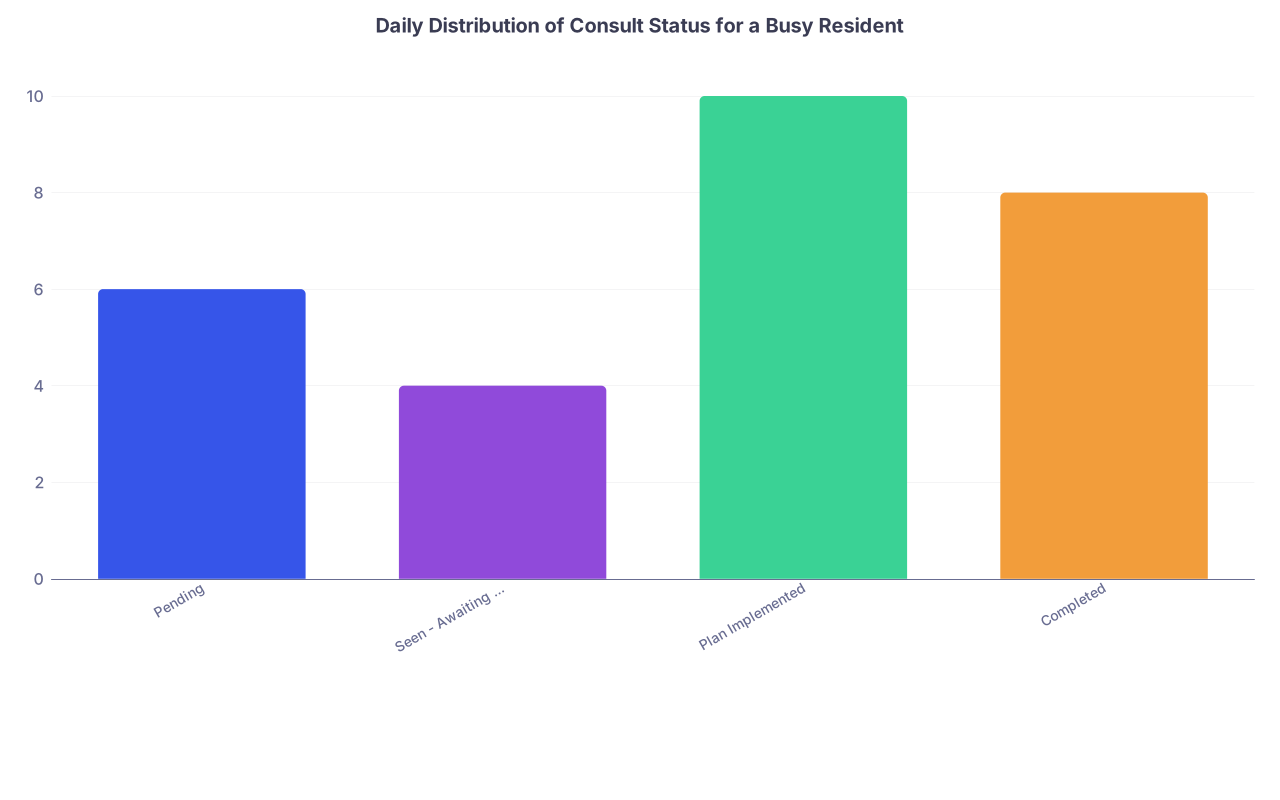
| Category | Value |
|---|---|
| Pending | 6 |
| Seen - Awaiting Note | 4 |
| Plan Implemented | 10 |
| Completed | 8 |
System 3: EHR-Embedded Tracking (For Environments With Good Tools)
Some institutions give you partial help: custom patient lists, flags, or dot-phrases.
Common tricks:
Create a “CONSULTS – ACTIVE” patient list
Use a custom column (e.g., “Comment” or “Care Team Note”) for service and status: “RENAL – paged 10:40, pending”
Use a standardized dot-phrase in your progress notes:
[.consulttrack](https://residencyadvisor.com/resources/residency-survival-tips/building-a-personal-smartphrase-library-to-cut-note-time-in-half)→ auto-inserts:- Service:
- Question:
- Date/time requested:
- Status:
- Recs summary:
- Follow-up:
You can then scroll your own note and quickly see which services are involved and what is still open.
EHR alone is not enough. You still need a way to see all consults across all patients at once. That is what your list or external log does.
How to Receive and Request Consults Without Creating Chaos
Residents get into trouble because they treat consult requests and pages as noise instead of structured inputs.
Let me break down both sides: you requesting, and you receiving.
When You Request a Consult: Script It
Weak:
“Hey, this is the medicine intern. Can you see Mr Jones in 12B for AKI?”
Strong, structured:
- Who you are and team: “This is Dr Lee, medicine resident on Team B.”
- Who the patient is: “I am calling about Mr John Jones, MRN 123456, bed 12B.”
- Working problem and question:
“He is a 72-year-old with decompensated cirrhosis and rising creatinine, concern for HRS versus ATN. We are asking renal for help with workup and management, and guidance on diuretics and volume status.” - Urgency and baseline stability:
“He is hemodynamically stable, on the floor, not oliguric but trending down.” - Key background: 2–3 lines.
- Callback number and chart update:
“You can reach me at pager 1234. I will put in a formal consult order and add a one-line summary in the chart.”
Then you immediately log the consult in your system. Before you hang up or as soon as you do.
If you cannot clearly state the question, you are not ready to consult. You are just punting.

| Step | Description |
|---|---|
| Step 1 | Identify Problem |
| Step 2 | Define Clear Question |
| Step 3 | Gather Key Data |
| Step 4 | Page Consult Service |
| Step 5 | Communicate Structured Request |
| Step 6 | Enter Consult in Tracking System |
| Step 7 | Place EHR Consult Order |
When You Receive a Consult Page: Do Not Wing It
You pick up the phone. “Renal consult for room 412, creatinine up.”
Do not run upstairs with zero structure. You will forget half the important stuff and waste everyone’s time.
On receiving the consult:
- Open your tracking tool. Start the entry as you are talking.
- Ask targeted questions:
- “What is your specific question for us?”
- “How urgent is this from your standpoint—STAT, today, or routine?”
- “Can you give me one-line background?”
- “Any active instability—pressors, increased O2 needs, active bleeding?”
- Confirm callback and ordering:
- “Please put in a formal consult order and include your question. I will see the patient today / within the hour.”
- Log time, method, urgency, and question clearly.
This alone separates you from the average resident. Consultants talk. “The new night float actually clarifies the question and calls back.” Your name spreads.
Managing the Middle: Plans, Notes, and Follow-Up
The middle of the consult lifecycle is where residents drown. You got the consult. The service saw the patient. Recommendations are made. Then what?
Three key tasks: capture, communicate, and close.
Capturing Recommendations So They Do Not Vaporize
I have watched interns nod along to a 10-item plan from cardiology, write none of it down, and then chart a vague “cards following; appreciate recs.”
That is not medicine. That is theater.
During the discussion (whether in person or on the phone), you should:
- Have the chart open
- Have your consult tracker open
- Be writing the plan in both places
Aim for structured bullets:
- “Cards recs 1/6:
- Stop metoprolol for now
- Start heparin drip without bolus
- Order TTE today
- Trend troponin q6h x 3 then stop
- Call cards fellow if chest pain recurs”
Put the key items in your tracker under “Key Recs” and “Follow-Up”. The verbose version can go in your progress note.
Whenever possible, repeat back the plan to the consultant:
“So just to confirm, for today you are recommending heparin drip without bolus, TTE today, and no need for emergent cath unless pain recurs or troponins rise further?”
You catch misunderstandings early.

Communication: Make the Plan Visible to Everyone
It is not enough that you and the consultant know the plan.
Who else needs to know?
- Nurses (who actually carry out half the orders)
- Your attending
- The patient and family
- Night team / cross-cover
- Other consulting services that may have overlapping recommendations
Practical methods:
- Clear, specific order entry. “Heparin drip per ACS protocol” is not the same as “consider anticoagulation.”
- Update your sign-out: “Cards: see 1/6 note. Heparin gtt on, monitor for chest pain, call cards fellow per instructions if worse.”
- One-liner in your daily note that lists all active consults and their roles.
I like a short section labeled “Consults / Co-Management” in the daily note:
- Cards: managing ACS, next step is TTE today, we are implementing heparin plan.
- Renal: following AKI; no dialysis indicated yet, repeat BMP this afternoon, strict I/O.
- ID: guiding antibiotic choice for pneumonia; switch to ceftriaxone + azithro.
This matters at 2 AM when night float is scrolling quickly and needs to know who is doing what.
Closing the Loop: Follow-Up and Completion
Two kinds of follow-up:
- Immediate follow-up on recs – did the orders actually get done?
- Consult lifecycle completion – is this consult now finished?
For immediate follow-up:
- After entering orders, do a quick mental checklist:
“Consult plan implemented? Meds ordered? Labs ordered? Imaging ordered? Nursing made aware if anything significant (e.g., NPO, strict bedrest, neuro checks)?” - If something is time-sensitive (e.g., repeat BMP in 4 hours for hyperkalemia), put a reminder in your tracker: “Check K at 16:00, re-page renal if >5.8”.
For lifecycle completion:
A consult is “complete” when:
- The question that triggered the consult is answered or no longer relevant.
- No new questions for that service are active.
- The consulting team has either signed off or clearly transitioned to co-management with stable, predictable follow-up.
When that happens:
- Mark it “Completed” in your tracking system.
- Note it in your sign-out: “Renal signed off 1/8; no current issues from their standpoint.”
- If there is long-term outpatient follow-up recommended, ensure it is in the discharge plan.
You want as few zombie consults as possible—services nobody knows are still involved, doing nothing, clogging charts.
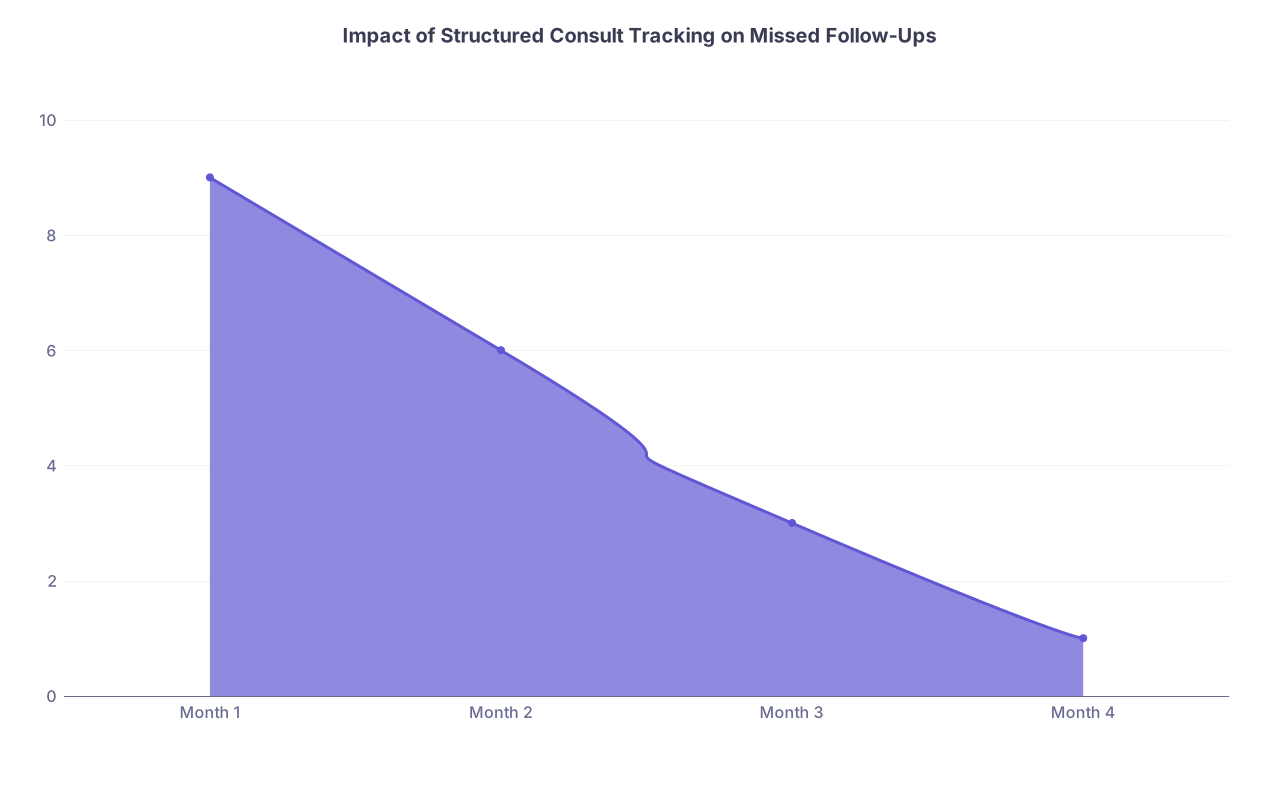
| Category | Value |
|---|---|
| Month 1 | 9 |
| Month 2 | 6 |
| Month 3 | 3 |
| Month 4 | 1 |
Handling High-Volume or High-Acuity Consult Days
Some days consults will try to break you. Surgical co-management list exploded. ED is dumping “admit with consult” on half your patients. Cards wants answers. Neuro is rounding late. ICU is calling.
You need a triage mindset.
Triage by Two Axes: Patient Risk and System Risk
Patient risk:
- Unstable vitals
- ICU or step-down
- Airway, breathing, circulation issues
- Rapidly changing neuro status
- Active bleeding, sepsis, arrhythmia
System risk:
- Consults where delay has consequences (e.g., stroke, ACS, acute abdomen)
- Services that have limited windows (e.g., IR before 4 PM, cath lab scheduling)
- Discharge-critical consults (“Needs cards to clear for discharge”)
You prioritize high patient risk + high system risk first. Then high patient risk only. Then system risk. Then routine “nice-to-haves”.
Your tracking system should help with this. Use:
- A visible urgency tag (S/T/R)
- Color coding, stars, or underlines for “critical path for discharge”

Time-Box Your Consult Work
You cannot be everywhere at once. So you deliberately cluster tasks.
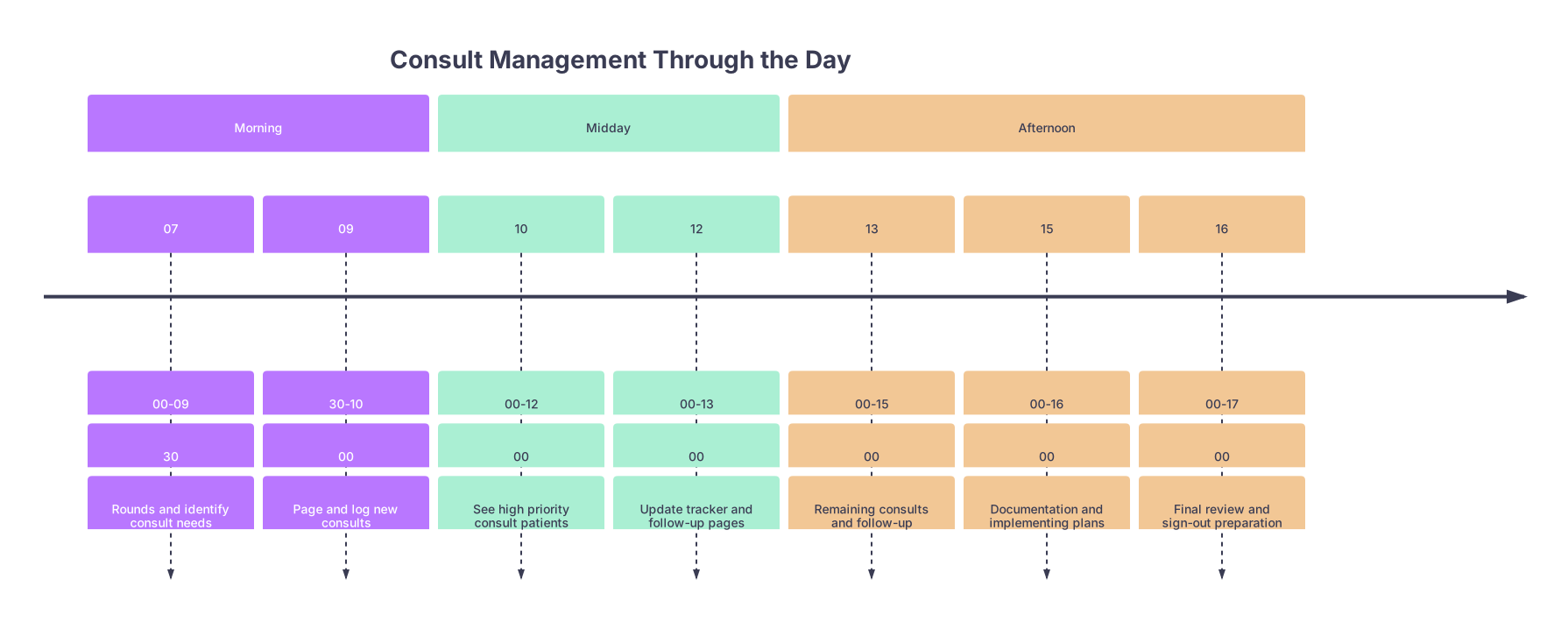
Example pattern on a heavy consult day:
- 07:00–09:30 – Pre-round / rounds
- 09:30–10:00 – Page out all non-emergent consults with structured questions
- 10:00–12:00 – See highest acuity consults in person, call services back if needed
- 12:00–13:00 – Quick loop through tracker: update statuses, check for missed pages
- 13:00–15:00 – See remaining new consults / follow-ups
- 15:00–16:00 – Update notes, orders, and sign-out with finalized recommendations
- 16:00–17:00 – Final loop through tracker; explicitly sign out open consults to night
Does the day always go like this? No. But the structure means you are not purely reactive.
| Period | Event |
|---|---|
| Morning - 07 | 00-09 |
| Morning - 09 | 30-10 |
| Midday - 10 | 00-12 |
| Midday - 12 | 00-13 |
| Afternoon - 13 | 00-15 |
| Afternoon - 15 | 00-16 |
| Afternoon - 16 | 00-17 |
Sign-Out and Cross-Cover: Where Consults Go to Die (If You Are Sloppy)
If you want to see the consequences of poor consult management, listen to a night float intern at 02:00 trying to figure out why “renal is following” but no one knows for what.
You prevent this with explicit, consult-aware sign-out.
What to Include in Sign-Out for Each Active Consult
For each patient with at least one active consult, your sign-out should include:
- Service and role: “GI for upper GI bleed management.”
- Active plan: “Banding done yesterday, IV PPI, clear liquids, Hgb checks q8h.”
- What night should do: “If melena recurs or Hgb drops >2, re-page GI fellow and transfuse per protocol.”
- What is pending: “Awaiting H. pylori biopsy result; not urgent overnight.”
Do not just say “renal following” and expect someone to like you.
If a consult is truly routine and requires nothing overnight, say that explicitly: “Neuro consult for outpatient EMG recommendation only; no acute neuro issues.”

How to Receive a Messy Sign-Out Full of Vague Consults
You will also be on the receiving end of bad sign-outs. You cannot fix their system retroactively, but you can protect your shift.
For each vague “X is following”:
- Ask: “What is the specific question they are following for?”
- Ask: “What did they recommend today that I might need to know if the patient worsens?”
- Ask: “Is there anything pending from them that is likely to come back tonight?”
- If answers are unclear and the patient is high risk, skim the latest consult note yourself at the start of the shift and write a short summary in your own notes.
Then log any overnight-relevant consult follow-up in your personal tracker under that shift. You are building a mini version of the day team’s system just for the night.
Common Failure Modes and How to Avoid Them
You will see the same consult screw-ups on repeat. Let me call them out.
Failure 1: The Phantom Consult
Nobody is sure if GI was actually consulted. There is no order. No note. But the day team “thought they called them yesterday.”
Prevention:
- If you request a consult, put in the order immediately, even if you also called.
- Log it in your tracker.
- If you inherit a patient and the sign-out claims “X is following” but there is no order or note, assume they are not. Verify.
Failure 2: The Unanswered Consult That Quietly Times Out
You paged ortho at 09:00. They got slammed in the OR. At 16:00, you realize no one ever saw the patient with the open fracture.
Prevention:
Your tracker should have a “recheck time” for each consult, especially urgent ones. For example:
- If STAT / urgent: recheck in 1 hour.
- If “today”: recheck by 3–4 hours.
- If routine: recheck by end of day.
When that time hits and no note or callback has happened, you re-page with a polite nudge and document the time. Consultants respect persistence when it is grounded in patient safety, not anxiety.
Failure 3: The “Appreciate Recs” Non-Plan
Everyone hates reading: “Cards following, appreciate recs” without any recs listed. It is lazy and dangerous.
Prevention:
- Any time you write “appreciate recs,” follow it with at least one concrete recommendation summarizing their plan.
- Keep your own one-line-per-service summary in your note daily.
Failure 4: Conflicting Consult Recommendations
Renal says “no fluids, strict restriction.” Cards says “give 1–2 L bolus.” You shrug and split the difference. That is not how this works.
Prevention:
- Recognize the conflict early.
- Call one of the services back with a clear, respectful question:
“Renal is recommending fluid restriction for his AKI, while cards suggests fluid bolus for hypotension. Given his exam and output, can we agree on a unified approach?” - Document the final, agreed-upon plan clearly.
- If still conflicting, loop in your attending and document the reasoning for the chosen approach.
Putting It All Together: A Practical Example
Let’s walk through a typical day with a functional consult system.
You are the senior on a medicine team with 14 patients.
Morning rounds:
- Patient 1: New AF with RVR; you decide to consult cards for rhythm vs rate strategy.
- Patient 2: Worsening AKI; consider renal.
- Patient 3: Upper GI bleed; GI already involved.
- Patient 4: Pre-op clearance; maybe cards later.
You log:
- Cards – Patient 1 – AF w/RVR, question: rhythm vs rate, anticoagulation considerations. Urgency: today.
- Renal – Patient 2 – AKI on CKD, question: cause and dialysis need. Urgency: today.
- GI – Patient 3 – already following; status: “Seen 1/5, banding done, f/u recs implemented.”
09:45 – You call cards and renal with structured questions; place consult orders; mark as “Paged 09:45”.
11:00 – Cards fellow calls back about Patient 1, sees them at 11:20, writes note at 12:00. You:
- Read the note
- Extract key recs and put in tracker: “Cards: rate-control strategy, dilt drip, no anticoagulation today due to concurrent GI bleed, reassess in 48 hours.”
- Implement orders
- Update sign-out: “Cards: rate control AF; no AC due to bleed; watch HR and BP, call cards if sustained RVR >150 despite drip.”
13:00 – Renal has not seen Patient 2 yet. Your tracker has a recheck time at 13:00. You verify: no note, no call. You re-page with a brief “just checking in, AKI still stable but we are hoping to avoid dialysis.”
15:00 – Renal sees Patient 2, gives recs: hold ACEi, adjust meds for GFR, no dialysis, BMP in AM. You log it. You put “Renal following, no urgent dialysis need” in your sign-out. You mark Patient 2’s renal consult as “Active, stable.”
16:30 – You do a final sweep of your tracker. Two consults still “pending recs” for tomorrow. You highlight them in sign-out. Your night float is not guessing. They are inheriting an organized list.
You leave. And your pager is not exploding at 23:00 with “who is managing this?” questions.
FAQs
1. Is it better to use paper or digital for consult tracking?
Use whatever you will use consistently. Paper is faster in the moment and never crashes. Digital is better for sorting, searching, and color coding. I have seen excellent residents with each. The key is a single, consistent system, not a mixture of loose notes, napkins, and half-finished spreadsheets.
2. How detailed should my consult question be when paging?
One sentence with a clear clinical problem and decision point is ideal. “Please see for AKI” is weak. “Please evaluate rising creatinine in a cirrhotic patient, concern for HRS vs ATN, and advise on fluids, pressors, and dialysis need” is strong. You do not need a full H&P on the phone; you need a sharp question and relevant highlights.
3. What do I do if a consult is requested for a bad reason (pure turfing)?
Clarify the question. If the primary team is asking for something clearly inappropriate (“consult ID to write outpatient antibiotic prescription for simple UTI”), push gently: “Is there a specific concern beyond standard therapy?” Escalate to your attending if needed. You are not obligated to enable bad consult culture, but you also should not pick fights every day. Document neutrally.
4. How often should I check back on pending consults?
For STAT/urgent: within 1 hour. For “today, please”: within 3–4 hours. For routine/deferrable: by end of the workday. Your tracker should force this by having a “recheck time” column or field. Passive waiting until someone remembers is how consults disappear.
5. How do I handle multiple services giving partially overlapping recs?
Summarize each service’s role in one line in your note and sign-out. Where recs overlap or conflict, get them on the same page by calling back one service with the specific conflict. Involve your attending early, especially in high-risk situations. Document the final, unified plan clearly, and communicate it to nursing.
6. I feel overwhelmed already—what is the smallest change that will help?
Start with one habit: log every consult request in a single dedicated place with patient, service, question, time paged, and urgency. Nothing fancy. Just that. Once that is solid for a week, add follow-up times and status. The awareness alone will cut your missed consult problems dramatically.
Key points:
- Treat consults as a structured workflow, not as one-off tasks.
- Use a single, consistent tracking system with clear questions, statuses, and follow-up times.
- Capture, implement, and communicate recommendations explicitly so that no one—not you, not night float, not the consultants—has to guess who is doing what for your patient.