
Last month I watched a PGY-2 sit down at a workroom computer, stare at the screen for a full 10 seconds, and whisper, “Wrong hospital. Wrong password. Wrong patient list. I hate this rotation.” She was on week two of bouncing between three hospitals in one month, and every single system—from EMR to pager to order sets—was slightly different. She wasn’t burned out from medicine; she was burned out from friction.
If you’re rotating at multiple hospitals, here’s the truth: the medicine is the easy part. It’s the 14 different logins, 6 flavors of “how we do it here,” and the constant low-level fear of messing up in an unfamiliar system that will wear you down.
Let’s make that part sane.
Step 1: Accept the Reality (Then Control What You Can)
Rotating at multiple sites means:
- Different EMRs (Epic at main, Cerner at community, maybe Meditech or some homegrown monster somewhere else)
- Different pager systems and call workflows
- Different “this is how we always do it” cultures
- Different ancillary resources (RT-heavy vs nurse-driven vs “write it on a paper slip”)
The mistake residents make is trying to “remember everything.” That fails by week one.
Your job isn’t to memorize chaos. It’s to build a portable system that travels with you.
Mental shift:
“Each hospital is different and that’s annoying” → “Each hospital is a module. I’m going to build a standard way to plug into each one.”
We’ll walk through:
- A portable “systems notebook” that works anywhere
- Fast onboarding for every new site
- EMR and order set survival setups
- Communication workflows so people can actually reach you
- Protecting your brain so you don’t feel like you’re switching countries every day
Step 2: Build a Portable Systems Notebook (Your Brain Offload)
If you try to keep all system differences in your head, you will miss something important at 3 a.m.
You need a single place where your cross-hospital brain lives.
Format doesn’t matter as much as consistency:
- Small notebook you keep in your white coat
- Notes app (Apple Notes, Google Keep)
- One Notion/Obsidian/Evernote workspace
- Even a Word doc on your phone + hospital desktop shortcut
The key is: one master place, divided by hospital.
Structure it like this:
| Section | Purpose |
|---|---|
| Hospital Overview | Basic identifiers, key differences |
| Access & Logins | EMR, PACS, secure chat, VPN info |
| Workflow Cheat Sheet | Admissions, codes, transfers steps |
| Orders & Protocols | Common order sets, anticoag, insulin |
| Communication | Who to call, how to reach them |
Create a tab or header for each site:
- “Main Tertiary Center”
- “County Hospital”
- “VA”
- “Community Affiliate”
Under each, keep the same subheadings so your brain knows where to look:
- Access & Logins
- EMR Tips & Templates
- Admissions & Discharges
- Cross-Cover “Landmines”
- Procedures & Consents
- ICU/Emergency Stuff
Do not try to do this retroactively after a month. Start on day 1 at a new site, even if the pages are mostly blank. You’ll fill them fast.
Step 3: Day 1 at a New Site – Rapid Onboarding Script
Most people waste the first week fumbling. You can compress that into one focused block on day 1.
Within your first shift, you want a 10–15 minute “systems interview” with:
- Senior resident on your team, or
- Unit charge nurse, or
- Program liaison if it’s a brand-new site for your program
You’re not asking, “So, anything I should know?” That gets you nothing. Use a script.
Here’s a tight version you can literally read off your phone:
Access & EMR
- “What EMR do we use here, and what’s the fastest way to see: last 24h vitals, recent labs, and active meds?”
- “Are there default admission order sets people actually use, or should I build my own?”
- “How are notes usually structured here? Is there a shared template I can copy?”
Workflow Landmines
- “When someone decompensates on the floor, do I call rapid response, MET, or just the code?”
- “Who actually writes admission orders – ED or admitting team?”
- “Any protocols that are really specific here? (e.g., stroke, sepsis, blood transfusion)”
Communication
- “What’s the main way people contact us: pager, secure chat, phone?”
- “If the nurse says ‘call the operator’, what exact number do I dial?”
- “Who covers what at night—do I page the on-call cardiology fellow directly or go through switch?”
Discharges & Follow-up
- “Anything tricky about discharge meds or follow-up clinics here?”
- “Do we have to send a discharge summary to outside PCPs manually?”
Write the answers live in your systems notebook under that hospital’s tab. Do not trust yourself to remember.
If possible, pair that conversation with a 15-minute EMR shadow: Sit next to your senior, ask them to walk through:
- A full admission
- Writing a progress note
- Entering a typical order set
- Placing a consult
You’ll learn more real workflow from 10 minutes watching a PGY-3 click around than from any “orientation packet” PDF.
Step 4: Make EMR Systems Feel the Same (Even When They’re Not)
You’re probably dealing with some mix of Epic, Cerner, Meditech, maybe a VA system. Each one has its own religion. That’s fine. Your goal is to make your experience look and feel as similar as possible.
Standardize your “view”
Your brain wants the same screens in the same order. For every EMR, build:
Your standard patient list layout
Make sure each list shows:- Room/bed
- Age/sex
- Service/attending
- Code status
- Key flags (isolation, fall risk, etc., if available)
Your standard daily workflow tabs
Try to make these the same across systems:- Tab 1: Summary / Patient list
- Tab 2: Vitals and I/O
- Tab 3: Labs & imaging
- Tab 4: Orders
- Tab 5: Notes
Rename or rearrange as much as the system allows so it approximates your “home” EMR.
- Saved reports / filters
For each site, build quick filters:- “My patients – day”
- “My patients – cross-cover”
- “ICU follow”
Put the names in your notebook so you remember what they’re called at each place.
Templates: your cross-hospital power tool
You should not be reinventing notes and orders at every site.
You want a core set of templates that you adapt to each EMR:
- Admission H&P template
- Daily progress note
- Cross-cover/event note
- Consult note
- Discharge summary skeleton
Keep the body of the templates the same across hospitals. Change only the dot phrases / smart texts.
Example structure for a daily note:
- Interval events
- Subjective
- Objective
- Vitals
- I/O
- Exam
- Labs/Imaging
- Assessment & Plan by problem
At Hospital A (Epic), maybe it’s .progimgen + your own .aandp phrase.
At Hospital B (Cerner), you might copy-paste from a text file and fill in.
Create a master template file on your phone/drive with the generic text. Then in each EMR, build the local version.
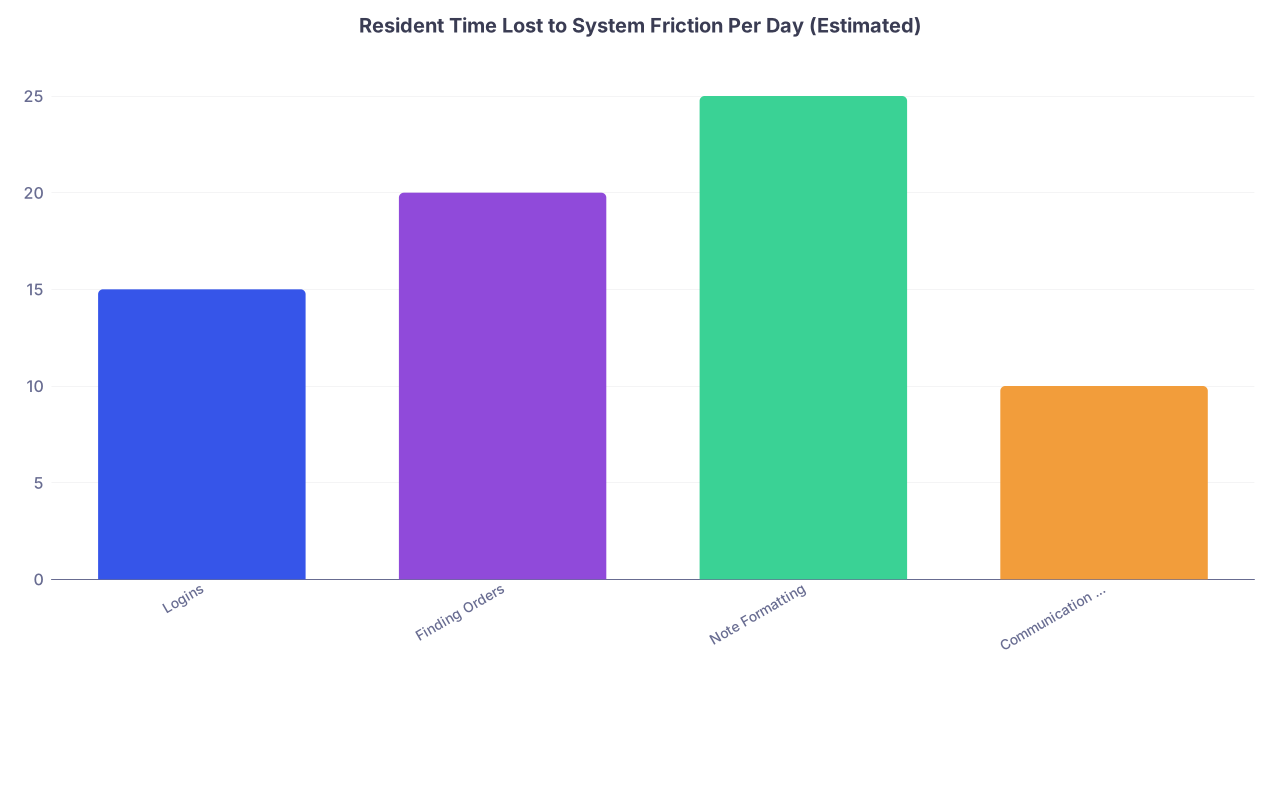
| Category | Value |
|---|---|
| Logins | 15 |
| Finding Orders | 20 |
| Note Formatting | 25 |
| Communication Confusion | 10 |
That’s roughly an extra hour a day. Regain even half of that and your month feels completely different.
Step 5: Standardize Your Own Workflow, Not The Hospital’s
You will not make three hospitals behave the same. You can make you behave consistently.
Here’s a cross-site workflow you can run almost anywhere:
Morning: same script, different building
- Log in → Open your standard views (list + labs + notes).
- Run the same triage checklist:
- Overnight events?
- Anyone on pressors / high-flow / new O2?
- Labs with big swings (K, Na, creatinine, Hb, trops)?
- Open your note template for each patient before pre-rounding. Fill in skeletons as you go.
The EMR clicks change; the thought process should not.
During the day: batch, don’t pinball
System chaos makes people reactive. You can push back a bit:
- Batch order entry when possible (admissions x2, then orders, not one full admission start-to-finish before you even see patient 2).
- Batch documentation (three quick notes, then orders, then pages).
- Keep a running paper/phone list of “To Do” items that’s not the EMR task list so you’re not fishing through 12 tabs.

| Step | Description |
|---|---|
| Step 1 | Arrive at Hospital |
| Step 2 | Login and load standard views |
| Step 3 | Review overnight events |
| Step 4 | Pre round using same checklist |
| Step 5 | Batch notes and orders |
| Step 6 | Midday check labs and vitals |
| Step 7 | Afternoon discharges and follow ups |
| Step 8 | Evening sign out with standardized format |
Step 6: Communication: Don’t Get Lost in Pager Hell
The fastest way to feel incompetent at a new hospital is not knowing how to be reached—or how to reach others.
You need a mini-communication map for each site. Put this near the top of that hospital’s section in your notebook:
Your role’s main contact:
- “Day: Medicine A pager 1234 via operator”
- “Night: Cross-cover pager 5678; admit pager 9012”
How nurses usually contact you:
- Direct pager? Secure chat? Call room? Team phone?
How you reach:
- ED for admissions
- Consultants (cardiology, GI, neuro)
- ICU / rapid response / code team
- Pharmacy
At a new site, verify these with:
- Senior resident
- Charge nurse on your primary unit
- Operator (just call and ask, “If I need the on-call [specialty], how do I reach them?”)
When in doubt, your script is simple and honest: “Hi, I’m new to this site—what’s the best way to reach [team] quickly?”
Better to sound new once than to fake it and delay patient care.
Step 7: Handle Cross-Cover Nights at “The Other Hospital”
This is where things fall apart if you’re not prepared. You’re tired, in a building you’re less familiar with, and the calls are coming in.
Here’s how to protect yourself.
Before your first night at that site
Spend 20 minutes on just three things:
“Where is…”
- Code cart
- Central line kit & ultrasound
- Rapid response / code button / number
- Blood bank phone number
“How do I…”
- Call a rapid / code
- Order STAT labs and imaging
- Get an emergent CT/CTA/stroke protocol
“Who do I…”
- Call for help: in-house fellow? Senior? ICU? Hospitalist?
- Page for procedures (if they’re done by a procedure team)
Write all of that down. Big letters. Night brain is dumb; forgive it in advance.
During the night
Use a one-phrase cross-cover note template in your EMR (again, identical structure across sites, different smart phrases if needed):
- Time of call
- Who called and from where
- Brief concern
- Exam/key data
- Assessment
- Plan
- Communication (who you updated, follow-up steps)
Copy your text from hospital to hospital; change only EMR command syntax.
Step 8: Protect Your Brain from Context Switching
The worst part of multi-hospital life isn’t just the extra work; it’s the constant mode switching. That’s what fries you.
You want a short “enter mode” routine for each site.
Example:
You arrive at Hospital A. Before logging in, you:
- Open your notebook to the “Hospital A” section
- Scan your “Top 10 differences” list for 30 seconds
- Say (silently or not): “Pager 1234, Epic, nurse pages through chat, ED writes admit orders”
At Hospital B:
- Different color badge lanyard
- “Pager 7890, Cerner, operator calls, I write admit orders from scratch”
It sounds trivial. It’s not. You’re giving your brain a label: “We are in Mode B now.” That cuts errors.
If you rotate during the week (Mon–Tue at main, Wed–Thu at VA, Fri at community), pick a small physical cue for each (lanyard, pen color, notebook tab with a different sticky color). Tiny, but it helps anchor you.

Step 9: Keep Patient Safety Up While You’re Still Learning the System
You are more likely to make a mistake at a new site. That’s just reality. So build in some guardrails.
Say out loud that you’re new
This isn’t weakness. It’s risk management.
Phrases that help:
- “I’m new to this hospital’s system; can we double-check that this order is firing the way you expect?”
- “I’m not used to where that shows up in this EMR—can you confirm you’re seeing the order?” (to the nurse)
- “This is my first week rotating here—if I miss anything in the usual workflow, please flag it for me.”
Most nurses and pharmacists will immediately help you avoid landmines once they hear that.
Double-check the “big three” any time you feel unsure:
- Anticoagulation (heparin, DOAC dosing, bridging)
- Insulin / hypoglycemia protocols
- Opioids and sedating meds (especially in elderly)
Every hospital has a slightly different favorite protocol for these. Look them up once, save a screenshot or key lines in your notebook.

Step 10: Avoid the “Every Hospital is Stupid” Spiral
One more thing nobody talks about: jumping between systems can make you chronically irritated. Every day becomes, “Why do they do it this way? It’s so much better at [other site].”
That mindset will drain you.
Here’s a more useful framing:
- This hospital: good at X, terrible at Y.
- Other hospital: opposite.
- You: collecting tricks and learning how to work anywhere.
Treat each site as practice for your future self. You might work at a place with a mismatched EMR, limited resources, weird paging. These rotations are rehearsal.
What you keep:
- A cross-platform workflow
- A portable system for onboarding yourself
- Tolerance for ambiguity and “we do it differently here”
What you don’t keep:
- The aggravation of arguing in your head with the system all month.
When you feel yourself getting snappy, redirect the energy: “OK, what about this specific thing is slowing me down, and how do I workaround it? Do I need a dot phrase? A new list? A saved order set?” Then move on.

Quick Example: How This Looks in Real Life
Say you’re an IM resident rotating like this:
- Month 1: Main academic center (Epic)
- Month 2: VA (CPRS-like, clunky)
- Month 3: Community hospital (Cerner)
By now, your notebook might have:
- A one-page “Top 10 differences” for each site
- List of key numbers: operator, blood bank, stroke pager, ICU
- EMR notes:
- “Epic: my patient list = ‘IM Wards – Dr X’; dot phrases: .imdaynote, .imeddischarge”
- “VA: no good admission order set; copy from template in my notes; need to click ‘sign’ 3x”
- “Cerner: admission orderset ‘GEN MED ADMIT’; problem-based notes clunky, use generic template”
You arrive at Cerner site, never liked it. But you open notebook, see:
- Red tab = Cerner hospital
- Pager 4412 days, 4413 nights
- ED writes initial admission orders; you modify on arrival
- Rapid response button on wall + call 111 immediately
Your brain doesn’t start from zero anymore. It starts from a known structure.
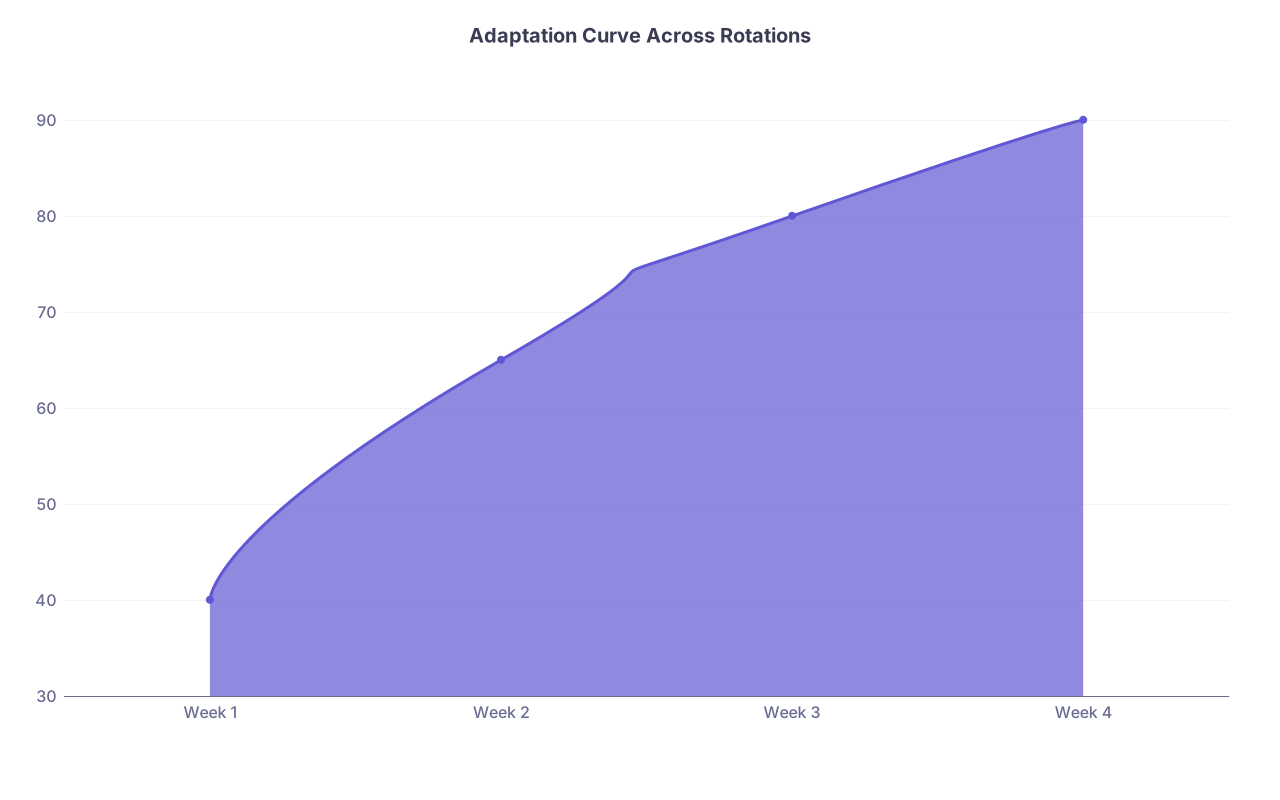
| Category | Value |
|---|---|
| Week 1 | 40 |
| Week 2 | 65 |
| Week 3 | 80 |
| Week 4 | 90 |
Call that line “% of systems stuff that feels under control.” You don’t get it to 100. You don’t need to. Around 80–90, your days stop feeling chaotic.
FAQ (Exactly 4 Questions)
1. What if I rotate so rarely at a site that it never feels worth learning their system well?
Treat it like a short-term deployment: create a mini-version of your systems notebook entry. You don’t need full templates and deep customization. You do need: how to log in, how to see your patients, how to place basic orders, and how to call for help. Even for a 2-week elective, that 20–30 minutes of setup pays for itself by day 2.
2. How do I avoid looking incompetent when I admit I’m new to a hospital system?
People can tell when you’re faking familiarity. Saying, “I know the medicine; I’m still learning the local system” actually builds trust. Pair that with competence on content—know your pathophys and management cold—and your credibility stays high. Confidence in what you do know plus humility about logistics is a good combination.
3. Should I keep separate sign-out systems for each hospital too?
No. Use one standard sign-out structure everywhere (ID, diagnosis, hospital course, active issues by system, contingency plans). The tool might differ (Epic sign-out vs Excel vs paper), but the structure in your head should be identical. You’ll give safer sign-out and be able to float between hospitals without re-learning how to hand off.
4. How do I deal with attendings who insist “this is how we do it here” and dismiss my usual workflows?
Do not fight them on their system. Say, “Got it, I’ll follow that here,” then quietly adapt your internal process. You can still use your own templates, your own checklists, and your notebook to keep yourself consistent. Let them own the hospital-specific quirks; you own your internal standard. If their way is unsafe, bring it up calmly with your senior or PD, not during rounds in front of the team.
Key points:
- Build one portable, organized “systems notebook” and standardize your own workflow across hospitals.
- On day 1 at any new site, ruthlessly front-load the logistics: access, EMR views, orders, communication.
- Protect your brain from context-switching with small routines, honest communication that you’re new to the system, and a consistent structure for how you see, think about, and document patient care—no matter what building you’re in.