
What happens if you sign the lease, order furniture, and then realize you have zero plan for telehealth—but your new patients expect it as a default?
If you’re launching a private practice now and treating telehealth as an “add-on later,” you’re already behind. Patients assume they can see you from their couch for basic stuff. Insurers increasingly reimburse for it. Competitors are using it to poach your patients the minute your schedule looks tight.
Let me walk you through how to bake telehealth into your practice from day one—without turning your life into a never-ending tech and compliance headache.
Step 1: Decide Exactly How Telehealth Fits Your Practice (Before Buying Anything)
Most physicians screw this up by starting with the software. Wrong move. You start with use cases.
Answer these three questions in writing:
- What visit types will be telehealth-eligible from day one?
- What percentage of your schedule do you want virtual in the first 3–6 months?
- What states are you licensed in (and realistically going to see patients from)?
If you dodge these decisions, your staff will make them for you on the fly, and you’ll end up with chaos.
Think in buckets:
- Medication follow-ups
- Lab result reviews
- Chronic disease follow-up after stable baseline in-person
- Behavioral health visits (if relevant)
- Simple acute issues (UTI, URI, rash checks, etc., depending on your specialty and state rules)
Then decide what is never telehealth in your practice (this line matters):
- New patients with complex conditions
- Visits requiring a physical exam or procedure
- Certain controlled substance visits (depends on DEA rules and your risk tolerance)
Write a one-page “Telehealth Eligibility Policy.” It does not need legal-speak. It just has to be clear enough that front desk and MAs can answer patient questions without slacking you for every edge case.
Step 2: Pick a Telehealth Platform that Plays Nice with Your EHR
Do not let a vendor talk you into a “beautiful, cutting‑edge telehealth app” that has no real integration with your EHR. That’s how you end up documenting in one system and messaging and scheduling in another, and everyone wants to quit by month three.
There are five core decisions you need to make.
| Decision | Options (Typical) |
|---|---|
| EHR vs standalone | EHR built-in vs 3rd party |
| Video type | Browser-based vs mobile app |
| Scheduling | Integrated vs manual |
| Messaging | Included vs add-on |
| Pricing model | Per provider vs per visit |
If you’re truly starting from scratch:
- Strong default: choose an EHR that has built‑in telehealth (Athena, Elation + integrated partner, DrChrono, Kareo, Jane, etc.)
- If you already picked an EHR and it has weak telehealth: look at a HIPAA-compliant platform like doxy.me (pro), Zoom for Healthcare, or VSee that integrates at least at the scheduling and link-delivery level
Your minimum technical checklist:
- HIPAA-compliant BAA from the vendor (no BAA = not an option, full stop)
- Waiting room capability (so patients aren’t in the room while you’re finishing another visit)
- Easy link delivery via SMS and email
- Works on mobile and desktop without downloading complicated software
- Screen-sharing (for imaging, labs, patient education)
- Ability for staff to start visits / room patients if you want that workflow
If a rep cannot show you a live mock visit—including scheduling, patient invitation, check-in, and documentation—in 15 minutes or less, move on. You do not have time to be their beta site.
Step 3: Build the Telehealth Scheduling Rules into Your Calendar Day One
Telehealth fails when the schedule is random. You get whiplash switching between in-person exams and virtual visits, your staff is confused, and wait times explode.
You want structure.
Start with blocks. For example:
- Morning: 9–11:30 a.m. in-person only
- Midday: 1–2:30 p.m. telehealth only
- Late afternoon: 3–5 p.m. in-person with 1–2 telehealth slots preserved for same-day follow-ups
You adjust this as you learn your patient mix, but do not start with “telehealth whenever.” That’s a guaranteed disaster.
Then define internal rules your staff actually use, like:
- New patient? In-person only (unless in specific exceptions you define).
- Established patient, stable chronic issue? Eligible for telehealth.
- Lives far away but in your licensed state? Favor telehealth when clinically appropriate.
- Sick visit with red-flag symptoms? They get triaged to in-person or ED, not to telehealth by default.
Now tie this into your scheduling script so the front desk is not guessing.
Example script for staff:
- “For this kind of follow-up, Dr. Lee can see you by video or in the office. Do you prefer telehealth or in-person?”
- “For first visits, Dr. Lee requires seeing you in person, but follow-ups may be virtual depending on your situation.”
Build these decisions into your scheduling system rules if the software allows it. If not, use appointment types named clearly:
- “Telehealth – Established – 20 min”
- “Telehealth – Brief Check – 10 min”
- “Office – New Patient – 40 min”
Make the telehealth nature of the visit painfully obvious in your calendar so you and staff do not miss it.
Step 4: Get Your Telehealth Compliance and Licensing Right (Before You See a Single Patient)
This is the boring part. It’s also where people get burned.
You need to answer:
- Which states are you licensed in now?
- Are you going to see any out-of-state patients?
- What are the telehealth practice-of-medicine rules for each state you touch?
The default assumption: You’re considered to be practicing where the patient is located. So if you’re in New York and the patient is sitting in New Jersey during the call, you need to be licensed in New Jersey, or you’re asking for trouble.
Make a stupidly simple spreadsheet:
- Columns: State, License status, Telehealth rules link, Prescribing rules, Online prescribing exceptions, Notes
- Rows: Every state you might see a patient from (start with your state + bordering states where patients realistically come from)
Then, two critical policies:
The address rule
You will document the patient’s physical location at every telehealth visit and verify it at the start of the encounter. If they’re in a state you don’t cover, you reschedule or redirect.The controlled substances rule
You will follow current DEA telehealth rules for controlled substances. These have changed repeatedly since COVID. You cannot assume “it was fine during the PHE” still holds.
Also update:
- Your Notice of Privacy Practices to mention telehealth explicitly
- Your consent forms to include telehealth consent (more on that next)
Yes, this is paperwork. Yes, it’s mandatory if you want to sleep at night.
Step 5: Create a Simple, Repeatable Telehealth Consent Process
Do not wing consent on camera. You won’t be consistent, and if you’re ever audited, you’ll regret it.
You need two layers:
- Written consent (once)
- Verbal confirmation (each visit, 1–2 lines documented)
Written consent can be:
- An e-signable form sent via your portal or email
- An online form integrated into your EHR intake
- Paper in-office for patients who will do telehealth later
Core elements you should cover (plain language):
- What telehealth is and what tools you use (video, audio, portal messaging)
- Risks: technology failure, privacy risks despite safeguards
- That they must be in a state where you’re authorized to treat them
- That they must disclose their physical location and a callback number
- That telehealth may not replace in-person care
Verbal mini-consent at the start of each visit can be as short as:
“Before we start, can you confirm you’re in [State] right now and you consent to proceed with this telehealth visit today?”
Then document something like:
“Telehealth visit via [platform]. Patient located in [state], consented to telehealth and verified contact number.”
Use a template or smartphrase in your EHR. If your note template doesn’t have this yet, fix it today.
Step 6: Set Up Your Telehealth Tech Stack and Physical Environment
Telehealth fails not because of medical issues, but because of stupid technical friction.
Here’s the bare minimum gear list that avoids amateur hour:
- Reliable wired or strong Wi-Fi connection where you do visits
- External webcam (if your laptop camera is mediocre or angled badly)
- Good microphone (a decent USB mic or headset)
- Neutral, uncluttered background (not the exam table with piles of boxes)
- Soft, even lighting (a cheap ring light or well-positioned lamp)
Also: decide where you’ll physically sit for telehealth. Is it:
- In a separate office room?
- In an exam room between in-person patients?
- At home on some days?
Whatever you choose, make it consistent and professional. I’ve watched physicians do virtual exams in an echoey hallway with fluorescent lights overhead. It screams “afterthought.”
You also want to hard-test:
- Joining visits as a provider from your laptop and phone
- Joining as a “fake patient” (have a friend or staff test from their phone on cellular and Wi-Fi)
- What happens when the patient’s audio fails
- How you switch to phone-only backup if the video dies
Don’t figure that out during your first real patient encounter.
Step 7: Build a Telehealth Workflow Your Staff Can Actually Follow
Telehealth isn’t just “you click a link and talk.” Everything you do in-person has an equivalent.
Walk through a full visit like this:
Scheduling
Staff schedules appointment using the right type (telehealth). System auto-sends confirmation and link.Pre-visit prep
Labs, imaging, referral notes pulled just like in-person. Pre-visit questionnaires sent if you use them. Copay or payment method confirmed if possible.Technical reminder
24 hours before: automated or staff reminder with simple instructions.
10–15 minutes before: reminder SMS/email with “click this link and test your camera.”Virtual check-in
MA or nurse enters the visit first (if you choose), confirms medications, allergies, vitals if self-reported, location, consent. Or you handle that yourself for lean ops.Provider visit
You join, confirm location/consent, do your exam as appropriate, document like in-person, and place orders.Post-visit wrap-up
Staff schedules follow-up (telehealth vs in-person and when), sends instructions, arranges labs/imaging.
Now put this in one-page SOP format for the team. No one is going to read a 20-page policy manual between phone calls.
Step 8: Decide Your Telehealth Payment and Pricing Rules
If you ignore the money flow, you’ll end up doing a pile of free care “just this once” that quietly becomes the norm.
For insurance-based practices:
- Confirm telehealth coverage and modifiers for your major payers before go-live
(Your clearinghouse or billing service almost always has a cheat sheet.) - Decide your default coding: usually same E/M levels as in-person, based on complexity or time; use appropriate telehealth POS and modifiers per payer.
- Set a policy for no-shows and late cancels for telehealth. Same as in-person, or slightly more lenient? Decide it. Communicate it in writing.
For cash-pay or hybrid practices:
- Decide if telehealth is priced the same as in-person for identical visit types (most private practices now treat them as equivalent).
- Set clear prices: “Telehealth follow-up: $X; Telehealth acute visit: $Y.”
- Make it easy to pay: card-on-file, link-to-pay post-visit, or pre-paid packages if that fits your model.
Your staff scripting matters a lot here, or patients will assume “video = cheaper.”
Example script:
- “A telehealth visit with Dr. Patel is billed the same as an in-person visit, and your insurance processes it the same way.”
Step 9: Train for Telehealth Communication and Virtual Exam Skills
Telehealth exposes weak communication skills instantly. You need to adjust how you show up on camera.
A few non-negotiables:
- Look at the camera regularly when giving important information, not just at your note.
- Say out loud what you’re doing: “I’m going to look at your chart for a moment,” so you don’t look distracted.
- Pause more. Video delays make rapid-fire speech harder to follow.
Clinical skills shift, too. You should have a mental (or written) checklist for what you can reasonably assess via telehealth for your bread-and-butter problems.
Example: primary care sick visit for cough
- Visual: Work of breathing, color, ability to speak full sentences
- Guided self-exam: Point tenderness, sinus pressure, throat using flashlight if possible
- Home vitals: Pulse oximeter, thermometer, home BP if available
If you find yourself repeatedly saying, “I can’t really tell over video,” then your screening criteria or your exam technique are broken. Fix those instead of improvising each time.
Step 10: Launch Soft, Track Problems Ruthlessly, Then Scale Up
Do not start your first week of private practice with 50% telehealth visits. That’s asking for disaster.
Better approach:
- Week 1–2: Telehealth for a small, specific subset (e.g., 1–2 slots per day for established follow-ups you know well).
- Track:
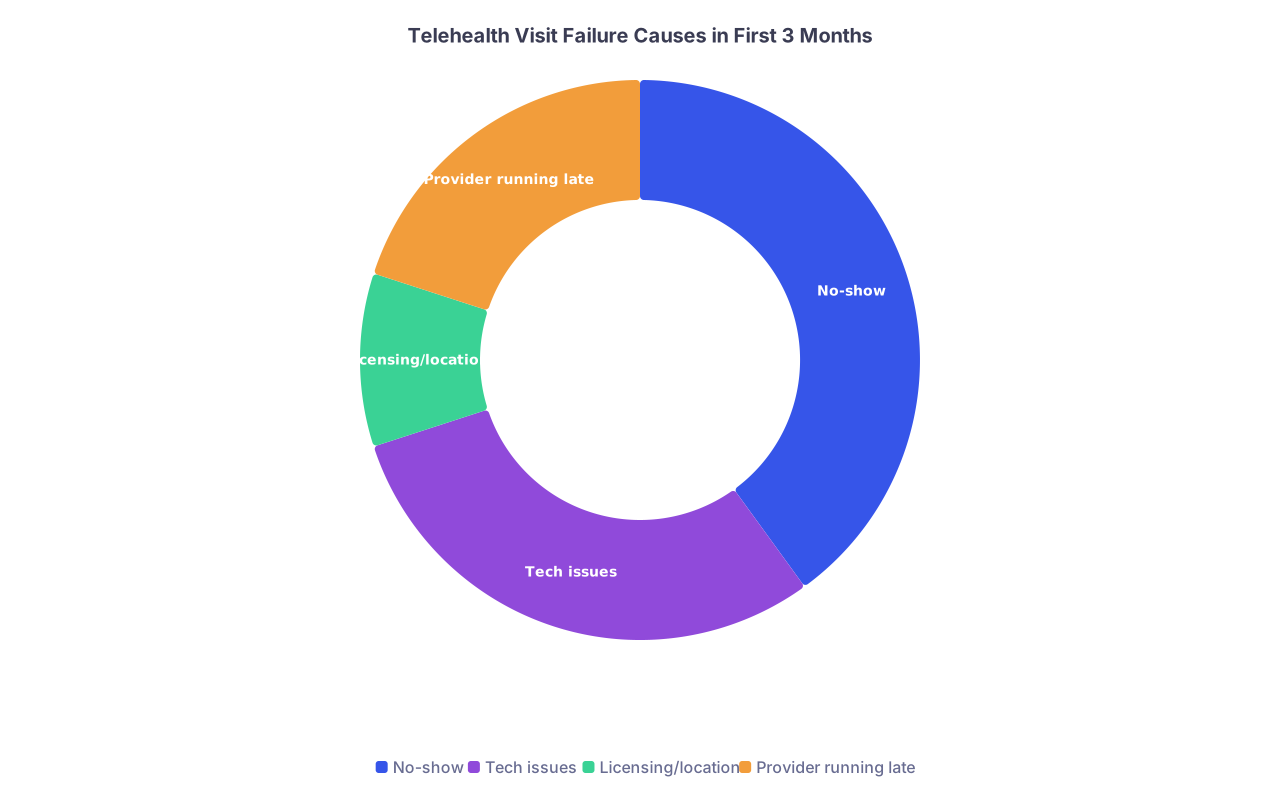
- No-show rate for telehealth vs in-person
- Tech failure rate (video/audio issues)
- Average visit length and overrun
- Patient complaints or confusion
- Fix the recurring problems:
- If no-shows are higher: adjust reminder timing, make the join link simpler, or tighten up confirmation.
- If you’re always running over: either your time slots are too short or you’re trying to manage issues that really need in-person.
- If tech fails a lot: move away from platforms that require downloads, and simplify instructions.
Once you’ve cleaned up the obvious mess, you decide how big you want telehealth to be in your practice long-term:
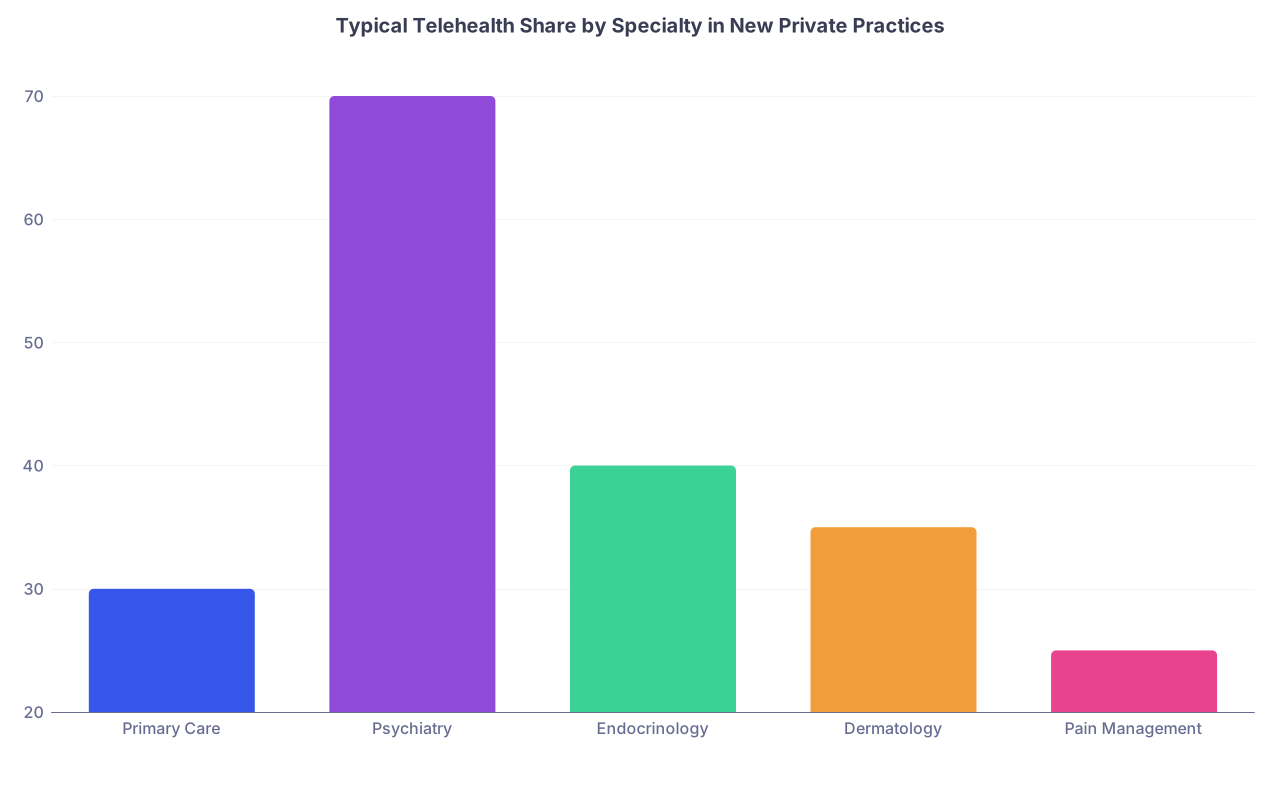
- 20–30% of total visits for a typical outpatient mix is common and sustainable.
- 50%+ is possible if your specialty fits (psych, certain IM practices, weight management, etc.), but only if your systems are tight.
| Category | Value |
|---|---|
| Primary Care | 30 |
| Psychiatry | 70 |
| Endocrinology | 40 |
| Dermatology | 35 |
| Pain Management | 25 |
How to Signal Telehealth from Day One to Your Patients
You want telehealth to feel like a core part of your brand, not a bolt-on.
Do these early:
- Website: “We offer same-day telehealth visits for established patients in [States]” on the home page, not hidden three clicks deep.
- New patient forms: Include checkboxes asking if they’re interested in telehealth for follow-ups.
- Reminder messages: “This visit is by video. You’ll receive a secure link 15 minutes before your appointment.”
- Office signage (if you have a physical space): “Ask us about video visits for follow-ups.”
Telehealth isn’t just a service line. It’s part of how patients experience your practice as modern and accessible.

Sample One-Page Telehealth Launch Checklist
If you’re the “just tell me what to do” type, here’s a condensed launch list you can literally check off:
- Define which visit types are telehealth-eligible vs. never-telehealth
- Select EHR/telehealth platform with BAA and basic integration
- Create telehealth-specific appointment types and calendar blocks
- Draft telehealth eligibility and scheduling rules for staff
- Update consent forms and Notice of Privacy Practices for telehealth
- Configure video platform (links, waiting room, SMS/email reminders)
- Set up physical telehealth workspace with proper camera, audio, lighting
- Build telehealth note templates (location, consent, exam structure)
- Verify payer telehealth billing, modifiers, POS, and coverage
- Decide pricing and no-show rules for telehealth and script them
- Train staff with 2–3 mock telehealth visits and scheduling scenarios
- Soft launch with limited telehealth slots and review issues weekly
Pin that above your desk during setup. If something isn’t on that list, it’s probably optional at the beginning.

| Step | Description |
|---|---|
| Step 1 | Start New Practice |
| Step 2 | Define Telehealth Visit Types |
| Step 3 | Choose EHR and Telehealth Platform |
| Step 4 | Set Scheduling Rules and Appointment Types |
| Step 5 | Update Consent and Policies |
| Step 6 | Configure Tech and Workspace |
| Step 7 | Train Staff and Run Test Visits |
| Step 8 | Soft Launch Limited Telehealth Slots |
| Step 9 | Review Metrics and Fix Issues |
| Step 10 | Scale Telehealth Share as Desired |
| Category | Value |
|---|---|
| No-show | 40 |
| Tech issues | 30 |
| Licensing/location | 10 |
| Provider running late | 20 |