The problem is not your willpower. The problem is your workflow.
Step 2 at home plus a smartphone plus endless micro-distractions is a rigged game. If you try to beat it with “more discipline,” you will lose. You need structure, constraints, and a repeatable system that makes focused work the default.
Here’s how to build a distraction‑proof Step 2 study workflow that actually survives your couch, your roommates, your phone, and your own brain.
1. Diagnose Your Real Distraction Pattern (30 Minutes, One Time)
You cannot fix what you have not measured. Vague “I keep getting distracted” is useless. You need specifics.
Step-by-step: Run a 1‑day distraction audit
Do this tomorrow on a normal study day. Do not change anything yet.
Set a simple timer
- Use your laptop (not your phone).
- Set a repeating 15‑minute timer (many apps or simple browser timer will do).
Each time the timer goes off, jot down:
- What you intended to be doing.
- What you were actually doing.
- Where you were (bed, desk, couch, kitchen table).
- What derailed you (phone, roommate, YouTube, hunger, “quick email,” etc.).
At the end of the day, categorize your distractions:
- Digital noise (social media, texts, browsing).
- Environment (noise, other people, TV, clutter).
- Internal triggers (boredom, anxiety, fatigue, perfectionism).
- Logistics (hunger, chores, email, admin tasks).
You will see a pattern. Every student I have worked with sees the same 3–5 triggers repeating all day.
- Pick your top 3 offenders
- Example:
- “Picking up my phone whenever a question feels hard.”
- “YouTube ‘study breaks’ that become 40 minutes.”
- “Studying on the couch and getting sleepy.”
- Example:
We are going to design your workflow specifically to attack these top 3.
2. Build a Physical Setup That Punishes Distraction
You cannot build a distraction‑proof workflow while studying in bed, phone in hand, 12 tabs open. That is fantasy.
You need a physical environment that makes the wrong behavior inconvenient.
A. Designate a single study zone
One place = study. Everywhere else = not study. This conditioning is powerful.
If you have a small apartment or shared space:
Choose a single chair + single surface for Step 2 only:
- A desk, table, or even a kitchen counter stool.
- Not your bed. Not the couch. Non‑negotiable.
Make it a clean surface:
- On the table: laptop, notebook/scratch paper, pen, water bottle. That’s it.
- Everything else lives somewhere else.
B. Create “friction” for your main distraction: the phone
You will not win if your phone is within arm’s reach. You are not special. Your brain is not stronger than 15 years of UX optimization.
Do this:
Physical distance rule: Phone must be at least 10 feet away while you are in a block.
- Ideally in another room.
- Face down, Do Not Disturb on.
Access friction:
- Use an app locker / digital well‑being setting:
- iOS: Screen Time → Downtime + App Limits.
- Android: Digital Wellbeing → Focus Mode / App Timers.
- Put social/media/entertainment apps in a folder on the last home screen page.
- Set a random 8‑digit Screen Time passcode and have a trusted friend/partner set it for you. You should not know it.
- Use an app locker / digital well‑being setting:
Notification triage:
- Hard rule: No push notifications from:
- Social media
- News
- Shopping
- Games
- Allow only:
- Phone calls
- Texts from 1–3 critical contacts (partner, family, childcare, etc.)
- Authenticator / banking if truly necessary
- Hard rule: No push notifications from:
This is not about being “strong.” This is about removing 90% of the triggers.
C. Control noise and people
Noise:
- Get one: noise‑cancelling headphones or at least over‑ear headphones.
- Use:
- Brown noise or low‑tempo instrumental (no lyrics).
- Same playlist every study session to condition focus.
People:
- Write a one‑sentence script and actually use it:
- “I am doing exam blocks 8–11 am every day; if my headphones are on, I’m not available unless something is urgent.”
- Put a visible signal at your study spot:
- Headphones on = “at work.”
- A small sign / sticky note can help with roommates or family.
- Write a one‑sentence script and actually use it:
3. Lock in a Daily Step 2 Structure That Eliminates Micro‑Decisions
Most “distraction” is really decision fatigue. “What should I do now?” is where your brain escapes to Instagram.
You need a fixed daily template that repeats almost exactly every day. Step 2 is perfect for this because the core ingredients are stable: questions + review + core reading.
A. A sample distraction‑proof Step 2 at‑home schedule (8–10 hour day)
Adjust the times, but keep the structure.
| Time | Activity |
|---|---|
| 08:00–08:20 | Wake up, coffee, light breakfast |
| 08:20–08:30 | Plan + warm‑up (no phone) |
| 08:30–10:00 | Block 1 (40 questions timed) |
| 10:00–11:00 | Review Block 1 |
| 11:00–11:15 | Short break (walk, snack) |
| 11:15–12:45 | Block 2 (40 questions timed) |
| 12:45–13:30 | Review Block 2 |
| 13:30–14:15 | Lunch (phone allowed) |
| 14:15–15:15 | Targeted content review |
| 15:15–15:30 | Short break (no social media) |
| 15:30–16:30 | Mixed questions / incorrects |
| 16:30–17:00 | Light review + shutdown |
This is not magic. It is just predictable. Predictable kills distraction because there is no “What now?”
B. Write your daily “micro‑contract”
Every morning, before you open anything:
On paper (not digital), write:
- “Today I will complete:”
- X full blocks (timed).
- Y minutes of review.
- Z minutes of content review (specific topic).
- “Today I will complete:”
Under that, write your no‑negotiation rules:
- “During blocks:
- Phone stays outside room.
- No internet except Qbank + reference (UpToDate/AMBOSS, etc.).
- No snacks / kitchen trips until block ends.”
- “During blocks:
Sign and date it.
It sounds corny. It works. Your brain respects written rules more than vague intentions.
4. Use Block Design to Force Deep Focus (Instead of Endless “Studying”)
Your core Step 2 study unit is not “an afternoon of studying.” It is one timed block plus review. If you protect that unit, your score goes up. Let distractions fracture it, your score stalls.
A. The Block Protocol (for at‑home Step 2)
For each block (usually 40 questions, 60 minutes):
Pre‑block (3–5 minutes)
- Phone goes to its spot outside the room.
- Headphones on, brown noise on.
- Open:
- Qbank only (UWorld, AMBOSS, etc.).
- Optional: one reference tab (UpToDate or equivalent) if you use it for post‑block review, not during the block.
- Close:
- Browsers with other tabs
- Messaging apps
During block
- Timed mode. No pausing unless:
- Bathroom emergency.
- Actual real‑world emergency.
- No switching windows to “just check something.”
- If you feel the urge to check phone / internet, note it on scratch paper as a tally mark. That is all.
- Timed mode. No pausing unless:
Immediate post‑block break (5 minutes)
- Stand up.
- Leave the study spot.
- No phone.
- Quick water / stretch / bathroom.
Review phase (45–60 minutes)
- Return to desk.
- Phone stays away until review is finished.
- For each question:
- Label: correct but confident / correct but guessed / incorrect.
- Write 1–2 bullet key takeaways for:
- Why the correct answer is right.
- Why your answer was wrong (knowledge vs process vs misread).
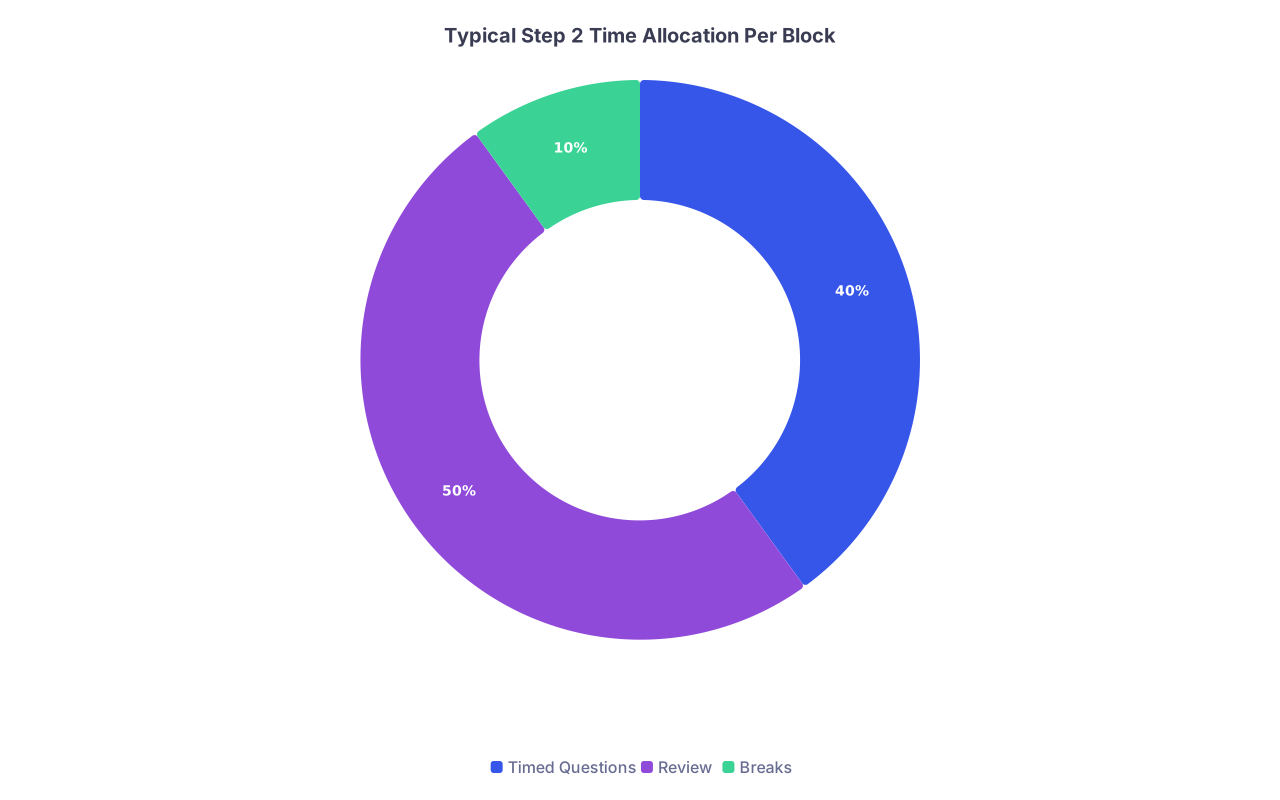
| Category | Value |
|---|---|
| Timed Questions | 40 |
| Review | 50 |
| Breaks | 10 |
You are training two things: content mastery and focus endurance. Both matter.
5. Kill Digital Distractions at the Source (Technical Setup)
If you rely on “I just will not click it,” you will lose by Day 3.
A. Use website blocking software aggressively
On your laptop/desktop, install:
- Cold Turkey, Freedom, StayFocusd, LeechBlock, or similar.
Set up:
A “Step 2 Focus” profile that blocks:
- All social media (X, Instagram, TikTok web, Facebook, Reddit, etc.).
- YouTube (unless you truly use specific medical channels; even then, strongly consider blocking).
- News sites.
- Shopping / streaming sites.
Schedule:
- Block from your main study hours (e.g., 08:30–12:45 and 14:15–16:30) every weekday.
- Use a password you do not know if possible (have a friend set it).
On your phone (besides Screen Time / Digital Wellbeing):
- Delete the worst apps completely for your dedicated study period (e.g., 6–8 weeks).
- If “delete” feels too hard, move them into a folder named “AFTER STEP 2” on the last page and block them with timers.
B. Turn your devices into single‑purpose tools during study
Laptop: Exam device.
- Only open:
- Qbank
- Reference
- Anki (if you use it)
- PDF notes / book
- Only open:
Tablet (if you have one): Reference / notes device.
- Not for entertainment.
- Keep entertainment apps off this device during your study period.
You want every device you glance at to reinforce: “I am here to train for Step 2.”
6. Fix the “Internal” Distractions: Fatigue, Boredom, Anxiety
You can block all the websites in the world, but if your brain is fried, it will still wander.
A. Protect sleep like an exam score multiplier
The Step 2 curve is not kind to the sleep‑deprived.
Non‑negotiable targets:
- 7–8 hours in bed, aiming for 7+ hours of sleep.
- Fixed wake time, 7 days a week, within 30 minutes.
Hard rule: no starting new Qbank blocks after 9–9:30 pm. Late‑night “grind” is mostly low‑quality questions and high‑quality anxiety.
B. Plan boredom‑safe breaks
Most students’ “5‑minute break” becomes a 45‑minute scroll because there is no pre‑decided alternative.
Define default break options that do not suck you in:
5–10 minute options:
- Walk up and down the hallway or outside your building.
- Light stretching.
- Make tea / water refill.
- Quick breathing exercise (4‑7‑8 or box breathing).
20–30 minute lunch:
- Phone allowed, but only for:
- Texts.
- One short video / episode with a hard stop. Use a timer.
- Avoid starting long episodes, new series, or intense games. Those are built to override your plan.
- Phone allowed, but only for:
C. Handle anxiety by scheduling it
Anxious brain loves to attack during blocks: “What if I fail? What if my score is worse than Step 1?”
Do this instead:
Worry time block:
- Choose a 15‑minute window every evening (e.g., 19:00–19:15).
- During the day, when anxious thoughts show up, tell yourself:
- “I am collecting these for 7 pm. Not now.”
- Jot a one‑line note in a small pad and go back to work.
At 19:00, sit down and actually write:
- Worst‑case scenario.
- What you can still control.
- One concrete action for tomorrow (extra block, targeted review, asking for help).
This trains your brain that worrying has a time and place. That alone helps stop intrusions during study blocks.
7. Combine Qbank + Content Without Drowning in Resources
Another huge distraction: constantly switching resources because you feel behind.
You need a resource minimalist strategy:
A. Choose a primary Qbank and stick to it
For 99% of students, that is:
- UWorld as primary.
- Optionally AMBOSS as a second bank if you have time once through UWorld.
Do not bounce between 3–4 banks. That is disguised procrastination.
B. One main content source, not five
Pick one of:
- OnlineMedEd
- AMBOSS library
- Boards & Beyond (if you have it from Step 1, some still use it for Step 2)
- A single concise text (e.g., Step‑Up to Medicine for IM‑heavy review)
Then define rules:
- Content review is:
- 60 minutes max on weekdays.
- Targeted to weaknesses discovered in Qbank blocks, not random watching.
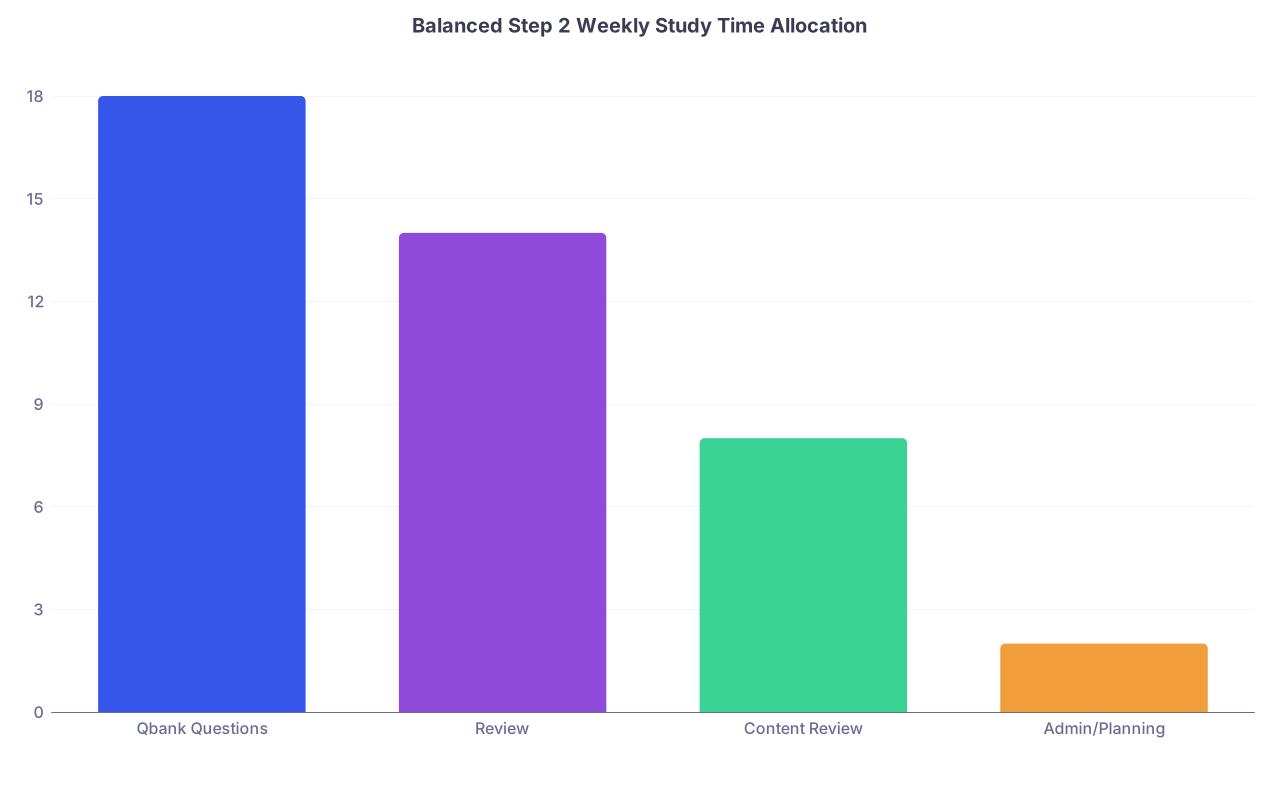
| Category | Value |
|---|---|
| Qbank Questions | 18 |
| Review | 14 |
| Content Review | 8 |
| Admin/Planning | 2 |
If you are spending 4–5 hours a day “reviewing videos,” you are hiding from questions.
8. Build an Anti-Drift System: Weekly Check-Ins and Tiny Adjustments
Your Day 1 plan will not survive untouched to Week 4. That is fine. What kills people is drift without correction.
A. Run a 30‑minute weekly reset (same time every week)
Example: Sunday 17:00–17:30.
Steps:
Look at your data:
- Number of blocks completed.
- Percent correct by system.
- Anki or flashcard streak (if using).
Ask 3 blunt questions:
- Where did I lose the most time to distractions this week?
- What time of day were my best blocks? My worst?
- Which 1–2 topics are repeatedly weak?
Make 3 specific adjustments:
- One schedule tweak (e.g., move your hardest block earlier).
- One environment/tech tweak (e.g., add website to blocker, move phone further away).
- One content focus (e.g., “Extra 30 minutes on renal each day this week”).
Write these on a sticky note and place it at your study spot.
B. Track only 3 metrics daily
Overtracking becomes its own distraction. Keep it simple:
- Number of questions completed.
- Percentage correct.
- Distraction tallies (how many times you felt urge / broke rules).
Write these at the end of your shutdown routine each day. That is your scoreboard.
9. Use Simple Process Flows for Complex Tasks (Study Admin, Applications, Life)
If part of your distraction is juggling emails, rotation tasks, or early residency planning, put those into a structured process too.
Here is a simple flow you can adapt for any recurring “admin” task:

| Step | Description |
|---|---|
| Step 1 | Start Day |
| Step 2 | Plan & Micro-contract |
| Step 3 | Block 1 |
| Step 4 | Review 1 |
| Step 5 | Block 2 |
| Step 6 | Review 2 |
| Step 7 | Lunch & Messages |
| Step 8 | Content Review |
| Step 9 | Mixed Questions/Incorrects |
| Step 10 | Daily Shutdown & Metrics |
| Step 11 | Short Admin Time |
| Step 12 | End Day |
Notice: Admin (emails, logistics, etc.) is at the end, not scattered all day. That alone can save you an hour of context‑switching.
10. What This Looks Like in Real Life (A 2‑Week Implementation Plan)
You do not need to be perfect on Day 1. You need to improve your system each day for two weeks. That is enough to build habits that hold.
Week 1: Foundation and Friction
Day 1–2:
- Do the distraction audit.
- Set up:
- Study zone.
- Phone distance rule.
- Website blockers on laptop.
- Define your daily template and micro‑contract.
Day 3–4:
- Run 1–2 solid blocks per day using the full Block Protocol.
- Practice leaving your phone in another room and not touching it until review is done.
- Identify which breaks are safest for you (walking vs phone vs stretching).
Day 5–7:
- Increase to 2–3 blocks per day if your schedule allows.
- Add fixed content review window.
- Do your first weekly reset on Day 7:
- Adjust schedule.
- Tighten blockers where you slipped.
Week 2: Refinement and Endurance
Day 8–10:
- Lock in your optimized time blocks (e.g., hardest block first thing).
- Add more aggressive friction if you still cheat (friend sets Screen Time code, unplug Wi‑Fi during blocks if needed).
Day 11–14:
- Aim for your target weekly question count (varies, but 280–400 is typical for intense prep).
- Run the exact same daily study structure 4–5 days in a row.
- Do your second weekly reset, focusing on:
- Weakest topics.
- Times of day your focus collapses.
At the end of 2 weeks, if you have mostly stuck to this, you will notice two things:
- It feels weird to study in bed or keep your phone next to you.
- Starting a block feels less like a battle and more like “this is just what I do at 8:30.”
That is the whole point.