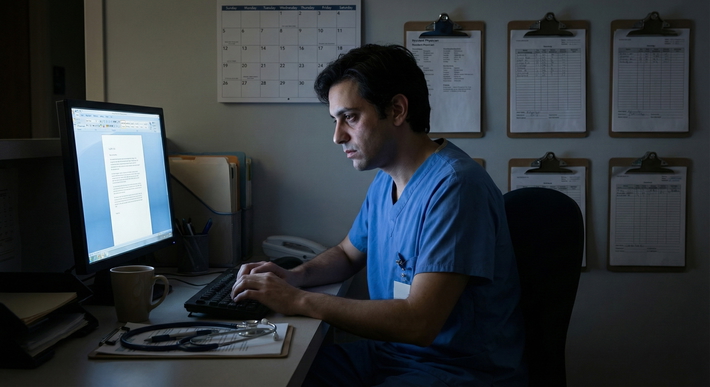
The blunt truth: you can’t assume you’re allowed to record lectures or rounds just because you have a disability—and you also shouldn’t assume you’re not. With the right documentation and process, recording is often allowed as an accommodation. Doing it secretly is where people get burned.
Let’s walk through what’s actually allowed, what’s smart, and what gets people in trouble.
The Core Answer: Yes, Often—but Only If You Do It Properly
Here’s the clean version:
- Lectures – Recording as an accommodation is commonly allowed in U.S. medical schools when approved by disability services. It’s even specifically mentioned in federal disability guidance as a reasonable accommodation for many students.
- Small-group sessions (problem-based learning, case conferences, skills labs) – Sometimes allowed, sometimes restricted. Usually needs explicit, written approval and often comes with rules about not sharing or posting anything.
- Clinical settings (rounds, patient encounters, sign-out, pre/post-op huddles) – This is where things get tricky. HIPAA, state recording laws, hospital policies, and professionalism all collide. Recording on rounds is not automatically allowed even with an accommodation—and often is outright restricted unless tightly controlled.
So the real question isn’t “Is it allowed?”
It’s: “Can I get recording approved as a formal accommodation for specific settings—and what rules will apply?”
Step One: Understand the Legal and Policy Landscape
You’re dealing with three overlapping rulebooks:
- Disability law (ADA / Section 504 or equivalent)
- Institutional policies (your med school and hospital system)
- Privacy/confidentiality law and ethics (HIPAA, state wiretap laws, professionalism)
If you ignore any one of those, you’re exposed.
Disability Law: The Part That Helps You
Under the ADA and Section 504 (in the U.S.):
- You’re entitled to reasonable accommodations that give you equal access to the educational environment.
- The Department of Education has specifically flagged audio recording of class lectures as a common, reasonable accommodation for some students with disabilities (e.g., ADHD, learning disabilities, hearing difficulties, certain psychiatric conditions, brain injuries).
Translation:
Recording lectures isn’t some fringe thing you’re asking for. It’s normal in the disability world when justified by your documentation.
But “reasonable” doesn’t mean unlimited. Schools can:
- Restrict use and distribution (e.g., only for personal study, no sharing, no posting clips).
- Deny recording in certain sensitive settings (e.g., standardized patient encounters where proprietary cases are used, or confidential discussions).
They’re not supposed to deny across-the-board for no good reason. But they can set conditions.
Step Two: Recording Lectures—What’s Usually Allowed
If we’re talking about traditional didactic lectures (in-person or online), here’s how it usually plays out when you go through disability services properly.
What’s typically possible
Most schools will allow:
- Recording audio of live lectures (phone, digital recorder, laptop app).
- Using apps that sync audio to notes (e.g., Notability, OneNote with recording).
- Access to already-recorded lecture capture systems when they exist.
- Sometimes: transcripts or CART captioning if hearing is part of your disability.
But only after:
- You’re registered with disability services.
- Your documentation supports why recording is necessary.
- They’ve issued an official accommodation letter.
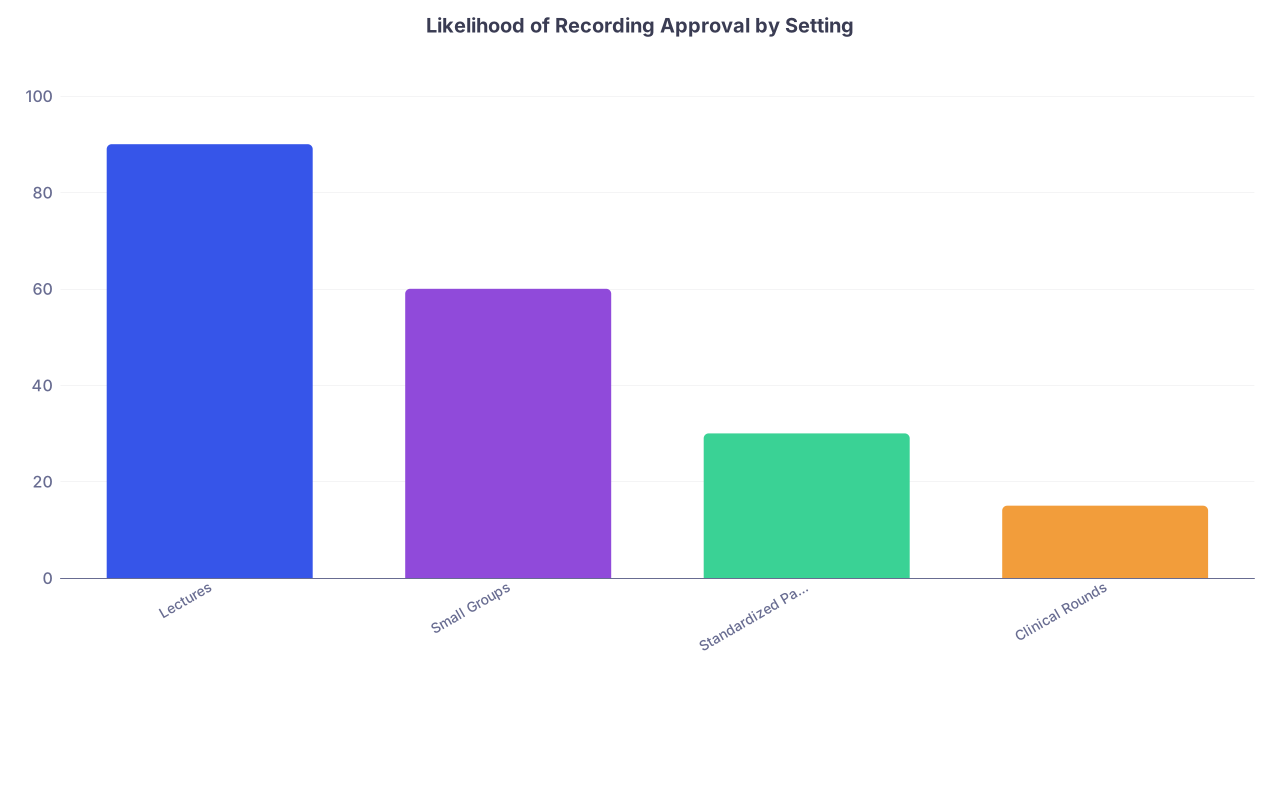
| Category | Value |
|---|---|
| Lectures | 90 |
| Small Groups | 60 |
| Standardized Patients | 30 |
| Clinical Rounds | 15 |
These numbers aren’t official statistics; they’re reality-based estimates from how schools generally behave.
Common conditions you’ll be required to follow
Most accommodation letters include language like:
- Recordings are for your personal academic use only.
- You may not share, distribute, or post recordings (including to classmates, social media, or cloud platforms accessible to others).
- Recordings must be deleted at the end of the course or academic year, or once grades are final.
- In some schools, faculty are allowed to opt out in rare, clearly defined scenarios (guest lecturers with proprietary material, sensitive content, etc.), but then an alternative accommodation must be provided.
If you violate these conditions (e.g., you post a clip of your professor on TikTok), schools are generally very unforgiving. I’ve seen students get hauled in front of professionalism committees for that.
Step Three: Small Groups, Case Discussions, and Skills Labs
This is the gray zone.
Think:
- Problem-based learning (PBL)
- Team-based learning (TBL)
- Ethics roundtables
- Case prep in small cohorts
- Communication or OSCE prep sessions (non-graded)
Schools get nervous here because:
- Students in the room might share personal experiences.
- Faculty might discuss de-identified clinical scenarios that still feel close to real cases.
- There’s more back-and-forth discussion and less formal structure.
What usually happens:
- Recording may be allowed with an explicit carve-out in your accommodation letter.
- Sometimes, you’re allowed to record faculty explanation segments but not group discussion.
- In some programs, the default is no recording unless each participant consents and/or a “recording in progress” notice is given.
If the school denies recording in these environments entirely, they’re supposed to offer functionally equivalent alternatives. For example:
- Faculty-provided notes or outlines
- Access to slides plus faculty-provided clarifications
- One-on-one review sessions
- Peer note-taking support
If your school just says, “No, we don’t allow that anywhere” and doesn’t offer any alternative, disability services is being lazy—and that’s challengeable.
Step Four: The Big One—Can You Record Rounds or Clinical Encounters?
This is the part everyone’s anxious about, especially students with memory, processing, or attention challenges.
Let me be blunt:
You cannot just hit record on rounds. That’s a fast track to a serious professionalism or privacy complaint.
Clinical spaces are governed by:
- HIPAA (or equivalent privacy law outside the U.S.)
- Hospital policies on devices and recordings
- State recording laws (one-party vs all-party consent)
- A heavy overlay of professional norms about patient confidentiality
So what’s possible?
What usually is NOT allowed
Most hospitals and med schools will not allow you to:
- Record actual patient encounters on your personal device.
- Record team discussions that mention identifiable patient information.
- Store any clinical audio on non-secure platforms or personal cloud services.
Even if patients consent, that doesn’t mean the hospital or institution does. You need institutional approval, not just individual consent.
What sometimes can be arranged as an accommodation
Here’s where disability services + the clinical education office can get creative, if they want to:
- Written or electronic team summaries after rounds (structured handouts, bullet-point plans).
- Permission to step out briefly to write notes or review an EHR summary again.
- Protected time after rounds to debrief with a senior or preceptor and confirm details.
- Use of secure institutional tools that already exist (e.g., accessing dictated notes, review of sign-out documents).
- Very rarely: tightly controlled recording on a secured, institution-approved device with prewritten policies on storage, retention, and deletion. This is uncommon and usually requires high-level approval.
If you’re thinking, “But I really need audio to process complex information,” that’s valid. You just need to understand that in clinical spaces, the solution might not be literal recording, but a different, privacy-safe way to get you the same benefit.
Step Five: How to Actually Request Recording as an Accommodation
Here’s the practical sequence that tends to work.

| Step | Description |
|---|---|
| Step 1 | Contact Disability Services |
| Step 2 | Submit Documentation |
| Step 3 | Interactive Meeting |
| Step 4 | Other Accommodations |
| Step 5 | Define Settings |
| Step 6 | Draft Accommodation Letter |
| Step 7 | Notify Faculty |
| Step 8 | Implement and Adjust |
| Step 9 | Need Recording? |
1. Get in the door with disability services
Schedule a meeting with disability services (called different things: Student Accessibility Office, Office for Equity and Inclusion, etc.).
Bring or arrange:
- Neuropsych testing, psych eval, or medical documentation that explains:
- Your diagnosis (if you’re comfortable sharing; usually needed).
- Functional impact: trouble with real-time processing, memory, attention, auditory processing, etc.
- Why recording (or reviewable material) would materially help you.
- Any past accommodations from college or prior training (if you have them).
2. Be explicit about where you need recording
Don’t just say “I want to record everything.”
Say:
- “I’m requesting the ability to audio-record lectures as an accommodation.”
- “I’d like to talk about how to handle small groups and case discussions.”
- “For clinical rotations, I struggle to retain complex plans—can we explore options that give me a reviewable record that’s privacy-compliant, whether that’s secure notes, summaries, or something else?”
This shows you understand the constraints and are trying to be reasonable.
3. Push for clarity in the accommodation letter
Your goal: a letter that says in plain language what you’re allowed to do.
Something like:
Student is approved to use audio recording of didactic lectures and non-confidential small-group sessions as a reasonable accommodation. Recordings are for personal use only, may not be shared or distributed, and must be deleted at the end of the course. In cases where recording is not feasible due to confidentiality or course design, functionally equivalent alternatives (such as detailed instructor notes or individual review sessions) should be provided.
If they want to totally block recording in certain settings, they should spell that out and offer alternatives. Don’t accept a vague “depends what the instructor wants” with no backup plan.
Step Six: Practical Rules So You Don’t Get Burned
Here’s the unofficial code of not screwing this up:
Never record secretly.
Even in a one-party consent state, it’ll destroy trust with faculty and classmates if they find out. And if any PHI slips in? Now you look reckless and unprofessional, not “resourceful.”Tell faculty you have an approved accommodation.
Usually this is done via the official letter from disability services. In some schools, you’re also expected to briefly say, “Per my accommodation, I’ll be recording the audio for my personal study only.”Use headphones when playing back.
You don’t want PHI-adjacent or controversial discussions blasting into a shared space or reading room.Keep recordings local and secure.
Avoid auto-upload to random clouds with weak privacy controls. Use password protection if your device allows it.Never post or share clips. Ever.
Not to your class GroupMe. Not on TikTok. Not as a meme. That’s the line that, once crossed, is really hard to come back from.Honor deletion expectations.
End of course or academic year? Delete the recordings. If you’re ever audited or questioned, “I still have three years of audio from everything ever” is a bad look.
How To Handle Pushback from Faculty or Admins
You will meet three kinds of responses:
- Supportive but uninformed – “I didn’t know students could do that, but if disability services approved it, fine.”
- Mildly resistant – “I’m not comfortable being recorded.”
- Flat-out obstructionist – “I don’t allow that in my class. I don’t care what they said.”
Here’s how to respond intelligently.
For “I’m not comfortable being recorded”
You can say:
“I understand. Disability services has approved audio recording as an accommodation for me. They’ve asked me to follow strict rules—personal academic use only, no sharing, and deletion at the end of the course. If there are specific parts of the session you’re worried about, I’m happy to pause recording for those, as long as we can find another way to get the material.”
If they still balk, loop disability services in. You should not be negotiating solo beyond a reasonable attempt.
For outright refusal
This is where disability services earns their paycheck. Forward the response and say:
“I’m encountering resistance from [course/attending]. Can you please help clarify expectations or suggest alternative accommodations?”
Do not argue “ADA law!” to faculty in the hallway. That rarely ends well. Use the processes your school already has.
Quick Reality Check: Future Tech and Where This Is Going
Let’s be honest: AI note-takers, real-time transcription, and auto-summarization tools are exploding. People are already quietly using:
- Otter.ai
- Notion AI
- Built-in transcription on phones and laptops
So the real future question isn’t “Can I record?” It’s:
- How will schools and hospitals regulate and integrate these tools safely?
- How can students with disabilities access these tools equitably without breaking privacy rules?
My prediction: in a few years, more schools will:
- Offer institution-controlled, secure recording and transcription for lectures as a standard, not just an accommodation.
- Set up clear “no recording” zones in clinical environments, but pair them with structured alternatives (summary notes, standardized handoff formats, etc.).
- Have stronger explicit policies on AI transcription tools in both classrooms and clinics.
If you’re a student now, you’re living through the awkward transition period. So document what you need, use the systems that exist, and don’t be the test case for a major policy violation.
Key Takeaways
- Yes, you often can record lectures as an accommodation—if you go through disability services and follow the conditions they set. Secret recording is a bad idea.
- Clinical settings and rounds are a different beast. Direct recording of patient-related conversations is usually not allowed; instead, work with disability services to get privacy-safe alternatives that meet the same need.
- Your best move is formal, not informal. Get an explicit accommodation letter, follow it carefully, and loop disability services in anytime you face resistance or need a more tailored solution.