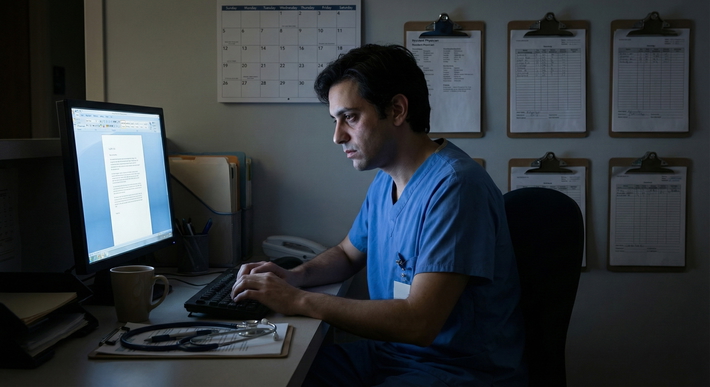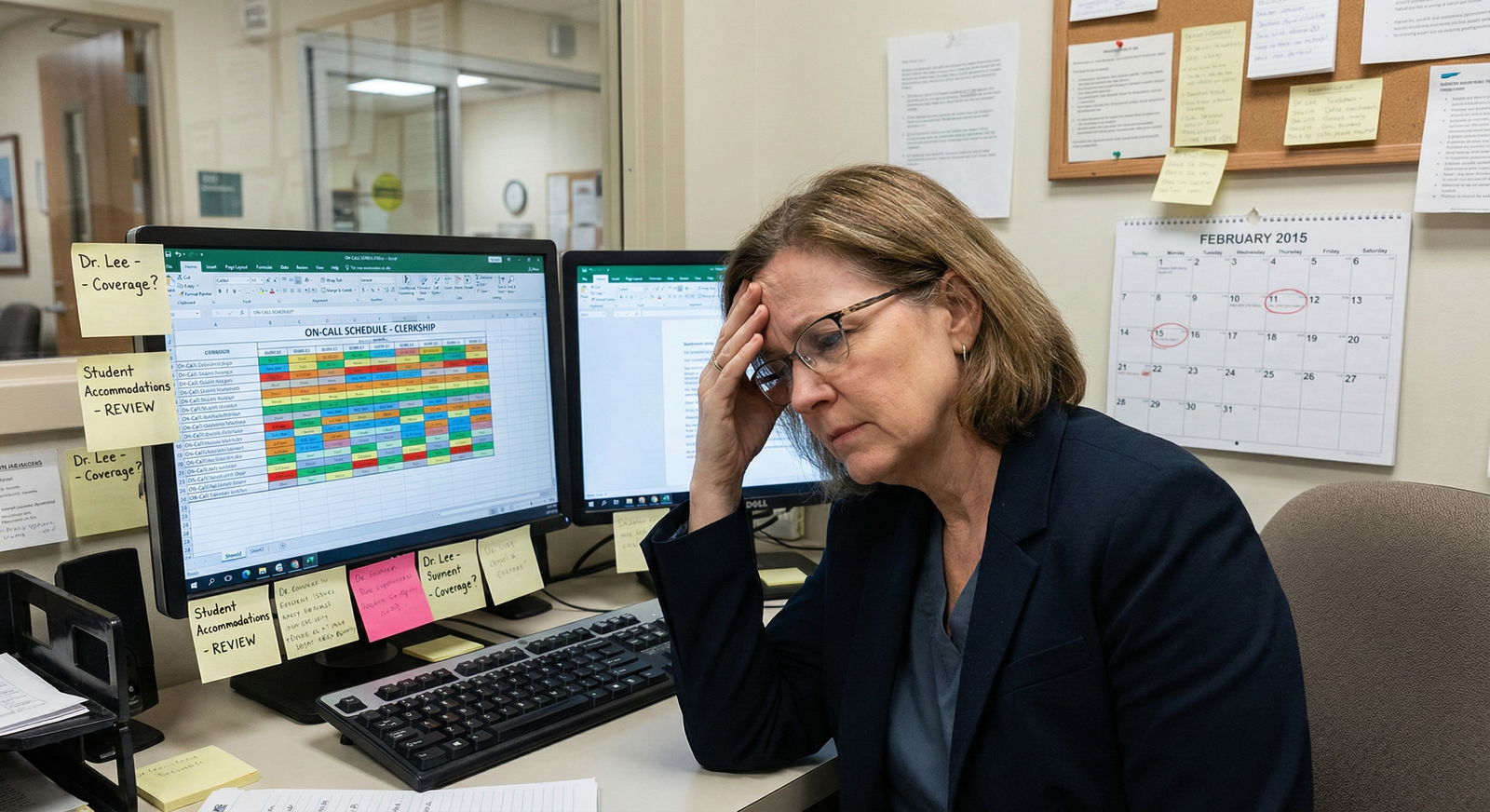
The most dangerous message in your inbox is not the angry attending email. It is the unread one from Occupational Health.
I have watched trainees lose rotations, stipends, and even their place in a program not because they were unsafe, unprofessional, or incapable—but because they ignored, delayed, or skimmed emails from Occupational Health and disability services. Not dramatic misconduct. Just… neglecting admin messages that looked boring.
Do not make that mistake.
The Hidden Power of Occupational Health (and Why Trainees Underestimate It)
You probably treat most institutional emails as noise:
- “Mandatory training”
- “Flu campaign”
- “System downtime”
- “Wellness survey”
Occupational Health (Occ Health) and Employee/Student Health emails often look exactly like that noise. But they are not peers. They carry institutional power and legal teeth.
Here is what people consistently fail to understand:
- Occ Health controls your fit-for-duty clearance.
- They control vaccine / immunity compliance.
- They often control or coordinate aspects of disability accommodations that involve safety or exposure risk.
- Their documentation feeds into HR, GME, risk management, and sometimes licensing issues.
If you are a trainee with a disability, chronic illness, pregnancy, immunosuppression, mental health condition, or you simply need modified duties after an exposure or injury, ignoring these emails is like setting your own career on fire in slow motion.
What Ignoring One Email Can Trigger
I have seen:
- A resident removed from the schedule for 3 weeks because they did not upload a TB test result despite 5 email reminders.
- A pregnant intern forced off high-risk rotations at the last minute because she never responded to Occ Health about radiation and call modifications. Result: chaos in scheduling, resentment from peers, and avoidable stress.
- A student with a seizure disorder almost reported to the state medical board because Occ Health did not have the correct paperwork clarifying control and restrictions—because the student never answered their follow-up questions.
None of those people were reckless clinicians. They were just overwhelmed and assumed “I’ll get to it when I have time.”
They never had time.
How Occupational Health Intersects with Disability Accommodations
If you think disability accommodations are only about the disability office or dean of students, you are already behind.
For health-related accommodations—especially anything that touches patient safety, infectious risk, or clinical duties—Occ Health is often:
- A gatekeeper: They clear you, clear you with restrictions, or pull you from duties.
- A translator: They convert medical details from your clinician into functional restrictions (e.g., “no night shifts,” “no exposure to chemotherapy,” “no heavy lifting,” “needs frequent breaks”).
- A record-keeper: They hold files that other parts of the institution may rely on without you realizing it.
Ignoring their emails means:
- Your accommodation process stalls.
- Your restrictions are not documented properly.
- Your “word-of-mouth” agreements with a friendly attending have no institutional backing when leadership changes.
The Ugly, Practical Reality
Let me be blunt: programs and hospitals care deeply about liability. If anything goes wrong—an exposure, a fall, a med error—the question becomes:
- Was this trainee cleared for duty?
- Did we know about any disability that required adjustment?
- Did we follow our own policies?
Occ Health documentation, or the lack of it, becomes exhibit A.
If you need disability accommodations and you ghost Occ Health, you are:
- Making it easier for the institution to claim they “never knew” the full picture.
- Weakening any future grievance or legal claim you might need to make.
- Leaving your attending and chief residents in the dark about what you actually can and cannot safely do.
The Most Common—and Costly—Email Mistakes Trainees Make
Let me walk through the repeat offenders I see every year.
1. Treating Occ Health Email Like a “Suggestion”
Subject lines like:
- “Reminder: complete health screening”
- “Action required: fit-testing”
- “Follow-up needed: immunization documentation”
- “Confidential: medical clearance pending”
Many trainees read that as “I should do this at some point.” No. That wording usually means:
- Your clearance is conditional or incomplete.
- You are technically not compliant.
- The clock is ticking toward an automated consequence (schedule freeze, access revocation, etc.).
2. Assuming “If It Were Serious, Someone Would Call Me”
This is a fantasy. Most large systems are automated to death. Here is what actually happens:
- System sends email.
- System sends second email.
- System may escalate to “supervisor notified.”
- Then one day, you are told you cannot start a rotation, badge access is cut, or your schedule is removed.
Nobody is going to hold your hand through this. The expectation is:
- You check your institutional email at least once daily.
- You act on Occ Health messages promptly—often same or next business day.
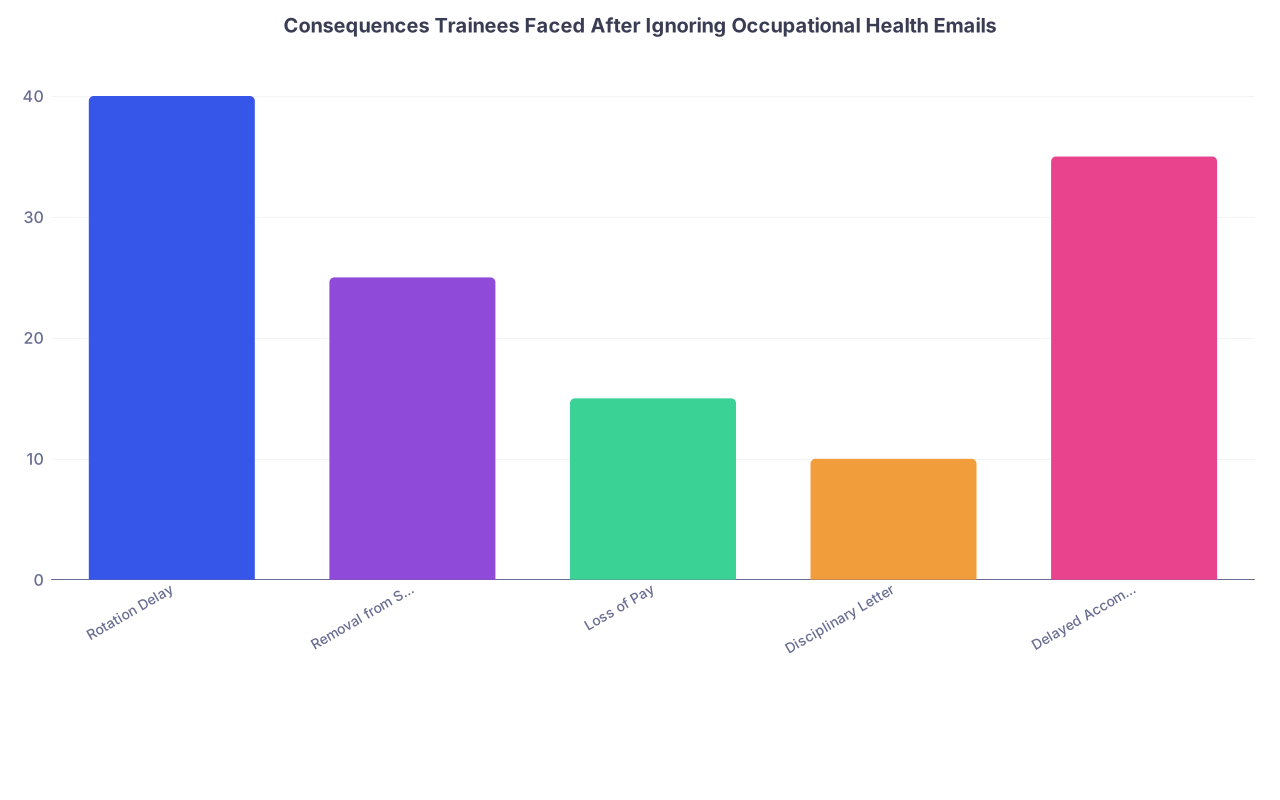
| Category | Value |
|---|---|
| Rotation Delay | 40 |
| Removal from Schedule | 25 |
| Loss of Pay | 15 |
| Disciplinary Letter | 10 |
| Delayed Accommodation | 35 |
3. Believing Your Program Coordinator Will Handle It
Program coordinators are already drowning. They are not your personal Occ Health assistant. Common misconceptions:
- “If this was really urgent, my coordinator would forward it.”
- “I’m sure they’re tracking my compliance somewhere.”
Here is the truth:
- Occ Health systems often track individual compliance, not by program.
- Coordinators may only get high-level flags like “X resident is non-compliant,” not the details.
- Even if they want to help, they cannot respond for you. Only you can sign consents, authorize release, upload your medical documents, or clarify your condition.
Counting on a coordinator to save you from an ignored Occ Health email is like counting on your landlord to pay your student loans.
4. Skimming and Missing Critical Deadlines
Buried in those dense institutional messages are phrases that should set off alarms:
- “By [date], you must…”
- “Failure to complete will result in…”
- “Required prior to participation in clinical activities…”
- “You are not cleared for patient care until…”
Trainees often skim for what looks “optional” and miss those sentences. The result:
- You show up for orientation or a new rotation and are told you are not allowed to see patients.
- You lose critical weeks of required clinical time—with no easy way to make it up.
- Your disability accommodations that depend on Occ Health’s clearance never kick in.
5. Not Recognizing When an Email Signals a Legal/Disability Issue
Some Occ Health emails are about compliance. Some are about your rights and protections. Trainees often fail to distinguish them.
Red flag phrases that relate to disability, medical leave, or accommodations:
- “Please have your treating clinician complete the attached form about your functional limitations.”
- “We require clarification regarding any restrictions affecting patient care.”
- “You may be eligible for workplace adjustments. Contact…”
- “We have received information that you may have a medical condition affecting your duties.”
These are not routine admin pings. They are your chance to:
- Get formal documentation of what you need.
- Avoid being placed in unsafe situations.
- Prevent rumors and whisper campaigns about your “fitness” by having a clear, official record.
Ignoring these is a direct hit to your future self.
Why This Is Extra Dangerous for Trainees with Disabilities
If you live with a disability or chronic condition, the stakes are even higher.
You are already walking a tightrope:
- Wanting privacy.
- Fearing stigma.
- Needing real support and adjustments.
- Worrying about appearing “weak” or “problematic.”
So when a “confidential health” email comes from an institutional address, the instinctive response is often avoidance. Delete, archive, promise yourself you’ll handle it when you are “less busy.”
That pattern creates three big, predictable problems.
Problem 1: Your Needs Never Become Official
You might have:
- A quiet agreement with an attending about longer breaks.
- An informal understanding with a chief that you will not take 28-hour calls.
- A classmate who swaps certain tasks with you when symptoms flare.
None of that matters if:
- Occ Health and the disabilities office never see this codified.
- There is no formal accommodation letter or modification plan.
- Documentation trails are empty or outdated.
When leadership changes or there is a crisis (like COVID, staffing shortages, a serious error), everything informal evaporates. You will be judged on what is in the system, not what you vaguely mentioned once to a friendly supervisor.
Problem 2: You Look Non-Compliant Instead of Needing Support
If Occ Health is trying to clarify your limitations and you ignore them, you do not appear overwhelmed or anxious. You appear non-compliant.
I have sat in meetings where the narrative shifted in real time:
- “This resident is struggling; we should see what support they need.”
becomes - “We have repeatedly asked for documentation and they have not responded. This is a professionalism and reliability issue.”
That reframing is brutal. And it comes from email patterns that, from your side, felt like “I am just too tired and scared to deal with this right now.”
Problem 3: You Lose Leverage When Things Go Badly
If you ever need:
- To contest an adverse action.
- To appeal a dismissal or remediation.
- To file an ADA-based complaint.
You need a paper trail showing:
- You engaged with the process.
- You responded to Occ Health.
- You provided what you reasonably could.
- They had the information necessary to act properly and still failed.
When Occ Health can show a long line of unanswered messages, your position weakens dramatically, even if your underlying need was valid and serious.
Practical Systems to Never Miss an Occupational Health Email Again
Now the constructive part. You do not have unlimited mental bandwidth. So you need systems, not heroic willpower.
1. Create Brutal Email Filters and Labels
Do this now, not “sometime this month”:
Create inbox rules that:
- Flag any email with:
- “Occupational Health”
- “Employee Health”
- “Student Health”
- “Medical clearance”
- “Immunization compliance”
- “Fit for duty”
- Apply a bold, screaming label like “URGENT – HEALTH CLEARANCE”.
- Mark as important or priority.
- Flag any email with:
If your system allows:
- Forward a copy of those flagged emails to an alternate account you check more often.
- Or send a text notification via your email client.
2. Block Time Daily for “Administrative Life Support”
You cannot rely on catching these between pages and consults. You need 10–15 minutes per day, non-negotiable, for:
- Institutional email (with Occ Health high on the list).
- Required online forms and portals.
- Uploading documents and screenshots.
Think of it as brushing your teeth. Annoying, repetitive, but failure has cumulative and ugly consequences.

| Step | Description |
|---|---|
| Step 1 | Start of Day |
| Step 2 | Check institutional email |
| Step 3 | Open immediately |
| Step 4 | Scan other critical emails |
| Step 5 | Complete form or schedule visit |
| Step 6 | Set calendar reminder |
| Step 7 | Confirm submission |
| Step 8 | Proceed to clinical duties |
| Step 9 | Any Occ Health message |
| Step 10 | Action needed today |
3. Respond Even When You Do Not Have the Answer Yet
One of the biggest mistakes: waiting to respond until you have every document, every lab, every note from your doctor.
Do this instead:
- Reply within 24 hours with:
- Acknowledgment that you received the email.
- What you understand they need.
- When you expect to provide it.
- Any barriers you are facing.
Example:
“I received your email about clarifying my work restrictions. I have an appointment with my treating physician on [date] and will ask them to complete the attached form by [date+2]. If you need anything sooner or different, please let me know.”
Now you look engaged and responsible, not evasive. And if they later claim you “never responded,” you have evidence otherwise.
4. Maintain a Personal Archive of Health-Related Docs
Never rely solely on the hospital’s portal. Keep your own folder (encrypted if needed) with:
- Vaccine records.
- TB tests, titers, immunity documentation.
- Disability accommodation letters (from disability services).
- Occ Health clearance letters or emails.
- Any forms your own physicians have completed for the institution.
So when Occ Health says, “We never received X,” you are not at the mercy of their system. You can resubmit within minutes.
| Document Type | Why It Matters |
|---|---|
| Immunization records | Required for clinical clearance |
| TB / titer results | Often annually or at intervals |
| Accommodation letters | Proof of approved disability adjustments |
| Work restriction forms | Basis for modified duties |
| Fit-for-duty clearances | Needed after illness, injury, or leave |
5. Tie Your Disability Process Together Intentionally
If you are in the disability accommodations space, you likely have:
- A disability office or dean of students.
- Occ Health.
- Your own treating clinicians.
- Program leadership / GME office.
The classic disastrous pattern: each of these knows a different fragment, and nobody has the full picture because you are too exhausted or scared to coordinate.
Do not rely on magic coordination. Explicitly connect the dots:
- Ask disability services:
- “What, if anything, do you expect Occ Health to know?”
- Ask Occ Health:
- “What information do you share with my program, and what remains confidential?”
- Keep your clinicians aware:
- “The hospital is asking for this form; can we review it together so it is accurate and supports my needs?”
You want alignment. Contradictory paperwork between your doctor, Occ Health, and disability services will delay or derail your accommodations and may raise “fitness” concerns.
Future of Medicine: More Automation, Less Mercy
You may think this will get easier as systems “modernize.” That is naïve.
The trend line is clear:
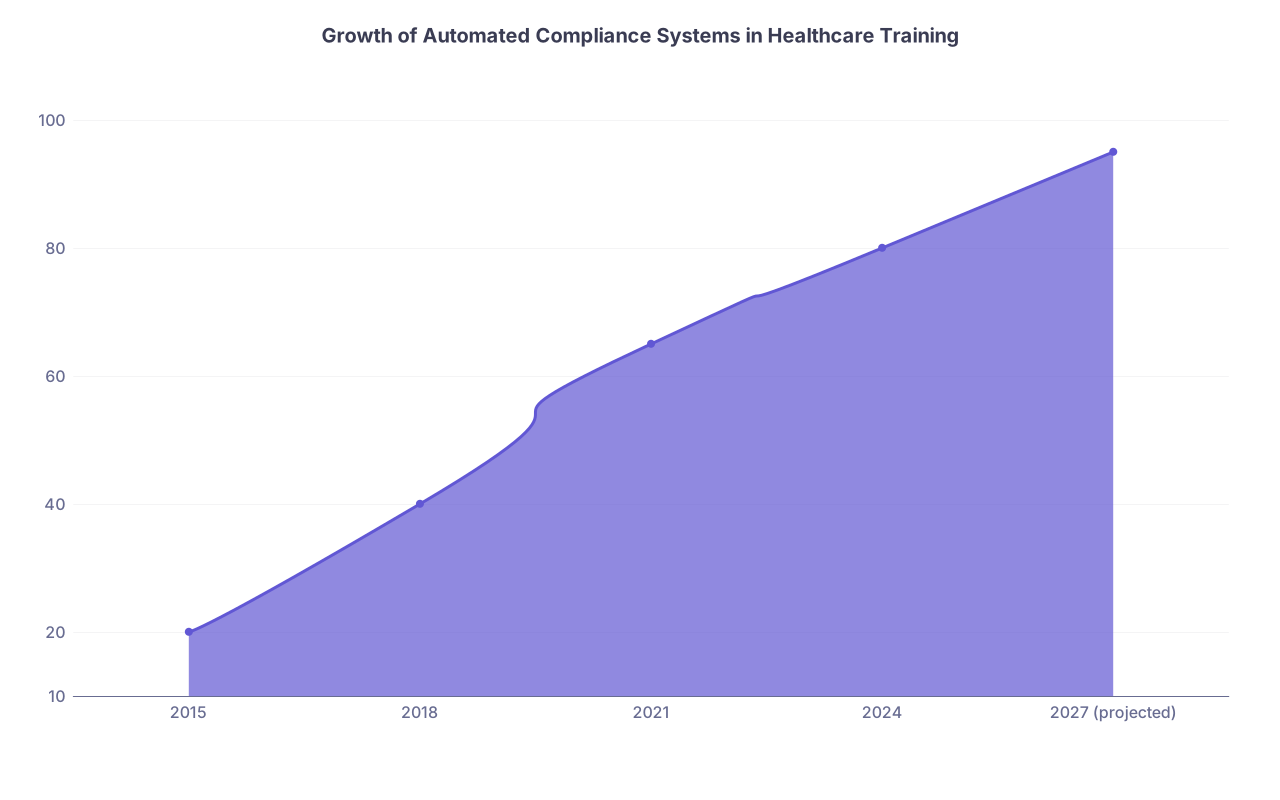
| Category | Value |
|---|---|
| 2015 | 20 |
| 2018 | 40 |
| 2021 | 65 |
| 2024 | 80 |
| 2027 (projected) | 95 |
Hospitals and medical schools are:
- Moving to fully automated compliance platforms.
- Linking health clearance to electronic scheduling, badge access, and EMR privileges.
- Standardizing “if X not completed by Y date → lockout” processes with no human override.
In disability accommodation, expect:
- More algorithmic “risk scoring” of roles and conditions.
- More templated restriction sets.
- Less ad hoc “let’s work something out quietly” and more “we follow the policy exactly as written.”
That means:
- There will be less forgiveness for missed Occ Health communications.
- “I did not see the email” will not be a workable excuse.
- Your ability to protect yourself depends heavily on process literacy—knowing how these systems think and act.
Ignoring Occ Health in that environment will not just be careless. It will be reckless.
A Quick Reality Check: What This Is Not About
To be clear, I am not saying:
- Occ Health always gets it right. They do not.
- Their forms are always reasonable. Some are absurd and intrusive.
- You must instantly comply with every request without questions. You have rights.
But you cannot exercise those rights if you are not engaging at all.
You can:
- Ask for clarification about what information is truly necessary.
- Push back on irrelevant or overbroad requests.
- Loop in your disability office or a legal advocate if the process seems discriminatory.
You cannot do any of that if their emails sit unread in your inbox for three months.

What To Do Today
Do this now, before the next crisis hits:
- Log in to your institutional email.
- Search for:
- “Occupational Health”
- “Employee Health”
- “Student Health”
- “fit for duty”
- “immunization compliance”
- “medical clearance”
- Make a list of any emails from the last 6–12 months you did not fully act on.
- For each one:
- Determine if anything is still outstanding.
- If you are unsure, reply today and ask explicitly, “Is there anything still pending on my side?”
Then:
- Set up that aggressive email filter and label.
- Block 10 minutes tomorrow on your calendar titled “Occ Health / Admin check.”
Open your inbox right now and type “Occupational Health” into the search bar. If something pops up that you do not immediately recognize as resolved, open it and deal with it before you see your next patient.