Already in Residency and Hate Tech? How to Cope with a Digital Hospital
You’re in the call room at 1:17 a.m., staring at a spinning wheel on the EHR login screen. Again. You just spent 12 minutes trying to order a simple CBC and type & screen. The nurse is paging you because the order “isn’t showing up yet,” and you’re thinking: I did not go to med school for this.
You’re not a “tech person.” You don’t care about app updates, you hate new phone interfaces, and now you’re stuck in a fully digital hospital where every move requires clicking through six screens and three drop-downs. You feel stupid, slow, and vaguely angry. Meanwhile, your co-resident blasts through orders like they were born inside Epic.
Here’s the reality: you’re not going to turn your hospital back into paper charts. The tech is not going away. But you also don’t have to be miserable or feel incompetent for the next three years.
Let me walk through what actually helps if you’re already in residency, you hate tech, and you’re stuck in a digital hospital right now.
Step 1: Admit the Real Problem (It’s Not That You’re “Bad at Tech”)
Most residents who say “I hate tech” are actually dealing with a mix of specific problems:
- You never got proper EHR training (or it was rushed and useless).
- The interface is overloaded with junk.
- You’re terrified of mis-clicking and harming someone.
- You’re cognitively fried and tech friction is the last straw.
This is not a character flaw. It’s a workflow mismatch.
I’ve watched older attendings on Epic who “hate computers” run circles around younger residents because they learned one thing: how to make the system bend to their habits instead of trying to memorise everything.
Start by defining where the pain is coming from. Be specific. On your next shift, actually write it down (on paper if you want):
- I get stuck when…
- I waste time when…
- I feel anxious when…
Common culprits I’ve seen:
- Finding old notes
- Reconciling meds
- Admission order sets
- Discharge summaries
- Messaging consultants in the system
- Finding imaging results buried in tabs
Pick your top three specific pain points. Those are what you’ll attack first. Not “being better at tech” in general. That’s too vague.
Step 2: Build a Tiny Personal “EHR Survival Kit”
You don’t need to be a superuser. You need a small set of reliable shortcuts and crutches that work for you.
You’re going to create a one-page, personal “EHR survival kit” you can glance at on a bad day. I mean literally one page.
That kit should include:
How to do your most common 5–7 tasks, step by step
Example:- Admit a patient
- Place common admission orders
- Write a basic admit H&P
- Write a progress note
- Order a CT with contrast
- Write a discharge summary
The 3–5 most important keyboard shortcuts
The ones that:- Jump to your patient list
- Search the chart
- Jump to orders
- Create a new note
The names of your two “tech buddies”
More on that in a second.
You can keep this as:
- A folded sheet in your white coat
- A sticky note on your workstation
- A locked notes app on your phone (if allowed)
The point is: stop relying on frazzled, sleep-deprived memory. Externalise the steps so your tired brain has less to carry.
Step 3: Use “Tech Buddies” Instead of Random Asking
Random “hey how do I do this?” questions are inefficient. Half the time the person you ask is just as lost, and the other half they’re too busy to give you a proper walkthrough.
You need designated tech buddies.
Pick:
- One co-resident in your year who seems fast with the EHR
- One senior resident or fellow who clearly has their workflow dialed in
Then say something like:
“Look, I’m not great with the system and I’m trying to get faster. Could I bug you once or twice a shift for very specific EHR questions if I can’t figure it out? I promise I’ll keep it short and write down what you show me.”
This matters for two reasons:
- You remove the shame. You’ve already admitted you’ll be asking; now it’s not awkward.
- You get consistent answers from people who learned the right way once.
When they show you something, don’t just let them click through while you nod. Literally say:
“Do that again, but slower, and talk through each click. I’m going to write this down.”
And then add it to your survival kit.
Step 4: Standardise Your Notes and Orders (Stop Re-inventing the Wheel)
Here’s where a lot of “I hate tech” people bleed time: they try to be creative in the worst possible place—documentation and orders.
You want boring, standard, copyable patterns.
SmartPhrases / Templates Are Not Optional
If your system has SmartPhrases, dot phrases, templates, whatever—use them. Ask your tech buddy or chief resident for:
- A standard admit H&P template
- A standard progress note template per service
- A standard discharge summary template
- A sign-out / handoff template if your EHR supports it
Then customise lightly:
- Insert your favourite exam phrases
- Put your assessment/plan structure in your voice
(e.g., problem-based vs system-based)
Do not build from scratch unless you have to. The point isn’t originality. It’s clarity and speed.
Pre-Built Order Sets
You know that feeling where you’re terrified you forgot DVT prophylaxis, or you missed a key admission order? That’s mental load the EHR can actually solve for you.
Find or ask for the correct:
- Standard admission order sets for your main services
- ED to floor admission bundles
- Post-op order sets for common surgeries
- Discharge med reconciliation workflows
Have a senior walk you through their admission flow once:
“Show me exactly what you click in what order for a standard CHF admit.”
Write down each step. Use that same pattern every time unless you have to deviate.
You’re not trying to be clever. You’re trying to be consistently safe.
Step 5: Set Hard Rules for When You Stop Fighting the System
Part of why you hate the tech is because you’re battling it all the time. You keep trying to do something “your way” when there is already an accepted workaround that’s good enough.
Make yourself some hard rules like:
- If I’ve tried a task twice and it’s not working → I stop and ask my tech buddy or charge nurse.
- If it’s the third time in a week I hit the same wall → I write it down and ask for a 5-minute micro-lesson during a calmer moment.
- If something is time-sensitive and patient safety is involved → I pick up the phone rather than wrestling with the EHR.
You’re allowed to say to a nurse:
“I’m having an issue getting this to go through in the system right this second. I’m calling radiology now / giving you a verbal order while we sort the click path.”
You’re not a bad doctor for prioritising the human-to-human steps over a laggy interface when seconds matter.
Step 6: Protect Your Brain from Tech-Induced Decision Fatigue
The digital hospital is an endless series of small decisions:
- Which note type?
- Which encounter?
- Which checkbox?
- Which order panel?
This is why you feel drained and irrationally angry at screens. It’s not the pixels. It’s the micro-decisions.
You reduce that by:
Defaulting as much as possible
Always use the same:- Note types (e.g., “Medicine Progress Note” every time)
- Order sets
- Tab layout or workspace if the system supports it
Limiting experimentation during peak hours
Don’t try a new feature or view at 5 p.m. with 12 patients to see.
Put a sticky note:
“Try [x feature] on a calm morning, not on call.”Creating “must-do” checklists that live outside the EHR
Example for discharges:- Reconcile meds
- Schedule follow-up
- Give return precautions
Put that on paper or in a non-digital checklist so the EHR isn’t the only keeper of your workflow.
This isn’t about being low-tech. It’s controlling when you engage deeply with the system so you aren’t constantly fried.
Step 7: Use the System to Reduce Your Typing and Clicking
You probably assume “more digital” means “more annoying.” Not always. There are some genuinely helpful features that you’re probably ignoring because you’re in survival mode.
Ask your EHR trainer or your sharp co-resident:
- Does the system support voice dictation or speech recognition?
- Can I pull forward yesterday’s note and just update the parts that changed?
- Can I favourite orders so I’m not searching from scratch each time?
- Can I create custom order panels (e.g., “CHF admit workup”)?
Even if you adopt one of those, you can save 20–30 minutes per shift once it’s part of your routine.
Here’s a rough comparison of effort with and without using the system’s tools:
| Task | Manual Each Time | With Templates/Shortcuts |
|---|---|---|
| Admit H&P | 12–18 minutes | 5–8 minutes |
| Daily progress note | 8–12 minutes | 3–6 minutes |
| Standard admission orders | 6–10 minutes | 2–4 minutes |
| Discharge summary | 15–25 minutes | 7–12 minutes |
You do those tasks multiple times per day. Small improvements compound brutally fast.
Step 8: Stop Internalising the System’s Stupidity
Let me be blunt: a lot of hospital software is badly designed. Clumsy. Counterintuitive. Created by people who haven’t placed a 3 a.m. stat order in their lives.
You are allowed to say:
“This interface is dumb.”
“This workflow doesn’t match reality.”
“This is not my personal failure.”
Separate:
- Your clinical reasoning
from - Your ability to remember where radiology reports are hidden.
I’ve watched excellent clinicians feel like frauds because they couldn’t find an old echo report. That’s absurd.
One practical way to stop blaming yourself: whenever you hit an annoying tech roadblock, mentally label it:
- System stupidity
or - Skill gap I can close
“System stupidity” examples:
- Needing five clicks to see the vitals trends
- Fields you must fill that aren’t clinically relevant
- Having to log in three different times per shift because of timeouts
Those are not on you. Don’t carry them emotionally.
“Skill gap I can close” examples:
- Not knowing the quickest way to place a specific order
- Not realising you can favourite an order panel
- Not knowing how to quickly message a consultant through the EHR
Those, you target deliberately, one at a time.
Step 9: Manage the Emotional Side So You Don’t Burn Out on Screens
The tech frustration often spills into general burnout. You start thinking:
- “I’m not cut out for modern medicine.”
- “I’m too slow; I’m dragging everyone down.”
- “I miss actual medicine, not this computer nonsense.”
You’re not alone. Plenty of strong clinicians quietly feel the same.
A few things that help:
Say it out loud to someone safe
“I’m really struggling with the EHR side. I feel like it’s making me worse at my job.”
Often your co-resident or attending will say, “Same,” and share one or two hacks they use.Set a “post-shift digital cutoff”
On heavy computer days, give yourself a rule:
“No more screens for 60–90 minutes after I get home.”
Walk, shower, cook, do anything analog.Protect a tiny piece of your day that’s 100% clinical-human
Even if it’s 5 minutes: sit at the bedside without a computer. Listen. Examine. Ask about their family. You did not go into medicine to be a data entry clerk; make sure some part of your day reminds you of that.
Step 10: Use the System’s Data For You, Not Just Against You
Most residents only experience digital systems as a source of extra work. But there’s one underused angle: using the data it collects to make your life easier.
Examples:
- Use your EHR’s dashboard (if it exists) to quickly see who’s trending the wrong way—saves trips back and forth.
- Use built-in task lists to avoid missing orders or unsigned notes.
- Filter your patient list by “new result” or “abnormal labs” if your system allows it.
- Review pattern data (frequent flyers, readmission trends) to fine-tune your discharge teaching. This makes your discharges faster and safer over time.
Is this advanced usage? A bit. Start small: pick one “dashboard-ish” feature and have someone show you how they use it. If it doesn’t help, drop it. If it does, you keep it.
What This Looks Like in Real Life: A Sample “Make Tech Suck Less” Week
Here’s how you could approach this without adding hours to your life.

| Step | Description |
|---|---|
| Step 1 | Day 1 - Identify Pain Points |
| Step 2 | Day 2 - Build Survival Kit |
| Step 3 | Day 3 - Ask Tech Buddy for 2 Tricks |
| Step 4 | Day 4 - Create Note Templates |
| Step 5 | Day 5 - Standardise Admission Workflow |
| Step 6 | Day 6 - Add 1 Shortcut Feature |
| Step 7 | Day 7 - Review What Helped |
Day 1:
Write down the 3 moments you felt most stuck with tech.
Day 2:
Draft your one-page survival kit with current best-guess steps.
Day 3:
Ask your tech buddy: “Can you show me the fastest way you do [pain point #1 and #2]?”
Day 4:
Steal or refine one template note with a senior.
Day 5:
Shadow a senior or fellow doing one admission and literally copy their sequence of clicks.
Day 6:
Add one feature (favorites, dot phrase, or order set) to your daily workflow.
Day 7:
Look back: which change saved you the most strain? Lock that in.
This is not a tech revolution. It’s a series of small, tactical adjustments.
When You Should Escalate Beyond Self-Fix
Sometimes, your frustration is a systems problem so bad that it’s unsafe. You’re not obligated to silently endure that.
Examples:
- Orders consistently not firing or disappearing
- Critical results hard to find or delayed by interface quirks
- System outages with no backup process
In those cases:
- Document specific incidents (dates, times, impact).
- Bring them to your chief resident or program director.
- Use your hospital’s safety reporting system if available.
You’re not “complaining about tech.” You’re reporting patient safety risks. Big difference.
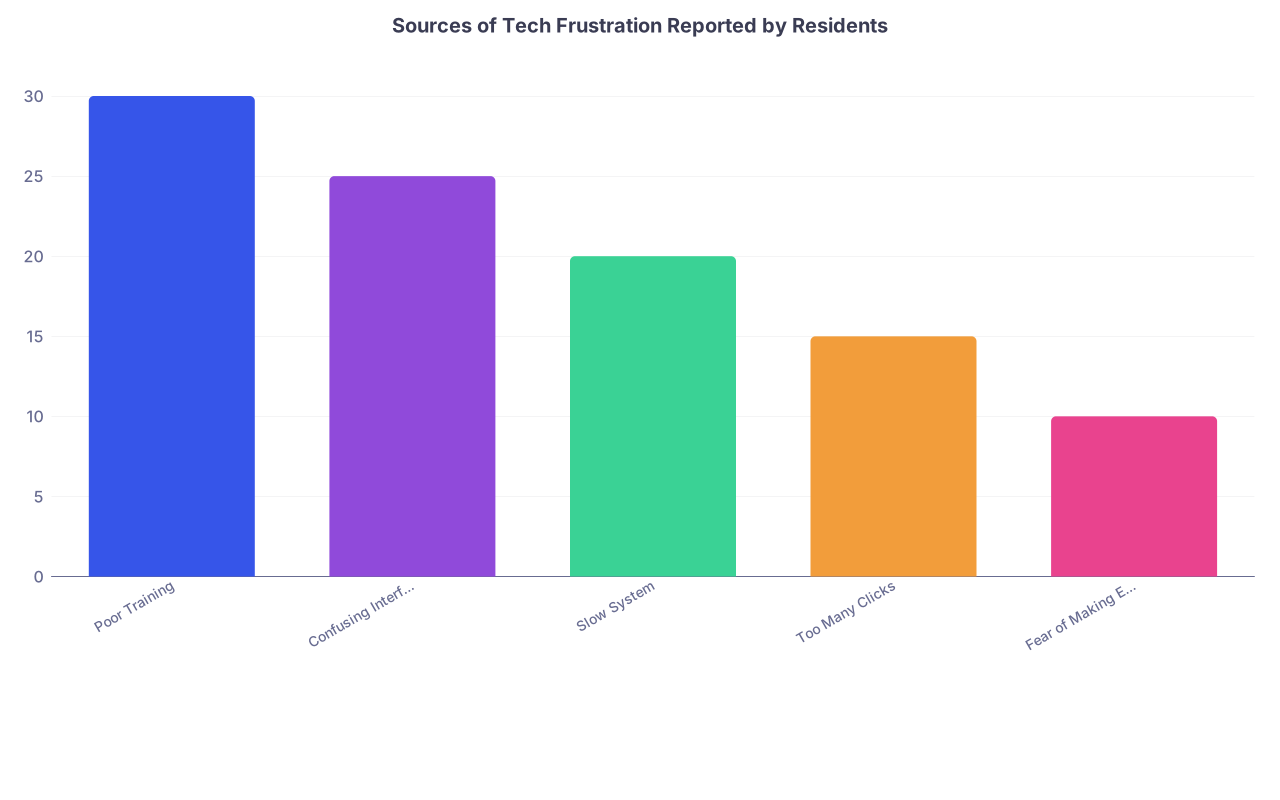
| Category | Value |
|---|---|
| Poor Training | 30 |
| Confusing Interface | 25 |
| Slow System | 20 |
| Too Many Clicks | 15 |
| Fear of Making Errors | 10 |
FAQ (Exactly 4 Questions)
1. I’m already behind on notes. How do I find time to learn new EHR tricks?
You don’t sit down for a 2‑hour tutorial. You piggyback learning onto what you’re already doing. Pick one task you’re doing today (e.g., discharge summary). Ask a senior to show you their fastest way while you’re literally working on that discharge. You incorporate one change and keep going. Micro-learning, not a separate project.
2. I feel dumb asking about tech as a PGY-2 or PGY-3. Isn’t it too late?
No. People fake it all the time. I’ve seen attendings in their 50s quietly ask interns how to pull labs faster. Seniority doesn’t magically grant tech skills. You can frame it like: “I’ve been doing this the long way; show me the right way so I stop wasting time.” That sounds efficient, not incompetent.
3. What if my hospital’s EHR is genuinely terrible and everyone hates it?
Then stop making it a personal failing. Focus on what you can control: your templates, your shortcuts, your survival kit, and your emotional boundaries around it. You can still become “the person who’s good at dealing with a terrible system,” which weirdly becomes a career asset when you move somewhere better.
4. Is there any point trying to get involved in EHR optimization or committees as a resident?
If you have the bandwidth, yes. Residents see the cracks first. Joining a user group, informatics committee, or pilot project lets you push for small changes—better order sets, fewer useless clicks. But do this only after you’ve stabilized your own workflow. Fix your day-to-day first; then go fix the system.
Key Takeaways
- Stop attacking “tech” in general. Identify 3 specific EHR pain points and solve them one by one with a survival kit and tech buddies.
- Standardise everything you can—notes, orders, workflows—and let templates and shortcuts carry part of the load.
- Separate your worth as a clinician from the stupidity of the software. Learn enough to make it tolerable, protect your brain from decision fatigue, and push back when the system is actually unsafe.