
If your patient list is a mess, you are already behind before sign-out even starts.
Let me be blunt. Most interns do not struggle because of knowledge gaps. They struggle because their list management is sloppy, reactive, and completely unsystematic. You can know every guideline for sepsis and still blow the day if you lose track of which patient has pending blood cultures, who needs a CT before 2 pm, and whose potassium is 2.8 and not yet repleted.
You are not being graded on how “busy” you look. You are being graded—informally, constantly—on whether your team trusts that when something hits your list, it gets done, done correctly, and done on time.
This is where “run the list” stops being a vague phrase and becomes a very specific, teachable skill set.
Let me break this down.
1. The Core Principle: Your List Is a Clinical Command Center, Not a To‑Do Scrap
Most interns treat their list as a static census that prints at 6:15 am and then slowly decays into irrelevance by noon.
Wrong. Your list is a living, constantly updated command center. If it is not evolving with the day, it is lying to you.
Here is the mindset shift:
- The EHR is for documentation and orders.
- Your list is for decisions, prioritization, and execution.
- Anything not on your list reliably does not happen.
I have watched brand-new interns “keep track in their head” and on scattered sticky notes. By 10:30 they have already:
- Forgotten to follow up a critical morning lab.
- Lost the imaging time for a patient who needed pre-op clearance.
- Missed that an overnight rapid response patient is now on pressors and needs a family update.
They are not bad doctors. They are working without an externalized decision system.
2. Building a High-Performance List: Structure First, Details Second
You cannot run a chaotic list efficiently. I want you to build a standardized template that you use every single day, every single rotation, with minor tweaks for specialty.
Core Columns You Actually Need
Most EMRs will give you demographics and room numbers. That is not enough. You need the following fields (regardless of exact layout):
| Column | Purpose |
|---|---|
| Patient/Room | ID and geography |
| Primary Dx/Problem | One-line reason for admission |
| Location/Level | Floor/ICU/Tele/Stepdown |
| Today’s Priority | High/Medium/Low or 1–3 |
| Time-Sensitive | Tests/procedures with times |
| Action Items | Discrete, verb-led tasks |
| Dispo Plan/Barrier | Expected dispo + what blocks it |
The hospital will give you name / MRN / age / sex. I do not care about those on your portable list beyond identification. I care that every patient has:
- One-line diagnosis or active issue: “Hypoxic resp failure 2/2 COVID; on 3L NC.”
- Today’s priority rating: 1 (must deal with early), 2 (mid-day), 3 (evening/not today).
- Time-sensitive items with explicit times: “CT A/P 14:00; NPO + contrast consent done?”
- At least one clear action item, not just vague nonsense: “Check 2 pm BMP; replete K if <4.0.”
The “Verb Test” for Action Items
If your action item does not start with a verb, it is probably useless.
Bad:
- “Electrolytes”
- “Diuresis”
- “Antibiotics?”
Better:
- “Recheck 14:00 BMP, page pharmacy if K < 3.5 or Mg < 2.0.”
- “Increase IV Lasix to 80 mg BID if net positive >1L by 13:00.”
- “Clarify antibiotic duration with ID; document stop date in note.”
Make yourself rewrite any vague item in verb form. You will hate it for two days. Then you will realize your error rate just dropped.
3. Color, Codes, and Categories: Triage Your Brain
Your brain is the bottleneck. Offload as much sorting as possible onto the list itself.
Priority Coding that Actually Works
Stop with the “everything is important” mindset. That is how you drown by 9 am.
I like a three-tier system:
- Priority 1 – Must be addressed before 11 am or the system will bite you.
- Priority 2 – Needs to be done by mid-afternoon.
- Priority 3 – Can slide to evening or even next day if chaos erupts.
Examples:
Priority 1:
- Tele patient with troponin bump waiting on cardiology recs and EKG.
- New GI bleed awaiting AM H/H + transfusion threshold.
- Pre-op clearance before 2 pm OR.
Priority 2:
- Chronic med reconciliation.
- Outpatient follow-up appointment scheduling.
- Family update if they were already updated yesterday.
Priority 3:
- Non-urgent chart review.
- “Nice to have” consults and optimizations.
If your list (or Excel / Google Sheet / EMR column) allows color-coding, use it. Red for 1, yellow for 2, green/blank for 3. Train your eye to hit red first.
Tag by Disposition Trajectory
This is the higher-order function almost nobody teaches you. Every patient should carry a dispo trajectory tag:
- “Home likely 24–48h.”
- “Home but needs PT/OT + DME.”
- “SNF likely.”
- “ICU-bound if worsens.”
- “Comfort focus; discuss goals.”
Why? Because what is “urgent” changes by trajectory.
A patient going home tomorrow? Their discharge paperwork and follow-up are Priority 1, not 3. A chronically sick patient likely in house for weeks? That extra imaging can slip a day if the world explodes.
You can add this as a short text field or a few standard abbreviations on your list (H24, H48, SNF, LTAC, COMF).
4. The Daily Cycle: When and How to “Run the List”
“Running the list” is not one thing. It is actually 4–5 distinct passes during the day, each with a specific goal. Most interns blur them into one long chaotic muddle.
Let us separate them.
1. Pre‑Pre‑Rounds List (Before You See Anyone)
Goal: Convert overnight info + vitals + labs into a plan-ready list.
Timing: Before you physically see patients, if your culture allows it.
Process:
- Rapid scan of overnight events on each patient; add any new action items (e.g., “Follow-up BCx; now febrile 38.6 at 02:00”).
- Check vitals and add flags: “New 2L NC” or “SBP 80s overnight; MAP goal?”
- Add or update known time-based tasks from orders that fired overnight (e.g., morning Doppler ultrasounds, stress test slots, dialysis times).
You are not perfecting the plan here; you are front-loading situational awareness. This is a 10–15 minute mental map-building exercise.
2. Team-Based List Run (Pre‑Round or On Rounds)
Goal: Align the team on priorities and explicitly assign tasks.
Here is where many teams waste the list. They read it linearly and talk around it. Use it as a structured war room.
Format I like:
- Start with sickest / highest priority. Not room order.
- For each:
- Present one-line update.
- State “today’s priority” in one sentence.
- Confirm or modify action items and dispo goal with senior/attending.
- Assign who owns each action (intern, student, resident, nurse follow-up).
If your senior is old-school and insists on geographic rounding order, you can still keep your internal mental list by priority. You do not have to think in room number order just because everyone is walking that way.
3. Mid‑Morning “Execution” Run (Post-Rounds)
Goal: Convert decisions into orders and phone calls with zero leakage.
This is where high-functioning interns crush their peers.
Right after rounds (not 90 minutes later, not after chatting, not after coffee), you:
- Sit down at a workstation.
- Open the list.
- Start at Priority 1 patients.
- For each action item:
- Place the order.
- Call the consultant / radiology / procedure suite as needed.
- Add a check box or a simple ✅/“done” notation on the list.
You do not bounce between patients randomly. You clear the urgent stuff in one tight block.
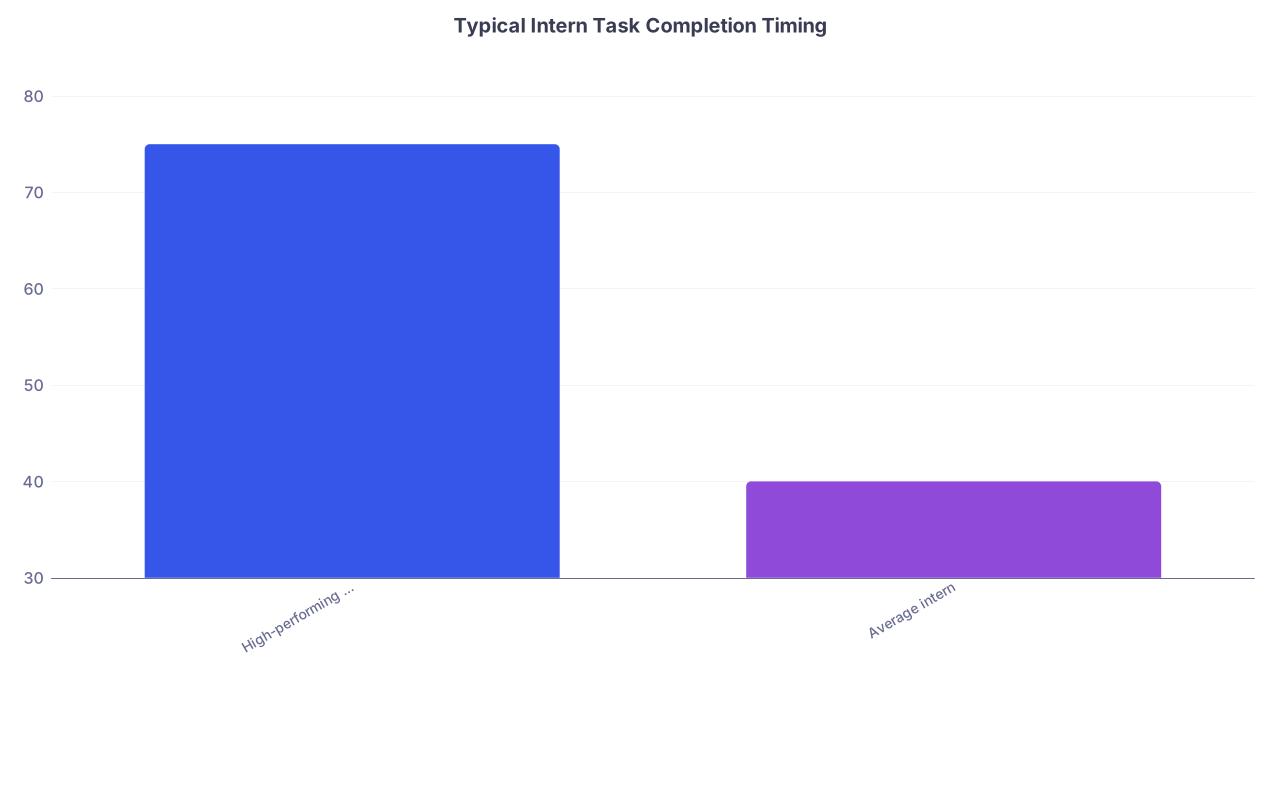
| Category | Value |
|---|---|
| High-performing intern | 75 |
| Average intern | 40 |
Interpretation: High-performing interns reliably complete about 75% of critical tasks before noon; average interns are closer to 40%. The difference is not intelligence. It is list-driven execution.
4. Afternoon “Clean-Up / Re‑Prioritize” Run
Goal: Reconcile what has been done with what is still pending; adjust priority based on new data.
Around 2–3 pm, you:
- Re‑run the list in priority order.
- For each patient:
- Check key labs/imaging that were due by then.
- Update action items with results: “CTA neg PE; de-escalate O2 as tolerated.”
- Promote any remaining tasks that now threaten dispo or sign-out quality.
This is also where you catch daily labs that never resulted (not drawn? hemolyzed? lost in the ether?) and imaging that got bumped.
5. Pre‑Sign-Out Run
Goal: Leave zero ambiguous or missing items for night float / cross-cover.
Before sign-out (ideally at least 30 minutes before), you:
- Go line by line.
- For each patient:
- Decide: is there any active issue that might change overnight?
- Translate it into specific anticipatory guidance: “If SBP < 90 despite 1L LR, please page me / senior” is better than “Hypotensive.”
- Ensure that any truly urgent unfinished tasks are either done or explicitly transferred with clear ownership.
Your list should be clean enough that when you look at it during sign-out, there are no surprises even to you.
5. Advanced Techniques: Filters, Micro-Lists, and Cross-Cover Strategy
Once your basic list habit is solid, you can layer on advanced tactics that really separate you from the pack.
Snapshot Micro‑Lists for Specific Time Blocks
Your main list will eventually get long and dense. That is fine. But for certain high-intensity windows, you should carve out mini-lists.
Examples:
- A “pre‑noon” micro-list: only tasks that absolutely must be done by 12:00.
- A “pre‑OR” or “procedure” micro-list: all clearance steps for patients going to OR/IR/Cath.
- A “cross-cover” cheat sheet: only active issues/handoff items for patients you are cross-covering.
These can live as:
- A second printed sheet.
- A second tab in an Excel/Sheets doc.
- A smart list / worklist filter in the EHR: “My patients + today’s Priority = 1.”
The point is: when the pager starts screaming, you should not be scanning a 25-patient list to recall which two have truly time-locked needs.
Filters by Location, Service, and Consultant
Most EHRs let you filter or group by:
- Location (ICU, stepdown, floor).
- Attending/service.
- Consultant (cards, ID, GI, etc.)
Leverage that.
You can, for example, group by “has cardiology consult” and do a single 10-minute blitz: call cards about all relevant patients at once with an organized list of questions and updates, instead of 3 separate disjointed calls an hour apart.
Same with radiology. Batch your needed calls so that:
- You know which studies you are asking about.
- You are not calling them every 20 minutes alone and frantic.
6. Running the List Under Fire: Codes, Pages, and Chaos
Everything above sounds tidy. Your day will not be tidy.
You will get pulled into:
- A rapid response on your GI bleed.
- A new admission with chest pain and ST depressions.
- A family meeting for a patient who is now DNI/DNR.
The question is not “how do I avoid chaos?” You cannot. The question is “how does my list protect me when chaos hits?”
The “Freeze and Mark” Rule
When you are about to step into something that will eat 30–90 minutes (rapid, code, long admission, family meeting), do one thing first:
- Open your list.
- Mark the current patient/task you are on with a clear symbol: “>>>” or “NOW”.
- Add a short time-stamped note: “Left list at 10:18 for RR on 7E-21.”
When you come out, you do not trust your memory. You look for “>>>” and resume from there. You also quickly scan for:
- Anything time-sensitive you likely just missed.
- Any labs/imaging that have resulted during the interruption that could change priority.
Real-Time Add‑Ons: Never Trust Your Brain Alone
When someone grabs you in the hallway:
“Hey, can you adjust the insulin on 6E-12? Her sugars have been low overnight.”
You do not nod and keep walking.
You stop. You either:
- Add a specific action item to the list right then: “6E-12: review insulin regimen; target BG; change sliding scale; discuss with RN.”
- Or, in emergencies, do it immediately and then document on list what you did.
Same with phone calls from consultants:
- “Increase heparin drip and repeat anti-Xa at 14:00.” You literally write: “Repeat anti-Xa 14:00” on the list, not just “adjust heparin.” Or you will forget.
Your list is the only memory you should trust at 5 pm.
7. Templates by Rotation: Medicine, Surgery, ICU, Night Float
You do not need a brand‑new system for each rotation. You need 90% shared structure with 10% rotation-specific tweaks.
Inpatient Medicine
Extra columns that help:
- Telemetry/monitor status: “Tele,” “Non‑tele,” “Pulse ox.”
- Antibiotic day count: “Day 3/7 Zosyn.”
- Code status / goals: “Full,” “DNR/DNI,” “Hospice eval.”
Common action types:
- Lab and imaging follow-up.
- Diuresis and volume status checks.
- Antibiotic narrowing/stopping.
- Discharge prep.
General Surgery
Rotation tweaks:
- Add “Post‑op day” column: POD 0, 1, 2, etc.
- Drain/wound field: “JP x2, output,” “Wound vac.”
- NPO/diet: “NPO,” “Clear,” “Reg,” “Tolerating?”
Surgical list questions are repetitively similar:
- Ambulating? Voiding? Passing flatus? Pain controlled? Tolerating diet? Build quick abbreviations or short columns to remind you during rounds.
ICU
Here the list is less about dispo and more about organ systems and support:
Add system columns or shorthand:
- “Vent mode/FIO2/PEEP.”
- “Pressors (agent/dose).”
- “Sedation/analgesia regimen.”
- “Lines/tubes/drains.”
Action items are almost always:
- Titrations.
- Weans.
- Daily labs/imaging.
- Family updates and goals-of-care.
The trick is to avoid building a novel for each ICU patient. Use concise structured phrases, not essays.
Night Float / Cross-Cover
For night float, your list’s job is different:
- You inherit a census you did not build.
- You have to rapidly identify who is:
- Sick and unstable.
- Likely to crash.
- Likely to need symptom control (pain, delirium, dyspnea, agitation).
You should have:
- A “watch closely” tag from day team on certain patients.
- Active issues clearly marked: “Recurrent hypoglycemia,” “Borderline pressures,” “Recent GI bleed.”
Your night list is a triage map, not a comprehensive plan doc. Focus your notes on actionable overnight instructions and patterns.
8. Digital vs Paper: Use the Tool, Don’t Worship It
There is no moral superiority between:
- Annotated EHR printouts.
- Excel/Google Sheets on your phone or hospital PC.
- Handwritten list in your white coat.
I have seen outstanding interns use each of these.
The only unacceptable choice is no externalized list or a haphazard mix of 3 half-used tools.
Some practical notes:
- If your hospital allows, an editable spreadsheet lets you:
- Sort by priority or location on the fly.
- Hide non-urgent columns during high chaos.
- Quickly duplicate templates from day to day.
- If everything is printed:
- Write neatly, not microscopic chicken scratch.
- Develop a consistent shorthand legend that your co-interns can also decipher at sign-out.
- Always consider HIPAA:
- Lose your list with names/MRNs in a cafeteria and it becomes a problem.
- Some places require shredding lists; others have secure bins on the wards.
Bottom line: pick one primary system and commit to it for weeks at a time. Constantly swapping between “today I’ll try index cards; tomorrow I’ll try a notebook” guarantees you never get past the beginner stage.
9. Common Failure Patterns and How to Fix Them
Let me call out a few recurring train wrecks.
Failure 1: Infinite Carry-Forwards
You copy yesterday’s action items onto today. Then again tomorrow. And the next day. Some items have been rolling forward for 5+ days.
What this means: you have items that are either:
- No longer relevant.
- Low yield.
- Or you are procrastinating on them because they are unclear or hard.
Fix:
- Once a day, be ruthless. Ask: “Does this still matter? If not, delete.”
- If it does matter but you keep skipping it, break it down:
- “GI consult” becomes “Call GI at x1234; ask about colonoscopy timing; document plan.”
Failure 2: “List Lag” After Rounds
On many teams, rounds end and for 60–90 minutes, the list is not updated to reflect new decisions. During that window:
- You cannot reliably tell what is actually planned.
- Multiple people (intern, student, resident) may be working off different mental versions.
Fix:
- Make immediate post-round updating sacred.
- Assign one person explicitly: “You own updating problem lists and action items based on what we just decided.”
- You can double-document in EHR later. The list comes first.
Failure 3: No Dispo Mindset
Every patient is treated like an eternal inpatient. No push to get them out safely.
Consequences:
- Discharges are rushed at 3–4 pm.
- Orders / scripts / follow-up get rushed.
- Patients stay an extra day for nonsense reasons.
Fix:
- Add explicit “Expected dispo date” and “Barrier” to the list.
- Every day, answer: “What is the one thing I can do today to move this person closer to a safe dispo?”
That might be:
- “Order PT re-eval.”
- “Clarify with social work regarding SNF bed.”
- “Call family to confirm home support.”
If you do not see discharge planning on your list, it will always live in the “later” bucket and never become “now.”
10. Putting It All Together: A Realistic Example Day
Let me sketch how this plays out when it actually works.
- 06:15 – You print your list / open your master sheet. You add overnight events, vitals flags, and new labs. You update “Today’s priority” column for each patient based on new info.
- 07:00 – Team huddle. You run the list (maybe not formally, but mentally) by priority. Sickest first. For each, you confirm: what is today’s primary objective? You mark them 1/2/3.
- 08:00–10:00 – Rounds. You annotate the list in real time, not just the chart. You write discrete verb-led action items and time-based tasks.
- 10:15–11:30 – Work block. You execute the highest-priority tasks, systematically. You place orders, call consultants, arrange procedures. You check off items on the list as you complete them.
- 14:00 – Second list run. You review new labs/imaging, reassign priorities, and identify any critical loose ends for dispo or safety.
- 16:00–17:00 – Final list pass. You refine action items into handoff language where needed, address things you can still realistically complete, and clearly mark anything that will hand over to night float.
- Sign-out – The list and sign-out are in sync. No surprises. No “oh, I forgot to mention she had a run of VT this morning.”
That is what efficiency looks like. Not speed-walking the halls looking busy. Quietly, methodically clearing the list.

| Step | Description |
|---|---|
| Step 1 | Pre rounds list update |
| Step 2 | Team huddle or rounds |
| Step 3 | Post rounds execution block |
| Step 4 | Afternoon re prioritize |
| Step 5 | Pre sign out clean up |
| Step 6 | Sign out |
FAQ (Exactly 6 Questions)
1. Should I use one combined list for the whole team or my own personal list?
Have a shared team census (often EMR-generated) and a personal working list. The team list tracks who is on service. Your personal list tracks what you are actually responsible for and how you will execute. Trying to make one document do both jobs usually produces a cluttered, unreadable mess.
2. How detailed should each action item be? I do not want to write mini-notes on my list.
Action items should be just detailed enough that if you read them at 3 pm, you still know what to do without re-thinking the entire problem. “Recheck K” is too vague. “Recheck 14:00 BMP, replete K if <4.0 per protocol” is about right. Two short clauses maximum. If you are writing paragraphs, you are overdoing it.
3. What if my senior or attending has a completely different style and does not care about lists?
You do not need their permission to run your own high-functioning list. Use their structure when presenting on rounds, then translate decisions into your system afterward. Over time, most seniors notice that with you, things just get done, and they will quietly adopt or support your approach.
4. How do I handle new admissions without blowing up my existing list?
Treat each new admission as its own micro-project: stabilize, assess, place initial orders, then immediately create a compact list entry with diagnosis, priority, time-sensitive tests, and near-term plan. Do not let a new admission sit as “TBD” on your list for hours. That is how things fall apart. Fold them into your next list run as quickly as possible.
5. Is it better to print a fresh list during the day or keep annotating the morning one?
Depends on how dynamic your service is. For heavy medicine services, I like one fresh print mid-day after most orders, imaging, and dispo plans are clear. For lower-volume rotations, you can survive on one well-annotated list. The rule: if your handwritten edits are so dense that you cannot read them quickly, you need a new print.
6. How do I train a medical student or co-intern to help with list management?
Explicitly teach your structure instead of just tossing them “the list.” Walk them through columns, priority codes, and how you phrase action items. Assign them specific ownership (“You track all imaging follow-ups; update the list at noon with results”), then review their updates with them. Treat list management as a clinical skill, not a clerical chore, and people rise to it.
Remember:
- Your list is not a census; it is your clinical command center.
- Priority coding and verb-led action items are non-negotiable if you want reliability.
- Running the list is a series of deliberate passes through the day, not a vague constant background hum.