
The way you format a letter of intent email matters almost as much as what you say. Sloppy layout screams “rank me lower” before they even hit paragraph two.
Let me break this down specifically.
You are not writing a sentimental thank‑you. You are sending a high‑stakes, quasi‑legal‑feeling document into a busy PD’s inbox, where it will live as a permanent artifact in your application story. Advanced formatting is how you control signal: what is seen first, what is skimmed, and what is remembered when they open your file at the rank meeting.
This is about structure, not decoration. Think of it as “clinical note style” applied to email: fast to parse, zero ambiguity, and unmistakably professional.
1. Subject Lines That Survive the Inbox War
Most LOI emails die in the subject line. Either they look generic (“Thank you”) or manipulative (“I will 100% rank you #1!!!”), or they do not map cleanly to what PDs and coordinators search later.
You want three things from your subject line:
- Instantly recognizable as application‑related
- Searchable later by program staff
- Neutral and professional – no theatrics
Strong pattern (fill in your own data):
Letter of Intent – [Full Name], [Specialty], [AAMC/NRMP ID]
Examples:
Letter of Intent – John Smith, Internal Medicine, AAMC 87654321Letter of Intent – Priya Desai, Anesthesiology, NRMP 1234567Letter of Intent – Alex Nguyen, EM Applicant, AAMC 00112233
If you are sending a “strong interest but not true #1” letter, do not play word games. Call it what it is:
Update and Strong Interest – [Name], [Specialty], [ID]
The subtle move is consistency. Use the exact same subject structure for every LOI/update you send that season. Coordinators scan by pattern. If you get cute with “Huge thanks after interview!!!” on one and “Grateful for the opportunity” on another, you bury your own signal.
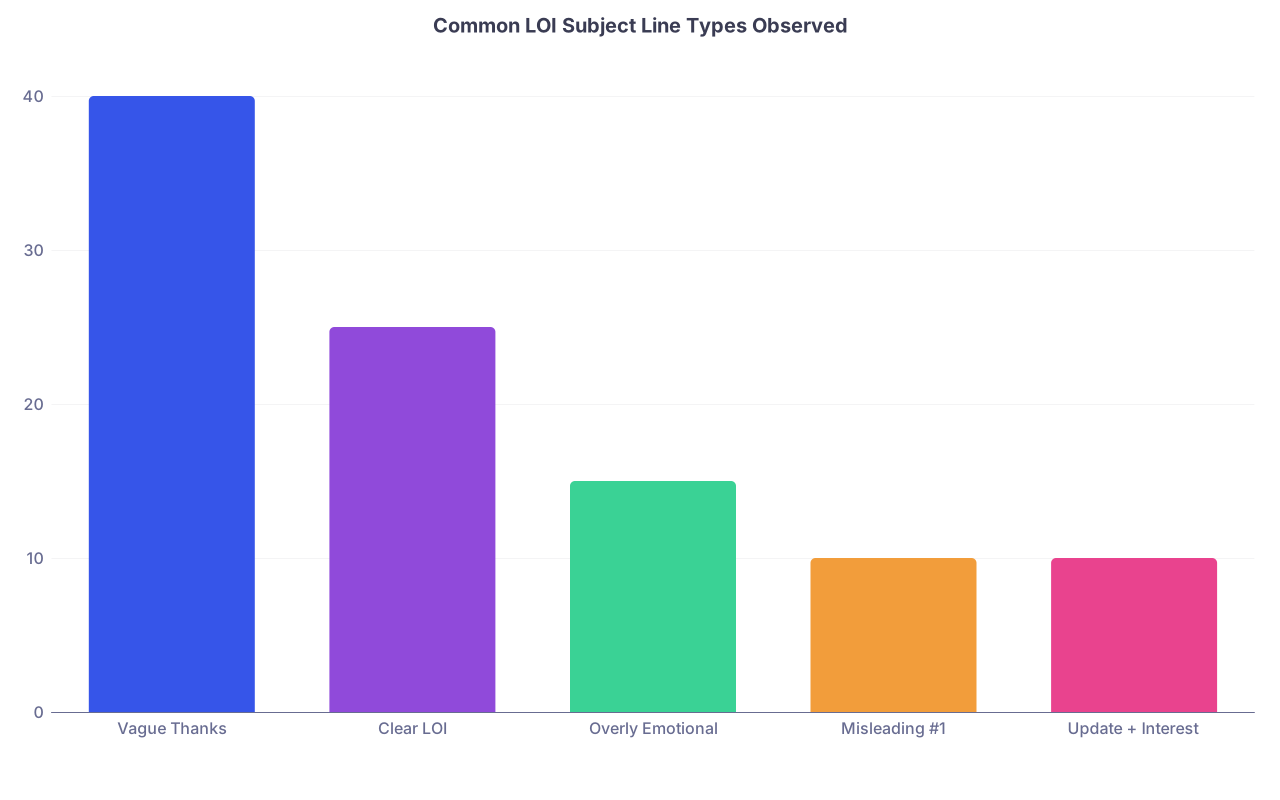
| Category | Value |
|---|---|
| Vague Thanks | 40 |
| Clear LOI | 25 |
| Overly Emotional | 15 |
| Misleading #1 | 10 |
| Update + Interest | 10 |
I have watched a coordinator search “Letter of Intent” in Outlook during rank week and pull up a neat stack of 12 emails. If your subject is “Following up” you are invisible.
2. The Invisible Header Work: From, To, CC, and Signature
Most applicants underestimate how much metadata programs see before text.
The “From” Line and Display Name
Your display name should look like something you would be comfortable seeing on a hospital badge, not a college Gmail relic.
Bad:
j.smith94Johnny SFutureDoc123
Professional display patterns:
John SmithJohn A. SmithJohn Smith, MD(if already MD)- For MS4s, you can leave out “MS4” from the name; put training level in signature instead.
If your personal address is embarrassingly casual, create a clean address for application season:
Do not send LOIs from a shared family email, random institutional alias, or a research group account.
To, CC, and BCC
Strategy here is simple but often botched.
- “To”: Program Director, and if appropriate, Program Coordinator (if they routinely communicate with you)
- “CC”: Associate PD or faculty if there was a particularly strong connection and they were obviously involved in recruitment
- Never BCC program staff. That is how people get paranoid.
Concrete pattern:
To: Program Director
Cc: Program Coordinator; Key faculty mentor you interviewed with (optional)
If you write distinct, personalized lines referencing a specific faculty member’s work, CC’ing them signals you are not just mass‑mailing.
Signature Block: Clinical, Not Cute
Your signature is where you silently prove you know how to write a professional email in a clinical environment.
Core pieces:
- Full name (matching ERAS/PhORCAS/etc.)
- Current status and institution
- Contact phone number
- Email (yes it is redundant; yes, include it)
Sample:
John A. Smith
Fourth‑Year Medical Student, University of Michigan Medical School
Phone: (555) 123‑4567
Email: [email protected]
Optional but acceptable:
- One institutional role (e.g., “Chief, Internal Medicine Interest Group”) if highly relevant to the specialty
- LinkedIn only if it is clean, professional, and you know programs sometimes look
Do not add:
- Quotes, Bible verses, motivational lines
- Images/logos that blow up on mobile
- Colored, cursive, or oversized fonts
3. Layout: Turning a Block of Text into a Scannable Document
Forget pretty paragraphs. PDs and coordinators read LOIs exactly like they read consult notes: scanning for structure, key statements, and red flags.
Think in terms of sections. Clear, compact blocks that can be mentally labeled.
A high‑functioning LOI email body generally has this skeleton:
- Salutation + establishing line (1–2 sentences)
- Explicit intent statement (1–2 sentences, visually isolated)
- Three short paragraphs:
- Why them (fit + specifics)
- Why you (very brief positioning)
- Updates / new information (if any)
- Closing gratitude + availability (1–2 sentences)
And every boundary between those pieces should be signaled by whitespace. Which means: Use line breaks aggressively. One blank line between sections, always.
Use Short Paragraphs, Not Walls of Text
Hard rule: No paragraph longer than 4 lines in a standard desktop email window. Long text blocks get skimmed and half‑remembered.
When I say 4 lines, I mean as rendered in the email client, not in your word processor. Do a test send to yourself and read it on a laptop and on your phone.
Smart Use of Emphasis: Where Bold Is Actually Useful
You do not need colors, underlining, or italics. Bold, used sparingly, can do real work.
An elegant tactic: Bold only the central intent sentence.
Example:
I am writing to state clearly that I will be ranking [Program Name] as my number one choice.
That line, in bold, sitting alone as a paragraph, is unmistakable when someone scrolls. You are doing the PD a favor. They do not need to “interpret” your feelings.
Avoid:
- Bolding full paragraphs
- Underlining or changing color (blue underlines often look like links)
- Mixing bold and italics in the same sentence
Think of it like highlighting in a chart note: one discreet highlight draws the eye; a rainbow makes everyone suspicious.
4. Micro‑Formatting: The Details That Signal “I Get How This Works”
This is where we move beyond “basic professionalism” into the kind of micro‑choices that separate a sharp applicant from an average one.
The Date and Location in the Header
In email, you do not need a full letterhead date block. But you do want the place anchor inside the first paragraph.
Some PDs are reading dozens of LOIs from different cities and rotations. Help them.
Example opening:
Dear Dr. Patel,
Thank you again for the opportunity to interview at the University of Colorado Internal Medicine Residency on January 9, 2026. I thoroughly enjoyed meeting you and your residents and learning more about your program.
You just anchored three key facts in two lines:
- Program name (exact and spelled correctly)
- Specialty
- Interview date (which often helps them find your file or recall the day)
This is not fluff; it is indexing.
Name and Program Consistency
You would be surprised how many LOIs contain the wrong program name from copy‑pasting.
Force a check by visually isolating the program name each time.
I like:
- Put program name once in fully expanded form: “Massachusetts General Hospital Internal Medicine Residency”
- Subsequent references: “your program” or “the residency”
Repeat the city once if you are talking geographically; repeat the institution if it is large and multi‑campus.
Strategic Use of Numbered Elements (Without Turning It Into a Listicle)
I rarely recommend full bullet point lists in LOIs—they look lazy if overused. But a short, numbered sentence sequence inside a paragraph can be powerful and still professional.
For example:
Three aspects of your program particularly resonate with me: 1) the longitudinal primary care track with protected clinic time throughout all three years; 2) the strong track record of graduates matching into academic cardiology fellowships; and 3) the clear culture of resident support that I observed during the noon conference discussion.
No bullets. No ugly indentation. Just embedded numbering that lets the PD quickly register “this person actually knows what we offer.”
5. The Core Template: How an Advanced LOI Email Actually Looks
Here is a concrete, fully formatted example that uses all of the above.
Subject: Letter of Intent – John A. Smith, Internal Medicine, AAMC 87654321
Dear Dr. Patel,
Thank you again for the opportunity to interview at the University of Colorado Internal Medicine Residency on January 9, 2026. I appreciated the chance to speak with you and your residents about the program’s strong training in both inpatient medicine and ambulatory care.
I am writing to state clearly that I will be ranking the University of Colorado Internal Medicine Residency as my number one choice.
I am drawn to your program because of its balance of rigorous clinical training and genuine support for resident well‑being. The longitudinal primary care track, the opportunity to work at both the university hospital and the VA, and the strong mentorship structure you described align closely with my goal of becoming an academic general internist with a significant teaching role. I was especially impressed by the way your residents spoke about being trusted with graduated autonomy while still feeling backed by their attendings.
Since submitting my ERAS application, I have continued to deepen my interest in academic internal medicine. I recently presented a quality improvement project on reducing 30‑day readmissions for patients with heart failure at our regional ACP meeting, where it received a poster award. On my current sub‑internship in general medicine, I have enjoyed taking on increased responsibility in patient care and leading teaching sessions for third‑year students on our team. These experiences have reinforced my desire to train in a program like yours that values both excellent clinical care and medical education.
I believe I would be a strong fit for the University of Colorado because of my commitment to caring for diverse patient populations, my enthusiasm for teaching, and my interest in quality improvement. During my interview day, I was struck by how comfortable the residents seemed with both the clinical demands of training and the support they receive from each other and faculty. It is exactly the type of environment in which I know I would thrive and contribute.
Thank you again for considering my application and for the time you and your team invest in training future internists. Please let me know if there is any additional information I can provide.
Sincerely,
John A. Smith
Fourth‑Year Medical Student, University of Michigan Medical School
Phone: (555) 123‑4567
Email: [email protected]
Look at how this reads visually:
- Obvious intent sentence
- 3–4 line paragraphs
- Concrete program references
- Updates embedded but not dominating
- No hyperbole, no pleading
That is the baseline you should target. Then you adjust content, not structure.
6. Formatting Across Devices: Desktop, Mobile, and Webmail
Programs are not reading your email in a controlled environment. I have seen PDs scrolling LOIs on:
- Outlook desktop in split‑screen next to ERAS
- Outlook web app on a hospital computer
- iPhone Mail between cases
- Gmail pulled up by the coordinator because the PD forwarded it from a personal account
Your formatting must survive all of that.
Font and Size Reality
You do not control the recipient’s font family in email. But you can avoid doing anything that fights the default.
Baseline:
- Do not manually change font family unless your system has done something weird (e.g., Comic Sans—yes, I have seen it).
- 11 or 12 pt equivalent is fine; do not bump up the size. Overly large text looks like shouting.
- Avoid colored text; some themes will render it low‑contrast or invisible in dark mode.
Final check: send the draft to yourself and view it on:
- Your laptop (or tablet)
- Your phone
- If possible, a different webmail client (e.g., if you use Gmail, open in Outlook Web in a guest browser)
You are looking for:
- Paragraphs not merging (watch for weird copied formatting from Word)
- Bold still visible but not glitchy
- Signature confined to a compact block, no massive spacing
7. Advanced Tactics: Timing, Versioning, and Tracking Without Being Creepy
Formatting is not just visual. It is also how you structure your communications over time.
Timing Your LOI
For most specialties, classic strategy is:
- Send a true “I will rank you #1” LOI once, about 1–3 weeks before rank list certification.
- Send strong interest / update letters earlier if you have real updates.
The formatting trick is to make any “update” section modular. That way, if you have to send a later email to the same program, the structure and tone match.
Version Control and Re‑use Without Copy‑Paste Errors
If you are applying to multiple programs and sending interest letters, you need discipline or you will eventually paste “I will rank Stanford #1” into your Harvard email.
Use a simple tracking table:
| Program | Type of Letter | Sent Date | True #1? | Key Phrases Used |
|---|---|---|---|---|
| Program A | True LOI | 2/10/26 | Yes | Bolded #1 statement |
| Program B | Strong interest | 1/25/26 | No | No #1 language |
| Program C | Update only | 2/05/26 | No | Emphasis on new pub |
In your document folder, maintain:
- One master template for “true #1 LOI”
- One template for “strong interest + update”
- One template for “update only”
You then customize:
- Program name (twice)
- Concrete program features (2–3 elements)
- Update paragraph content
Everything else stays structurally identical. That consistency keeps you from accidentally mixing “true #1” language into a generic interest email.
Read Receipts, Tracking Pixels, and Other Bad Ideas
Do not use:
- Read receipts (annoying; often blocked; screams insecurity)
- Link trackers or fancy marketing tools
- HTML signatures with hidden images solely to track opens
Programs are not your newsletter audience. They are gatekeepers to your training. Treat them that way.
8. When You Have Complex Content: Handling Updates, Dual Intent, and Edge Cases
Some LOIs are simple: “You are my #1, thanks again.” Others involve nuance: couples match, dual‑training interest, major updates (like a new publication).
Formatting becomes even more important when the content is complex.
Separate the Intent from the Complexity
Even if you have a long explanation, your core intent should still stand alone in a short, clear paragraph.
Example with couples match:
I am writing to state that I will be ranking [Program Name] as my number one choice in the couples match with my partner, [Partner Name], who is applying in pediatrics.
Next paragraph explains:
We are both deeply interested in training at [Institution], and after interviewing at multiple programs together, your internal medicine and pediatrics residencies stood out for…
The PD immediately knows:
- You are couples matching
- You are serious about them
- There is more detail below, but the key is clear
Structuring a Substantial Update Paragraph
Suppose you have multiple updates (new publication, new leadership role, improved Step 2 score). Dumping them in one long sentence looks amateur. Break them with micro‑structure.
Pattern:
Since we last corresponded, there have been a few developments that I wanted to share briefly: I recently [update 1]. In addition, [update 2]. Finally, [update 3].
Or, if truly dense, you can justify a short bullet list. If you do, keep it tight:
Since my interview, there have been a few updates I wanted to share:
- My manuscript on [topic] was accepted for publication in [journal].
- I completed my sub‑internship in [service] and received strong feedback on my clinical reasoning and team leadership.
- I began a new quality improvement project focused on [brief topic] that I will carry forward into residency.
Then you return to normal paragraphs. One bulleted island in an otherwise traditional email is acceptable. Three bulleted islands are lazy.
Dual‑Interest or Categorical vs. Advanced Programs
If you are dealing with advanced programs plus prelims, you may have to clarify what this LOI refers to.
Format that clarification cleanly:
To avoid any ambiguity, this letter refers specifically to my categorical internal medicine application at [Program]. I will be ranking your categorical program as my number one choice.
No need to detail your prelim list here. Keep the focus tight.
9. The Future: AI, Templates, and Why PDs Are Getting More Suspicious
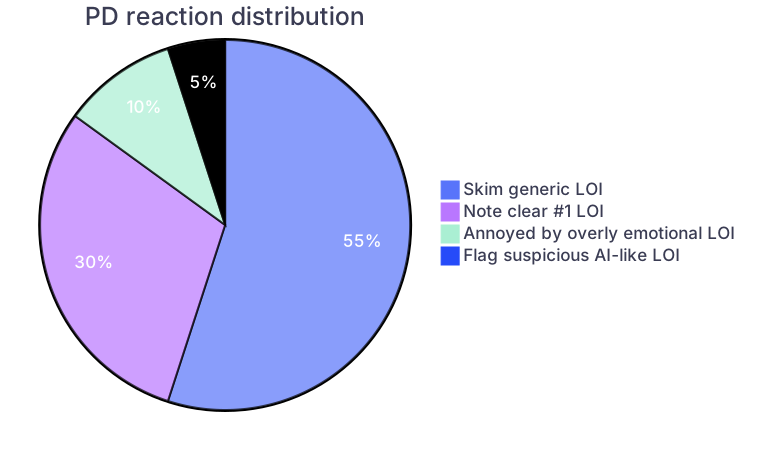
We are squarely in the era where many applicants are using AI tools to “help” write LOIs. PDs know it. They are already complaining about it.
You can absolutely use tools to outline, to check grammar, to suggest phrasing. But if your email reads like a smoothed‑out corporate brochure, people notice.
The antidote is specificity and restraint.
- Specificity: Concrete details about the actual program that an AI cannot hallucinate (exact clinic structure, rotation sites you visited, residents you spoke with).
- Restraint: Avoid over‑dramatic, generic compliments (“unparalleled”, “life‑changing”, “truly exceptional in every way”).
What will matter more and more is:
- Clean, human, disciplined formatting
- A voice that sounds like a real medical trainee, not a marketing department
- Obvious effort to tailor without obvious desperation
Your formatting choices are a big part of that “human but professional” signal.
10. Putting It All Together: A Simple Workflow
Let me give you a quick, concrete workflow for a high‑stakes LOI so that formatting does not fall apart under time pressure.
Draft in a plain text editor or simple word processor.
No fancy fonts. Just structure the paragraphs and bold the single intent sentence.Run a ruthless simplification pass.
- Any sentence longer than 3 lines? Split it.
- Any paragraph longer than 4 lines? Break it or cut.
- Two bold sections? Pick one and remove the other.
Paste into email, then fix spacing.
Some editors add extra spaces or odd line breaks. Ensure:- One blank line between salutation and first paragraph
- One blank line before and after the bolded intent sentence
- One blank line before “Sincerely”
Add subject, To, and CC last.
People mess these up when they start there and then copy/paste bodies from other messages.Send a test to yourself first.
- View on laptop.
- View on phone.
- Check for typos in program name and PD name.
Only then send to the program.
Here is what a good LOI workflow visually resembles in the lifecycle of an application:

| Step | Description |
|---|---|
| Step 1 | Decide true #1 |
| Step 2 | Draft LOI in plain text |
| Step 3 | Edit for content and specificity |
| Step 4 | Apply formatting and bold intent line |
| Step 5 | Test email to self |
| Step 6 | Check on laptop and phone |
| Step 7 | Correct any spacing or name errors |
| Step 8 | Address email with correct To and Cc |
| Step 9 | Send LOI to program |
Once you have done this two or three times, it becomes fast. You are no longer reinventing structure; you are just slotting in honest, program‑specific content.
11. One Example for a Pure Update (No #1 Statement)
Not every note needs to be a declaration of love. Sometimes you just need to update without misleading.
Subject: Update and Continued Interest – Sara Lee, General Surgery, AAMC 33445566
Dear Dr. Hernandez,
I hope you are doing well. I wanted to thank you again for the opportunity to interview at the [Program Name] General Surgery Residency on November 18, 2025. I remain very interested in your program and appreciated the chance to learn more about your structured mentorship and early operative experience.
Since my interview, there have been a few updates to my application that I wanted to share: I recently received notice that my manuscript on postoperative delirium in older adults has been accepted for publication in the Journal of Surgical Research. I also completed my surgical ICU sub‑internship, where I took on increased responsibility in managing ventilated patients and coordinating multidisciplinary care. My attending’s evaluation from that rotation, which I believe reflects my growth in clinical judgment and communication, has been uploaded to ERAS.
My experience on this rotation reinforced my interest in training in a program like yours that provides strong exposure to complex surgical patients and emphasizes teamwork in the ICU. I continue to feel that [Program Name] would be an excellent fit for my goals in academic general surgery.
Thank you again for your time and consideration. Please let me know if there is any additional information I can provide.
Sincerely,
Sara Lee
Fourth‑Year Medical Student, University of Texas Southwestern
Phone: (555) 987‑6543
Email: [email protected]
Notice: no #1 language, no bold. Still structured, still professional, and still very easy to skim.
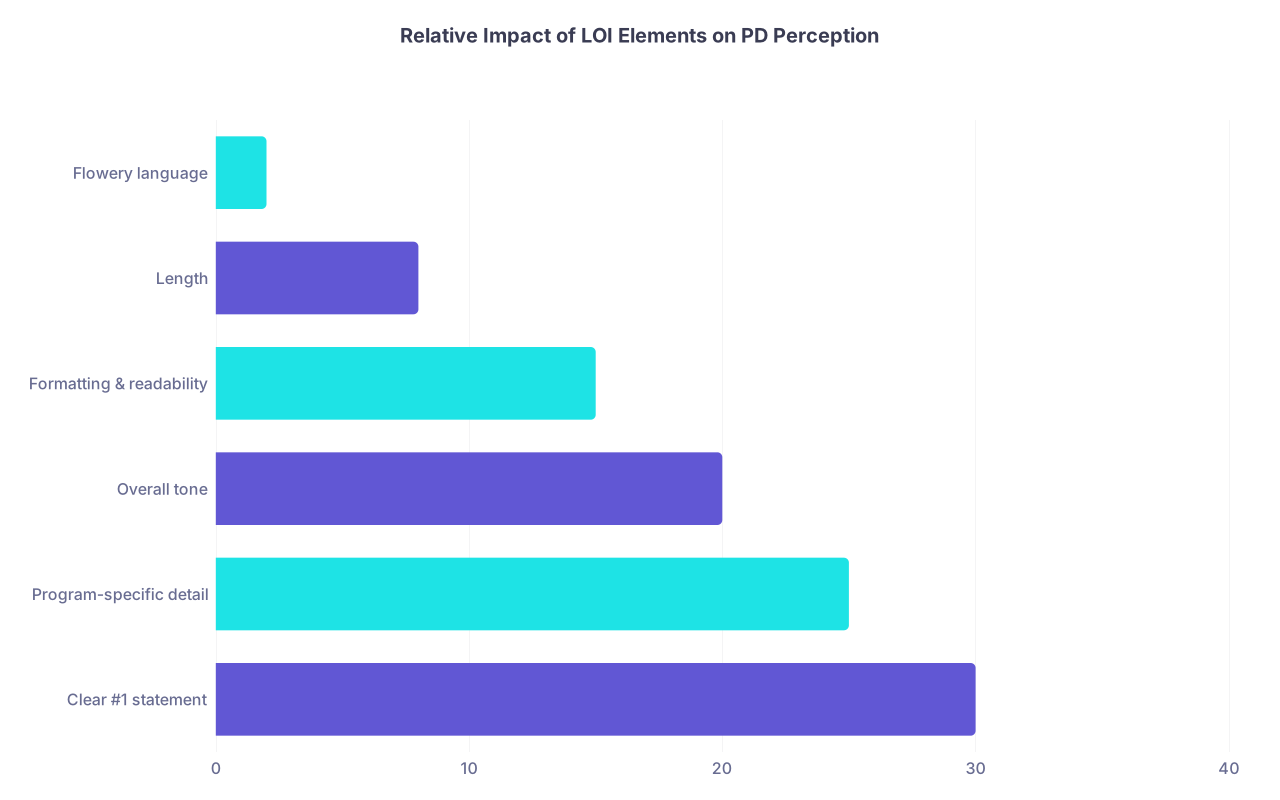
| Category | Value |
|---|---|
| Clear #1 statement | 30 |
| Program-specific detail | 25 |
| Overall tone | 20 |
| Formatting & readability | 15 |
| Length | 8 |
| Flowery language | 2 |


Key Takeaways
Treat your LOI like a clinical note: structured, scannable, and unambiguous. One bolded, stand‑alone sentence for your true #1 statement is the cleanest approach.
Use consistent subject lines, signatures, and paragraph structure across all programs so your message survives busy inboxes, multiple devices, and rank‑meeting searches.
Specificity beats drama. Concrete program details plus disciplined formatting make you look like someone they would trust with a pager at 2 a.m.—which is exactly the point.