
The way most applicants track letters of intent and interest is chaos disguised as effort.
A half-broken spreadsheet. Random starred emails. A note on your phone titled “schools I like??” That’s how people end up double-emailing a PD, missing an interview reply window, or sending a “you’re my top choice” letter… to three different programs in the same week.
You need a calendar. Not a vibe. A system.
Here’s how to build it, step by step, and what you should be doing month by month, week by week, and day by day so you never lose track of LOIs, interest notes, or program replies.
Step 1: Decide Your System Before Interview Season Hits
At this point (2–3 months before interviews typically start for you), you should choose where this calendar will live. If you wait until you’re in the thick of it, you won’t do it right. You’ll just throw things wherever.
You have three realistic options:
| System | Pros | Cons |
|---|---|---|
| Google Sheets | Flexible, shareable | Easy to break, no alerts |
| Notion/Airtable | Powerful, customizable | Learning curve |
| Calendar app | Great reminders, visual | Weak for detailed notes |
Here’s my blunt recommendation:
- Use one main spreadsheet/Notion database for data.
- Use your calendar (Google/Outlook) for reminders and “do this today” tasks.
- Do not try to track everything in only one of them. That’s how it becomes a mess.
Week -12 to -8 (3 months before interview season)
At this point you should:
- Choose your primary tool
- If you like simple: Google Sheets.
- If you like structure: Notion or Airtable.
- Create your master table with columns like:
- Program Name
- Specialty
- City / State
- Type (Academic, Community, Hybrid)
- Interview Status (Not invited / Invited / Completed / Waitlisted / Rejected)
- LOI Status (None / Interest note sent / “You’re top choice” LOI / Post-interview thank you / Post-interview update)
- Date Interest Note Sent
- Date LOI Sent
- Date Thank You Sent
- Program Response? (Yes/No)
- Last Contact From Program (Date)
- Priority Rank (1–5)
- Notes (PD preferences, vibe, anything you’d forget in 3 weeks)
This sounds like overkill now. In December when you’re staring at 17 similar IM programs? You’ll be glad you have it.
Step 2: Build the Actual LOI & Interest Calendar Framework
Now you’re building the timeline scaffolding. So when specific programs start dropping into your life, you already know when each type of message should be scheduled.
Use your calendar app as your action dashboard
At this point (same month), you should:
- Create three calendar categories (separate calendars if possible):
- “LOI – Top Choice”
- “Interest Notes – Strong Interest”
- “Replies / Follow-up”
Color-code them. Don’t be cute. Make them distinct.
- Red: LOIs (“you are my #1” letters)
- Blue: Interest notes (“you are one of my very top choices” / “strong interest”)
- Green: Thank yous / Follow-ups / Reply reminders
Then set default time blocks:
- Weekday evenings (e.g., 7–8 pm): “Email/LOI Time”
- Saturday morning: “Program review / calendar cleanup”
You’re building habits into the calendar, not just events.
Step 3: As Interviews Start Rolling In — Week-by-Week Setup
Now we hit real time.
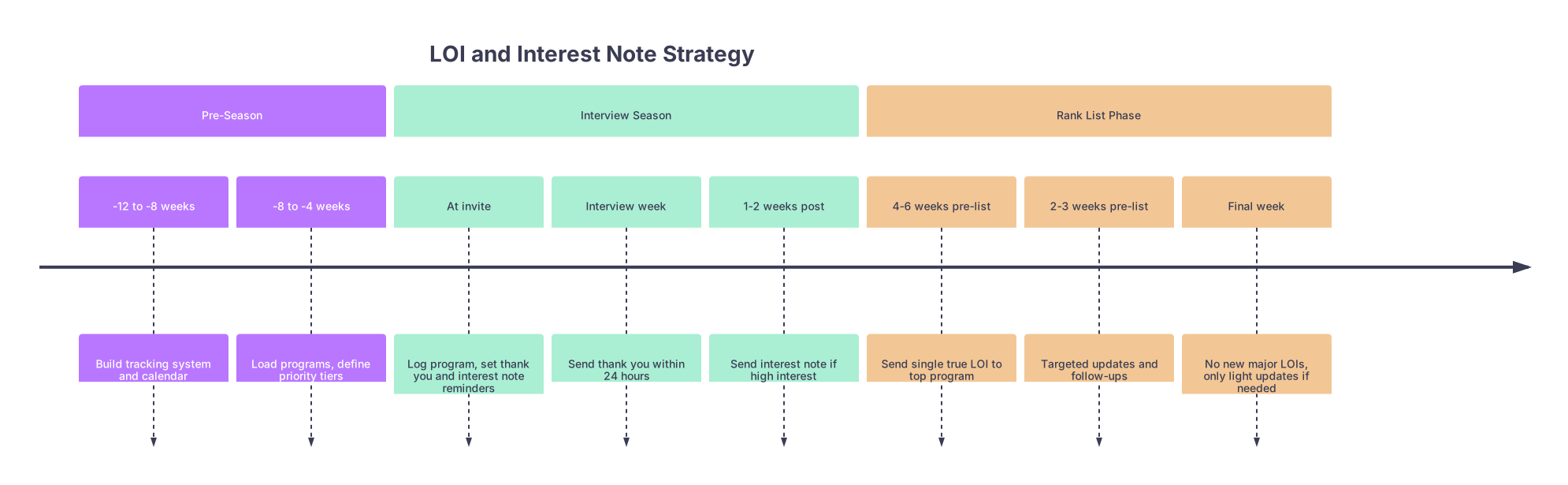
| Period | Event |
|---|---|
| Pre-Season - -12 to -8 weeks | Build tracking system and calendar |
| Pre-Season - -8 to -4 weeks | Load programs, define priority tiers |
| Interview Season - At invite | Log program, set thank you and interest note reminders |
| Interview Season - Interview week | Send thank you within 24 hours |
| Interview Season - 1-2 weeks post | Send interest note if high interest |
| Rank List Phase - 4-6 weeks pre-list | Send single true LOI to top program |
| Rank List Phase - 2-3 weeks pre-list | Targeted updates and follow-ups |
| Rank List Phase - Final week | No new major LOIs, only light updates if needed |
Week 0: First Interview Invitations Arrive
At this point you should:
1. Immediately log each invite into your master table.
Add/confirm:
- Date invite received
- Interview date
- Your gut reaction (1–5) after reading invite / looking at website
2. Create three calendar events per interview:
For each program that invites you:
“[Program] – Thank you email due”
- Date: Interview date + 0 or +1 day
- Time: 7 pm
- Calendar: Replies / Follow-up (green)
“[Program] – Post-interview interest note?”
- Date: Interview date + 7 days
- Time: 7 pm
- Calendar: Interest Notes (blue)
“[Program] – Reassess rank & communication”
- Date: Interview date + 21 days
- Time: Weekend slot
- Calendar: Replies / Follow-up (green)
You’re pre-wiring the system. You don’t “try to remember.” You force future-you to get a calendar ping.
Step 4: During Interview Season – Your Weekly Rhythm
This is where people fall apart. Interviews, travel, clinical duties, notes, plus life. Communication falls to “when I have time,” which means “never.”
Build a weekly pattern.
Every Sunday Evening – 30 Minutes
At this point each week you should:
Open your master table.
- Update every program’s:
- Interview Status
- Priority Rank (1–5, gut level)
- LOI / interest status
- Update every program’s:
Open your calendar.
- For the coming week:
- Which programs need thank yous sent?
- Which have “interest note?” reminders coming up?
- Which are now clearly dropping in rank and shouldn’t get more energy?
- For the coming week:
Make simple decisions:
- Top 1 program: candidate for true LOI (only later, near rank list certification)
- Next 3–5: candidates for strong interest notes
- The rest: thank you only, maybe a mild “I enjoyed my interview” follow-up if appropriate
Daily – 10–15 Minutes Max
At this point each day (yes, daily) you should:
- Check that evening’s email tasks on your calendar.
- Decide:
- Send now?
- Snooze 3 days?
- Cancel (if your interest dropped significantly)?
Don’t keep “thinking about it.” Either schedule, send, or consciously delete.
Step 5: Timing Rules for LOIs, Interest Notes, and Replies
Now let’s anchor what goes on the calendar. You don’t send everything to everyone. That’s amateur hour and programs can smell it.
Post-Interview Thank You Emails
At this point (0–24 hours after each interview) you should:
- Send a brief thank you to:
- Your main interviewer(s)
- PD or PC if they gave you direct contact
Put this on your calendar before the interview:
- “[Program] – Send thank you to Dr. X and PC”
- Date: Same day, 8 pm; or next morning, 7 am
If you miss the 48-hour window, send it anyway but stop overthinking. Just don’t stack that with a long LOI; it looks reactionary.
Post-Interview Interest Notes (Non-binding)
These are “I really liked you, I could see myself here” messages. Not “you’re my #1.”
For a program you genuinely like (top 5–8), at this point you should:
- Schedule:
- “[Program] – Draft post-interview interest note”
- Date: Interview + 5–7 days
- “[Program] – Draft post-interview interest note”
What that does:
- It gives you a little distance to avoid the “interview high.”
- It puts you back in their inbox after the initial flood of thank yous.
True LOI – The Single “You’re My Top Choice” Letter
You get one real LOI. Not three. Not “well, they’ll never talk.” Don’t play yourself.
Use your calendar to control you here.
4–6 weeks before rank list certification
At this point you should:
- Have a calendar block:
“Identify true #1 and plan LOI” - In that block, look at your table:
- Which program sits at Priority Rank 1 consistently?
- Which checks your non-negotiables: location, training quality, vibe, career goals?
Once chosen:
- Update table:
- LOI Status = “Planned” for that one program
- LOI Status = “Not eligible (top choice used elsewhere)” for all others
2–3 weeks before rank list certification
At this point you should:
- Send the actual LOI:
- Calendar event: “[Program] – Send true LOI to PD”
- Include PC if customary in that specialty
This is where most people screw up: they send it too early (before they’re sure) or too late (right before rank list lock when it might not get read). Two to three weeks out is usually a good window.
Step 6: Use Charts & Data to Keep Yourself Honest
You’ll think you remember how many programs you’ve contacted. You won’t. So track basic volume.
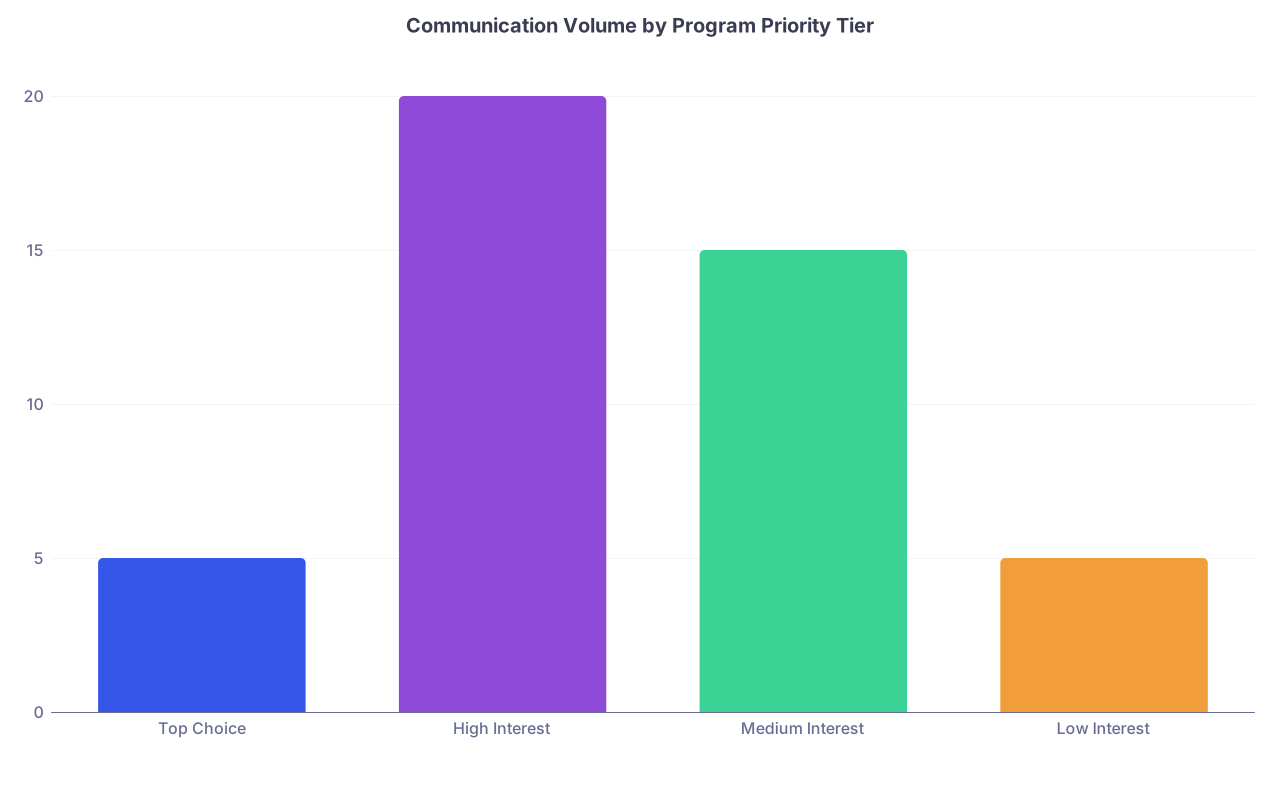
| Category | Value |
|---|---|
| Top Choice | 5 |
| High Interest | 20 |
| Medium Interest | 15 |
| Low Interest | 5 |
Roughly, for most people:
Top choice: 3–5 contacts max
- Thank you
- True LOI
- Maybe 1–2 updates if something significant changes
High interest (tier 2–5): 2–3 contacts
- Thank you
- Post-interview interest note
- Maybe 1 update if something changes
Medium/low interest: 1–2 contacts
- Thank you
- Possibly a light “still interested” message if they specifically encouraged it
Your calendar plus your table keep you from turning into “that applicant” emailing every 5 days.
Step 7: Structuring the Calendar Across the Whole Season
Let’s zoom out and lay the season arc. Month by month.
Month -2 to 0 (Before Interviews Start)
At this point you should:
- Finalize:
- Your master table template
- Your calendar categories/colors
- Add:
- All programs you applied to
- Basic info and early impressions (from research, word of mouth)
No LOIs yet. No interest notes to places that haven’t interviewed you. That pre-interview LOI trend is mostly noise.
Month 1–2 of Interview Season
At this point:
- Every time you get an invitation:
- Log the program.
- Create the three events (thank you, interest note, 3-week reassess).
- Every Sunday:
- Re-rank programs based on interviews completed.
- Mark programs that are:
- “LOI candidates”
- “Interest-only”
- “Thank you only”
Month 3–4 of Interview Season / Early Rank List Time
At this point you should:
- Have a pretty clear top 5–8 list.
- Begin:
- Sending selective post-interview interest notes where you truly feel strong alignment.
- Trimming programs that have clearly fallen in your mind.
Use your calendar for:
- “[Program] – No further contact (decision made)”
- Date: when you know you’d never rank them high
- Why? So you stop emotionally revisiting dead options.
Final 4–6 Weeks Before Rank List Deadline
At this point you should:
- Identify and lock your true #1.
- Calendar:
- “Draft true LOI to [Program]” (3 weeks before deadline)
- “Final review and send LOI to [Program]” (2 weeks before deadline)
- For other high-interest programs:
- Calendar “Last appropriate update?” events spaced out:
- 3–4 weeks before deadline, not all on the same day.
- Calendar “Last appropriate update?” events spaced out:
You are not spamming; you’re ending the season with a clean, controlled communication pattern.
Step 8: Replies and Program Communication – Day-by-Day Rules
Programs will email you too: updates, waitlist messages, occasional “we remain very interested” notes.
You need a 24-hour rule:
At this point, for every incoming program email you should:
Same day:
- Log it in:
- Last Contact From Program (date)
- Notes: “PD said they rank based on [x]”, or “PC said letters after [date] are ignored.”
- Log it in:
Within 24 hours:
- If a reply is obviously expected (clarification, info request):
- Reply within 24 hours.
- If it’s just an update:
- Decide: no reply vs short acknowledgment.
- If a reply is obviously expected (clarification, info request):
Use micro calendar events for tricky replies:
- “[Program] – Draft careful reply to PD email”
- Date: Same day, 9 pm
Gives you space to think without ghosting them.
Step 9: Preventing Common Disasters This Calendar Avoids
This is why you’re doing all this:
Double LOI to two different programs
Your table + calendar LOI fields make this nearly impossible if you’re honest with yourself.Sending “I’m ranking you highly” to a place you actually decided to drop
Your weekly Sunday review cleans out old feelings and keeps communication aligned with reality.Forgetting to reply to a program’s important question
Calendar + 24-hour rule keeps their emails from disappearing into your clerkship fog.Blowing up a program’s inbox
Communication counts per program become obvious in your table. If you’re at 4+ emails and no reply, you stop.
Step 10: What Your System Looks Like On a Random Wednesday
Let’s make it concrete.
It’s mid-January. At this point you should:
- Open your calendar for tonight and see:
- 7:00 pm – “Thank you to [Program A] (yesterday’s interview)”
- 7:15 pm – “Post-interview interest note? [Program B] (7 days ago)”
- 7:30 pm – “Reassess [Program C] rank & comms (3 weeks since interview)”
You sit down:
Thank you to Program A:
- Takes 10 minutes. Sent. Mark table: Thank you = Sent, Date = today.
Program B interest note:
- You check your table: Rank = 2, very strong fit.
- You send a brief, sincere “strong interest” email. Update: LOI Status = Interest note sent; Date = today.
Program C reassessment:
- You realize after 3 weeks: it slid to Rank 9.
- You decide: no additional communication.
- Update table: “No further contact planned” in Notes.
Total time: 30–40 minutes. Then you stop thinking about it.
That’s the value of the system.
Final Recap – The Only Three Things That Really Matter
Front-load the structure.
Build your table and calendar before interviews. Future-you in January will not have the brain space to design a system. They’ll barely have time to use it.Tie every program to scheduled actions.
For each interview: pre-scheduled thank you, interest note check-in, and reassessment. No free-floating intentions. Only dated actions.Be honest with your priorities and your LOI.
One true LOI. A small ring of high-interest programs with limited, thoughtful contact. Everyone else gets appropriate, minimal communication. Your calendar keeps you disciplined, and that discipline makes you look like someone programs want to rank.