
Most people are wildly underprepared for the 5 minutes that actually matter on Match Day.
You do all this work ranking programs, interviewing, stressing over emails… and then treat Match Day like a spectator event. That is a mistake. You need a system for rapid, clear decisions if things do not go to plan.
Let me break this down very specifically.
Why You Need a Pre-Match Day Decision System
Match Day is usually binary: you matched or you did not. But if you are in a system that allows:
- SOAP participation
- Scramble-like rapid applications
- Early contract offers in certain specialties or countries
- Or even last-minute “what if I get off a waitlist?” calls
…then you are not just celebrating. You are making extremely fast, high-stakes decisions with incomplete information, limited time, and emotional overload.
Here is the problem I see every year:
Students have vague impressions of programs (“I liked them”, “seemed chill”, “strong research”), but no structured record. When they suddenly have options they did not expect, they cannot compare programs cleanly. Emotions and anxiety take over. They freeze or choose badly.
You want the opposite: a pre-built command center that lets you answer:
- “If I get Offers A and B at the same time, which is my first call back and why?”
- “If I do not match and see 12 SOAP programs in IM, what is my rapid triage sequence?”
- “If Program X calls and says ‘we have a spot if you sign today’, do I take it? Under what conditions?”
That is what “Pre-Match Day Briefing” really means: you assemble all the program intel before Match Week so you are not improvising under stress.
Core Framework: Your Master Program Tracker
You need one central document. Not ten scattered notes. One master tracker.
Spreadsheet > Notion > Obsidian > plain Excel. I do not care. But it has to be sortable, filterable, and accessible on phone and laptop.
Here is the basic structure I recommend.
| Column Name | Purpose |
|---|---|
| Program Name | Official program name |
| Specialty | IM, EM, GS, etc. |
| City / State | Geographic anchor |
| Rank List Position | Final or provisional rank number |
| Tier (A/B/C) | Quick preference banding |
| Training Priorities Score | 1–10 summary based on what *you* value |
That is just the scaffolding. The real value comes from what you attach to each program.
I break your tracker into five domains:
- Training quality
- Lifestyle and support
- Career trajectory
- Logistics (money, visa, family)
- Red flags and dealbreakers
Each domain gets explicit fields, so let us go through them.
Domain 1: Training Quality – The Non-Negotiables
You are training to become a competent, safe physician. That is still the point. So you need structured data here, not just “felt strong”.
Key columns I insist on:
- Board pass rate (5-year trend) – not just one year.
- Case/exposure volume – surgical numbers, ICU time, sub-specialty clinics, trauma level.
- Fellowship placement strength – both rate and type of fellowships.
- Procedural autonomy – “early autonomy”, “attending scrubbed on all early cases”, etc.
- Program size and structure – number of residents per year, tracks, 4-year vs 3-year.
Example entries (Internal Medicine):
- ABIM Pass Rate 5-year: 100/100/97/100/100
- ICU Months PGY1–3: 4 / 4 / 3
- Cards Fellowship Placement (last 3 years): 3 / 2 / 4 per year
- Autonomy: Senior runs MICU nights; interns run code team with backup
You do not need perfect data. You need enough to say, “this is clearly better/worse than that,” under pressure.
Domain 2: Lifestyle, Culture, and Support – The Reality Check
Residents quit or burn out more often because of culture and support than missing a lecture on hyponatremia. You have to capture this in a way that is usable, not just vibes.
Create fields like:
- Workload intensity (1–10) – your subjective score based on call schedule, night float, scut.
- Call structure – q4, night float, 24-hour calls, etc.
- Resident happiness (1–10) – what you perceived, plus any anonymous info.
- Support systems – wellness initiatives that actually exist (protected time, therapy access, meals, backup call).
- Program leadership responsiveness (1–10) – did PD/APDs answer blunt questions? Have they fired problem attendings?
- Location liveability – commute, safety, partner job market, schools if relevant.
You want enough to answer:
“If I am on month 11 of ICU + wards, will this place support me, or will they shrug and quote ‘residency is hard’?”
Do not sanitize your notes. If a chief quietly said “people leave after intern year sometimes,” that goes into a red flag column. If multiple residents told you “we never leave by 5, ever”, that goes under Workload, not “maybe long hours”.
Domain 3: Career Trajectory – Will This Program Get You Where You Want To Go?
This is where most students are either naive or vague.
You need explicit fields for:
- Your target path – Primary care / hospitalist / subspecialty / academic / private.
- Program fit to your path (High/Med/Low) – clear label.
- Fellowship match list quality for your field – not just “they match GI”.
- Research infrastructure – active mentors, required projects, funded labs, not “we support research”.
- Networking and brand – regional reputation, alumni footprints.
If you are categorical IM and your dream is GI:
- What is their GI fellowship acceptance rate over last 5 years?
- Do they have an in-house GI fellowship or send everyone elsewhere?
- Name at least two GI faculty who actually mentor residents.
You should be able to glance at your sheet and say, “For cards, these 5 programs are green, these 4 are yellow, these 3 are essentially dead ends unless I get lucky.”
If you are undecided, you score programs on flexibility: range of exposures, electives, faculty across multiple subspecialties, support for career exploration.
Domain 4: Logistics – Money, Visa, Family, Sanity
This domain becomes crucial on Match Day if your reality shifts: SOAP, unexpected offers, or difficult choices between a “better” program and a “better life”.
Key fields:
- Cost of living index (rough) – rent, taxes, car vs public transit.
- Salary + benefits snapshot – PGY1 salary, meal money, parking, childcare.
- Visa support (for IMGs) – J-1 vs H-1B options, history of successful sponsorship.
- Proximity to family / support – driving distance, major airports.
- Partner / spouse considerations – job market, licensing if also in healthcare.
- Housing options – safe neighborhoods residents actually live in.
Here is where a simple visualization can help your brain on Match Week:
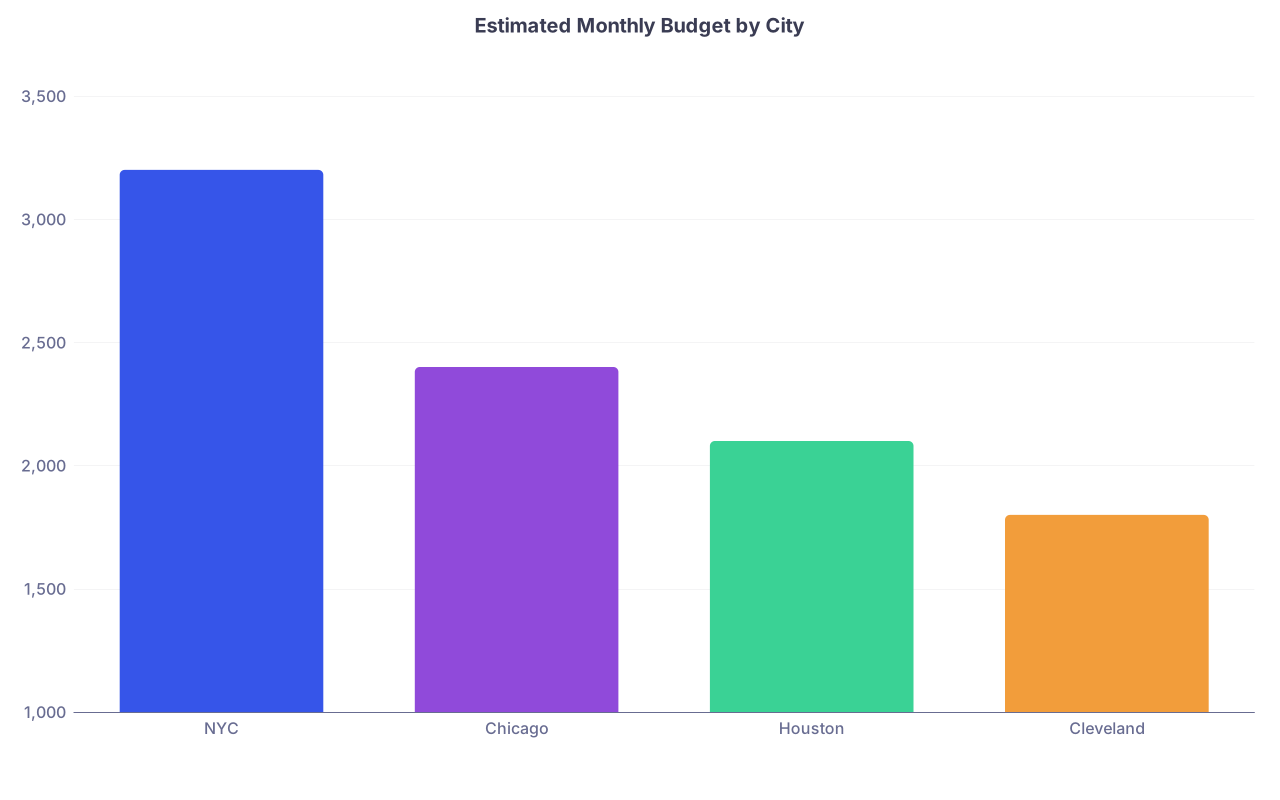
| Category | Value |
|---|---|
| NYC | 3200 |
| Chicago | 2400 |
| Houston | 2100 |
| Cleveland | 1800 |
You do not need financial perfection. But you must avoid the “oh, I did not realize rent here is $2600 and parking is $250” surprise when you are about to sign up for 3–7 years.
For visa-dependent applicants, have a binary field: “Would rank lower or avoid due to visa issues – Yes/No.” Under time pressure, you do not have space to sort that out from scratch.
Domain 5: Red Flags, Dealbreakers, and Contingencies
This is the tab people skip because it feels negative. That is dumb. This is your safety net.
Create explicit fields:
- Red Flag Present (Y/N) – yes or no, not “maybe”.
- Red Flag Description – short, blunt: “Multiple residents quietly said PD retaliates against complaints.”
- Dealbreaker Trigger – under what condition do you walk away?
- Contingency Priority – if you fall to SOAP, how attractive is this type of program?
This is also where you record that one horribly awkward faculty interview where they bragged about “we weed out the weak by design”. Do not assume you will remember clearly six weeks later.
Turning Data into Decisions: Scoring and Tiering
You do not need a machine-learning model. You need a simple, honest scoring system that reflects your priorities. Then you test it against your gut.
Step 1 – Define your weightings. For example:
- Training quality – 40%
- Lifestyle/culture – 25%
- Career trajectory – 20%
- Logistics – 15%
Step 2 – Convert each domain to a 1–10 score per program.
Step 3 – Compute a weighted composite score. This is your Training Priorities Score from the earlier table.
Step 4 – Assign tiers:
- Tier A – automatic “yes” if offer / match.
- Tier B – solid options; “yes” unless there is a clearly superior alternative.
- Tier C – fallback / SOAP-level; “yes” only if other options fail.
| Tier | Composite Score | Description |
|---|---|---|
| A | 8.5–10 | Top choices, no hesitation |
| B | 7–8.4 | Good fits, acceptable tradeoffs |
| C | <7 | Backups, SOAP, or emergency |
Important nuance: your final NRMP rank list does not need to match the numeric ordering of your composite scores perfectly. Human judgment still wins. But if your rank list and your scores are wildly misaligned, you need to understand why before Match Week.
The Pre-Match Day Briefing Document
Now you condense your giant spreadsheet into something you can actually use when your phone starts buzzing.
This is a separate, 1–3 page document. Call it your Pre-Match Day Briefing. It should include:
Your absolute preference order (top 10–15 programs)
Brief one-liner for each:- “#1 – University X IM: Best cards pipeline, strong culture, family nearby.”
- “#2 – Big City Y EM: Elite training, brutal hours, expensive but doable.”
Rapid tie-break rules
If two programs are close, what breaks the tie? For example:- Better fellowship placement in my field > location.
- Safer culture > marginal training superiority.
- Visa stability > prestige.
SOAP / Scramble game plan
If you are SOAP-eligible, write explicitly:- “Primary SOAP target: university-affiliated categorical IM, any region except West Coast due to family.”
- “Avoid: prelim-only positions unless absolutely necessary; FM in small rural towns unless no other offers.”
Dealbreakers on paper
“I will not accept:- A program with documented abuse or retaliation culture.
- A program with unstable visa support that could leave me stranded.
- A position that forces my partner into long-term unemployment with no path forward.”
Contact / communication plan
List PDs, coordinators, mentors who agreed to advocate or advise during Match Week, with phone/email.
This document is what you review the night before Match Week. Not your entire ERAS application. Not old interview invites. The briefing.
Organizing for Time Pressure: SOAP and Scramble Scenarios
SOAP (or equivalent) is where organization really matters. You have:
- Limited time windows to review the list
- Caps on the number of programs you can apply to
- Complicated emotional fallout from “did not match”
You cannot think clearly if you are building your system in real time.
Here is a simple pre-built framework that works.
1. Pre-define your SOAP specialty priorities
Before Match Week, write down:
- Primary SOAP specialty (e.g., IM categorical)
- Acceptable alternates (e.g., prelim IM, FM in metro areas)
- Hard no’s (e.g., transitional year in isolated location, prelim surgery at malignant programs)
2. Create a SOAP-specific filter view in your tracker
Add flags like:
- “Acceptable SOAP speciality – Y/N”
- “Would accept SOAP from this type of program – Y/N”
- “Willing to move to rural area – Y/N”
On SOAP day, when the list is released, you:
- Filter by specialty
- Filter by visa acceptability (if applicable)
- Filter by “family/location ok”
- Rank the remaining by your pre-defined training + lifestyle scores
Now you are choosing from a curated list, not scanning 200 programs blindly.
3. Pre-build triage logic
If you do not match, your SOAP logic tree should already be written down.
Here is what that looks like:

| Step | Description |
|---|---|
| Step 1 | No Match |
| Step 2 | Filter by Visa and Location |
| Step 3 | Rank by Training and Culture |
| Step 4 | Filter by Training Quality |
| Step 5 | Consider Prelim or Gap Year |
| Step 6 | Submit SOAP Applications |
| Step 7 | Call Advisors and Mentors |
| Step 8 | SOAP Programs Available in Preferred Specialty |
| Step 9 | Acceptable Alternate Specialty Available |
You do not improvise this at 9 AM with your dean calling and relatives texting “What happened?”. You follow the flow you already designed when your head was clear.
How to Capture Good Data During Interview Season (If You Are Not Done Yet)
If you are still mid-season, you can fix the future version of this problem.
After each interview:
- Within 24 hours, fill in your spreadsheet for that program.
- Write a short narrative: 5–8 sentences, your raw impressions. Do not edit for politeness.
- Rate domains (Training, Lifestyle, Career, Logistics) 1–10, while the details are fresh.
- Flag any weirdness: contradictory answers, dodged questions, visibly burned-out residents.
If you are done with interviews and did not keep detailed notes, do a rapid reconstruction:
- Pull up your email invites and confirmation letters to jog memory.
- Go through your calendar and remember specific interview days.
- For each program, write down whatever concrete details you still recall. Those matter more than vague “liked it”.
Even a partially filled tracker is better than nothing.
Practical Tips for Match Week Readiness
A few hard-earned specifics.
Keep everything offline-capable.
Google Sheets is nice until Wi-Fi collapses in that giant lecture hall. Export key sheets as PDFs or offline docs.Share your system with one trusted person.
This is usually your closest mentor or a very grounded friend. If you start to spin out emotionally, they can remind you: “You wrote this down. Program B is clearly better for you than Program C.”Color code aggressively.
- Green: Tier A
- Yellow: Tier B
- Red: red flags / SOAP-only emergency
Your brain reads colors under stress faster than numbers.
Make a 1-page “If I Do Not Match” playbook.
Bullet your priority path, alternate specialties, and who you will call. Print it. Keep it in your bag on Match Day.Do a 10-minute simulation.
The week before Match Day, sit down and pretend:- Scenario 1: You match at your #5. Are you still comfortable? Why?
- Scenario 2: You do not match. Walk yourself through SOAP using your tracker.
You will find holes in your system. Better now than later.
Example Snapshot: Turning Spreadsheets into Clear Choices
Let me show you what “rapid decision clarity” looks like.
Imagine three Internal Medicine programs end up in play during SOAP or last-minute offers:
- Program A – Mid-tier university, mid-size city
- Program B – Big-name academic center, high COL city
- Program C – Community program, low COL, heavy workload
Your tracker, summarized:
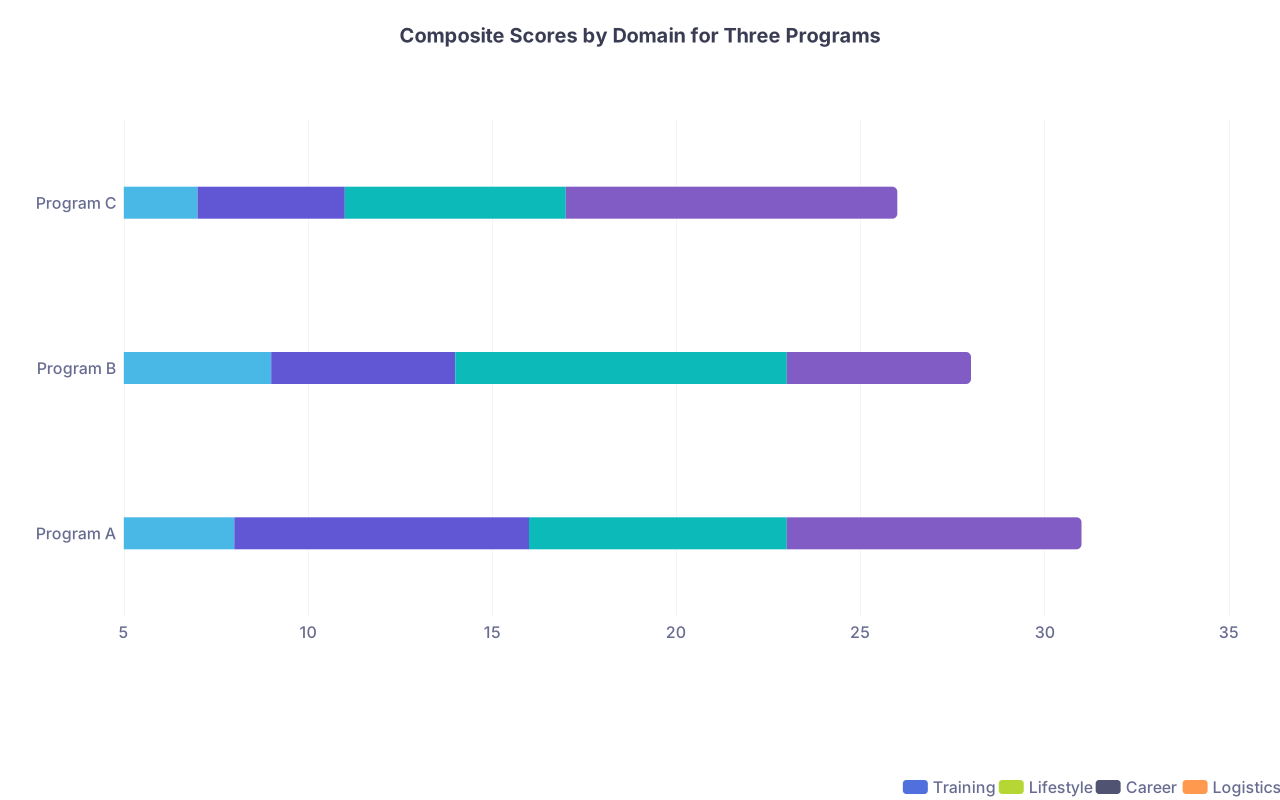
| Category | Training | Lifestyle | Career | Logistics |
|---|---|---|---|---|
| Program A | 8 | 8 | 7 | 8 |
| Program B | 9 | 5 | 9 | 5 |
| Program C | 7 | 4 | 6 | 9 |
Now under pressure, what do you see?
- Program B: phenomenal training and career prospects, but miserable lifestyle and expensive city.
- Program C: survivable logistics, but high workload and modest career trajectory.
- Program A: balanced, no extremes.
If your written priorities say: “I will not sacrifice basic quality of life for prestige,” then Program A rises clearly, even if it is less shiny on paper.
The point is not that one answer fits everyone. The point is that your system makes your answer obvious to you when it counts.
FAQs
1. How many programs should I include in this level of detail?
For most people, detailed tracking for your top 15–20 realistic options is enough. Beyond that, you can use a lighter-touch format: basic scores, a few notes, clear tiering. Do not try to build a 60-program dissertation. You will burn out on the data entry and then not use it.
2. Should I change my spreadsheet after I submit my rank list?
Yes, but only in one direction: clarifying, not second-guessing. Once your rank list is certified, use your tracker to prepare for potential SOAP or unexpected outcomes, not to obsess about “should I have moved #3 to #2”. Focus on what you can still control.
3. How do I factor my partner or family into this system?
Give them explicit fields. “Partner job market suitability (1–10)”, “Distance to family (drive/flight)”, and a simple Yes/No: “Sustainable for us as a family?” If they say “absolutely not” about a certain city or setup, you mark that program down before Match Week. Do not wait to negotiate that on Match Day.
4. What if I have almost no data on a program because the interview was short or virtual?
Then you label it as such. Put “Data thin – high uncertainty” in your notes. Under pressure, that often pushes a program down slightly relative to one you know well, unless the name or location is so compelling that you accept the risk. The key is to recognize uncertainty as its own factor, not pretend you remember more than you do.
5. I am very anxious about worst-case scenarios. Could this kind of system make that worse?
If you build it like a doom spreadsheet, yes. If you build it as a decision safety net, no. The goal is not to rehearse failure; it is to eliminate chaos if things go sideways. You will probably use 10–20% of this planning. But that 10–20% can be the difference between a panicked, regret-prone choice and a deliberate one that you can live with.
Key points: First, do the unglamorous work now: a structured, honest program tracker beats vague memories every time. Second, translate that tracker into a short, brutal Pre-Match Day Briefing so you can make fast, aligned decisions under pressure. If Match Week throws you a curveball, you should already have your swing planned.