
The obsession with “systems” in residency is overrated. You don’t need fifteen apps and a Notion empire. You need 4–5 rock‑solid personal systems that actually work when you’re exhausted at 3 a.m.
Here’s the answer you’re looking for: if you have more than about five core systems, you’ll spend more time maintaining them than using them. Below that, you’re underpowered and things start slipping. The sweet spot is usually 4.
Those 4 systems should cover:
- Tasks & to‑dos
- Time & schedule
- Knowledge & notes
- Life admin & money
Everything else is optional flair.
Let me walk you through what that actually looks like in residency, what to use, what to ignore, and how to tell if you’re over‑systematizing your life instead of surviving it.
The Only Systems You Truly Need in Residency
I’m not talking about apps. I’m talking about repeatable ways you handle the chaos so your brain is not re‑inventing the wheel every day.
Here’s the punchline:
| System Type | Minimum You Need | Red Flag Count |
|---|---|---|
| Tasks & To‑Dos | 1 | 3+ |
| Time & Schedule | 1 | 2+ |
| Knowledge & Notes | 1 | 3+ |
| Life Admin & Money | 1 | 2+ |
If you’re using more than the “Red Flag Count” in any row, you’re not “organized,” you’re drowning in tools.
Let’s go through each one, with something you can copy today.
System #1: Task Capture You Can Use Half‑Asleep
If you fix only one thing, fix this: where do you put everything you need to remember?
Not “in my head.” That’s how you forget to sign that STAT order at 6:30 p.m. and get a nasty message in the morning.
You need one primary place where all tasks go. Not three, not seven—one.
A simple, clinic‑proof setup:
- Tool: Notes app or physical pocket notebook. That’s it.
- Structure:
- Top of page: Date + “Running List”
- Left side: Checkboxes or dashes
- Right margin: Tiny codes:
- “H” = hospital/computer task
- “P” = patient‑related
- “C” = call/text
- “D” = can delegate
Example from a typical medicine ward day:
- Recheck K+ on 712B 2pm (P, H)
- Update discharge summary 801A (P, H)
- Call daughter of 720C after CT (P, C)
- Reorder diet for 705 (P, H)
- Fill duty hours (H)
Then you add one small habit: 2–3 quick reviews per day. That’s your “system”:
1. Pre‑round scan (2 minutes)
Circle anything that must happen before noon.
2. Midday check (3 minutes)
Cross off what’s done, star 3 most important remaining.
3. End‑of‑day triage (5 minutes)
- Move unfinished items to tomorrow
- Convert anything long‑term into your “later” list (see Life Admin system)
That’s it. That’s a task system.
The mistake I’ve watched interns make: they try to build a perfect digital task manager with tags, colors, and due dates for everything. By week 3 of a tough ICU rotation, it’s dead. They’re back to post‑its.
You survive residency with a frictionless capture system, not a sexy one.
System #2: Time & Schedule That Matches Real Life
Residents already have calendars shoved down their throat—AMION, block schedules, shared Outlook calendars. That’s not a system. That’s static information.
You need a personal way of seeing your time that tells you three things at a glance:
- When am I working?
- When can I sleep?
- When do I have actual, usable life hours?
Here’s a minimal setup that works:
- Tool: One digital calendar (Google, Outlook, whatever your program uses).
- Layers:
- Layer 1: Official schedule (import or manually add: calls, clinics, continuity clinic, didactics).
- Layer 2: Baseline sleep for the week (yes, really—block it).
- Layer 3: Protected life blocks (tiny, realistic ones).
Realistic examples of life blocks:
- “Groceries / laundry” Sunday 4–6 p.m.
- “30‑min workout” Tue/Thu 7–7:30 p.m., only on lighter rotations
- “Call parents” Sat 3–3:30 p.m.
Now—the key rule that will save your sanity:
Your calendar is for time‑bound commitments only.
Your task list is for everything else.
Do not shove tasks into your calendar as 15 tiny events. They will shift, you will ignore them, and you’ll stop trusting your calendar.
One more decision: how do you plan the next 24 hours?
Bare‑minimum daily planning:
- At the end of the day, look at tomorrow’s schedule for 60 seconds.
- Ask: “What 2–3 non‑clinical things must happen tomorrow?” (rent, visa form, car inspection, Step studying).
- Block micro‑time for them: 15–30 minutes in actual calendar gaps.
If you do that 4–5 days a week, your life stops catching fire.
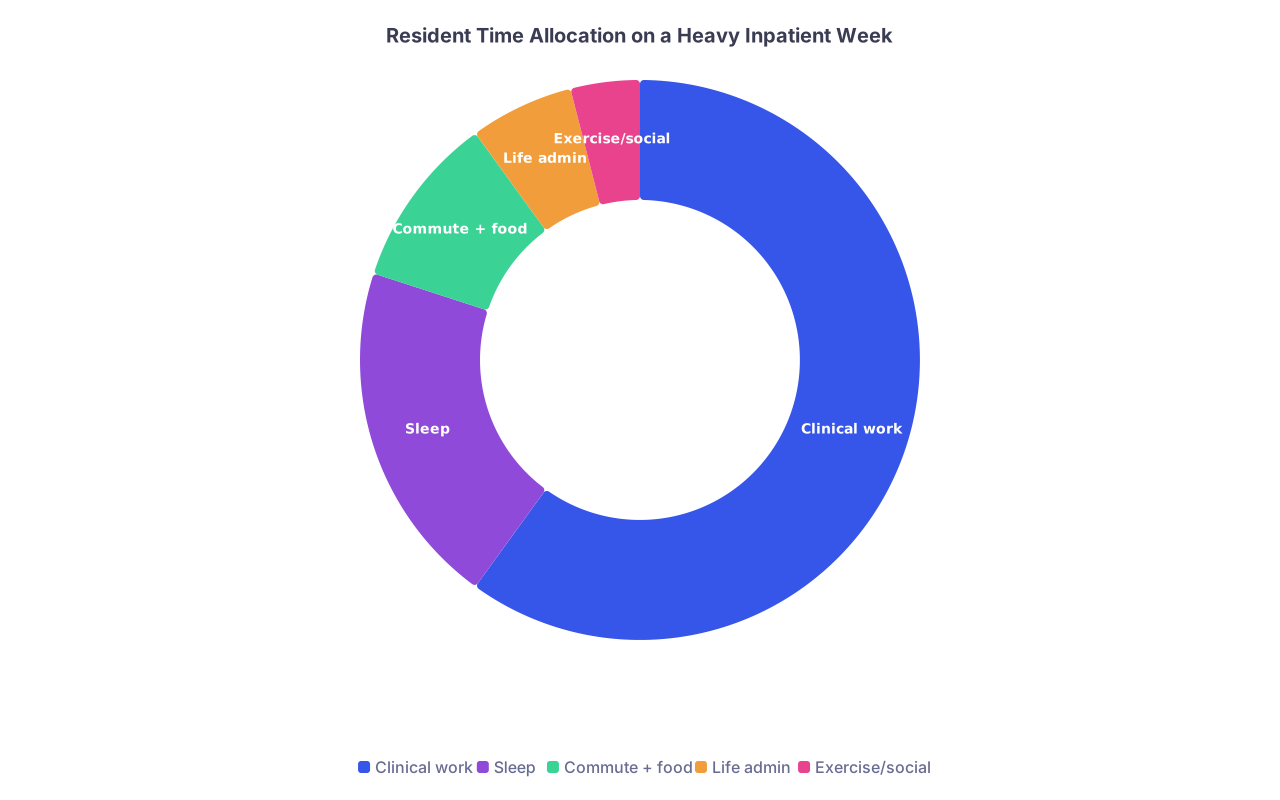
| Category | Value |
|---|---|
| Clinical work | 60 |
| Sleep | 20 |
| Commute + food | 10 |
| Life admin | 6 |
| Exercise/social | 4 |
System #3: Knowledge & Notes You Can Actually Find Later
Residency feeds you a firehose of information:
- Teaching points on rounds
- “Look up later” conditions
- Procedures you barely see twice a year
- Pearls from seniors
Without a minimal system, it all dissolves into the ether.
Again, you don’t need a knowledge palace. You need one searchable brain outside your skull.
- A single digital notes app (Apple Notes, OneNote, Notion, Obsidian, even Google Docs)
- Or a small, consistently organized paper notebook
Then give it a dead simple structure:
Digital example:
- Top‑level folders/notebooks by specialty or context:
- Medicine
- ICU
- ED
- Clinic
- Procedures
- Inside each, short notes like:
- “COPD Exacerbation Admit Orders”
- “DKA Protocol – My Short Version”
- “Afib Rate Control Cheatsheet”
- “Lumbar Puncture Steps + Tips”
Rules that make this work:
- Name notes so Future You can actually search them at 4 a.m.
- One attending pearl per line, max 1–2 sentences. You are not writing a textbook.
- Screenshot or photo of good tables/algorithms is fine—just tag or title the note clearly.
Useful daily micro‑habit:
- After rounds, pick one thing you actually looked up and distill it into 5–10 lines.
- That’s it. One per day. In a year, you’ll have 200+ high‑yield, actually relevant notes.
The mistake: residents build a beautiful system for a week (color‑coded tags, linking, etc.) and then never touch it again because it’s too much work. Keep it boring and functional.

System #4: Life Admin & Money So Stuff Doesn’t Explode
Residency doesn’t pause real life:
- Rent
- Loan payments
- Board exams
- Licensure
- Car registration
- Health stuff (your own)
You do not need a full financial planning dashboard. You do need a simple “don’t drop the ball” system.
Break it into two parts:
A. Life Admin List
Tool: same notes app or a separate page in your notebook.
Sections:
- Monthly recurring: rent, utilities, loans, credit card, duty hours, evals.
- Quarterly / semiannual: car service, dental, board prep payments, credentialing tasks.
- One‑off deadlines: Step 3, in‑training exam signup, visa/immigration renewals, moving, fellowship apps.
Then, once a week (on your “lightest” day), spend 10–15 minutes:
- Look at this list.
- Move anything pressing into:
- Your calendar (if it’s truly date‑bound)
- Or your daily task page for the next few days.
That’s your system. One list + weekly glance.
B. Money Basics System
Minimum viable money setup:
- One primary checking account
- One savings account (buffer fund)
- Autopay:
- Student loans
- Credit card (at least minimum, ideally in full)
- Rent if possible
Then set a recurring calendar event:
- “Money check” – 20 minutes once a month
- Glance at balances
- Make sure autopays went through
- Adjust if something changed (new rotation parking cost, etc.)
You’re not optimizing investments during residency. You’re preventing financial fires.
| Category | Item |
|---|---|
| Housing | Rent / utilities paid |
| Work | Duty hours submitted |
| Training | Evaluations completed |
| Money | Loans / credit card check |
| Health | Rx refills / appointments |
The Hidden System: Boundaries & “Good Enough”
There’s one more “system” people ignore because it doesn’t live in an app: how you decide what’s enough.
Residents burn out not just from work hours, but from trying to be “optimized” in every domain:
- Perfect notes system
- Perfect gym routine
- Perfect social life
- Perfect sleep hygiene
Here’s the mindset that tends to keep people intact:
Decide what you will let be mediocre right now.
Example: On ICU months, social life drops, workouts are 10‑minute walks, and that’s acceptable. You’ll dial them up next block.Define your non‑negotiables.
For many residents, that’s:- Minimum sleep target (e.g., never <5 hours two nights in a row)
- One tiny joy per day (good coffee, 15 minutes of a show, quick walk)
- No charting in bed (you end up sleeping less and worse)
Build “if/then” rules.
- If I’m on nights → I do not schedule daytime obligations except absolutely critical ones.
- If I work >14 hours → dinner is always something pre‑prepared or delivery, no guilt.
- If I’m behind on notes → skip optional teaching that day and catch up (yes, attendings respect not getting sued).
These are systems too. Behavioral ones. They matter more than whether your task app has dark mode.

| Step | Description |
|---|---|
| Step 1 | New idea or tool |
| Step 2 | Try for 1 month only |
| Step 3 | Skip it |
| Step 4 | Keep and drop old |
| Step 5 | Does it replace an existing system? |
| Step 6 | Does it solve a real pain? |
| Step 7 | Adds <5 min per day? |
| Step 8 | Better after 1 month? |
Use that flow every time someone shows you a new app “that changed their life.”
How To Know If You Have Too Many Systems
Here’s the quick self‑audit. If any of these are true, you’ve overbuilt:
- You’re rewriting the same task in 2–3 places.
- You “forget” to open your fancy planner after week 2 of a hard rotation.
- You feel vaguely guilty about “not keeping up” with your systems.
- You spend more than 10–15 minutes a day maintaining your tools.
Target outcome: all of your personal systems together should cost you 10–20 minutes of maintenance per day, max. If you’re well above that, cut.
Where to prune, in order:
- Kill extra note apps. Pick one.
- Stop tracking tiny habits in three places. Decide what actually matters.
- Consolidate calendars. One personal calendar, one work if required, but view them together.
- For task management, pick paper or digital for day‑to‑day. Not both.
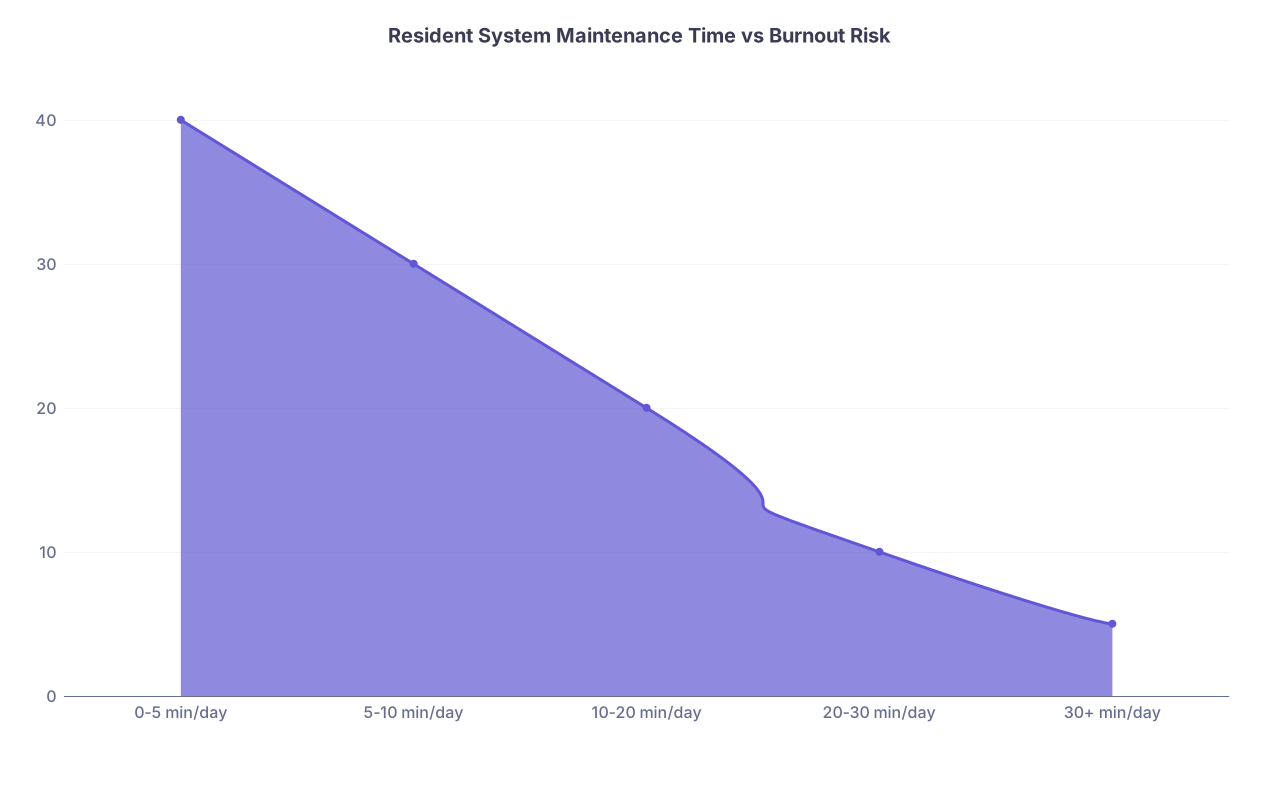
| Category | Value |
|---|---|
| 0-5 min/day | 40 |
| 5-10 min/day | 30 |
| 10-20 min/day | 20 |
| 20-30 min/day | 10 |
| 30+ min/day | 5 |
A Simple Starting Loadout (If You Want a Template)
If you just want someone to hand you a working setup, steal this:
- Tasks & To‑Dos: Small pocket notebook + pen. One page per day. Review 2–3 times/day.
- Time & Schedule: Hospital scheduling system + Google Calendar (synced on phone). Sleep + 2–3 life blocks per week.
- Knowledge & Notes: One digital notes app with 5 main folders (Medicine, ICU, ED, Clinic, Procedures).
- Life Admin & Money: One “Life Admin” note + monthly 20‑minute calendar reminder for finances.
That’s four systems. Enough to survive, not so many you suffocate.
Tweak tools if you must, but do not add more categories. Everything you want to track will fit inside those four.
FAQ: Surviving Residency With Personal Systems
1. What if my program already uses a ton of platforms (EMR inbox, messaging app, AMION, email)? Do those count as “systems”?
They’re environments, not your personal systems. You can’t control them. Your job is to build one layer on top where you consolidate what matters to you—mainly tasks and schedule. Don’t try to re‑organize the hospital’s chaos, just capture what you’re responsible for in your own simple setup.
2. Is it better to use paper or digital for my daily task system?
Use whichever you’ll actually touch when you’re exhausted, gloved, and running down a hallway. For inpatient: pocket notebook usually wins. For outpatient or research blocks: digital can work well. The right answer is the one you can access instantly, with zero load time and no log‑ins. Consistency beats features.
3. How much time should I spend organizing my systems each week?
Aim for 30–60 minutes total per week outside of quick daily check‑ins. That’s maybe 5–10 minutes a day plus a slightly longer weekly reset. If you’re spending multiple hours fine‑tuning, you’re probably procrastinating on something more important or overcomplicating things.
4. How do I handle studying for boards on top of everything else? Is that another system?
Think of board study as a sub‑system inside “Time & Schedule” plus “Tasks.” You don’t need a new category. Decide:
- How many days/week you’ll realistically study on this rotation
- How long per session (even 20–30 minutes)
Block that time on your calendar on specific days, then add the concrete task (“QBank x20” or “Review cardiology deck”) to your daily list. That’s it.
5. I keep starting systems and abandoning them. How do I make one stick?
Stop aiming for perfect. Pick the simplest version (one notebook + one calendar), commit to it for 30 days, and add only one behavior: end‑of‑day 5‑minute review. Do not change tools during those 30 days, even if someone shows you something cooler. Once it’s a habit, you can refine—but not before.
6. What’s one system change that gives the biggest payoff for most residents?
A daily shutdown routine combining three things:
- Quick pass through your task list (move or close loops)
- 60‑second look at tomorrow’s schedule
- Add 1–2 non‑clinical tasks to tomorrow’s list if needed
Done consistently, this alone reduces dropped balls, anxiety, and the “3 a.m. did I forget something?” jolts. And it takes under 10 minutes.
Key point 1: You only need about four personal systems to survive residency: tasks, time, knowledge, and life admin/money. More than that and you’re just organizing your own overwhelm.
Key point 2: Prioritize frictionless, boring tools you’ll actually use when you’re exhausted. One capture point for tasks, one calendar you trust, one notes hub, one admin list. That’s enough.