
The cult of color-coding your life is wildly overrated. Especially in residency.
You can have the prettiest pastel Google Calendar in your program. If you are sleep-deprived, constantly interrupted, and drowning in cognitive overload, a new highlighter color is not going to save you.
Let’s dismantle the myth that better stationery equals better functioning. Residency is not a bullet journal problem. It’s a systems, bandwidth, and decision-fatigue problem.
The Myth: “If I Just Organize Better, Residency Will Feel Manageable”
I have watched interns on night float spend 30 minutes “setting up their system” at the start of the shift. Different colors for cross-cover, admits, tasks, lab follow-ups. By 3 am, that entire system has collapsed into scribbles and arrows on the same piece of paper.
Here’s the uncomfortable truth: most residents don’t have a planning problem, they have a reality problem.
Residency reality looks like this:
- You’re interrupted every 3–5 minutes on a busy floor.
- You’re working against unpredictable events (codes, stat pages, angry families, weird consults).
- You’re sleep-deprived, which nukes your working memory and executive function.
- You’re managing multiple patients at different levels of acuity, with competing priorities.
Under those conditions, the brain does not care what color your tasks are. It cares about survival, pattern recognition, and not missing the thing that will kill someone.
Color-coding feels productive because it’s concrete, visual, and controlled. Residency feels chaotic because it’s none of those. So the brain grabs the thing it can control: aesthetics.
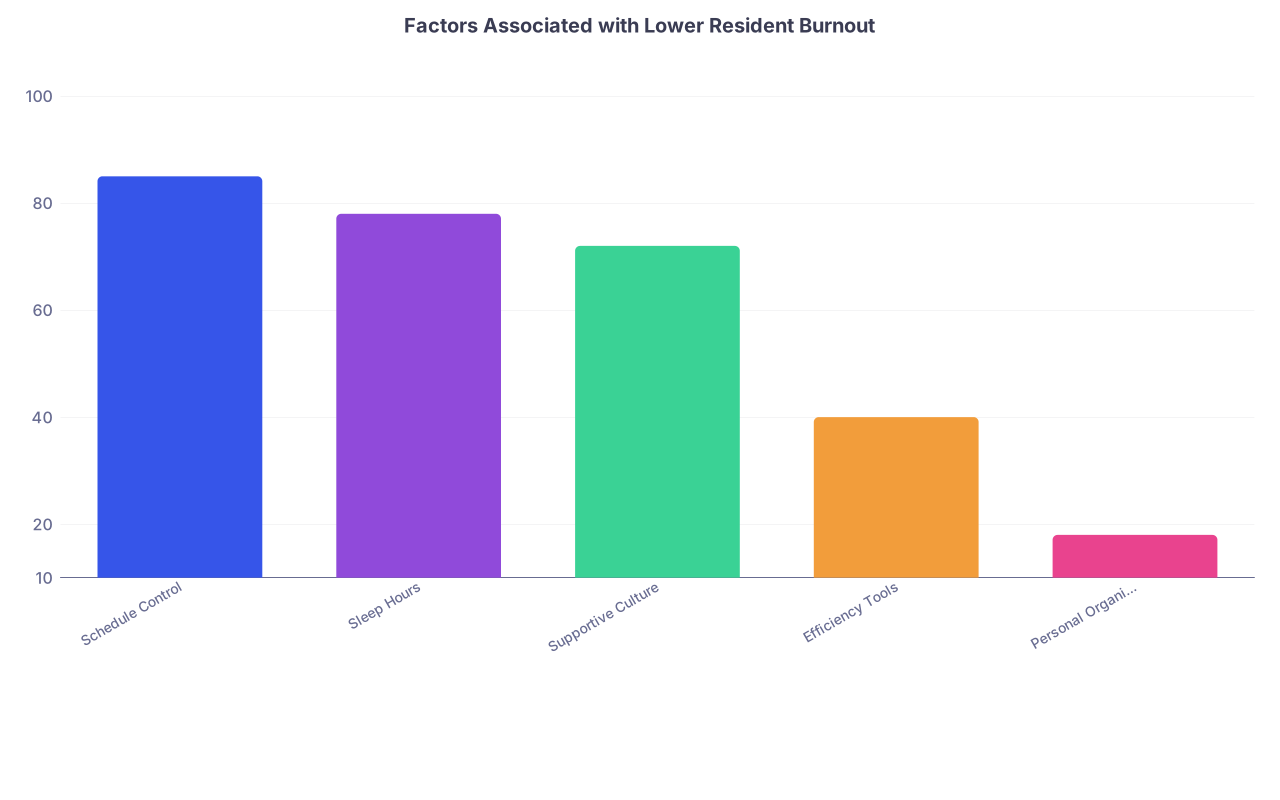
But if you look at what actually predicts performance and burnout in residency, it is not how visually pleasing your notes are.
| Category | Value |
|---|---|
| Schedule Control | 85 |
| Sleep Hours | 78 |
| Supportive Culture | 72 |
| Efficiency Tools | 40 |
| Personal Organization | 18 |
The data from multiple GME and burnout studies all point in the same direction: structural conditions, rest, and culture matter more than personal “systems.”
Your calendar palette isn’t the lever you think it is.
Why Color-Coding Fails in Real Clinical Chaos
Color-coding isn’t useless. It’s just massively over-applied and mis-sold as a cure for what is, essentially, a cognitive load and workflow problem.
There are three big reasons it breaks in residency.
1. Residency Is High-Interruption, Not High-Planning
Most productivity advice assumes you can protect blocks of time and work through a pre-planned list.
Residency laughs at that assumption.
You plan to pre-round from 5:30–7:00. At 5:45, a patient desats. At 6:10, lab calls with a critical potassium. At 6:20, a nurse grabs you for chest pain. At 6:35, you’re on the phone with cardiology.
Show me how your carefully color-coded “Pre-round” block helps you here. It doesn’t. What actually matters is:
- How quickly you can re-prioritize.
- Whether important-but-not-urgent tasks (notes, discharges, orders) are captured in a way that survives these disruptions.
- Whether you have a reliable “recovery” routine after interruptions.
Color doesn’t solve any of that. A simple, ugly, three-column list (Now / Soon / Later) often works better on a real call night than the prettiest digital system.
2. Your Brain Under Stress Can’t Handle Visual Complexity
Cognitive load theory is pretty blunt on this: when your working memory is maxed, extra “formatting” becomes noise, not signal.
I’ve seen interns create rainbow-coded patient lists: red for stat labs, orange for pending imaging, yellow for discharges, green for stable, blue for something else. By noon, they can’t remember which was which.
Under stress, your brain wants:
- Fewer categories.
- Clear hierarchy.
- Obvious next actions.
Not a Skittles bag.
The more layers you add—symbols, highlights, colors, emojis—the more your system turns into a decoding exercise. Residency is not the time to be solving your own UI puzzle at 2 am.
3. Color-Coding Feeds the “Productivity as Self-Worth” Trap
This is the quieter, more toxic part.
Residents already internalize a lot of blame: “I’m behind on notes because I’m inefficient.” “I missed that result because I’m disorganized.” “I’m drowning because I can’t manage my time.”
Often, the truth is:
- You have too many patients.
- The EMR is poorly designed.
- Staffing is inadequate.
- You’re post-call and cognitively impaired.
Color-coding sells the fantasy: if you just optimized harder, you wouldn’t feel this way.
So you spend energy “improving your system” instead of recognizing that a lot of what feels like personal failure is structural sabotage.
That belief—“if I was just more organized, this wouldn’t hurt so much”—is a straight line to burnout.
What Actually Helps: Friction, Not Flair
If you strip away aesthetics and trendiness, the systems that work in residency all share one trait: they reduce friction in the moment of action.
Not before. Not after. In the moment when you are tired, interrupted, and mildly overwhelmed.
Let’s talk about what that looks like in practice.
1. Dumb, Fast Capture Beats Pretty Organization
Your first job isn’t to organize information. It’s to not lose it.
When a nurse mentions a new symptom while you’re walking to another room, you don’t need to decide what color it is. You need to capture it in under 5 seconds.
That means:
- A consistent place where every new task goes.
- Minimal taps, clicks, or decisions.
Examples I’ve seen work:
- The “one inbox” pocket card: back of your sign-out sheet is where every new task gets jotted, no icons, no colors. Just a running list.
- A single “Resident To-Do” note in the EMR, refreshed daily, that’s always open when you’re at the workstation.
- A basic notes app on your phone (if allowed) with one running list titled “TODAY – FLOOR” or “TONIGHT – ICU.”
Color adds friction at capture. You’re deciding how it looks before you’ve even confirmed what it is.
2. Time-Based Triage Beats Categorical Triage
Residents love categories: “labs,” “imaging,” “discharges,” “social work,” “sign-outs.”
That’s fine for later organization, but it’s not how your brain works under pressure. What it really wants to know is: What must I do now vs what can safely wait?
The systems that reduce chaos usually focus on time and urgency, not topic.
A simple pattern:
- “Now” – will meaningfully change care in the next 60 minutes.
- “Soon” – must be done this shift, but not emergent.
- “Later” – important but deferrable / can be planned.
On paper: Three mini-columns. Patients and tasks move between them during the day. No colors. Just location.
Digitally: Three headings in a note. Reorder freely. Again, low art, high utility.
Triage by time = less cognitive overhead. You aren’t scanning a rainbow calendar and deciphering your own legend. You’re asking one question: “What can safely wait?”

| Step | Description |
|---|---|
| Step 1 | New Task Appears |
| Step 2 | Do Now |
| Step 3 | Do Soon |
| Step 4 | Do Later or Delegate |
| Step 5 | Emergent? |
| Step 6 | Needed This Shift? |
3. Standard Routines Beat Custom Designs
Residents waste an astonishing amount of mental energy on “how” to do recurring work:
- How to pre-round.
- How to structure progress notes.
- How to run sign-out.
- How to prep for clinic.
Once you find something that works, lock it in. Standardize ruthlessly.
Examples:
- Same pre-round order every day: vitals, overnight events, I/Os, labs, imaging, plan. Same sequence for every patient. It becomes muscle memory.
- Same template for progress notes and sign-outs. Copy forward, edit intelligently. Don’t reinvent phrasing.
- Same handoff checklist: sickest patients first, anticipate overnight problems, explicit to-do items.
This is where checklists beat color-coding every time. A boring checklist is a proven safety tool. A beautiful color key is… decoration.
| Habit Type | Example | Impact on Chaos |
|---|---|---|
| High-Yield | Standard sign-out checklist | High |
| High-Yield | Fixed pre-rounding sequence | High |
| High-Yield | One capture inbox for tasks | High |
| Aesthetic | Rainbow-coded Google Calendar | Low |
| Aesthetic | Color-theming notebook pages | Low |
4. Batch the Work That Can Be Batched
Where color-coders sometimes accidentally get it right is in visually grouping similar tasks. The instinct isn’t wrong. The implementation usually is.
Batching helps because task-switching is cognitively expensive. Clinical reality prevents perfect batching, but you can still do small versions:
- Batch discharge work: do 2–3 discharges back-to-back instead of dribbling them across 6 hours.
- Batch calls: do all your “call this consultant / call this family” tasks in one block when possible.
- Batch orders from the same room or pod.
You don’t need colors for this. You need small windows (10–20 minutes) where you protect a theme. Even on a chaotic day, you can sometimes carve out these mini-batches.
Color is a weak proxy for batching. Intention and timing are stronger.
When Color Actually Helps (And When It’s Just Procrastination)
Let me be fair. Color isn’t evil. It’s just often misused.
Here’s where it can help:
- To highlight true exceptions. For example, one bold color for “must-discharge-today” or “high-risk for decompensation.” But that’s one color, not eight.
- To make shared documents clearer. A multi-resident sign-out list where post-call vs on-call teams are visually distinct can reduce errors.
- To separate work vs non-work in your personal calendar so you don’t accidentally schedule your dentist during continuity clinic.
Where it becomes procrastination:
- When you’re “reworking” your system every week instead of using any system consistently for a month.
- When you spend more time designing than executing.
- When your “organization session” conveniently eats into the 20 minutes you could have spent actually finishing 2 notes.
The useful test is brutal and simple: Did your system help you in the middle of your worst call night last month?
If the answer is no, it’s not a system. It’s a craft project.
| Category | Value |
|---|---|
| Direct Patient Care | 35 |
| Documentation | 25 |
| Communication | 20 |
| Logistics/EMR | 15 |
| Planning/Organizing | 5 |
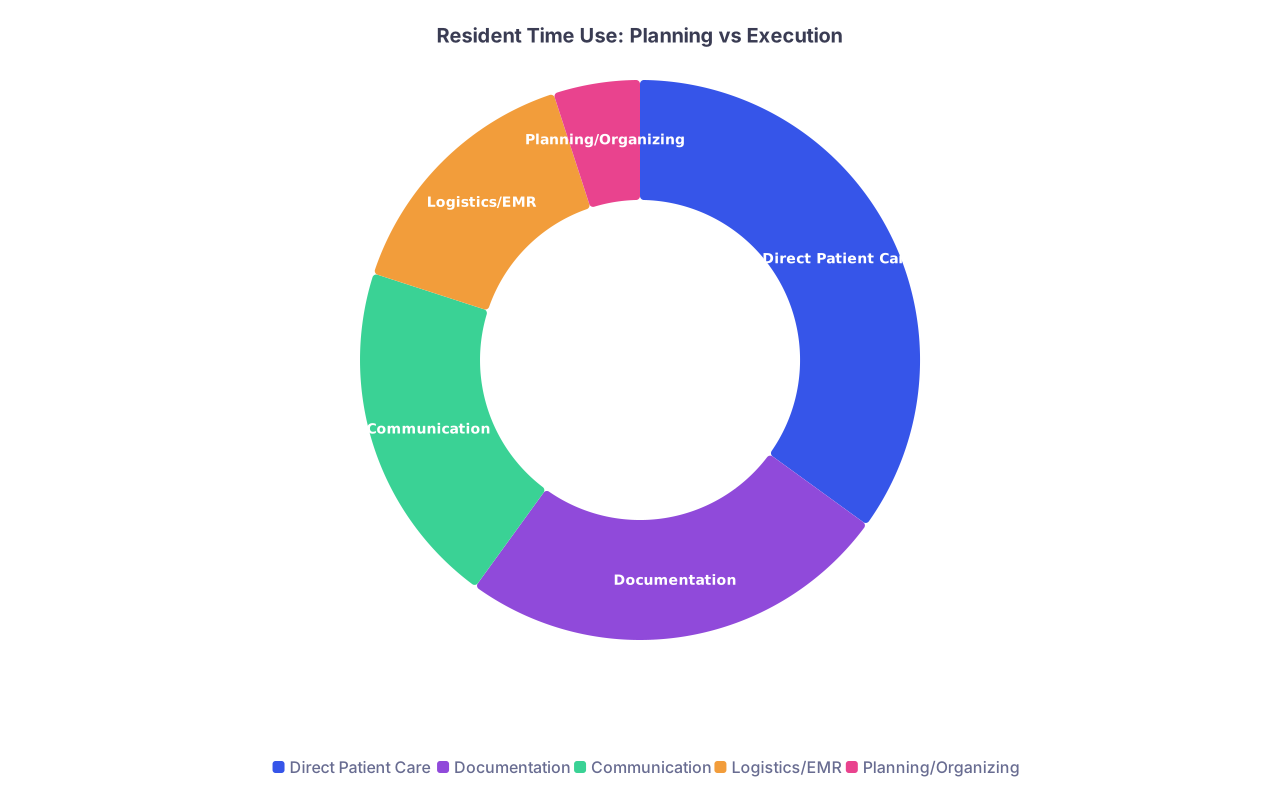
Residents spend a tiny fraction of their time “planning/organizing” compared to everything else. Optimizing that 5% with more colors has sharply diminishing returns.
What to Do Instead of Chasing the Perfect System
Strip it down. If you want less chaos, stop optimizing cosmetics and fix failure points.
A practical, unsexy approach:
- Identify the last three times you felt totally underwater. What actually failed?
- Missed a critical lab?
- Lost track of a discharge?
- Forgot to call a consultant?
- Ask: was that a design failure or a bandwidth failure?
- Design failure: no place to reliably capture tasks, unclear priorities, clunky processes.
- Bandwidth failure: you had 20 tasks and 10 units of time. No system fixes that.
- For design failures, implement one boring guardrail:
- A “follow-up” section in your sign-out.
- A recurring reminder in your EMR or phone for daily tasks (e.g., “15:00 – check all pending labs on new admits”).
- A standard phrase you put in notes to flag needed actions.
You’re looking for moves that:
- Reduce things falling through the cracks.
- Require less thought under stress.
- Survive sleep deprivation.
None of that requires a pastel marker set.
Years from now, you won’t remember what color you used for ICU days. You’ll remember the patients you caught before they crashed, the notes you barely finished on time, and the nights you realized the problem was never your calendar—it was a system that expected you to operate like a machine.
Your job is not to make residency look organized. Your job is to make it survivable—and occasionally humane—using tools that still work when you’re on hour 27 and nothing is going to plan.